How to Hack OAuth
Show original YouTube description
Show transcript [en]
some of you may have heard that so Aaron's going to speak to us about how to hack a auth and just to give you a little background about about Aaron he is a senior security architect at octa and an editor of several specifications for the IETF and w3c and maintains the OAuth net Aaron has spoken at conferences around the world about OAuth data ownership and qualified self and qualified self ads and his work has been featured in Wired Fast Company and more and I just found out you just got back from Zurich last night and he's leaving on a plane tomorrow for Copenhagen yeah so he's a very busy gentleman and I'm glad that he could be here today to
share his information so please welcome Aaron thanks for the introduction I'm I'm Aaron Preki and yeah today we're gonna talk about how to hack off I am like you just heard my I'm a senior security architect octa I'm also heavily involved in standards so I write Sanderson could contribute to web standards like ooofff so I have a lot of a lot of experience with the nitty gritty details of these kinds of things I also run a conference indiewebcamp and that's I was actually just at one last week in Brighton and that's a conference all about online identity and data ownership which is encouraging everybody to have their own website and not only rely on Twitter and Facebook for your
online identity so that's it seems to be getting more more relevant every day um my website is Aaron PK comm and my twitter is NPK please tweet your questions I mean during the talk I can't promise I'll answer all of them during the talk or that we're gonna have time for questions at the end but I will answer all your questions on Twitter afterwards if Twitter is not your thing you can also toot your questions to me on macedon so I assume some of you probably have an account on some Masson service so yeah I also maintain a well-thought net which is like the community website niveau auth and OAuth is been around for a long time and it's taken a
lot of it's evolved a lot since it was started and it's gonna kind of gotten to the point that trying to learn about OAuth and how these things work is like trying to find your way through a maze because it turns out that it's not even just one speck it's actually probably like almost two dozen at this point various specs some of them are even made in different groups not even necessarily auth working group but there's a lot of extensions developed by other groups and yeah it can feel like a real challenge trying to understand this space and when really all you were really trying to do was just build your application at the end so instead of talking about the
specs I want to start talking I want to start with talking about some background on what both was created to solve to kind of set the contacts context and then we'll talk a little bit about how it off the works so that we can see where we can go and actually try to attack it does anybody remember this kind of pattern this was from about ten years ago or so it was very common you'd you would go sign up for a new app like Yelp and then you would give it your it would say like hey let's see if any of your friends are already using Yelp you know ask you for your email address and
the password for your email which yeah you're all laughing because like we now know that this is a terrible idea right like why would you let some random application log into your email account but it wasn't just Yelp it was it was everybody doing this including Facebook and they actually only shut this down like a couple of months ago and this was this was definitely like a bad idea to begin with but it was also kind of the only way that it was possible to work at the beginning when companies were just starting to add api's and we now know that you you would never go and let some random application log into your email
but people would happily do this you know back in 2010 because there wasn't a lot of other options and it's because they actually wanted the end result of what this app was promising so they they want a way for Yelp to access their contacts but they you know don't really want it to access their email so both was created to solve this exact problem which was how do we actually let Apps access data and some other API but without giving it your password so this this pattern it's all about accessing data in some other systems so it's Yelp wants access to your contacts or last.fm is trying to pull your listening data from Spotify or buffers trying to post
to your Twitter account and that is you know that that was the origins of oweth which was always about third party apps getting access to data in some api now o of--this been extended over time to also be used to first party logins so you actually do use OAuth to log in to for example Google contacts with Google's own OAuth server but that's sort of just an internal implementation detail although it turns out that it's pretty important because we can take advantage of that when we're looking for holes in these systems the at the end of an OAuth flow the result is always just the app has an access token and now it can go
and use the access token at the API so it's going to look like this you're gonna put it in a header in an HTTP request go make a request to the API the API is gonna give you some data back that access token is called a bearer token and a bearer token is also something that is a seqable interesting properties but I like to use this analogy of checking into a hotel so when you go to the front desk at a hotel and you check in the person at the front desk checks your ID and then they give you this key card now that key card is like an access token and that key card
is you then take it to the door and the door opens up and lets you in so I had to look at the screen because I have the different view here um that access token that key card is like a ho is like a home office token and what I mean by that is that the door in order for the system to work the door doesn't actually care who you are the door doesn't need to know your identity or your user information it just needs to know does this card have access to the store at this time and that's a really important property of ooofff is that access tokens actually can be any format and represent it just
represents access to a resource so I want to start with talking a little bit about how it works and then we're going to look at some examples of where things have gone horribly wrong in there are always these sort of five roles and these roles in our conceptual not necessarily a physical thing so for example if you have like a relatively small-scale API like github then github is providing both an API and the OAuth server as part of the same software running on the same servers and then your application the application is always the thing trying to get access to that's that server that application is the one that's going to be getting the access token and then it
has to be able to interact with a user through something like their device so let's take a look at the most common auth flow and talk about how how this works and we're going to see where we can kind of poke some holes in this so this starts off with the user visiting the website like yelp calm or whatever this application is that's trying to get the access token that's the user saying hey I'm trying to use this application the application then says great please go over to the OAuth server so that I can get access that causes the users browser to land at the OAuth server with a bunch of stuff in the query string
that describes the request like I'm trying to act I'm trying to login to Yelp it wants to access my contacts now these are all things that are in this URL which means of course anybody can change this which is why the OAuth server then gets these ER to log in and then ask the user if this is okay did you really mean to log into Yelp and do you actually allow it to access your contacts assuming that they say yes then the OA server will generate a one-time-use temporary code and return it back to the users browser in the redirect the users browser takes it back to the application and says hey application I'm done
logging in there they lost server gave me this code this one-time use code that you can use to go get an access token and now behind the scenes the app can go and exchange that temporary code for an access token it also has to authenticate itself so it provides it's it's its own secret that I got when it registered and then the server returns an access token and now we're done the app has an access token there's an important difference between the first half of these lines and the second half of these lines and that is that in the first part everything is always running through the users browser so what's actually trying to happen here
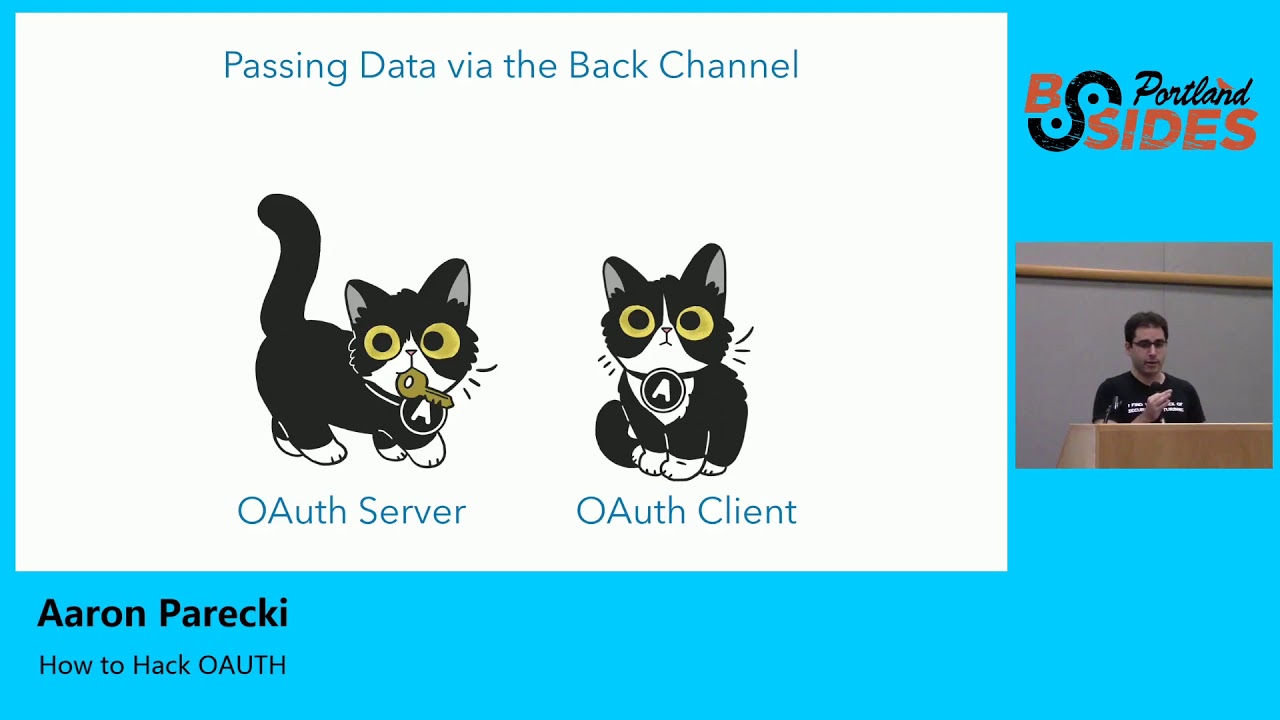
is trying to get this temporary code from the server to the users browser alright sorry to the application but we do that through the users browser now the bottom part the pink lines are applicate the application talking directly to over to the web the authorization server that's the back channel the back channel is what you're like more familiar with it's an HTTP request it goes over SSL it's encrypted and transport things like that the the blue lines and everything going through the users browser is is what we call using the front channel to send data and that is literally using the address bar of the users browser to move data from one system to another system
so there's a lot of obvious benefits of using the back channel which is why it's very common in web programming it's you know we validate SSL certs so that that connection we know we're talking to the right server that connection is encrypted and importantly the response can be trusted because it's again over SSL I like to think of it as hand delivering a message right you walk up to somebody you give them the thing they can see you they can see that you're giving it to them you can see they took it and walk away and everything's everything's great it sounds very simple but it turns out that this is a very important difference from using the front channel using the
front channel the same data is more like throwing it over a wall and kind of hoping they catch it and I want you to think about both sides of this wall right because in on the on the the OAuth server side that the cat is trying to you throw this key over to the client can't see over the wall so it kind of just has to hope that it's caught by the right application and that it wasn't intercepted and didn't fall on the ground and there's no way to confirm this on the other side of the wall that cat is just waiting for this key to be to fly over the wall and sees this he catches
the key has no idea where it came from it could have come from anybody on the other side of the wall not necessarily the actual OS server so this turns out this front channel is an extremely weak point in in the OAuth ecosystem of because neither side can confirm that the transaction was legitimate or was complete so why do we use the front channel at all it turns out that it is actually really important in in because it is a way that the OAuth server can actually ensure that the user did give their permission for this transaction to take place and it wasn't just the app saying oh yeah this user totally said it was okay for
me to access the contacts because it gave me their password great but it's also a way that this receiver doesn't need a publicly accessible IP address which in the webserver context is not a big deal but if you're talking about an app running on a phone all of a sudden that's more important because a phone does not have a public IP address that something can go push data into from from a server okay so that's kind of like the baseline Roth flow this was just a kind of set some context I want to start getting into some of the hacks and what you can do just sort of take advantage of some of the weak points in
the systems turns out that there are a lot of ways to hack and they are actually very well documented and they are documented in other RFC's because again the core OAuth RFC was written in 2010 and it leaves a lot of room open to interpretation and a lot of options available to you as an implementer of a server or a client and these have been sort of these have evolved over time and there are new RFC to talk about here's a handful of things that we know are a problem here's how to solve them and these are all thankfully well documented well well understood by the industry and I'm actually not going to focus on these
ones because you can go read them and these documents are actually not that bad to read because they're not they're not written like a spec telling you what to do there tell them they're written as a way to describe an attack and a solution to that attack so there's some links up there to some of the sections in these various documents that last one is actually an active working group item right now which the group is working on and trying to publish that as a best practice so we're gonna talk about some other things that can go wrong you know OAuth and to do this I want to share some examples of when this has gone so
wrong that it has actually turned into headlines in press because at that point like you know something bad has happened because it's one thing to just kind of be like oh yeah there was this little you know redirect mix-up attack thing someone did a bug bounty on it and told the company and they fixed it great that's not terribly interesting to me because it just means that someone built their system wrong and we already knew the right solution and they just didn't do it so we're gonna we're gonna talk about some things that actually did hit tech press or even mainstream press let's start with an old one from Twitter so in 2013 there were a bunch of these
headlines that came out which was Twitter's API keys were leaked now what does that actually mean so it turns out that somebody went and found all the API keys for Twitter and put them on github and you could go find this it's still out there because you can't delete things from the internet the end result of this is basically that the way Twitter Twitter's Roth is OAuth 1 and it requires API keys and client secrets in order to work and they would go their own apps used OAuth so they would issue a client ID client secret to the official Twitter for iPhone app put it in the App Store people who download it and then they would log into the Twitter
app and it's not gonna prompt you for permission right it wouldn't make sense for the official Twitter app when you log in to say hey is it ok if Twitter post tweets no of course it's ok because it's the Twitter app but if you're gonna use buffer it is very important that that you as a user see this prompt of is it okay if buffer posts to your Twitter account so the end result here is basically that with these this client ID and client secret anybody could go and use these in an application and sort of impersonate that application and it's not gonna necessarily give you access to everybody's data because you still have to have a user log in but when they log
in they think they're logging into the real Twitter app and instead they're logging into this fake app and that might do things like yeah bypassed the the consent screen or maybe get around rate limits because they don't rate limit their own application but they rate them into other applications so it's it is it is a big deal in its but it's not like everybody's accounts were hacked in media the moral of the story though is that there isn't really a good solution to putting secrets in mobile apps you can't do it because at the end of the day any API key you put into a mobile app and distribute through the App Store is going to be downloaded by everybody who
downloads an application and it can always be reverse engineered and extracted so this is the solution here is that we just don't use client secrets on mobile apps anymore and that is documented in an extension called pixie or pkc e stands for proof key for code exchange and this is a pretty clever solution to be able to complete an OAuth exchange without using a client secret so I mentioned that at the at that first athough that we saw the reason that it works is that when the lot server throws that authorization code over the wall and kind of just hopes that the writes the right client catches it the reason that it can be sure the right client did
catch it is because that request when it comes back and is used to get a token also includes the apps secret which then means nobody can use the code if they steal it if we can't use a secret on a phone what do we do instead right so there's a slight variation to this flow which is called pixie which is how we do this on a mobile phone so it starts off the same the user launches the app and clicks login since the app doesn't have its own secret it actually says now hang on I'm gonna generate a new one on the fly right now for this particular request and this is going to be unique
for this request and then it says I'm gonna hash the secret and the idea with the hash is that that's a one-way operation so if someone can steal the hashed value there's no way for them to reverse-engineer it into the original secret at least not in any amount of time that is reasonable so then the app says great go over to the O server to grant me access and take this hash value with you so the user then lands at the OS over like before but now there's also this hashed value in that URL they login approve the request and now the code is issued back to the application so this is the point where someone could steal
this code and if they do even if they also stole the hashed value it turns out that it's not gonna be useful because when the app goes and exchanges that code it has to prove that it actually started the request by including its plain text secret used to generate that hash then the server can hash the plaintext compare the hashes and now it knows that the it knows that the code was not intercepted so this is the solution for being able to do an OAuth flow on a mobile device without using a client secret it's also usually handled by libraries thankfully so you don't have to worry about actually implementing it from scratch if you use any of these native libraries
that sort of package it up with it okay next attack is actually only kind of related to OAuth it's actually an attack on JSON web tokens and this one also was a pretty big deal it turns out that this one didn't make mainstream press but it was it definitely made like the tech press headlines of you know these critical vulnerabilities in these JSON web token libraries and the reason this is related to OAuth is because JSON web tokens are often used as access tokens for api's which means that if you can fake a JSON web token you can often get access to an API either that you didn't have access to before or you can
impersonate somebody else or change expiration dates things like that so what does it jason web token it is a long string of characters and it has a particular structure there are if you look closely you'll find two dots in that string of characters those separate this into three parts the header the payload and the signature if you then base64 decode which is an important remember that it's encoded not encrypted this is just basically four encoded JSON data so anybody can take a JSON web token and see what's inside of it which coincidentally is also a great way to find out sort of internal incomplete implementation details of API is because they are putting who-knows-what into
these tokens and you can often see what they expect and in these requests and kind of learn about them by looking inside there and it's not encrypted it's just basically four encoded the the way that the token is validated the API will receive one of these days some web tokens and then it will say okay cool so here's this header here's all the payload here's the claims which contains like the user ID and maybe some roles maybe expiration date scopes of the request book what api's you can access at the bottom is the signature and the signature at the bottom is typically it's using a public/private key pair to sign it so the the Oh a server that
generates this will use this private key sign the token and then make its public keys available on the internet so that the API endpoint can use the public key to verify the signature of the token that's great how does that work well it turns out that in the header the header describes how to validate this token including this property alg algorithm which says rs.25 six so that's the public private key 256 method of you know doing the cryptography that's great so what happened was that if your validation library was using that header to determine how to validate the token an attacker can come in and just change the algorithm now it also turns out that
there was an algorithm in the spec called none which means don't verify the signature so if you just changed the algorithm to none and then drop the signature you can then modify anything you want in the claims send it to the API the API is like okay how am I gonna validate this well it looks like the algorithm is none so we're done great good job you've authenticated that's pretty bad it's kind of also like an obvious bug in hindsight because essentially it's like this whole this whole thing is untrusted data until it's been verified and if you use untrusted data to verify it then you aren't really verifying it there's a more subtle attack on this - which is that sure so
you might say great we're just gonna avoid we're gonna prevent using the algorithm done hard code that into the code disallowed that completely and now you've fixed it right well no turns out that there's another signature method called HS two five six which is using a shared secret and you had those various reasons for the may want to do this in your API instead of using public private key pairs but what it means is that if you change the algorithm to HS to five six which says now please use the shared secret well the library already knows where to go find the public key of the server right so you can then also go use
that public key as a shared secret create a signature because then you're telling the library great go go verify this using this shared secret and it turns out that was also very easy to do so the moral of the story here is just because something looks complicated and like someone thought it through it that is they that's not always true and the header here and all of this data about the token until you verify the signature it is untrusted data and you should not use that in the process of deciding how to verify the token just like you wouldn't use a form field on a webpage that determines like how to validate the rest of the form because it's untrusted
data so the other good news is that thankfully most JSON web token libraries fix this around 2015-2016 pretty quickly after this sort of was was made public and the fix is that in your code it actually the library now requires that you specify which algorithms you want to be able to use so it's only kind of a fix because if that code says you support both public private key and shared secret this attack still works because you can still trick it but you know most of the time we're only ever using one method so you just hard code that in your code and it's fine but this is definitely something if you notice JSON web tokens you know being being
sent around as cookies or access tokens that's definitely one take a look at not that I'm endorsing actually trying to attack the live systems or anything ok next one this one's this one's a little a little trickier this anybody here remember these headlines it was last year 50 million Facebook accounts were attacked yeah I am seeing a lot of heads nodding this was a pretty big deal this was this was yeah the headlines were 50 million Facebook accounts were attacked weren't hacked and this actually did make mainstream press because 50 million is a very large number and it was actually that you know the attacker could actually access people's accounts without them initiating the request
which is a way worse attack than just sort of theoretically having somebody be able to impersonate an application so what I thought was really interesting about this this hack was that because it made such mainstream news Facebook actually put out a surprising amount of detail about the attack more way more than a company normally would when there's kind of a security breach like this and so they had their like you know public facing on their main press website statement about whatever went wrong sorry well we won't do it again but they also on their security blog published a lot of details about how this attack actually got pulled off so I want to take a look at that and see if we can
analyze it and see if we can learn anything from it and it turns out that the really interesting thing about this was that it was three different bugs that Facebook had that each individually didn't seem like that big of a deal but when you stack them then it leads to this so let's take a look at Facebook's own words and how they describe this so first they have this really cool feature called view as well they had they've taken it down the view as feature means that you are on your profile page you click view as choose somebody else one of your friends and you can see what your profile looks like to them which is
extremely powerful feature I wish more companies would do that because it's a very good way to let the user verify their privacy settings are correct there was a bug in that feature and the bug was that normally it's supposed to turn your profile and to read only because it's you know it's somebody else's looking at your page it incorrectly showed the video uploader which is which would let you wish the person happy birthday okay that's not that big of a deal right because you're looking at your profile page the video uploader appears and what are you gonna do like post a video to your Facebook wall well you could already do that anyway so it
seems like it's just a little weird UI glitch right so remember that keep that in mind and now we'll look at the second vulnerability secondly there was a new version of the video uploader that they launched which in correctly in their words generated an access token to had the permissions of the Facebook mobile app now this is starting to sound a little bit weird to me and this is starting to get into the into oo auth right because I'm assuming that internally they've got sort of like different client IDs registered for the different components of the of Facebook because they're a pretty big company and they have lots of different teams working on the product not all
coordinating together so video uploader is one app mobile mobile application is a separate you know client ID and somehow in this case the bug was that when the the video uploader it would go and like request a new access token and that access token had the permissions of the Facebook mobile app which means it normally was supposed to be limited to being able to only post a video now it could also go and do things like everything the mobile app can do which is literally everything on your account but again by itself this isn't that big of a deal because what the end the day like it's still you're looking at your page it's sure this little component
gets an access token with escalated privileges but what are you really gonna do with that you can just go get if you wanted one of those tokens you just go use the mobile app and get it yourself that way anyway okay third here's where it starts getting weird when the video uploader appeared as part of the view as feature the access token that it got was not for you but for the user you were looking up yeah this is this should never have been possible this this is not something that should have been able to be pulled off because well it sounds to me like they just sort of swapped a user ID field in
the access token that was generated but when you stack these three things up the end result is that you could use the u.s. feature to see what your profile looks like to somebody else you would end up with an access token belonging to that user which had the permissions of the Facebook mobile app so basically you have complete access to their account and they didn't have to do anything so moral the story here I think is it seems like they were placing too much trust in these different components of the system and letting things sort of take shortcuts and when you are that large and that many different teams working together you kind of have to treat everybody as
an adversary so the same way that you would not let a third party app just like be like hey I need an access token for this user and the server is like sure go ahead no you need the user to be doing an OAuth flow and approve the request so that you know they agreed to it and so just like you thought for third parties like you need those kind of safeguards in place for first party apps when your system is so big that you end up with these people doing things that aren't coordinating with each other so yeah treat components of your own applications the same way as third-party applications don't assume don't just
sort of grant extra trust just because it's your own teams okay last last one this one is Google from Google and this was in 2017 and it's it was either called an OAuth phishing attack or an OAuth worm depending on the press that would write about it this was a google docs phishing email or Gmail or phishing email basically the it was very clever there very cleverly pulled off and I'm not sure if it's actually been fixed so you also me what tell me what you think after we look at this first of all does anybody see anything wrong with this picture would you click the allow button so it doesn't look super wrong at first glance
right but what if you clicked a little google docs drop-down and then this appears so this is a sorting you look a little suspicious right what is Google Docs dot Docs cloud info / G dot PHP that looks a little fishy also who is this person who is this email address right it's the developer of the application so what's going on here is that this developer went into the Google developer console created a real Roth client registered it and called it Google Docs and gave it the Google Docs icon in the app icon settings Google then happily gave them a client ID and they were able to start an OAuth flow it turns out that
you can start an OAuth flow by just visiting a URL which means you can create a URL that initiates the OAuth flow which will look like this so it says client ID and here's the scope which is sending email and managing your contacts I then you just have to get someone to click on this link and click allow and there's many ways to send a URL to people right you can run it through bitly and send it via Twitter DM you can SMS it to somebody doesn't matter how you get at them as soon as one person clicks this now you have a real access token issue to your application which can send email from
that account and read that person's contacts so then this this attacker then use use the access token to send an email from that person's account to all of their friends and the email said this person shared the document with you click here to view it so now you get a real email this is also not a spam email because it's being sent through the Gmail API from someone to their friends so gmos not gonna flag it as spam you get an email that looks maybe a little suspicious but it says you know open this into Google Docs which sure ok great you click it it's also a link to real Google it's not a link to a
phishing website it's a link to accounts.google.com and as soon as you click that you see this prompt and now you're already thinking about Google Docs so you're even more likely to click it because you're on your it's real Google it's gonna SSL cert and what didn't go through a suspicious-looking URL shortener and as soon as you do this it repeats and so all it takes is one person to start this and now just kind of escalates and this spiraled out of control it happened so fast that Google actually tweeted this out in the middle of this about 20 minutes into this they're investigating a phishing email that appears as Google Docs which was kind of the right statement but not
quite and then meanwhile there was a reddit thread where this is being reported and discussed in a bunch of Google engineers we're chiming in on that thread being like hey we've you know escalated this internally we're working on it and then sure enough about 40 minutes later they realized what was going on which was that there was no real hack here it was just that a client ID had started getting access tokens and kind of gone you know viral but that it was a real oweth for the whole time the the fix was they just disabled the client ID and the next time somebody clicked that link they would get this page and then I just kind of aborted the
whole thing right they could they can very easily revoke all the access tokens that application because they were all obtained legitimately so it was very easy to sort of just stop this in its tracks once they realize what had happened but who knows what other information had already been leaked by that point there's no way really to tell and this is why I say I don't think they actually really fixed it because they just stopped this particular instance of the attack from happening they didn't go back and change the screen that shows what what the user was about to grant permissions for because the real problem was at that screen didn't make it clear that that Google Docs app was a fake
application so this gets into the idea of it turns out that consent screen is extremely important part of oath and is a challenge to design in a way that is not going to result in this kind of thing this wasn't an attack on the protocol it wasn't an attack on it there wasn't really finding a flaw in any of the exchange of data it was tricking people into clicking allow in a pretty convincing way so the idea is that you know you're you want to share you want to show the user you're about to give this application access to do something with your account do you allow this and you need to do that in a way that
doesn't overwhelm them and also effectively describes what they're about to do so you need to provide information that's clear and straightforward within that v-tail so they know what's going on but not so much as they just click OK to make the screen go away so this is this is Google's right it says slack wants to access your Google account well first of all how do I know this is the real slack that name is blue I can probably click it that's kind of the problem if you make users click something extra to verify it's probably going to their probably not going to do it and that is where this flaw came from the one thing that I
do like about this is that Google is a very complicated API they have hundreds of different systems internally so describing what the app will be able to do is a challenge and they've done a pretty good job of summarizing the Scopes here so you can say you can see it says view and manage the files in your Google Drive but then there's a little high next to it and if you click on that you get more details about that particular scope and I feel like this is a pretty good way of doing that sort of progressive enhancement of you give the user a little bit of information just enough so they know something where if
they're curious they can find more and so that's the one thing about this I like these these screens tend to look wildly different on every OAuth server because it's very just dependent on what application is providing this API this is Wonder lists I think what I like here is that they call out what the app can do and also what it can't do to sort of reinforce to the user the app will not be able to change your password or delete your account Flickr also does that with these green check marks and the red acts of this application will not be able to delete your photos which the interesting thing here is that this is of course with Flickr these are
photographers putting photos they care about a lot into and storing them on Flickr they would like to sort of remind the user that they're not gonna this application won't be able to delete that from their account the this is Spotify switch if you look carefully you'll see that the scopes that are being requested of track what you can listen to what you listen to and receive your account later they're written in two different fonts and two different font sizes so it's kind of confusing it there's also that whole wall of text legalese stuff down below for some reason so pretty much if someone looks at the screen they're gonna click the one button that has
color on it the big green button and just ignore it because I can't even understand what's going on here so you can see that like getting this right is a challenge github actually is done a pretty good job of both showing the application name an icon but also the developer of the app right on the screen and says this is a developer of the application which means if someone want to pull off that phishing attack in github it would be a lot harder they would have to go and make a github user account that's called like support or admin or some sort of generic thing that probably github has already blocked those usernames from being able to be
registered and even then down at the bottom you notice that it says this authorizing that will redirect to this URL which means again it's also right next to that big green button so as a user you're clicking this button it's again one more reminder that like this is where you're gonna go afterwards just wanted to make sure you're aware of that and that way if this said Doc's club don't info you would probably avoid clicking that button at that point Facebook does something really interesting with this which is they actually put a lot of control of this into the hands of the users so this application is requesting my friend list in my email address but then it says
edit the info you provide and as the user you can go in and change what scopes are granted to that application which is very very cool and it turns out this mechanism has been built into OAuth from the very beginning but almost nobody has ever actually taken advantage of it Facebook is one of the few Fitbit as well I took advantage of this and said you're here all the Scopes they're checkboxes as the user you can go in and uncheck them so you can say I actually don't want I want to login to this application so we can analyze my sleep but I don't want to see my location history or my my weight so I think
that's a pretty cool feature as well you know giving the user more control and more empowering these are really to know how the data is being used so if you take a look at all these like what's what do they all have in common there's a couple of components to this screen that are really important to make sure that the OAuth server defines so if you're building an OAuth server and building an authorization screen make sure that you have at least these features so identifying first of all where the user is what service are they on because it turns out that anybody can just get dropped into one of these without having clicked a link from a
login button because you can just SMS somebody a link to drop them into an authorization interface identify the service identify the application that they're logging into both by name but also identify the developer and maybe even either the URL of the app or the URL of the redirect show what user is logged in because people often have multiple accounts and you don't want someone to accidentally authorize their work Twitter account when they meant to authorize their personal Twitter account listing the Scopes this is again one of the challenges is this is copywriting because you have to write things that are really concise but also meaningful and not completely overwhelm the user with us and of course is always the
allowing cancel buttons so that I that is the end I hope you learned something I really enjoy this stuff and I'm spend a lot of time writing about it and doing talks on it um I have a couple copies of the book that I wrote available for me with me here so if we have we have a couple of minutes for questions so if you ask a good question it's not a statement I will give you a book and and yeah thank you all very much I'll leave this up on here while we do questions [Applause]
Related talks
 45:24
45:24 19:06
19:06 19:28
19:28 54:14
54:14 25:13
25:13 27:42
27:42