Jayson Grace & Aleksandar Straumann - MOSE: Configuration Management for Evil
Show original YouTube description
Show transcript [en]
hello all please join me in welcoming jason grace and alexander strahman jason is a penetration tester at facebook and alexander is a security engineer at sandia national laboratories their talk mows using configuration management for evil introduces a post exploitation tool that uses configuration management servers to compromise associated agents
cool all right there's al that's good all right hello uh thank you all so much for uh hanging out and coming to watch our talk today we're going to be talking about mows which is a tool to help you to use configuration management servers for post exploitation any uh opinions that are expressed over the course of this talk are our opinions and don't reflect those of our employers and all the work that we've done has been as independent researchers and subsequently not associated with our employers so my name is jason i've been playing death metal for several years now i used to tour but now i just play local shows every so often of course when there's not a global
pandemic going on i'm currently a member of the red team at facebook before that i was a penetration tester on splunk's product security team and prior to that i founded and led the corporate red team at sandia national labs and i really enjoy automating things it's it's one of the pure joys that i have in this world but i have a special place in my heart for automating post exploitation tasks hi my name is alexander strahman i mostly go by al jason i don't think you're presenting the slides right now um i currently work as a security engineer at sandia national labs where i work on various assessments uh both penetration testing and more red team
engagements as well as tool development and my passions strictly lie with kind of the tool development aspect as it kind of helps me develop skills that i can use in my day to day and mosel is just one of those tools cool slides look good yep all good solid all right sorry about that folks uh on the agenda for today we are going to begin by briefly discussing what configuration management tools are following that we will discuss how attackers can take advantage of them once we understand that we will then talk about what moses and what we are hoping to accomplish with its creation and there will be some demos so real quick for those of you who are
unaware of what configuration management tools are used for they are used for maintaining and provisioning systems into an expected state so the configuration management tools can also be used to manage the expected state of a machine for example if you want to make sure that a service is always running software is installed on a machine or you want to make sure that machines are automatically updated regularly on a scheduled basis and so the tools that are the most prominent on the market these days are puppet chef salt and ansible and if you haven't run into these yet you certainly will a ton of companies use one or more of these tools and these tools have some things in
common for starters they all have this concept of edemptency meaning that you can run the code as many times as you want and expect to produce the same result they also give you the means to scale infrastructure while guaranteeing consistency across it you have the ability to provision machines that are running on a variety of operating systems so you could have a puppet module or a chef cookbook salt state or ansible playbook that works on red hat suse debian ubuntu and windows and they all have a form of secrets management which we'll get into a little bit later so while these tools are all used for the purpose of configuration management their implementation will vary slightly
from each other and that might direct you to use one over the other for instance puppet and chef have agents which pull down changes from a centralized server while ansible and salt will push their changes onto their managed nodes the terminology will differ from each of the tools that you decide to use ansible further deviates from the paradigm by being agentless which simply means that it uses another protocol for the authentication and management of its nodes typically being ssh so this also allows ansible to apply configurations to any agent with the ssh key so long as it has access to it so there are some more differences but ultimately it kind of comes down to
preference and the environment which you want to work in and deploy them to in short they also have the same problem but their implementations vary and it's up to you to make the decision on which one you want to use and so we're going to show you an example in a bit here of how provisioning a system works but if you're still trying to figure out why you would use this technology a prime example can be avoiding things like this 1100 line bash script which has zero functions in it and is completely void of hope for future generations to maintain it's a great idea to have code driving your infrastructure and any changes that need to be made in it but it needs to be
modular easy to test and easy for others to pick up in the event that you're no longer in the picture all right so for this example we are going to be looking at a puppet managed environment so we start out on the puppet master and we are going to look at the main manifest in this particular example we're going to be provisioning webprod.demo.com but one thing that is worth noting in puppet specifically is node default covers any cases that are not explicitly defined however for the example that we're doing we are essentially going to be installing a web server and then running a web page on top of that web server
so as we can see there is not anything running on port 80 currently but let's go ahead and pop into that puppet agent and check in with the puppet master so this is the manage node um as you can see there is no web server running presently but we'll go ahead and run puppet agent-t this will kick off checking in with the puppet master and the puppet master will tell it that you have new instructions you are going to install a web server and run a web page on top of it and as you can see we are now running a web server let's see if the web page is there looking good let's take a closer look
once we get the public ip address from the metadata service
there we are cool looks like we have a web page running on top of a web server so hopefully that gives you a sense of what this technology is used for now a common question that comes up around this technology is in this day and age we have containers we've got kubernetes like really who needs this stuff and to that i would say a couple of things first and foremost not everything can be a cloud native ephemeral workload that runs in a container furthermore it's typically not a trivial effort to migrate older monoliths to container-based deployments and finally you still have to install configure and manage your kubernetes deployments with something ideally something that's repeatable and can be tested regularly
in an automated fashion this is where configuration management tools can do quite well for you a lot of companies for example will use ansible to stand up and manage their kubernetes deployments so from the previous video you can kind of begin to get a sense of how powerful configuration management tools are unfortunately or fortunately for us they're incredible resources for attackers we can abuse the tools that are meant to provision and maintain systems to introduce any commands or tools that we as an attacker kind of want access to any changes we introduce will be run on any of the systems that the specific configuration management server manages and once compromised we can do all sorts
of things it's essentially a shell in a box so configuration management tools often operate on schedules similar to a cron job and this means that your introduced changes will persist so long as the initial vector of compromise is never found and the impact of this is particularly devastating as blue teams will often times use configuration management tools to provision and maintain systems that their seam and source solutions operate on so pwning the main configuration management server can effectively change what the blue team sees resulting in complete compromise of the infrastructure and further damaging is the ability to modify and introduce backdoors into production systems that may host company websites production software or even just development environments in general
and lastly oftentimes you need credentials in order to set up systems in an environment and so most configuration management tools have ways to store these credentials or secrets and that means we can steal those secrets so these credentials are created to run in an automated fashion which means that their overall security is lessened so stealing them can provide us as an attacker with many lateral and vertical escalation paths a lot of the times it's as easy as running the decrypt command to gain access to these credentials or secrets however you need to be careful when using them because they're automated there's like this predefined behavior for using these secrets defenders can oftentimes build alerts around them and
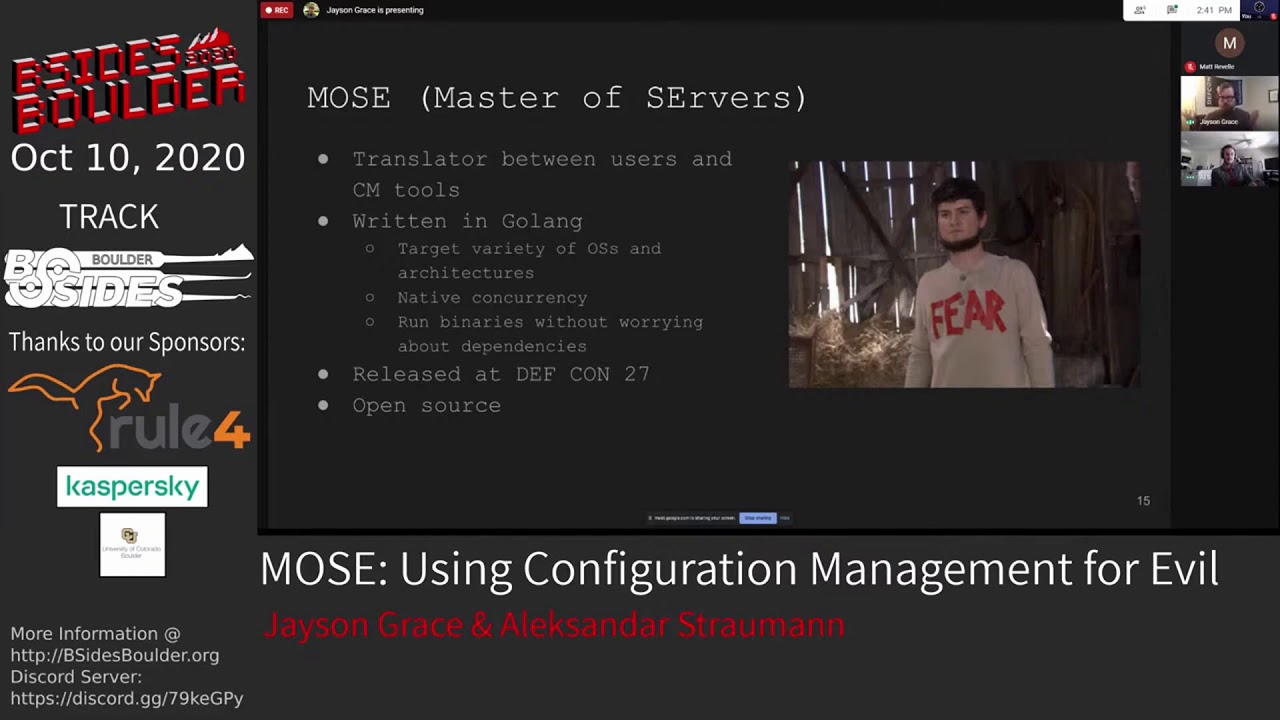
their expected behavior so they can quickly determine when they're being abused so with that in mind we can see how most fits into all of this yep so mos is effectively a translator between a user and a variety of cm tools the idea being that we know what commands or code we want to run on our targets but we don't necessarily know how to implement them for a given cm tool so moz takes the commands or code that you want to run on cm managed systems and translates them into a format that a given cm tool can understand it also takes care of getting things in a place for you as well so that when the
managed nodes check in with the server they run whatever you specified it is written in golang i chose golang because it has a few really useful features first of all it enables us to easily target a wide variety of operating systems and architectures it also has native concurrency and allows us to generate a binary that can run on a target system without having to worry about dependencies i would also venture to say that the fact that go has these makes it a fantastic tool for offset tool development in general so you haven't popped in to go for a try maybe give it a shot next time you're gonna throw something down uh moe's is an open source tool that i
came up with in december of 2018 and i released it and presented on it at defcon 27 in august of 2019. i also gave a talk at b-sides sf earlier this year for this talk i'm incredibly excited to have al joined me al has been my contributor on the project for a while and without all of his hard work moz wouldn't be the tool that it is today so far we have a small team of core developers you are looking at us and we are always looking for contributors and testers right now an event called hacktoberfest is actually being put on by digitalocean if you're not familiar it happens every october and basically you can sign up
for the event and if you create four pull requests during the month of october you get a cool t-shirt and some awesome stickers so if you have some great ideas for mo's and you want to get some of your prs knocked out we'd love to have you join us in making this tool a staple in the security community and so i was created i was motivated to create modes for one main reason configuration management tools can be as difficult to exploit as they are powerful one reason for this is that each cm tool has its own learning curve if you check out the docs for any of these tools you'll quickly see that there is a lot
to digest there are many tool specific idiosyncrasies and gotchas that you need to be aware of before using them they also have significant differences in their workflows syntax and architectures and since you'll likely encounter several different cm tools while on engagements or at different jobs you'll have to deal with this learning curve multiple times over ultimately you can't choose which tools your target uses so you want to be able to weaponize them all and not have to worry about tool specific differences it's also important to keep in mind that with great power comes great responsibility you can break a ton of systems while attempting to back door cm server if you're not careful imagine changing a couple of lines in a file and
saving it off and before even a minute a bunch of production systems are knocked off hundreds potentially if that's not in scope for your engagement which let's be frank it isn't for any of us you're probably going to be in a world of hurt and to give you some perspective these are some of the links that comprise the documentation for puppet this is what i'm talking about with respect to the learning curves the documentation for most of this technology is extensive and takes time to ingest and understand and as someone who has done this manually several times before creating mows i thought it would be helpful to outline the process for you first i'll uh
so to start we will have to figure out how the cm server is configured and fair warning a lot of the implementations of these tools that i've seen lack uniformity and how they do things as apparently best practices are merely a suggestion for a lot of organizations so you'll need to figure out how they've done their deployment before you can get to the good stuff this typically involves a lot of guessing and going down various rabbit holes which can get to be time consuming and torturous especially if your time box on an engagement next you need to figure out where your backdoor code needs to go and depending on how the environment is configured this could be in a number of
different places next you need to find the right files to reference your code in and once you've found those files you'll need to make changes to them in order to hit whatever hosts you're targeting this is the part where you got to make sure that you don't break anything and or everything in that environment and once this is all done you'll need to figure out where the secrets are stored and how to decrypt them which of course this method varies for every cm tool so that's a huge pain and mows is here to automate all that for you which is a huge time saver we've also added some quality of life improvements that allow you to be more strategic in which notes
you want to target or specific tasks that you may want to target such as you only want to target web servers for uploading a web shell or stealing all aws keys from the managed ec2 instances or just simply limiting your presence during an engagement so because moz allows you to be pretty like pretty accurate from discovery to the exploitation phase without kind of having to go deep into the weeds of tool specific details it kind of helps to prevent someone who's less experienced with any one of these details from just breaking everything as jason's already mentioned so it really kind of empowers you to focus on what you know and to not have to get
wrapped up in the little details of each technology and so mos is great for everyone you don't have to know tool specific implementation details to run mo's either commands are input the same way for all supported configuration management tools and there's even granularity if desired more experienced users can modify the templates that we utilize for basic payload generation to create something much more curated to a specific task or tool that they have in mind so with that let's see kind of a basic workflow for working with moz yep so uh this is the workflow for using modes essentially in this particular instance we're going to be targeting a chef environment and we've specified that we want to
create a file and then throw a string into it not super exciting but easy enough to understand for an example so once you run this command moz will generate your payload for you as a binary and then by default it will host that payload for you with a web server that it stands up alternatively if you don't want to go this route for transferring your payload you can use another command line parameter to just spit the binary out to disk and then you can get it to your target whatever way you choose whether that's scp or what have you once your payload is onto the target system you go ahead and run it and it
will start by identifying things like the managed nodes and potentially things like the cookbooks that are in place for that environment it will then ask you if you want to make backups of the files you're going to modify which is a good idea you know unless you're trying to be stealthy uh following that it will ask you if you want to target specific nodes or everything in that environment and once you answer those questions you're off to the races mose will introduce your backdoor logic and then try to pillage any secrets it comes across cool so let's see how that looks in practice with mohs versus ansible so real quick background for how ansible kind of functions
at bare minimum you need a playbook which is going to contain a list of tasks or commands that you want to push off to the managed nodes the inventory is going to contain a list of the host machines the managed nodes in this case that you want to apply your specific changes to so from there we can use mos to inject into a playbook as you can see here we execute mos we specify the configuration management tool in this case ansible and the payload that we would like to inject into our maliciously introduced role in this case we're just going to echo some contents into a file and then there's an additional flag there that just allows me to specify
which interface i want to bind on for our demo so we serve it up on a local web server and after that we w get it from the control node see there easy and the next step we execute it so it's going to run through all the steps that jason just mentioned identifying the systems it's going to ask you some questions for backup and it's going to go through some more granular options in this case we only have one task because it's a very very simple playbook and so we inject into that and then it finally dumps the secrets or secret in this case so to see if our injection was successful we can execute it now
oftentimes ansible is automated either using cron jobs or ansible tower or jenkins or what have you and in this case we're just going to manually kick it off for the demo so we take the ansible playbook command and specified the site.yaml that we've injected into and you can see that the malicious role my command has been injected into the site.yaml and executed against the control node so just to see that that's worked we'll go on to the manage node and you can see that our file has been created with the contents that we want on the machine cool let's go ahead and take a look at mows and chef so chef has two components that can be
compromised you have the chef workstation and you have the chef server the chef workstation is usually run from a developer's laptop a dev group server jenkins etc and as far as chef nomenclature goes uh basically chef nodes run a client which is known as the agent so i will probably use agent and client interchangeably but rest assured they are the same alrighty so compromising a workstation is a bit more straightforward so we'll cover that first similarly to what we did with the ansible environment we specify the cm tool that we're targeting the command that we want to run on the manage nodes and then we hit enter this will again by default cosmos to serve our payload with
a web server that it stands up for us go ahead and download that payload onto our target chef workstation and then when we run it a couple of things happen first and foremost as mentioned previously it identifies the agents that are being managed by the chef server it also identifies the cookbooks that are in place for that particular chef server which can be useful to get some context for the environment and get a better understanding of what it is you're looking at next it asks us if we want to target specific chef agents in this particular case we are opting to target chef agent one once we go ahead and hit enter there it will create the cookbook for us and
then when that agent checks in with the chef server by default every 20 minutes with the chef client cookbook which is considered an industry best practice our backdoor logic will be run and of course there is a secret that we can go ahead and hold on to for later so uh we wait for 20 minutes or we go ahead and check in manually so we can get this nice screenshot for all of you to kind of see what's going on and as you can see it synchronizes the cookbooks that are associated with its run list and it finds that it does need to do something for this my command which is a new cookbook and subsequently
it executes the logic that we specified through moz that was pretty easy right uh pretty simple uh similar to what we did with ansible really um but landing on a chef server is a bit more complicated than that unfortunately makes me need to drink every time i think about it so as a quick point of reference we've landed here and the chef server is connected to chef agents so we can spawn a cookbook with moz but chef server has no way to provision chef agents so we need a chef workstation what we can get from the chef server are the certificates and organizations that are in use in that particular chef environment which can be used in
conjunction with a chef workstation to achieve our desired result of running our road cookbook on chef agents now we don't want to install workstation on the chef server because we could potentially clobber some dependencies or just doing that could just get us caught anyway and we don't really want to have to install it on our system either and in an ideal world it would be great if it was automated for us so we didn't have to think too hard about it to solve this problem we have leveraged docker and some templating and so the idea is we exfil all the data that we need and use it to automatically build our own chef workstation so
to visually sum up what the plan of attack is here we land on the chef server exfil the keys and org names to our system which we then use to stand up our own chef workstation with docker and then we can use that to go to town on the agents that are managed by the chef server let's uh go ahead and walk through that so this command is obviously pretty similar to the one that we did for the workstation with the exception of this dash l here that allows us to say that this is our local ip address that will come in play uh sorry that will be useful for when we need to pillage the
secrets or the org names and the certificates uh we're opting to use tls and then this parameter here will basically throw the the chef server's host name and ip address into the etsy host file for the container that we stand up so we go ahead and download our payload you'll notice that we provide a self-signed certificate with moz which i highly recommend that none of you use and if you do use it i hope that you get popped by the blue team once we go ahead and run moz it determines that we're on a chef server back on the attacker system as soon as we download the payload we are asked a couple of questions first off are we on
a chef workstation we are not we are on a chef server and when we say that we are on a chef server it will stand up our listener that we can use to exfol the stuff that we need so let's uh move on to exfil it's pretty simple really moe's finds the stuff that we need to steal and sends it to the endpoint that we stood up and so now that we have the information that we need we can stand up a workstation of our own and use it to run the command that we want to run initially on whichever managed nodes we choose and so mos stands up a container for us with all the dependencies that we need
and it then drops us into it so at this point you are really just going to follow the exact same steps you would as if you landed on a chef workstation in the first place cool at this point we are on to the demo portion so this is a scenario that i ran into at some point in my career we are going to compromise a chef workstation and leverage it for lateral movement and persistence with the help of mows
all right so we do some recon and we don't find any bones on their externally facing web application but we do support scanning we find port 2375 is exposed to the internet which is handy that is the port for the docker socket and so what we could do there is we could create our own container and then mount the underlying file system for the host into that container which is exactly what we're going to do cool this point we are in that container and uh looking around a bit we see that there is a public private key pair that's cool uh take a look at the private key pair it's not encrypted which is helpful
although we don't really know what it goes to so we'll have to do a little bit more digging to see if there's anything we can do with it fortunately after a bit more digging around we see that in the batch history there is a command that helps us to use that certificate so we'll go ahead and test that out and see how it works neat at this point we are on a chef workstation i've skipped a lot of the steps you do for discovery and kind of getting a better sense of where you are but rest assured we are on a chef workstation that is managing some agents so we're gonna look at taking advantage
of those to start we are going to uh kick up a reverse shell payload and use that to access one of the systems that is managed this is just a python reverse shell pretty textbook stuff so we specified that reverse shell script that i just showed you and at this point we are hosting the payload we go over to the compromised chef workstation and we can go ahead and grab that
once we've got the payload we go ahead and extract what's in that tar file if you do a shell script with modes you got to extract stuff out of a tar file but that's all right so as you can see a couple of nodes were identified also we see that the cookbooks that are in place already were identified we're opting to target the dev system and uh so as you can see there is a cookbook now that will run our reverse shell on the dev system and it looks like we also got a secret there so we can hold on to that for later and see if it does anything for us so now we gotta wait for 20 minutes for
the uh agent to check in with the server and introduce our logic but fortunately through the power of video editing we can just set up a listener and then magically a reverse shell appears it's great so at this point we are on the dev system which is one of the managed nodes for that particular chef server that that workstation is interfacing with a couple of interesting things off the bat permit root login is allowed for the ssh config we kind of figured that out already but this is helpful because it's a cm managed environment that's probably a policy that's in place for all the systems so we can take advantage of that it also looks like there is a maria db
system that is known to this host so we can test out that secret and see if it is a fit
cool so we can come back to that database later and pillage it and so if you were paying attention we also saw that there was a web server that is being managed through that chef server so we're going to go ahead and take advantage of that now so we'll throw a web shell up and then we will weaponize the dub dub dub data user
so pretty similar to what we did with the reverse shell we specified the bash script that i just showed you for the payload this point we are hosting the the payload and so we can go over to the workstation download the payload extract it and run it for some reason when i was filming this i kept wanting to rename files.tar.1.files.tar i don't really know why but i did it
all right so we're running this payload and this time we are going to target the web server
cool so at this point that should be in place for our web server when it checks in with the chef server so now we can go over to the web server and let's say for this example that it is a publicly facing one so hop over to that real quick there we are and we can go ahead and check out the end point where our web shell should show up currently as you can see there is indeed nothing to see here but when we wait for 20 minutes or through the power of video editing we now have our web shell so uh just looking around a bit checking out what processes are running looks like the www data user is going to
be a great uh guest for us when we did our set action earlier and if we look at the hosts we can see that this system also is hooked up with the dev system which we have a reverse shell to currently and the workstation which is what we compromise through that initial vulnerability so we should figure out a way so that if we get kicked off of our reverse shell and that initial vulnerability gets patched that we can get back in so what we're going to do is we're going to spawn a rogue ssh key pair and of course because we currently have shells to those two systems we could just knock those in manually but blue
team comes and finds those and gets rid of them or sol so we can go ahead and use the chef server to do that for us so that even if they remove that stuff it'll come back and in my experience blue team isn't as keen on knowing to look for these sorts of things in the configuration management servers so this is a nice persistence mechanism that will probably let us hang out for a little bit if we're not too noisy this point we're knocking our persistent script in that will get our pub key in place for both the dev system and the web server
go ahead and run it this time we're targeting the chef workstation and the dev system
very nice so at this point let's say that we lost our initial means to exploit uh that that system with the docker bomb and the blue team has also killed our reverse shell and gotten rid of our web shell as well so we at this point need to wait for the agents to check in with the server and get back in so we'll set up a listener and we'll come back the web shell's back you can use that to send off a reverse shell to our listener and at this point through that persistent script that we did we should be able to ssh right back into both the dev system and the chef workstation so hopefully this gives you a sense of
how you can start to leverage configuration management servers for post exploitation if you end up using this on an op or an engagement i'd love to hear about it and obviously not too many details but just to get a sense of what you've done and some of the successes that you see all right awesome so i have one more one more demonstration for you and in this scenario we're going to be leveraging a compromise developer machine where we've already done the due diligence to kind of do our privilege escalation as well as some post-exploitation and in this scenario we know that the demoman user has used ansible tower to provision systems across the infrastructure but
there is no ansible on the system that we can use to connect to other other systems inside of the infrastructure there is an ssh key however it doesn't allow us any access for lateral movement via ssh so with that in mind we can move on to the demo
so we're going to start out on the victim machine the developers box and we're going to list out the contents of the home directory we're going to notice a weird file this tower cli config and tower cli is a way for connecting to a tower instance and executing commands via the command line however unfortunately it stores the credentials in plain text if you're not careful so we're going to take those credentials and we're going to log into the tower instance from here we're just going to poke around a bit we're going to notice that there's only two users on the system the demoman user as well as the admin and we're only actually able to access
the red organization and there's one project and the project uses a git repository the most demo docket and it's set to update on launch which is important for what we're going to do the template uses that project and specifies a site.yaml and some extra variables when launching unfortunately we can't edit anything as we only have the ability to execute with the current permissions we have so we're going to go back to the developer machine and just poke around a little bit more so within the working directory we're going to notice that the site.yaml exists here and that there is a git folder and so we we're going to want to check if that repository that's on the
developer's machine points to the same remote in this case it does so we can use mohs to attack this so from our attacker machine we're going to generate a payload using some bad keys that we've generated and we're just going to generate a simple payload that cats the contents of that public key into the authorized key files of the writ user and we're going to scp this up now one of the reasons this works is that developers will oftentimes use passwordless ssh keys to gain access to git repositories without really thinking about the consequences of anybody who might stumble across this maliciously and that's the case that i've seen a lot of as well as jason
and so back to the developer machine we're going to cut out the contents of that site.yaml there's a conditional flag and an import playbook for the basic prov so that's going to be the target for our attack so we sudo sue to the writ user that we've compromised and we're going to go to the home directory and execute our payload so from here we're going to specify the roles directory as well as the playbook that we specifically want to inject because ansible isn't actually used on this system the ansible.cfg is not going to exist so we're going to create a backup and we're going to target all of the tasks within that basic playbook and so
back to the demoman user you'll notice that the backup file exists and within the source control we're just going to do a a quick get diff and you'll notice that our malicious rule the mycmd has been injected you can always change this to your preference so we'll add that to source control and we're going to cat out the contents of our malicious role to make sure that everything looks kosher and it does so we'll add that to source control we're going to put an innocuous commit message for the case that the user doesn't have privileges to force push um so that way no one would really bat an eye at it we'll push this up to the
master branch and then we will sudo sue back to the root user and do some basic cleanup we're going to specify the c flag as well as the playbook that we injected into so that our payload knows which backup file it needs to replace the contents of so we're just going to say yes please clean up everything we're going to get rid of that ansible binary and we're going to switch back to the user make sure everything looks good so the backup file no longer exists as well as our malicious roll file so later we can do just some more covering of our tracks onto the ansible tower instance we have the ability to execute and since the
project is set up to allow update on launch we can kick off this job and the basic flag for the environment variables are the extra variables allows us to specify which imported playbook we want to kick off so we specify basic to true and we launch our job so this is going to be sped up but you'll notice some yellow text flyby and that means our task has likely been kicked off so to test this from the attacker machine we're going to use our maliciously generated ssh keys and we're going to use the demomans box as a proxy for our ssh tunnel we're going to use one of the ips from the change task command
and we're going to try to ssh into it and hopefully this will allow us to gain access as the root user takes a couple seconds because we're proxying and there you go we now have root compromise of all the managed nodes nice so i bet after those strolling demos that you all are ready to test out moe's and see what it can do for you one thing that is always kind of a bummer for me whenever a neat new offset tool comes out is it comes out to solve a problem but you don't really have anywhere to try it out and so you forget about it and maybe by the time you actually find a problem where
you can use that tool you've forgotten about it for us we decided that we wanted to have test environments for every single one of the cm tools that we've mentioned throughout the course of this talk so that you can just go out and try moz immediately uh there are clear instructions on how to build and run them for each repo in github um they're pretty much all docker based so pretty easy to stand up really just make run one of them is vagrant-based but again we've abstracted a lot of the work just with a make command and you can actually do the demo i showed previously yourself it can be found in the chef test lab repo and also
if you happen to watch the defcon version of this talk and want to reproduce those demos you can find those in the puppet test lab repo and for any forward-thinking blue teamers out there i'm a big advocate for having blue teams adapt red team tooling in order to better their defenses and knock out some sig gen ultimately with the intention of detecting low-hanging fruit so if you're interested again i think mohs with the test labs could be useful for that purpose so when jason first introduced this tool we only supported puppet and chef and we've now been able to support all the tools that we kind of sought to support when moe's was first started so
that includes puppet chef salt and ansible for those of you that may have forgotten and we really just want to kind of push the importance that moe's is open source and we really would like contributions any feedback contributions always make tools better so if you think we could have done something better give us some feedback give us a pull request we'd love to see some alternate diverse opinions yeah get that cool t-shirt and stickers yeah and uh just a quick plug cindy is hiring for the red team that i work on uh if you're interested please reach out to me at the following email address yeah and as someone who spent most of their career in the doe space and
started that red team i can confirm that is a fantastic place to work with some great people highly recommend it real quick i would like to thank my wife amanda who is endlessly supportive and patient with me i'd also like to thank the b-sides boulder staff for rolling with the punches with this whole pandemic we're all going through i'm really hoping to move to denver in the near future and i was very excited to be a part of this conference and get to network with some of the great folks involved with the security community there so i'd love to keep in touch and hear about how everything's going in that neck of the woods yeah and i just want to thank my
mom and dad bridget and travis and my girlfriend aishwarya who put up with me ghosting them for the entirety of this pandemic as i've been working on this project with jason and i also want to thank the b-side staff they've done a really good job and i know this must be incredibly stressful but they've pulled it off and it's gone really well from what i've been able to tell so thanks again and it's been a real pleasure absolutely again i'm sure you also uh you all have some great ideas on how to make moz better luckily it's open source and it's hacktoberfest so contribute your ideas get them stickers in that cool t-shirt this is where you'll be able to find
mo's and the associated test labs and with that i will be catching up on questions in the discord and something else will happen i imagine through matt
Related talks
 53:25
53:25 41:51
41:51 39:16
39:16 20:40
20:40 46:38
46:38 33:37
33:37