Paste Wars: Fighting for Copypaste Freedom
Show original YouTube description
Show transcript [en]
oh [Applause]
hi everyone my name is ignat i work for cloudflare and today we are going to talk about passwords let me just take a moment i i haven't presented on the stage for 18 months i i'm just feel filled it feels nice to be back yeah uh first a little bit about myself uh i do linux at cloudflare and i'm also passionate about security and crypto and i enjoy low-level programming i like to do linux kernel different bootloaders and other very scary low-level c stuff but today we're going to talk about passwords and uh a bit of an advanced warning this presentation is star wars zoomed so please a little bit of star wars as well
uh yeah but passwords have a very long history and actually like we can trace them back to early roman empire so passwords were even used back then so roman military used passwords to authenticate each other when they change shifts and and they even had a very sophisticated password rotation scheme so passwords were or they called them watch words were rotated daily so it was quite impressive back then and even today passwords are still the most widely used pillar of authentication so who here thinks passwords are obsolete so we talk about all these new methods like to factor authentications hardware security keys but in the end it just shifts the password out authentication elsewhere for example you have you if
you have a security key usually you need to authenticate yourself to it with a password so passwords will stay with us for some time as well yeah and because like passwords are used to protect so many interesting things like personal data access to different web services and and other stuff they are frequently a target of an attack so what are the mo let's review the most common password attacks they can probably break broken down to uh three like major categories the first type of like uh the first simple password attack type is just a simple brute force attack and yeah sorry i just got confused a bit yeah so three types of password attacks we can say a brute force attack
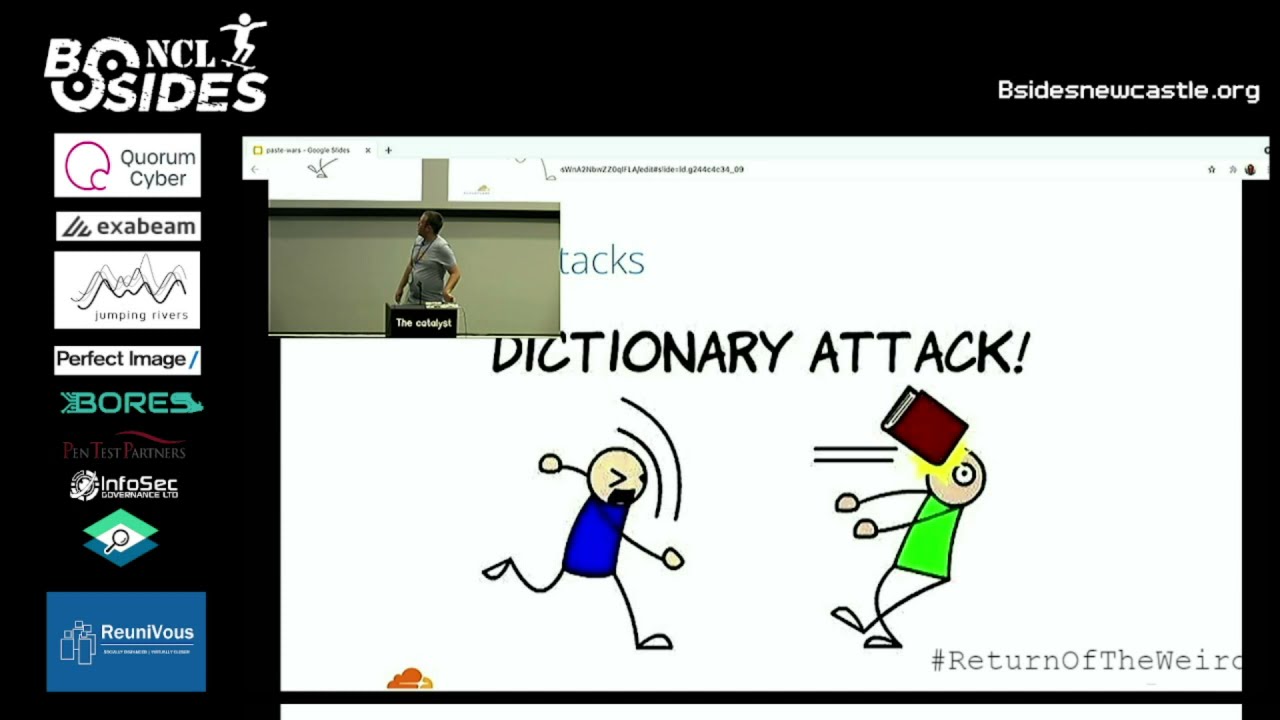
and we have dictionary attacks and we have different services account hijacks and links so what about brute force attack brute force attack is a very is is the most simple type of a password attack where an attacker tries to actually try every possible combination of of every password and before they get they succeed and actually get access to the service it's very time consuming and resource intensive so the longer you pass for this the harder it is to know dictionary attacks is probably not what you see on this slide so in this case the attacker tries to exploit the human nature that humans do not come up with passwords as random character strings but they
usually use real words and so they compile and like many humans use the same words for passwords so they compile a list a big list of words commonly used as a password then they usually develop some kind of automation to actually because those lists are quite huge like thousands millions of passwords and they just try each password from the list until they succeed to get into the service and the third potential type is service account hijacked and licks which can be further broken down to a client-side attacks where for things like phishing mails insecure or fake login pages and some kind of social engineering so they're a client-side because the attackers try to somehow steal the password from the user the
client itself and we have the service side attacks where sometimes the account databases with password leak we have code vulnerabilities the previous talk showed us a lot like how threat actors use golden vulnerabilities to get into the systems and the same social engineering so sometimes the attackers try to social engineer the specific service customer support team to give away users information so based on these attacks modern passwords to be secure have to comply with some specific requirements so first of all they have to be long to actually be to be protected from brute force attacks they have to be random-like to actually be protected from dictionary attacks they have to be hard to guess to be protected from both and other like
other types of attacks so don't use your birthday as a password for example and most importantly never to be used for n websites because the attackers usually take the paths of least resistance if they somehow hijack your password and one of your websites they will definitely try the same password on all the other services you use so the weakest website will like compromise all your other services but what it means what all these requirements mean in terms of users right so long means hard to remember right random like means hard to remember hard to guess means hard to remember and never use for an website means end times hard to remember because now you have to remember a unique strong
password for every service you use and this basically becomes that like as the complexity of password attacks grow like the complexity of passwords themselves grow as well and like passwords are just unsustainable these days if you don't believe me this is the internet standard rfc 7616 which describes http digest authentication and it says that uh digest authentication should only be used with passwords that have a reasonable amount of entropy 128 bit or more and such passwords typically cannot be memorized by humans but only automated web services so even the internet standards tells us that more than secure passwords are non-memorizable and this is http digest authentication most web services use http basic authentication but we use every day we use both of them
every day on the web luckily in 21st century we have a solution called the password manager right so the concept of a password manager is very simple so you have all your different unique passwords for different services you use you just get a database and you store these passwords in a database then you come up with only one really secure password which we'll call the master password which is later converted by to a cryptographic key and this key is used to encrypt this database so the advantages of a password manager are clear so you have to remember only one password and your other service passwords can be as complex as required so they can be
totally random strings and numbers almost and arbitrarily long in characters and yeah and your passwords can be totally random so you can generate random passwords for every new service you use and it's very simple and easy to use so hooray we solved our problem end of the talk bye uh unfortunately no right so unfortunately javascript strikes back and i would say enterprise web applications javascript strides back so who knows who this is this is a average security product manager in an enterprise company which says go to their web developers and say hey for security reasons you need to prevent password pasting in our password fields in our authentication forms and this is a big problem right and
because blocking paste prevents users from adopting password manager which is considered the most secure way to manage your password these days right and a famous researcher troy hunt actually tried to understand the reasons behind this and he went to different like big companies asking like why do they do that and compile the list of common answers they provide and it's you can read about this in his old blog post but to summarize basically the most typical answer you get is like clipboard security concerns so the companies say that oh users might have some malware running on their laptops which can intercept passwords from the clipboard when they copy paste it it is interesting why the same malware
cannot like for example still the password the keystrokes when the users types in the password so it's uh it's a little bit of a security field i think uh some say it's for password brute force protection but what they actually mean is they're trying to protect from dictionary attacks so to prevent uh yeah somehow they think that hackers or or threat actors uh try to brute for like pro mount a dictionary attack by manually like copy pasting passwords from from a list into their login form and like trying like thousands and millions of passwords they should it's not like that they develop some kind of automation script that probably queries some api directly so it's still not a valid
not a valid use case in my opinion so others are other responses are more vague they say like compliance requirements although no one actually pointed out which ones so i to be honest i haven't found any compliance requirement compliant security requirement in any countries which actually says directly you have to prevent password pasting if you know plea such compliance requirements please let me know but i think it's mostly due to misin interpretation and like more vague answers like because it's our procedure it's for your security it can't work otherwise and it some say it's just a feature of a browser the browser it just then allows you to paste passwords in the password field well luckily we can fight this right we
can there is a rebel movement trying to push the security community to allow password pasting on the web application and there are some things you can do yourself the first thing you can try is actually to restore paste functionality on such logging forms is if you use a firefox web browser you can go to its configuration and set this this config to false which will actually disable the javascript encode on copy and cut on paste events which are usually used by web developers to block password pacing functionality this approach has no extra dependencies it's easy just go and flip the switch it's not very reliable because it assumes that the web developers use this these events to block password paste but
there are other events for example which may be used by wade developers so depending on the implementation of password blocking it may not work reliably it's not portable right it's for firefox only if you don't use firefox you're in trouble and it can break other functionalities so modern web applications uh are very you know like responsive and they may rely on extensive javascript for to function properly so disabling these events is basically like cracking a nut which is with a sledgehammer or you might as well move to link's browser as well and but it will not be very usable right so the second approach we could take is there are numerous of different browser extensions out there which claim to
restore password pasting functionality so the way how the you work is they inject more javascript into your browsing data which tries to contract override the paste block in javascript in the web application and they're mostly third-party extensions and they try to actually disable the pace blocking functionality in the web application the second type of these extensions they they just can manipulate your document object model directly and inject passwords for you in your passwords field so these extensions are implemented by a password manager themselves because they have access to your password so they can just prefill them for you when when the web application loads in your browser the advantages of this these this approach is it's
also easy to install so you just pick the extension from a web store right um it usually requires zero or very little configuration but there are some downsides of course they may be not reliable as well again because different web developers may use different techniques these password paste unblocking extensions may not detect these and like properly contract and restore the password block functionality they're not portable so they only work for browsers for common browsers like firefox and chrome which have popular web stores and not less popular browsers and again they can break other functionality because if they are implemented incorrectly they mess you with your document object model with your javascript and like application may
actually break and stop working for you but one further downside for me specifically is security consideration so when you install uh such extension like chrome for example will tell you that this extension will read and change all your data on the websites you visit and it's actually like there is nothing wrong with that it's by design to actually um performance functionality it needs access to your browsing data so basically these extensions have access to mainly malicious your document object model your browsing data and it happens after tls termination so it's the extension sees the clear text browsing data and because these extensions run in a browser they have full network access right so let's recap here for a second so
you're installing a third party code which has access to all your browsing data and can change it and has full networking access right so yeah what could go wrong here yeah and yeah and these extensions uh even popular ones are not always malicious by themselves but sometimes they they're written like in javascript and have many javascript dependencies sometimes these dependencies get hijacked and like these extensions can be easily weaponized by threat actors to actually start collecting your information remotely so what can we do here right i had a thought about this and because i'm an operating system developer like can an operating system actually help us to to fix this and i came up with a
small tool called pass kb which is an operating system based on blocker i think it's kind of a new hope for to counteract this evil web applications uh which block password pacing functionality but to understand how this works so let's just zoom out a little bit not dive into specific technical details but try to understand the concept of how password pasting password-based blog work in generally so you have your web application you have your users and your users may either try to paste the password into the login form or type it in so password-based blocking techniques usually implement some kind of filter usually in javascript which tries to detect paste functionality somehow right but what they should allow by design
they should allow typing right like any web application should allow users to type in the password and all the techniques before uh past kb what they try to do it they try to find this filter as this implementation in the web application and disable it somehow so what if we take a different approach here what if we uh if the web application wants you to type in your password let's just type it in but instead of typing it ourselves we will ask our operating system to do it for us so this separate tool can you can paste the password in the separate tool and the separate tool can emulate typing functionality into the form for you and
the web application should allow it by the design because it should allow typing right so this is exactly how pas kb works so yeah again we have the web application we have our users and this is like a common line utility you can run in your terminal so if you encounter web application it prevents password pasting you can just paste the password into the tool and if it you run on linux on linux it would will use the operating system w input interface on windows it will use the send input api call which will emulate typing functionality and type your password in so this black box is actually a pre-recorded demo but i'll try to do it
live because what's use of the in-person conference if you do pre-recordings right yeah so i temporarily switch my display so i can see what i'm actually doing
okay so here is a simple web page right where it emulates refilled one field where you can actually paste your password and there are two fields which prevent password paste blocking by using different techniques so let's emulate a simple password manager with a with a secure password so for example here i can paste the password here but i cannot paste the password in in these two boxes right so actually here is what i can do is i can just launch my i'll copy paste it again just in case i will launch my pas kb tool it asked me okay paste me your password so i paste the password here press enter and quickly put the cursor
back here and wait till it types it in oh and this is one password basing blocking technique here is another one so it works with any of those paste and back no hands yeah so it works
where is my display
all right i'll be back now just a moment okay yeah we're back
so yeah this approach is very uniform and straightforward except it's if you run it on linux it requires some additional configurations at least so on linux it uses w input interface to emulate keystrokes and the problem with that is like the process required read write access to the device file but on most linux distribution this file is owned by rule so you have to change that so we have three approaches there we can just run it as a super user but it's not recommended because of the list privilege feature if you're a single user of your linux laptop you can just change the ownership uh to this file to yourself and and then you can use it from your normal user if
you run a multi-user linux distribution it's better to create some kind of group and ask add all users in that group and actually allow the group to access this device file and because on linux the device file system is virtual it will all your changes will actually be reset on reboot so you have to have some kind of startup script of udev rule which does it on every system boot but other than that this requires no configuration yeah so the advantages of this approach it's uh cross platform and browser independent so because it emulates keystrokes by the operate system it doesn't care which browser you run or even if you use some kind of different like fat application
which also prevents you to paste passwords it has access no access to your browsing data because it runs outside of the browser and it actually doesn't need to have any access to your browsing data again it has no network access it's a separate tool you can put it into container and like block it accessing anything except for the single interface it needs to emulate keystrokes um it's a separate constraint process so even if for some reason this application is very simple it's do one thing unix philosophy but if it ever gets exploited nobody will be able to get to your browsing data because it runs in a separate operating system process and it's simple reliable there are no
settings no state no heuristics and no regular expressions itself and the biggest advantage it cannot be detected or blocked because all the paste blocking techniques need to allow typing functionality by design they can never detect or block this type of tool there are some downsides as we saw from the demo uh it doesn't at least currently work on mobile devices but i think more mobile operating system now have their own dedicated approach to solve this problem which is quite similar uh to what pas kb does and as you've seen from the demo there are some usability uh inconveniences so you have to run a terminal session alongside your browsing session and you have like when you paste the password into the
tool you have like three or five seconds to switch back to the browser otherwise it will type your password somewhere else whatever the cursor will be yeah so it's a little bit inconvenient so yeah so what can you do if you're a user and you don't use a password manager please please please start using one there are plenty of open source and commercial free ones available if you're a web developer or that security product manager please reconsider messing with paste functionality use my tool provide feedback and and actually spread the word with this tool available or similar tools becoming developed and more available like the paste blocking in web application is no longer effective if you have a separate tool
which can emulate keystrokes on the operating system you can never block such tools from the web application itself so it's useless actually to put it there in the first place yeah and i think that's it so here are the links to the resources i used in this presentation the first one is the link to the troy hunt's blog post about why companies actually uh blog password pasting the second one is actually linked to our uh government security service in the uk which recommends like if you ever encounter an enterprise saying oh we do it for security reasons at least here in the uk you can direct them to this resource which actually recommends web like web services to actually allow
users to paste their password for security reasons the third link is the link to this test was web page i used developed by other developer which emblazed password blocking and by the way that user also that developer also believes that password-based blocking is bad is they just wanted to investigate how it's done and the final link is linked to github to my tool which you can grab and compile yourself or you can probably even grab a binary yeah and in the end the obligatory star wars memo here is like if you if you block password paste you're not a great person and we will find you thank you very much for your attention [Applause]
five minutes i'm always muted which is fun does anyone have any questions don't come over the street oh hi thank you for the talk uh is it for the tool you have to paste the password into it is not actually accessing the clipboard a choice or did you just run into some roadblocks with it just directly access the password in the clipboard i mean currently the tool uh i wanted to tool to be very simple like with zero functionality so you can either type your password in the terminal yourself but why would you need the tool or you can copy paste it in the terminal so it doesn't access the clipboard itself it just takes whatever
it receives from the terminal so it actually it's similar to ssh login it just doesn't show you the characters when you type it in but other than that it it just receives the password from the standard input and and tries to type it in like you emulating key strokes does that make sense
just just a quick clarification i'm assuming the dev input or send input do not depend on the type of keyboard you have and this is an interesting actually question and i think different operating system have even when i implemented the tool it like the api is a bit different so for example on linux w input actually emulates keys on a keyboard so you operate in key codes right whereas on windows the send input faction actually you hand it like unicode characters so yeah different operating system have different break it will break if it is a us keyboard or a uk keyboard kind of situation that's that's what i was trying to get at does it work with
different keyboards or will it break if i use a us keyboard or a uk so i'm not sure to be honest on which operating system on which operating system will you use and how it is configured i would technically not advise to use like non like ascii characters or symbols for passwords because it can break uh many web function web applications right it's better just to have like a longer path the only point is like the actorate symbol on uk and us are at different places that's the which is quite a common uh input character for a password yeah that's what was like will it break back to be honest that's that's it i encourage you to test it and
submit a github issue if you want or even a pull request if it doesn't work that is a quintessential screw around and find out um anybody else have any questions sorry i you appeared out of nowhere have you had any issues with like stuff like antivirus like saying hey there's a random process sending keystrokes do people still run anti-viruses this day
i mean yes no maybe sort of no no i don't run an antivirus fair enough just a question find out what your personal uh preference is if you go back to the beginning of your uh display you want about brute force attacks and dictionary attacks so if you're using a password let's say in excess of uh 25 characters most people as you say can't remember that so the thing is lauren write down on post-its and and or in books or something like that uh which if you find a book you get a book full of uh kind of passwords so when it comes to you've got to renew your password uh every month three months or whatever uh
you know uh is your preference towards uh not having that renewed quite so often so people will actually remember that past uh password because otherwise they'll get a bit hacked off if they're trying to get big password done in uh every month uh or uh are you more inclined to still say that password should be changed as often as possible i think um i would follow the bruce schneier's i think post on renewal passwords that it's actually he presents an idea that it's harmful in terms of like if you force people to uh sorry password rotation to rotate password they actually start coming up with uh with insecure passwords and i i think i noticed myself doing this as
well on like dodgy websites which require you to do so of course uh the ultimate recommendation is still use a password manager if you have to renew your password you just go and click button generate a new one and it will you will always get a random password it will and will not be tracked by like password tracking history a web application maybe made to implement and just put it in so yeah and password managers usually don't require you to rotate passwords as far as i know so like your master password come up with one big secure password remember it and like stay with it forever but don't write it down in a book i have romanian post-it notes
ladies and gentlemen give a big round of applause thank you
Related talks
 18:12
18:12 23:41
23:41 33:14
33:14 39:36
39:36 24:40
24:40 1:01:45