Hacking K-12 School Software in a Time of Remote Learning
Show original YouTube description
Show transcript [en]
cool well uh let's get started then my name is sam quinn i'm a security researcher at mcafee's advanced threat research team and i'll be walking you through some of the uh the vulnerabilities i found in educational software last year um just a little bit more about me i've been a part of the advanced threat research team for about two and a half years i've always been in the mindset of hacking things from an early age taking things apart rarely putting them back together i actually uh currently live in portland oregon you can see mount hood right there behind me in this picture when i'm not hacking i like to go skiing i'm hiking mountain biking getting
outdoors i also am pretty avid of my home automation and tinkering and things like that or just trying to keep my my linux distribution alive do you want to find me on twitter my handle is eip and um but uh that's enough about me let's let's get into it um so a lot of uh that we do a part of our like uh security researching team is we try to think like uh the attackers um we try to find industries that have uh either emerged as a high impact target or try to find things that have been overlooked and one of the things that we haven't hit on yet was the school software and last year the zd net
article published that 2020 had a record-breaking number of cyber security incidents is inside of school districts and things like that so it's kind of brought our attention to the um the whole industry of school software and so we kind of began to look for software that would have a large user base and things like that and that's kind of when we stumbled upon netapp vision pro netapp vision pro has around 6 million teachers and students using their software and around 9000 plus school districts netapp vision or netapp is the parent company and they encompass around 100 million users worldwide with all their other products and then i kind of want to explain a little bit of how this
the attack surface has opened up due to like e-learning and hybrid learning normally netapp vision pro is designed to be used on a local network where it is confined to like a classroom or a computer lab but we've started to identify that um some of these exceptions due to like hybrid learning uh that these kind of computers with the software installed could be taken off the um the walled garden of a district network and kind of opens up the attack surface to this kind of software that was previously not very common and just as an example hillsborough county public schools were like lending out you know school owned school district owned computers to the students to continue learning
remotely so let me explain a little bit more about how the software kind of works and what it what it's meant for it's technically considered a like student management software where a teacher has a client and can view and kind of remotely manage a all of the students in that classroom they can perform a handful of administrative tasks like blanking the screen they can even perform like remote control like an rdp session on their their remote pcs they can view their screenshots like what they're currently doing start applications and like even shut down the computer the way that this is handled to make it tamper resistant is this software is actually on the student install installed as a system service
and um is a actually like started at boot so it can't be disabled by the student without administrative uh privileges and that and that's to probably prevent them from just disabling it and not participating in class or whatnot um so let's put on our hacking shoes here and dive into some of the uh the technical details um like i mentioned earlier uh as a security researcher we we like to get into the the mindset of an attacker and these are kind of what we identified as the goals that an attacker or a malicious actor would have come across if they decided to attack this type of software knowing that it's not internet based they would
be trying to look to find a local network attack um it's much better than a physical access you know and then they would probably want to try to remote control the student pc either through the rdp full remote control or like a command line instance just running remote code on their pc and then lastly they would most likely want to improve their position on the compromised machine so uh how did we begin we um first of all once we identified netapp vision as our target we uh actually found that they had a free 30-day trial so it's pretty easy uh and fast to get our reverse engineering hat on and start looking at how this
software was um was running i personally like free trials but uh it is a pretty easy way for even attackers or whatnot to kind of get a handle of how this this application is running in the back end and then we um next we set up like a test environment where we made a handful of vms where we made one the teacher the others the students and really at this stage we're trying to identify the most common install so we're trying to enumerate through the installers on all the students to make sure that we have a a normal environment there's nothing worse than finding a vulnerability and some software and then you found out you
configured it insecurely or something and no one does that out in the wild so we're trying to at this stage trying to figure out what the most common install is and there wasn't many options to change so it was quite easy to make sure we're kind of on a a default settings here and then next we we try to become the teacher a little bit we wanted to narrow down our scope go through many of these actions a teacher could do figure out what kind of functions that the software can perform and how it's facilitated in the back end and which ones as an attacker would be good to start looking at um it the this application
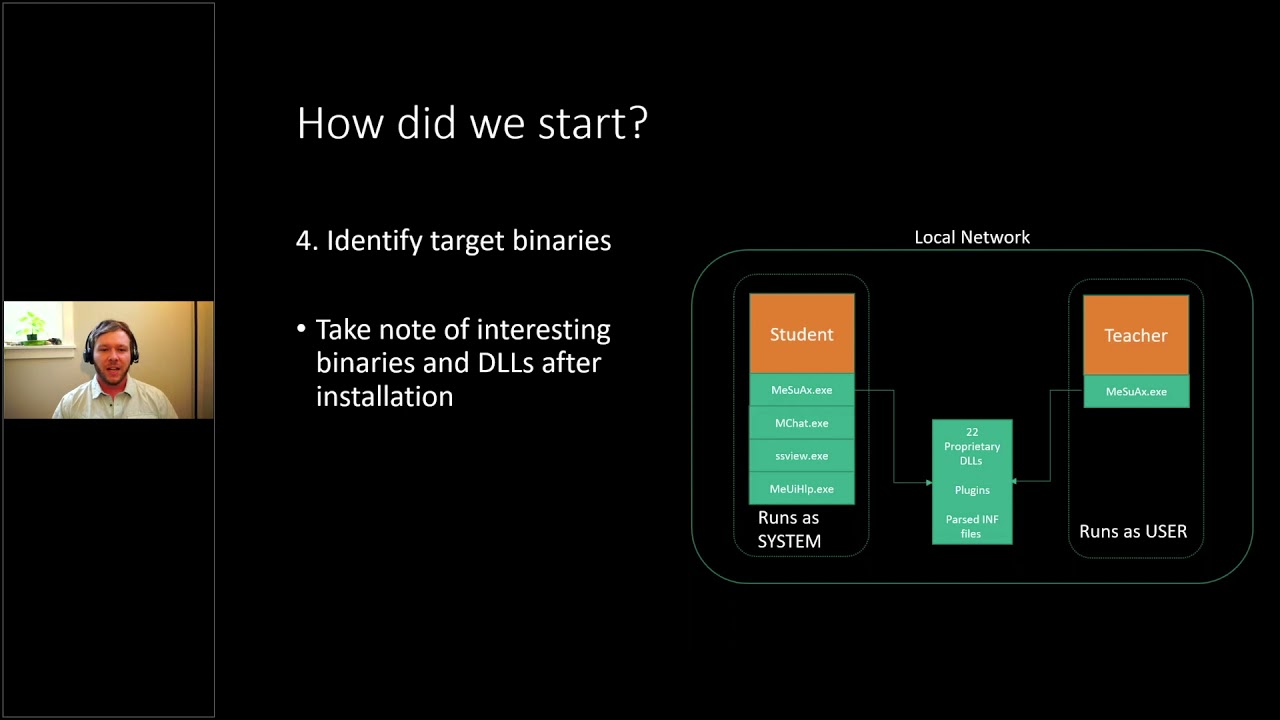
had quite a bit of of code paths and we wanted to try to start narrowing down what is hackable here and then lastly we kind of took a an over our all view of these two installs the student and the teacher and wanted to identify the simulink similarities or differences between the two and the commonalities if we found a vulnerability in one does it transfer to the teacher and vice versa and pretty quickly we identified that the student actually has a lot more interesting binaries and dlls and things like that that we can as an attacker it they had a bigger attack surface i guess i can say and then one other thing we noticed is
all the student clients run a system probably to prevent tampering and then the teacher clients was using the same main executable but in like server mode i would say and they uh would only run the application as their logged in user so at this point we kind of wanted to attack the students um and there's probably more students than teachers and that means more devices that we could potentially hit so we at this point decided to take a look at the students and now that we have kind of a groundwork of how the application is laid out let's start enumerating through some of these goals so the first thing we noticed was that the whole concept of encryption was not
uh not applied here so all of the network traffic while we were eavesdropping on the local network was sent in plain text um even sensitive things like this windows username and windows password um was just sent in plain text over from the teacher to the student so and in this screenshot um yeah this one the teacher is actually trying to perform a login action on the remote pc that's just one of the uh administrative actions the teacher can perform on the students and then in the green and red down there they um are just shown in plain text on the uh the wireshark capture but um it wasn't just the the login credentials like everything like i
mentioned uh was sent in plain text so when the teacher would run an application on the remote pc you can see calculator is shown in plain text in the wireshark capture as well and same with the screenshots so whenever a student connects to a classroom they instantly begin sharing their screen to the teacher so they can kind of keep an eye on the whole classroom those are also sent in plain text and using a tool like driftnet here we were able to just ease drop these these images sent over the network and uh to kind of fill in our system architecture a little bit so now we've identified that all of the network traffic is unencrypted there are uh i
want to point out that there's um a lot of the different functions that the teacher can provide actually talk and communicate on different ports um and so there's some tcp ports and udp ports throughout the this and this ecosystem here and um this was our first finding in cve we uh we published against them um clear text of transmit or clear transmit clear text transmission of sensitive information um not only the windows credentials but also the screenshots and even the applications could be considered sensitive and just to kind of highlight on how easy it was was for an attacker to to do this was all we had to do is be on the local network uh wherever the student clients
are uh have a wi-fi card or a network card that supports promiscuous mode and then a wireless or a network sniffer that can capture this traffic like wireshark drift net for the pictures things like that and there's many others so uh just to recap on our goals we didn't have a we didn't actually achieve a local network attack through that um because it's kind of passively just eavesdropping on the network but we were able to compromise some windows credentials through that and uh just to kind of enumerate on how we've gotten to this point all we had to do is uh you know get access to the software we set up a mock classroom and then
pretty much pretty quickly identified that all network traffic was sent unencrypted we also noticed that teachers have like full control of the students the students can't deny these requests at all um they can start applications things like that and all the student installs run a system so let's dive into our next goal of trying to figure out how we could potentially remote control these students and see if an attacker could do the same and kind of given that the teachers actions are already pretty useful for an attacker the ability to see their screen and then even that whole the ability to start applications remotely that's a pretty big so we wanted to think like the person we want to become
so we want to become or emulate a teacher in this respect and to highlight on some of the things a teacher can can do that's better than you know just being a normal person on the network or another student the the teachers are always considered trusted it doesn't matter if it's during class time or off you know uh whatever network it is these devices find themselves on if a teacher one connects and tells it to do an action like start an application or blank the screen the students have no way of denying or rejecting these these actions um a lot of the uh the actions that a teacher can perform could also be useful as a an attacker
like i mentioned earlier and then also the screenshots automatically start sharing so at this point we i really want to become a teacher as um or emulate a teacher from an attacker's perspective but the next we had to figure out how how to find these students now that we want to target them um we wanted to figure out how we could find them um and thankfully all of these students actually beacon out or broadcast out their presence on the the local network um and you can see in like green here that's the student the computer name uh the blue is the mac address and then uh red is just their ip address in uh hex so uh really everything an
attacker would need to kind of create a list of these targets and then potentially iterate through each one performing a handful of actions or attacking each one individually but before we can attack them we kind of had to figure out how they connect how the teacher facilitates the connection to the student and diving back into wire shark we we captured a like a handful of these um these connections the handshakes between the teacher and the student and we identified that there's around 11 packets in a handshake and then i want to point out that there's these two udp messages in the beginning this teacher is actually a listening socket and all the students are actually uh outbound traffic to the
teacher so the teacher would actually broadcast or not broadcast i guess send a udp message to the student the student will respond with another udp message in a similar format and then it's actually the student that connects to the teacher so the teacher has to just have like a listening connection and all the students connect to the teacher so that was one thing we found and through the handful of handshakes that we've captured we started to diff with them and see what was being dynamically created and kind of trying to see how the handshake was facilitated and we actually only identified three unique elements that were being dynamically created the rest of the packets were actually just
um static so a direct replay could have could be used there and the three unique elements um were all unique d words that we ended up having to identify the token one we noticed was unique to each teacher token two was unique to each student and then token three was we actually called it just token three in our python output for the majority of our research until one day when we um started to notice that that range of that d word started to look familiar and we typed it into wendy bug here with like the bang address and it's actually a heap address and it's so the student was actually just sending over a heap address kind of i guess as a
unique identifier or something i was hoping to use it in an exploit at some point but we never got around to it but i just thought that was kind of an odd and odd thing um but uh so after we kind of were able to uh enumerate through all of the dynamic fields that a handshake needed to be completed successfully we um started to try to script up a solution to emulate the teacher and on the left here these these are just a few of the packets that we we created we created scapy layers for them if you haven't used scapy it's a great tool to for network communication and um replaying and modification and everything on uh and it's all
facilitated through python so um and i also kind of want to point out that a lot of them we still didn't actually know what the each field did at the end so there's a lot of ukws and those were just unknown values but um we identified as much as we could through reverse engineering and uh kind of changing values and seeing what they do um so we we uh have we we were able to change everything we needed to do um for a a handshake to be completed successfully and then this is just some of the wrapper python code um of just kind of showing how most of the packets aren't actually being changed at all all we're changing is
like the target ip um the tokens uh and things like that so and then lastly like the command since this one's trying to emulate the run command action so um it was pretty easy to actually get a replay working on this and that's kind of what i'll show here in this video as a demo so these are all student computers all these windows pcs and this is uh the attackers window here so if i start this video yep we'll see that if we type in c powershell it'll actually scan on the network just for only five seconds and that's long enough for it to capture all of the student broadcast out packets to identify their ip address and
things like that and then we create a list of those ip addresses and then um execute just replay uh the command with um powershell and so i changed it to the second one on here to just run calculator and i also want to point out that since we are actually emulating a teacher these vision client disconnecting and connecting um to the the student they have no way of authenticating or validating that our python script is a python script or a real teacher so they greatly execute any command we tell them to thinking that we're actually their teacher even though it's just a python script at this point and so this kind of brought us into our
second finding with a cv cve here of incorrect authorization because the student has no way of authorizing or authenticating the teacher we thought that deserved a cv and so now if we look at our goals we've accomplished a local network attack and also the remote control of the student granted that it's a uh you know just arbitrary code execution that's still remote control so to kind of recap on how we got here um we can passively identify these targets on the network these students that have this software installed we can dynamically spoof the handshake by filling in those three d words that we've that we're changing the rest is just static we can modify the the actions that are
performed from the teacher um we showed in the last demo the application execution and we've modified that to powershell calculator whatever we want and that kind of leads into the fourth one where we now have arbitrary code execution or commands that can be executed on the remote machine but we still have a privilege escalation that we want to hit on so let's dive into that um and i want to bring up that the in the previous demo while we were starting those calculators and power shells and everything that was actually being executed as the student even though the the parent application all of the netapp vision binaries are being ran as system the uh the the back end um drops the privileges
correctly that's good to see um uh as a security researcher we like when companies are actually taking um that kind of uh steps to secure their product so if they didn't you know this project would be done right here but um so that was good to see it just uh we wanted to see if there's any way around it and like i said earlier all of the plugins like the screenshot viewer the web filtering the chat application they're all running a system but they do drop the privileges to that of the student if if there's any way to execute code um so we wanted to see how that was kind of facilitated um in um the the main binary itself
and so we we brought open the code in ida and i want to point out that this left here this whole left path and all of this code here is just wrapper code to find the current logged in user and eventually drop privileges before calling shell execute somewhere down here of the command that we typed in there was a a path that just goes directly to shell execute which would execute the code as system however we weren't able to find any ways to set that it seemed to be reading a value like a variable from the registry at boot and then never reading it again so we weren't unfortunately able to hit this this path
but this kind of got us thinking do all of the shell executes in all of the binaries including the plugins have this wrapper code or did they forget to add it to a to a few and that's when we started to just parse through all the code finding all the shell executes and we noticed a few that weren't so um right off the bat i want to i want to point out that these were all local privilege escalations um none of them were accessible over the network um but we were able to find a few what i like to call mouse-based local privilege escalations so if this one number one here the support page is what
you see on ida on the right it was executing internet explorer but without dropping the privileges to that of the logged in user with a pre-filled url for their support page and then once you have internet explorer running a system it's pretty easy to uh go to like save as and or you know click around and eventually get to the um through the uh the explorer get to system 32 and then execute like a cmd for instance um so we were able to do that and then for the next uh two through four um they all had a save as button so like um you could save the system info you could save screenshots and save your chat um dialog that you
had and the save as opens the file explorer um again with system and it you can um click around and eventually get it to execute code with system but since we didn't have access to um the the mouse this wasn't a viable solution for us we still wanted to try to do something uh remotely but um that did give us our third cbe of incorrect privileges privilege assignment um but yeah so we still wanted to try to figure out how to do this over the network and that's kind of when we started to look uh the main applica the main binary that was shared between the teacher and the student actually did wrap all of their shell
executes properly and so we started to look at some of the plugins that were available and a lot of the teacher actions would execute these plug-in binaries on the the remote students pc and we kind of directed our attention to this chat feature and we noticed this when we were downloading the free trial and this kind of helped us remember that this could be an issue where the teacher when they send a document to the student for one the ability to like send files is interesting as an attacker but also it seemed to have launched in the system context so they might have still have problems with that so we wanted to investigate that a little bit
more and kind of see how uh the file operations were handled how this chat application was sending these files and that's when we kind of realized that this chat application was much more feature complete than we we initially thought i thought it was just going to be a simple im message between the two but uh it was a it had quite a bit of functionality right here this is actually still in the chat application where the teacher can actually remotely browse the file system of the student um but there was no way that like there's no like dot dot directory where it can help you traverse back up you know to a so this is kind of confined right now to
the student threes my documents folder um but if you right click on it you can still actually delete and view these files through this this chat application and so next we wanted to figure out if these file operations were being executed as the logged in student or if those were also they forgot to drop the privileges to that of the student and being executed as system and that's when we brought it open in ida again and noticed that yes actually all of the file operations were being executed as system and then right at the end they're uh setting access to everyone you know a chmod 777 almost if you will um so that was interesting
and we did a few uh tests where we would create a file with an administrative account lock it down privilege wise or permission wise and then see if the student could delete or through that teacher's view if we could delete it and or view it and even though the student couldn't we could still perform file operations on it so we definitely knew it was being executed a system and that's when this brought us to our uh this is the fourth finding i think so with the highest cvss score of 9.8 of in incorrect default permissions because now we have a primitive to read write and delete you know any file that this application can see this
chat application but to kind of enumerate why that score got so high is we wanted to see if we could traverse the file directory um right now it being just in the my documents folder it doesn't help us very much as an attacker so we wanted to see if there's any way to um move up to a more uh restrictive file path or whatever and that's when we found this kind of convoluted path here of um but the the teacher was able to actually set the root file path of the remote student um remotely as well so at this point right here if this teacher just said it's like the c drive for instance we would have system level
file system access meaning we can view delete any file on the c drive regardless of permissions because system is like you know the unrestricted account um and so at this point this is why that cvss that uh previous slide was so high is um at this point we could really do anything we could overwrite system files we could drop malware um all all from a remote uh attack vector and so that's exactly what we did is we um we wanted to overwrite a a binary that we knew would be executed with also the same system privileges in knowing that all of the netapp vision pro plugins and binaries start as system we decided to just
change this work file path to the default install directory of netapp vision and overwrite one of their plugins and to kind of lay that out in maybe a more simplified view i like looking at code i'll kind of show this code here so um this is how we this is the the entire attack script of how we gain system level privileges on the the student computer first of all we if we don't pass in a an ip we will find all this targets on the network all the students that have this software installed because they're bkinging it out we can create a list of them and then enumerate through each of the list of target of students
we will create like i mentioned before the mchat client which is the chat application also has a similar paradigm as the main app the main binary where the students actually connect to the teacher so this thread is starting a listening socket for the chat application then next we send that udp message to the student telling them to connect back to us we are their teacher even though we're not really um and then we grab all of those the three dynamic tokens that um are uh generated or are different could be different and then we finish off the handshake here with running the rest of the the 11 packet handshake and then the join is kind of a big step so in the
background that thread is actually changing the root directory kind of showing in the previous slide how we did that it's doing that by just emulating that code to that of the netapp install directory then we're deleting the screenshot viewer plugin in this case um and then we're uh dropping our malware whatever binary we we pass in from right here and then it's saving it itself as the same file name as the plugin that we just deleted and then we um start that plugin so we're starting the screenshot viewer here and then we just close the connection and move to the next target in the list and um to see that in action i'll show you this video
and so again all the students are around the attack script here and i'm just showing that they are all just normal users on a fairly recent version of windows um and have like virus protection turned on i had to write my own um reverse shell for this demo because the the antivirus kept flagging it but um so now the i'm showing just the net up vision client is disconnected then we'll start the same python script before but this time we've added a few flags dash s for system and dash b for whatever binary we want to overwrite the screenshot viewer with and so it scans on the network found the three vulnerable computers it will enumerate through each one and
then these reverse shells will start popping up and so in the background it's starting the chat application as well changing the directory deleting the file dropping in our malware and then executing that all in a what seems like a blink of an eye and so now the um the attacker has disconnected um so the student has no way of knowing that there's any process really running in the background and then we can just execute like powershell for instance and if we do a who am i we are indeed running our code as system and just kind of show which computer i'm i'm currently attacking let's bring up a calculator obviously an attacker probably wouldn't do this in the real world where
it would disclose their presence but um yeah so this was kind of showing that um at at this point knowing all of that information we were able to enumerate through each of these computers and perform this the same attack on all of them and uh oh i guess i'll just let it finish so all of those applications are running as system all remotely from an attacker's uh script over the network and to kind of highlight just on some of the the impact of this um for one because these students broadcast out the information that can identify that they're using the software as well as their ip address and everything we need to do to really attack them
this could be wormable so a well-designed malware could infect one of these pcs if they brought it off the school district network or if it is on the school district network um and then just kind of lie dormant and wait for another one of these beacon then you know listen for these beacons and then further the spread because the code that we do eventually execute runs as system there's it's kind of the keys to the kingdom we can disable antivirus control webcams microphones delete any file start ransomware you know it it's kind of your mind can wander but um the scenarios of kind of this is if these computers with this software are installed and
are brought off the network from from hybrid learning or e-learning and they or even just a student with the software installed goes to a cafe or a library they could potentially get infected and then they bring these devices back to a school network it could further the spread to each of them and uh to summarize our findings we've covered the two critical issues here the four local privilege escalations the three instances of plaintext sensitive data what i didn't cover was the with the scapulars that i showed in the previous slides we were able to actually enumerate through all of those and kind of fuzz each of the different fields and we were able to find
six crashes now kind of right now we're just labeling them as denial of service we didn't enumerate through the exploitability of each one because there was a passive least resistance but um we we disclosed all of them to netapp and they we followed our 90-day disclosure period they were very responsive soon as we we disclosed to them they they began working on fixes uh they patched uh most of the issues um in the latest version of 9.7.2 they still their network traffic is still unencrypted however they um have uh done like a temporary patch where the sensitive data like windows credentials and stuff are actually encrypted with um inside of the unencrypted packet so um that's uh
good to see it that they're and they have a planned future release where they plan on rolling out full network encryption um we disclosed this on 1211 2020 and publicly released it on 3 21 21 um and uh i i appreciate you guys tuning in for my talk if you want to find out more information uh we go into some more details um at my uh at our blog you can visit uh there from this link and you can also see some of their of our atr's research there um and we'll be coming out with more stuff there as well if you need to email me um there's my email right there but um i will gladly take any questions
if you guys have any thanks sam i was actually really looking forward to this talk we're gonna wait for people to pick their job off the ground i'm sure a lot of people are shocked on this one but we've got chris craig says there were a ton of implicit trust and besides from defeating aslr over the wire why would you advise why would you advertise heap addresses oh i know i i had no idea i i was kind of thinking that maybe it's a way to for because it was all the students broadcasting out their heap address to the teacher maybe it was a way to have a unique identifier for the teacher or something i i never got to the bottom
of why they were doing that but i was hoping to use it at some point and i never did what would you say is the most egregious security er uh from this one product is that what you're talking about okay that's what it sounds like yeah uh all right like the the unencrypted traffic like you know like uh it clearly seems like they they might have not thought that they would ever these kind of the software would ever be taken off the network or um or any network any malicious device ever being on the local network um so that that it might have been the most egregious but uh there's a lot of software out
there that's unencrypted so i can't say that that's like you know too cringe-worthy but that definitely gave us easy um entry into the the software and how you know kind of laid the groundwork for every all of our other attacks and everything yeah as soon as you said everything was unencrypted i was just why yeah but uh yeah like you said i'm sure a lot of software out there is unencrypted yeah so i'm assuming since since the idea behind it was that most people wouldn't be taking this off network as far as gaining access to a machine you would have to be on the same vlan right absolutely yeah so that that was um there are uh
they do have some software that ties into like google classroom and works on like chromebooks that seem to be more e-learning if i can use that word like where that does kind of happen more over the network however um we still thought that uh even though you have to be on the local network this is still a pretty big target and um i don't think any administrator would uninstall like their software suite you know with this installed before they lend out these computers to the students so um you know i i think that uh if they're bringing them home this probably would still be running on them if you're if you're if your school district is using the
software yeah carl i think uh i asked your question just in a little bit of a different way yeah correct carl there's um yeah nothing that we saw really could be attacked over over the internet um yeah so we we did see that they do have guidelines of kind of setting it up through a like an rdp or vpn but at that point we would still have to break through those layers to get to the software all right well thanks sam i really enjoyed that talk wow excellent thank you so much for for tuning in yeah no worries
Related talks
 42:28
42:28 44:35
44:35 46:17
46:17 47:57
47:57 27:44
27:44 43:49
43:49