USB Write Blocking with USBProxy
Show original YouTube description
Show transcript [en]
with USB proxy. Oh. Okay, that was um It's all right. I need to light up my keyboard now. All right. No.
All right. Um Oh. Yeah. Something like that. Excellent disco style. Um hi, my name's Dominic Spill uh and I've been working on a project called USB proxy and I'm going to talk about trying to block writes to uh USB mass storage devices using it. Um and it's a little project I've been working on for a while. I just used the application this time to uh I decided to apply it to mass storage devices rather than anything else. But I'll try and quick give a quick demo so of some other stuff, too. So, um I'm well aware you can see me. I've only got a picture of myself on the slides because someone's going to read
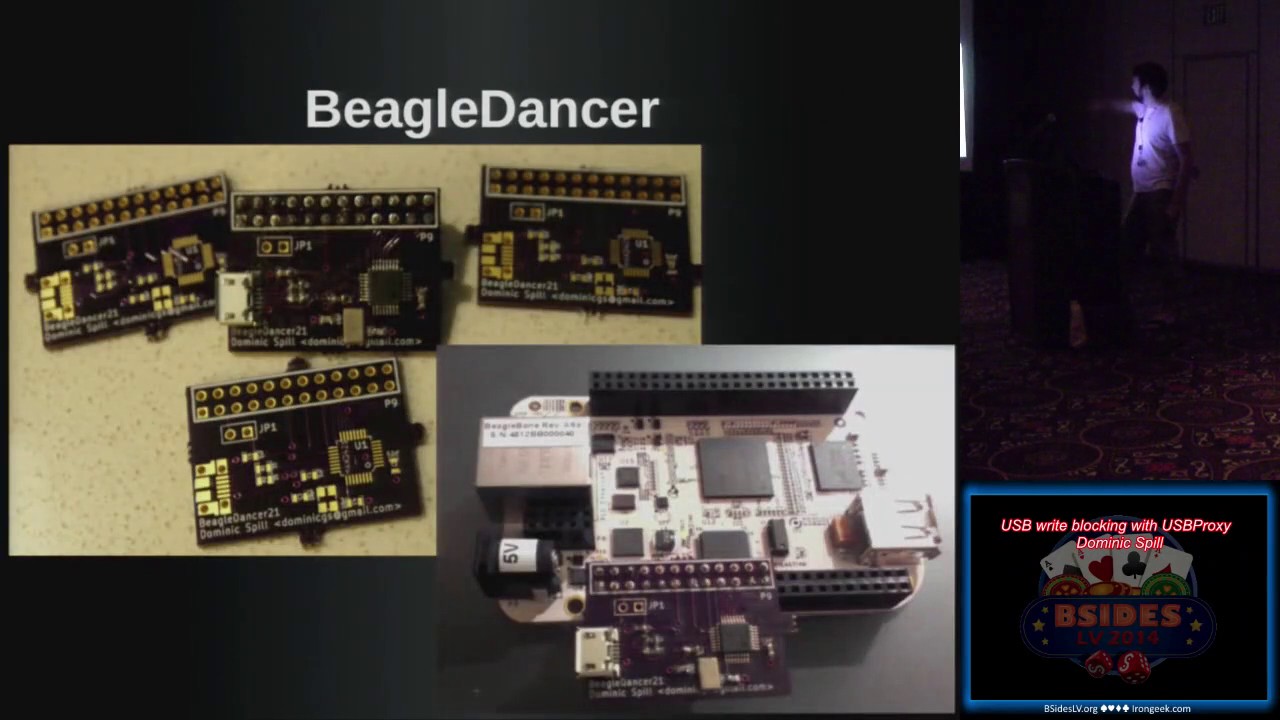
these later and like not recognize me. And I like my own face. Um I work for Great Scott Gadgets. Uh I write open source software, mostly working on Ubertooth and Daisho and things like that. Um I work on a few things in my own sort of spare time. Uh this is one of them. Um fcc.io is a redirector to do FCC uh finding lookups because it's super annoying trying to find the search function on their page. Um and that's totally worth looking at. Um and I've had a little play with them some hardware. There's Beagle Dancer which I'll show you in a minute and there's PS/2 tap which uh has never really worked and it's sort of pointless
anyway. Um but you got to start somewhere, right? So, the other person who isn't here um is Adam Stasiak and he's done a lot of work on USB proxy as well. Um he wanted to use it to um The his main goal was when playing Xbox with a friend, he wanted to inject uh button combinations without having to actually do them on the controller. Um and it's one of those things that he thought one afternoon, "Oh, this might be fun to try." And I'll get a Facedancer and it's an excuse to play with it. And it got somewhat out of hand and we've been working on it for about 8 months. And it's this huge kind of
system that we've built around it. But he's got a blog uh which is Controlling Xbox um where he talks about injecting um button presses and things like that. And he's done a lot a lot of the work on the the core library of USB proxy with me. Uh I don't have a picture of him. Um I have no idea what he looks like. I met him on the internet. Um so, if he's here hi. Um so, I mean, I don't don't I'm going to go ahead and assume that I don't even need to ask the question, "Does everybody know what USB is?" Um if you don't, then there might be slightly high barriers of entry for this
uh this talk. But um it's it's like the device interface that you get on every home PC, every laptop, um most tablets, most Android tablets at least have a a USB port of some sort. It's still the communication method used for updating your your iPhone or whatever. It's like the interface that that replaced serial and all these other kind of different methods that we had back in the uh the late '90s. Um and it's so popular, so ubiquitous. I mean, yeah, the 2 billion devices a year is the last figure I could find and that was 2008. Um and I swear that like it must sell that many memory sticks a year now. Um so, it's it comes in a variety of
speeds. I'm only dealing with uh low, full, and high speed at the moment which is up to 480 megabit. You'd know it as USB 2. Um the super speed stuff uh we're looking into but can't be done with this solution so. Um So, my point of view of the for looking at So, I wanted to build a tool that people could use for security assessments. I wanted people to be able to look at um the drivers and fuzz the drivers. And I want them to be able to look at device firmware. And obviously there's a talk at Black Hat tomorrow or Thursday about looking at USB device firmware. Um and I wanted to just be able to have a
look at the packets going across the connection. I I literally wanted to be able to do the same things everyone else does with Wireshark for networking stuff. I wanted to be able to do for um USB. Uh and we build USB devices as part of our our work at Great Scott Gadgets. And it's nice to be able to work out what's going wrong across that connection. Um and there are lots of commercially available devices that do that, but we thought we'd quite like to build something open source and um much cheaper. So, you can build a a device that will let you inspect packets in the middle of a USB connection. Um and you can get some and
they range in price from a couple of hundred dollars to a couple of thousand dollars. Um they're really good. The the commercial ones, the like $6,000 one is excellent. But it's also $6,000 and I can do a lot more with the the change if I build one for $40. Um so, I decided to go for this. Um And most of my history is is building um Bluetooth sniffers and um Ethernet taps and things like that. So, it's pretty much the same same style of work um but on a different bus. So, um I Can I have a quick show of hands? Who's familiar with the Facedancer board? Anybody seen it? Travis Goodspeed designed it. It's a It's basically a
good fit because he has way too many MSP430 chips hanging around. And then he put a USB device chip on the front end. And the idea being that you use it to prototype a device in Python on a host and and act like that device. Um and you can He'll give you a a blank PCB for free and you can just go and build the board yourself. Or you can buy one. I think they're about $70. Um they may be a bit cheaper than that now. I can't remember. But you can you can go and pick up one of those. Um And mo- mo- most of this comes from his work with Sergey where Sergey said,
"Well, it's USB is basically a network. It's exactly the same. Like, why do we not have the same tools for USB that we have for Ethernet? Like, we have so many tools to explore. You got two hosts that are communicating via Ethernet and you've got so many tools to look at that connection and explore the the data going across that. Why are those tools not available for USB? And why are we not able to inject traffic and sniff traffic and do all the things we want to do to that? So, that's where Facedancer came from. And um they look like this. So um Try and give a quick explanation. This is an FTDI to serial chip,
uh an MSP430 chip, and then a um Maxim Integrated um USB device chip. And the idea is it speaks serial so you don't need firmware and things like that um initially and you don't need much host code um or drivers or anything cuz it just speaks like standard serial. Uses the MSP430 to do the translation and then speaks um SPI to the chip. It speaks SPI at 1 megabit, which is incredibly slow for a lot of the USB applications I want to play with. Um there's a huge latency because you've got to go from that device every time there's a request from the the host, you've got to go back to the the other host over that 1
megabit uh connection. We stall the connection, you do some stuff in Python, you send your data back, we unstall the connection and and send it and then we wait for the next one. And it's so it's incredibly slow. And um this isn't mine, but mine looked even worse than this. I actually managed to lift some of the uh tracks off the board with my terrible soldering technique. It probably explains why I don't really do hardware. Um so, so it's kind of difficult. Um And some some um people decided to build one that attached to the Raspberry Pi. And a guy called Phil in in France. And the idea being that you can run the SPI
interface on that 26 megabit. So, that's pretty useful. Um You can uh you can kind of now work at at least 26 megahertz for your USB connection. You're getting up there. You can start dealing with proper devices and and act like a real device. Uh and Travis just put out a tweet saying, "Would anyone mind designing one of these for the BeagleBone?" So, I did. Um and it's largely due to other people's work that it works. Um but that's the design and it looks like that. And then this is the only working one attached to my BeagleBone. And it's basically exactly the same same thing. It's exactly the same uh piece of kit as uh Facedancer. But you take off
that expensive front end with the FTDI serial stuff and the MSP430 and you just plug the SPI section straight in. And then I went to my boss and I said, "Hey Mike, I built this thing. Look at me, I did hardware." His immediate response was, "Yeah, but you can just do it in software. Why did you do the whole spend a weekend designing a board, wait 3 weeks for it to be manufactured, be terrible at soldering it thing, when you could have written some code?" Um which I hadn't realized. And it turns out that the BeagleBone Black has USB on the go built in. And I I knew this. Like, you you get a BeagleBone
Black, it comes with a firmware on it that acts as a mass storage device. It acts as a USB serial device. So, why can't we just make it act as any other device we want? So, we wrote USB proxy. And USB proxy is a C++ firmware that um uh allows you to move traffic from the host port on the BeagleBone Black to the device port and vice versa. So, we don't have to bother with anything. It's it's relatively high level. We don't have to bother with sort of packet checksums and things like that at the at at the kind of low level. We just get messages passed across at the libusb level. Like, kind of if you've ever designed any
written any code that interacts with USB devices, libusb just kind of gives you this high level thing, you know, here's a block of bytes, send that to the device. Or go and fetch me some bytes from the device. And that's pretty much how it works. You can There are a few extra little bits and pieces in there, but largely it's it's fairly high level. Um and we built it on the BeagleBone Black because it's open source hardware, which is something we believe in. It's um incredibly cheap and it has the capability. So, one question I get asked a lot is, "Does this work on the Raspberry Pi?" The Raspberry Pi doesn't have a um USB device port. So, the the
actual the Model A kind of does, but I've never been able to get it to work on there. But um it the BeagleBone is of cheapest possible board that you can go out there and buy and just run this code on there. And so, it's kind of our target platform. The only problem is they're really difficult to get hold of. So, um, I am currently targeting a couple of other boards. The Allwinner Lime is, um, based on a little Allwinner A10 chip. Um, and that's about the same price, about $40 and exactly the same sort of setup. And that's quite nice. Um, I haven't got it working on that yet, but there's no reason I wouldn't.
Uh, the Parallella board from Adapteva, um, that was Kickstarter where they built these boards that have these massively parallel chips on them. But, it's just got an ARM MCU and it runs Linux and so, may as well give that a go. That's another one. Um, and pretty much any embedded board that will run Linux with a USB device port. So, if you've got a board that already runs Linux and has a embedded device port, this code will probably work on that. But, um, I make no guarantees and I'd love to hear from people who are sort of interested in that and want to give it a go. Um, I should also skip a couple of slides
and clarify. Down here we say built upon gadget FS. Gadget FS is built into the kernel, uh, the Linux kernel. It's a it allows you to present a set of, uh, USB device endpoints as a file system. So, in you don't have to worry about interacting with some obscure driver. You from your code, you literally read and write from to and from files when you're transferring bytes to the devices. And again, it operates at roughly the same level as libusb. So, we just kind of give it a bunch of bytes and say, send this to the host. Or, the host sends a request and we just read from the file and get the request. So,
it's pretty, um, pretty simple to use. Um, and that makes our code a lot easier and a lot more stable. So, uh, so I'm going to try and give a quick demo. How am I doing for time? Have I got time to do another demo? A quick demo. Four hands better than more coming later. I just want to Excellent. All right. So, what I'm going to attempt to do now is to Right.
Okay, so I have a keyboard plugged in. Um, and if anyone's seen my ShmooCon talk, you will have seen this demo before. It's my sort of standard demo for this. But, um, I will type something and hopefully it will work.
Um, and I'm pretty sure everyone can read that and knows exactly what it says cuz it's super obvious. Um, so, what I can show you I was actually doing is this. Where is my mouse? Sorry, I've lost my cursor. There we go. What I was writing was BSidesLV because that's where we are. Um, and you'll notice on this screen, which is the where I'm SSH'd into the BeagleBone Black, I get BSidesLV written because I'm keylogging it. Which is what I was hoping to do. But, on this screen, I get OFEQ R F Y I, which for anyone who does the maths in their head quickly enough will know is ROT13 for BSidesLV. Um, so, what I've done in the middle
there is I've enabled a a keylogger. I don't know if it lists the ones. So, I've got a keylogger running and it's dumping to the to standard out. And I've also got a ROT13 packet filter in there. And so, the ROT13 packet filter obviously only works on HID keyboard stuff. If I was to plug any other device in right now, it would just go a bit haywire. Um, and I didn't bother writing any error checking in there and making sure it's a proper human interface device packet or anything like that. But, it's just a simple proof of concept to show that there are I am typing on a keyboard. The keyboard is hooked up to a
BeagleBone Black, which is here, which is then hooked into my host laptop. And in the middle, I'm able to, um, man in the middle connection. I'm able to change the packets on the fly and pass them over to the host. So we There we go. So, we've pretty much achieved man in the middle. We know we can do that. So, now let's look at some applications for that. Oh, um, before I do that, I should explain what the structure is apparently. Um, so, all we're doing is we're moving packets backwards and forwards. And then, we added some hooks in that allow you to put in filters to, um, modify the packet packets on the fly, um,
to filter out packets so you can block packets and things like that. To, um, they we have injectors which can inject traffic. We set up either endpoint, the host side and the device side, as, um, these proxy plugins. And one of the reasons for that is because we don't always want to talk to a device or a host. We might want to, for example, um, set up a TCP proxy. And the idea being that we take the USB traffic, we then encapsulate it, push it over the over a network, and then at the other end we have another BeagleBone Black attached to our target system, and we can then, um, convert it from the TCP
back into to talk to the host. So, you can do things like do remote USB devices. Um, we're pretty interested in looking at that to play around with those software protection dongles. The idea being is I have a server somewhere with a couple of them plugged in and USB proxy running. And anyone who wants to use it just kind of connects and I I just time share the access to those software protection dongles. Um, and we're pretty sure that will work, but, um, no one was willing to sell me any samples, um, that I found so far. So, if anyone has any lying around and wants to give me a software a USB software protection
dongle, I would love to hear that. Um, so it looks a bit like this. And the project is the the center section. The relayer in the middle that pushes things around is just is a library. It's called libusbproxy that we wrote. And then, the injectors, the filters, and the device and host proxies are plugins. So, you just have a a standard interface um, that you have to to produce. And, um, you can connect those. So, for for a filter, the interface is as simple as you write a function that takes our packet struct as an argument. And that's it. All you do is you modify it. If you set a flag on the packet struct that says drop this packet, we
drop the packet. If you want to modify the data in it, we you can modify the data. You can do whatever you like. The injector, you just have to have a a pollable um like pipe file descriptor of some sort to, um, inject and you just like throw data down that in a a given sort of format and it produces, um, produces USB packets for you and it injects them onto the given endpoint that you've discussed and things like that. And, um, there are some slight intricacies that you need to know about the way USB works, but I'm going to leave them out of this talk because they're not super relevant to everyone in this room. If you get into
it, you can always email me and I'll happily give you a crash course in how USB proxy and USB works. Uh, oh, on that note, there is a talk on Friday at DEF CON called something about USB for all, um, which is by two guys. One's called Jesse and I can't remember the other guy's name, but it's going to be a good crash course intro to, uh, USB. Um, if you're interested in looking at USB security or just playing around with USB devices or writing your own in software and things like that. So, so, let's move on to what we we want to look at here, which which is USB mass storage. So, everyone's seen a USB
mass storage device. Mine's around here somewhere. Um, no one is going to be able to see mine from there from where you are, but mine's a little man, um, that I found. So, thank you very much to, uh, Fox actually, who gave it to me. But, uh, it's a little it's a little man. It's a little USB, uh, mass storage device. And all it implements is a protocol called bulk-only mass storage. And what that means is USB has these endpoints that are a um, directional. They only go in they only go either towards the device or back. So, you have one of each, one in each direction, and that's all it uses for the, um, mass storage.
So, all the control messages go over there and all the data go over the same one. So, if you're sending data to the device, it goes over the one to the device. If you're reading data, it comes back over the same thing. It's pretty, um, pretty straightforward protocol. And all it does is implement SCSI over that. So, it just uses those bulk endpoints and sends standard really old SCSI commands. Um, and those happen in a three-stage process. All SCSI happens in this this three-stage process. You send a command telling it what you're going to what you want to do with the data. You then send as much data as you promised in that command. And at the end, the device
sends back a status message to say, yes, it worked. No, it didn't. Whatever happened. Um, and now this this leads us to a a tricky situation with, um, with our USB device because I want to build a write blocker. So, ideally, what I do is I take the write commands and I just get rid of them. I just drop those packets. So, uh, let me just go through in case this was a a read command is from the device to the host, I'd like to read this block. The device sends the block back and then it sends a an okay message. The write is obviously the opposite direction. The whole everything is controlled by the host obviously. The host writes,
says I want to write to this location, this is the size. Then it sends all the data to write. And then, the device sends back a status message. So, I could reasonably drop all the messages in the middle and have the host think that the write had happened, but it would never get the status okay message. Um, an alternative is I could do things like, um, change the write to a read and read the block and then drop both of the read and the write and, um, the status message would still come through okay. But, that turns out to completely confuse everybody because the messages are tagged with an ID. Um, and so, the I you'd have to copy the
ID and it gets a little bit confusing between the the read and the write. Um, I could first off, I could stall the connection. I I read a block from the from the device. and then I could just substitute the data when the right comes through and write exactly the same data through. Um or I can just change the length field to to zero length and just try and write zero length data and then just ditch the packets in between. It turns out writing zero length data actually um crashes the connection, and I don't I have yet to discover if it interferes with the with Linux's uh uh kernel driver or whether um for for
talking to USB mass storage or whether it interfered with the uh controller on the USB mass storage device. Um so I decided to kind of combine some of these into a a a single method and and kind of mix and match. Um so instead of what I tried to first and and the main one is is blocking the entire transaction, and that is I drop that I drop that write command, I drop the data, I do nothing with it. But then I have to somehow tell the host, "Okay, this is this is all right. Everything was written perfectly fine." And my device won't produce that message for me, but luckily because we also have injectors as well as filters, I can just
inject that message. So I will attempt this right now. Um
So hopefully there we go. So you can see all the reads happening. This is as my host system tries to read out all these different blocks. And we can open this up and see that I have a um see that I have an empty USB stick here, and then again I can do B sides. I'm terrible at typing when people are looking. And I can write file called B sides, and we wrote and it was tagged, and it said, "I want to write one block to this." And then I've dropped both those, and I just inject a false okay status, and we get a success message coming through. And so we still see this file here, and
we can still look at it and it's it looks like it's on the drive, and that's due to two things. One is that it's um we've been told the the thing happened okay. The the connection the uh the right happened. The other thing is it's still in the uh host's file system cache. Um and we can flush the rights and it'll it'll go through. And the other thing I can do is I can open it up in Leafpad, type a bunch of junk in it, and save it. And I can still open up and it's still there. So the the host has no idea that this write has not happened. Um and I'm super hopeful that the demo
worked because if the write didn't did happen, then I'd be in trouble. But if I kill that and I unplug the device and plug it into my host directly, I quickly see that it's completely blank and we managed to block the write. So that's kind of useful. That's that's achieving what I've set out to achieve, right? I've I've blocked the writes, and this is this is sort of useful for a lot of people who don't trust a host system. Right? You don't trust the host system you're connected to. You want to read some data from this. Reads happen perfectly fine, but writes will get blocked. So that's kind of useful when you're plugging someone else's USB stick
because yeah, reasonably they could have something on there that owned your box. They could also reasonably have something that owned the BeagleBone, but um it's unlikely, and it's less likely that they're going to have a a malware on there for ARM, so I'm less concerned. But it might be quite nice also at the same time to examine those block those writes. So does everyone remember earlier in the year um there was some stuff people talking about called BadBIOS? Um and the idea was there were various ways it was propagating. One was with um sort of ultrasonic communication, and another was whenever I plug in a USB stick, it copies itself to the USB stick and it infects certain
things. Well, it would be nice to see what's being written to the USB stick because when you plug it in, you think the only thing Well, you may think that the only thing that's being written is what you're intending to write, what your system is intending to write. Um but obviously that's not always the case. So it might be nice to to have a look at what's going on on that connection. Uh All right. So again, it's come up as a device, and again I'm going to create a file called B sides. And oh, this font is way too big. But what I've done So if the fonts are normal size, this looks like a really nice diff and hex dump. Um
and I had not considered that I needed it to be this huge. But what you'll find is um it's colored in red the old blocks and in uh the old bytes the and in uh blue the new ones, and this is the change. So um the left-hand side should be left-hand side is uh the original data that was uh on the dice, and it cached the read at some point when the when the device read from the um when the host read from the device. But as we've come to give a write, um it's gone looked in the cache, said, "Yeah, this this block's in the cache. Why don't I compare what's the what's going between the two?" And so what we
can see here is I should clarify this is a FAT16 file system. So the file name is up there. It is also right here in uppercase characters. Um and that's uh part of just the way that FAT16 works because it's a horrendous old file system. Um an interesting question is why I'm using FAT16. Um I'm using FAT16 because I only found out this week that the reason that some of my um some of my code the some of my USB sticks, sorry, don't work with my code is that my code only seems to work with FAT16 at the moment. Um I have absolutely no idea why because I'm not interacting with it at a file
system level. I'm interacting with it up at like the the um USB protocol level. But anything with a more modern file system on the device does not work. Um I'm pretty sure it's a very small bug to do with the way that um the device decides which method of um USB storage uh protocol to use, and I can just force it to use bulk only, but for some reason it defaults to this for FAT16, so that's what we're playing with today. So we can look at the diff of the write, and we can see what's being written, and we can say, "Well, that looks like the thing I expected to be written, so I'm happy with that." Or at other times if
you suspect you have this bad BIOS malware or whatever, you can say, "Actually, it looks like something else is being written that I didn't intend to write." And then we can start to examine that and um look at the look at how that um is affecting our our system. So let me eject this device. Um I should say this is very experimental very experimental code. Another thing that always has to happen is between each uh usage, I have to unplug and reinsert the device. And again, no idea why. Um so what I've done is I've just shown um that we're able to block writes, and so if you're connecting to uh your memory stick to a
sketchy-looking host, um you can just put this thing in the middle, and it will stop anything being written, but you can still read your your stuff off it, um which is kind of handy. And I've also shown that we can start to examine those writes and how they're happening, and um what data's being written um using that diff and and caching the blocks in the middle. Um there are there are actually some oddities to do with to do with this block caching. Almost everything I've used, um the file system reads the blocks first and then uh reads blocks first and then writes over the top of them. So it the block is always in the cache. And this morning, I
just tried this out, and I was instead of using Leafpad, I was just using um Vim to to write some files. And as I used Vim to write some files, it wrote to a whole lot of blocks that it had never seen before. They were all zeroed to start off with, and it wrote zeros to them. And I've no idea what in the file system handling Vim triggered to do that. Um but it was it was really strange. It just yeah, just wrote zeros across a whole load of blocks, which were already zeros, and it had never read from the file system. So I don't know if anyone knows anything about FAT16 file systems and wants to have a chat about that, um
I may be interested. Um so what we do here is we we cache the blocks on the read. Um as the write comes through, we drop the write command, we let the data from the write command come through, and we update the cache, and we log this diff, and then we drop that write, and then um we just return that fake okay message again. So again, the host thinks that it's being written, but it's not being written, and we're able to examine what's going on. Um you could of course not drop those. You could still cache them and not bother dropping the writes, um but it didn't seem worthwhile for me. So and this is the experimental part. Um I
was having a discussion about this last night, and we had this idea that maybe you want to write some uh you want to block some of the writes. You want to block You know, you plug the thing in and you think, "Oh, if there's a device that's going to try there's some malware that's going to try and write to it instantly. I want to block that." But later on in the day, I might just want to write something quickly. So it'd be really nice to turn the write blocking off and then turn it back on again. And reasonably, you could do this using a GPIO pin on the um BeagleBone Black's headers, but I couldn't find a paper clip. So um I
wrote an in-band signaling system that is super hacky, and I wrote this at 6:00 this morning because I thought it would be fun to demo it. So, this was this was not intended to be in my talk and I'm really sorry if it fails, but we'll give it a go. So, essentially what we want to do is we want we don't want the host to know anything about this. We don't want the sketchy system that we've just plugged our USB stick to know that we've got a right blocker running or anything like that. So, we can't present a special USB device. We've got to present as exactly exactly as a USB mass storage device. So, we can only interact with it as we
would any other mass storage device. So, what I decided to do was send the signals as if they were writes to the file system and have my code on the BeagleBone try and pick up where those um try and look at those data blocks and see if it could pick up the the changes. Um and use them as a kind of key to to turn it off and on again. So, I used file system writes. And this is called the in-band signaling mode.
Okay. So oh. Just popped up on the wrong screen. Um So, what I'm actually going to do is switch to this one. Kill that. Um So, I'm going to write a file called A. So, it's still blocking the writes at this point. I'm going to write a file called A. I am going to write a file called unblock. I'm going to write a file called B. And I'm going to write a file called Oops. Reblock. And then I'm going to touch a file called C. All right. And we can see all those files are there because they're still cached in the file system in file system controller and things like that. But if I eject the device
and I pull it from here and I plug it into my host, what do you think is going to have happened? And the obvious answer is my demo didn't work properly. And I had not considered some aspects of how the file system works. Uh no, that's slightly annoying. Uh Open. So, what I actually get, and I know what the problem is here. Is I get A, B, reblock, and unblock. And the reason I get these is because I have no files on the device, which means they're all written to the first 512-byte block of the file system. So, even though A was written and when it when we were still blocking, that right was blocked.
And then we undid the the right blocking and then B was written. And at the point B was written, it rewrote that entire 512-byte block with A and B and unblock in it and then reblock because with that point we're not blocking rights, we let that one go through. So, that one's always going to go through. So, what I realized is yes, it does technically work. So, it still blocked C and it did block A, I promise you. But then it rewrote the same block, it just rewrote the data. So, if these were bigger files, this would have worked as a demo. And if these were if I was smart enough to have checked the um
checked the diff of the right and only write the diff for the new block rather than the diff for the original thing, that would have worked as well, but that would have meant I had to get into the internals of how the file system is storing those those files because the file system would get incredibly confused when it tried to write this block that says I've got file A and file B and you modify it just say no, you've just got file file B because file B will be in the wrong place for the file system. Um so, it could feasibly work, but it's a really really stupid thing to do. And actually the smart thing to do is just
to put a switch on the BeagleBone and use that. But um I was running around my hotel this morning looking for a paperclip to short two GPIO pins. I'd written code for it and everything. I was trying to short the pins and I could not find one, so I decided to just waste an hour hacking this up instead. Um So, that's uh pretty much coming to the end of my talk. Um we're working on a whole bunch of things still. USB3 would be lovely, but obviously none of the cheap hardware like there's no $40 hardware that supports USB3 man-in-the-middle stuff. So, we're going to use Di show, which is a project I've been working on for about a year with
Mike Ossmann and a few other people, Mike Kershaw, Jared Boone, and a few people. Um I'm going to I've had a sort of a a first pass at writing a Python Python bindings. And Python bindings are super useful for the next thing we want, which is Facedancer compatibility. Um because there's a whole load of code out there that works with a Facedancer to do things like um driver fuzzing and stuff like that. And it'd be really great to run them on here because on this it could run at almost um 480 megabits. It's not quite that fast, but it could run at much higher speed, but it with the Facedancer it's a lot slower. There's a lot greater turnaround time.
I'm sorry, Sergey. So, this this is a bit faster and it will enable us to do like more more interesting things. It also means you can not worry about having to poke registers in the in the maximum integrated USB chip, which the Facedancer code has to do at the moment and things like that. So, at the there's a slight different Hmm? Okay, not anymore because no one needs a Facedancer anymore cuz they can get USB proxy. Um So, um with with I mean USB proxy is at higher level than Facedancer, so there are Facedancers still required for different things, but we we kind of do very similar tasks, but operate at slightly different levels. Um
but hopefully we should have some um some uh code working soon that will go same. Just want to say thanks to Adam Stasiak who wrote a big bunch of it, uh Travis and Sergey for being very helpful and being very nice about the fact that I always say mean things about Facedancer, and Mike Ossmann for continuing to pay me even though I work on this the whole time. Uh and any questions I don't have time for, but I will be outside right afterwards for anyone who's interested. Um and this is how you can get in contact with me or get the code for the project. Um on the GitHub page there is an SD card image that you can just write
to a microSD and plug into the BeagleBone and it will just start working, hopefully. Ish. So.
Because if you have any questions, we have time for a couple of questions. have We have a couple of minutes. So, I misjudged the time. have any questions, put your hands up and I'll come over with the with the mic. Sorry, I should plug this back in then. Don't don't be afraid. Put your hands up. Any questions? Someone? All right, well uh if there's no questions, I'll let you go. Two questions.
Hi. Yeah, I was Sorry if this is a very basic question, but uh what is like so good about the BeagleBone? I haven't really done much with it. Um so, okay, so there there a couple of things that I like about the BeagleBone and the reason the BeagleBone works for this is um it has both a host and device port. So, I just plug into either end of it and it's nice and easy. It's it runs Linux, so I don't have to worry about writing firmware for it or anything like that. All my stuff is written in relatively kind of high-level code. Um it's like $40, so it's cheap. Um and it's open source hardware, which is the same thing
as like all the other projects we work on are open source hardware. So, that does mean something to some people and not to others, but um it's that's kind of why we use the BeagleBone Black. Also, once I bought one that was just a device I started using, so I haven't changed from that. Um but they're really difficult to get hold of at the moment. Um How's it compared to the Raspberry Pi? I'm not How's it compared to the Raspberry Pi? I'm not a huge fan of the Like I don't dislike the Raspberry Pi, there's nothing wrong with that. But so, for example, for this project you can't use a Raspberry Pi because you don't have a
USB device side. So, you can't act as a USB device as a Raspberry Pi. Um So. Have you considered the applications of uh using the man-in-the-middle of modifying the data in some sort of exploit process in which like a a signed image is verified first and the verification process opens a file handler or to verify the signature and then secondly opens another file handler to actually read in the data? So, you're saying is the if if host code has like a two-stage process, one where it reads the file, verifies it, and then actually reads the file for other purposes, Right. could I fake that the data the first time and then change it the second
time? Yeah, but I absolutely you could do that. There's no there's no reason you couldn't do that at all and that would work. That would be pretty simple to write with this stuff. Um you'd need to know more about how the file system works. So, at the moment I was trying to ignore the file system as much as I could, but um there's no reason that wouldn't work in with this code. You just have to probably find some sort of library or write some code to handle the file whichever file system you're targeting. And obviously it's not going to be file system agnostic. Um whereas this code reasonably should be if I could get it to any other file
system working with it. Uh is that it? Any other questions? One more.
Did you mention what throughput did you have using the BeagleBone Black uh for reading and writing? Yeah, I I haven't tested it um and this is terrible cuz I this is not the first talk I've given about USB proxy and uh the previous talk there was a question about what throughput do you get on it. And at the time I was only using keyboards. And now I'm using my storage device, so I really should be able to experiment with a lot of throughput I get. Um I don't know, but I can probably take my demo kit outside in a minute and just try to write a really big file to it and give you a rough estimate. Um so I'll be
around, we'll try that. I I it's much higher than face dancer, but it's much lower than it would be if you directly connected it, I think. Um and it also depends on what I'm doing in the middle. So if I'm caching the pages, then I've got all the other screwing around with writing stuff to RAM on the on my device. But if I'm not, and I'm just passing the um passing the data through, then obviously it's much quicker, but it depends what you want to do with it in the middle. All right. Great. Well, if you have any other questions, I'm sure Dominic will be around for a little while. all day. So uh hands together for
Dominic.
Related talks
 9:40:42
 24:15
24:15 40:32
40:32 1:10:35
 42:03
42:03 39:49
39:49