Are your Network Devices Good or Evil? Introducing CHOX
Show transcript [en]
besides DC would like to thank all of our sponsors and a special thank you to all of our speakers volunteers and organizers hello and thank you for coming to my talk I hope you all are enjoying the conference thus far by the end of this conference this presentation you will have a technique and a tool to assist you in knowing whether your network devices are doing things that they maybe shouldn't be I would say it's doing something good or doing evil I found the cybersecurity community to be very generous and I view this as a way to offer something back that has given so much okay so the the flow or the agenda for the talk and we'll start with
a little bit about me and then we'll talk about the problem of how routers are such an amazing place for a hacker to hide they are a choke point and the network and for many places they think it's the best way to hide and have your way with the network and the endpoints in it the talk is laid out a bit about me overview the problem where we dive into why routers have been and continue to be a juicy target this is also any really real network devices now doesn't have to be routers but for my my research in this talk it is routers mostly so they are juicy target while simultaneously being very much
vulnerable to attack for a number of reasons we'll look at a few examples in the wild and my frustration was trying to understand how they were initially discovered because I wanted to audit my own networks to understand I know I'm following best practices but I don't find any ways to detect if they were doing anything sneaky without overly relying on the trust that it is not already implanted okay we'll talk about how shocks works and then we'll do a demo hopefully that goes well and then some recommendations maybe you can use this tool and at your home as a hobbyist as in your business etc and I'll put a link to you guys to download it and it's really soaking
source I did have a friend named Artie that helped me with some of this he couldn't be here today but thank you
okay so a bit about me I started off in the Navy that's how I gained experience and IT and insecurity if there's anyone out there that is looking for experience or just wants to change and to be thrown into really amazing work right off the bat I definitely highly recommend it I was in the Navy so if any of you were a nurse that I definitely recommend it to anyone after that I worked in defense contracting and then went to work in the startup world I currently work in moving target defense it's where you change the view of endpoints in the network so that mapping becomes not very easy or impossible I live in Maryland actually
up the street in Kensington Maryland near Rockville Methos des when I was in the Navy I went to UMUC and Webster University
so the router is a juicy target as the there was a DHS alert that came out not too long ago about how you owned the rally owned the traffic and just the last few years last handful of years it's really coming to my view you know I'm not in the threat research community thing like that I'm just a network defender a security architect and I want and I was looking for ways to see if what fireEye and Cisco Talos and Kaspersky reported on and it really got me interested that's when I kind of started down this path but government groups are reportedly very keen to set up shop in a network infrastructure in 2005 apparently it became beyond just
theoretical it became known that these implants were out there something like across 14 countries are 14 different implants across a few countries like I said DHS released the alert not too long ago about apparent russian implants in five hundred plus thousand routers bottom line it's a it's a really juicy target and 2x as a choke point which is perfect place to sit and pick things off that are interesting to you so the problem has I view it and I'm a network guy is network devices in general are not really meant for security I mean as its kind of saying the obvious they're definitely meant to just work like i/o into mini networks and I see things that
are working but they're just not done correctly like you know sleeve VLAN one on everywhere and everything works but it's definitely not gonna help you out in the long run especially if you have someone inside that is willing to do the work to move around and it becomes very easy it's normally a set it and forget it mentality with infrastructure devices unfortunately at least based on my experience in my my disability they're often unpatched poorly configured and not really a good way to monitor them except for relying on the data that they themselves sent which I don't it's kind of annoying to me I don't like that because if it's been owned and I don't really trust
anything coming from it I don't think that there are a focus for many groups for a while because there's such a rich landscape to exploit that why focus on the routers except for some really advanced groups I guess that have been doing this for a while the compromises are now known in more widespread I'm talking more about the enterprise level routers and infrastructure not the ones that are you know exposed like a linux shell and those are those are applicable as well but I'm talking about the ones that are more opaque and you don't have visibility into the insides of them so here again some of the recent examples in the news simple knock this is a
really interesting when I was at Cisco when this actually no I was a Cisco a few months after this and I got to sit in on a the conference call with the company about an internal one about simple knock and the guy Omar Santos was speaking and talking about it and I was trying to get information out of it cuz I was really interested like how do you guys discover this do you have like who do you think could do this type of thing and they're really tight-lipped about it and it's kind of frustrating because I would like to learn more I wanted to learn more about how this could possibly be happening so we have simple knock
we have slingshot discovered by Kaspersky so that was kind of interesting that they're very stealthy and their traffic would be hid within Mark data packets that the firewall could intercept and modify along the way to try to hide in with the existing traffic which is kind of interesting Cisco Telus released information on what's called VPN filter where's 500,000 home and small business routers were implanted DHS lurk came out not that long after and while I was looking at these I they're very interesting for a defender and yet to be on top of these obviously patch and whatnot but I was really thinking to myself and I didn't find out the answer is how they initially discovered them because I
would like to do that myself and maybe other people would like to do that themselves I read some they said it was their global telemetry and it that sounds good I mean that makes sense but for me that doesn't really help us I don't really have local telemetry as I said I'm not aware of them any of any of it that I could use where did they have a honeypot or some kind of honey net that they're actively looking for these things they haven't their own internal tools and techniques did a customer report some weirdness and then they started pulling on a thread to uncover these the beginning of it where they tipped off by some group or some
some place did they found it in some hacker stash other I mean you guys some people here might know better than me so if you let me know what your thoughts on it if you want after the talk but I led to my frustration of not being able to audit my own gear which I wanted to do the existing infrastructure best practices are great and it takes it takes a lot of effort to do it right by you know maintaining a current model of hardware which would then make you allowed to have a current software release so maintaining something that has supported installing patches promptly obviously supply chain is pretty important so I would as best you
can with that be on top of it dedicated management implement protocols with authentication encryption secure boot technologies when you upload separately when you do installs or upgrades you know hash the firmware to make sure it all lines centralized authentication to play I mean like tac-x plus is helpful at least if someone lands on it they'll probably be pretty scared that their stuff just got logged somewhere logging to a syslog server and then making sure that server is protected monster logs for anomalies and the management domain but there's so much other things to worry about in environments that I feel like it's really difficult to identify these things and then watch for vendor industry and government advisories which
are you know there's so many good resources out resources out there
so it that's if you see there's something missing there's no I don't see away or that I know of two really uh okay - detective it's been it's something that's already bad is already on there like I don't see any way to really detect it other than relying on what it says it's doing which can be automatically think so my view it is that we're actually fighting a losing battle because the the networks are built on broadcast base technology and there's not much segmentation inside and even current best practices are just limp they're still lacking they're just not gonna stop anyone once they get inside so this is how one endpoint being owned turns into the whole network being
owned and it's unfortunate but it's a it's doodles and legacy issues and a function of networks being of being snowflakes they're all really unique that's what you can have programmatic control and access yet but eventually I think it will be so every endpoint views other every other endpoint the same all right so it's very distributed map out of network you want to probably do it sneakily but oftentimes the most place start watching or they're busy doing a lot of other stuff it's it's not a easy thing to do I don't think in my experience there's no Indian identity inside there's something things like trust sec or kryptonite where I work that does integrity within the inside
and authentication but it's not very widely deployed at all not yet so some things I did when I was trying to solve this problem before myself and a friend worked on this problem to create something new I was manually watching packets going into and out of the router or layer 3 switch or firewall whatever routers just a lot easier because it typically doesn't modify a lot of things if you just some internal router you don't have to account for as many changes that are legitimate so you basically watching the inside interface outside interface however many interfaces you have but if you go beyond anything that is a couple enter a few interfaces it becomes difficult
untenable to maintain it with this method that I'm going to show you but with a simple inside and outside interface you're basically watching all the traffic going into and out of it so you know anything that's been modified anything that's initiated to it from it redirected replicated anything it's there but then you can see that by looking at pcaps afterwards but I didn't want to have like huge hard drive space to store this stuff and look at it act afterwards for this specific use case that I want to do so the existing methods just didn't work for me like P captive and TP cut I just didn't really meet my needs and also I it's not when
you're where you're keying in on the the layer 3 interface of the routers themselves and if they initiate something right that's easy to catch you can just put a filter and catch that but if they start you know initiating with an IP of an insight interface an inside IP address that would be really hard for me I think to catch unless I'm missing something I didn't find a good way to do that so it's trying to initiate traffic to some command control but it's initiating l he came from an inside IP address so if you're keying in on the layer 3 address of the router you're not gonna see that I didn't find an easy way
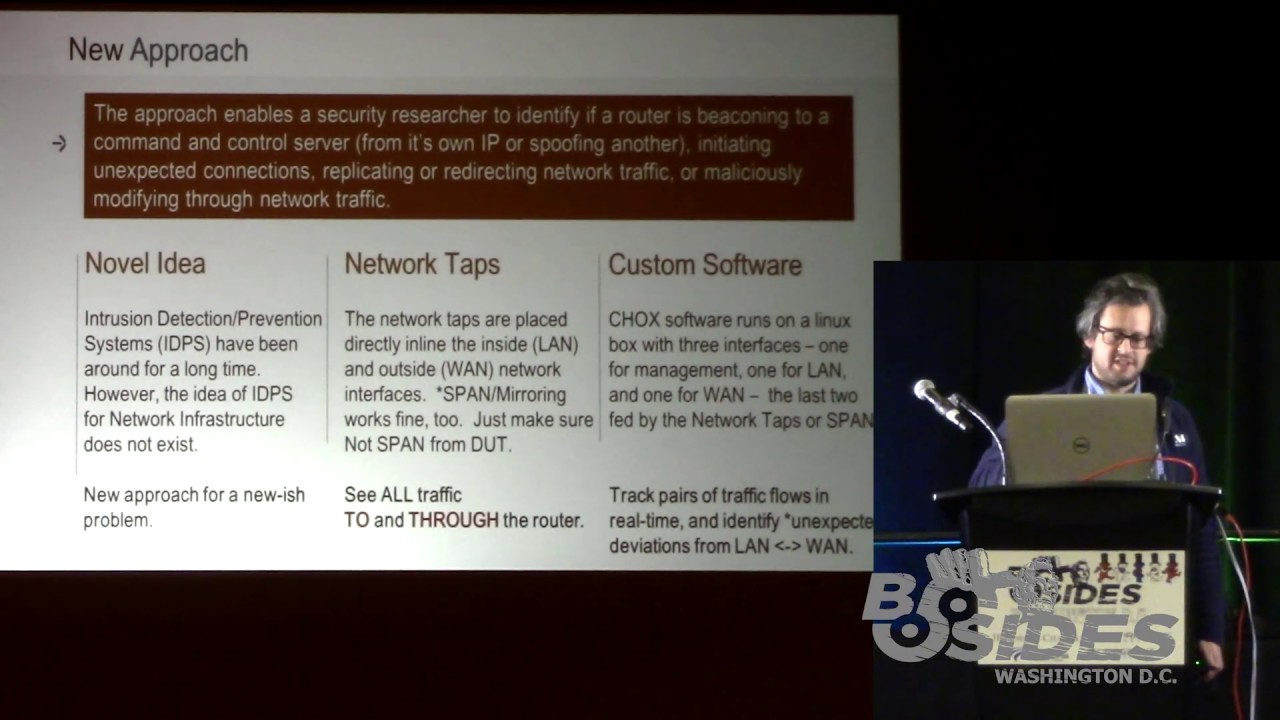
to capture that kind of thing so a new approach I don't I couldn't find anyone else really doing this that I could see but you know if you know people that are let me know I'd love to learn about how they're doing it but I couldn't find anything so this is my approach it should enable a researcher to identify Ferrara's or layer 3 devices is beaconing to a command control server or spoofing the IP of another to do that beaconing if it's initiating unexpected connections or their internal or external replicating or redirecting or maliciously modifying the traffic as it goes through I've heard that there's things like you know downgrading encryption when you're initially setting
up setting up the session things like that seems like something that a bad guy would want to do I really to test the functionality of the network there's no IDs right EPS for like okay is your network device doing what it says it's doing there's things to look at what the network's to them and not what the devices themselves are doing that as far as I know so this technique uses taps or span on a device that is not that is not the device under test like you don't want to use a span on the device that you're testing because you think it might be bad and don't do that so you want to get like a
fresh switch and use that for your spanning and then each of those tap interfaces you're gonna feed to this box running chalk so you guys can download later I want to make it public and it's basically you're gonna have data coming into the internal interface and the internal interface you're gonna see everything going into and out of this device that you want to analyze it's gonna do a real-time diff on it so it's only gonna write changes was only gonna write to disk when there's a change so you don't have or try drives at all so you can just set it and forget it which is really nice because I don't I don't have I don't have a lot of the
experience with this network infrastructure attacks and beaconing per se but I can see what is possible that it could do and I've covered all the bases for what is possible it could do I couldn't find any bad things in the wild I tried I I got eight different vendors vendor model routers from micro Center and Best Buy and all these different places around here and I tested them you know I was like where is would someone put this like maybe off the assembly line or something so I went to places near the CIA and you're the NSA places like that that I thought maybe I'll get something off the right off that the package I found some bugs and the things
that like you turn off in checking to make sure the active interface is still up it'll send a ping you know and you turn it off and it continues to ping so I found some bugs there where it's still beaconing out but it's just a ping it's not bad or some other nuances of networking where if you do not overload on a Cisco IOS device the TTL imma DNS record goes down to zero which choksi's that is a change but it's actually a legitimate change it's not a malicious change so bottom line I couldn't find anything bad with this but the tech the technique should catch what you want to catch if it is in fact doing something that I
just explained
so here's a quick diagram of what it would look like this is with a tap it could be easily be a span you're gonna feed it to an interface on the the shocks box and you how the management interface on there as well you'll run the run the binary or run the script to control the binary with some parameters you want to fill in there may be some things that you want to not look at like I don't want to see when my admin SSH is to the box so you could exclude that or I don't want to see when someone is monitoring my router interface the ICMP echoes you could just exclude some IPS with BPF
filters so the existing research the pcap Tiff's and TP CAD looks awesome I didn't have much luck with it but it looks like it should do the job not exactly for what I wanted but for others can do I didn't know how often these things would be can home it could take a month I have no idea so I didn't want something that I had to rely on retroactively huge peak apps just didn't meet my needs I wanted to be 24/7 coverage if possible and only write to disk when I was a difficult when there was that change so this is what afterwards if you're interested in testing this out of your home or business or whatever we're just using it
this is what you should expect to find basically what I what I can do myself and find in a lab initiate UDP TCP ICMP out the land interface or to the LAN interface from the device that'll they'll throw a trigger on there depending on what ports and protocols you want to trigger on because maybe you don't care about some TV or something a llamar track when like TCP 23 we're telling it wants to get the box so you can distinguish there so you don't get a bunch of false positives again networks are like snowflakes are all very different so you're gonna have to tweak it to meet your needs the best you can it will catch spoofing
something like that said or there might be even a better tool out there to do this but it catches that modifications I can I can do this by mistake just natural functionality of how some network devices work with modified in CTL on Tina's record or just continuing pings to see if an interface is still alive so it knows to not switch over to another interface for an active-active failover now replicating packet flows and redirect and packet flows these will stick out like a sore thumb in the presentation there's a a form like a testing form that you can use to kind of write down your results and your notes about them I use this it worked really
well for me so some recommendations that for me at least that I see I like to do this with my own stuff every once in a while maybe you can do the same maybe you can find some value out of it maybe not find a time that works for you and I would recommend auditing some things that you're interested in and worst case say you see some like you get a tipper from someone that says I see this IP address was talking out to this bad IP on the Internet and then you go look through your blogs and stuff you know I don't see that thing communicating and you just you don't know where it could be
from maybe maybe check your router that maybe it's initiating it has a mind of its own maybe schedule a time to look at your network infrastructure I don't see this done very often although the network guys are normally I would say the networks network in the linux engineers are normally the best and the organizations in my experience so they normally have a good handle on the network but set aside some time to look at it and don't just focus on endpoints I think there's a community that is really focused on router security and IOT security you know I'm not a part of that community but maybe I am I could join it so to learn more about it but
set aside time to to look at these things that's important and for me obviously is looking the moving target defense their technologies out there to to make yourself not an easy target okay so the caveat is currently it only works up to a hundred megabits per second right now so it's best to do it in like a lab environment or a low bandwidth type environment currently I hope to get it up to maybe a gigabit per second eventually there's no releasable GUI yet but not too long there will be networks or snowflakes again the third time I said it expect to tweak the filters to meet your needs to not focus on maybe when your network
admins are initiating to it but only when other users are or they're different there's a myriad cases where you'd want to tune it modification modifications can occur causing a trigger with what we call it as a trigger for a seemingly unrelated config you let's have to run these down and also uh doing this on a large multi interface router or network device it would be just unmanageable it really would be at least with with how I'm doing it so you'd really have to focus what you're what you're doing to get any real value out of I think without pulling our hair out
oh yeah and I do I do once you do like a long-term like study on fresh devices coming out of the package that the check is see what are they doing when they can have the package like are they coming own like with already bad software on there already or what and I think this tool could maybe be used by other people in the community to do that research as well okay I don't see another easy way to do it but you know there might be but this could help you if you're interested in doing that kind of you know checking a couple out of the supply chain and testing them to make sure they're not
doing anything they shouldn't be doing I did it on a small scale but obviously uh I only watched for you know 24 hours 48 hours it's not really gonna give you much I don't think and other than some false positives I didn't get much I'm gonna do a demo no hopefully that works okay I have a lot of gear so if you can just bear with me while I set it up and make sure it's all all functional
okay so I actually have this machine that I'm on now is connecting to another machine through a Cisco 18:41 router and going into the 1841 router from Cisco I'm watching all the traffic going in and out of the inside interface and in and out of the outside interface and we're going to turn shocks on to watch those interfaces and then when we see deviations for on can you guys see that okay what do I should I make it a little bigger much bigger now okay all right okay okay so I'm actually going from this machine going up through show you guys real quick right yeah I didn't have our guys know what I'm working with here
okay so out of this interface here which is a little dongle I'm 10 166 166 to going to the Cisco router dot 52 54 on the other on another interface on the router I'm have 1066 that's 66 dot 254 going to the chalks box this is just for this is for testing traffic the chalks box also has two interfaces that are doing the passive capture so I'm using it all in one just made it easier for this talk and I throw together very quickly alright so
okay so chalks is installed here and if you just run chalks and you can just do help or actually anything that doesn't exist you'll get information on some of the capabilities and the features you can turn on I tend to use it with script to control it look at that so in the config file you can run it all from command line - you don't have to just use it with a script you can run it all from the command line but you're saying for a config file read in the config file which is going to tell us on the chalks box which is this box that I'm on right here did it I'm SSH into it here which interfaces which
one is LAN which one is when so I have land name of chalks LAN chalks win so what's named now I had the land Mac in the land Mac this is the layer 2 address of the device under test so these are the max of dot 254 and dot 2 54 in the 166 and 166 subnets on either side of the router it also reads in the config file in the config file you can say what you want to track what is interesting to you for this demo I'm just going to do 23 I'm just going to be very simple so all the traffic that goes to this box if it doesn't have a pair on the other side
it's okay I'm not gonna trigger on it but if something on 23 initiates from or to or through and changed any of that it's gonna it's going to trigger and also I seen people you can also do the land filter in the land filter which you can take a BPF I feel like the capture filter so you can say like not host in our host name not pork whatever all right so let's go ahead and
nope
okay so you can see this is my ssh traffic going to the box right it's kind of noisy okay and then we'll do that's going in the lane interface and now let's look at land we should see it should be a mirror image of it except for a couple fields obviously when you go through a layer 3 hop some things changed and it's expected so we don't trigger on that there's some values that change in the headers that they're they're normal they're supposed to change which one did I land okay do an same thing okay so let's go ahead and start it okay so we see the traffic going through it and this is this is the
traffic you saw going through it in and out of the active queue and we'll go ahead and ping from my box here through the monitoring infrastructure to the chalk spots which also hasn't interfaces are actually monitoring and we'll just ping it's ten dot 6666 dot one you know it's good to go it doesn't trigger on its expected but if we we would change that and we actually let's ping the router interface itself so layer 3 interface that would cause a mismatch there would only traffic be seen on one side for something that we're interested in monitoring which is ICMP echo request and I could replies zero and eight the codes so if we change this to 10 166 166
dot 254 we should see a trigger on that which we do ok and now if I want to open up telnet to the device going through shocks that'll be fine to send out 6666 dot one on telnet that's okay we shouldn't get a trigger there because it's going all the way through seen on both sides that's right but if we go on that device and initiate something from it itself [Applause]
okay so we'll initiate something from itself to say the router let's initiate telnet from from the router itself I think it has a built in here it does okay so let's tell them that to 1066 at 66 dot 1 so we get a trigger on that and it's giving us a and I was working this on this and designing it and working with my friend to help me with a lot of the real times that with the real time stuff because I didn't just want the events I wonder what was happening before the events and after the event so I don't just give the trigger packet because that's that's interesting I want that but I want what was happening X
number of packets before and after the trigger on the land and the land so as we'll see in a minute that is we're gonna get those uh P caps and I'll bring them up and show them to you real quick and you'll see how there are packet comments to explain to you which one is the trigger which one is pre land trigger post land trigger pre-planned trigger post land trigger because if you read about how some of these things like simple knock how I read that it works is you know you send some packets to its interface and then another port opens up some kind of porn Aki and then you can initiate it in on something so that it
should catch something like that at least some kind of pattern to pick out if you keep seeing these triggers you could at least be pick out what was happening directly before right after ok so I think we can go ahead and stop it let's go ahead and pull it back
okay so when you started it when you start chalks there's a director that's created and everything gets thrown in there all the triggers and the pre and post let's go in there and pull them out should have a few here okay let's delete these
I'm glad this all works okay okay so if the first mismatch I think we did a ping
so well this you can you can just do a search real quick for the trigger it just search for trigger and it will work I'm just gonna go down you can see what was happening before you see - 39 - 38 37 etc on which interface before the trigger happens
there's our ping so we see that does not look like the others and you can see what's happening before after I guess there wasn't enough traffic afterwards or it's something not working correctly but we get the trigger okay that's the first one this one might be a continuation of that one because if the triggers happen in quick succession I can get confused sometimes let's see let's see what trigger 2 is trigger one again it's ICMP again let's find the one that is a the telnet that we did is this again it is again so if you do in succession you're gonna get a lot of repeats but this last one should be the telnet yeah there it is there so there's
the telnet that the router initiated and you can see what was happening before it
okay I'll make this public tonight and let me know if you have any questions or if you find anything cool with it let me know be kind of neat yeah thanks a lot and I hope you find some value in this [Applause]
hello know everything during my research was uh I didn't find anything bad I did find it catches things but there they were there were there were normal communications like for example you know you can have an attract an interface if it's up by sending traffic through it and it gets a reply keep it up even though I turned it off and kept doing it so I kept triggering so I had to comment it out but but I didn't find anything bad but based on what I'm doing I if I it's and I also exposed known vulnerable routers and switches to the Internet and open the ports and all I got was people doing trying to guess telnet passwords
guess SH bastards I didn't get anything targeted like I hoped but I would like to do this in front of someone that is actually worth going after that may be someone that is maybe a nation-state or some economic espionage would want to go after and kind of dangle it out there and see what they get I think they might get more than what I got personally that's my view at least of course
yeah I did and I did not because I found something in my initial testing that did the job for me by my chance I found I kept beating these triggers on this packet and unfortunately doesn't show you what changed you have to find that it could be difficult going through it really so you have to find out what changed and right now and the router that I was using when you put a specific it config on it it goes into the payload of the DNS pack in the response and it changes the TTL and that was good enough for me because it met and I'm a network engineer by security architect now but I came from the network roots and that was
enough for me I know it was caching payload and that was that was good enough
real what I did not I didn't find any badness like I was hoping I believe it for me I can simulate that but I didn't find it myself the thing that simulates whether it's a redirection it doesn't match on either side so whatever we want to call it if there's a change there that is not an expected change but I didn't find anything of that in my my testing of the eight eight or so vendors I tested links yeah Linksys Cisco because I have my own Cisco Network enterprise infrastructure some ones that micro centers there ones like relatively cheaper ones out of some Chinese company neck here yeah those I can get a list maybe I get
out a listing here's the ones I tested I was hoping to catch something but like I didn't watch it for very long because I didn't want to buy that I do I wanted to return them you know like I don't know like keep all these things I want to return them so yeah great thank you
Related talks
 37:50
37:50 32:24
32:24 35:42
35:42 55:38
55:38 47:55
47:55 44:22
44:22