BSidesWLG 2017 - Dan Wallis - Shining a light on the Internet of Terrible
Show transcript [en]
thank you very much I'm speaking and I microphone Wow hello everyone I'm Dan I'm going to be talking about the Internet of Things yes I have a slide this is a this is the official company slide I put this in so that I can come to these events without having to take annual leave and those sorts of things I work in the Christchurch office of lateral security you'll see some of staff wearing little security shirts and other things we a information security company we do these things there's more information on our website also we are looking for staff come have a chat with me I'll point you in the right direction of the people to
speak to yeah but who am I really I am Dan my handle is Frieden he can probably no you probably can't see that on my tag from there I'm on Twitter I've got a website which has very little things on it I've ever said I work for lateral security I'm also involved in the local Christchurch IT community in that I am an organizer of check on which happened just recently - as I understand success I also look after the monthly meetups for AIESEC in Christchurch and then I have in my copious spare time haha I also have fun with family music and I'm dabbling a little bit with bit of web development which is a bit of my history
so today I'm talking about the Internet of Things so it probably makes sense to start off and figure out what the heck thing what what is this Internet of Things so I did a bit of research and it turns out that the Internet of Things are connected things so we're looking at things being anything that you would probably use in your day-to-day life for example a fridge or a toaster or bathroom scales or lights in your in your house or an alarm system a camera a doorbell an a safety alarm a locking system could be any number of things basically anything with us with a sensor or an actuator or both or multiple of these that is also
connected to the Internet so in order to play with this new fun Internet of Things I decided that I needed to get one or several and have a play so my main criterias for finding an Internet of Things thing that I could play with was that it would be using a technology that I was familiar with so for example so in this case Wi-Fi the the other alternatives are things like Bluetooth or other radio for example RFID is an option in my case Wi-Fi I understand bluetooth I'm still learning I I also wanted to not have a brick at the end of it I wanted to have something that I could potentially use in my real in my
actual life and the other big factor for me was cost so I had had a look around my home and I thought what could I get that has potential use that I could hook up to the Internet I thought how about a toaster I mean there's that old gag from way back in the day that you can you can get knit bsd to run on anything even a toaster I mean it's pretty awesome but I did struggle to find a cost-effective Wi-Fi enabled toaster that I could potentially use in my home so toaster was out but then I had a light bulb moment I thought let's get a light bulb so I had a look around there
are lots of different options the the bulb I ended up buying was a vowel me ye light which which has some pretty awesome features I mean it's easy into easy to install there are there are quite literally two steps you screw in the light bulb and you hold a phone in your hand also there's a there's a fun thing here you can fill your life with lights with an 11-year companion meaning I mean who doesn't want an 11-year companion and fun colors as well I mean there were lots of different options this one was an RGB light lots of others were just the standard white on/off so I bought one and in the box you get a bulb and some instructions
so I've got one here so the instructions here you go here's a bulb an Internet of Things thing but the instructions are not in a language that I understand I speak French and English but I don't speak what this is so that as far as I can tell the instructions go number one turn the light on number two do something and number three must be profit I mean come on what else could that say so I had a look at the QR code and the QR code goes to home my comm download Michael this sounds easy let's try it oh now I have an apk so an apk is an Android app all built into the one
file nice and easy to use don't even need to to go through the App Store and it's it's really easy to get I thought that finding the apk would be really difficult but turns out nope just go to the QR code in the instructions and here's an apk it mean I mean I did find the I did find the app in the App Store which was a benefit but it wasn't something that I needed to go out and find there are ways to get apks from app stores but this way made a whole lot easier for me to just open up the apk and have a look around so my first step was to plug the light in and when it
comes up you get it is a Wi-Fi access point initially and I had this named Yi link light color one my app and then some numbers so the numbers you may note that so the last forward carrot of the SSID are actually the last four characters of the bulbs MAC address which makes it easy to find it in future and also to differentiate between the bulbs because I bought multiple so I connect it to the bulb Wi-Fi ID actually paid it gave me an address and I thought well let's have a look around let's see what this bulb is doing so I in mapped it and there was nothing there was no web interface there was no dodgy telnet there was no
SSH port listening it was just not doing anything so that was a little bit disappointing so I then I went and I got the I download the apk and I put it on a throwaway phone that I hadn't attached to any App Store but I looked it up on the App Store and the permissions that it was asking for were really really broad so it's a little bit hard to read these pictures it's big but it's not enough pixels sorry guys but the the things that I wanted to know it wanted to know where you are it wanted to be able to read and send SMS and make phone calls and look at files and photos
and use your camera the camera made sense because one of the features of the app is that you can point your phone at a thing and the bulb will turn that color which is a fun feature I guess but not something that I'm gonna use it also wants to use my microphone I don't know why it would need my microphone or Foe noise mess the the particularly scary things were in the the miscellaneous section it can download files without notification interact across users full license to interact across users transmit infrared modify secure system settings mmm this doesn't sound good so I put it on I put it on a device that I didn't care about throwing away and I
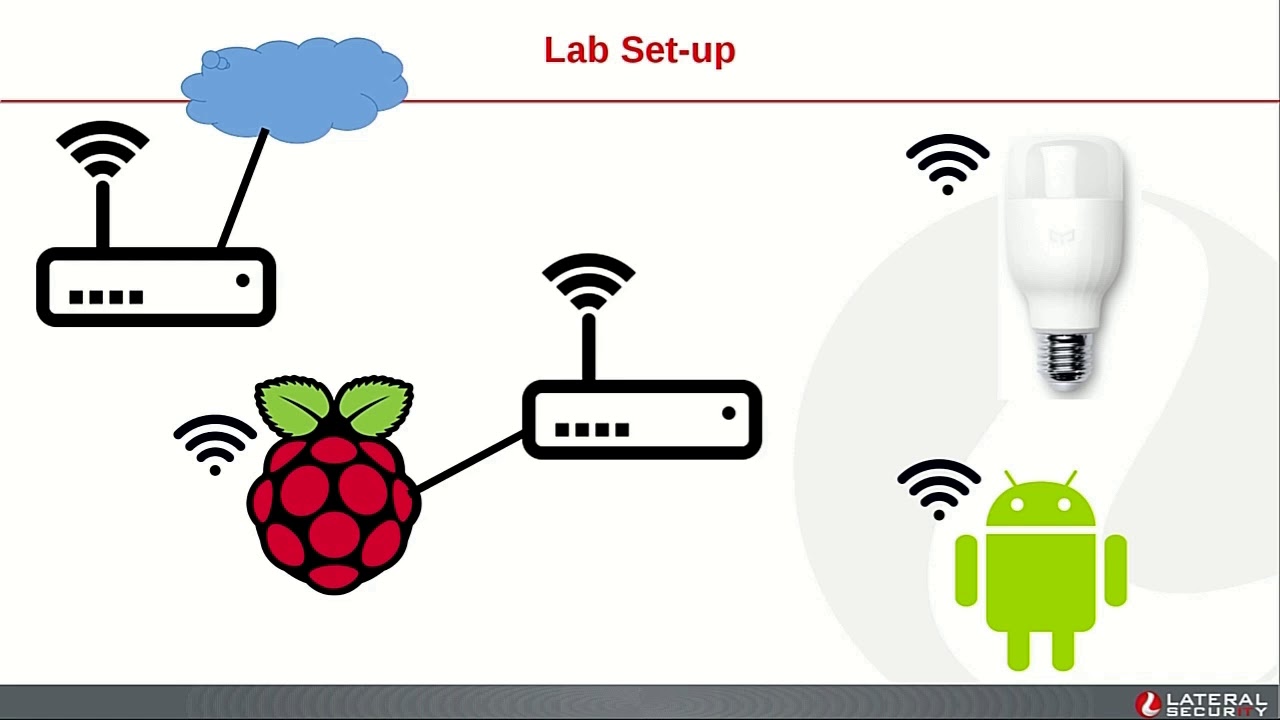
set up a lab so I I fired up fired up the app and got it to control the bulb this is this is all without without sniffing this is all just using using the bulb as a regular home user would be intended to use the bulb so after I figured out that yes these bulbs actually work in New Zealand you I I said about getting a lab so I had my Android device I had the bulb without both Wi-Fi enabled and then instead of connecting them to my guest Wi-Fi in my house I can I set up an access point on my Raspberry Pi except the Wi-Fi card in my Raspberry Pi isn't able to do an access point so
that was very frustrating for me so I went to my cupboard of things and I got out a really old voter router if you prefer and I say then I set this up so then it could do the Wi-Fi then the Raspberry Pi can capture all the in all the traffic so this is what it looked like but if you want to make it actually legible you got to put symbols on things but there's just too much noise so I had a because of the layout of my house I had my Raspberry Pi wife eyeing to my home Internet Ethernet into my new router or old route oh I guess that then it did Wi-Fi to the IOT and my
Android this was great that that lit that means that I could capture all the traffic going from these things out to the Internet and back and find out what it's actually doing so if I fired up Wireshark and I had a look and yep sure enough it's going to China so when when when the bulb once once you've associated the bulb to an access point it phones home and this is the first thing it does it connects to it looks up some DNS and then it starts doing UDP something from five four three two one great port number to 80 53 but unfortunately the traffic is encrypted so I've got a I've got a code snippet
later of showing you how that's that's done but the takeaway from this was the traffic is encrypted I can't just read it off the wire this was depressing so the phone phone phone sorry the the bulb phone's home to China this address about every 15 or 20 seconds depending on what it's been doing recently the the other thing that I tried was I set up multiple accounts and I associated the bulb with more than one account but the bulb this is at the zsa me and they they disassociate the bulb from the old account when you associate it to the new so that was a little bit a little bit sad but it was a good a good
finding on the air on the account so all up I don't really have anything so far this is a bit depressing but I also noticed that I wasn't actually capturing all the traffic I was only getting the traffic that was on the internet side because I was on the Raspberry Pi during packet capture there but there was all this potential of the the phone to talk to the bulb direct without going to the internet I I had verified by putting the the phone on a separate Wi-Fi connection that it does go over the Internet and can control it that way which is how they how the online services would be phoning home to the device they call to
the to the same address as the foreigners doing and then they can the bulb then when it phones home gets a response saying yep you should be blue or whatever it's told so I set up my desktop computer in the middle instead of the Raspberry Pi but again I had trouble with the Wi-Fi card so even though the Wi-Fi card was capable of doing all the things that it should be doing I just wasn't having any luck the the bulb was fine talking to up at the phone maybe my phone's just too old I mean it was a throwaway phone so maybe that was it so eventually I asked for some help from a colleague and he lent me a Wi-Fi
adapter which was a bit larger than mine with a long aerial and i plugged this into my desktop and that worked so I was very happy so now I can see all the traffic that's going through except the local traffic is encrypted too so at this point I thought hang on why am i doing all this research into this bulb on my own surely other people have looked at these sorts of things so I had a look around the internet and found that yes there were some other people who had done research into these and they were quite willing to destroy the bulbs and also they know a thing or two about hardware and electronics which
I'm still learning I'm not cool enough to do this sort of stuff but they've done it so I got in touch with these folk big thanks to URI and ila - just to find out what they got and to see if I could participate in that in any way so this is what the inside of the bulb looks like one of the findings was that they they took apart a white-only bulb but the board the control board was head pins labeled BG no idea why they're out of order but they they had RGB outputs showing that this can this board would probably being the same controller for the the color bulbs as well so I got in touch with him
and said hey can I have a copy of the firmware that you got because I'm not gonna have much luck pulling it out of this without without doing the same sorts of things that they did except I don't know how so super big thanks to those guys for letting me be a part of that they hit me back pretty quickly actually and said yep here's a copy of the firmware here's the research that we've done and so I've been able to leverage on that so I had a quick look at the firmware and you start with the basics I ran strings and in the firmware the only thing of interest really was that there was an x.509 certificate for
cloudy light com no I had not seen this DNS name in my sniffing in anyway and so I wasn't quite sure where that was going but probably they're doing cert panning or something like that I ran been walk and been walk found the same certificate but nothing of interest really beyond that so I thought okay well maybe this is pinning let's let's see what cert is on that domain the moment note it's a totally different search so the the search for the cert that's in the firmware is a self signed certificate the cert that's being served on the Internet is a from so so no sir pinning is not a thing so I then carried on and looked into some of
the scripts that are available both on the internet and also I'm shared with me privately and I found that the bulb is completely controllable one of the good things about this particular bulb which I which I found out before purchasing was that the vendor publishes a interoperability PDF Oh short you later if you like it it has all the necessary information in it to to communicate with the bowl but not using the their proprietary cloud systems so I had a look and the the code that the card that I had access to said that yep in in the header of this so you can see in a particular packet to the device saying just it's
just a hello packet but the response has a token in it now this token is reset when when you when you power on the bulb the the token is reset and it is it seems to be a random string I'm yet to to find the the algorithm within the firmware that produces these so basically you say hello bulb and the bulb becomes back saying hi here's my key this is very useful it means that I can then communicate with the bulb so when the bulb was unassociated to a network when it fires up its own access point and you connect to it you can communicate to it through through this UDP channel and say hey what's your just
say hello it gives you the key and then you can tell it to do stuff so I've got a dimmer coming up which hopefully will work but the the gist of it is when you do a factory reset of the device it also resets its token so all these tokens came from actually this bulb yes this bulb all within a space of a few minutes so this this to me looks like it's not going to be predictable super awesomely I don't know maybe maybe you lot can say that's total ashhadu 5/6 counter or something I'm not sure but so factory resetting the bulb also resets the token if I have the token I can control the bulb if it's
either talking to it directly or after its associated to our network like if I have the token then I can also communicate with it with that token I couldn't find any I there was no way that I could see that the token was being transmitted across the wire I did check that in all my P caps but that that wasn't showing up for me so I'm gonna do a bit of things that won't be on the screen hopefully this demo works I'm gonna what I'm gonna do is I'm gonna reset this bulb okay let's see if I can
okay cool so I want to fun I can type I can type why can't I type all right let's see what wi-fi's are around Wow okay let's see what Wi-Fi access points around Wow all right let's see what Wi-Fi access points around that I can look at of course I can't type all right let's go to the top again is it working yeah there is okay so let's see if I can type again why is tab not working and then I want that one oh no I can't middle click this is going to be annoying alright I'll type an American car all right this is your opportunity to really mess with my demo please don't
okay cool so I'm now I'm connected and I'm going to get a dress
cool so I have an address I'm connect to the bulb so now hopefully my tip my works all right let's go that's going
okay so I wrote a quick web in Python because Python have adding time okay I'm good so here you can see yeah that's one so in here I've got the so that this this web app is a very simple taught let's pull it up
so this is a very simple bottle Python thing so basically what it's doing is it's sending a hello packet and then getting the reply and pulling the token out of it so the things that I've written so I've got a couple of buttons here so hopefully when I click this the light should go green way so this particular demonstration is the is the most basic so the the interoperability guide which I can pull up which is
well that's frustrating all right I don't think I've got a PDF you just corrupt is some Firefox VP do snow that's crime okay oh it does okay let's try it here we go live demos right do I have to do some magic I'm being told no I just view the file okay so if I make this big then this interoperability guide shows you how stuff works it's pretty detailed but it has the it yeah it's it's got details in it in terms of what how to communicate with the device so you can do lots of different things so one of the one of the fun features of this particular bulb is that you can tell it
turn off in X minutes so that's here you've got um crong crong get rondalee so the the the fun fun fun thing with that would be if you could control if you can control one of these then you can tell it hey turn off in six minutes and then leave for some reason the light just turns off randomly so I am going to go back to here and this one nice pads okay so the other the other things that the the bulb can do you can adjust the brightness so hopefully this works I mean so it's at 100% now so if i dim it down I should go to one percent which is fairly low but basically it's got a 1 3
100 brightness scale another feature of this particular bulb is that you can change its color just for fun it looks like this is working yeah good news but you can also toggle it is the the kinda basic use case so I'm going to be pushing all these changes back up through the existing channel and research channels I intend to get these into the the repos that are available publicly to be able to control these things but basically if I go back to my slides which my takeaways from what I've found so far that the bulb phones home on UDP so there's nothing interesting happening on TCP I can't fuzz the bots I can't do anything fun on the box I did
try sending random UDP packets by virtue of bad copy pasting and it just doesn't reply if you've seen it dodgy things all the traffic is encrypted locally and to the Internet the device gets removed from one account when when it's associated with another so I yeah I don't have time to do that demo the tokens are rolled when when the the the ball was reset so I can show you that if I run out if we don't have questions I can show you that yeah also the particular light fitting that this uses is a 27 which is surprisingly hard to find I mean I I eventually found a disc lamp that worked but I did I did give
some promises in my in my blurb how much doubted to these bulbs leak can one user control another device universal plug and play and what happens when the internet goes away so how much data do they leak I can't see a lot going back and forth that's not encrypted can one user control another's devices well yes they can if they have the token but generally speaking no these bulbs are pretty good also if you fear that your token has been compromised reset the device it's really easy to do the universal plug and play no it doesn't matter it phones home to the Internet about every 20 seconds or so so it's not really a factor for this what happens
when the internet goes away you can still control the device locally because the traffic only goes from your local device preferably it's the official app but totally you can do it through a dodgy laptop running on a USB stick but online services like IFFT and such are not going to work if the Internet's not there because the Internet's not there so I think that's all of my content yes that's all my content so I have a little bit of time for some questions if you want to ask things I can see a couple of hands so let's go questions yeah so I'm gonna point to people I'm gonna point to you first so the question was is the do
I think that the excessive writes for the app is malicious or just lazy I think it's probably lazy there is a potential that it could be malicious I do have the apk I mean it's also available freely on the internet just hit that URL you'll get it home Mediacom flash download and yeah yes the the bulb is yeah I'm fairly sure that it's probably just lazy I I did I did scour the apk I did scour the firmware there wasn't really anything of particular interest in there
yes that would be my feel as well that they're also the the app is also enabled to control more than just this bulb the app can also control other products by the same vendor there's definitely big sway there's a code in there too in terms of controlling temperature of things so maybe that could be my own at my next purchase cool I see another hand down here I'm gonna yep
the interrupt guide should be
I didn't know but that's a really good thing to try basically when when I sent it bogus or when I sent at things that it wasn't expecting from the in terms of if I send a packet that was bad in some way it just didn't reply and then carried on as normal thereafter so it was effectively just ignoring ignoring those that's my understanding yes cool I've been signaled that I'm out of time so I'm gonna say thanks
you
Related talks
 1:12:47
 37:09
37:09 24:30
24:30 42:11
42:11 46:58
46:58 26:16
26:16