SniffAir – An Open-Source Framework for Wireless Security Assessments
Show original YouTube description
Show transcript [en]
so here we have Steven and Matthews all right thanks so we're here you're here to hear about sniff air a tool that we designed for wireless penetration tests go ahead take it to the next one the obligatory who are we slide Steve and Erica Matt idle burg aka white shadow aka tieless we were for a little company called Optive where we do all sorts of pen test ranging from network security or network pen test physical security wireless security at of all the people on the team there's only a handful that could call themselves really wireless specialists you have to those people up here for you today we can go ahead and roll them to the next one so what is
sniff air right Jackie Chan wants to know we'll go to this next one alright so the idea of sniff air was born from the hassle of having to deal with large amounts of data on our wireless penetration test you know we test a lot of big name companies sometimes have 20 30 stories of a building then we go through and we do a network capture for each floor now parsing through that data basically it just became a huge pain in the ass so there's a number of things that we have to go through all these pee caps and pull out like number of access points probing clients what are they what are they probing for things like
that and the kind of old-school way of doing things was with Python scripts right you had a Python script that go through and pull out one specific thing from your network capture or you just pull it up in Wireshark and take screenshots of the information you're looking for so what we wanted to do is make a one tool to use for all of that so you can go through and look at your data easily pull it out and analyze it that way when we were coming up with the tool we realized that the data that we were pulling out could also be leveraged in the attacks that we use during our wireless penetration test so kind of
building on that as well we're like okay so if we're gonna launch attacks what would be a good way to do it so we decided to go with a modular framework something that people in the community are familiar with with tools like Metasploit powershell Empire things that nature and I will stop talking about the tool and Matt's gonna show it to you so first how does it work like Stephen said it uses peak apps but it also can use live capture data in real time and what it does is it runs each packet through a comprehensive finger printing system that we built using escapee the tool first identifies what that packet is and can groups it
together so that it would be either an access point packets like a beacon frame probe request probe response or anything related to enterprise user credential password passing once it's grouped them it parses each of the packets and pulls out the important data that could be the channel that the X point sits on the encryption the authentication method the MAC address of the access point itself and stores only unique strengths as we all know beacons cellphones laptops a concert sending out many of the same type of packets almost identical so we only care about the one one copy of each so we could talk more about it through slides but want me to show you how the
Tool Works
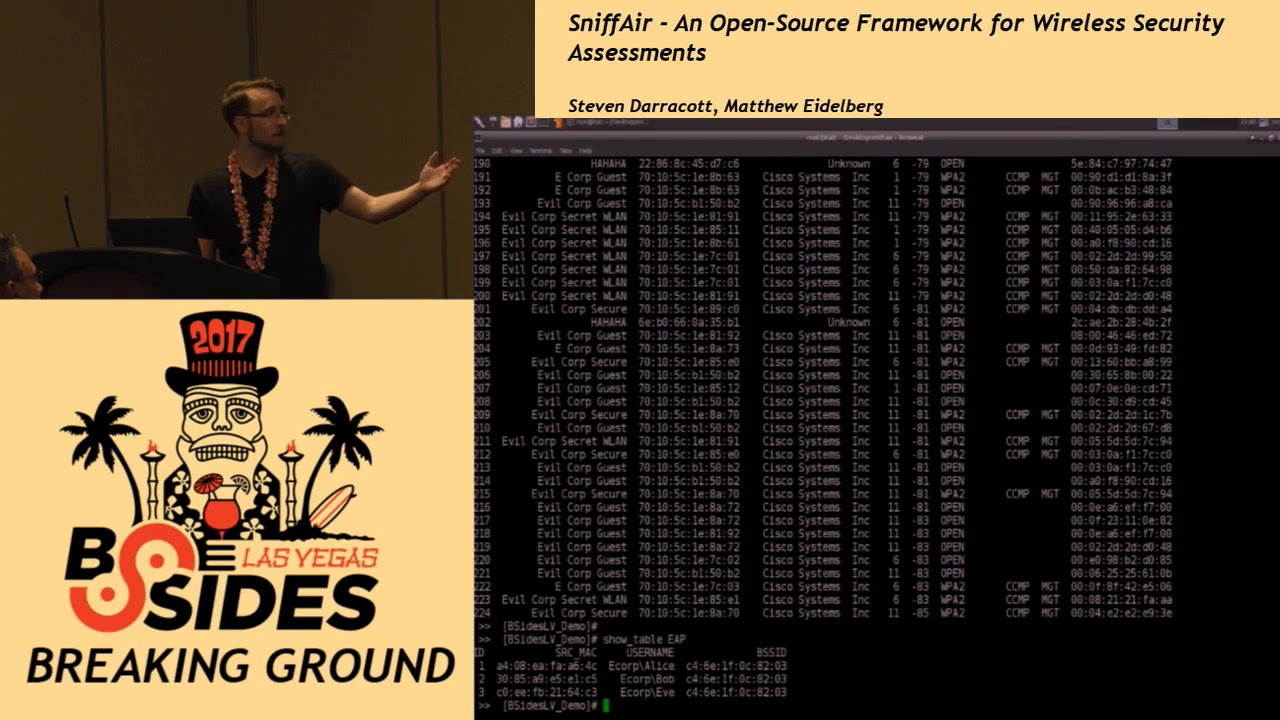
so first thing you would create a workspace and that would be a database that you can store all your data in in this case we've actually already done that so we're just going to go ahead and load it once it's loaded you can actually see the identified ESS IDs so far now we have many tools built in which we'll discuss more that allows us to discover further once well right now we're going to talk about one of a table that we can't we as pen testers find very valuable that would be the access point table I'm just going to scroll up
so in this table you can see the es Society the associated bffe which is the MAC address of that access point the vendor who built it what channel that access point sitting on the power and the power denotes how close you were at at any given point to that access point sniffer only cares about the lowest value so they would be the smallest value because that indicates how close you were higher values mean you're farther away and that doesn't really help you as well the type of encryption is it open is it WEP WPA wpa2 what type of cipher is used as well as is it you know private tuition probably key or management using EEP all right and then
another useful table that we use is pen testers or kid utilizes pen testers is the probe request table so what this shows is communication between a client and a potential access point so what a probe request is is say you're at home or you're at your friend Bob's house right you're using Bob's Wi-Fi on your phone when you leave Bob's house your phone is constantly sending out these messages saying hey where's Bob's Wi-Fi that's a probe request so even if the access point isn't there your phone is still going to be broadcasting that message out so we can leverage this type of information here in a number of ways one is hidden SS IDs a lot of people don't realize
that when you hide the SSID of an access point the client is broadcasting that in the traffic and can be seen by anyone so hiding an access point doesn't do you anything at all so we can actually see that in these probe requests when we see a client that's sending out a probe request for a network that we don't see but we see a lot of hidden ones we can assume that it's probably one of those and we'll get into that a bit later also what we've seen on pen tests is typically when clients have a hidden SSID configured at their office or workplace sometimes people don't know how to set that up on their device and
they will actually put in the pre-shared key or the password for the network as the hidden SSID so when we're looking through these probe requests we see one that looks really weird was a bunch of special characters and stuff yeah that was probably the network password and we've seen success with that on numerous engagements the next table we're going to talk about is the probe responses so probe responses shows association between an access point and a client we can leverage this at pentesters in a few ways if you're standing up say an evil twin and you want to copy an access point you could see exactly which clients are connected to that so you know what clients are looking for you
can even take that a step further in your evil twin and set up maybe a MAC address whitelist blacklist something like that so that you only get the clients that you want a man-in-the-middle with your evil twin oh right and now I'm going to hand it back to Matt we'll show you another table okay so this is the heap table the enterprise table so this table collects and stores information pertaining to user names as well as the source address of devices that send said user names the interesting point why is pentesters we should carry about that is with beep I keep those type of networks that the user names are sent unencrypted before any encryption with regards to the
password is sent so right there we can see clear text usernames which we can facilitate for further attacks that will this will discuss further down the road right and that's that's another thing like the hidden SSIDs right a lot of people don't realize that you're using eep-eep encryption just like a lot of people don't realize that they're hidden s's IDs are being broadcast by their clients with eep eep encryption usernames are going across over there over-the-air before that actual encryption tunnel is set up as Matt just mentioned so aside from these we also have a couple other little queries that we've put together so show the AP max this is all the MAC addresses of all the
APS that you collected on showing the vendors is the easy way to pull the the vendors out this is good for rogue detection and things like that if you have 150 cisco access points and you see one Linksys or d-link that's broadcasting the same SSID as your other ones it's probably a good indication that's a rogue access point also we have the user names just as Matt just showed you how we can pull out the EEP information we can actually pull out they just the user names themselves which is easy to copy and paste into whatever kind of attack you're trying to watch aside from these that are pre-built in we also put in the
functionality for users to create custom quick so we're using a sequel database on the backend sequel is a very easy language to learn if you don't already know it a lot of people in the community are very familiar with it and so like Matt just showed you you can just run a sequel query and query the information that you specifically want from our database all right show the in scope so another thing that we did in order to facilitate tactical precision in our at our tool here mass collection of data is easy right now mass sorting through that data isn't so what we created was a scope and you can actually add one specific SSID to a scope and then show
it you can actually add multiple SS IDs into this scope so there is a easy good picture for a screen shot in a report all based on the in scope table so now as Matt showed you the show modules command we actually have attack modules built in and one of the modules that we're going to show you real quick is to uncover hidden SS IDs now talked to you about earlier how clients probing clients are actually broadcasting the name of the SSID if it's hidden by an access point since we have all this is all passively collected or yeah passively collected information that we're doing this passive way we can uncover hidden SS IDs just based on the data that we've
collected so go ahead and run the module and so this is what I was just talking about how we saw those clients that were probing for specific access points we reference to other tables and said hey this access point was hidden well so if this client is probing for this hidden access point with that name it's got to be that and so we can uncover them another tool so or after you've done this this all gets stored in a hidden table so you can pull up the show hidden table oh yeah okay it's a table not a query
there we go so now here is kind of a broken down list of that now you can take that list you know those were hidden SS IDs that you walked by so you now have a word list you could apply into additional attacks and uncover more that possibly you didn't collect passively you could then actively send out those probes and unhide those SS IDs so now we're going to talk about another attack module and this is besides we didn't want to show you guys something like cracking WEP or WPA we didn't want to show you the MSO 806 seven of Wireless so we actually brought a unique attack unique to us that was built from
the ground up by Matt out of idle burg himself and he's gonna show that so we have a video of it because this is besides we didn't want to have people in directly connect to it and target them so this tool is called Auto you this tool is an automated wireless brute-forcing and so we've made a video of it so as we go through we'll discuss it so as we stop before we load it at the workspace but what Autoweek does while this is setting up is it performs enter peep and peep level of fun occasion checks and checks for response success or failure packets so you can see right here we've discovered a management
access point broadcast in the ESS ID honeypot now if we take a look at the table heap which stores any possible user names we can see a series of usernames and they've connected to that BSI the SSID that bssid in turn maps to honeypot so we know that all these users have connected to honeypot so using this information we can then load up the module Auto EEP and set the appropriate variables so for each one of the attack modules you can actually setup the SSID the channel if you wish interface as well as the various specific configurations for each attack so captive portal would be what type of what you want to webpage you want to
masquerade as evil twin do you want it to be enterprise wpa2 what have you so once it's been set up you can then select what type of password you want to feed it now another option that we can do as you can see with the info is instead of using the DB store username you can actually specify a file so we there are many tools harvester and other underground ones on github that allow you to enumerate other types of usernames which this will cut off but what this is now doing is to exploit so it spins up its own WPA supplicant and generates these packets and requests opening Oh spinning up sorry looking for those success or
failure packets and once it's detected them it will record and login store is successful and failed attempts
fortunately uh
yeah I mean I fast-forwarded just kind of see so can everyone see you know it's a little cut off and it's at the bottom but you can see we've had several successes failures and we can now use these credentials for other attacks not just specifically for login through EEP of wireless networks we can actually use this to log into if the client has a Citrix VPN publicly facing we can log in we can access the outlook web portal using these credentials in plan gain access or lateral movement through those different attack vectors alright so to summarize this tool parses data that you import whether pcap or live capture and allows you to easily parse through that data and pull out
what you need so and we did that with queries and we also added attack modules and we also have custom queries so that you don't have to just deal with what we made you can also run your own queries as well and yeah we've already touched on the modules as well so the next slide is our future stuff stuff we look forward to doing more attack modules obviously than the ones that we showed you here post ex module so once you get on the network what do you do plan on implementing things like responder and things like that just so we can have some kind of post X in there as well implementing reporting modules so more
reporting to make it easier for screenshots and stuff like that a lot of the tool is based on pandas within the Python library and that's there's a lot of features within pandas that allows you to graph things easily that we haven't really touched yet we could definitely improve on that as well yeah that's about it there's the github are there any questions for us no no questions
all right oh good question that is isn't that is a no the github is there's no numbers and the github for month for that one no more sir you mentioned that you were using SQL on the backend have you done any hardening to make sure that Wes McGrew doesn't make allergy err next year no we haven't built any kind of security into it or anything I mean the database is being encrypted yeah when you think about wireless attacks you're typically separated from a network on your own no one's connecting to you to exploit your locally running software you know supposedly hopefully great so no question but yeah it's definitely a future feature that we could definitely
include right yeah any more questions thank you thanks - hey
Related talks
 45:27
45:27 24:13
24:13 42:28
42:28 59:11
59:11 16:08
16:08 16:07
16:07