Overview of Python: Flying Made Simple Without the NyQuil Hangover
Show original YouTube description
Show transcript [en]
hi I'm Keith and this is a little overview of python how to fly simple or flying Made Simple without the nyquel hangover I'm going to tell a little bit about me a little bit about python some Python's Basics some main things that you can use Python for going to a little bit of the coding for penet penetration testers book some tips tricks and observations I've picked up along the way and provide you some resources that I've come across okay who am I I'm a husband a father a geek and according to my wife I get distracted by shiny objects real easy my career path switched to it in 99 professionally in it since 2001 I'm currently learning studying and
interviewing for anos professional roles oh I've been playing with visible basic script for since 2007 and just started learning python back in 2011 I'll go more into that a little bit of about python Guido van rossom who's currently at Google started python back in 1980s remember this that's back when version 2.0 remember this version 3.0 so you can see how solid it is what is python good for python comes with a large library that can covers many areas and you can see whether it be string processing for Unicode or or rex or Internet protocols HTTP software engineering operating system interfaces whether you want to do Network stuff or work with files or AI which I haven't really gotten into that
so what is python good for and thank you R clown for letting me use this pick it's getting extensive use in the information security industry whether you're doing exploit development Network debugging reverse engineering fuzzing web forensics malware analysis there's Python's easy to write short scripts for regular system admin work and the big thing it's easy to understand you can take a piece of python code set it next to um Java code you'll look away from java code you'll look at python because it just makes sense Python's CL cross platform you can what what script you make on Windows you can use on Mac and Linux it will and there's also many many resources and a really big friendly
Community out there some Python's tools that or some tools that have been made with python I'm sure maybe some of you might have heard of this guy social engineer toolkit artillery is one of his latest ones and Fast Track all of that is all python based the time I started this talk he's probably started working on a new release for social engineering toolkit and by the time I finish this they'll probably be able to finish that release and have it ready for everyone it's just that simple to bust out Co that quick there's also scapy not made by dat but you can do all kinds of stuff creating sniffing forging Network packets there's Pitbull you want to run
your IDs or IPS through the ringer scrapey if you want to do any kind of screen scraping or web crawling and w3af the inspiration for this idea for this talk I went to to a conference and I bought a book and the book was neat the book was so much better than the chapter one print hello world I've done enough coding and VB script that anything beyond chapter one or anything like chapter one print hello world is just boring to me I want to see something that gets down to the heart of the matter and this book definitely explains things really well and it shows some good stuff you can do the other inspiration for the idea
came from AMC post seesaw CTF talk where it was Matt and wolf where wolf was the white spy with CP and that was Powershell so one night I'm talking with wolf on on Twitter and I said oh I can do this and two lines of cod so that's when he' ask want to do a talk for my SEC so my theme was bring a new spy to the game python I'm going to tell you a little bit of python 101 just to kind of get you a little familiar with it maybe shows some differences where you may be used to BB script or whatever kind of scripting indentation with python does matter I found this the script for the
Fibonacci sequence and if I think could see one two yes that line that return line if that is how it is on the second one it will not work VB script you only indent just to make it look pretty and to make it easier to track well the p otation does
matter all scripts are considered modules sorry about that you can import the whole module in and use all the functions of that module or you can just import the function that you want to use if you want to use a whole CIS module import CIS if you just want to use arcv from CIS import arv there's built-in help you can you can get the help by typing in the import of the module and then help in the name of the module or the name of the the function or you can run P docs by calling out the appropriate module you're looking help for or the appropriate function it can be ran interactively so via command prompt or
terminal just type in Python and Away you go or there's python shells idle which is part of the Python install dream pi and there's I Python and IPython a little different but it will still get what you need this the basics of the scripts for windows. py for the python script that's the main one that you're really concerned about anything with pyc it's just generated by running the script for Linux while the file extension is optional since it is clock crossplatform it 10 to kind of lean toward keeping the same file extensions I'll create something on my Linux box or take it into work and look at it and play around with it while I'm at
lunch um for Windows you have to make sure py file extension is associated with python.exe and it helps to have python.exe in the system path so that you can just run the script straight from the command prompt and adding the hashbang userb python at the top of the script for Windows scripts will help with that crossplatform also but for Linux you can either just call Python and then the script name or make sure it's ch moded to where it's executable data types python has all kinds of data types whether it be integer long integers octal hex binary handle floats and complex numbers uh the string processing and the second line no the third line of the string
print a bracket 3 colon 6 that will trim off the the third fourth and fifth and sixth character uh there's lists you can keep adding to the list where it's mutable and tuples which I don't really use that much yet tups are non mutable if you try to append to the tupal you get the particular error tupal object has no attribute append you have your conditional statements your if your else and your else if looping your while loop for this one for instance while the count is less than nine it's going to print the count is and then the number and keep adding to it so once it hits think once it hits uh 10 then it says hey
goodbye the second one is a script that I had worked up for the PO seesaw CTF it takes the the script argument it was believe it's a bunch of character code and it was all split up by the colon so I would read that argument in and then split remove the colon and then for each one it converts it to an integer and then converts it to the character code then it prints it out and this Loop control so if you want it to only Loop through seven times for this one that's a way to do it there functions here's a simple little base 64 function you define the function in the appropriate variable and then you call
the function with the base 64 code and I will put out the decoded info let's see files you can open files for reading or open files to write to the open files for reading one of the scripts that I had created was the base 64 code was in this text file so it would open it read it and then decode it and then print out the answer um the right to file would also do the same thing where would write out the answer to the file when it was done input output it's two different kinds where there's raw input where you can be prompted to like for this one for instance enter your input you're prompted with the to end
whatever and then it will print out or you just type back raw input versus input is different where input will go through python code itself raw input will just spit out what you type back some pythons uses for General scripting cryptography password creation use files write to and read from and this is by far not the only things that can be done is just some examples here's one that I created to encode base 64 code prompted to enter in the code you wish to have encoded and then we'll print out what print out the Bas 64 coded information and then to uncode it R 13 the same way look I got a little typo oh I guess I was copy paste happy
but you kind of get the idea here's a here's a module that I created for the Post seesaw CTF where there's one function for hex code one function for the Unicode one for base 64 and one for binary decoding and the binary decoding Google was my friend on that particular function um I found that I believe off of stack overflow great site great resource and here's the the module in action you call the you import the script and then type the module and then do function and then enter in your data and that's how it decodes it same thing just continue up to the r 13 and the base 64 here's one I found for password
creation as you can see the code is easily understandable print how many characters would you like the password to be must have nine or more and then it takes that length of the input and for and then it groups up in random groups of three whether it be string asky letters string punctuation string digits and then it constructs the password here's one to read from a file and again I go back to the one that I created for the for the Seesaw CTF or post seesaw CTF and I want to write to the file I found a bunch of resources off of Dirk dl. de's website there's a bunch of python tools and stuff made that's
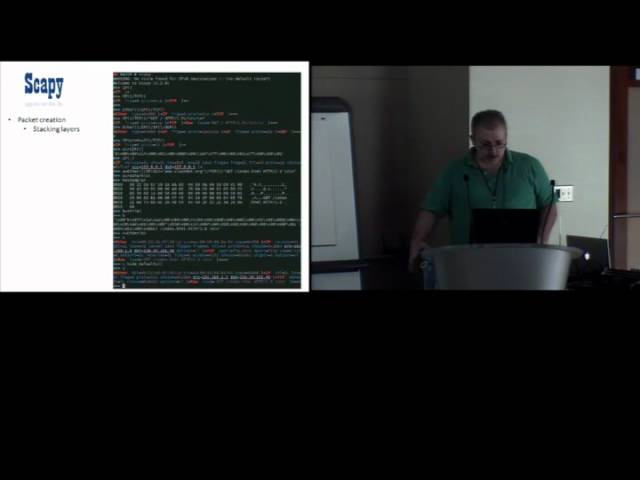
geared more toward networking scapy which I talked about earlier and I believe it's I think it's pikap or peppy that I believe John oberheide or Doug song created I know one of these I I'd found that it was someone from Michigan so now now let's talk a little about scapy as you can see scapy does some things does some really neat things with networking so um let's get to crafting some packets right here here's just a basic rundown of stacking the layers and giv a quick test run of the packet and you can see you can dump out to wire shark the packet that you just created and see how it's going to appear and then you can just doop it out to hex
to see what's going to go across the wire you can read pcaps I found some went out looking for some random pcap files and I do believe it looks for the the number of packets through that pcap file and we'll mark it down will'll tell you that there's 78 TCP packets for the conficker one that I'd found 255 UDP for the Ping tunnel attack you can see there's 4,343 you can also create a graphical dump of the said pcap I don't know how it's useful but I'm sure someone might think it's neat and pretty you can send packets here's a example you can even take a pcap file that you created and essentially replay it using the send recap or send send P
RDP cap and then the file location and here's an example of one that I had replayed here was a one that I thought was kind of neat you can just send a message just straight over the ethernet and it appears to be o x69 69 protocol it seemed neat at the time you can send and rece C packets I crafted up this one to where send a icmp with nothing but X's at the end and one with AB bcde e f g h j to.org you can also show how the packet is going to appear and that's how it appeared through wi shark you can see the payload toward the end so part of sending and receiving packets
you can do like in map light you set your destination set the TCP ports you can even set up the amount of times to retry and timeout want to do fuzzing here's an example of some fuzzing that I did against my printer upstairs and I didn't realize it was my printer until all of a sudden I started hearing some funny sounds then I went oh good thing the wife isn't here you can do a TCP trace route of multiple locations and dump it out to a nice little table and then a more pretty pictures you have to have the appropriate dependencies installed and the scapy documentation definitely gives all the needed information so that if you want to make pretty pictures you
can make pretty pictures you can do sniffing with scapy here's an example of some sniffing that I was doing I didn't have a chance to craft the script but I with the framework of python you could easily take that and just dump it out to text file or whatever you want for later use here's an example of running a sin scan set your destination set your TCP ports and set your send flag you can even do the classic attack of the Mal form packets or the Ping of death see x times 60,00 and that particular frame right there I made sure to count there's all 60,000 A's now here's the neatest thing neest thing that scapy can
do and if you don't think that's impressive here's why it's impressive you can send packets from one computer to the other via icmp and here's the script I found the script in the book that I bought because hey the book has all kinds of neat things and here's the receive script the book covers it really well I highly suggest it and unfortunately I don't get any Kickbacks for it so if you want to use debugging or reverse engineering here's some of the tools that are python based immunity debugger Pim um here's a little example of some exploitation scripting from the coding for pentesters book originally when I did this presentation for my sec I had to mark it
incomplete because I had a little surprise come along but now he said go ahead you can do it and at the time he wrote me a information slip but now I can actually show a little bit of it to start off building exploits with python you start with a Windows XP sp0 book War ftpd V 1.65 and Immunity debugger start off with open opening War ftpd through immunity you run it by pressing F9 and then select it to go online and here's the script that I got from the coding for pentester book to where it Imports the CIS and the socket modules you set the username to a times24 and password of anything and you
can see the sets up the socket and then it tries to connect to set host name and there's also even error control that if it can't connect just says connection error and the script ends and if it can connect sends that username of a times 1,24 and here it is an action and yes there are 24 a I made sure to count them all and here's the wire shark dump of it once that runs War FTP crashes I would go into it more but there was quite a bit more slides and this is definitely a good opportunity to say if you're interested in any kind of scripting like this this book I highly suggest coding for
pentesters malware analys is malware analyst cookbook there's all kinds of python based tools that you can find off of the DVD that's included you see there's plenty plenty of tools I want to do I know there was one for automating uploading to virus total there's another malare analysis book the guy guys that wrote this book came up with this python based script that sets up a fake Network you run this and it will start listening for traffic on Port 80 SSL traffic you name it and anything that comes across it will report it so you get your malware analysis lab set up and on your victim machine set it on the same network and you'll see if any
kind of malware is calling out here's some more malware analysis tools cuckoo sandbox I recently heard about they had a pretty good article on their analysis of the new malware flame if you want to do any kind of fuzzing you see there's plenty of tools that are python based for fuzzing what I'm going to show it on sick fuzz here's a demo of me fuzzing my printer again and it did make some funny noises but it survived web there all kinds of python stuff that is you can use for web related stuff Scrapy is the one that really stands out and I'll show a little quick demo of here's a script that I'd found off of
the site I have listed we'll go out and do a scrape of stackoverflow.com and the function and the flexibility is there to where you can take that script and easily convert it over to other sites if you want to do a quick dump of that site forensics if anyone was in the forensics Workshop yesterday you probably got to play with volatility or if you watched Brett Cunningham's presentation yesterday you definitely saw some work on volatility here's a little demo on volatility I came across a Zeus MIM dump off of uh volatility website they have some good memory samples that you can use and get familiar with the tool here's the particular connections that were going for that memory dump and
here's the process list there's all kinds of other miscellaneous stuff too as well I won't go into that because you can see the list is rather extensive now for the coding for pentesters book there's all kinds of scripts and opportunities to Learn Python with that I mean you can learn particular use of script arguments how to connect to a web server and get run a get request um parsing the robot text file all the way up to NE Network socket creation and the one valuable lesson that I definitely made sure to note spaces will bite you when you least expect it because I copied the script from the book and I think I spent about 10 minutes trying to
figure out why the script wasn't going and it was just one simple space in the wrong spot so ever since then no space have snuck up on me like that and then the receive icmp and send icmp got that from the coding for pentester book here's some little gimps that I found along the way someone went out and created a python library for using inmap this python API for virtual box pi to exe if you want to take a python script convert it into a Windows executable where once all it's done you can run that on your Windows machine and it works pretty good I heard that Dave Kennedy uses a different one and I unfortunately didn't get that
information if you want to play with python inside Chrome there's at least three good Chrome extensions tweey by far this is the best working p python library to interface with Twitter and I even created a little python script to do stuff through Twitter you see from the screenshot I named it Taz drummers handy python script you can do some direct messaging check friends timelines create favorites and other stuff and here's the link where I got all the information from IDE indep integrated development environments and the only the ones that I have listed here I'm only going to comment because these are the ones that I played with there are plenty of others that you can
find from the link so I'm only going to talk about the ones that I know P scriptor has got to be the best one by far for Windows it's got the best auto code Auto completion appana Studio was pretty good idle that's your basic default ninja I really didn't like all that much and Wing IDE there's about four or five different versions of it where you can start off with your basic free Bare Bones barely does anything all the way up to a high-end developers version and of the Linux Ides idle Genie python tool kit and sp's got to be the best last one that I played with Linux wise uh the editors which will color code your color
code your scripts so that they're easier to read notepad++ is the only one that I've really played with on Windows Linux gedit and S scit are both really good ones your shells dream pop dream piie is a really good one I really like that one it's got the built-in autoc completion of attributes and file names history box idle that's part of python you got I Python and you got pyell you also got guake while guake is the normal roll down terminal you can set in the settings for guake to use Python instead of your regular user terminal and then there's python anywhere python anywhere is well exactly like sis you can run python anywhere log on to the S log on to the
website set up an account you get five shells where you can access anywhere and you can share out those shells with other people I think I already covered this so we can skip past this I mean it's just the same stuff Linux versus Windows portable python I'd found this little gy where you can plug in your USB drive you have python complete no install run it off your thumb drive and you can see that it comes with quite a plethora of libraries and for 32 for portable python there's only a few because python most of the Python libraries out there haven't fully converted over to three yet here's bunch of the books that I use
for my resources the learning python was really good the foundations of python Network programming was really really good i' found here's a bunch of links that I'd found and I can have this slide deck up on my blog anyone wants to grab it you're more than welcome to there's all kinds of online exercises and the ones that I have bolded out were the ones that really stood out to me there's free online videos there online books online interactive tutorial an interpreter there's really good forums and the module package repository if you want to go out and if you're looking for a particular python module someone may have already created it because off of the Python side
there's at least 17,000 and that was the last time I did this talk but there's probably quite a few more because it's constantly being additive another good one for scripts is active state code recipes and then last but not least the python tools for penetration testers is where I found most of the links for the for the networking and all the other categories if you want to have any kind of python training security tube they came out with their py security 2 python scripting expert program and you can see the nine modules covers a nice little variety python training for Security Professionals I believe that one is run by Joel McCrae and here's all the scripts that I
created for the uh seesaw CTF uh Redux is what I called it here's some stuff from the coding for pentesters scripts that I had used there's the the wire shark dumps that you're more than welcome to to grab these out of this now to close it out anti-gravity when you open module docs or click on anti-gravity module or from idle run import anti-gravity saw that web browser that popped up earlier opening the xkc cartoon the Zen of python to start the path of finding Zen of python remember these two words import this from Idol or python sh run import this and the Zim of python will be revealed see that was an interesting little Easter egg that that i' found out about
now final thoughts I really like python it's it's really easily understandable and if you want to get something done quick python seems to be the way to go and it's really flexible and I don't think of anything else I can think of if anyone wants to get a hold me there's my information you can find me on Twitter there's my email or my blog or you can find me on the MX Channel occasionally that one hour a night I get to play when the wife and son are in bed at 9 o' and I'm getting getting ready to get up at 5 so that's
it programing Chang the last talk will be in the other room uh I believe it's War driving with robots or some something that nature all right yeah what he said um so everyone head over there I think it'll be final goodbye to the river Riv
think I went through that
quick you're out a
Related talks
 43:45
43:45 45:19
45:19 25:28
25:28 50:00
50:00 57:32
57:32 33:38
33:38