Offensive Azure Security
Show transcript [en]
sure um and let's start that to be fair i have so many content so i i would like to chat with you um i would be happy but so many things i want to show you uh so let's get started um hello hello hello hello hello hello thank you thanks that you allow me to speak here that's my pleasure and especially i like barcelona and i'm missing that i haven't been there for for for a few years so hopefully someday so uh in the next 45 minutes i'm gonna uh talk about um azure um or azure house some people call that or azure um in the as they called azure so i'm going to talk about azure and um about how we can
uh find different mis configurations in azure a typical misconfiguration i found when i work with my customers so this session called offensive azure security so it means that i'm gonna i'm gonna show you how we can uh pen test azure services around assessments and find out what may be not configured properly i mean from the security standpoint my name is sergey um i'm from russia uh thanks christian that you mentioned about that um and so let me say a few words about myself and then i'm going to start my sessions right away um i mean start the content um so what i usually do i work with companies that and and they're on finance different some some few companies and
they're on 10 tests for their customers um assessments and after this implement services to fix all of this like clouds and quite often work with the cloud also i'm an instructor and i teach people um cloud and security i speak at different conferences i was also speaking on global azure uh security b sites some other besides wild west i can fast defcon as well so many conferences if you want to contact me so here's the linkedin i don't have twitter to be fair so linkedin that's the best way to to find me i'm also microsoft azure mvp which means that most valuable professional oscp or sap and and many many many other certifications i think it's not super
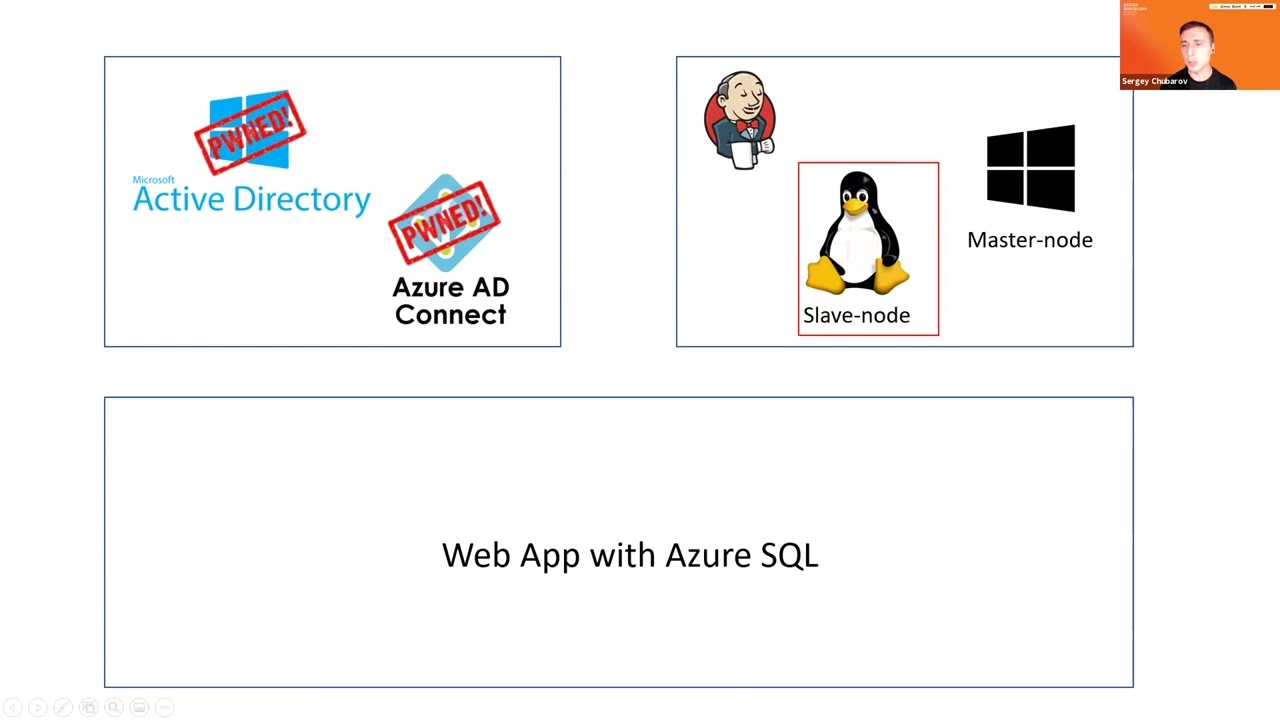
important to talk about certifications since we don't have so a lot of time let me without being said start the actual content one one last thing i wanna i'm gonna say uh i don't like slides so you will not see many slides on this session most of the time you will see live demos so i hope you live live live that you love live demos like i do so let's get started um in the next slide that's my agenda you may say what that's that's that that's uh this three shapes that that's agenda uh yeah so in my in in my session whatever what i want to do i want to show uh three primary things first of all um
i wanna i wanna compromise three environments so first of all i will compromise hybrid active directory so when we have on-prem id and integrate into the cloud so how we can try to compromise that environment what may what typical misconfigurations may be found there or what what usually we find when we work with our customers then i'm gonna show you how we can fan test and find out something in virtual machines so when companies they use virtual machines to run their applications what we can find in virtual machines and finally the largest scenario so that's the largest shape um so web applications so when we we in the third scenario we don't use virtual machines anymore we are using
pass services so web up sql sql database in azure so we don't we use azure native services we don't use virtual machines anymore so what we can do there from security standpoint of course so that's my agenda and let's get started so first scenario in first scenario i have uh on-prem active directory and azure ag connect which is variable known tool to synchronize your your identities from on-prem to the cloud let's take a look what we can do there and let me jump to demo so i don't know if you work with ad connect or not quite quite often i speak at microsoft conferences and many people that are there uh they know it pretty
well but here it's a that's that's security conference i i don't know if you have experience with with this tool or not uh but this this this one is quite well known so with azure ad connect we synchronize identities from on-premises to the cloud with this tool uh what is interesting about about about this tool um let me show you a few things first and then again i will show you the problem so when we configure ad connect one thing one of the things we must do we must create an account that will have access to on premises first because because ad connect must have credentials to you know to read uh user names uh to read uh groups and
so ons or read properties from active directory so some sort of account must be associated with um ad connect so this account will be created during the installation and the most recommended option is to allow ad connect create account for you so in this case nobody will know password so um so the first option is recommended uh you just need to uh enter enterprise button credentials once you uh so the account will not have underpercent credentials in the future uh let me show you this account how it looks like i'm gonna jump back to the main controller and here is a massill underscore and and different numbers maybe in your case it will be different
uh not in my case nine cc zero four and so on so if i look at this account um go to membership where's that uh member of so it's just the main user so noth so it's not an enterprise admin or the main admin just a regular user so probably this account is not dangerous right i mean it can't do any anything but let me jump back to slides and tell you one more thing so uh in a typical installation of ad connect uh microsoft three commands and not only microsoft but almost everyone recommends to enable feature called password hash sync so password hashing means that uh users and their passwords i mean not of
course not passwords but hashes will be synchronized from on premises to the cloud as well so in that case cloud will be independent from from on premises and if you look connectivity to uh so users will be able to log in also you will have detection of the credentials so many benefits from from password hashing it's highly recommended feature at the same time if you enable that account will have extra permissions like this um so in that case account i showed you before uh will have those permissions replicate directly changes and replicate there they changes all maybe you know how to use those those permissions i will show you that slightly later let me quickly
show you those for about those permissions first i'm going to go to properties of my domain go to security find out msl and here are permissions so they are automatically configured because i enable that password hash sync feature all right now um first of all um maybe you already know how to use those permissions i will show you that slightly later but we have the first dilemma we know that we have an account so let's say we want to compromise that account and we want to use those permissions we know that we have this account but we don't know the password because when we when we made installation ad connect manage manage account itself so you will not know the passport
so let's go back to ad connect and probably if adconnect manage manage the password adconnect must know the password so where does pass where this password is stored if i go to to two program files uh and find ad microsoft adc folder here is database so a password will be stored in this database let me just connect a database uh using sql mention studio and look at the table called management agent and select top thousand so let me also remove number of columns i don't need so just to make it more simple um [Music] let me just keep let me leave just those columns that's enough let's execute expand that and let's take a look here we go
here we go so here's the account a username and it says password but password is encrypted wow so password is there but password is encrypted so it's not that easy it's not just you know i can't just take password in the plain text but who can decrypt the password because it must be decrypted to been used must be decrypted and now the first problem we i commonly see in customer environment let me show this real quick uh so local administrator of this server so member of administrators group can decrypt the password uh by the way also a member of agcm admins also can decrypt this password um so i will in the end of the session i'll
quickly talk about mitigations but the problem that we usually see is like a companies allow regular administrators like server admins sometimes even help desk administrators allow administration of ad connect because ad connect is not a controller let me show you what maybe the problem here so let me open powershell and let's extract the password you made it manually but it's quite tedious and takes a while but there is a script you may find on the internet on the github called ad connect done so let me run the screen and look at this so there's a username and there's a crazy password here as well so i'm gonna i'm gonna open another machine uh called client
let me open that as administrator command prompt here come on and the same time i'm gonna open cmd again as a different user and i'm gonna type this crazy password and username msl underscore so um let's first check who am i in the first command prompt i'm a user jdo let's check if i have permissions to access my controller uh no i don't access denied uh all right so let's wait before the second cmg appears because it takes some time on using this account it's usually our 30 seconds 40 is 30. come on i don't have time thank you so who am i am i still underscore so let's check also uh max denied so i cannot plug it i
cannot enumerate the c drive for the main controller so looks like i don't have permissions to list my controller c drive but what i can do so let me go back to the slide once again i have permission to replicate directory changes so maybe you know what it what what what what it means if you're if you're using mimikats or some tools like this you may replicate information about any user in active directory including the mail administrator so if i go back and open mimic ads uh don't ask me why it's running because yeah of course it's inclusive of exclusion of antivirus but i have a separate session about antivirus evasion it's possible to offer skip mimic ads um
oh it's not a topic here so i'm gonna run command called dc sync and i wanna take and i'm gonna find hash of user trainer who is the administrator let's run that and that's working look at this ntlm hash of domain administrator now if i open mimikatz again on a different command prompt as local admin and run command very well known past the hash probably not security conference everyone knows about that what is that or most of you knows um so and let's check the last time if i have access to the main controller yay i do so i became the main administrator just because i had permissions to administer ad connect so i think you know what to
do here don't don't have don't provide uh permissions to access the main controller officer dummy controller 80 connector middle level admin um but that's the first scenario so we here compromised um active directory uh using ad connect and now the next target will be virtual machines in azure so for this purpose i deploy i deployed uh application on virtual machines jenkins to be fair it's not really important which application i deploy just just for the for the example uh the the main idea here i have one linux machine and one windows machine and now my goal is to compromise that to virtual machines let me go back to demo and somehow i must connect to virtual
machines uh from my current state so now currently i'm a domain administrator if i'm domain administrator probably i can connect to any workstation on the network right so the main administrators usually usually they don't have many restrictions of course even if they if they do they may disable those restrictions right away so if i'm the administrator let's say i i'm connected to workstation of azure admin or azure developer let me open cmd here and let's type something like a azvm list and output as a table so i want to just uh list virtual machines and i can see here there's number virtual machines and some of them are using for for this demo as well and my target is jenkins master
and jenkins slave now um let's do the same on a different cmd on a different command prompt um let's do it again here this time it should fail so please cross your fingers it must fail yeah that's fail it failed so why i open cmp on one machine it works fine and i open cmd another machine it doesn't work and it says i must log in first the reason is because after login after i type ac login for the first time uh the token will be cached in user profile so look at this uh there's a folder called that azure and so that's the folder where token of this user will be cached so access token
and the refresh token that usually a refresh action access token will be will be cached here x talking expires in one hour but a refresh token that leaves for a long time so what what if i take this token uh our zip that in an archive uh so what if i take this token you can just zip everything here in this folder or or some of the separate files like access token and profile but i i took all of them so if i zip this i um this azure folder and copy this content to to a different machine [Music] paste here and extract all right now i have the same profile and with this with this token which was
cached and fingers crossed now it should work here without any easy login come on yay so now uh i can run commands so i can i i have some sort of command line command prompt in the cloud so let me jump back jump this time to the portal azure portal and let me show you real quick that we have here um few machine virtual machines and here are machines jenkins master jenkins slave so let's say i want to log into those machines i want to explore the opera like operating system file system and so on so if i want to log in to jenkins master for example i must click connect rdp or might just
take this ip address um so let's say mstc and it asked me for password uh and the same will be with linux of course um so i don't know the password so i want to log into the machine but i don't know the password is it possible to do um yes if you have permissions to run command so there's a fee there's a feature in azure so you may run command instead of operating system um without logging to the machine and so what i can do i can run the command they want on windows i can run powershell script on linux it will be patch script of course shell script i can run command here um right now
command here so now let me jump back to this machine and now what i want to do i want to run my first command oh before that sorry sorry i want to establish my netcat listener [Music] and here as well a different board [Music] and now let's try to to to run this command what this command is all about that's a shell so if everything will be fine hopefully then i will get a shell to linux and let's try the same for windows [Music] so let's try windows [Music] and let's try windows as well now let's take a look uh fingers crossed should give me a shell uh it takes so those commands do not they do not run
immediately so it might take some time um [Music] i hope it will not take super long because i don't really have time to wait here um but anyway so i think don't just oh succeed shell script bad oh damn it that was bad character um all right this one bad character will be maybe windows will be better oh yeah i have a show on windows at least so let's say who am i um and a local system and by the way windows is my masternode so let's try to um check if we have um access so let's see let's go to my master node let's copy this jenkins has port 8080 [Music] let's see if it will be available
so and one one more thing that i want to do i want to check um airlock because an airlock i may find sometimes password initial password oh look at this so that is initial password of jenkins let's see if i can oh looks like it doesn't want to connect from from outside um because i didn't configure jenkins for i just i just installed that but i didn't i didn't say uh set up the password uh looks like that's the reason anyway so i found uh that's not what my goal was to just get into virtual machine i don't really care if i can log into jenkins or not but i have access to virtual machine now
um uh let's go back to slides and so we here compromised windows and linux machines uh not limits to be fair i just i i i i in a script i i use the wrong command so uh looks like it doesn't accept on this modern limits machine i just need to have to use the different reverse shell but anyway um so in a similar manner we can run that on linux all right so now let's start the third module and the third another module but third scenario where we're going to have more complex infrastructure so now we have a web application with backend in sql database and of course when application connects to sql it must have credentials right
um so it must connect to sql it must be authenticated the request and so credentials should not be stored locally on web applications so that's a very bad practice i'm storing credentials in key vault and also i rotate those credentials so periodically uh it changed the the credentials in keyboard and change credentials in sql database as well now let's take a look how we can uh how can we do that how we can test this environment what misconfigurations possibly may exist in this environment so i'm gonna start from oh let me first show you credentials that they exist i'm gonna switch to my portal um and let's go to two uh cable and here's my key vault let me show you
that i should not have access to credentials yeah so look at this so you don't have permissions to list now let me just go to access policies very quickly i'm gonna give myself permissions just to show you that those credentials exist uh let's say list just list is enough um and let's say i want to give permissions to myself let's find my all right add save go back to secrets and so username and password are there i cannot i actually give my game myself on the list so i cannot get actual secret but you can see here there are two secrets username and password in keyboard and so so they will not be stored on the
application locally they will be retrieved from keyboard um now let me just remove permission from from that now let's go back so where the problem exists in my environment in my environment i don't want to say it's it's commonly used i don't want to say i i see that often but i saw that um one more one or two times uh so when com and comp when companies use credential rotation it's recommended by microsoft as well um um so how it looks like so there's a special function function application which will automatically rotate based on the sum events based on triggers uh credentials here and and here in the target as well so uh the secret in the key vault will be
changed and the password in in sql will be updated as well so that's that's the rotation the problem is a function application has permissions to modify keyboard and of course extract data from keyboard and if function application doesn't have prop appropriate uh configuration so so for example i i saw that i saw that so key vault configured securely using access policy in key volt but function application has a bit more permissions so people that manage function up they have some permissions on function application so my entry point may become function application if i if i can modify this function i can extract data from key vault so let me jump back to demo let me show you
quick the function and then i'm going to start to my modification so let's find function up so here's the akv rotation and so let's go to to deployment center i guess uh a little deployment center will be used slightly late let me first show you functions so i have two functions here uh one e one that i want to show you is triggered by https request let me click on this function by the way that's a function from microsoft so you may find on the github let me show you the code so this function based on powershell so let's show the original one so that's the original function based on powershell um and what i want to do
i want to add my own function here my old own code and so i already did that i will show you how i did that and so this code should extract data from keyboard let me show you how we can modify how we can modify this function uh one of the default configurations and functions is accessed through ftp so if you go to to to configuration um come on [Music] um and in configuration if i go to general so ftp state all allowed is just by default it's it's default i didn't change that and so if i have permissions to access this this function i mean to read this function i can get ftp credentials
and so they are here so i can click show here and you will see the username and password i don't have 3d interface access oh by the way let's break those shells um i don't have um i don't have access open jump to this one i don't have access to to interface so let me do it from command prompt so let's say first of all i want to find url to this function application so that's that's the url let me copy that and paste into filezilla then i want to get credentials so let's do that and here is username and here is passport as well all right let's connect okay and look at this so here's my function
and let me go there and i i just add another font another another script with this name so it will it so the script with name run that ps1 will run automatically and so i renamed the original one to run around one uh and i placed my own script here now i just need to run my function using http http trader and that should work by the way it's hard to predict for how long this function will work usually it takes 30 40 60 seconds but a few times it took much longer so fingers crossed it will it will work i mean it will show me the result here if not uh i know i know password anyway but so
here's just a request to this try to trigger this function um and um so my script will do everything everything for me i'm just i'm just i'm just send the oh look good username oh look at this so username is weba and password is passport um all right now uh i want to connect the sql with those credentials so first of all let me try to connect to sql from here let's say connect and from here as well let's click connect so the first machine i'm trying to use is web sport is my on-prem machine and look at this it says connected database oh no that's not different there uh let me double check what the hell is
that what the hell is going on with my database uh online that's fine interesting um let me copy this address just in case uh [Music] should be fine uh i can connect the database could not resolve user realm uh azurity oh sorry that's a sql authentication my bad all right so now it says hey firewall does not allow you to connect so even if you know username and password firewall will not allow you to connect because we have firewall just just just just by default um in the in azure so let me click on this firewall and by default firewall configured where properly so firewall will will will not allow you to connect at all so
you must configure your firewall and and that's the most that that's what i see almost every time very very often so there's a configuration that says allow azure services and the resources to access the server and many companies enable this so it means like azure services they should have access to this sql server let me let me check that and let's let's say help me type password click connect and yeah i can connect to this sql server but one of the problems with this with this configuration and it's not really described here on the portal because it says connection from api specified below provides access to all databases the problem is um it will not be your services so many
people think like oh it's my subscription so services from my azure subscription they will be able to connect ah no no it means that any service any ip address not service any ip address belongs to azure will be able to connect so if i if i live in a different country um and and and and and around the different companies so but i have virtual machine and azure i will be able to connect of course i must use them and password but firewall will not be will not stop me so that's not the most secure configuration so let me disable that
and so let me uh enable what's what is we can what is more command from security standpoint deny public access a public network access so that means now access will be provided only internally so my my resources in azure connected to virtual network in the cloud will be able to connect but not any services that use public endpoints now let's try to to to connect again from my azure azure machine so let's say disconnect click connect again i use password oops doesn't work and it says a public public access network is set to yes all right so now um what i can do with that uh if i'm if i'm a pen tester if i'm an attacker what
i can do that so um let me check maybe i have permissions to access web applications so our application has access to uh to backend database right so front end has access to back end somehow directly on indirectly um of course ideally is the front end doesn't have permissions to access sql backend directly and there's a must be another tier between them but in my case i have [Music] a web web web tier here web up and back end and no middle tiers so this one should have have access now let's try to jump the web up to jump jump back to portal and let's see what web application i have uh
come on yeah that's that's just just a regular application uh very simple with simple registration form uh let me register real quick let's say uh b sites besides bcm that's going to be my name and the email will be beside bcn whatever.com so let me click submit and you're registered well done good now let's try to get into the database using this web application i'm going to jump back to my demo and now let me clear the screen and so web application has the same issue as uh functions they have ftp access allowed and so i can do i can repeat the same steps absolutely so i have ftp url let's just create a new tab
and let's take credentials as well [Music] good and this could this password as well connect yes and look at this uh yeah i i already put some files there so here's my application one pager and so if i have access to ftp to this uh to file system what i can do i can uh it's either i can upload my own php file i can see it's php so let me upload my own php called myself.php and now let's try to navigate to this my shell my shell dot php yay i have access to i have a shell web shell yeah of course web shell is not the best shell in the world so let me uh
establish the normal netcat shell whoa whoa whoa whoa whoa that's a roman sorry that's the wrong plan um this one [Music] and now i have netka shell all right so so so so uh let's see who am i um who am i and i'm i'm dub dub dub data i i definitely i'm definitely not root i don't have id i'm not root so if i want to access database i need to have some tools before i want to access from command prompt i need some tools and tools to i must install them but but um i don't have permissions to install so let me go back to my ftp and what i'm using is special tool called usql so
this tool may connect the database without so it made me it's a tool to connect the sql database without uh without installation so let's connect using this usql and looks like i connected let's try to list tables um and i can see the registration tbl all right let's try to to to get the table content [Music] and look at this uh b sides bcn whatever so i can see this table alright so that and like that and so that is my web application and sql backend as well compromised so now we have the last piece here and i think i have seven minutes and for q a can you advise me if i have any
questions so we will have do we have questions should i reserve time for q a um uh so [Music] i haven't i didn't hear you but anyway um so last piece we have here application gateway uh so it's application firewall that does not allow me to uh get into the web app from outside so i just just quickly want to show you that um if if i protect with with with buff let's try to run sql injection sequence sorry where's my injection here we go so uh it was error-based injections so i can see that like a path to the my to my php file i can see the information about database um so it reveals some information
uh driver and so on so it's exceptional exception now what i want to do i want to show you one last thing if i try if i have another application i have another application and this application will be protected by vav let me open that quickly application gateway um here's the ap address um and if i try to run injection whoa whoa or one equals one whoops accident doesn't allow me to do it if i try some other way other other things like no bytes um or [Music] uh cross-site scripting whatever so let's say script that's not sorry my bad script doesn't work either and so on let me try i try i can try many things and
what i did i used waft ninja which is fuzzer and just check all of that and look at this on the right so all all all attempts to bypass the firewall they are blocked all right so let me jump back to slides now i hope that that demo and that session was informative and gave you some ideas what you can do to uh fix uh so to to to protect your your azure environment better so first of all if we have first scenario here it's very important that adconnect must be managed by the administrator do not allow middle level administrators access and admin access to ad connect it you may have problems with that um if we talk if we're talking about
virtual machines here we need so there's no way to stop this execution of those commands but you may not allow permission we may not give permissions to uh around those commands so be careful permissions that you provide to users um because [Music] uh you know some people may do something like this and the last one the last scenario um here i can give you many advices first of all if you are using a credential rotation try to keep permissions to this similar to kivo because if you don't have if permissions are different then someone may use this one to access keyboard and then you will be able to [Music] um compromise actual database and of
course database should should if if possible have only private access and the application should be protected with application firewall as well and also the last thing disable ftp so who who needs ftp nowadays we use devops process continuous deployment process we don't use ftp to be fair but let's say it's allowed by default disable that don't forget to disable that all right so um and that's that's the last slide where i can handle questions so first of all thank you very much for your participation um i hope that demo was informative and you spend your time here with me and that was nothing vain um and now i'm ready i have two few minutes to handle your questions maybe
i'll get some extra time if you have if i have many questions so thank you sergey that was very interesting and i have to say you're a brave person going and doing a full presentation basically on full demo that that is brave thank you there are no questions on the q a but i do have a couple of questions um one was about the run script um if i understand correctly transcript cannot be disabled you can only like change permissions to allow people to run it or not but it cannot be disabled together uh yeah that's that's the built-in feature uh in azure so the idea is uh so the console of the cloud like
do not log into machines to administer them so do it uh some somehow differently so do not log into each machine though to administer but if you need to administer uh just use the portal or some other ways without logging into the machines so yeah that's the built-in feature and they it can't be disabled so run command will be with you the only thing you can do is not allow other people to run commands but you can disable this feature completely from from azure so let's build it right and my other question was about configuration of the stuff because like as you mentioned like some of this stuff is basically misconfigurations i'm sorry about my card is mirroring in the
background uh is there any way to control configurations globally like for instance i don't want to go on every single uh web application and disable ftp i would like to have like globally ftp is disabled when you create an application um so in that case we have what's called templates so in the cloud we don't deploy uh hopefully we don't uh deploy anything manually so we should have a proof template uh proof configuration that we're using for deployment uh so in the cloud we just it's uh that's like arm template we use thera form for that um so there's a number of ways to deploy and so terraform is like maybe you may deploy in aws and then
azure at the same time um so arm templates more specifically it's more specific to azure uh so yeah use templates you you create a proof configuration and you can and then you deploy from that template and you do not deploy it manually and each time do not reconfigure it because yeah if you do if you have to do it every time you will forget that one someday you will forget to disable ftp or this or or enable some other security features so templates approve templates use only them for deployment cool so um that's great and also one kind of a follow-up question is i do have more experience with aws i don't have a lot
of experience with azure and in aws there is a service called aws config which is something that if you are familiar with it you kind of create rules that will alert you or do something when something happens right so it could mean like for instance you configure the template to not allow ftp but someone goes and enable that afterwards right so the template is not enough maybe you want to also know or even execute something automatically like disabled ftp as soon as it is enabled is that a similar service yeah um in in azure it's called policy so uh it's not the same as uh uh as a config as aws config but it may do
similar things so uh you may secretly like a policy and say so uh this is so deployment in that subscription must be done only with that configuration so you can deploy for example ubuntu 1604 because it's it's absolute so you may only deploy ubuntu 20.4 because now it's an approved image um and so that's called a policy and also policy may uh may not only deny to do something but also policy may uh monitor and say okay so that configuration it is not something that we want to see and it will report about this so yeah that's called azure policy and so if you just open the other portal and find policy policy you will find number of built-in
templates so the definitions um and uh policy and here's the long list of built-in things so for example here's my custom policy only allows certain vm platform image uh so audit version uh here's the other built-in policy that all the virtual machines without this is recovery configured and so on so yes we can do something like this in azure as well [Music] and we can combine by the way policy with deployment template in a special service called blueprint where we can deploy policy and the resources together so it deploys a resource and deploy policy on top of that of that cool thank you very much so those were all my questions on the note q a and
that's all the time we had thank you very much for for your talk uh i enjoy it thank you um stay safe and hope to see you next time hopefully in barcelona bye
Related talks
 19:36
19:36 8:43:32
 27:32
27:32 51:17
51:17 52:17
52:17 32:16
32:16