Mark Baggett - Free tools for your threat hunting toolbox
Show transcript [en]
all right there we go good now okay so i have i have a router and i've got an upstream connection a thousand bytes i transmit 2 000 bytes the router breaks it down into two smaller chunks transmit them one at a time across another then when it reaches the router on the other side it doesn't put them back together it makes it all the way to your workstation or your server or whatever the final destination of the packet is it's responsible for putting that back together so hackers figured out that different operating systems treat these things differently and so they could use this to evade packets so let's say that let's pretend these are bytes right
they're actually going to be eight byte chunks that it transmits let's pretend each of these are bytes and i want to transmit let's say 12 bytes across a network what an attacker can do is he can send three bytes with an offset right so the offset is each chunk is broken down and so the end point when it puts them back together it's going to get these pieces of a puzzle and the offset says okay put this this bit here and put this bit here so it knows how to put these things back into the right order so what the attacker says all right we'll transmit these three bytes here in position one at an
offset of zero we'll transmit these packets at an offset of five these two bytes here and then we'll transmit these three bytes at an offset of position seven and then these four bytes at an offset of position two and these five and so forth right so if they transmit these packets then when the receiver puts them back together they've got to make some choices right what what bite is going to end up in this first spot well one of the four or the of these six fragments is what they're called six fragments only one of those fragments is claiming that they have a byte for position one but in position two there's actually two that are saying
i've got a byte for you i've got some data for that position so who's gonna win right um the operating system like windows could say all right i'm gonna take whoever arrived first or the operating system like cisco could say i'm going to take whoever arrived last in which case the two different operating systems have a different view of the world right they they're going to see different packets and so if your intrusion detection system the things that's looking for attacks sees all these packets in four and is saying are there attacks here but the end point that's actually going to process the pact sees what's in packet two well then your ids says oh there's nothing evil
here but the end point says there's evil here and so this is one of the ways that um this is it's been a problem but um so this has been known for for years fragment over fragment overlap attacks have been known for years and there's the best way to solve this by the way is to put something in the front of your network that reassembles all of these packets and just puts out a unique stream into your internal network okay but the thing is that even today right this can be a problem because well um although ids's what idss will also do your intrusion detection systems they will reassemble all these packets in all of
these different flavors to so they can see every view of the world and they'll inspect all of the views of the world so they'll say there's definitely attack here right but we use wireshark to once we see get that alert we're going to pull it up in wireshark we're going to do it and which one of these what does wireshark do wireshark has one view of the world and it's not selectable and it's hard coded into the product so these this is what the different operating systems would see so windows sun mac os they would all see this stream of packets the cisco-based products see this linux operating systems see this and so forth there's some asterisks next to these
because some of the operating systems have changed their behavior in recent years as the way they process these things but the problem is that wireshark is hard-coded that it will only show you this frame which um so when you're analyzing your packets in wireshark right you your your ids just said hey there's an attack that's going on in your network against a windows system and you say analyst i want to understand what's going on you download the packets you open them up in wireshark wire shark isn't showing you what your windows system saw right wireshark is showing you what well what aix operating systems freebsd hbux and vms with those operating systems all so those operating systems on your network
are completely safe right but if you're using i don't know mac or windows or linux or cisco that's not what you're seeing when you're looking at wireshark so what reassembler does one packet in six packets out right so it will write those six p caps so you can look at each of the different packets in each of the reassemble format the other thing it does is it scans networks and it'll tell you what a remote network is using so if like me you're on the offensive side of the house and and your customer you want to avoid some intrusion detection systems on your customers network then i can use reassembler to scan a given company and say hey reach out to
this company and fragment some packets and overlap them in different ways and tell me which of those different reassembly policies that we saw um is it being used and so here we can see that i scan facebook comes back says oh they're using the linux policy here amazon using the bsd policy and here when i ask for google it's saying sorry they're they're doing something they've get written their own tcp stack there that is not using any of the known reassembly policies so it'll scan those things so based upon that i can come back to here i can then look and see how would i overlap my fragments and that's reassembler and again you can get that
for free on my website or github's website i don't own that one yet so i don't think i ever will all right so domain stats is on as a third tool that you can also get on my github page what domain stats is intended to do is to supplement your internal intrusion detection systems so um you know you have soft elgs zeke you have all these different tools that you've got that are monitoring your networks or maybe you have commercial security event management platforms that are collecting up all of these logs for these other things the idea of domain stats is it's going to be another server that you stand up on your network and
you'll integrate it in with any of these other products and every time it sees a domain on your network a request for a host name google facebook whatever it'll send off that request to domain stats domain stats will look it up come up with some statistics on it and then give you back some information that you can then integrate in with your normal alerting it's looking for dgas dgas are dynamically generate you have a dynamic generation algorithm that is choosing host names randomly right if i'm an attacker and i want to set up a command and control network and i'm not going to buy mybotnet.com and send have all of my bots report back to buy net
mybotnet.com because the fbi is going to come and take down my botnet.com and then i've lost control of all my bots right so instead what i'm going to do is i'm going to program all of the bots to have multiple names that they can choose and then go back to that same location so they take down my botnet we'll all meet at this next location this new random name that they're going to choose it's important that my bots don't randomly and accidentally choose google.com right because well i can't go buy that um hostname so these names tend to be very random looking right and they are made up of numbers they just look they look different they
don't look like domains that we would ever choose because if they did then somebody might have chosen it and well then we can't purchase it so these dgo demands they they look different here you see a couple of examples of the kind of names that we see with command and control channels malware payload droppers and other things that are associated with malware these also appear in certificate names associated with malware so the ssl certificates and things like that actually these i'm sure nobody recognizes these but um these were disclosed by sands last year you see uh sands got popped with a phishing attack sometime last year and then they they did several broadcasts where they
disclosed all the information they said so here's the domains that the attackers were using the malware that they used and they went through a full disclosure and showing everything that that happened would turn out to be pretty good so here's some actual domains that were used in this track and you can see that you know they don't look they don't look like domains that we would ever type right they're random looking well so one of the things that domain stats does is it identifies whether or not these are random by using what i call the the wheel of fortune method right i used to skip school a lot growing up and pretend to be sick and then watch wheel of fortune
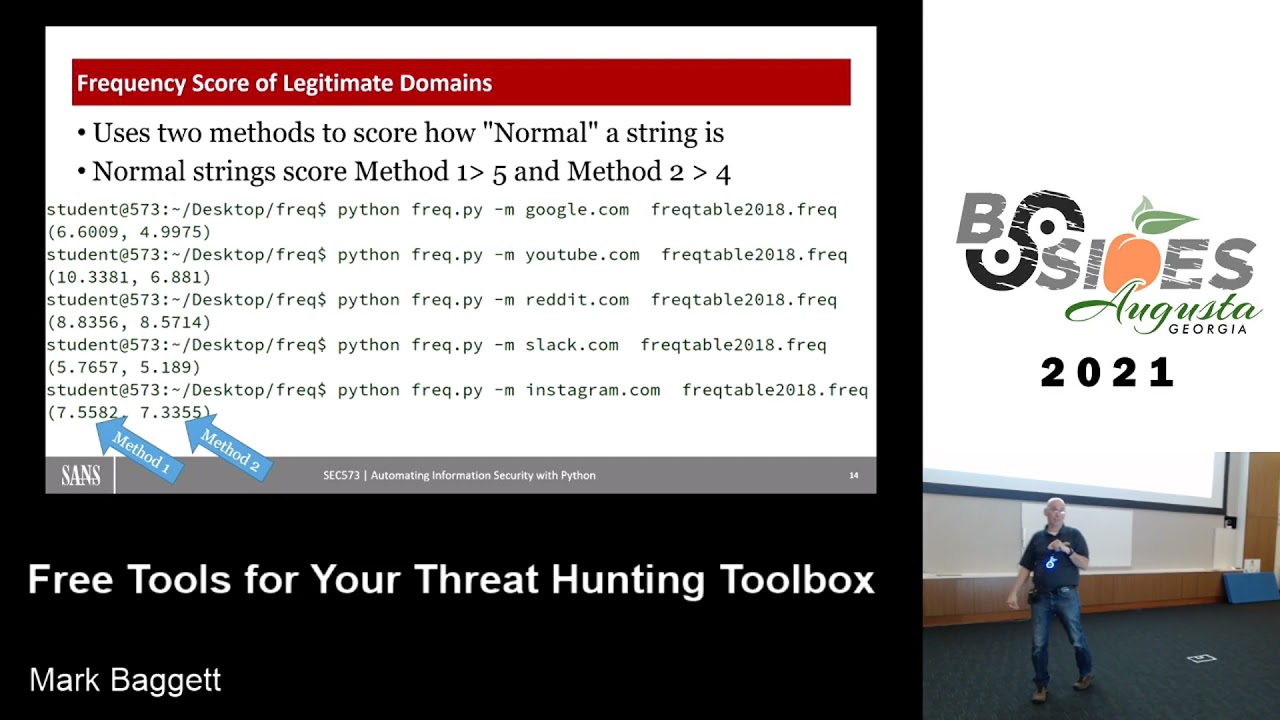
right and so i know that ivana just turned the letter q that the letter that's gonna after that is the letter u right i know if it ends in the letter r but there's a pretty good chance that the letter e is going to come before that and so i can measure the probability of certain character pairs and see well do those pairs is it likely that in oops a name i'm going to have a g followed by an o or an o followed by an o or an o followed by a g right what's the probability of each of those character pairs and then i can measure them so i build a table called a frequency table that comes with
this tool called freak and it just measures these probabilities of these characters so here i'm measuring google.com and it gives me back some scores of six and four youtube i get back 10 and six and so that's what the scores look like for its if it's probably not a malicious domain but then when i start putting in some random looking characters here that we would see and these these are all legitimate um malware domains that i just grabbed off of a website that says here's some known bad actors on the internet just plug those in and you can see the scores drop way down right so twos fours threes right and so generally speaking if you
get below a five on your first score below and a four on the second one then it's and it's likely a dga or a dynamically generated algorithm um so this will identify those as one of the things that domain stats does the other thing it does is it looks at the creation date of the domain when was the domain registered and here we're looking for what we call baby domains um so the other thing is if i want to stand up a legitimate organization a legitimate company and i might buy the domain stand up the website with great intentions and then it takes a year or two before you can actually get any customers to come
to your website so having a website that is only i don't know days old weeks old months old and having lots of people know about it and go to it is not that common um things like google.com google.com was registered in 1997. uh youtube in 2005 right the the baby of the group here is snapchat and it is almost 10 years old now um that domain name but if we look at some domains that are associated with malware and specifically i'll look at the ones that were were disclosed in that sans uh sans fishing disclosure um you know the registrations are well recent um this they actually disclosed this on 7 24 um 2020 is the day of the attack
the registration date of this domain 724 just hours before it was used in the phishing attempt right it was they purchased that domain and stood it up so if i can take every host name that you give me and i can look up when was this thing registered and determine is it is it is a domain that's been around for a while or is it a brand new domain and identify those baby domains then that's something that is useful to you so that's what domain stats does right you stand up it acts like a web server and then you'd send requests to your web server so here i'm asking for google.com i just got it running on my localhost
ask hey what's google.com and i get back some a json response right json response so it's easily integrated into your uh your event management platforms it's got some alerts and then it's got some things like the category the category is always going to be is it new or is it established established in this case means it's two years old but that's tunable you can set you can whatever's established for you but i think two years is probably um a good number the alerts you can see here it's telling it this is your first contact meaning that no one in your organization has ever looked up google.com before all right so this is a brand new system
i just stood this up for the um for capturing these sprint screens but you can imagine that on over a while over a number of months at first everything is going to be a first contact but once this system stabilizes and it learns what's normal for your organization well then it's got a list of the domains that you've gone to and if you've never gone to this domain before like you would for a phishing attempt or commanding control channel that just happened then it's going to identify that as one of its alerts that's in the alert section here i'll get the categories established here you can see the frequency scores and the rest of this is some of the detail how it looked
up this information this is seen by the seen by internet or internet storm center isc it is how it looked these things up i can explain that in a little bit more detail later but there we see the date that this thing was ever first seen on the internet which is the registration date of google.com there's that 1997 date again and this is the first time it was ever seen by you right so the first time that uh your organization ever saw that domain so we'll we can take this stuff we can integrate these in here you can see i go to runcode.ninja an amazing website with lots of great ctf challenges looking forward to that
coming back up soon runcode.ninja i go there the first time i get the your first contact my next request to run code.ninja that your first contact alert goes away so i can see when i go to a domain for the first time so here's some some lookups of those domains that were in that phishing disclosure so had sans been running this at the time then this is what their analysts would have seen um in their list they would have seen an alert that says hey i want you to know this is your first contact at a domain which has some suspect frequency scores it looks like a dga to me you've never gone there before
and this is a brand new domain so this is not a domain that's been on there so three alerts there to to give you a strong indicator of compromise um and then here's here's the second domain you'll notice this one has low frequency scores so the difference between suspect frequency scores and low is suspect says one of those two scores was below its threshold low means both of those scores were below their threshold is what those mean okay this tool is ready today you can download it the name resolution is limited to really rdap and me giving you so when you download it it'll preload the born on dates what we'll call the the date registration for
all of uh for about the top 1 million domains and then the rest it'll look up over rdap and rdap has limited support for a certain number of domains so it doesn't do very well with like the country codes like the dot uk domains and things like that it doesn't do very well actually there's no doubt uk um it doesn't do well for the country codes um that are on and looking those up but it that those protocols will be added to the when they add those those countries to the rdap support then then the tool will support it as well there are some plans for for having rdap actually resolve through the sans internet storm center
and then have them actually look up with a paid service that goes directly to who is and if we do that that'll have an additional advantage in that you'll be able to get an alert that says all right of all the people that are running domain stats you're the first person to ever look up this domain so you could have you know this is new to you new to the web and it's new to all of the domain stats users if we centralize that but um but that the the um having that centralized login has been delayed for a while i don't know when we'll get internet storm center to host that for us um so where do you get this again it's
on my website it's got zeke integration scripts so if you want to integrate this with zeek you can do it it's got docker scripts so you can um you can run this within a docker and all of these are there so this is all you have to do if you want to run in a docker is just docker build and then point it at my github page and it'll it'll build that docker file for you and you can run it in the docker some additional instructions on the website for getting it installed it comes with some elastic pipelines so you can ingest this information into security onion and you get some nice alerting at a security one so here you
can see my suspect frequency scores my low frequency scores first contacts are all alerted through this elastic pipeline and here's another look at some more security onion then it just makes it so much prettier right than than looking at a json response so we can see over time the kind of domains that i'm getting okay uh another tool um that you can download for free on my github it's called api ifi um api if i what like my goal here is just to save you one command a day right we whenever you're doing incident response or network monitoring and you see an alert you see some domain that's on on the network right we've all got some go to commands
something that that we do first to see you know what what's up with this domain where is this right um maybe well hopefully it's not a ping right hopefully you're not just pinging the host to see well are they up because we're not it's not our job to troubleshoot their network right but but maybe you might look and see well where is this domain from um is what's my route to them maybe a trace route information or look up the registration date of it things like that that we wouldn't do with domain so what api ifi is is well it's just a web server that you can configure to run any one command for a
domain that you give it or an ip address that you give it it'll run that command and then give you a json response so that you can incorporate that into your seam so it looks kind of like this it's got an a configuration file where you give it the command you want to run and then web info this asterisk web info is going to be replaced by whatever it is that you put on the url who's thinking command injection attacks all right all right so whatever you put in the url here right is going to be replaced with who is and then that command it'll take the results you can have it capture the information
and run it through a regular expression so it'll give you back just pieces of that information so here you can see the kind of json response i'm using to get back just the creation date on this so this is doing something very similar to what domain stats is doing for looking up that domain and actually there is a version of this so you can either enable or disable command injection attacks so if you were actually looking for a little website that was very hackable right where you could inject commands so in here instead of typing in a domain you type in a command and then it'll run it on your instead of the command it's doing you
can enable or disable that in the configuration files i have written it so that it um it is it should not be command injectable and i won't say it's not because right but if the libraries that are supposed intended to protect against command injection actually work then it would not be command injectable okay it comes with several different configurations but one of them that i found to be fun at least on uh the networks i was monitoring with this was monitoring tracebacks right so let's let's say that i see a an attacker come into my network i got an ip address from an attacker um i want to know what is the infrastructure between me
and the attacker and then figure out which other ip addresses on my network share that same infrastructure where what other ip addresses are also associated with the attacker right so it might be that you know an attacker comes in they could go through one path and another hacker and if they go through everything is the exact same path except for that last hop right the only thing that changes between them is that last hop well then they have all of the same infrastructure it's it's very likely that those attackers are um on the same network or at least in the same area they're sharing a lot of internet infrastructure so uh what if i just do a trace route
for every ip address that i see on my network or every hostnet well the problem with that is if we look and see how long does it take to run a trace route to a network like let's let's just do a trace route and see show me all the connections that between me and google here if i run that once it takes a minute and six seconds to do that for google and so i want to do that for every ip address i see on my network as i see them that sounds like that's a losing proposition proposition well can i make it faster well there are some options you can pass to traceroute so
dash n says don't do dns lookups of host names just look up the ip address you can use a dash f to say you know what skip the first x number of hops i know what my infrastructure looks like so i don't need to trace route my internal router and then my internet service providers router i just i'm going to skip the first five hops right and then just start tracing from there to see what the network is the other thing i can do is by default traceroute will map that same network three times it'll send three packets out to try and discover the network so i'm going to reduce that to just one packet right now i'm only going to
do it once and so if i do that same thing right with google and i'm also going to do tcp port 80 as i do this all right now i've now i'm down to well less than a second here in order to do that same trace route so maybe that's a little more doable um there's all kinds of configuration changes that you've got inside of api ifi and oh did i drop the slide oh so how effective um is it so this is what that the api configuration looks like i'm gonna put in there traceroute dash t 80 and then plug web info in there i've got some regular expression options so i can parse out um just the ip addresses
of the infrastructure and then when i um use this api if i configure and then i ask for sans.org i can just see all right hop 3 is this ip address hop 4 is this ip address hop 5 is this ip address i get back a json response that i can incorporate in there all right so how effective could this be at looking at your network all right so i just took some ip addresses off of a list of known bad actors and if you just looked at these ip addresses 93 174 93 0 80 82 70 89 247 174 0. would you would you say those are on the same network right would you immediately say
oh those those are the same attacker i should worry about those i don't think that just by looking at those ip addresses you would think that they were coming from the same location but here i ran those through this let it do its trace routes and then um here i'm actually dumping i'm using a tool called dump cache that comes with apify just to say dump dump what's in your database i'm asking it to dump the the json responses here and look for this one ip address that's in the list and then show me dash c1 says show me context show me the line before it and the line after it and so here you can see it's
giving me the results for that ip address the line before it align after it and you can see that these have the exact same hops the exact same infrastructure um is shared there now it could be at least they look like they do at this point it could be that they have 20 hops on both of these um both of these networks and that beyond 10 none of the routers are responding um to it so that's that's a possibility um but and the fact that they have they probably don't have 20 hops right um and the fact that they share 10 is some strong indicator that they're they're uh likely at least perhaps related maybe i
should pivot my investigation if 80.82 is attacking me maybe i should pivot my investigation and then go look at this other ip address as well okay um so that's apify so ap ifi comes with uh several pre-configured config or commands that you can run in the configuration tool it can look up whois records it can do the trace routes it can do a full trace route it can do a geoip lookup so if
it's a json response so you can incorporate that into your sim platforms okay um the other two tools another two tools i want to tell you about is srumdum and ese to csv so what these tools are really focused on i can't remember if i put a slide in yeah so this slide here you've gone to your task manager on your windows systems before and if on your task manager you've got this app history right um the app history tab have you ever looked at that app history tab it's usually a bunch of useless information right it shows you over here the metro application all these applications that we don't use on our operating system are over here on
the left and then the statistics are all zero because nobody uses those applications right so it doesn't seem like there's much useful data there but actually um this app history doesn't just record the app history for these applications it records the app history for every process that is running on your computer for whatever this date here at the top here it says uh resource usage from 10 10 2009 so when i made this print screen that was 30 days of information right um so this was done on november 9th so 30 days worth of information it's keeping in that database and it's not just those applications this is every process that's on on your system so how do i get the information
of every process that's run on my computer for the last 30 days out of the serum database so i wrote these two tools called srumdump and esc to csv srumdump was actually written with with law enforcement in mind the idea is i wanted to present you with a graphic user interface that is very simple to use right you just point click and have it export everything to an excel spreadsheet and then you can do all of the additional analysis in in an excel spreadsheet so it's really focused on ease of use esc to csv is for the uh for the network admin who um needs to pull the logs from everything i don't know about you but i've done some
incident response work even in the last three months right where i show up at the customer site and they've been compromised and i'd say hey all right let's start looking at some logs and they looked you like logs what are what what are these logs you speak of where where would i find such logs i'm like hopefully you've turned on logging of some sorts right so still in many organizations there's just an in effect they're not capturing all the data they could and even in organizations that do have logging process level logging on every point in the host right the unless you've got a good um a good edr that's really monitoring every single process it's
it's not common to find every process on every host logged so esc to csv i can use something like ps exec or cape would be a better option to reach out to every host on the network and say hey give me a list of every process that's run on every host in the last 30 days and write all these things to a centralized share and then i can take that centralized share and analyze every process for the last 30 days so it's it's intended to be powerful so esc to csv has got a modular plug-in framework so it doesn't just dump this rum it can also dump like browser history um edge browser history or really anything that's in an ese
formatted database is uh is what it's intended to be able to dump okay um so here's a look at the strum interface you run it it's got a nice graphical user interface you have to reach out to the srudb.dat file which is in your windows system32 and then it also wants to know like where do you want to put the spreadsheet and the spreadsheet can have has a template that comes with it so if you only want to dump some information out of it you can modify the template and then also wants to know where your uh where your registry files are used because it does do things like look up the names of wireless networks and look up the name
look at the names of of users and things like that on on the internet so it'll ask for that information as well if you don't know that information if you run strum dump as an administrator then when you try and access the srudb.dat it says hey you're trying to access this and it's locked by the operating system so that this is that file along with the registry file you can't just browse out and select those actually you can and if you try and access those files the operating system lets you copy them but they actually are corrupt copies right you don't get complete access so you do need to make a backup copy of those files first
if you run it as an administrator it will um you can click this auto extract button and it will use um it it'll it'll use the shadow copies uh on that you have on your system to make a backup copy of these locked files so that uh that so it's got that and then it'll extract all the information builds a nice spreadsheet this is the kind of information you can get at some you can see that there's multiple tabs here so i've got a network usage tab an application resource usage tab network connections network push notification data and the kind of information i get is well i ran this process so at some point i had netcat
running on of course i'm a sans instructor we had to mention netcat right so we got netcat running on this process i can get the security identifier of this and if you provided it with the registry file it looks up and it'll tell you this is the user that's associated with that so it'll give you the names of the sid it'll tell you that netcat used the open wi-fi connection so you have a wireless network named open wi-fi it used that in um when it was running and uh it transmitted this much data across the network right so that is that's a lot of detail that you have in task manager that looks like a table that's full of zeros
right so strum has a lot of great information and that's just the network usage tab you can go to other tabs and see what the percentage of the battery was that was on the system right so the battery's fully charged and i've talked to law enforcement that's used that when um in places where um the person has said that their laptop was there at their house in the docking station the entire time right and that their laptop was never taken somewhere else where crime was committed but then they can look at the battery usage as they say yeah apparently that's not the case because your battery ran down to 10 and then it came back up to um so there's all kinds
of useful data that's in there again esc to csv is the command line version of this um it also has the ability to acquire locked files using uh the volume shadow copies so if you are an administrator you can use that dash a option you can list all of the tables that are in an ase database you can dump all the tables or you can dump um specific tables so you don't have to dump everything um and it it does have plugins right um when when i published this i had i had visions of the entire internet community then sending me new plugins to plug in of course it only has the two plugins that i've written um at this point uh
which is it will dump this rum and it can drop your uh your your edge browser history which is the spartan database okay um so you can combine this with ese to csv and ps exec or s or or cape and then run this on every process in your system collect up all this process essentially the way you do that is you're going to stand up a share right and then you're going to specify that the output of esc to csv is going to be some centralized share and it'll be written to that spot the seven tool i want to mention i think this is my last tool is where'd you go okay where'd you go is a laptop um
historical location tracker this is actually a tool that we develop in the class that i've written in the sans sec 573 right we talk about how to um to write code in python and some of the things that we talk about in that class is how to access the windows registry and how to talk to online websites and submit things to apis to be able to get responses back and so we combine those tools into this is one of the tools that uh we write a large portion of in in the course um so what esc to csv does is it will pull your wireless history from various locations on your system it'll pull it
from your registry right so we've all seen on our phones that or our laptops it recognizes when we're around a wireless network that we've been on before that preferred network list of wireless networks is stored in your registry on a windows system so it will just go through all of those wireless networks it will get the bss id which you can think of as a mac address right which is a unique identifier for the wireless access point and it will submit that to online websites i can do it through google and i can do it through um through wiggle and it can look up what the physical location of those wireless networks are the other thing that i kept in the
registry is the very first time that you connected to that because when it when you connect to it the first time it creates a profile a network profile so i can get the data that network profile and then the last time you've connected which is also there so let's say you go on a business trip and you're in a location for a week you arrive you connect to the wireless network on the hotel you leave i get the first i i can place you at that period of time or at that location for that period of time so where'd you go pulls information from the registry it also looks for wlan auto config logs and your network diagnostics
this is this is pretty cool if um on a windows system if you've ever had that uh uh you're trying to connect somewhere and you're not getting there and then it says would you like to diagnose your network connection and you click the diagnose my network connection button one of the things it does during the diagnosis process is it turns on your wireless network card and it records all of the wireless networks that are within range of you at that point in time along with your the signal strength to those so i can take that information i can submit that to a google api and i can well you were you were here when you clicked the
wireless diagnosis information and and put you at that location also as you saw in the srum right it you ran netcat at this date and time and at that time you were running over this wireless network so those wireless networks are also recorded in the strum we can place you at uh locations at that point in time so it pulls the information from all of these different things and it builds a little map puts little pins on there it says his laptop was here laptop was here laptop was here again you can get this at my github page where'd you go and the last thing i'll mention is i i'm happy to support these tools right um if
i didn't want people to use them then i wouldn't have um of tricked you into coming to this talk and told you all about them right um so i i hope that you'll
information security download python and i'm happy to uh teach you to build your own tools like this or modify these tools that you're doing it okay that's all i have any questions any questions yep
recently at work had um
yeah that's a great question so the question if you if you couldn't hear it was uh how does um freak.py work for non-english characters um or things that um so the table that comes with it freaktable.um or freak2018. i built that table by just feeding it text from i i fed it uh the complete works of charles dickens little women war and peace um uh hermann mel uh herman melville's uh moby dick and several other which is i also fed it um a bunch of technical documents and uh debates between al gore and george bush and um a bunch of just if i could find a big bunch of people with lots of words fed it in there um and so at the
frequency table is based upon that but the frequency tool the frequency table also has the ability to create your own so if you have um if you have mandarin right and it's just based upon this character follows this character and so if you have a mandarin a bunch of mandarin you feed it mandarin it will learn that this character follows the scare and it does have unicode support so or utf-8 character support so you feed it these things now the tables that that comes with this tool is just english but you can build any table that you want to and doing it i have seen people using freak tables for finding other things so one of the things i
think was pretty cool is you know like metasploit um generates random host names when when the pale when you get popped by metasploit or other pieces of command and control backdoors they generate executables random exe names and then they run those processes so i've seen people build frequency tables that you take all of the names of the standard executables that comes on windows and you build a frequency table for those names and then you analyze every executable in your network with freak.py i've seen people build some frequency tables for certificate names and so that the kind of names that you would see inside of ssl certs and things like that and identify things that just
don't conform to standard names that we have on there so um you can build you can build any tables that you want to with freak.py and it will measure the probability of character following character that's a good question thanks other questions yep
yeah so the question is how does domain stats work against shortened domains it depends upon where you're feeding it from right so um ultimately you're going to have to have something on your network like an event management platform or or zeek or something else that takes a domain name and sends it off to domain stats now with domain name shorteners right you're going to make a request for the the domain name and then you'll get back the actual host name and then send a second request off to that actual hostname where you get redirected to it so that's going to have both of those requests and if you're if you're just monitoring all dns traffic you get both of those but i
would imagine that there's maybe a way to just just get one to the other i don't know how i'd do that but
yeah yeah you could do some kind of filtering where you look for a list of known filters and ignore those but once you see them they're going anywhere okay any other questions all right well um i hope you find these tools useful if it is some additional feature or something yeah i this would be useful to me if you just did this one other thing then just send me an email and i'll invite you to come to my class and then i'll teach you how to do that no no that's it all right thank you
Related talks
 16:05
16:05 37:29
37:29 26:31
26:31 1:25:58
 51:37
51:37 30:27
30:27