Rosetta 2: Keeping Mac Malware Alive for Years to Come
Show original YouTube description
Show transcript [en]
I'm currently a cyber security structure instructor at LSU and I've also co-founded a public safety software company that also does some cyber security and I'm also a former software my name is Rafaela mechig I also recently got my master's degree from in computer science from Louisiana State University where I now work as a researcher with the applied cyber security lab and in the past I've also done I was I worked as a cyber security analyst for a handful of companies all right so for our research motivation and importance as the name of this talk implies our research largely focused on malware everyone here is aware of how destructive and costly malware can be but it only continues to become more so
the average data breach now comes at a cost of more than four million dollars to the company and ransomware earnings last year were in excess of 600 million so despite the obvious impact and cost of malware we haven't seen very much technical research in this space on Apple silicon um so this is also despite the fact that we've seen in the wild actual binaries compiled with code for M1 with just one such strain infecting over 30 000 Mac OS endpoints so it's also important to look at new technology through the lens of an attacker so considering known uh techniques as well as already compiled malware that may be able to be reused thanks to Rosetta 2.
arm 64 considerations such as needing to update your dependencies to arm 64 as well as your code needing to validly sign in order to run arm 64 slices at all and then also needing an arm64 machine so Apple silicon to actually debug those code slices may actually make it preferable for malware authors to stay on Rosetta 2 or stay on Intel and just let Rosetta 2 handle the translation itself um so assuming that malicious actors can and will use Rosetta to to their benefit it's also important to identify novel forensics artifacts that incident responders may be able to use in an incident to figure out what malware ran when it ran and even you know how it ran
whether or not it ran through Rosetta 2. so a final motivation related to This research was the nature of the apis chosen so spyware has obvious privacy implications and memory only malware continues to be difficult to detect even for forensics analysts and it's also important to look specifically at malicious capabilities associated with userland rather than just the the kernel level capabilities that often overshadow user land in the research so now we're going to dive a little bit into the background that's required to understand some of the work that we did and we're going to start off with what exactly is Apple silicon so in late 2020 Apple announced that they were going to start rolling out
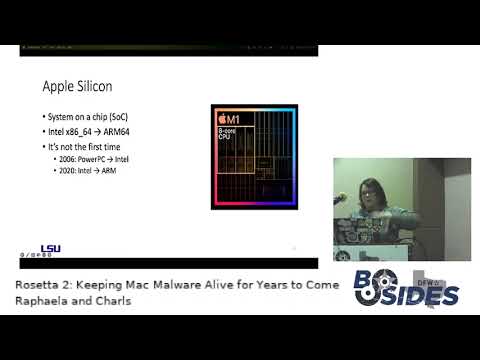
their own processors which at the time it was the M1 so the M1 is a system on a chip so not only does it contain your CPU it also contains your GPU your Universal memory uh secure n club and all of those components integrated within a single ship now a lot of uh one of the biggest changes that they announced that came with the M1 was that they were changing the architecture from Intel x8664 to into arm 64. now this is not the first time that Apple has announced that they were going to switch architectures so in 2006 they announced that they were switching away from in powerpc into Intel architecture and then from Intel now now in 2020 they
announced that they're switching away from Intel to arm now the thing about changing your CPU architecture is that all of the software that is able to run on that architecture will not be able to run on the new architecture because when you change the CPU you're changing the entire instruction set with which that CPU is able to run that software and so I'm not a business Expert but telling your entire customer base that the software that they've spent thousands of dollars on will not be able to run on future iterations of your product it's not a very good business model right so with that in mind Apple decided to make sure that there was some compatibility after they
transitioned into the new architecture for a couple of reasons so this would allow some time for current software developers uh to roll out uh Native applications and adapt to the new architecture but the having Rosetta it would allow to for software that relies on older dependencies to still run right so there are essentially two main ways that you can run Intel code on the M1 so you have Universal binaries and you have Rosetta 2. with the universal binaries so universal binary is is Apple's version of a fat binary which contains compiled code for two different architectures in this case and which gets combined into a single binary and then at runtime the operating system will decide which code slice to
run depending on the uh whichever matches closely the architecture so one thing that can be noted is that with the universal binaries you can actually even though you're running it on M1 you can default you can force the execution of the Intel slice and some scripts will only uh will already just straight the fall tube Rosetta two now with Rosetta 2 that's the other way that you can run Intel binaries and what exactly is it so Rosetta 2 is a dynamic binary translator so whenever what that means is that whenever you run an Intel binary for the first time it will be translated into arm that's going to generate a new arm equivalent binary and which is our DOT aot files
so these aot files they will be stored in a specific folder that is protected by System Integrity protection which means that even if you have root access you're not able to see this uh this directory so you would have to reboot the machine and disable Sip and then reboot it so that then you can actually access the directory another thing about Rosetta is that it does not come pre-installed so whenever you try to run an Intel binary for the first time you'll get a prompt asking for you to install it and then you'll never be prompted again and lastly Rosetta is capable of translating most Intel based apps with the exception of virtualization software or kernel extensions
here we have two screenshots of what the oah directory which contains all your aot files looks like so we disabled Sip and we were able to view all these files so at the top we have the top level directory of the oah where we have a directory at the top with with all the numbers and there those contain subdirectories which contain your aot files and then we have an oah version file which contains Rosetta runtime information and then at the bottom we access that that other directory and you can see all the subdirectories that contain your aot files and then here we have a test program so this is the VM app output which is it's
the equivalent of proc map on Windows if you're familiar with it that shows the process mappings in memory so you can see we ran a test program that was compiled for Intel and you can see all the references to the aot file the to the aot file in memory and also to the Rosetta engine running as well all right so getting into some of the previous work that's been done in this space the work that most closely relates to ours is that that was done by KO nakagawa where he was examining Rosetta 2 and specifically looking at it for potential exploitation um so while he was doing that he ended up reversing the Rosetta 2 runtime
binary detailing how to um debug the emulation process at the rm64 level as well as patch engagra to actually correctly disassemble aot files where it did not before the corellium research team was able to get Linux running on M1 chips in order to do this they had to understand and Implement a lot of the sort of Hardware programming chips or tricks that were used on Apple silicon so for example the custom interrupt routing that Apple uses for their apple silicon chips needed to be implemented in the Linux kernel by the corellium team in order to actually make this work properly so Zach Ops was able to exploit m1s using a historically vulnerable arm-based i o kit driver that was
included on m1s and essentially led to a race condition being possible that led to exploitation so over the years there's been a lot of great analysis of Mac malware binaries done on Intel most notably would be Patrick Wardle and his security blog Objective C his book The Art of Mac malware and then his security conference that happens yearly objective by the sea that are all largely on Mac security and Mac malware so looking at malware analysis on Apple silicon binaries specifically as the number of samples grows in this space we're going to see more and more reports coming out some of the notable ones are Red Canary exposing and detailing silver Sparrow which was that Max sample that I
mentioned earlier that infected over 30 000 Mac OS endpoints that had an M1 binary within it Google's threat analysis group looking at cdds which was it was essentially a watering hole campaign attacking pro-democracy Hong Kong websites that also included an M1 binary that they detailed and then Patrick Wardle analyzing go search 2022 or 22 where he was looking at the anti-analysis arm logic associated with that M1 binary foreign so moving into our analysis goals we had two main analysis goals that we were attempting to accomplish we wanted to test Which Intel compiled samples would still work on the M1 and analyze those that did not go correctly and see if it was because of Rosetta 2 and then we
also wanted to look specifically at specific apis within the objective-c API to see if they were still going to work through Rosetta 2 and how they would work so starting with running Intel binaries on M1 and on Apple silicon so the environment that we used that we set up in order to do this was using parallels so that was the virtualization software we used there was essentially no virtualization software that had support other than parallels so VMware wasn't an option nor any other products so parallels is what we went with the VMS were Mac OS Monterey 12.2 a couple notable things about them is that snapshots were not a feature and still are not a feature with their M1 VMS so
if you've ever done any malware analysis especially Dynamic analysis you can imagine how much fun that was to deal with um another notable thing is that sip had to remain enabled uh so in order to disable sip you need to boot into recovery mode and do it from recovery mode but there's no way to modify the config options or the boot config order associated with M1 VMS on parallels or well it's actually not true you could do it but you would need to modify system files to do it so you would need zip to be disabled so there's like a really nice catch 22 there that just makes it not possible um but there was only one uh sample that
we tested that actually was affected by this and I'll go into a little bit more about what I did there um and then the host was a Mac OS Monterey 12.2 and then the one sample that was in fact or was affected by System Integrity protection remaining enabled uh was actually run on a 12.1 Mac OS host that just had networking totally disabled all of the VMS were pre-installed with Rosetta 2 command line developer tools and Wireshark Rosetta 2 for obvious reasons command line developer tools because a lot of the the malware relied on functionality from those and then Wireshark to perform some some network analysis and then the way the networks were set up uh so parallels has three main
networking modes uh host only network is the only option that actually allows you to isolate the VM and take it offline um and have it be basically within its own subnet so that was the mode that we went with uh it also served its own DNS which was not ideal but still allowed us to view the DNS queries that were going to be coming out of the malware the the classic way to actually set this up is to have multiple VMS within one like VM net on VMware where you would have one of them acting as the DNS for the other so you would have like inet Sim or something running so that whenever the
malware made connectivity pings it would get 200 get 200s okays back and the malware would continue with whatever functionality it was going to do any attempts at that only resulted in frustration on parallels with M1 so the the best we could do was having observing DNS queries but having those connectivity pings ultimately fail the malware ending its functionality uh there so moving into the malware selection the criteria related to it how functionality was determined and where we ultimately got the malware so the first and foremost thing we were looking for was clear indicators of compromise so uh you know either C2 or other connectivity pings coming out of the malware launch agents or other persistence mechanisms so launch agents
are the most common persistent mechanism on Mac OS they can be used for anything from watching a directory and then whenever that directory's contents change something happens or having set intervals on which a job runs or even every time a user logs in a script is run so launch agents are are really popular for persistence there and we we see a couple of those with the samples tested and then information harvesting so any credential harvesting looking for passwords looking for running processes any enumeration of that in-text files that would then be exfiltrated out all all things of that nature fall under the information harvesting umbrella for us recency was also considered so cdds which was the one that was analyzed by
Google's threat analysis group is one of the samples we tested that had both a 2021 and a 2019 installer associated with it the 2021 version was what was tested the impact level associated with it so silver Sparrow the one that affected 30 000 Mac OS endpoints was an obvious one there and then we also wanted to look at the viability of the attack Vector we wanted these to be attacks that still posed a real threat to even M1 users so that if Rosetta 2 were functional and did translate this malware it would be a real viable attack Vector that M1 users could be infected by this Intel based malware so what we get when we add all
of that up is recent high impact malware that can actually affect M1 users today about 150 samp samples were looked at and only 16 were determined to be a part of our testing from that 150. so we tried to be selective we tried to pick good samples um and then the functionality that was determined was just using the iocs that we mentioned and there's a little bit of a caveat there that without too much help I'll get into some specific samples and and the ones that we determined were non-functional and how I determined that and then all of the samples that we used were obtained from Objective C the objective-c blog maintains a repository of malware so if you see any of these
samples and you're curious to try them out yourself or you know pick them apart see how they work that that repository is a very good source and and we'll have all of our samples discussed so looking at the security mechanisms for Mac OS this is useful because in part the results that we report on are what security mechanisms all of the malware encountered so briefly looking through them with file quarantine essentially the way that the flow works for that is when you download a file from the internet Apple markets it with the com.apple.quarantine flag and then any file that has that flag when it's Run for the first time uh essentially a dialog box box pops up it's probably one
you've seen before this file was downloaded from the internet are you sure you want to run it you click yes the flag is removed and it runs this is often pretty easy for malware to get around if the initial stage is already on there because using like other FTP protocols or even curl is is simple enough to get around that quarantine flag so anything that comes in with curl or another protocol is going to not pick up that quarantine flag and be able to run straight away without user interaction so gatekeeper was the next one that they tried since you know file quarantine ended up not quite being enough with gatekeeper the idea was that only
developers that were validly signed by Apple would be able to run their software on a Mac without any user interaction so the thing about user interaction though is that social engineering is easy enough you can ultimately get users to override those check boxes easily enough and developer IDs ended up being easy enough to obtain illicitly so they introduced notarization as a third mechanism where when the apps are notarized they're only going to be notarized when they pass checks related to malicious content being a part of a binary or code signing so actually having a valid signature associated with gatekeeper and if you pass both of those you're considered notarized and again can run without user interaction but
unnotarized apps like with file quarantine are going to result in a dialog box asking the user if they're sure they want to run that application because essentially Apple can't guarantee your security there and the final one that sort of has been developed while all of these three mechanisms were being introduced over time was their ex protect malware protection mechanism so it uses Yara scanning essentially just looking for known malware that's going to be a part of like the X protect sets of Yara signatures uh so it's not going to detect novel malware and we'll see in a little bit the results that it actually doesn't do a great job of detecting even years old malware
and it also can be overridden for applications via checkbox but for executables or other file types it's actually going to need system Integrity protection disabled and to be disabled altogether through the command line so looking at the malware and what was determined as functional or non-functional and initially looking at the security mechanisms so the first thing to note is that 11 out of 16 were functional basically out of the box and we'll get into the specific behaviors that made them functional but they would encounter one maybe two of those security mechanisms that required interacting with the dialog box and then would work so they were essentially one social engineering campaign from working the next thing to note is that with
malware protection all of the samples tested when they were tested at the time were at least three months old but only five out of 16 samples were actually fingerprinted by xprotectus malware and as mentioned in the the obtaining and selection of the malware these were all high impact samples that were very notable for their time so it was interesting to see only 5 out of 16 be picked up by xprotect um so looking at the specific non-functional ones and whether or not uh Rosetta 2 was the culprit there so apple juice slash Mac loader its initial stage was caught by gatekeeper and then its second and third stage didn't deploy at all even after allowing it through uh
gatekeeper so it needed to actually have its uh its file extensions changed and then given executable permissions and then eventually ultimately ran and functioned technically through Rosetta 2 but it was non-viable to the point that it was put in the the non-functional malware and you'll see that as a trend with these that are part of the non-functional malware all of them except for crisis could have made it into the functional malware category if it were not for that viability category which means that 15 out of 16 samples essentially function through Rosetta 2 and so the 11 out of 16 that we're looking on the left side are not just ones that Rosetta 2 allowed to function
but ones that were so effective that they actually are viable even on M1 systems and will work straight away so moving on to crisis the reason that that one didn't work was simple enough it was an i-386 executable so it was 32-bit Intel and Rosetta 2 doesn't translate 32-bit Intel schlayer relied on a zero day that was patched at the time of the OS I was running so it didn't work as far as its infection mechanisms but it did run properly through it was at a two silver Sparrow was that 30 000 Mac OS endpoint sample that one on Rosetta 2 actually did fail related to an installation that was associated with JavaScript so I
thought maybe that this one actually was not functioning through Rosetta 2 but I looked at the UDP stream for both the arm 64 and the x86 slice associated with the installer and it was the exact same for both it filled in the same spot so that means that if it was running the same and failing the same on the arm 64 slice and the x86 slice that Rosetta 2 was not the culprit because it ran the same on both and then finally looking at sis Joker that one uh again was one that needed its extension changed needed executable permissions uh and then also had a mechanism associated with it that it needed to um needed needed bypassing
um so an individual end user is not going to change the extension givex pupil permissions and then also ignore security mechanisms so again it was non-viable as an attack but did function through Rosetta 2. so Rosetta 2 is more than happy to to make malware functional so looking at the specific Xavier Behavior observed in some of these samples so again we were looking for launch agents or demons and some secondary binaries we also saw with with one sample like ventir that we're watching for killed processes and would restart them so that's the persistence we're looking for networking again was any connection attempts either to C2 or to just like google.com and then harvesting again credentials key logging
screen recording keychain dumps so we saw at least one of these mechanisms with all of these 11 samples and again even with some of the ones that didn't make the cut off for actually functional and viable Rosetta 2 was more than happy to make possible the reason there's a question mark related to evil quests networking is because that was the sample that was run on the host OS where networking was totally disabled so I wasn't even really able to look at what uh connection attempts were ultimately coming back from from DNS or anything uh but the belief based on other functionality associated with the evil Quest that you'll see in a little bit is that its
networking would have worked it would have made a connection out to to C2 so looking at an example of a launch agent we're looking at cdds here which is the one that targeted those pro-democracy Hong Kong websites hopefully you all can see that but what we have here is the XML file essentially a config file for how the uh the user agent so the launch agent here is going to run we have the program arguments and the program arguments first it's going to be the like the arc v0 is going to be the actual executable itself and then any Flags behavioral Flags associated with it so run mode if needed is also what comes along with that and then we
see the user agent actually functioning in NPS aux with those those flags run mode if needed so looking next at macdownloader which was another one this is an example of a credential harvesting malware that we saw run so we can see here it's got the the root username and password it acquired those via a fake prompt associated with your credentials for Adobe Air this was uh masquerading as a fake Adobe installer which is a favorite among malware so it got that username and password and then after that where the keychains were located got some networking information and then even what applications and processes were running so doing a lot of reconnaissance and then this config file was attempted
to be exfiltrated back out we saw in the the Wireshark logs um and then looking at evil Quest so this one was interesting it also had a user agent or it also had a launch agent and it also actually killed a process named Avast so it looks for any keywords associated with any anti-virus and looks to kill those processes and then a final thing that it did that we saw was it went through essentially the directories surrounding it looking for any other executables that it then actually infected so it hollowed out and created essentially a space for itself within the process and then it adds a marker for itself at the end so dead face so
because it's it's little Indian the most significant bite is at the end so we see Dead face in Reverse here actually um but yeah evil Quest was very interesting and presented a lot of functionality so moving into the discussion for that some of the assertions we can make based off this particular part of the research we can say without a doubt that Rosetta 2 will translate malware and that none of the malware that malfunctioned or was non-viable was really because of Rosetta 2 except for crisis being i-386 but we know that uh 32-bit is not going to be translated just from the documentation so that's not really Rosetta two's responsibility so that wasn't Rosetta 2
malfunctioning the infection viability associated with Intel samples on M1 xprotect missed most of the samples despite some being around for over five years um the the trade-off there's at most infections on Mac OS will require user in action with the malware so we saw basically at least one security mechanism being triggered by each of those but you all know as well as I do that there are many potent ways to get a user to infect themselves when all that stands in the way is one are you sure dialog box and then the the final takeaway is that signing validly requiring an M1 or an M2 to debug arms 64 slices and needing to rebuild all code modules for arm64 may
actually leave Rosetta 2 preferable to modernizing and sort of the the case study to really drive this one home is zuru so zuru was one malware that we looked at essentially it was masquerading as I term two as a binary so I term two is a very popular essentially terminal emulator for uh for Max and it not only made a perfect copy of that that also had remote code execution capabilities as well as downloading capabilities they actually paid to become the number one search result on Baidu so they appeared even above the legitimate I term two with their perfect copy and then essentially face planted and didn't work on any m1s so what I think about when I think of like the bad
guy HQ associated with zuru is zugrew going over his uh his evil plan and it's you know create a perfect copy of iterm 2 appear as the number one search result even above the legitimate eye term and then it crashes on every M1 this is not a great result for an advanced persistent threat so uh the there's a very real possibility that just sticking as a malware author to Intel binaries and letting Rosetta 2 translate everything for you and handle all of the headache for you is going to be preferable to modernizing and uh you know actually having to figure out m1s and m2s yourself to the second part of the project that we worked on so this part focuses more
on actually isolating some of the apis that were used by this Mount some of this malware that we talked about and what we need to know is that apis they are commonly used in Mac OS development more specifically we're going to be looking at The Objective C API and the thing about them is that they provide a very convenient and easy way for you to interact with system resources and for you to get system information at runtime which is a pretty good feature for our programmer however that ease of access is very appealing tomorrow malware authors as well so it gets pretty commonly abused by Mac OS malware so our goal here is to write some proof
of concept programs that mimics malware Behavior so that we can check if these apis that often get abused still work as it as expected and what other system Behavior do they trigger so our setup for this was that all of the programs um they were compiled uh using xcode on an Intel MacBook Pro and we then took those programs and ran them on our 24 inch M1 Mac and which was running Mac OS Monterey 12.1 at the time and the apis that we selected were pulled from a research paper that was published Last Summer that uh also looked at some of this malware and compiled a list of apis that were largely abused by Mac OS malware so
here is a an overview of the apis that we're going to be looking at so they kind of range for they do different things so we have key loggers we have some of them launch executables some of them will allow you to get system information run scripts and memory only execution as well as clipboard monitoring so we're going to start off with our key loggers so a key logger essentially is a program that captures a user input it's more specifically like keystrokes and and mouse clicks and more often than not when used maliciously they try to they run without the user's knowledge or consent so we are looking at apis from two different uh classes so we're looking at
the appkit framework and we're looking at the core Graphics framework and um one thing that was interesting about the key loggers was that um keylogger the using capturing user keystrokes is a part of Apple's accessibility features which you cannot every time a program uses it you will trigger an accessibility prompt as you can see here on the right and this actually impacted how one of these programs ran so to to demonstrate that um here we have a screenshot so at the very top of the screenshot we have um we can check that we're actually using a Mako 64-bit uh for a x86 binary which is our Intel binary and then when we run this at first we we ran it with
our accessibility disabled as you can see for our accessibility check here so the idea with this program was to whenever I press a a key on on on my keyboard it should be able to it should be printed out back onto the terminal but as you can see um here at the bottom it only it's only showing my my terminal input it's not piping back out so once we enabled that accessibility permission we can see what the expected output was here so it's kind of hidden here in in the very corner but you can see my uh you can see the the letters that I'm typing hello here and then it immediately gets printed back out onto
the terminal as it was expected and then here just to double check we have our VM map as well and where you can see the same references to the aot files for that that Intel binary as well as other references to the Rosetta runtime here we have our other our second keylogger where we're looking at the CG event tab and this one was a different key logger where we're actually trying to Output it to a file that's on my desktop so you can see the program execution on the left where you have a very nice keyboard smash over there and then hello my name is Rafaela a new line This is logging me new line and then I press Ctrl C to try
to exit the execution and then you can see um hopefully on the screenshot on the right that is our key log file and you can see this you can see that with this API in particular they not only capture the my um the text that I wrote on the terminal but they also captured the other keystrokes that I did with the new for the new line as well as the left control C so you have the keyboards Mash return or enter uh hello my name is Rafaela return this is logging me return enter and they'll have control c as well so this gets a lot more information from the user and then if you try to run it again
it'll pipe it to the same output file and again same level of detail to verify this one um we ended up using a tool uh by The Objective C Foundation that's available for download for free which was created exactly for this purpose which is to monitor keyboard event apps and here we can see after while our program is running and we ran a re-key you can see that our you can find easily find our keyboard at the very um at the very top and we have the um that the filter is active so moving on to our next class we have launching executables um so malware will often try to launch executables to you know try to sometimes
they'll want to check the environment that they're in they're in request maybe contact a C2 instance and download the actual payload so for example proton B try uses NS task launch which we're going to look at to check for the process list and see whether it's persistence mechanism has already been installed and is actively running then we're also going to be looking at NS Apple script um NS test launch uh this one was pretty straightforward so we just wrote the program called the API and then we put it to sleep so we're actually running the binary sleep um and then you can see that we have successfully uh ran the um we were able to launch the bin sleep
as a sub process of our NS task program and then NSA applescript was also pretty straightforward where we also just launched called the API and we put the program to sleep long enough so we could get the VMware the sorry the VM map dump and the interesting thing about this one is that since it's using applescript to uh and it's being called from an Intel binary you can see that even applescript is also running as an Intel um as an Intel and it's also being translated by Rosetta so you can see with the arrows in the bottom right that you can find the references for the the Apple script aot files this is an interesting case uh memory
only execution it's this is a technique that's commonly used by modern malware techniques where it um it they will try to load so they will try to load the payload and leave it only in memory without ever really touching disk so this provides them a really high degree of stealth and reduces the change the their chances of detection so for example um apple juice that we talked about actually uses this specific API that we're going to talk about uh to load the payload that they received from the C2 instance and this is a very common way to load code and memory uh so much so that a couple months after we did this work uh
Patrick Wardle uh posted a tweet talking about this API that Apple actually this got so abused that Apple went in and changed the implementation of the API to temporarily write the payload that's going to be loaded into memory to a temporary directory on disk and one last thing about this is that it can only load Apple bundle type applications so any like dot app um files then here we can see the execution of our program so this program was also pretty straightforward we created a dummy bundle and compiled that as well so we're trying to open that file get that file size map that in memory and then once that's mapped we can create that object in memory at a specific load
address which we're checking the specific load address printed out twice and then I'm going to point out the 1094 db000 which is the address we're looking at and at the very bottom the VM map we can check that at that exact same address 1094 db000 we have our bundle loaded and then last but not least we have clipboard monitoring copying um this is commonly used by malware that's trying to steal your your credentials or trying to or steal your wallet addresses if you do a lot of cryptocurrency stuff so for example if you use password managers you're constantly copying and pasting your credentials um so uh malware if you have a piece of Mallet they are able to read that from
directly from your clipboard without your knowledge and for they are also able to write directly to your your clipboard without your knowledge um so for example they could overwrite if you're copying an address that your wallet address that you're trying to send some cryptocurrency to you could technically override it with a separate address that you don't want to send it to right for the malicious actor so we're looking at ns-pace board here which is a part of the app kit and then this one is also pretty straightforward we use the API to write to the clipboard and then we read it back from the clipboard at the very top and then on the bottom left we have the actual code
for the program just to show that like how simple it is it's just like a couple lines of code and then you can read write the hello world and then read it directly from the keyboard and then we also can check that our hello world in the recent clipboard history so after all that is done we go back to our oah directory and sure enough you can see that every single Intel binary that we ran has its own respective aot file um which could serve as indication that the the that Intel binary was executed on the system so in conclusion we have it's pretty safe to say that at this point uh functionality of Intel malware on Apple
silicon is still largely complete and it's not very difficult for you to still leverage the object of C API on Intel to run it on on the M1 and you might ask like how long is is this feature going to be available we don't know how long Rosetta is going to stick around might be a lot longer might be a couple years might be a couple months we don't know also the objective secant API can still very much be used for um malicious purposes just write it and tell and then run it on on dm1 you're still guaranteed to um pretty much guaranteed to like for it to work and then your aot files at the end of
the day they can serve to some degree as an indicator that an Intel compiled uh program ran on your system so for future work uh we also want to continue understanding Rosetta better both as a an attack surface and as a source of forensic artifacts and information there's a lot there that I think we just started uh scratching the surface we also want to make sure we want to work out our lab environment for virtualization a little bit better so we can test some of the malware functionality to its full capability and we will also be retesting some of these This research on m2s that just came in this past week actually and on Mac OS Ventura
all right so thank you all for coming to our talk thank you so much for besides for having us and if you have any questions um I guess now is your time
yeah so project so project champion oh yeah sorry so they're they're um the question was that it seems that there's some a naming convention it's some kind of Shah uh 256 hash on um on the directory names and I think according to project champollion it seems to be a Shah based on like the file contents and the path that it executed on um I haven't seen any of the references to that but um that was the only reference that I have seen so that's it seems to be a hash of something of the file for sure
software offerings that you've seen that people may use you notice if it bypasses maybe any of the controls for like let's say let's say
everything's so available to look at I mean that would depend on exactly the way that the the antivirus or antivirus control was was working if it were looking in you know specific spaces and it hadn't updated for Rosetta too then obviously that would be the case but if it was using like prioristics approach and looking for common things like apis that are abused or whatever then it would still see because it does get translated to you know the M1 and apple silicon space where assuming the antivirus was sufficiently comprehensive it would still see all of that behavioral and heuristic type information that is not necessarily
available to me yeah it's just an emulation process and it's actually still mapped like the vmap output showed it's still mapped in the same space as the that initial Intel binary getting executed um so it's very much just a process that's running uh with memory mappings that have both the aot and the Intel associated with it
oh he got first oh yeah sure
so um oh yeah have we seen any malware that um uses both Rosetta and any native capabilities um I yeah from so that's essentially what a universal or a fat binary would be where it would have both the Intel capabilities and it would have it would have the Intel binary and it would have the M1 or M2 binary associated with it so a lot of the malware samples that we've looked at that had M1 functionality were Universal binaries because obviously they were enthal binaries initially and then they were updated to also have some M1 capabilities so when you're talking about a fat binary that has literally both of those code slices so it's going to have functionality for both would be
able to run on Intel and would be able to run natively on M1 potentially so that would be a way that it would sort of Encompass both as far as like specific Rosetta 2 functionality Rosetta 2's purpose is to make Intel's essentially function exactly like their apple silicon counterparts so there's no like specific functionality that any of them Target where it's like it only existed maybe on the uh Intel binaries because if it didn't exist on Apple silicon then it wouldn't be able to be translated and run in some capacity maybe it was a different API and it gets translated on Apple silicon to a different API but the functionality needs to exist on both where it's not
possible for it to run on Apple silicon so there's no like if that answers your question Yeah so basically if you if you're running an Intel process you're not so Rosetta is going to the Intel will be in the Intel binary will be in memory only as long as it requires for Rosetta to um to actually translate and generate the aot file so they the aot file will contain the arm um the arm the translated code which is actually going to run and that has and then it uses the data from the Intel binary but the Intel binary is technically more there is like a database to my understanding as opposed to actually that's what the code
that's running if that not sure if that helped out um in case somebody had a question
um I have not seen anything that tried okay so the question was have we seen anything that tried to evade having the prompt come up for you need to install Rosetta 2. I haven't seen anything that like tried to bundle the Rosetta to installer trigger that to install Rosetta 2 itself and then move on with its capabilities I haven't seen anything that tried to do that whether or not that's theoretically possible I mean you would still need to bypass other security mechanisms in order to make that happen because you can't just run zero clicks without any user interaction and just have stuff install and then go So eventually you would encounter something it would be a
trade-off for either having the user have to install Rosetta 2 and maybe they Google Rosetta 2 and say oh that's a legitimate thing I'll install that versus a security mechanism popping up that's like this program is trying to install this apple can't verified security are you sure you want to install it like I would generally prefer to have the first pop-up be the one that pops up for me right but but also like at that at that same time like it only pops up for you once so like once that Rosetta gets installed it's it's pretty much done right so if a user is already using any software that is okay okay yeah okay yeah if there is if
there essentially if there's one um if Rosetta gets installed and the user already has an Intel software that still hasn't been adapted like the company hasn't rolled out the native application then Rosetta will need that Rosetta will need to be installed for that to run and so the user the malware is able to run without any prompts okay so that seems like the last question we were able to take so again thank you all for coming if you have any specific questions feel free to come up after um but thank you all for coming up [Applause] well also I'm also on Discord on
Related talks
 36:34
36:34 52:06
52:06 1:27:23
 29:00
29:00 40:20
40:20 49:41
49:41