De-Google your Smartphone
Show original YouTube description
Show transcript [en]
oh that was that was lovely it's very loud and very very clear about it so yes i'm going to start again just for the recording hello welcome to my workshop uh this is oh god you can see my slides no it's called d google your smartphone lineage os welcome welcome welcome my name is kim that's my discord handle um for those of you planning on following along um just uh remember to take it slow and read all the instructions just see i've been living with a d google smartphone since january of 20 that's accurate yeah or is it january 2020 2021 yeah i've been living with it for a long time oh i just got so i'm in a public space i have to
wear this they're making me wear it well okay so i look like this now so um i have quite a bit of experience living with my d google smartphone so yeah uh yeah i even wrote a blog post about it it's linked right here i'll share it with you all at the very end if you want to see the slides or pdf of the slides uh is a google's life viable i argue it is though you will have to accept a few trade-offs because the world we live in today is geared towards the assumption that you have a google smartphone so to give you an example i bought a package from amazon just two days ago
and i chose an amazon locker to pick it up and my assumption my fullest assumption was that they would email me a qr code or something to unlock the locker but no they integrated with a google api to disclose my location and my bluetooth hardware so that way it could pair to the locker to unlock it so when i took my degree phone to unlock the locker it didn't work right like that amazingly like challenging feature to achieve like it's amazon they make it available for everyone but if you have a degoogled phone some very specific features like that you're gonna have to learn to live without which is fine i meant it i got
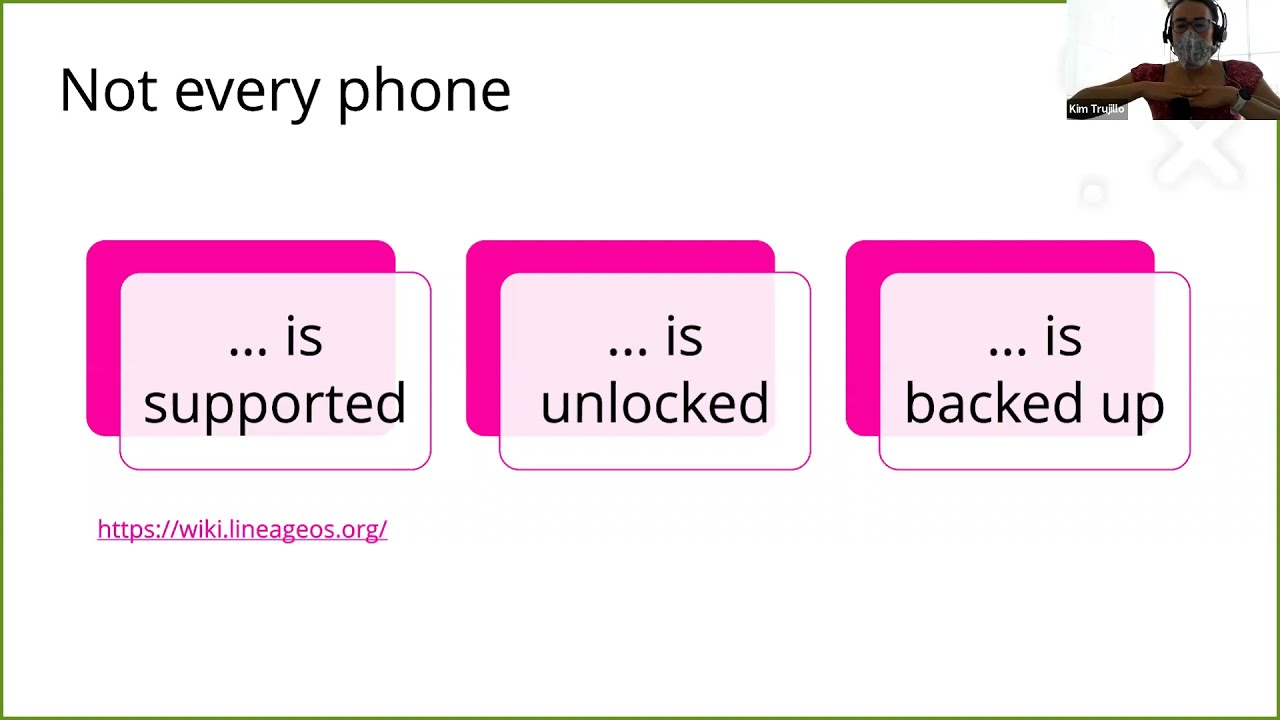
my package uh i used another phone to do it i cheated but um i do live with this phone every day so it's very viable indeed in my opinion so i gotta warn you now not every phone is supported okay on the lineage os website they have a long list of devices that they're willing to release software for and unless your phone is on that list your life is going to be um your life is going to be hard with what i'm saying is if your phone isn't on that list if it is on that list it's pretty it's pretty seamless you just follow the instructions so with that i gotta warn you again not
every phone is unlocked carriers when i say carriers i mean cellular carriers like verizon at t at least in america here we have vodafone and a company called orange which is pretty neat um they regulate um what you can and cannot do with your phone and so do the carriers that sell the phones and carriers have a rationale they want to make sure that you fully paid off your device before you are allowed to um do things with it because they don't want you like jumping carriers like you know finance a phone and then just leave so you gotta unlock the bootloader and um finally if you are following along i'm not seeing if there is anyone
following along or not but you gotta remember to back up your phone because we are reinstalling firmware today so it's going to erase absolutely everything it's you're starting clean slate and that's what this is all about we're not de-googling by just removing google software it's well beyond that now it's too difficult to just do it piecemeal lineage os started from the ground up they took um android which by the way android um if the goal here today is de-googling we've already kind of failed a little bit because it is android and android is uh was originally published by google but we're kind of glossing over that because the real thing that offends us the real
privacy invasive thing is all the supporting services that are installed on top of android so android by itself is is very lightweight and very non-intrusive but the google services are not so much and actually oh yeah i forgot to add the outline oh well so what is lineage os i just got into this um it's very easy to do google is what it is in a nutshell um you follow the instructions and you get regular updates very fast updates um a lot faster than any carrier i've ever had it's almost weekly so yeah and what you're giving up is this right here the google mobile services and i'm going to go ahead and just click that just to see
just to show you so the google mobile services are all these apps so gmail google maps youtube google drive google play you won't have an app store right away i'll show you how to install an app store it'll be fine but that's what you're giving up when you install lineage os like all these apps don't come pre-installed and that's a good thing in my opinion oh so oh yeah so lineage os is actually based on something called cyanogenmod which went under uh several years back it's the same thing it's just renamed it's a fork of that project so i'm gonna try to get back into here i accidentally foolishly exited out of my presenters mode
so i'm gonna go ahead and represent that there we go [Music] all right warnings what you're signing up for when you unlock the bootloader you're going to get a bootloader warning it's kind of scary looking relax what this means is is that google can no longer guarantee the software that's installed on the phone is the same as as they shipped it to you this is actually a security feature this isn't google trying to control your life this is actually that bootloader warning is kind of a good thing because they're preventing people from manipulating android and giving you something with spyware on it so [Music] google can no longer guarantee the software on the phone but you can because you changed it you
installed it so when you get this warning you can kind of be proud of it like you know i did that and finally um what i mentioned earlier not all apps will work get used to seeing this message for a lot of apps uh it won't run without google play services which you can try to install there are communities of people that try to get google play services working on lineage os it's kind of hit or miss and i don't recommend it but it is something you can do so these are the tools you're going to need you need a computer any computer running any operating system you need a usb cable to connect the
phone to the computer and you need the phone all right you're gonna need to know a little bit just a little bit of command line so really quickly here uh let's see if i can grab one i'm going to open up a terminal i'm going to bring it up there see if we can see this and the commands at the same time oh zoom in there we go it's a little bigger a little bigger a little better so this is the terminal this is what it looks like i'm sure you heard of it we don't see your terminal we're only seeing your browser really okay excuse me thank you for pointing that out i'm going to start a new share
and i'm going to share the whole desktop this time like a good presenter yes how's that it should be snapping in where you can see yay thank you excellent so this is the terminal uh so you're gonna need to know uh the cd command and actually the ls command is kind of helpful which stands for list your listing directories uh and with that you can use cd to change into a directory so i'm going to pick the steam directory and now i'm in the steam directory yay and i can list that and it has stuff in it if the terminal is cluttered i like to recommend a clear command clear and that just makes it
nice looking you know so if you're like lost in all the texts like you can type that command and everything's kind of okay again and finally the tab completion is going to be very important because it's going to save you a lot of typing because some of these downloads that you're handling are quite long in the name so if you for example type l and you hit tab it's supposed to um whoa uh ls and then l yeah it completes names for you so you just hit tab and it completes names that's all it does so don't worry too much about this we'll i'll point out when you can use it when it's time to use it
if you're following along i haven't actually seen anyone post if they're actually following along with a phone today so i might just be de-googling the phone live and not stopping for people to catch up so if you have a phone tell me now otherwise i'm going to go a little fast so with that but i'm gonna hide that away excellent and i'm going to present uh five what that does this is due oh god that's not what that does at all [Music]
what is this i don't want that all right so these are the tools that you have to install you can download them from here they have different directories for different types i am on linux today so i'm going to be downloading this tool right here you can see here this is what it looks like when you're actually running the tools um and finally we're going to cheat today instead of actually fully installing them we're just going to run them right from the folder because they do work without actually installing them you just download them and run them the instructions here actually get into like how to install them in your system but it's very developer oriented so we
just kind of skip that so i'm going to go ahead and download that i'm going to save it very nice and i'm going to save it to my desktop under a new folder titled android and we're just going to save it there cool [Music] and i'm going to go and go to that folder i'm going to unzip that little guy cool and now i'm going to go ahead and start using those tools so if you had a phone and you're going to follow along this is what i would have you do i would have you go to the wiki and check to see if your phone is supported this is where you go for that
so yeah if you want to do it go ahead give it a shot wiki.lineageos.org [Music] and um i'm going to give people a chance to do that and i am going to get into that tools directory and i'm going to do that by changing directory to home but you can use the little tilde thing or you can just type cd but i'm going to go home then a cd into my desktop android folder i just use tab completion there i'm going to list that folder i'm going to cd into platform tools i'm going to do that by typing p and then tab enter i'm going to list that directory and it has a platform tools folder it's very deep
i don't know why they did that so cd change directory into platform tools very nice and this is looking cluttered so i'm going to clear [Music] and i'm going to see what's in this directory right now there's a bunch of stuff i don't know what all this stuff does but that's okay you don't have to know what you need to do is type the adb command and you're going to dot slash so we're going to run it and then a d b and i'm going to hit enter and look at that it ran it put out a bunch of garbage onto the screen that is cool so now i'm gonna do adb don't forget the dot slash adb
list devices oh is it devices list it's one of them yeah there we go and it came back blank so i'm going to clear and run that again i'm going to hit the up arrow then i'm going to do adb devices and it's showing no devices are attached so i'll attach a device and i'm going to change your view so you're no longer going to see me so i'm going to wave goodbye and i'm going to move the webcam can you all see my webcam by the way [Music] it's going to be important um i do see you yes but it looks like people can put that uh wherever they want so yes i think
everyone alright so if you can see my webcam um i'm gonna turn it off for just a second because it's gonna get kinda i'm gonna move it
[Music] okay starting the video again this time you see my tabletop and you see my phone i hope i can't see my phone i don't know how to see it but i'm assuming you can yes we see in the different screen excellent so i'm going to go ahead and plug it in to plug into the computer i'm going to unlock it with my super fancy fingerprint and yeah it's connected so in order to get adb to see the phone you have to enable um usb debugging and in order to enable usb debugging you have to enable developer mode it's going to be down here in i believe about phone if you tap on the build number
several times you'd have to tap it seven times and once you do that it enables developer mode okay so one person oh it's christian has an old xiaomi me 5. that's cool well give it a shot let me know let me know how it goes so yeah build number unlock android developer tools android developer tools live in a system at least on my phone it does i'm going to go to advanced because i'm an advanced uh android developer i'm going to go to developer options they look like that [Music] then i'm going to scroll scroll scroll until i see something that says usb on it and i'm going to enable it yup i'm going to get that warning
intended for development purposes only you gotta get it gotta just hit okay cool and right away i know it's working because i just got an rsa key this is my computer requesting control over my phone right now i actually like to leave that box unchecked because of this because i like to get the confirmation first the permission asking it's always good when i ask permission right and second and more importantly it gives me some kind of visual cue that it's actually gonna connect so i hit allow here and now i go back to my computer and i go into that terminal the up arrow and i list adb devices oh my god a device is connected
amazing so now we've gotten this far i'm going to go ahead and open the guide to my phone go over there it is the oneplus 6t they call it the fajita which is cool and this page has a lot of things in it the thing you need the most is going to be the installation guide yes so now you have the installation guide and actually by the way that page has some special boot modes and things um so just some key combinations you generally won't need these but it's kind of nice to have it tells you how to take control over your phone uh so we're going to go to the installation guide and we are going to read these instructions
i've already read them and if you were following along i would actually pause for five minutes and i would make you read them because if you skip any of these instructions it's you're gonna have a bad time um so read them so make sure your computer is adb and fastboot that's gonna that's one we already did because i just downloaded the tools here so that's fine and yeah here here's the thing that tells you to read them at least once before actually following them to avoid any problems due to any missed steps this big red box here make sure it's running android 11 so i'm going to go back to my phone and i'm going to look
at it and i'm going to see is it android version android version 11. i am fine i am ready for this and you'll see it's already lineage os that's how i know this is going to go well today because i've already googled this phone once so [Music] make sure it's on android 11 firmware it is on android 11. [Music] we're going to unlock the bootloader so you take this command and because we are cheating we are cheating with adb you have to type dot slash adb so remember that because i didn't install it i have to be in the directory where it is so if i list you'll actually see the command adb in there it's a file
it's an executable file so dot slash adb space reboot space bootloader and if you watch my screen on the phone you watch the phone as soon as i hit enter this phone's going to reboot into the bootloader oh my god what just i already told you what happened you should know [Music] there it goes fastboot mode cool [Music] now we're going to make sure that we still have control over this phone right now and we can't use adb to do it we have to use fastboot command so i'm going to type the command that they tell me to we can skip this step because we're already there we're already in fastboot mode [Music] we're gonna run this command by typing
dot slash because we didn't install it we're just running it fast and i can just tab complete that pass boot devices and look at that it's detected if it weren't detected you wouldn't see that um that string right there so and actually i can disconnect it right now i can unplug it from the phone and you'll see that it disappears but when you plug it back in it's immediate you get it back so don't be afraid all right and finally the command that they're telling us to run next is going to be dot slash fast boot oem unlock and this is the place where i anticipate a lot of you are going to get stuck on
because each cell phone provider has a different way of unlocking the phone when it comes to actually providing the key to the phone it's usually the same they send you like a string that you have to type into this terminal you know you have to do like a special key and um you type it and it unlocks it but you can only get this key from the people that sold you the phone assuming it's unlocked assuming it's locked if you bought an unlocked phone then you don't really have to worry about this but this is a command to use to unlock the phone and as you can see here i bought an unlocked phone so the task failed but it failed
successfully failed remote device already unlocked hooray so if the device doesn't automatically reboot reboot it it should now be unlocked so i would reboot it but um it's already unlocked so [Music] we're going to download the custom recovery i'm going to do that from lineage recovery i'm just going to click the things that give me i'm not like going anywhere special it says download a custom recovery you can download it from this right here click it and you'll see this menu here this menu is kind of confusing in my opinion so i'd recommend paying attention to this next bit um these ones on the left are actual full operating systems these ones on the right are the recovery
images the ones on the top are the newest and you want the newest so click the one on the right that's on the top we're going to save this file in the android folder i'm going to go to the desktop where i saved it and i'm going to go all the way into that directory platform tools and yeah this is where i'm going to leave it so you'll notice i select that directory because that's where i am in the terminal so i want this path to be the same as this path which it is so i'm going to leave that name alone and i'm going to hit save in this directory which is the same as this
directory and it's going to take a little bit of time we're going to wait until that downloads [Music] and actually while i'm at it i'm gonna go ahead and kick off the the download for this one once this one finishes because it's kind of big so if you have slow internet at home i recommend starting this download as well as soon as possible um it's not too big it's only 500 megs but in my particular scenario i'm going to do it now because my connection is kind of slow so yeah and we can even check on that download to make sure the directories are the same by going into the terminal just typing ls i should see
some files appearing here so i know i got the directory right because they're in here next to this adb command that's going to save you a lot of time a lot of headache if you save these two files next to each other your life is easy so definitely do that [Music] uh let's see what else can i do to stall for time while that downloads it's my next slide oh yeah this is how you enable developer options what else live demo oh yeah so live demo that's it that's all i got um i'm gonna go back to my instructions i'm just gonna continue and we're just gonna twiddle our thumbs for a minute and wait
uh how's chat doing it's chad alive i see eight of you we are alive but quiet i don't know if people have had coffee yet hello kasoni i see you i am here too [Music] so yeah so yay the meantime i'm going to to to say something about like we've got some uh giveaways for besides that you can find on the general slack channel oh excellent and we have like a free course from applied network defense and we've got a bunch of vouchers for pentester lab so and we also have like some discount codes for other stuff so if you go there there are some pin commands uh so pin messages so you can check that out if you if you'd
like to have a chance to win one of those well definitely check that out i will i'm not sure if i'm allowed but anyway my file download is ready that's exciting thank you for that uh uh what do i do now let's see it says connect the device to your pc by usb because you've already done that on the computer type the command adb reboot bootloader i can actually skip this step because i didn't restart the phone so this is the one only time i'm going to tell you to skip the step if your phone is already unlocked if it's not unlocked then you need this step so in my particular case i can skip it
[Music] now i'm going to go into fastboot mode dot slash fast boot mode and devices and i'm gonna see it's connected excellent so we have positive control over this phone right now [Music] and i'm gonna go ahead and flash new firmware onto this phone the firmware i just downloaded in fact so to do that dot slash fast boot [Music] flash boot and then that special file name that i downloaded which um you can see it up here ignore the part file now that the download is finished the part file's gone this is the file the only file that will be there i'm going to type the l i n for lineage and i'm going to hit tab
and it's going to type all that stuff for me and then i hit enter and it's going to flash that firmware to the phone and it says okay on the right and it said it only took 2.039 seconds it's very exacting apparently so i just flash firmware onto this phone if you just followed along um pat yourself on the back because um you're kind of a developer now all right [Music] volume down power so with the device powered off hold down volume down and power
all right so we're gonna do that [Music] i'm going to power off the phone oh no it's powering on i don't have to power off [Music] turn off you [Music] here we go it's off no no no excuse me one moment [Music] it's putting up a fight turn off
month i'm going to take it off screen [Music] power power off all right now it's off i'm going to hold down volume down and power [Music] let's see if it does it oh good it did it so the firmware you just flashed gives you this it's called the lineage os recovery this is the fancy recovery software and what's kind of cool about this actually is it is touchable like this interface it they actually put enough love and care into it to make it finger interactive so with the preinstall instructions i'm going to read this real quick to make sure i don't break anything sideload the copy partitions.zip package by doing the following so this brick is
kind of intimidating i just read all of this up to here so to do this side load the copy partitions.zip package by doing the following download it from here [Music] yeah it's a different file host but um that's what you get i guess when you download lineage os you do have to download from a third party i'm gonna go ahead and download it let's see if i can get a little bit closer to my region i'm gonna save that file in the platform tools folder save it and that wasn't too bad and i'm also going to go ahead and kick off that download like i said i would because it's a lot bigger and we're going to let that run while i
do this all right download the copy partitions file did that sideload the zip package on the device select apply update apply update and then apply from adb to begin side load it's now in adb side load mode active slot b cool the copy part so it has a warning here i feel like it should be in red because it is a security warning lenny and joe s the publisher is telling you that it was created by a developer but it isn't signed with the official lineage os key therefore the lineage os recovery software is going to complain about it it's going to say signature verification failed but they're telling you to click continue so i'm reading these instructions on the
wiki.lineageos.org website and i'm going to make sure i'm actually viewing these instructions from a um a good source so i'm going to view their certificate real quick just to make sure i trust this domain and lookie.lineageos.org so it is ssl encrypted and it's under the lineage os dot org domain [Music] so if i go to that domain are these also people i trust yeah i think so [Music] that missing owner field is a bit funny but they're just using let's encrypt certificates so it's kind of you know entry-level tls certificate but it's there and i trust these people so i'm going to take this advice today and bypass the security warning [Music] so i'm going to run the command they tell
me to run which is this command i'm going to highlight here i'm going to go to the terminal i'm going to clear it because it's cluttered [Music] and i'm going to type dot slash because we didn't install adb adb side load copy and then from there i can just hit tab copy hmm why didn't i tab complete it dash partitions there we go it needed the dash so copy dash and that's enough to make it distinct so i hit tab and it auto completed that and i'm going to go ahead and execute the command on the computer and when i do you're going to see a lot of stuff happen on the phone on the webcam over
here okay and hit enter and it's serving a file no there it goes so you got some text down here and you got the signature verification failed install anyway they warned us about that so we're going to accept it yes and it's going to install things very nice
[Music] um [Music]
[Music] cool it looks like it just finished [Music] now reboot to recovery by typing advanced and then reboot to recovery so to get to advanced we're going to go back and then advanced reboot to recovery excellent there's that ominous bootloader warning be proud of it i am [Music] so now i'm in a bit of a pickle as far as the presentation is concerned because i have to download the linux lineage os installation package and i already started it and it says it's got 22 minutes left which is a long time to wait to download file i was hoping when i tested this during my practice session the internet was a little bit faster than this
today it's not so fast so it's it's creeping down it's got 16 minutes on the clock but um that's a lot of time to ask my um to ask my audience to wait which i was prepared to do if people were following along but in this case uh yeah i don't have any tv magic that i can pull today oh gosh yeah we think we can do a 15 minutes break early and then we can continue okay that sounds like an excellent plan so sorry everyone if i had um thought about this particular problem ahead of time i guess this is kind of the what i sign up for i guess when i do this live
um yeah i'm used to fiber internet at home and i have it all to myself so yeah we'll go ahead and take a break and um yeah get a coffee get chips um if you leave that's fine i forgive you and yeah all speak up when it's finished downloading and we'll continue from there
[Music]
okay it's downloaded everybody come back come back to me i'll show you the next step we are continuing so we're in the first step of installing lineage os from recovery [Music] to help us all focus i'm going to turn off the music [Music] and we'll keep it low i think it feels nice [Music] they're telling you if you wanted to sneak in some google apps because you can't live without them personally i miss google maps everything else i can live without but google maps was one that i kind of wish i still had so if we're not already into recovery they're telling you to reboot into recovery we left it in recovery it's over here
so we're going to factory reset this phone then format data factory reset it's going to delete everything so be ready for that i did plan ahead on this part and i did back up my phone so here we go delete everything factory reset and then format data factory reset do you want to format user data that means all the files you care about so if you care about these files click cancel i don't care about my files so i'm going to format data it's going to erase all my stuff [Music]
and then when we're done we're gonna return to step four all right there it is data bike complete so we get to return to the main menu and we're going to sideload the big android file we just waited to download so on the device select apply update then apply from adb just like we did for recovery apply from adb and now i get to apply the update from my computer so i'm going to go into the terminal now i'm already in the folder where the edb command exists and i can confirm that by just listing the directories i think yeah it should be here there it is right there cool so dot slash edb side load
and then the file name now what's the file name well i can cheat i can go here lineage dash 18 [Music] is what i think i'll need to make this file unique enough for the next part which is tab completion so i'm going to hit tab and it's going to complete that for me and look it's stopped so apparently the recovery i downloaded is named similarly enough to the recovery so the file name is the same all the way up to here so it stopped and it's now kind of asking me do you want to um do you want the recovery so you type r or do you want the nightly signed zip so i want the nightly signed zip so i'm
going to type n and then tab and i'm ending with a dot zip which is what they're telling me here it's going to be a filename.zip cool so the next part i'm going to read this ahead of time the process succeeds the output will stop at 47 i'm going to say that again it will stop at 47 which is misleading because it's kind of scary like you get a progress bar and you expect it to go to 100 right on my phone now oh yeah look at that good eye uh so to get to the front of this command and bash i'm gonna type control a and then right thank you thank you very much um joe
j-o-e-t-joe a db is the command i need thank you thank you thank you now i'm going to go to the end of the line i was going to press some end all right cool so success in some cases it will report adb failed to read command no error which is also fine so just because you're going to see if you see an error message here doesn't necessarily mean something bad happened so be prepared for that i'm going to go and hit enter and we're going to watch on the phone just to kind of see what it does click in hit enter and there goes it is now serving files to my phone and those files are being
um acknowledged by the phone [Music] and we're just going to watch that progress bar tick up fortunately it is a lot faster than the download so this will probably take about a minute or two and um if you do actually get to this point again pat yourself on the back because you're flashing firmware right now if you get here you're flashing firmware which is kind of impressive at least in my opinion the more i i feel everyone should know how to do this and the reason i feel that is because google would like you to believe that you can't do this that you don't have control over your phone and that is disposable and um i'm here to tell you today that
um your phone is a computer it is just like your laptop or your desktop computer it has a screen keyboard inputs and outputs it has a bootloader and it runs an operating system instead of windows or mac os it runs android in this case this particular flavor of android is called lineage os it has a cpu the cpu on a phone like this is actually something called arm architecture which is kind of like intel for on windows computers and nowadays apple makes their own silicon and funny thing about that apple silicon is actually arm as well when apple licensed their chips they bought the blueprints from arm so fun fact your apple device is actually quite similar to this phone
right here yeah yeah only mobile but still they license arm it's it's cool [Music] uh anyway where are we total transfer 100x that sounds good right it's an installing update step two of two it looks like it's done let's see what the instructions say it's telling me here this is your opportunity to install some extra software onto uh the phone so this would be your opportunity to download software that is kind of um kind of shady if i'm honest there is one package that allows you to um to spoof a google signature so that way you can get some um special google services back on the phone i don't recommend it but it's called micro g
so if you want this lineage os phone to be a bit more googly you can install micro g but this is the time you have to do it once you proceed from this step you can't get a full installation of micro g and you'll have to do all of this again so um just kind of you know pin that away in the back of your mind in case you get really into this so yeah and it's telling you if you sideload any apps it's going to complain with that signature signature verification failed again [Music] so yeah and yeah if you want google apps in your phone which i don't understand why you would if you're going through
all the trouble of installing a d google's android i don't see why you would want these but you can do it you can put them back all right so we're on step seven once you've installed everything click the back arrow and then reboot system now so i'm going to do that reboot system now bootloader warning that's never going to go away uh you can try you can look into actually getting this bootloader message gone and re-locking the bootloader but to my understanding you as a developer and you are developer now in my opinion you as a developer cannot lock that bootloader because only the oems have the keys to do it i might be wrong on this
you might be able to hack it closed your own way but um just know that if you try to lock the bootloader you're kind of playing with fire because um you might you might lock yourself out with no way back in so just um just take care and um yeah we're actually done we're at the bottom that was it we we installed lineage os today but we're not done with the presentation because i want to show you the software you're going to need because it's not complete so i'm just going to leave it like this if you don't mind lineage doesn't come with an app store so i'm going to set my time i guess
and actually i'm going to take the phone off the screen for a minute because i just realized i don't have a sim card in here but i do have one handy i just have to put it in so um bear with me one moment [Music] give this phone a connection to the internet [Music] [Applause] there's my sim card putting the sim card the phone okay i love how you all here in spain actually put sim pins on your sim cards i think that's really neat okay where am i i am gmt minus two i believe where the plus two what's my time zone there it is gmt plus two cool 10 one that looks right that looks right
next and you'll notice just by um i hope you're all looking at my webcam by the way because that's what i'm doing i'm playing with the phone right now so you'll notice it's a lot like setting up a regular android phone that all of these things are kind of the same except um you don't get google standing in front of the door telling you you have to agree to all these terms and conditions before you're allowed to use your own phone here it just enables features and lets you in which i love and appreciate so i just enabled cellular data and now i'm going to go ahead and hit next it's asking if i want to enable location
services i actually like lineage os so i'm going to leave that on i usually turn it off with google and i'm going to help lineage os i'm actually going to give them my logs because i love lineage os i love their developers i love everything about them i appreciate that they went through all the trouble to make this as painless as it can get and it actually could get more painless but this is manageable i i'm prepared to live like this if you ask me if i want to set up a fingerprint i'm going to skip that right now and if i protect it i can set a pin and encrypt it and all that good stuff i'm
going to skip for now and i'll restore my data later so i'm just going to hit start and there it is lineage os and all its lovely glory here's all the apps you get um web browser it's not firefox or anything it's just called web browser i don't know what it is uh and yeah you'll notice in here there's no app store there's no google play they even removed f droid so we have to go get one so here's where you get it fdroid.org and ooh look at that it went to google as its default search provider gross they should fix that in the next release duckduckgo thank you very much f dash droid [Music]
don't work [Music] and that'll probably get me there yep there is a google map like app i'll show you what it is uh first i'm gonna download an app store because i need an app store to show it to you so i'm gonna go ahead and allow i'm installing f droid right now i'm going to download it when it's finished downloading i'll install it and i'll install it like you do install software on a regular computer i'm going to browse down here i'm going to click that apk it's going to give me a security warning this phone is not allowed to install unknown apps from the source and actually this phone is like it's it's set up very securely because you
can't install any software aside from side loading once it's booted like they've got no way in so you actually have to go to settings like it tells you to and just click the thing that's telling you to click which is to allow me to install software from the browser which i need to do to install f droid which is an app store welcome to f droid i personally recommend you install a lot of software out of here as much as you can because this software is free not just free is in zero cost i mean free is in free is in freedom the software is almost always open source and it's very respectful of your privacy
and if it's not 100 respectful of your privacy f droid will tell you right on the front page of that app [Music] um and now that i've just said that i'm going to tell you how to find um aurora store where all the apps you want are going to live so if you want to install like snapchat or facebook or something you're not going to find it in f droid it just doesn't exist in there they do have facebook alternatives though in my personal opinion i like frost for facebook they do call it an anti feature because it's not 100 privacy respectful but when you're dealing with facebook that's just kind of what you sign up for
but frost for facebook is really good it's a respectful alternative oh yeah so i have to enable this one to install software as well so f droid is an app store it's reasonable to allow it to install software i'm going to install frost because i like frost actually i'm going to go back and i'm going to find the aurora store a u r o r a [Music] install takes just a moment [Music] and this is really neat i don't know much about them and i do want to understand a little bit more about how they're operating because i'm not i'm not sure how they get away with it frankly but uh it's basically a copy of the google
play store but it's not served by google so after reading agree just in terms at some point i am going to read these because i do want to know more about this store and yeah i'm going to set it up next i'm just going to accept the defaults and i'm going to read them next sounds good i like this color next i have to grant three permissions that's what it's telling me to do hello uh [Music] hello [Music] and allow done app store setup [Music] comment [Music] go next why are you stuck [Music] there we go cool so you can choose to log in with google or you can go anonymous mode you can just
get into the play store without signing in imagine that just downloading software and then installing it what enough concept um speaking of just downloading software and installing it that's actually my next slide um personal safety you're operating outside the walled garden of google all right when you use a google phone you're trusting google to protect you and they want your business so they protect you really really aggressively since we've abandoned google you the user are now accountable for your own online safety if anything should happen to your phone if your data is stolen you can't run and complain to google i'm not saying you're any more or less safe per se if you behave like a reasonable person
you're gonna be fine but i still recommend you install something to protect yourself i use sofas x intercept [Music] and the reason i use sophos intercept x is because it's free they don't charge any money so that's kind of nice uh it looks like it's still downloading um some repos so it's not showing up just yet but it will i believe in it but [Music] yeah come on where are you [Music] i can search for different kinds of apps in here [Music] it's gonna search let's see there you go yay sophos intercept x for mobile that's what the application icon looks like i install it immediately it's the first thing i do whenever i re-google my phone i
install this app it scans your apps every time you install something and if it recognizes a low reputation app or something malicious looking it will notify you and it will prompt you to remove it so it's nice it's gonna accept and continue allow it allow i'm looking i'm just gonna trust it [Music] uh always run in the background yes i want my anti-malware to always run in the background that's something i definitely want and yep scan everything track all of my apps please you are my auntie malware i believe in this app to protect me [Music] yep don't let any apps draw on top of sophos intercept x [Music] cool what is it complaining about screen lock
i have no password configured on my phone and it's telling me about it thanks so fos and uh yeah so great way to protect yourself all right moving on fixing notifications you can do so with micro g um someone asked if there is a google map like alternative and there is i'm gonna go and go to the aurora store and i'm gonna show you what that is right now the google map alternative i use is called here we go [Music] yep they have a beta and a regular version they're both pretty good um i like stable software so i'm going to install a regular version and i'm going to level with you right now it's no google
it doesn't have street view and it doesn't have the most up-to-date hours for businesses so it's not the best directory listing so [Music] yeah it is pretty good with metro though i i do get around here in barcelona really well [Music] and you know it's all thanks to this app and um when i want to actually use google maps i like to um actually set it up i um i pin it to my home page i actually have both google maps and here we go and i use them both because i'm still dependent on the business listings for google maps so yep there's some full disclosure for you finally micro g i do need to bring up
micro g because it's it has some pluses and minuses that you need to be aware of at some point you're going to run into a feature that isn't going to work without some kind of google play services and it's going to be a feature you will miss so if you want to go there you can go there micro g oh actually yeah you can't even download it from the f droid store you actually have to download it from their website that's right i forgot uh i'm going to open a web browser and i'm just going to search for it micro g [Music] yep and the micro g.org is the official publisher of this app there are some copycats
and honestly it's they're all kind of shady but at least in my opinion it's the fact that they have a spoop signature and they're encouraging the use of it in my opinion is kind of stepping over the line but yeah this is where you go to download it you install a repo into f droid i'm just going to tap on the address they give you fingerprint signing key all of that if you open this on your computer you can just scan that qr code and it will install the repo for you which is the same as just clicking this link it's going to open it in f droid i believe open at least i was hoping it would
address afraid archive yeah i'm going to install firefox real quick because this built-in browser isn't actually good enough for me so yeah the default lineage os experience is very pared down it's as google free as it gets and as free as it gets but my the world i live in demands a little bit more of me so i use a more fully featured browser like firefox which also happens to respect my privacy
i'm gonna let that install this progress bar down there [Music] yeah install it please open it cool i like the dark theme i like the url on top [Music] strict privacy enforcement please start browsing and i'm going to go back to their micro g [Music] release [Music] and again with google as the default search engine i don't know why people do this go [Music] all right one more time from the top once again for the third time my g [Music] you can do it record your project [Music] i'm going to go to their download page [Music] restart repository open like an external app that's what i wanted to see yay so i don't know if you just caught what
i just did there but i clicked the open link an external app button and it got it to pre-populate all of this ah what a fuss it's okay it's worth it and excellent now it's going to pull down that repo i believe or not [Music] i'm going to force it to update this repositories cool and now i'm going to search for micro g in the f droid store [Music] there it is micro g services core re-implementation of google play services um yeah and it kind of spoofs google play services kind of puts them back and i actually do use this i don't really recommend doing it unless you have to but i need notifications push notifications are served
by a service called firebase um i really don't know too much about it but what i do understand is that push notifications originate from the web and they are served to your phone how does firebase know what phone you have well google issues you a special token it's like a key and it's registered with firebase so your key to get your notifications is registered firebase so anytime an application wants to publish a notification to you they uniquely identify you with your registered token so i'm going to install it and yeah we're going to open it this is where you would add a google account if you had one and the thing you really want is um
i believe it's this one google device registration and that's yeah that's the key the unique identifier micro g strips identifying bits other than your google account name from registration data and you want to enable this google device registration if you want push notification to show up on your phone so things like discord or slack you need you need to do this in order for those notifications to make it to you so [Music] yeah i'm at the end of my presentation really i think from here you all have what you need to kind of take off from here you have an app store you have a web browser you actually have two app stores so um
yeah oh and i have a question in chat here what about uni mail it's a gmail one you are right my university mail i actually have three four i have five gmail addresses i have three personal ones one from my last university and one from the university i'm attending right now so let me show you what i have to do [Music] we're just gonna go there [Music] hold on i'm gonna i'm not gonna let you read my mail trust me when i say this i'm opening the settings button i'm clicking on my profile and i'm managing my google account [Music] here's what you need all right so this is the url myaccount.google.com you need to set up something called an
application password and the reason you need to do that is because the free webmail app that i use doesn't support oauth some of them do if you're willing to spend some money you can actually get mail apps you can even install gmail i think but um i like to use from the f droid store because i'm a weirdo okay uh fair mail there it is fair email fully featured email client and they do support oauth but the one served up by f droid isn't licensed to have oauth so it doesn't support oauth unless you pay fair mail and get the fully featured one which in my personal opinion is probably actually a really good thing to do
because it saves you all the setup of having to do things to your google account but you don't have to pay money i'll show you how to get away with it without paying money so it's fair and open source focuses on privacy and security and you're going to get like private and security every time you download an app from f droid it's just kind of their mantra if you will i'm going to agree to those terms because i really like them and i'm going to add an account and it's going to be yeah and again normally gmail oauth it does it only works in official versions only because android chats the signature okay so yeah all walk doesn't
work but that's okay because i'm going to go to other provider and i'm going to set it up another way so i give it a name can beginning name email address kim at kim's domain dot com and in this case it's actually gonna be gmail.com [Music] and for the password you have to go to the security tab i believe where is it data in privacy yes security tab so on my screen i have to create an app password so i go in here to app passwords i uh authenticate this is all ssl so i select an app give it a name i like to name it what it is going to at least the device so
6t uh now yeah [Music] and i generate and if i do that it will show me a password that i can type into this box which lets me in the password in my opinion is a lot less secure it is at least a one a password that only serves a single purpose so on that front it's it's a bit more focused but ultimately i don't really like app passwords and i don't like using them that is how i operate for the time being um i implore all of you if if you follow in these footsteps if you decide that you want an android phone that's de-googled i implore you to go out search find an application a mail application that
supports oauth because olaf is actually a stronger method of authentication and the app passwords should really not be used unless you have to but you can do it this way you absolutely can [Music] so yeah any other questions [Music]
what can i share about lineage of less stability i i personally in the last year i have found it to be completely stable i have not had a single issue and mind you i install every update they send me when i see an update they push their ota updates on it's either weekly or bi-weekly i don't know when i see one i just install it i don't think twice i don't read the change logs i i just install it and it's been incredibly stable and trustworthy of course i'm using this phone so take that with a grain of salt if your phone is supported by a developer who probably doesn't care as much then maybe it's
less stable i don't know but i can tell you in my personal experience on the oneplus 6t fajita it's incredibly stable i have not had any problems you know outside of the usual i don't have google type problems which is kind of a nice way to live i'm i'm kind of proud of it i own it uh it's a lifestyle choice and if you do choose to live like this i do recommend going out and getting a second phone use that new phone purchase to buy a phone that's supported and then keep your old phone and the reason i say that is sometimes you run into situations where you have to have to have to have google
and you must use it and in those situations you can pull that phone out of your back pocket or off your desk or whatever and you have you can turn it on just use it for that purpose and then turn it off so you can kind of at least compartmentalize the areas of your life where google is required sorry i got a bit ranty there did that ask did that answer your question sergio
okay cool awesome uh any other questions in chat [Music] [Music] all right well [Music] i guess that's uh i guess that's the end of my uh my lecturing [Music] um this question is more what it feels like to possess your own data it's quite satisfying i i have a nas a network attached storage appliance um where i house all of my data at some point i'm actually going to set up a personal cloud i'm i i like to pick and choose where i trust cloud technologies and having my entire personal file system connected to the internet does kind of make me a bit nervous so i'm still devising a way to maybe have a separate just on cloud private
nas solution but um it's very satisfying to um to not be constantly leaking as much information to google um you can't really escape google because if you have any presence at all um on the internet you're you're public you're exposed right so anything anyone sees during those public exposed times are candidate for being logged and recorded so google being the advertising company that they are are very interested in profiling you and they want to know as much about you as they can possibly take from you so google knows things about you and there's nothing you can do to get away from that except fight back you can stop willingly giving them things if they if they get something about you
they have to take it from you that's my take on the matter so i like to fight back i liked it i like to use the software um it's makes me feel good bubbly inside even when even when things don't work even when i even when i can't unlock my amazon locker i still feel good because it's a reminder that i made it amount of time before i ran into a feature that i need that requires google and that's that was like months where i just operated without google and then suddenly this thing came up and i i don't carry my google phone anymore because of that i never need it except when i go pick up packages from
amazon so yeah sorry but i seem distracted i'm enrolling a fingerprint right now i'm following my um instructions that bit warden is giving me so yeah [Music] were there any other times where i needed google services uh let me think back here
i'm sure there are uh offhand i can't really think of them but again i've been working i've been de-googled i've been using lineage os for well over a year now [Music] or at least it feels that um so all of the challenges that i've overcome are kind of behind me i found alternatives to google services and just started using those so yes there have been other times where i've needed google services uh the google maps store is actually like um sorry google maps is the one that i still miss very very deeply and that's why i use their web version because it's actually pretty good on the web it's not the best you don't get turn by
turn directions but if you go to maps.google.com [Music] you can actually pin google maps to um oh yeah same you have to you have to agree they got me guys they got me i'm accepting their terms because i like google maps but you see it was a choice i let them in it wasn't uh it wasn't a blockade telling me you're not allowed to have your phone unless you click this yes button it was me deciding i made an active choice right then to accept google services so i can have google maps so [Music] yeah i'm going to oh yeah here it is install and when it says install what that really means is put a shortcut on my desktop
so now yeah i sort of have google maps on my phone now which is just a web browser that does one and one thing only which is go to google maps but it's not bad oh yeah yeah i use youtube on the web as well i um i still log in i still log into youtube i like the recommendations and i like the lack of ads i used to use an ad blocker on youtube but they're it's kind of a cat and mouse game where every time a new ad blocker comes out google has to you know kill it so i i personally like to sign in to i sign in through firefox and i let firefox
fight the battle for me as far as maintaining my digital privacy and firefox also has containers which allow you to at least jail [Music] you can put a jail around different apps i have a container for facebook i have a container for school and i have a container for um [Music] well i guess that's really it but and i actually don't see containers in the web version so i only do it on the desktop version i guess but the point is i i go to the firefox for everything they're the ones i i um decide to trust i never install chrome so [Music] yeah any other questions [Music] which chat app do i recommend that's a good one
uh i use them all actually so um the one that's nearest and dearest to my heart is signal s-i-g-n-a-l i don't know if they're in here i think you can actually download signal directly don't quote me on that [Music] but [Music] let's see yeah signal home download let's see if they'll just serve me a download now it goes to the google play store yeah get used to not seeing that yep yep so the other one is telegram i like telegram as well and i don't see them in here either i always check f droid to see if the app i want is in here first and oh look oh my god telegrams in here i forgot they have a floss version
[Music] yes look at that it even gets love it was updated three weeks ago they actually update telegram so all right so i revised my prior statement i no longer love signal i love telegram now because they publish on android [Music] i love apps that are published on f droid because they don't come with any strings they generally don't come with ads and it's it's just better it's a better way to live they're not constantly after your money it's just software that belongs to the community and you use it so telegram is the one i now love the most but again i use them all whenever i don't see it in f droid i go to aurora
and i can tell you right now one of the first things i'm going to need is discord and yeah i i use discord i like it a lot because all my friends are there i don't know how much they respect my privacy but i know i love my friends so i download and use discord and i don't notice any differences when using this app uh problem for me with the chrome wallets extension oh yeah are they arriving in brave i don't i don't actually use a digital wallet on my phone so i have absolutely zero experience with that i don't see why it technically couldn't work but if it's a google exclusive service i would almost expect it to not work
unless a browser can provide that functionality entirely which i'm kind of doubtful if i'm honest i wouldn't get my hopes up about having a digital wallet but try it i mean there's nothing wrong with trying see if it works and if it works that's a victory and if it doesn't um maybe politely ask somebody if they're willing to show you how to make it work and we'll see if anyone else oh speaking of asking people um asteroid i'm sorry not f droid lineage has community people and they actually have at the bottom of every instructions is a get existence right if you get stuck ask our subreddit or they have a chat the subreddit's pretty good
you can ask questions on their subreddit and i don't know what libra is i'm sure it's nice but yeah so yeah crypto wallets are principally there cool well i implore you i implore youtube install an hos and go up to your favorite um someone you know ideally if you're a regular at someone just tell them like just warn them like i'm gonna try this and if it doesn't work i have a card ready you know just tap see yeah let me know how it goes [Music] good
[Music] any other questions
all right well i guess we'll go ahead and call it here it is exactly noon so um thank you to all my attendees who stayed around for gosh three hours or ten well only two hours my mistake it wasn't that long
all right thank you very much kim that was very interesting i'm one of the ones who's going to definitely try with my old phone if not i think i'm going to get just a cheap one to try this apart from my main phone and see how it goes excellent first so thank you that was very well explained i think that was for angel with the phone in there and everything so thank you very much for for everything absolutely take care now give me a thumbs up bye bye everyone
Related talks
 53:47
53:47 1:00:45
 41:58
41:58 22:41
22:41 1:03:50
 52:46
52:46