2016 - Jerome Smith - From CSV to CMD to qwerty
Show transcript [en]
over to the man himself thanks very much uh thanks very much for coming um so jav said this is a a pen testing War Story I mean this presentation sort of evolved as I was writing it as these things tend to um so we're starting off with a war story um with about a web application that had um Excel export um and the vulnerabilities that that can present um that in itself is not particularly new um what was interesting about this is the it was very restricted environment in which I was doing this test it was very lock down you weren't allowed a pentest laptop so it was like how did I manage to achieve that uh with just some
basic tools uh and then about the last third of the talk is really about where we can go from there and sort of taking a generic case of web application uh Excel exports um is there any way that we can cut down on the number of user warnings so we'll sort of uh which you know I'll explain along the way so where do these user warnings come from and how can we um try and manipulate our payloads to try and cut those down so I think there's a little bit of something for everyone really so just a quick who am I so in computer security for quite a while uh a fraction of which I've been a
pentester and a fraction of that I've been at NCC and if you can solve those equations then you'll you can figure out what those numbers are and then you'll understand why I like to kind of keep it a bit quiet um because the numbers are quite large um so uh yeah I've been to slow uh and uh I was here two years ago as well I did a a talk about open SSL so I don't know if any of you saw that um essentially it was about how to manually check for uh results that you get from tools um concerning TLS and SSL and how you can actually make sure that they are um true positives um using open slsl and
like so I've got a Blog explor security.com and that's my Twitter handle so as I said this is based on a true story um and any s similarity to uh actual events is completely intentional um obviously I've changed some technical details um done a bit of OB OBC and stuff so if you can actually identify anything then please keep it to yourself um and let me know and then I'll we just cut that out out of the slides and edit the video um but we should be good to go so what by way of an agenda U this is what uh what we're going to what we're going to do is I'm going to take you
from the steps so from CSV to CMD is essentially we've got a web application does Excel export how do we go from there to command execution on victim users um I then just wanted to do as a proof of concept for the report that I was writing something you know better than the equivalent of an alert one so um so I sort of grabbed some hashes of the victim user and had to go cracking them so that's from CMD to querty so none of that is particularly difficult um but what was what was difficult about this particular engagement was the was the environment uh we weren't allowed to bring any pentest laptops in we had um
domain user accounts so with those kind of restrictions it made life a bit more difficult so that actually forced me to sort of get into the nitty-gritty of the topic and um uh and that's what I'm presenting you know today for for information and then at the end there as I say can we improve the attack um you know can we make it uh more seamless so that users don't have to accept so many warnings so this is a big big big company um the application was internal um this is why there were all the restrictions about the testing so it's internal app web app is6 classic ASP kind of like the beginning of casualty
really um there are a lot of problems with this um and much more severe problems than what I'm going to lay out here uh you know secret injection and the like um but I'm only going to focus on one um so the XL export was this is a financial um application so you know you sort of uh mess about and and plug out some data you get a page of results then you say please export this to excel it would it would it would download an Excel file except in this case it didn't it did it in a horribly complex way it actually returned some JavaScript to the to the browser which which compiled a
post that posted back up to the web app and that returned you an Excel file so in fact the contents of the Excel file were going back forth back forth it was it was disgusting and just to give you an idea that's like that's a snippet of the final post so basically the the entire Excel file was going was already at the client it was s of going back up to the server to be returned back as an Excel file it was it was disgusting so you know this is a pretty extreme example of how Excel export works but you see Excel export in quite a few different web apps out there so the principles I'm talking about apply you
know more generally there's there's nothing particular here that only applies to this particular condition set of conditions so let's imagine a request simplified request there where you you're doing your Excel export and you and you've got some data that you've got control over um just a simplified version here and you what's returned is um uh a in this case a an XLS file so several things to to to point out there obviously the first point critical risk is the mispelling of output um so obviously that goes straight in the report um then you've got HTTP this is uh um HTTP as well is an internal app but obviously you're going to raise it um the content type was was wrong as
well well so there's the potential there you might think for some cross-site scripting because if your hello world is in fact you know script alert and all that you might be able to do something there unfortunately because of the content disposition header that's going to force it to be a download and so actually practically speaking that doesn't really work um and cache control as well um often I find in web apps that where you the caching control headers are generally pretty good um so in other words you know it's not being stored um by the browser downloads can can can fall foul of of of of bad caching headers so pay particular attention to that if you're looking at web apps and
everything kind of looks all right from a caching point of view if there's file download have a close look at that CU that's often U done incorrectly so attack scenarios then in this particular case um you can spoof data you can basically produce an arbitary Excel file um so this is just a for Interest really you know you you could basically Force an Excel file on someone that contain data of your choosing so you could deceive them into thinking that you know some sales report was you know some sales period was better than it actually was I just there for information um in this particular case you could have a go exploiting Excel vulnerabilities as well
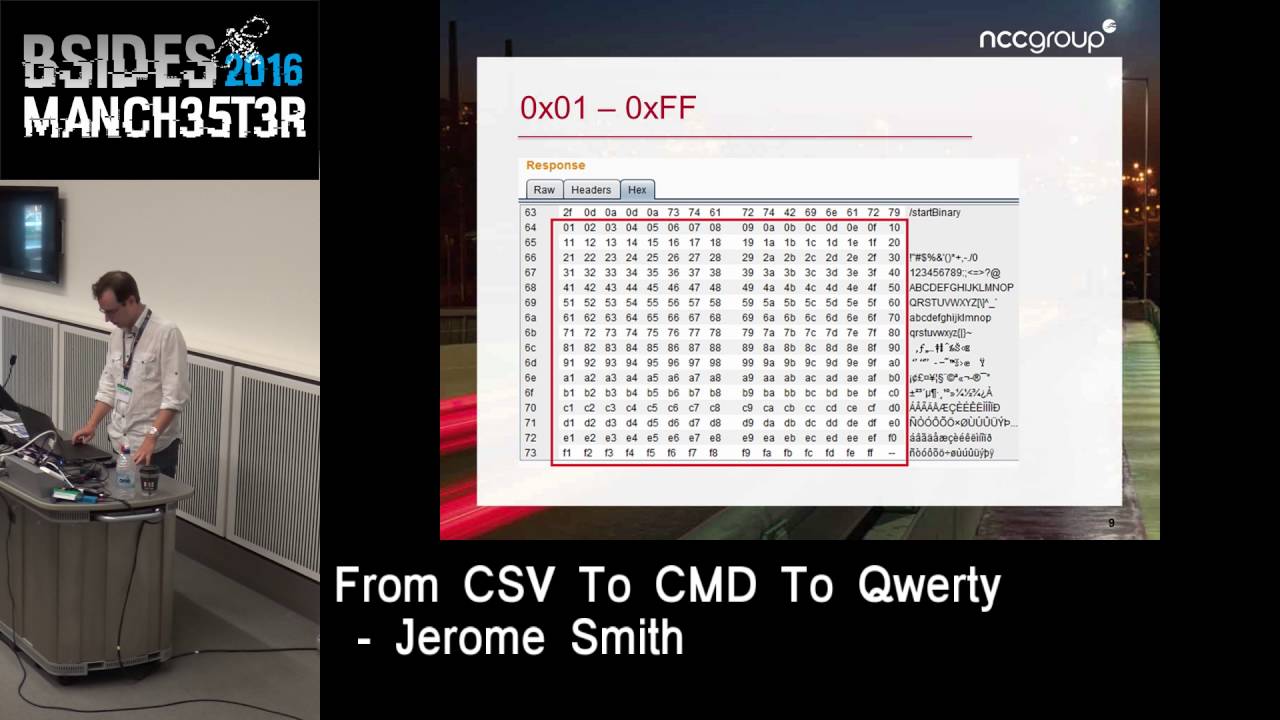
which I'll come to in a second the main thrust of this talk is about OS command execution so what do I mean by exploiting Excel vulnerabilities so um what I did here is just send a request U which contained every single value single bu value all 256 possible values up to the server to see what would happen and back came 255 of them um so essentially you you know that means that you could craft an Excel file that could contain binary content and so potentially you you know you could exploit a problem with someone's um Excel out ofd Excel instance and and and uh you know get up to Mischief there so it was just there for interest turns out
it's much easier to get command execution on the victim anyway because of something called DDE Dynamic data exchange now this is an old Microsoft Technology uh and allows applications to um talk to each other the security risks of this were published um in 2014 cou Years Ago by albino wax James Kettle who I don't know if he's here James you here or maybe he's hiding um but uh so this this particular aspect of it is not particularly uh is not novel so let's consider um a different example with our EXL export here well instead of hello world we've got this this field here which decodes to equals CMD pipe uh for/ K ip config bang and then a cell
reference and you often see this cell reference in in um on web pages that are discussing this problem in fact it's irrelevant that could be Fubar it it doesn't it doesn't really matter in this particular context um so the breakdown of that is that you've got a service or a program a topic um and what's called an item now these are sort of DDE specific uh terms so the point about DDE is that you can basically send a message it's basically a messaging system that they that the app that the operating system handles for you so you've got one application here one application there they can talk to each other using this messaging system so if you like there's a kind of
API between them and there what what these topics are um so when in terms of uh Excel what that is doing is is trying to um Locate a DDE service called CMD with that particular topic and that particular item but that DDE fails because there is no such thing and so what Excel does is try and run that command for you so we'll look at look at that in in in more detail so the warnings that you that you get when you download one um an Excel spreadsheet that has this equal CMD this kind of DD payload they're not Excel is not um not stupid in that regard it knows that something is up in this particular case
um I I actually got a format warning because this was an XLS file and I had complete control of the whole spreadsheet so I was returning like a CSV format inside a XLS so Excel actually first of all complained about the fact that there was a different file format now if you get through that warning you get another security notice about links these that link is is is relating to the um to the to the DDE call saying you know what do you want me to do with that and then finally you get the uh remote data is not accessible now I don't know if you've ever thought about these what these actually mean if
you if you if you you've had to go at doing this kind of exploitation yourself so Excel is complaining there because the DD DDE link call failed there is no you know CMD um service that's uh that's running so it says can't get the data what uh best I can do is just run this thing you know what that's that what do you want me to do so again there's a there's there's another warning and these are the warnings that we're going to look at at the end of the presentation and see where they come from and see if we can sort of cut them down so um one advantage for our attacker is that the the user is
downloading it for themselves so you you kind of already you know this is like a stored payload you know so you you've managed to upload some malicious data to this web application um you know the name of a um of a of an employee or something like that and then someone a month later downloads an Excel export of of that so they doing it voluntarily you know you've got that to your advantage you know that that person has requested that data themselves it's not been pushed on them that's the beauty of stored payloads uh you know like xss so the command execution um so there it is there's the cell equals CMD uhk IB config and you just obviously the SLK
just persists the command window just for this screenshot um uh otherwise it actually runs quite nicely if you have for/ c in there so it just runs the command and exit it runs in a very minimized way you can't wouldn't even notice it uh which is quite nice um so this is like the equivalent of a of an alert one in xss you know let's see if we can do something better with that so because I was on the inside I thought it might be quite interesting to examine some like some SMB style um uh abuses so one thing is that I could run an arbitrary command by on a network share and of course that Network share is
sitting on the attacker's machine um and the one I decided to have a look at um just because it was a bit more challenging was to to grab user credentials you can imagine that everyone who exports this particular set of malicious data you know is having their domain credentials swiped and by by swiped I mean you know collecting the ntlmv2 hash uh which is part of the process of connecting to a network share so obviously an ISP you know would block or should block these kind of ports from going out this was an ex web app that was available to the to the public at large you know that kind of thing you know shouldn't really work but R was on
the inside remember uh so that's what I had a had a now normally you know you might fire up something like responder or Metasploit and it would sort of do all this magically and you know it would be great but I didn't have a pentest laptop I only had a domain user account but and this is this doesn't normally happen on pentest when things go your way there was another corporate workstation which had wire shark on it um um so uh I was able to sort of that then became my attacker machine so I had wi shark running um and that became the attacker uh machine so the the victim connected to that and wi shark obviously
sniffed the SMB you know style connection so straight away you get the domain and username uh uh for free that wi shark's pulled out so let's have a look at some of these um um well we'll have a look at some of those messages later and and what they contain so I had I had my wihar capture of an ntlmv2 exchange and I needed to know what I needed to pull out in order to uh to crack it with um you know with John or or or hashcat or whatever now because I knew the password in this case because I was the victim and I was just trying to do this for a proof of concept I didn't
need any sort of heavyweight um cracking going on I just chose John just randomly you know there was there was no real reason to sort of send this to a GPU rig because I knew the password so I just went to um uh pentest monkey and looked at the hashcat uh sorry the John format so um there it is at the bottom if you can't read uh uh the screenshot so you've got your username the colon and a set of dollar delimited Fields so everything in red is an unknown at this moment and what's in green is a known and that is just a constant uh net ntlmv2 so I already know from wi shark
just looking at the high level um uh packet capture what the uh username and and domain is so I can pop that in straight away um just call it domain doesn't really matter so I've now got half of what I need what about the other half what is this Challenge hmac md5 and blob and this is not Sally not normally something you need to look at because you know responder or whatever is doing it for you but I had to sort of go in Deep dive here so what is this nlm business about well it's challenge response um the first uh um the first sort of command is like a uh negotiation uh it's a bit like sort of SSL where
you're just sort of sending up some some parameters um you then get a challenge come back from the server as well as an agreement of what parameters are going to be used for the chat and then the and obviously the last bit is the response it's the response which contains some maass which includes some calculation involving the password and it's that that you're you know that that you're that's what you're attacking so ntlm versus ntlm V2 just you know our background and so ntlm is using md4 algorithm and Dez and that's sort of that's known to be weak because of null bites and that's probably something you've seen before you can look up but we're in ntlmv2 land and that uses hmac
md5 and which is a little bit stronger and there's a lot more that goes into the computation of the hash um there it's more than just the password and the challenge there's all sorts of time stamps and and and that is known technically speaking as the blob um so let's see where those actually are in wihar this is what I actually had to do you know go into that that go into that capture file and pull these things out uh manually so to get to the to to the focus of if you've ever looked at an SMB Exchange in wi Shar it's just horrible I mean it's just there just packets and packets and packets so you can quickly
get to where you need to go with this ntlm SSP wi shark filter so this is the type one message and there's actually nothing really of interest in terms of cracking hashes what it does leak is information about the client that telling you that it's Windows 7 uh tell telling you that the client machine your victim machine is a Windows 7 machine other than that not that useful so the type two message is a response from the server that's the thing that contains the challenge and so and and there it is so nlm server challenge that's our challenge that's that one of our Fields filled in there there's also some Clues there that we're talking about ntlmv2
because of some of the other things that that that are in this uh in in in this packet so there we are so we've got our challenge that's that's from the second uh packet uh and you can just quickly get that out of wi shark um with um with a few right clicks so what about this hmac md5 and the blob well unsurprisingly they're in this third message um so there's some more clues that would we're looking at ntlmv2 here um because there's like a client challenge which is unique to ntlmv2 remember the CH the challenge that we're after is our server challenge this is a client challenge of no use here but it just allows that two-way process we spot
here that the all the LM style hashes are blanked out because you know obviously this is a Windows 7 machine there's no LM business going on um there's the domain and the and the username so um which is what y shark pulled out of that high with that high level summary so we've got um this is our type three message when we break open this um section here the nlm response um W shock nicely tells us that it is ntlmv2 and inside there is our hash the HM md5 and everything after the hash assuming you can see this mouse y everything after the uh hash is what's affectionately referred to as the blob um so so it's easy to pull this out from
um from wihar so you know that you're doing this correctly if you ever have to do this manually because it starts 0 1 0 1 0 00 0 um so so there we are so we've managed to pull this out without responder without Metasploit just by a bit of sniffing uh now we have everything we need so let's pop it into into John and uh it didn't crack now remember I knew the password so it should have cracked pop it into hashcat didn't crack recovered zero of one okay so U remember that this is on site and you know there was time pressure to be there and I had an awful feeling that it was going to be one of
those reports that may have had the phrase and attacker with more time and resources now if you're a consumer of pent test reports rather than a generator of them if you ever see the expression an attacker with more time and resources that means that the tester was not leat enough to do the job um there are other key phrases in pentest reports as well and if you want to know what they mean then you you can talk to me afterwards um but uh obviously we didn't want that to be the case you know why what was going on here one thing to my advantage is that obviously I didn't need to be on site to do this I was now
cracking it I had my hash had everything I needed so actually during some of the reporting time during in the reporting day I had a bit more of a poke at this and managed to get it working so the key thing that I pulled out from from that was a was an error if I actually go back a slide you can see that hashcat is actually complaining about something not obviously it's not saying error or something like that it seems to be having a go but it says skipping line that which doesn't sound very good why is it skipping a line and that is actually a fraction of my uh of my hash so I just tried different
combinations um on the hashcat website there is some there are some test hashes uh I've got a link to it later um which is a nice way of just doing a sanity check that that everything's working okay so these are these are is that all the various millions of formats that you can that you that you can that you can crack using hashcat so for ntlmv2 there is a hash for the admin user and the password is is password or hashcat or whatever it says on the page so that's a known so if I put if I put that hash into hashcat it worked it said recovered one of one but it didn't work for my
hash that I knew the password to so I then tried the same hashcat test case with uh with John and that didn't work so it worked with hashcat but it didn't work with John so it's just getting a bit confusing now so then I threw that the hash that I that I had from the pentest job and put that onto our GPU rig that we have in in NCC um and that worked so so over here on in in GPU land that cracked over here on my machine it didn't crack um and then eventually I just tried the um the the Smith jur hash which is the one that I got from the out of this job and and I tried it with John
but in a different format I tried it in the hashcat format and then it worked I thought oh thank God okay right I've got my I've got my proof of concept I've managed to crack the hash that's that's good enough but um why were all these mixed results let's go through why I was getting these gotches why was I getting these sort of bugs so it's time to activate this person here um any ideas who that might be probably not who you expecting in a presentation about computer security black and white photo so this is John Stewart Mill and he's an English philosopher or was an English philosopher and 1843 he wrote a book that basically codified How We Do
Science really so how how do we actually find out what causes an effect you know cause an effect and essentially you know you're trying to control you've got a controlled environment where you're changing one thing and you're looking at the effect over here and he he sort of classified a series of methods and it's intuitive to us but he was the first person to sort of write it down really and they're called Mills methods so what were the differences in in between you know the the the hashes that didn't work and the hashes that did work work what were the what were the circumstances well for John as in the Ripper not the philosopher um this is really easy
because as I've already explained the hash cracked when the format was in this style and the hash didn't crack when it was in this style and this is the style I got from from the from the cheat sheet what was confusing about it is that John did seem was did seem to be happy with it when you put this hash here into John it was saying loaded the hash it's ntlmv2 but it just didn't handle it correctly so to be fair um to pentest Monkey uh the cheat if you look at the cheat sheet it does say and which is quite old you know it said this is originally based on a certain version of
John and I'm not really going to change anything afterwards um or you know don't don't blame me if it if things change and so that was the what the case so John uh was expecting or wanted this this this this different format and that's what seemed to do the trick so that's kind of easy so what about hashcat there's a bit more to it here so why was it that I couldn't get this thing to um to crack so um on the for the admin which is the uh test hash that came from the hashcat website this cracked um locally um but my uh hash that I got on this pentest job didn't now remember I know both the passwords
here the only thing that I could see that was of significant difference was the size of that blob you know all those date time stamps all that kind of stuff so the The Blob over here was much much bigger than than than what was over here um and another difference when I uh came to cracking the um uh Smith J hash uh was the the difference in product so on the GPU rig that was using ocl hashcat and also was running on Linux um I was using just hashcat locally here and it was just running on windows so actually that's got two differences um to it so I kind of zoned in on this blob just
basically because it said something about skipping line and I know that this is a much much much bigger hash for it to to deal with so I got a bit suspicious about that so I kind of wrote a script to do some analysis um so this script um pull pulls out hashes from um Yar capture files but more importantly it allows you to play around with them so you can feed this script called CAP flap either a capture file or a hash that you've already got from some other which you know basically you're not often going to be using W shot to do this um but if you've got a hash from that you're having difficulty with this
is a way to do some sanity checks so you feed it the hash file and you tell it the password that you want it to be so obviously this is a case where you you've grabbed a hash from somewhere it's a legitimate hash it's a it's a password that you don't know um you just want to make sure whether things are kind of running uh correctly so yes you can feed in the admin uh hash from the from that hashcat website but as we saw that doesn't always necessarily correlate with with with with the working set of conditions because this one over here didn't work so this allows you to sort of experiment a bit more
because that hashcat um test hash um is obviously you know fixed this allows you to actually play around with the other inputs so in the hash cap file you can change the username you can you can change the password U you can change the blob and all that and it will recalculate it so this allows you to experiment with it and it's a bit of a more faithful check as well because rather than using um the username admin it is actually going to be using the username that you've pulled out from this this hash it is actually going to be using the real blob that came from your um from from your pentest or you
know whatever you're doing so the conditions are much much closer to the hash that you're trying to crack so there's a little demo here just to see what that's
about no I don't want to yeah that's a good point um yeah let's go with the help right um so this is the a wi Shar capture file and um
by putting in that that uh filter nlm SSP we jump straight to the three packets of interest um negotiate Challenge and authentication you can see um it's pulled out the uh the username and password in this in this test case so that's just to sort of show you um what we're dealing with here so cat flap's going to just take that file and it's pulled out the hash sort of automatically um so you got the username NCC and uh it's obviously just set test conditions um domain laptop and there's the there is the challenge um there is the the the hash um and this horrible long thing at the end is the is is the
blob so let's feed that into uh into a file and crack it with John and it cracks so that's our that's our sort of um uh you know the quiry part of the title if you like so
so let's try cat flat with a change of password so just to prove that this isn't just sort of completely fixed anyone want to suggest a password that is crackable by John because we haven't got hours to sit and wait for it what will be in a what was going to be in our standard dictionary file anyone snowflake snowflake you think snowflake is going to be in there okay let's try that
no didn't seem to like that um I tell you what let's just put something like that so what we're doing here is feeding cat flap um with the hash and a new password um so it recalculates the hash uh the you know the end the response if you like the um that comes back from the client as if the password were Brazil so if you look this is the original hash that was the the the one that had the uh password of querty um but other otherwise be a password that you don't know imagine this is the hash that you're targeting you and hash cat has failed and you're just trying to sort of go why is this
failing is is this something that I'm doing wrong you could check it by feeding it a password that you know you know will be in the dictionary file so what this is doing is taking the username The Blob the The Challenge and recalculating the hash to Brazil in this case and if you look at the file closely you'll see the only thing that's different is this area here um because that's the recalculated response so we put that into John and that's cracked quickly if you put it into hashcat it doesn't like it you see there recovered zero of one so let's now shorten this blob that that was the bit I was zoning in on because
that was that was sort of the obvious difference between the two hashes that were that were cracking so let's um use the same password Brazil you can see there that the blob are just cut short in fact this is the same number of bytes as the test case in uh in in hashcat so so we've got a much shorter blob again we're setting the password to uh Brazil and then if you pop it into hashcat now it cracks so obviously there is some bug so that's what I discovered so hash had a had a bug and it wasn't handling these these blobs properly uh when it was above a certain size and I sort of
calculated what that size was and I and I issued a uh a uh you know I put in a um a request to get it to get it fixed it actually came up with a flag of new feature I didn't really quite understand because it's seems to be a bug to me but anyway there we go so you know I knew that it didn't affect ocl hash care it doesn't as it happens I've much much later found out like um sort of the other day um that um that it doesn't work on uh so that it didn't affect hashcat on Linux either so there's a very small footnote there because you've just been watching a a demo of hashcat
apparently running in Linux well I sort of had to fudge that [ __ ] um but promis me I promise you it does actually if you were to run that on Windows it's um you know you would you would see that that uh that that doesn't work so it turns out that old John Stewart Mill was right there I was looking at two differences there that it was it wasn't working with um with hashcat it was working with ocl hashcat and also the platform made a difference as well so um so there we are so that sat there for a little while and then hashcat 3 turned up and it got fixed and disappeared so so so that does
seem to have been taken into account and and fixed which is cool so that is sort of explained sort of what what was wrong with my um and it wasn't my fault as such you know that was explain what was wrong with the with with the cracking operation so um there's some N1 V2 Theory there's some sort of bits and Bobs and uh this is sort of something that just screw out of interest and I wanted to take it further for this for this presentation can we cut out some of those warnings this is essentially about can we can we play around with this Excel export um you know we've seen that we can grab a hash and and some
complications with that scenario but more generally speaking if we want to get some command execution on the victim you know what can what can we do and and and can we make it more streamlined from the uh attacker point of view so the standard sort of warnings that come up when you um have an Excel spreadsheet that contains one of these references like equals CMD pipe into something you know whatever first of all you get a protected view warning and this is because it's coming from the internet the file has been downloaded coming from the internet and it's not trusted so you get that warning come up the next warning you get kind of varies depends
where you are so that warning in the background there with the yellow bar that's kind of the first warning that that you might get um where it's sort of suspicious of the content it knows that you might be sort of you know calling malicious programs so it gives you a warning there the second warning the sort 2B warning there that's slightly different you see it hasn't got a security warning you know quite so it's not quite so it's not that one that you get on the bar of excel it's it's subtly different that's saying that that you usually get that kind of warning when the first warning has been previously accepted um and you're you're running
the file again and it it realizes that you've still got links and you want you want to run them again so you get some different warnings there depending on on on the context and the last warning which I've already explained you know do you want to run cmd.exe you get that warning because that your equal CMD which is it treats as a DDE core fails um because there is no um DD um service listening uh called CMD so it then offers to to run that so what can we do about These Warnings well the first thing to mention is that we know that users click through warnings so um these are some stats from uh ntc's sort of
piranha tool which is sort of In-House tool um that uh is Al also available as a as a service as well to a limited extent where where we can do red teaming and fishing and and and things like that so I man I ask someone someone pull out some stats and um the stats were pretty promising from a from a um from the attacker point of view so the difference here is between people who have open the spreadsheet and people have opened the spreadsheet and must have clicked some warnings the fact that there is a difference there means that the thing definitely didn't Auto execute someone has definitely sort of clicked okay we obviously don't have any visibility as
to what those warnings were but we know that something happened so in a few different cases here you know 70% 75% 44% you know it's always a little bit of a uh you know a lottery as to who who who you're up against um so these people are clicking through warnings so to an extent do we have to worry about the warnings too much not all the time we know that that is a that is a important Vector for for getting stuff um into organizations however it would be nice to to to cut down on those warnings interestingly enough I was uh with someone uh who who who works in uh uh reasonable siiz Corporation and I
just as I Was preparing this talk so let me just have a look at your Excel settings uh and it was set to that so enable all macros so sometimes you might be lucky and they you know the configuration and the the organization may be wide open and of course you know macros is is much more dangerous and that's an important Point here DDE is not the same as a macro you could have macro settings to you know give me a warning and DDE is not going to sort of trigger that um which is quite nice from a from a red team point of view so where do These Warnings come from so they are obviously various
settings in it uh in Excel um so the protected view warnings are coming from the default uh part uh fault set of tick boxes there where you know it says if this file looks suspicious then give me a warning and the external content that's these sort of dynamic links that are making DDE calls and so forth that's in the external content um section there and the default there is is is prompt and hence the yellow hence the yellow bar so while poking about I noticed that inside the Excel spread sheet if you go to data edit links go down to Startup prompt at the bottom so data edit links you get this dialog popup go to Startup
prompt and the default option was let users choose to display the alert or not but there was another option at the bottom don't display the alert and update the links automatically I thought H that's interesting um now this is a property of the file itself so this property goes with the file and I thought this is like a network packet with the evil bit set to off um you know so I had a little experiment with this turns out it's not quite as good as you as I hoped so it is a setting of the property sorry is a setting of the um of of the file it follows the file but it's only effective
if the file has been previously trusted so you get one warning to say you know are you happy with this essentially with this spreadsheet after that it doesn't give you any more warnings when you run it again which is you know not not ideal you could if you wanted to do like a really low and slow attack you know you could could have a a file uh with the same name uh where the first payload was just benign just didn't do anything and then you followed it up with something more malicious later on and that second um uh file wouldn't wouldn't have the same warnings on it um so where is this being stored when
you accept the protected view when you accept the security uh enable uh content warning what's happening well it's just entries in the registry as you might expect so um you get an entry entry here in trust records you get the name of the file and some horrible binary blob I don't know what half of this does but if you once you accept the protected warning file it has this value once you accept the security content uh you know enable content security warning then it changes to this and so that's of interest because only the file name is is stored um so where you have downloads if you're thinking about web app export for example um or maybe you're sending
attachments or something like um if the file name is static then that's more of of more interest because if that file and it could have been obviously completely different content but if it's been previously trusted your file will be trusted U because it's got the same name there's no no no it's not like it's hashing it or anything like that it just goes on the name so once that file once that file name is trusted anything afterwards will um will be subject to less warnings because uh you it's as far as it's as Excel and the operating system is is is concerned you're happy with that even even though you've overwritten the content with something else that could be malicious
it's it will just um to run that so we potentially that's a um that will reduce the number of warnings I then had a poke about with um the Excel the file formats as well is there something you know if you've got a web app that's exporting XLS is that going to be different to a web app that's exporting CSV and that's not something you always have control over when you're doing your web app testing because it's it may just be export a CV CSV and that's it um but some there could be some uh import into red teaming or you know sometimes there may be different options in your web export and so I had a little poke around there
wasn't all that much difference the only thing I noticed was CSV you didn't get that protected warning um message so that first warning protected view this is coming from the internet don't not happy about this with CSV you don't get that so it's almost like you know there's been a design decision in in Microsoft that CSV is benign and we know that not to be true so you get one less warning with csvs um one thing though is that the CSV can't contain that startup prop you know that where it says like I want to auto update my links and and uh not be bothered about it because of because of what it is just comma
separated uh values it you can't store that value a part of the um as part of the file that's obviously not something that you can do with uh with web app export you know is is to is to create the file with that setting but in red teaming you know you can where you're crafting an Excel file you could change the data link properties and and and set that so it may be of use so I'm kind of switching a little bit between different scenarios where you've got web app export and where you might be sending malicious Excel files there's a little bit of an overlap in some areas and in other areas there's there's there's some
differences the other thing I noticed is that if the CSV format was in an XLS file so you had a XLS extension but it was actually in the CSV format now this is actually similar to the real pentest job that uh that was at the top of this presentation so here you get a format warning as saw instead of the protected view so even though it's come from the internet the protected view warning disappears and instead you get a format warning which is a little bit sort of less um uh in in in your face um you might be more likely to click yes to that all the formal security warnings actually aren't shown um all the ones
that have you know the yellow Banner they don't they don't come up um as a consequence though the file can't be trusted because you've got to click those yeses in order for it to appear in the registry so if you're thinking about a long-term attack where you're following it up with other um Excel files that uh that have more malicious payloads you know that's that's not going to work so there wasn't really as it turns out and this is what research is about I suppose you know that didn't really sort of offer offer too much so why don't we have a look at this cmd.exe warning um as well what can we do about that so first thing I thought about is
well what what about if we use some native functions now there's a few here that have already been documented elsewhere you know the equals hyperlink for example is a way of stealing data that was in James kettle's original uh presentation so you can create a high hyperlink to my evil site.com um add some contents of cells and if someone clicks that hyperlink it'll just steal that data and send it off and you know you can read it you can also get some information about the operating system and some bits and Bobs as well if you can grab the contents of cells that you have control over and you put these kind of um instructions in
there equals info directory will'll tell you about the current directory and to be honest there isn't an awful lot there but it's just there for information here so something that was new to I think it's 2013 was the equals web service function I thought well that sounds interesting it's it's automatically making an HTTP request to you know an arbitrary site unfortunately I couldn't get it to do ntlm authentication it doesn't seem to support anything very exciting you know I tried getting it to grab a file to to use UNCC paths and all that kind of stuff and it wasn't it wasn't happy it look it looked fairly locked down to me um but the only thing
that I found of Interest was that it allows you to steal data without someone clicking a hyper L because equals web service it will actually automatically go and grab that so at the top there you've got a hyperlink someone's got to click in this equals web service it's a way of stealing data automatically um the only other function that I could see that just you know sprung out was equals filter XML um and we all know sort of XML paing is quite dangerous um I had a very quick poke at it I wouldn't say it was exhaustive couldn't see anything but it's you know there for interest so in terms of functions that wouldn't produce the CM
MD or XE warning because they are native to EXL you know there wasn't all that much sort of that I that you know that I could see so what about alternatives to running cmd.exe I thought you know could we get a process running that a user might sort of trust more uh I just started poking around with stuff that that would be of interest um you know whether someone would be happier of clicking on a link that had uh you know Powershell XE I you know I don't know but I just sort of had a little poke around to see what you could do one thing I noticed is that in my setup and I tried this across various um uh
different um versions of Excel and operating systems um and when I try and run something like equals Powershell um which obviously isn't a DDE service listening um in the operating system so Excel goes all right I'll have a go running this it says do you want to run powers. XE which sounds like some kind of superhero um and uh and that obviously isn't going to work um so you can see it's got that 8 8.3 kind of format to it isn't it um I saw us um a Blog posting by um Andy I think uh at zepher fish and he and and he seemed to have got the the equals poers shell to to work fine but it didn't in my case so
the fact that there are two different conditions there you got to be careful what you're running because it could be that uh that on the victim machine uh if you've got something that's longer than eight characters do XE it's going to fail um obviously you can always run Powershell by by invoking it like this with equal CMD then we're back to where we started so I looked at some XE files in the path where the the file names were less than 12 characters you know and there's plenty of fun you can have equals Explorer will open the default browser uh you can schedule tasks you can pull down this is Java web start so it'll go and grab that and run it and
run dl32 is an equivalent here invoking this dll uh function is an equivalent way of running CMD but without it saying CMD um trouble is for each of these it we're still going to get a warning it's still going to say do you want to run explorer. XE some you know they uh user may be happier more happy with that than CMD at the end of the day we're still getting a warning and we're getting that warning because none of these are actually DDE calls so my next thought was well what what you know what what what is natively listening uh on this sort of DDE um platform you know what can I take advantage of so I I found
this tool called TCL tool command language uh and it has a sort of DDE client and server package which I got running and then I just asked it to list the available DDE services that are you know that the operating system was was currently supporting with various apps so a few things popped out as a Excel so Excel itself is a d is is offering a DDE interface um shell uh one called um folders uh one called progman so I had a little look at what these actually what these actually do because if I could make calls to these then I wouldn't get that warning because Excel would be happy that it was that you know that the
the call was working so I thought well what can I do with these so using the DDE client as part of TCL I had a little bit of a poke you know and I found out that you could pull out data um which I found kind of interesting that you have an Excel app over here and a and a program over here and this program can read the contents of the worksheet um just you know sort of kind of interesting you could also sort of programmatically from this DDE client tell Excel to run a limited form of macro um so you know some there's some alert uh and you can string them together like this and I thought that
was interesting because if you can get macros running then you know you might be able to get command execution um and but it turns out this macro format is extremely old I mean DDE itself is very very old um and this is in the what's known as the xlm I think it is format this is like pre Visual Basic this macros before VB this is pretty dated um and there's some interesting operations the most important one was exec um and that is a s legitimate uh macro command in xlm world but it did not want to work in this case unfortunately so that was that was a bit of a shame so I started looking at some of the other ones what
does this progman thing do program manager it seems to control shortcuts and and and things like that so you could you could you can you can with a DDE call tell the program manager to create a shortcut and you know you could make it look like something you know something else so here I've just called Cal I've got a hyperlink um a shortcut called Microsoft Word that actually points to calc.exe and when you start in your search bar searching for word it you know it pops up you know it pops up in there as an as an alternative um in terms of folders and shell these other DDE Services um you could um essentially you know run a
similar attack to what I you know what I did in the pentest job where you're getting it to connect to a network share and as a result of that you can still the ntlm you know hashes but the trouble with all this is that there's sod all documentation um it it was so so hard to pull anything out at all um probably because it's so old um and it's kind of frustrating because you just think there may be something there uh and uh you know you only basically ran out of time um so the other thing I decided was this is this is all very well and good if I can do this using a DDE client but if I
can't get it working in Excel the whole thing is pointless so what happens when we take these DDE calls that are in a DDE client and try and put them in Excel in the format equals service topic you know item so so this could save you hours by the way if you do decide to have a play with this because this uh this really threw me when I was doing my testing I was putting in these equals service topic you know these kind of DDE calls and nothing was happening I thought well you know I don't why isn't it working turns out for the vast majority that um the TCL program which I happen to have
running as my DDE client seemed to be interfering it with some way so um if you are sort of poking around then just be wary that you may there could be some interference in the messaging system um I don't know why but but there you go as soon as I Clos my DD client it kind of ran again so um so be wary of that if you if you decide to have a play um so I didn't have all that much luck with some of the things that I was um uh that I just pulled out from my experimentation with the client so for example if I tried to take this DDE client um DDE call and put it in a sort
of excel format where you were kind of getting equals folders app property is and then trying to feed it some data it didn't seem to be happy I tried doing escapes I tried doing all sorts of things and and I couldn't get it to work so then I thought well okay what else what else could I do so I then found out that the that DDE client was not telling me about all the services that were listening you know there was this progman Excel and so forth it wasn't it wasn't actually complete and I pulled out this tool called DD spy which is part of Visual Studio 6 I told you this was old um and if that's running at the
time that you're launching ations it gives you some hints as to what DDE um API if you like they're exposing so it turns out the browsers are exposing some as well so I explore and Firefox and there are some um methods although they're called topics in DDE world so I explore is the name of the service and you know these are the name of the topics so I started having a play with that so I explore that that that was quite happy working in in in Excel probably because the what the maybe because the characters that I were using were much simpler so if you put equals I explore and www open URL nccg group.com
for example in a spreadsheet it will just you know you know um Point Internet Explorer to that URL sort of silently in in the background so similarly I could do a back slashback slash um attacker IP network share and grab a hash in in the same way you could also try and run an executable although you just get a a dialog almost as if you were downloading the file and of course the whole point about this is trying to get rid of prompts so you know that wasn't really too interesting and I I didn't really find a way of getting any command switches in there either so you know that really isn't going to help
us so Firefox offers a similar sort of in interface the only thing that I found the different between the two was a a topic called get window info so if you have an Excel spreadsheet uh has this as its um DDE call equals Firefox get window info Etc and again doesn't really matter what this is um it will pull out details of the uh of the URL that that happen to be you know that you happen to be on so let's do a little bit of a demo with with some Excel files that are trying to take advantage of DDE uh so somewhere here so I've just got imagine this is like a webout export
kind of thing so so here we have a monthly report which uh we we're downloading and you know saving and what have you uh let's just there we are so we downloaded monthly report. CSV and we open that up and nothing very exciting so this is you this is our sort of standard test case if you like so this is our CSV file so what happens if this is malicious so we're going to open that uh actually let's save it um then I've got a copy of it sounds working here we are so here we've now overwrote that CSV file with a new one that's malicious so let's open that up um now we've got no protected view
warning uh so this has come from the internet we've got no protected view warning because this is a CSV file um but we do have the security warning because it realizes there's some kind of content in there which is active if you like so we we if we enable that now you can see back in the background in the background the browser has been navigated away to a completely different URL and obviously the point of this is to do like a fishing exercise so imagine that you're you're doing your web app um export um you can put in a payload which sort of which in the background navigates the user to some arbitrary site that site is our fishing
site and is meant to look like the original site there's the original site um but it's got a login prompt there so you could quite easily be you know um downloading a a malicious Excel format um Excel file running it you can see there's no there's nothing obvious there's a any problem um and in the background you flick back to here and you think oh my session's timed out you know and and you put in your credentials and and you're actually giving it to the to the attacker so the call there is simply you can read that but yeah so equals Firefox just using a DDE call so this time we're not getting do you want
to run firefox.exe because that is a legitimate call the DDE service was responding so you don't get that error message um so here we're navigating off so let's do a a final demo which is just like if the stars are aligned if you like so this is when everything is uh working correctly so let's just get responder [Music] running uh yeah so we see we've got an smv server on so let's now download this uh malicious file yeah replace that and open
it so here we've got a slightly different uh call in here let's go back to our responder and there you go so you've got you've got an ntlmv2 exchange going on in the background around with no warnings um and so there is the it's very similar um um sort of payload to the previous one all I'm doing is pointing it to a UNC path and you can see that uh it has actually tried to open it in Firefox that's happened in the background um it's just got a blank blank page so without any warning that um that you're going to do this um you know you you you your back to start of stealing hashes so for f presentation we just
sort of round this up so exactly what happened there because I got absolutely no warnings whatsoever um so in order to get rid of some of the security warnings I had to have previously downloaded that file um with um and and accepted the warnings uh before so remember that this needn't have previously been malicious um and uh this is kind of sort of rather exceptional um the main um I think the main warning that you can tackle uh potentially is the is the cmd.exe warning I think that's the one that you've probably got the most control um over so what lessons have we learned there so Excel export is definitely something to be pay attention to with
with web apps and I you know I don't know whe How many of us pentesters and what kind of background here but if you're new to it definitely sort of look that up um CSV is definitely not a benign format DDE is not the same as macros so um Excel files that are being uh if you're talking about emailing um uh you know from a red team point of view emailing Excel files um then uh even if they're catching macros then you can um you know possibly bypass that with using DDE calls in some case it's possible to cut down the Excel warnings um and Excel may have more to give in this area this is kind of work in
progress you know I got as far as I could you know I kind of finished this on Tuesday um you know I pushed it as far as I could you know unfortunately there was no like obvious sort of command execution that I could find but you've seen the principles you can see that if you are making d e calls you don't get warnings um that they're that they're running and if you can poke the right thing there may be something more here um so please you know go away and explore this I'm certainly going to have a little poke more of a poke this certainly applies to Red teaming as well not just we export because you know
ultimately you're trying to get command execution um and just at the end there um this is more about the sort of problems I had with cracking hashes you know the closer that you can get to developing test cases that match your environment you know the better read errors as well it's so quickly to it's so easy to it could be telling you what's wrong and you're just so sort of obsessed with the fact that it hasn't actually worked that um you kind of forget the error message so quick word on defense uh the original article um said that we should prefix the E uh anything beginning with equals with a uh with an apostrophe that
will cast the sell's text um but we know and this has actually got a little bit more of a an uplift sort of in in the last couple of months um this this sort of topic went quite quiet for a while which is why I decided to talk about it and then funnny enough it sort of popped up again so um lots of these different pay all these different payloads work so you can see there that we we've got celles that are working without an equal sign and all sorts of stuff and this is beginning to feel like cross-site scripting black listing here um so obviously what we want to do is sort of validate against a white list of known a
known good which should be of no surprise so when the slides eventually make their way to um the internet there's a few references and things to to look at for some DDE some uh hashcat test fars where this cap flap script is um and some appendices about how I'm pulling out data from wi shark and actually how I'm sort of recalculating the ntlmv2 and that's it so I don't know whether anyone has any any
questions so I'm not exactly doing a a root dance here and but there's some I feel like there's some progress you know in trying to cut down those warnings and there may be more so this is a bit of an open call to people so go and have a look cuz I think there may be there may be more to find it's just so difficult because it's just undocumented hello yes yeah no so the question was whether uh I looked at anything other than uh Excel no I'm not I know that word is also a DDE server um one of the things I was thinking about is whether you could you could actually leverage when Excel opens
whether you could make a DDE call to excel itself it in order to get things uh operating so it could be that word has some more interesting um um methods if you like exposed you know topics to use the DDE uh term and and I've not had a look at it no no so that that could well be something that uh deserves further investigation yeah I did I think I yeah I couldn't see anything well let's say that when I had Outlook running and I ran the DDE uh Services list it didn't display anything but as I've as I've shown that wasn't exhaustive because that that wasn't listing for example that Firefox would had some Services
exposed it wasn't listing that wasn't listing the Internet Explorer so I don't really know what's happening in the DD mechanism which whether that client was was able to uh know those Services were running but obviously in some cases that it's not it's not advertising it so this and of course you how do you research something like that you know you don't even know what's there it's so so there may be more to give I you know I took it as far as I could in the time available um you know go and have a look have you
any so so the question was whether that how essential was that so pipe character so in in in terms of excel to get Excel to do a DDE call that's the format so that you have equals CMD that's the name or you know as we've seen Firefox for example and in that case that doesn't refer to the executable that is referring to you know um a DDE Service uh you then distinguish that with a pipe to say now that's the service I want to call this is the topic that I want to send to it so as far as I'm aware in terms of DDE in Excel that pipe is uh is essential the oh hello
Andy no no of not the only thing is um yeah cuz I saw that conversation I mean he was raising the fact that um you had other payloads which which did other things you know so for example like the equals web service for example doesn't rely on a on a pipe character but could steal but could steal data um so as far as I'm aware in terms of DDE that pipe character is is essential yeah in in Excel I think that's yeah that's that's the that's the sort of constant if you like hello
the
sorry uh right um no and so the question was like um so so so can can we take advantage of uh IBC dollar um so you mean sort of do a network connection
ex yeah well I think I think the are I think it's you know the the mechanism that DDE uses is not necessarily I mean obviously to use the term RPC generically remote procedure call it is obviously a remote procedure core of some description but I think the mechanism within DDE world is is very different um um oh I see what you mean I think I yeah so you're you're saying whether whether I could have a client over here and uh and and I could sort of programmatically poke something over here on but but not on the same machine but over on the network I see what you mean right okay uh don't know didn't get that far um I
was yeah yeah I'm not not that I'm aware not that I'm aware as far as I've only looked at it locally I've only looked at DD running locally because the focus of the presentation uh was about you know if you can get something running um in terms of an Excel file that you download from a web app that's obviously all local and I kind of kept it with that scenario in I know I flicked occasionally to to Red teaming and and the like but that's the focus so I've not I've not looked at that now I don't know whether that's possible to be honest please
do lunch h [Applause]
Related talks
 39:16
39:16 42:21
42:21 46:25
46:25 47:26
47:26 46:12
46:12 48:32
48:32