Malware Analysis and Automation using Binary Ninja
Show original YouTube description
Show transcript [en]
all right i guess we'll get started here just a little bit here so um i'm going to talk about malware analysis and automation with binary ninja which is a new relatively new software program so we're going to cover you know what is binary ninja in case you guys haven't heard of it why binary ninja brief introduction to a malware family called plug x if you haven't heard of it disassembly and intermediate languages in binary ninja and then the automation of plug x string decryption using binary ninja so who am i um i'm not in any way affiliated with vector 35 the company that is developing binary ninja um but uh i actually worked for carbon
black as of last monday so uh yeah a little bit new here and i have my lovely corporate laptop because i haven't gotten my uh analyst laptop so hopefully everything goes smoothly because i haven't had a chance to set everything up here um but i've been in the security industry for a while doing some malware re some firmware stuff digital forensics ios programming a few years ago i was at dc3 in the intrusions department doing defense network intrusion investigations which is mostly reversing malware and then also sometimes system forensics so i just wanted to make some acknowledgments here everyone in binary ninja slack channel is just awesome it's a great community but especially josh watson who if you
don't follow him he works at trail of bits and he's been he was an early adopter of binary ninja like a lot of the guys that and girls at trailer bits um there's a really good uh you can't read it i guess but um i'll have these links up later but he he's written some good blog posts about using binary ninja and that's actually what how i found out about it so last june no june of 2016 sorry um he wrote a blog post where they had actually automated used binary ninja to automate the processing of over 2000 binaries for a ctf challenge and it was pretty inspiring so i was like wow what is this
thing and i ended up getting a license in october of that year to try it out also ryan snyder who works with vector35 fairly recently as i was doing this uh exercise trying to write my decryption script i ran into a lot of problems and um he helped me track down what was actually ended up being a core bug that was affecting the disassembly so and then you know all the early adopters that have been really helpful in the slack channel especially and just really sharing knowledge on the platform also jordan who's one of the main guys that started vector35 for help and support he's always there but also he gave me a big bag of
stickers that i can get out to you guys so so you can see me after so what is binary ninja it's a reverse engineering platform that was developed by this company vector35 released back in july of 2016 the first public release it's got a linear disassembly mode graph mode the graph mode has disassembly mode ll and mlio which i'll talk about a little bit later there's a fully featured hex editor which i'll be honest was the main thing that i was using for the first probably year that i had it because it's just awesome you've got built-in transformations like you can encrypt and decrypt xor with even you know single byte or multi byte just
pasting the key in uh it's great there's also an open plugin architecture and the open source community plug-in repository which is up on github it's github it's under vector35's github there's community plugins and then some of those are actually adopted back into the product after there's also a very active community slack channel which is just great even if you just want to hang out they're just a bunch of great people it's hashtag binary ninja but they also do announcements support um anytime you have a question you can get an answer pretty much almost immediately from somebody whether it's one of the vector 35 guys or somebody that's in the community a lot of the trail of black people uh
trail trail bits people hang out in there as well so why binary ninja so what was my motivation so i've been using this off and on since october of 2016 when i first got my license and i've been an evangelist for for them since then but i realized you know i'm not really using it in my day to day you know i still fall back on ida and a lot of the malware analysts i talk to my friends i'm like you know they're like yeah i've kind of loaded up binary ninja and i come playing around with it but i still just kind of fall back on ida so back in january you know doing
quarterly planning and stuff i'm like you know i need to come up with a project for this quarter what do i want to do this quarter and so i decided um it's like you know i'd really like to just take some common malware analysis task that i do regularly and see if i can just do this end to end using binary ninja just force myself to just do it not go back to ida so i was thinking about it and i thought you know plug x is a malware family if you're not familiar it's been around forever you know first samples were found back in 2008 so you know 10 years worth and it's still kind of
you know even the first samples of it or variations of the first samples of it you're still seeing in the wild so if you look um in any of the kind of automation platforms there's almost always a plug-in mod a plug-in or like a module that handles plug-x because it usually it always follows kind of the same or usually follows the same methodology so these things continue the signatures and decryption routines tend to keep working on them so i thought that would be a perfect example to to do for this so i decided you know i'm gonna do kind of a history of plug x which the blog is i have a blog post up
uh on my former company's website going over kind of the history of plug x and pulling together all of the um kind of historical research over the last 10 years and i thought you know why don't i just take the simple string decryption one of the first steps it decrypts the api calls so i thought yeah that's a simple thing can automate that using binary ninja and you know why but why do i like binary ninja first of all you know ida is a monster not a monster but you know it's it's been the de facto tool for decades basically um and so it's kind of nice to see somebody coming in and trying to shake up the industry
and just the progress that i've watched over the last two years it's been amazing you know it's a great team of developers they're very responsive to the community anytime there's a bug or something that you know feature that people want to get in you know they're right there they're taking that feedback and they implement things very quickly so it's really an agile platform um also you know the community support is just great all the people that have adopted it everybody wants to help give back and um i've always had a very responsive feedback to questions and things like that and also it's very extensible the um the api is great it's fully documented which is great
it's actually readable and very easy to understand so one of the things i talked about at the beginning was these intermediate languages so binary ninja has its own intermediate language that or i guess set of intermediate languages that they developed called binary ninja intermediate language the first one is the ll the lower level intermediate language and then the ml the medium yeah medium level intermediate language they're also developing an hl for future release there's no timeline for that just yet but if you're not familiar with ielts which i wasn't honestly i don't have a computer science background to be honest i came from math so i wasn't familiar with this concept but um compilers actually use this
intermediate representation to analyze and optimize optimize code that's being compiled and um again josh uh from trail of bits he wrote a really good blog post um on breaking down the low level aisle so he's it's a much more elegant overview of the il for binary ninja than i can provide but i wanted to get an overview as well so these intermediate languages basically provide a higher level abstraction where you have the assembly that's you know translating your machine code into something that's more human readable but anybody that studies or analyzes assembly it's not super human readable it's not real friendly it's not like reading source code right so intermediate languages provide this abstraction that
lifts the assembly up to something that reads a little bit more like so source code and i just put a quote up here from the actual documentation they actually have a developer's guide for this ll and it's it's a really good read that really helped me it's they stepped through an example to kind of demonstrate what the aisle is and how it works so they said the binary ninja intermediate language is a semantic representation of the assembly language instructions for native architecture and binary ninja and they actually support quite a few architectures and unlike well i'm not going to get into that but um everything is packaged unlike ida you know it's not like you pay for different architectures in
terms of like decompilation so anyway bnil is actually a family of intermediate languages that work together to provide functionality at different abstraction layers so that's just kind of a basic overview of these aisles this is kind of a tangent but i just saw this yesterday um ben demick who was teaching the introduction to reverse engineering yesterday i went to actually get these stickers from him because he brought them from infiltrate um he showed me this tool or website called compiler explorer and if you haven't seen it this is really great so you can basically put in this is c code but it's got support for like 10 or 12 different languages but you can basically put in source code here and
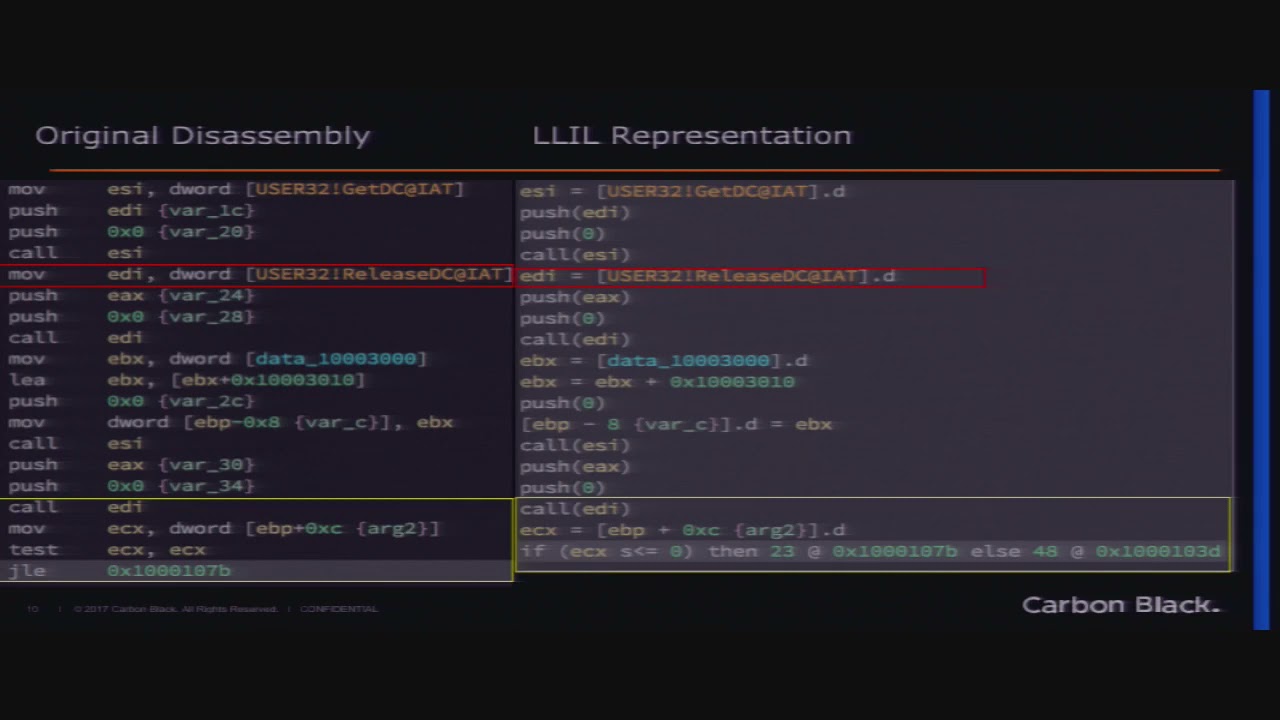
it'll disassemble it for you but it also color codes so like in sum equals zero it actually color codes what the assembly structure that that corresponds to that over here i just thought this was really cool and it's you know it's assembly so it's slightly relevant anyway back to this so um these intermediate languages i wanted to just kind of give like a pictorial representation here i know you can't read this but we'll go into it a little bit more in the next slides basically here's your disassembly and the way that the intermediate languages work just by virtue of of the their purpose really you end up getting kind of a condensation of code so it's almost like
an optimization ish so you can see that like on the lower level representation this code gets collapsed a little bit it's a little bit more compact and in the medium level it's actually even more compact so i just put a few like kind of a quick example of here's like the dis assembl the disassembly and then what that would look like in ll what that looks like in ml so you can see it's kind of you know compressed but let's look at it a little bit further so here's the original disassembly that we were looking at there and you can see you've got a move instruction up here so we're taking the um the address for that function
release dc moving it into edi so that we can call it later right so this is typical call for for disassembly uh in disassembly the llyo representation we can see it looks a little bit more like source code so you've got this func the function address and this dot d is just indicating that it's a d word so you'll have d dot b that's just a binary ninja representation so it's actually just showing this is an assignment edi is getting you know this address and then it's a call edi rather than you know i mean it's not a whole lot different right but semantically so then but the the difference is you've got this jump here
so instead of doing you know this move and then testing the register it's actually going to look more like a an if else statement so you know if this condition then we're going to jump here otherwise that so just makes it a little bit more human readable right so ll versus the mli so here we've got basically this whole set of instructions gets compli uh collapsed down here you've got the um the call basically they've collapsed the instead of pushing these arguments onto the stack and then calling you're just going to see a function call with the parameters so it's just even more human readable and again similarly you know this is kind of the same but you've
got the if else statement rather than a conditional statement so let's look at the original disassembly versus this ml again you know you've got this whole set of assembly instructions that gets kind of collapsed just down into three lines so it's a little bit less to to pour through you know makes it a little bit easier um so one of the things that is a little bit different with binary view i mean with uh binary ninja is this concept of binary view so when you first load a binary into binary ninja either whether it be from the command line because there is a headless mode i didn't mention that it's not in the demo version
there's a free demo version but it is in both the personal and commercial versions but basically when you load one of these binaries into the program it's going to give you two different well okay so i'm just going to talk about x86 playing pe binary it handles all sorts of you know it's you can load maco and you know elf files whatever but we're just going to talk about a pe here since we're talking about malware so there's this binary view module and basically when you load into the software you could for a pe you've got raw mode so basically you're just manipulating bytes in a raw fashion kind of like you know you're in a hex
editor or you've got pe mode pe view so the pe view is going to give you a different set of apis that you can work with this binary so the very first thing that you have to do if you're going to automate something or use this headless mode you have to tell binary ninja like what view am i working in here and so that this binary view module has several methods you can do there's a binary reader and a binary writer this is another one of my favorite things about binary ninja instead of you know like ida in the past when i would do something like this let's say a string decryption you know i would load
i have the binary in the in in the editor in ida and you can perform this encryption a decryption routine and then you have to patch back the database right you're patching the database and saying okay this string at this offset is now decrypted to this and you can put like maybe a comment in there or something but that's just in your database right it doesn't touch the binary itself with binary energy you can actually write back to the binary so i can say okay all these strings at these offsets these encrypted strings now i've decrypted them now write those back to the binary so now when i load that binary back into ida or
any other program those strings are already decrypted so i don't have to go and patch you know put comments in or any of that it's just going to fix the references which is really handy so you've got this binary reader binary writer those are probably the most you know section segments references and all that so this all this documentation is up on api.binaryninja.com and um kind of that standard doxygen format you know if you're familiar with that it's very easy to navigate so let's just take a look at the actual interface let's see if i can actually get this to behave that's not what i wanna
yeah i've had this laptop for about five days so uh yeah i don't know how to get the
this new like touch bar thing it doesn't have the same options on it yeah so i haven't quite gotten used to this if anybody knows how to switch yeah i need to show myself
i was closer all right this is great
all right this is not going to be in here extend desktop mirror mirror displays yay okay okay yeah i don't think i've used vga in a while all right so um basically this is the the main binary interface i've already loaded up a dll in here so this is our actual um malicious plug x binary but i just wanted to show the interface a little bit because honestly like when i first started using this program the ui i'll be honest it was a little bit hard to navigate they are actually completely redoing this so this is version 1.1 point something i'm on one of the developer builds but version 1.2 has a complete overhaul of the
ui so i've heard about some of the features that are going to be implemented but i haven't actually seen any of it yet but it's supposed to be coming out sometime soon so i don't know the exact release schedule but this is all going to be kind of changed but i did want to show it anyway so like i was talking about before we've loaded this up and for a pe it'll actually just default into a binary view i thought we were going till 11 30. okay i was like oh my god are you kidding me okay so um i was getting the 10 minute warning there so anyway so when you first load this binary into
the interface if it's a pe it's going to default to this binary view i'm sorry pe view and load you into the graph view of the disassembly but down here there's a hopefully you can see that all right it's not too low there's this menu down here where you can change to either raw view or pe so we can actually switch to raw view which is kind of like a like hex editor view basically so let's go back to pe view and then you've got this other one where you can go to hex editor or disassembly graph so you can see when i moved back to pe it's it's still in kind of the um
the hex mode so you've got the disassembly graph which is what we're seeing initially you've got strings which is just you know the strings in the binary obviously linear disassembly so if we look at one of these functions here this is going to be more like you know just like ida which i'll mention also if you're familiar with ida most of the key bindings are the same so you know your space bar will go between graph view and um linear uh g is going to be your go to address you know so most of these key bindings are the same there are extra ones um like uh no i'm in linear now if you're in graph
you can hit i to switch between il modes but you can also do it down here um from this last option if you're in graph view so the low level aisle and medium level aisle are only available right now in graph view i've been well a lot of us have been poking them and say please put that in linear disassembly view because i don't like graphy personally most of the time but so you've got your low level aisle view here and your medium level aisle that you can kind of switch between but again you know you can also toggle between those that way down here you've got your xrefs so i've got all the the cross references to this function
just listed here which is nice you can actually hover over it and it'll show you kind of a preview of it which is nice uh one thing i'll mention though you'll see there's four functions here so one of the things that initially was a little bit difficult these guys developed all the guys that developed this are kind of vulnerability researchers so they come at at they use you know ida and these tools they do very different reverse engineering than i do with malware analysis so the kind of the um the features of the product initially were very much more geared toward using it for ctfs and and vr stuff but finally i think it was last year
sometime they implemented in in 1.1 they uh implemented linear sweep so that made this a lot better because before when you'd load malware into here a lot of times if you're familiar with malware analysis it doesn't always play very nicely with disassembly and purposefully tries to trick you or trick the disassembler and mess things up so a lot of times functions wouldn't be defined automatically so you'd have to go through and manually define functions which again the key bindings are just like ida you can hit y to define a function at an address and all that so anyway so they implemented this linear sweep um and it's still a beta plugin right now but you can actually run this analysis
module linear sweep so if we run that on there we see we get an extra function here that wasn't identified previously so it turns out that this this first function is actually our string decryption function so once again just like ida you can hit n and and actually rename that and then we see these xrefs down here um so all of these are going to be calls to this decryption function so this is where we're going to find all of our encrypted strings so if we look at this let's go here so here's this call let me switch back to regular assembly so here's this call to the string decryption function you see these um the parameters that are passed on
here we've got the address of our our encrypted string so let's just go over there so if we double click on that we can see this sorry the the it's a little bit compacted here because of the screen resolution but you can see you've got the you know obviously these are not most of these are not ascii so these are our encrypted strings here and hit escape go back here so we'll take a look at this a little bit more but just wanted to show you that real quick and while we're here actually so i can hit um apple n so here's our hex this is actually hex the hex editor so if we put
in um we can just whoops wrong side we go over to this ascii side here i can just type something and just to show you the the transformation here you've got if you right click on this you can actually you can actually copy as you know these different types of strings and and things you can copy the raw hex whatever but this transformation thing is one of my favorites um you can actually you know xor this you can rc4 encrypt it if you've got let's say you've got an x4 encrypted string you can actually just hit this and give it the key and like i said you can just paste a whole you know it can be arbitrary
length which is nice you've also got encoding you can encode this or decode base64 which is great so just a nice little kind of handy thing in there all right so let's see if we can a mirroring display so hopefully this is okay let's go back to the center view here so just a little introduction there to the ui so what's plug x if you're not familiar with plug x it's a fully featured remote access trojan or remote administration tool depending on who you talk to the first samples as i said were seen back in 2008 but it's still being used you know um a lot of the what's old is or what's old is new again there's a lot of code
reuse in malware um by malware actors so this is certainly one family that like i said even the version like the first variant um you're still seeing that in the wild today so even though there's been a lot of code evolution over the last 10 years and actually paulo unit 42 recently somewhat re i think it was in january they saw a new one that is completely different than all of these they called paranoid plug x which is kind of interesting but even despite that you still see these these original versions out there so this original version um typically follows this same kind of methodology you have like a self-extracting rar or you know a dropper
that has three files embedded in it um you've got a legitimate signed executable a dll loader typically that gets side loaded by this signed executable and then you have an encrypted shell code payload so the shell code is generally it's decrypted um decrypted and decompressed usually lznt-1 by the um this dll and then inject it into some legitimate system process usually it'll do well i'm going to talk about that in a minute so the sample that i'm using today for this demonstration is follows this this pattern so what is side loading for anybody who's not a malware analyst in case you're not familiar with this legitimate windows executables or executables in general will typically you know they rely on external libraries
to do functions you know you don't want to statically compile all these things or rewrite all this functionality that's available in libraries right so at runtime these libraries are loaded by the executable to perform you know network functions or whatever the malware wants to do but these executables typically don't do any sort of validation before they load these libraries they just say i want network.dll give me network.dll and windows will follow a chain of locations to find those dlls but malware can take advantage of this and say because the first place that the binary is going to look for the dll that it wants is in its current directory so malware can just say okay you want
networkday.dll i'm going to give you my version of network.dll and put it next to you so that you load mine instead of yours or the legitimate one so basically a lot of times um malware authors will use a um these legitimate executables are usually from something like antivirus or some security product so that not only is it legitimate it's signed trusted by the operating system but you might even take advantage of some application whitelisting that might not be on your system so you might actually your administrators your network may have something like let's say they've got mcafee whitelisted in the network so not only is it going to be trusted by microsoft but it's also going to be whitelisted on
the endpoint so here's just a couple of examples of some the one that we're going to look at today is actually this a shield dot exe a shield res dot dll so a shield.exe is an actual mcphee v shield component the actual thing from the product similarly you've got an f-secure gui component here there was one that was a office 2003 sp2 update file so we've got our legitimate executables here and then the malicious executables that are loaded so how does this work i mentioned that the shell kit is loaded and usually injected if you're not familiar with process hollowing this third component contains the encrypted and compressed shell code and c2 configuration data the loader dll this malicious dll that
gets loaded will decrypt and decompress the shell code like i said it's usually a lot of times it's lz and t1 and usually a simple xor or xor combined with some arithmetic in terms of the decryption so this this loader actually starts a new instance of process let's say like svchost.exe but it starts it in a suspended state so that program's not running and then it'll actually go into this suspended process free or unmap a section of memory and then load the shut the shell code into this freed memory set the execution to the beginning of the shell code and then start the process resume the process
so the decryption method so how do we identify this if you're not familiar probably most of you if you do malware analysis are familiar with yara they call it the pattern matching swiss army knife but basically you can if you're not familiar you can key off of ascii strings or you can do regex or you can actually specify bytes with wildcarding so here for this particular this is actually the string decryption signature that i'm using there's actually two versions of it so if you're familiar with assembly you know you've got a uh like an xor instruction you know it could be one of two things your move instruction whatever so we're actually going to have
two different versions of these with with different um instruction disassemblies but when you've got in your disassembly you know a lot of times you're going to have a hard coded offset or something like that so you want you don't want to actually hard code that offset because it's going to you know vary among different binaries so you actually kind of can wildcard that out so i can say you know 8a followed by two to four bytes somewhere in there followed by another 8a or 8b 2-4 bytes followed by an 8-a et cetera so so we're going to use this yara signature run it against the binary to find the offset of this decryption routine basically it'll give us back the
offset of where this code starts so we get the offset of this decryption code then we want to say okay what are the cross reference let's find the function that that this code is in get the cross references to that function get the parameters passed into the decryption function because that's going to give us you know our key and our encrypted string and all that and then we're going to decrypt the strings and then patch back the binary so that's a basic methodology please excuse my python i'm not a python expert and this was written rather quickly so no judging please um but anyway so here we're going to see i'm going to get the yara offsets for
this of the we're going to run the r against it get the offsets like i said again this binary view so the very first thing you have to do when you start processing a file is to get this binary view object because that's basically going to open the door to your api and give you an object to work on basically sorry yes actually i should have um okay so i should back up basically um in headless mode you just import binary ninja as a library so you've got your binary you add it to your python path the whole binary ninja library and then you can just import it like any other python library so you say import binary
ninja import you know you know from binary view yada yada so these um these methods are actually available to you once you import this library so the very first thing that you're going to do is get this binary view so that you have something to work on and the very first thing i did was run linear sweep against it so that we can make sure that all of our functions are analyzed or um identified and then you up you can update the analysis and wait so it's just going to wait for it to finish running through that linear sweep um then we want to get the xrefs again your most the time you're going to
have to pass this binary view object in we're going to get the key and the other parameters and then we're going to decrypt and then save this back out so my decryption function is going to patch back that binary and then save it out and you can save it out to you know a an external file of some sort and i've got a useless print function in the bottom of that that was probably from debugging all right so i'm not going to go through all this code but i just wanted to show a few things in here so the way that yara works um you're going to get basically an array of hits so if you've got multiple offsets
for let's say there were multiple decryption functions or something for some reason it'll give you back a array of these hits so you can you can basically just iterate through those for each hit then you know you can match the strings and i want to get the offset of that and then the function that contains that offset the xrefs again pretty simple you've got this in the binary view you've got this um get address for data offset this is the other nice thing most even though they're kind of long sometimes to type out it's nice that the the actual functions and api the calls that you're referencing are very descriptive so get address for data offset pretty
self-explanatory we're gonna take an offset and get the the actual raw address for that and so then again get functions containing so i've got my offset i want to know what function contains that offset and then i'm going to append that to these x xrefs again get code refs so i've got the start of my function i want to get the code refs to that so very simple trying to do this uh in ida python is would be a lot more code basically i'll just sit up so we want to get the key so this is where um one of the things i wanted to go through because this was something that i really struggled with
this is one of the things that josh really helped me through because working with ida if you've done something like this in ida you get your offset and then you're kind of like traversing back or traversing forward and looking at the operands and blah blah in this because you've got you've got that assembly level and you can do that but you can also lift to il and actually work with the aisle the instruction itself in il or you can go up to ml and so it kind of took a while to wrap my brain around the way to you know because it's a different way of looking at it i guess i'll say um rather than just saying okay
go back i've got my hit let's go back find the xor call let's go back find the call to this function get the parameters that are pushed you know just kind of iterate back instead of doing that manually you can actually do it kind of um semantically where you say i've got this called as function it's got parameters rather than you know working kind of at the byte level so for these offsets um let me go down here so once you get oh this is the other thing when you've got if you're looking at the code like i said in that graph view so instead of just looking at an instruction view you can actually go
through with binary ninja you can look at the blocks so i can say this function block or this function block and i can work on a function block rather than a whole function or like an individual address so when i get the functions containing this offset i can actually get the basic blocks so i can look at the block that contains that virtual offset and and get the low level il for that block so i'm just going to say give me the intermediate language the low level intermediate language for that block and then i can iterate over that so for every basic block in that in that lol uh i want to look at the instruction
instruction index and then for each of those instruction those ils i want to look at the actual operations so if there's an ll set reg and an llxor operation then i want to say this il source right is giving me the second parameter for that call so that's going to be my xor key and i'm just appending that to my keys in this case there's only one but you know in case you had multiple the description again we're working at this il level so i can say you know get the ll aisle at this address but then i'm going to actually lift back lift up so i can lift up to this ml now right now this was another confusing
thing to me they haven't fully implemented the api for the mlio so you actually have to lift up to l ll i'll and then up to ml and back but in the future you we're going to be able to skip this and just get the get mli at the xref address but for now we're going to look at this ml operation so i want to see um i want to look for is this operation a call so if it's a call then i can get my params you've just got the for this call object you've got a parameter array so i can say okay my encoded string is the first parameter the string size is the second parameter
and the there's like an arithmetic operation that's the third parameter so instead of saying okay what's pushed onto the stack before this and having to know okay i know that there's three arguments so i need to get this push this push this push get those values and come back down this knows okay i've i've got a call and that call has parameters so you don't have to think about it really you need to get those values um this br like i said before when you've got a binary view you can make one of these binary reader objects and a binary writer object to read and manipulate the actual binary so we can seek for that encoded string
and actually patch back you can write eight bytes basically so patch back to the binary itself which is great this is just the encryption function here basically just an xor and then you're subtracting this this one value and then xoring and adding it back very simple okay so i can't actually run the code um because i can't get the environment set up on this corporate laptop unfortunately but i mean i you guys don't really need to see me hitting enter on a terminal window and then you know it's not very interesting um but i do want to show the result of this so if we go back this isn't going to work i've got to use this
all right so if we go back to the interface here so i've already run this my decryption script so this is our initial our original view here and if we go to so you can see here this is our offset of our encrypted string oh if you if you hover over it unfortunately it's off screen but it shows you the actual location in memory where this encrypted string is so after i've run this script i get this file written out the modified binary and let's go back to our string to code let's go back to our xrefs here and down to the call whoops that's not the call let me go back here so here's our call and you can see
instead of having um just this offset there we actually it gives us the decrypted string and i didn't have to you know in ida this would be like a comment or something that i manually wrote back to my database but here i've actually patched the binary so as soon as it loads this again it knows what's at that that offset and it just gives it to me so we can actually look here let's look at this so before we had you know this was all these were all encrypted strings but now we've actually got the decrypted versions written back to the binary which is really handy so i can actually take this um this file that i've loaded in here
and load it into any other tool and this stuff is already patched so i don't have to mess with it as you can see back here whoops so here's our same region of memory with the encrypted so very handy all right
so i've got actually oops sorry i'm really bad at powerpoint all right and you're not gonna be able to see these but basically there is a free version of binary ninja the only rule restriction it's pretty much fully featured but you don't get headless mode so you can't do the scripting but the personal version if you're not using it for commercial use um it's like 129 dollars i think 99 129 or something so it's you know unlike ida where i think my license was like 15 000 with the decompiler a 120 it's a little bit easier to kind of get into um yeah so you know it's great because i've heard just the last couple days i've heard that there's
some universities that are starting to use binary ninja in their classes so i think this really does have the potential to take off um you know i'll admit i'm not using it 100 for my complete workflow yet but going through this exercise was really opened my eyes to how easily you can work with this api and the not only the ease of it but it's very robust so you know i really think that it's got a chance to take off but even the commercial version was only is only 600 so and the support you know you've got you just go into the slack channel and i mean there's tons of people are just willing to help
and get answers and even patches um when rss or the guy that um ryan when he found the bug that when i was in the disassembly and identified it it was you know a few hours later he was like oh okay that's fixed now so you're good to go we're going to push that out in the next dev cycle or the next dev release it's like great so i just have some the community plugins are on vector35s so it's github.com vector35 that's where you'll find the github and the community plugins and all that a lot of this code is actually open source so if you go to the um let's go back here i don't have internet
access but i did load this beforehand this was a very good this is another josh really has if you're interested in this i would definitely go to the trail of bits blog he's written some really good blog posts explaining this is the the one that i mentioned earlier explaining the low level aisle so it's actually a tree structure that's the way that they did it and it goes into more detail in the developer guide which is here so this this developer guide written by the binary ninja guys kind of explains here's you know the lifted aisle low level aisle mapped medium and then um the future high level and they just kind of go through an
example to to walk you through what it means this was very helpful for me not knowing what intermediate languages were initially and so they talk about that tree structure so in this case this is a load effective address so we're loading edx plus ecx times four into eax so the way that works we've got an llyl add so we're adding source and dust this ecx times four is actually going to be a shift by 2. so we've got this lsl shifting ecx by 2 and we're going to load that into eax so it's just kind of gives you a pictorial demonstration of how the ll works in this tree structure but that was not what i was going over
here for what was i talking about github thank you um that's yara
no that's not okay i don't remember what i was talking about um josh has thrown me off but anyway um yeah this documentation is very good oh here's the yeah this is what i was talking about the api documentation so i can't actually load it but any of these modules you can actually um you can actually see the source for that so there have been a few times where they didn't necessarily give like much of a description you know some of these things actually have a good description like this analysis completion event you can see it gives you a good description of what what this module is doing but if you need more you know the source
is actually there which is nice because you can actually verify things and a lot of these actually have i can't scroll sideways but um there will actually be examples which is nice um nice change i'll say all right so we've got about 10 minutes left i wanted to leave some time for questions because um i know you know i had a lot of questions when i was first doing this and like i said the slack community was just amazing um this is my contact info but um gutter troll on twitter and feel free to email me as well um but does anybody have any questions
yeah so he was asking you know how is this going to change the workflow basically are you using it is it going to change the workflow i'd say yeah you know a lot of times with ida i'll just load load the binary up and do some static analysis but with the ability of the api one of the the things i think i mentioned before that josh had written about back in 2016 was processing like 2000 binaries with this so you know a lot of times the initial will probably be the same you know i'll load up this plug example and i need to find the decryption routine right but once i identify that instead of in
ida you know maybe writing yara signature and finding some other samples or something like that you can very quickly write up one of these decryption or a script like this to run against if let's say i'd run a retro hunt or something on virustotal to find a bunch of samples then i can very easily process a large number of samples whereas before you know it might have you know i'd run yara manually and um i might write the description routine for eye to python but it would take me a lot longer you know i i don't know if that really answers the question but you know i i guess i'll say that it's not exactly like i said it's not really
in my day-to-day workflow just yet so that's probably going to change once i get a little bit more comfortable with it but i really wanted to because people were saying you know i i've kind of played with it but i don't really know how to use it um i really wanted to go through this exercise just to say you know it's really not that scary it's not that hard the there's a lot of help out there i felt very shy about asking for help you know the whole imposter syndrome thing it's like you know i don't know what i'm doing whatever but um everybody is very supportive and very helpful and really just wants to get
they just want to get more people using it and build that community so that we can all work off of each other so there's a really good exercise and i hope that um maybe you'll take a look at it and play around with it too because the more people that are using it the more people we have to bounce off ideas and um you know help solve problems you know when they come along so um any other questions yep
yeah i mean you definitely could so he was asking instead of using yara to identify the um decryption routine can you use the il to actually say you know search for like a set of instructions and i didn't really think about that that kind of gets back to my point initially where when i went into this i'm still in that old mindset of you know this is how i've always done it and so having to go through the il really opened my mind to hey i have to think about this differently and so i hadn't really thought about using the aisle that way but that would certainly be potentially more elegant than yara which can be they call it the swiss
army knife but you know sometimes you're using a knife to kind of hack at something until you know you get it to work so um so yeah i hadn't thought about it that way but you certainly could because you've got um like i said in that lol call you just go back to um you've got these mlio operations dot you know mll call add you know all of those things so you could certainly like you know set up an array or something or i can't think off the top of my head how you do it but if you're just looking for a pattern of push push call or something like that you could certainly do that
and then get the x refs so yeah that's a good idea um any other questions i think we're almost out of time here yeah or if you can if you want to you can see me after um i've got stickers so thanks
[Applause]
Related talks
 31:48
31:48 40:52
40:52 49:35
49:35 17:51
17:51 28:03
28:03 55:23
55:23