All Your Containers Are Belong to Us
Show transcript [en]
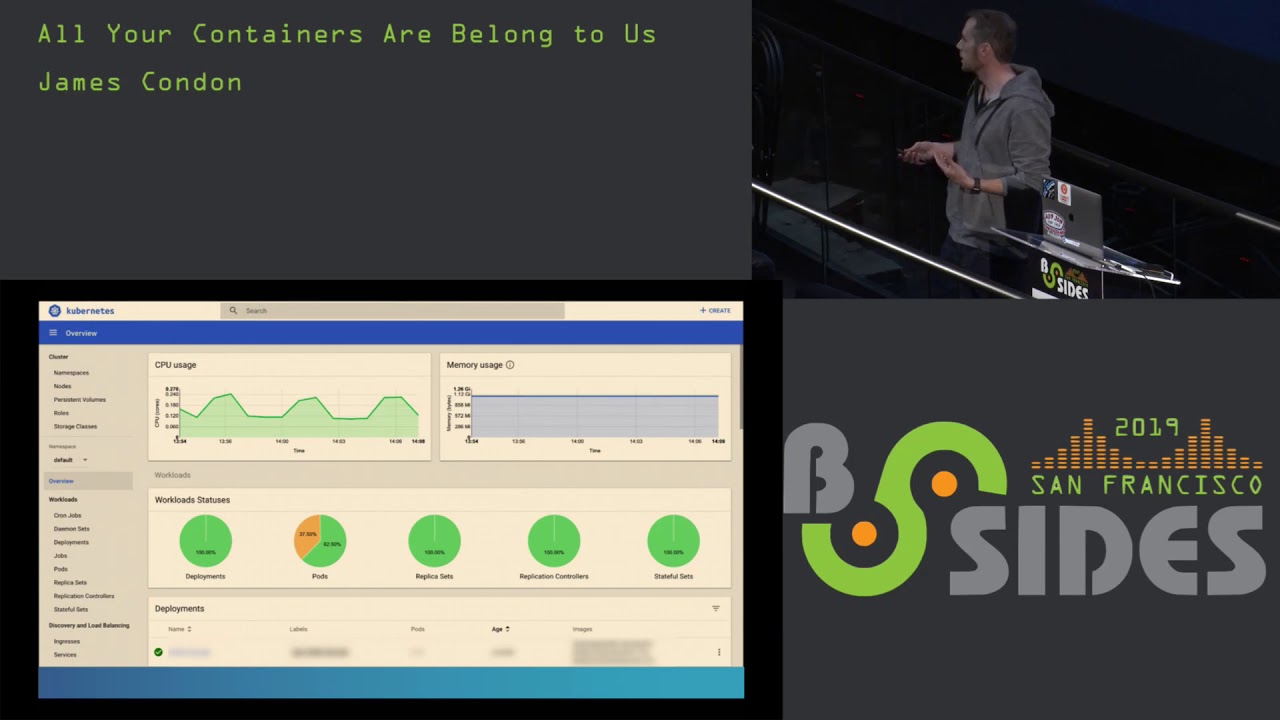
hello everybody welcome to all your containers are belong to us right now we have Jane's Kannan going to be giving us a nice presentation on containers so this is a third of three consecutive containers as well so a lot of you have gotten like container after container after contain a world this is gonna be the last one from now so take it away all right thanks everyone for coming to my talk today we're going to be talking about major kubernetes components that have been exposed to Internet so as far as an agenda goes they'll give you a little bit of background on myself we'll do a quick overview of Coober neighs because I know a lot of people here
pretty familiar with it and then we're going to talk about the infamous kubernetes dashboard API server and then the data store at TD so specifically I'll give you a little bit of an overview of what they are and then I'm gonna follow up with some demos of how we can find them attach the Internet then we're gonna go through some of our research findings on that and then we'll wrap up with security recommendations on how to harden them so right now I'm director of research at least work lacework is a start-up out of Mountain View we do cloud security everything from config and compliance auditing to anomaly detection container and kubernetes security I actually got
my start in the Air Force Office of Special Investigations and for those of you who don't know acai is kind of like the FBI of the Air Force when I was there I investigated Network breaches and produced threat intelligence following that I went on to mandiant where I was the network traffic analyst supporting instant response and managed services this was back around the time of the apt one report then following that I went to a company called protect wise and there I built out their security research team so my background is primarily in network forensics Incident Response threat intelligence and recently I kind of made the move into cloud security so focusing on container and Orchestrator security as
well as Linux malware and then cloud provider security so if you're completely new to orchestrators in general you're probably wondering why do we need an Orchestrator well the reason is is we've seen a big shift from large monolithic applications to microservices and containers now as you start to scale up those micro services and containers you start running into some management issues it becomes difficult to do things like networking and scheduling now kubernetes is the most popular Orchestrator out there right now and if you're completely unfamiliar with kubernetes or you've never seen this video the first place to start is the illustrated children's guide to kubernetes this is a ten minute youtube video it's very entertaining and
it starts off where a daughter asks her father you know hey Dad what's kubernetes and he goes into this technical explanation and ends up just flying right over her head so he tells it like a chill Tori where he uses his character here this giraffe his name's fit and he's a PHP app and he starts out living in a hosting provider area environment where he's sharing the space with a bunch of these other unknown apps and then whale comes along and that stop docker saves them and puts them in a container but over time he starts feeling isolated so a boat comes along with an owl and that owls kubernetes and kubernetes puts Pippi into odd aboard the boat and then from
there they can describe all the features of kubernetes everything from namespaces to volumes for storage to replication to service discovery the other important thing to note is there's a lot of security features with kubernetes and really the big part is understanding what those are and what the defaults are start are set to if you're managing a cluster so but the main reason we're talking about kubernetes is kubernetes is really hot right now so I think it was a week or two ago I saw a tweet and it was a graph in this graph ode the number of times that the word coo Bernays came up in hacker news job descriptions and in 2016 it was you know
kind of flatlined and then too 19 you see this exponential increase so it's definitely taking off it's one of the fastest moving open-source projects out there right now so before we get into the research and the demos I have a few disclaimers first and foremost no containers were harmed during the making of this presentation and so what I mean by that is when we do research we use things like census and showdown and we survey for these different components now when we discover them we what's there at that first layer and then we survey those results we don't actually go into people's clusters and start manipulating them we don't kill off pods or do anything like that
or download secrets so the main reason I'm sharing this research with you and specifically how you can do this type of research to is really to promote awareness around exposure and also enhance security for your own clusters that you may be running the other important thing to know is a lot of these kind of recommendations are really geared towards people who are administering their own clusters if you're using a managed service like Google Cooper neighs engine things like that a lot of times these are taken care of for you but you still need to know what they are and be aware of them as well okay so the kubernetes dashboard this is a web-based cluster management
UI so you can use it for a lot of different things you can use it for monitoring the state of your cluster you can use it for viewing deployment you can start new deployments you can add pods there's a lot you can do depending on the user service account that you're using and the privileges that it has now it's important to note that after kubernetes seven the dashboard has a default service account and that default service account privileges have been lowered quite considerably since there's a lot of risk in using these dashboards however you need to use our back to make sure that those privileges are actually enforced but one of the main reasons that were talking about this is recently
in the news we've about instances of unsecured debt specifically Aviva Gemalto Tesla was probably the biggest one in News & Weight Watchers and one of the things that all four of these had in common is they all had credentials to the cloud provider within this these accounts and three out of four of them had been used for crypto jackin so what we're gonna do next is I'm going to give you a demo this is one way that we can discover dashboards and in this demo we're using census does anyone here use census before okay I see a couple hands now is anyone here you showed an before okay so since this is pretty similar to
showed an in essence what it does is it crawls the internet and it looks for default services on their default ports it makes queries to those and then it pulls back that data that information in the response to the queries and then it goes ahead and it indexes this so you can use their engine to search through it one of the things I really like about census is there's a lot of breadth in the amount of attributes you can search for example you can do a very common string but then say okay I want to only want to see this on port 443 HTTPS you know status codes things like that the other thing is they refresh their Quandt
crawling at a really high rate so I've had really good luck with any of the findings I have still being live when I check them out so if we back up one slide we need to find these dashboards we need to find something to kind of keep of so we're looking for something unique and if we look at the index page of a kubernetes dashboard ironically a pretty unique HTML tag we see kubernetes dashboard so in our demo what we're going to do is we're going to search that dashboard look at the search results and kind of follow it through to see what we get so here I'm just typing in kubernetes dashboard this gives us a list of results on the
left you can see things like the associate a SNS ports and protocols that are open and then we drill into a specific one and then we can actually go to where that page is being served and so in this instance this pops us right into a dashboard the interesting thing here in this example is normally we need to ploy the dashboard when you first go to it you get this prompt and it's going to ask you either for a coop config file or token to authenticate with and then you have the option to skip which puts you in this the default service account so what we saw is that's pretty common in our findings but we also saw
sometimes that skip would be disabled forcing the authentication and then in other instances it was completely wide-open like this so if you were actually to scroll up and down and we blurred things out in this demo to you know protect the innocent but what you can see is you know all the pods that are running you can view secrets and the namespaces that you're looking at a lot of sensitive information so as far as our findings this was pretty recent February found about 500 different dashboards with AWS being one of the most popular places to host them something important to note here is that this was on ports 84 43 and 8080 and the reason that I bring this up is when you
use something like census it's going to look for standard ports and we need to pull a dashboard you can deploy it on whatever port you want and a lot of times you might be deploying it on an unusual port and so this number could be a lot larger we haven't actually gone through and tried to do any crawling on less common ports the other thing to think about here is that 500 it could be you know anything from people's you know small deployments test clusters things like that but it's possible there might be some more sensitive clusters within that so that's something that we're continually researching and looking into as far as recommendations the biggest
one is don't use it if if you can get away with not using it this is something that really introduced a lot more risks than you need but if you do make sure that you have our back and abled so that service account if discovered has lower privileges and then resist the temptation to maybe over privilege that service account think about using other users or different service accounts to actually do any sort of your cluster administration and then the biggest piece here is avoiding internet access so you don't want this to show up on show Dan and census you don't want researchers finding it and blogging about it in the news so put things if
you have to access it via the internet with like VPNs Bastien hose things like that so the next thing we're going to talk about is the API server so the API server is really the heart and soul of kubernetes handling all the communications to the different endpoints it's implemented with the REST API so it's very easy to use and the important thing is that handles authentication and authorization now something the note in a default deployment of the say API server it actually serves on two different ports what they call the secure port and the insecure port and the secure port is your normal API server as you know it but the unsecure poor is actually just
an HTTP endpoint and that ends up bypassing all the authentication and authorization so it's really important that this guy isn't expose the other thing is we had that major CV in December that broke the internet for a couple of days this is important to note that if you know you haven't upgraded then anonymous users discovering your API servers could potentially make elevated requests to some of your aggregate servers like metrics and service log and things like that so in this demo for as far as like a search term that we want to use looking for the API server one of the things that works really well is using kubernetes - master and the reason for that is in your SSL
certificate that's a very common common name that you would see in there and the other thing is if someone has basic authentication enabled if you go to that endpoint and then you do not authenticate properly you get a 401 response you actually see in those HTTP response headers a WW authenticate with keyword kubernetes master so in this one I have the developer console up just so at the end you can see what that response header looks like to confirm that we're looking at an API server something interesting to note is you do want to do this in quotes otherwise they'll search for those terms separately so we search kubernetes master here we get a lot more results
than we were seeing with our dashboard we'll go ahead and click on one of those
and then follow that through now when we visit this umbrella in chrome we'll get a warning about the certificate when we go past this we get this password prompt go ahead and cancel out of that and we end up getting our unauthorized 401 response and then what you can see there and this is kind of cool that we're in the iMacs because on no other screen would you actually be able to read that but what you see is there's the SAS code 401 and then that WWE authenticate basic rome kubernetes master so as far as our findings see quite a few of these so from doing some recent searches in January and February we're seeing about
a little over 21,000 the vast majorities belonging to AWS with a very small amount in GCP and Azure one thing to point out is in 2018 lacework did a research survey where we are looking at all the different orchestrators including mazes marathon Red Hat open chip and docker swarm and kind of the combined total of management nodes that were accessible to the Internet was about 21,000 so basically what we're seeing is in this time a lot more of these being discovered something that I also found pretty interesting is the SSL certificate common names that we see on these like I was saying before kubernetes - master is one of the most popular and then you see things like
system API server API server so just something to be aware of so probably the most interesting finding of all and this is truly a all your containers are belong to us scenario is we found over 800 of the insecure port being open now I didn't include this in the demo because there's a lot of sense of information there and we're still kind of combing through it and seeing what some of the results are but it's important to note that with any of these API servers you can just locally use queue control point that at that server and then you have cluster admin level access to it so we hear a lot about the default of kubernetes and I think a lot
of times we say well no one would ever do that but once we start putting numbers behind that we see that that this ends up happening so as far as recommendations same as the dashboard really want to restrict that network access use even though your secure port is going to handle authentication and authorization you still don't want to leave a footprint out there you don't want people to maybe use that for information in a reconnaissance stage so restricting access with ends the other really big thing is make sure you disable that insecure port if you're bootstrapping this yourself it's really important that no one can access that enabling auerbach you know what's good with authorization if you aren't using
it and then there's a lot of new advanced authentication options that are being offered to some of the different providers that can give you another layer of depth there and then upgrade so when that big CD came out in December one of the important things there is there's a lot of people that were kind of in this position where if they were to upgrade it would break a lot of things it's always being in that position where you can upgrade because there's always going to be more CDs that okay so Etsy d Etsy D is an interesting one it's the distributed key-value data store used by kubernetes it maintains cluster state and secrets by default
there's no authentication on this and there's also no encryption by default and so any of the secrets are stored from kubernetes are actually just base64 encoded and then it has some very very nice and easy to use rest and G RPC api's and so the joke I kind of make about this is fcd is like the hemsworth of unsecured databases on the internet every day you hear people talking about a new researcher found elasticsearch or MongoDB with a bunch of sensitive information but you never really hear much about SED I think last year there was you know one blog post kind of talking about this but what you're going to see here and the demo is that this
this is actually a problem as well okay so for this one we're gonna use showdown and there's a couple ways we can discover a TD clusters one is looking for the default port which is 2379 but shodhan also can recognize when it sees an entity closer and tag it as such so what we'll actually do is use that tag to do our search results and then at the end of the demo also you're just like a really quick and dirty curl command that can recursively list the key value pairs that are in your data store so here we're searching product : at CD and from the search we give C about 2400 when we do this one of the
interesting things as most of these are located in China and then here this is just a very simple curl command that's piped to jQuery for formatting and that's really all it takes so for these FTD clusters that you see out there you could actually run these in dump out what side of them one thing you can do from a research perspective instead of actually doing and get requests and pulling that data down is you can make a head request just to see that you get an OK response knowing that they may be vulnerable to that so as far as our SED findings go see about what we saw in there of 2,400 see that kind of go up and down
I think the blog post I was talking about this last year is more around 2,200 and just because we found at TD that doesn't necessarily mean that that's part of a coup Renee's cluster you could use a TD for other things but one of the things that your den does is it can pull down any names have been assigned to the clusters and when we comb through that we end up seeing that there's a lot of kubernetes related names such as coop master COO master at CD k-8 snowed all kinds of things like that so as far as recommendations we talked previously a little bit about your network access well in the case of that CD using in your communities
cluster it's really important that the API server is the only one that's talking to it as you can see from that demo that we just showed some of the things that you can do to kind of enhance the security of that is you can use TLS for any of the peers in the cluster for their communication back and forth at CD also does support certificate authentication so you can use that for some defense-in-depth and then there's a number of different third-party options that are coming out for encrypting the data at rest so this is something really helpful to look into in the event of you know some sort of unauthorized access
okay so it's just some final thoughts on our research and yes this is a stock photo of dave Franco I was pretty excited to find that one as you can see from the different numbers that we have up here the amount of exposure is is pretty large scale we talked about defaults of kubernetes and again we say like you know do people actually do that and now we kind of have some numbers to back that up something important to note here is that internet exposure is just one piece of the security puzzle and comes to kubernetes there's a couple of talks earlier talking about you know container security and when you're thinking about Kerr Bernays you need to
also be thinking about okay if a container in a pod gets compromised what's the blast radius the radius of that you know and then how can attackers move further from there the other really big thing about this is kubernetes has a lot of security features and a lot of the work if you're administering your own cluster is really finding out what those security features are and then how you can use them and then probably even bigger is if you're using tools to bootstrap your cluster like you know if you're using like micro k-8 or cube admin and stuff like that it's really understanding what they set those defaults to so what I went ahead and did
is I uploaded my slides to the schedule so you can actually pull this down there's a bunch of different resources here that you can go through and then I have my contact information here you can follow us on Twitter for things related to a container an Orchestrator security linux malware stuff like that and now I just like to open up to any questions that anybody has
going once I got one up there for API server recommendations you mentioned looking into advanced authentication options can you talk about some of those yeah so I'm not too familiar with the number of them I know that google kubernetes engine is supporting a few different ways like I think it's open ID things like that but yeah you can check out some more on that I think from their website if you're using google kubernetes engine any other questions
take your pictures now or they might as he said they are attached to the schedule so you can actually download them yeah the only thing that won't be in the PDF is the actual videos but you can always send me a message and I can talk about some more details around that all right cool well thanks everyone for coming stop by after if you have any questions
Related talks
 46:38
46:38 42:51
42:51 30:01
30:01 28:52
28:52 33:46
33:46 20:01
20:01