maraki1982: A Management Tool for OAuth2 Phishing
Show transcript [en]
Hello everyone, really glad to be on Besides Athens yet another year. Of course it's not the same as being IRL but yet it's the next best thing. Today we will talk and present Maraki 1982, an open source web social engineering post exploitation toolkit. A few words about us, first I am Yanis, I am the Managed Director of 12sec. I am a penetration tester for more than 15 years. I have a bunch of certificates and so on. And I am a strong cybersecurity community supporter. Hello everyone, I am Dimitris. I am an application security engineer at 12sec. I have almost three years of working experience in application security and nearly 10 years of software engineering experience. I am also a certified DevSecOps professional and
currently attending a master's degree in cybersecurity. So a disclaimer first, don't try this at home unless you're doing it for educational purposes or unless you are engaged by one of your clients in a real team engagement or something similar. So a little bit of background.
Nowadays we live in the era of cloud suites and two-factor authentication. We have Google suite, we have Microsoft Office 365
and a lot of organizations really live on those but they do not have everything that they require so
A lot of third-party apps have been created that in order to work they need to have access to corporate data. So this third-party integration
could not work with two-factor authentication. You could not ask someone that uses a calendar app for example on their mobile phone to always authenticate to Office 365 via two-factor authentication. So
the cloud providers they have implemented the OAuth authorization framework in order to bypass two-factor authentication and it still applies but with some issues sometimes. So let's see the Microsoft implementation. So in order for an app, a third party application to have access to Office 365 data, they have to create a URL which is actually a Microsoft.com URL but with specific parameters and one of these parameters is the URL of their own API. And when the user visits this URL, which again I remind you is the Microsoft.com domain, he's prompted to login and then a pop-up appears that asks the user if they want to give access to the specific app.
Then as soon as they say OK, Microsoft goes to the API of the app and provides them with an access token which eventually gives them access to the emails, the drive data, calendar and so on. So to take advantage of this setup we created our own web post exploitation management tool called Maraki 1982. Just for the history because maybe some of you ask yourselves why we chose this name. The name came from a real world example where in a specific forum it was a user that had selected to not display their name, their surname or age information but their email address which was shown contained both the name and their date of birth. So this is a reminder to this situation.
Regarding the technical details about Maraki 1982, it was built on a Microsoft stack including .NET 5.0 and .NET Stadar 2.1. We used, believed or not, this stack in order to be multi-platform. In fact, we set up the project on a Linux machine. We developed this application using the database code first approach in order to support multiple databases. So currently we support SQLite, Postgres, SQL and Microsoft SQL Server. So let's now describe what the Maraki 1982 take advantage of. So we create a malicious URL which looks 100% legitimate because it's under the Microsoft.com domain and
we send it to a user and this user is promised to login to Microsoft normally and to give their consent in order to provide access to this application and if they do we get access to their emails and able to download their files. And you see that in a schematic, in this diagram we see that the attacker, the threat actor, uses Maraki and asks it to create a malicious URL, which actually is again the Microsoft.com domain with some parameters and a URL pointing back to it. The attacker sends this URL to the victim via email or something else. The victim naturally follows the link because it's Microsoft after all. And it's presented with the pop-up to
login and then to authorize the app. And then Microsoft sends the access token to Maraki-92.
So let's go see that in action. When Maraki 1982 is launched, login page is displayed. I will login with my email and password. And when I hit the login button, it redirects me to the home page. Here we can find some information about Maraki 1982. The first thing we need to do is to get the malicious URL. As you can see here, we have two URLs, one for Microsoft and one for Google. Although our case focuses on Microsoft, the development of Google has already started. You can either copy or navigate to the URL.
If you notice, the URL is Microsoft's legitimate one, asking me to fill in my login information.
When I click Sign in, it redirects me to the consent page. Here, under the application's name, we see an unverified status, which means that the application is not a legitimate one. You can disguise Maraki 1982 as a legitimate one and receive the verification from Microsoft. Let's now accept the consent. This redirect us to a page and download a file. Hint here, the file can be a malicious one. Now, let's go back to the Maraki 1982 and start performing actions to the hooked users. As you can see, the user is hooked and now we can use the Received token to get the emails and files. First, I'm going to get the user's emails.
As you can see here, there is an email in the inbox folder. Let's check it out. It has the subject for your eyes only and you can either display this as a raw HTML or display the email. Whichever you press, a new window will display it. As you can see here, we can read the email content. I have heard that on besides this year there will be a lot of hackers. Now let's go back once again to the Meraki 1982 and get the users files.
As you can see the folder personal has one file named xxx.jpj. The most important thing here is that we can download this file. If we click here to download,
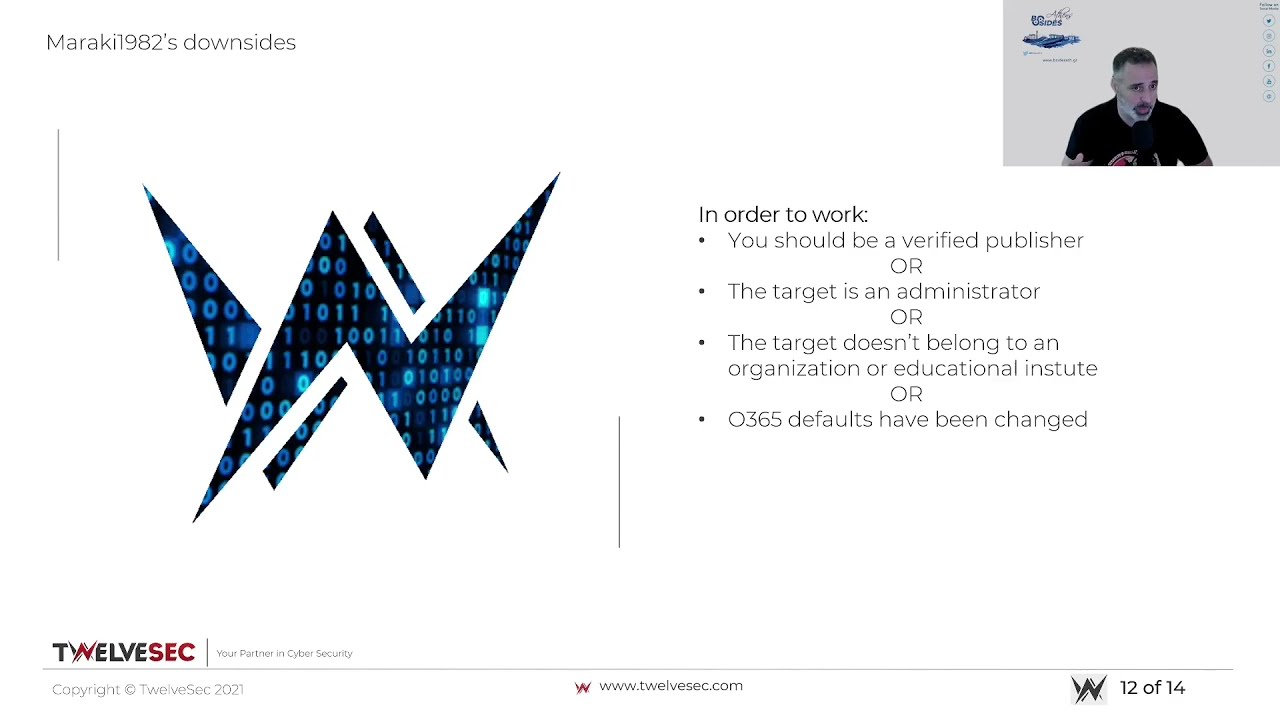
it downloads and opens the file successfully. I will end this demo by informing you that there is a logging system on the application and the basic user management functionality. So we hope you liked it. So some downsides now. It would be great if there were no downsides, but unfortunately there are. So as of November 2020, where Maraki 92 would work just fine, Microsoft made some changes in their policies. So in order for it to work, either the app should be a verified publisher something that is not by default but of course you can take the source code mask it around another legitimate application like a calendar app that needs access to
to the office 365 data and submit it to microsoft and it will be accepted at least for some days
the other thing is if you are an administrator if you are an administrator then even if it's an unverified app you can still give access to your data and also there's another extra tick if you are an administrator that if you tick it you give access to the whole domain to the app so that's pretty scary
The other option is to have a victim that is not part of an organization or an educational institute. So just a user of office.com for example. Then you can target them easily. And of course if you have messed up with the settings of Office 365 there is the option to allow unverified publishers so yeah you can do that as well so the next steps for Maraki 92 like you saw on the demo we are working on Google Gmail and Google Drive also we're working on creating a malicious URL crafter in web application which we are fully customizable malicious URL We're working on getting email attachments through the API, Dockerize the whole project and a lot of other things and we expect from you as well to contribute
to our GitHub page. Whatever you think of please come forward.
And also feel free to contact us in case you have any ideas for new features that you would like us to implement. We thank you very much, me and Dimitris, and hope to see you again next year IRL. Bye-bye.
Related talks
 3:30:16
 24:50
24:50 53:19
53:19 41:20
41:20 24:05
24:05 31:41
31:41