"Wi-Bear: Intelligent Autonomous Wi-Fi Honeypot Detection" - Vivek Ramachandran
Show transcript [en]
Thank you. Thank you so much. So we'll be talking about why Bear Intelligent Autonomous Wi-Fi Honeypot Detection. Before I begin, I think the obligatory self-promotional slides. Right? So my name is Vivek. I've been doing security for the last 15 years. Started off as an electronics and communications engineer, specialized in security, worked with Cisco Systems Layer 2 security team, I implemented most of the 802.1x and port security on the CAT 6K. After that, grew a little bit bored of regular development and moved into security research. I've broken web cloaking. I've discovered a bunch of wireless attacks. Cafe Latte is one of the more popular ones. I won a couple of competitions and started my own training
company. I've spoken and trained at most of the larger conferences multiple years, Black Hat, Def Con, and others. What people know me most about is Pentester Academy. I run Pentester Academy. We provide courses, labs. I've authored a bunch of books as well on Wi-Fi security. Okay, so that's enough self-promotion. So moving to the agenda. So I know that most of you may have used wireless attack tools, AircrackNG, AirbaseNG, anyone? OK, a couple of hands. So we'll actually go through a very quick primer of understanding Wi-Fi communication basics and honeypots. And once we do that, we'll look at how enterprises are actually solving the honeypot problem with wireless intrusion detection systems and prevention systems. After that, let's try and
understand if it's even possible for a Wi-Fi client to autonomously detect honeypots. And if so, then what kind of telemetry data is actually available even on a closed platform like Windows? And if that data is adequate, then what kind of attack detection can we do at the endpoint? So let's begin with a quick primer. We all used Wi-Fi. Now, if you look at any Wi-Fi client access point communication, typically what happens is the access point sends out these broadcast packets called beacon frames, right? Now, these beacon frames advertise the capability of the access point. So these would include the SSID, the channel, what kind of encryption it supports, rates, and a bunch of other important information. Now, once Wi-Fi clients look at
this beacon frame, they decide if this is a network they'd like to connect to. So this could be based on the fact that the network is already pre-configured or the user ends up manually connecting to the network. So when that happens, the client sends out the probe request packet, which can also be sent when the client is searching for new networks. Once the access point receives the probe request packet, sends back a probe response packet, most of those elements which you see called information elements, which actually tell what the access point supports, is pretty much copied into the probe response packet as well, the same as what was there in the beacon. And after that, we have a very simple auth phase,
open auth. It's really a misnomer to call this auth. The client ends up sending the auth request packet. The AP basically says you're successful. Now, from that point on, association happens between the client and the AP. Now, the most important thing I want you to note in all of these packets, do you see any form of identity information embedded? So let's say you were doing SSL. The server would end up presenting its certificate which the client can validate and know that this is the real server, right? In the beacon frame or any of these frames that you've seen so far, do you see any identity or any other information with which you can actually authenticate either party? You don't see
anything. I think these are important conclusions we need to understand. So the biggest problem is with basic Wi-Fi association, there is no way for the access point or the client to know if they're actually talking to the authorized party. So let's say right now you have NCC Wireless here or you have B-Site CTF. You could create a new access point. There's no way your client can actually tell the difference. And the protocol was built that way so that you could very quickly connect to any access point. Now, what are the security ramifications of this?
Well, the most important one is the attacker can also create arbitrary packets and impersonate any access point or client on the network, creating a regular access point or even doing raw packet injection by spoofing frames one at a time. Now, the only exception where auth really happens is web shared key authentication. But web is flawed already. SK is flawed as well, so I'm going to leave out that. Okay, so till now we've discussed how client and access point connect to each other. Next question arises, which networks does a client connect to? So there are two possibilities. We all have that wireless configurator, which is on Windows or your phone or whichever device you're using, and you manually click and select the network you want. Once you do
that and you decide to save that network, along with a couple of options like connect automatically, et cetera, that network gets saved in what is called your preferred network list. So the next time you're in the vicinity of the same network, your client may end up automatically connecting or based on some more advanced options depending on the OS. Now, the last point is very important. You will see a massive spread in behavior between clients for different operating systems and even versions of different operating systems. So what is happening is most of the OS vendors are trying to solve this problem by making it more and more difficult for the attacker to create a honeypot. Now, what kind of options are available? So
if you notice, this is Windows 10, the latest version. You have options with, say, connect automatically any time this network is in range. look for other networks while connected, which is can you find a better access point while connected to the current one? And the last option to the left is connect even if the network is not broadcasting. So this would mean the client sends out these probe request packets constantly trying to find the networks in its pre-configured list, right? Problem is when you give users the responsibility of securing themselves, How many of you have at least once clicked connect automatically? Or rather, let me say who has never done it? And once you have, how
many of you have responsibly removed that network after you've left that hotspot or hotel every single time? Right, couple of people. So you can well imagine if in a highly technical security audience, I mean, I myself don't do it. I'm guilty, right? In a highly technical audience, if we aren't removing it, imagine what non-technical users would be doing. Actually, I haven't used Windows for some time apart from this research, and it took me a little bit of time to even figure out where the pre-configured networks were. I remembered they were in the network settings, but they've kind of shifted things around a bit. So the key thing is, unfortunately, any time you're going to have convenience versus security, eventually, convenience will win.
You have a new laptop, the very first time, I'm not going to do it, I'm not going to connect automatically. Second, third, fourth, eventually you give in. So once you have users burdened with security, it's generally never going to work. So typically, how does a Wi-Fi honeypot attack happen? Now, you have a bunch of users, you have the attacker, Depending on the client device, the operating system version, the client devices may send out probe request packets searching for pre-configured networks they've connected to before. The attacker creates honeypots with the same SSID, and the clients end up connecting because, hey, that's how the protocol is supposed to work, right? So in the initial part, if you recall, We discussed that there is absolutely
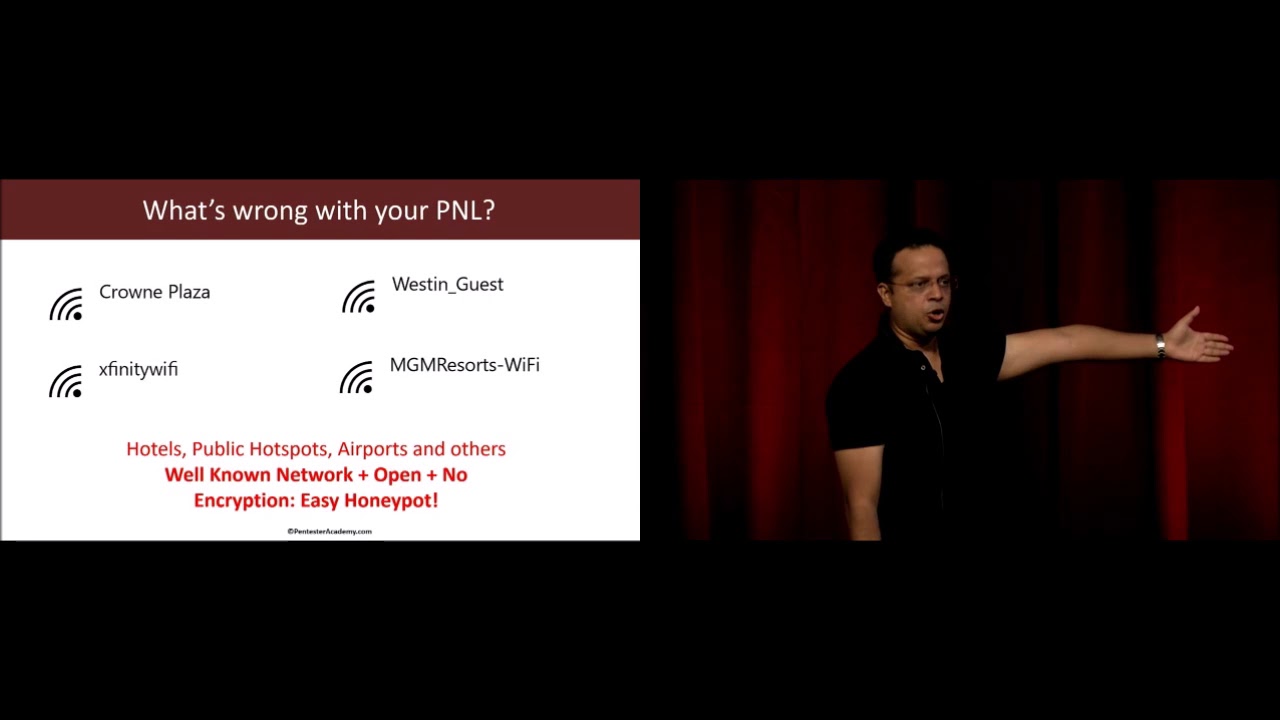
no way, till the association happens, for the client or the AP to authenticate each other. Now, the case where probe requests are only sent if we see a beacon, right, that was option three in the previous slide. Connect even if network is not broadcasting, if that is unchecked, then the client would have to see at least a couple of beacons from the pre-configured SSID before it connects. So in that case, here is what ends up happening. So what we've seen is when we do a lot of audits for Fortune 500 companies, we've actually found that many of these common SSIDs in a location pretty much end up remaining in the pre-configured list. So how many of us
have connected to, let's say, hotel networks when we are there and just left that little connection in our configuration and not removed it. Now, depending on where you are, so for example, in the US we have Xfinity Wi-Fi, and Xfinity ends up giving this as a public hotspot wherever Xfinity APs are. So this would end up always remaining in my configuration. And this is an open AP, absolutely no auth. I connect, I get a splash page. and from there on I log on to the network. So the fact remains that even if you have just one single network, which is very common to a geography in your pre-configured list, all the attacker would have to do is send a series of beacons for each of these APs,
and what would happen is your client would automatically send out a probe request, registering its request for that AP. Now the attacker knows that you have that network in your configuration list, right? And this is a very common way by which attackers right now are enumerating your configuration lists. A lot of tools like Wi-Fi Fisher have this built-in capability. So a common question people ask me is, you know, my office network is all protected, so why am I even concerned? The reason is this. All you need is one weak link in your PNL or preferred network list for the attacker to create a honeypot where you end up connecting. Now what about encrypted networks? So we have WPA, WPA2, PSK, which is personal, then you have
enterprise. So there are ways by which you can actually do AP-less cracking by using honeypots. So Cafe Latte was the very first one. As I mentioned, I discovered the attack. And from there on, people have extended to other encryption mechanisms as well. Now, we don't have enough time to go into details. You can look at YouTube talks I've given at other conferences talking about AP less cracking. You just have to take my word for it right now. OK, so the next question is, well, fair enough. The attacker created a honeypot, right? And this is maybe MGM Grand or a hotel network. And I have that in my preferred network list. I did go to that casino at one time. And I've connected to the attacker's
honeypot. So what? Right? Now, keep in mind that the moment you connect to the attacker's honeypot, he ends up having a direct IP layer access to you. Now, this has a lot of ramifications. I think you've heard about talks here where people have told you that an iOS exploit sells for $250,000, right? half a million dollars for other browser-based exploits. Now, truth be told, me and you might not be juicy enough targets for someone to waste a half a million dollar exploit on, right? However, for the right target, it's actually very simple. What attackers are doing is they create a honeypot. The moment the victim connects, they do a DNS redirection. This ends up opening your browser.
If you recall, any time you connect to a hotspot, your browser opens up saying log on, right? So this is really your browser window, and at that point of time, browser-based exploits can be very easily served. So now going from pure network connectivity, the attacker with a simple DNS redirection can start a browser and then use browser exploits. Now, there are also cases we found in the wild where simple social engineering attacks are also conducted. So let's say it opens up, says, hey, you need to update. You need to download this utility to get on the internet and all of those different combinations. Truth be told, most non-technical users or even a very small percentage may end up falling prey to
such attacks. And if that happens, hey, your organization could be compromised. The most important thing is this could even escalate over to man in the middle attacks. Keep in mind, once you connect to the attacker's hotspot even momentarily, the attacker pretty much has hijacked layer two. So at that point on other attacks like traffic monitoring, DNS hijacking, SSL MITM, many things could happen. He could on the other side of the honeypot be connected to the internet so that you seamlessly feel as if you're connected to the right AP, or you don't even bother looking at your Wi-Fi configurator? How many of you check your Wi-Fi configurator to make sure you're connected to the right AP at a given location? All the time. How many
times every 10 minutes? So even with a very small window of opportunity, the attacker could conduct some of these attacks. OK. So now that hopefully we've established basics of Wi-Fi communication, honeypots, how they work, what could go wrong. Let's look at how enterprises are actually solving this and other Wi-Fi attacks using wireless intrusion detection systems and prevention systems. So when you look at enterprises, they end up deploying heavy-duty Wi-Fi sensors around the perimeter of the enterprise. So these sensors are continuously monitoring the air looking at the spectrum, picking up interesting packets, and sending those packets or metadata back to a central collector or appliance. Now, that appliance does all the machine learning and AI and whatnot magic and
hopefully figures out that there is an attack going on. Now, if you have a wireless prevention system, the appliance will actually push updates to all the sensors, and the sensors will automatically try to contain the attack by sending out D-auth packets and a bunch of other techniques. The key problem really is all of enterprise defenses for honeypots and other Wi-Fi attacks are specifically meant for the enterprise premise. So this does not unfortunately extend to clients which may go out of the enterprise setup at an airport or a hotspot or any other place. So how difficult is actually detecting a honeypot? How many of you have used tools like Airbase NG? Okay, good, couple of people. So let me give you an example. I did work for
a wireless intrusion detection vendor around a decade back in their R&D team. So I've looked at exactly how these systems work, This is how simple, no kidding, it actually is. So here is an authorized access point beacon frame. This is how it looks like. You have a bunch of information elements. You have capabilities, blah, blah. Now let's look at a beacon frame created by probably one of the most popular tools out there, Airbase NG.
This format, the IE elements have not changed since the past decade. So detecting a Wi-Fi honeypot using traffic forensics actually should be in the 101 class. You could literally walk with Wireshark, apply a couple of filters, and figure out if someone's running Airbase NG. Now if you look at Airbase NG's code, this template is actually completely hardcoded. Clearly, this looks like an access point from probably the early 2000s, right, when hardware wasn't capable. And it hasn't changed. Now, another very popular tool, it isn't a honeypot tool, but sends out fake beacon frames to confuse clients, MDK3. Anyone heard of it, used it? MDK3, murder, death, kill. Don't know why, but tool author gets rights to naming it. This is how an MDK3 beacon looks like.
So I have accompanied salespeople to different meetings where they explain to enterprises how difficult the problem of Wi-Fi access point and honeypot detection is. But in reality, most of them just end up using extremely simple rules. And then you would have the pentester and the organizer come, start an Airbase NG, and boom, right? Sub-second detection.
The truth really is most attack tools haven't been updated at all for a while. So definitely what is surprising is then why haven't people extended honeypot detection or attack AP detection to the endpoint, right, if this is actually so easy? So a couple of things, and we'll use this later. Keep in mind that an attacker in the wild can never know the exact beacon frame of an authorized access point at your home or office. Additionally, you just cannot clone capabilities. Because the moment the attacker has, let's say the attacker tool has an option which says clone AP beacon, well, what that actually means is the attacker's AP is also supporting all of those things. So the client truly
believes that the AP supports those capabilities and might try to use some of those capabilities and connections might fail. So this is an important consideration to keep in mind. So as I said, if this is so easy, why can't clients autonomously detect these honeypots? Now, there are a couple of challenges. How much time do I have left? Half an hour, OK. I ought to go a bit faster. So there are a couple of challenges. The first is the client Wi-Fi radios. Now, we all wanted this. We all want that, you know, we are on a Windows system and we can just run Wireshark on our wireless adapter and get Wi-Fi packets. It's never happened, right? So most client Wi-Fi adapters do not
support monitor mode. Even if they did, the problem is the adapter can only be in monitor mode or client mode at one time. Can't do both. So the biggest issue is A wireless intrusion detection system has sensors which are in monitor mode, can pick up every single packet, and hence have a complete detailed view of what is happening on the network. Unfortunately for the clients, they do not have that. There is no way you can put a client on monitor mode. You could do it on a Linux laptop, but I'm kind of focusing right now on Windows because I'd like to look at a closed system and see if we can solve the problem on that. If you could do it on Windows, you can
do it, of course, on more open systems like Linux. Now, the next thing is, even if you probably did have a card which does monitor more on Windows, some hardwares do support. They are rare, but they do support. You would require low-level device driver access to get meaningful information out of those cards. which unfortunately, again, is a no-no as far as enterprise networks are concerned. None of you have admin privileges on your office laptop. Now, at the very same time, we said sensors send data. All the intel is actually residing on the appliance. Unfortunately, a roaming client cannot always connect back to the central server, send back intel, and get input. By definition, it's not connected to a network yet. So how would it
send back any info? So unfortunately, clients can only use Wi-Fi telemetry data available by the OS and which is ideally available to even an unprivileged user. OK, so what Wi-Fi telemetry data is available on Windows? Apart from this wireless configurator, have you ever interacted with anything on Windows to do with Wi-Fi?
So is this all? Right? So is this all we have to work with? Now, well, we'd say Windows event logs. That could be interesting. Now, if we look at Windows event logs,
so while he's trying to fix it, I can still go along. So what you would end up finding in Windows event logs is you do see a couple of events connected to the AP. The AP has so-and-so encryption, but the amount of data available is not that much. Now, you could use this with your Active Directory and a little bit of threat hunting to look at all the details. However, it isn't going to lead to much. So Windows Event Logs is definitely better than the Wi-Fi configurator that we just looked at, but isn't going to add anything new. So what we would want to look at after that is what does Microsoft actually offer in low-level native APIs? So I
looked at their C-sharp, .NET, there was really nothing in there. Finally, after going through multiple days of research, I figured that they have a very small documentation available on what they call the Wi-Fi Native API. So the Wi-Fi Native API is just all C, C++, it's been maintained probably for the last, since maybe Windows started, because I can see in the documentation they have references to Windows XP and whatnot. And that API seems to provide some amount of information about what kind of data can we get. So if you remember the access point beacon frames that we'd actually shown, what did I say the sensors end up using for detection? They look at the beacon frames. They
look at the different IE elements. And they can very easily see that, unfortunately, a real access point will have a lot more IEs, while an attack tool is going to have much lesser than that.
So let me go a little bit more in depth into the talk. So what have I done is I've looked at all of those native APIs, and I've tried to reconstruct the beacon frame. So the whole idea is the beacon frame consists of fixed elements. It consists of elements which can have variable sizes and lengths. So hidden somewhere in all of that documentation is a little nook and corner where it says, for any given access point that I can see in the air, I will also end up picking up the beacon frame IEs. All right. OK. Thank you.
All right. I'm kind of afraid to switch to the Windows event logs, so why don't I finish the presentation and then move on to the demo where I'll show everything together. OK. So the Windows Native API. as I mentioned. You can do a bunch of stuff, actually, through the command line. How many of you have run the command net sh wlan show networks? Okay, a couple of people. Ends up showing you the same list of networks you see on the wireless configurator on the right-hand side.
Not my day. Okay, so if you wanted to look at the name of the networks and all BSSIDs associated with the network, you can actually modify that command and say mode equals BSSID. So BSSID for people who haven't done any Wi-Fi hacking, in the most simplest case, is the MAC address of the access point.
You can look at profiles by running WLAN show profiles, NetSH. You can look at profile information as well by actually running show profiles name equals to and then giving a profile name. So I've given class demo. Do you actually see there is a security key section which says present? Do you see that? It's probably the third section under security settings.
Now, a lot of times we end up forgetting Wi-Fi network passphrases. You don't have to download a utility to do that. Some people might already know. All you have to do is write key equals clear. And if you look at it now, you'll actually see the security key is actually at the bottom. Can you see that key content? So at the very least, this probably paid for the talk. You'll never have to buy one of those wireless password recovery agents anymore. And of course, if your friend is just away for a couple of seconds, boom. You can run this as a regular user and figure out what he keeps as his home AP SSI. I've never done it. I wouldn't recommend doing
it, but... Sometimes knowing people's passwords is like reading their minds. A lot of fun stuff in there. I've never done it. I've heard it's... That's where the way it is. So what we've seen so far is we have a native API. How much time do we have? 20 minutes. So the big question arises, what kind of Wi-Fi telemetry data is actually available? So I said native API. I'm going to go through a couple of these slides a little bit faster because we lost some time. So the native API ends up giving us a lot of interesting information about what is happening in the Wi-Fi subsystem in Windows. Now, this includes state machine data. State machine data is the card currently connected. If yes, is it
authenticated? Is it associated? All of that stuff. Scan data. Some of you might know this, but while you're even connected to a regular AP, every minute Windows is automatically scanning the network in the background, fetching all of those results. And this is also available to you. Then you have network profiles. I've already showed you how they look like. Finally, card control, which is scan, connect, disconnect, start, stop, et cetera. I mean, all the likely suspects that you would imagine would be involved in card control. Now, buried deep, there's an interesting function. Before I get to that, how does Windows deal with results? So what Windows does is it scans the air, let's say roughly every minute, stores the results in a
cache. Now, at that time, if you call most of these APIs, the results being fetched are from that cache. You calling the API does not always immediately initiate a new scan. There's only one API which does that, but doesn't provide a lot of information. So keep that in mind. So sometimes when we get that telemetry data, there is a little lag, but doesn't really matter because even Windows doesn't see what has changed in the network. So WLAN get network BSS list, The last pointer down there, I won't get into pointer referencing, dereferencing, et cetera, but simplifying it, what that points to is this structure on the left. Look at the last two elements. The last two elements are UL i
offset, UL i size. So when I talked about how enterprises end up detecting all these malicious networks, I said they have access to the whole packet, right? They can look at the whole beacon frame, which unfortunately, on a regular user Windows, you cannot. Interestingly, this API gives you those last two members, and they contain a binary blob of those information elements on a per access point basis. So Windows is not parsing this for you. It isn't giving you a beautiful IE, len, value tuple. It isn't doing any of that. It just says, I don't even think you should use this. But here you go. Here is the binary blob. Do whatever you want with it. Now, this is gold because even though we still cannot
monitor the error, we can actually look at the whole beacon frame, or rather the IE elements and their values, of any BSSID we see in the air. Now, using this and other APIs, we can reconstruct the values in the beacon frame. So here is what I've done. I've actually taken all of that data, put it into a data collection engine. So you notice we have the Wi-Fi native API, and after that we pick up all this different info, put it into a data storage layer, which is nothing but a SQLite database. And from there on, we have analysis, rule-based engines, and ML detection, and then a presentation layer. So let's actually look at this. Now I'm very afraid. Demo gods don't do this. First time in Australia, first conference,
I want to be invited back. OK. Everything looks good.
So I've been running and maintaining a tool called Chelum for quite a bit. And what I've done is I've incorporated all the stuff I'm going to talk about in the talk with Shilam, because the platform is already written. The tool is absolutely free. You can go download it. Oh, yes.
So even though I have no ninja skills, can at least make sure what the tools that I do, it does change color. There are four different colors. I'm serious.
So what Chelum does, I'm going to close the alerts. So what Chelum actually does, and I'm going to go ahead and use a magnifier. Hold on. So if you notice,
if you looked at your wireless configurator, it will actually just show you three networks which are really chunked by SSID. So Chelum now ends up using all of that detail and picks up every single access point along with all the info from Windows' wireless cache. So if you notice, now we have the SSID. Just going to rearrange this a bit so that I can actually show you the amount of information available. Is the screen visible? I doubt it. At the back? OK. So hold on. I'm going to add a lot more details. And then I'm going to go ahead and use the magnifier in just a bit. A little bit of patience. OK. So now if you notice,
what we are doing is we are picking up each of the networks. I'm picking up the BSSID. I'm using the same database file which Wireshark uses to resolve between MAC addresses and vendors. we can get some idea about who the vendor is. And there are other informations which are also something I've picked up, right? The channel it's running on, the authentication, last seen, et cetera. Now here is the interesting part. If I click on Details, what we've done now is reconstructed everything in the beacon frame using data from multiple APIs. So I've actually taken the beacon frame, said, hey, we have these 20 different fields. I've looked at all the APIs, tried to figure out which one
gives me which field, and I've kind of virtually reconstructed the beacon. So in a way, I've kind of sniffed beacons by using all the APIs. So we can see the SSID. We can see the different elements. If we scroll down, you'll actually end up seeing the whole beacon frame. So element ID is really the IE type number. Zero is for SSID. You have length, you have value. The hex values are really just binary data which need to be resolved based on the IE type. So now I've actually gone from just the configurator to having enough information about every single access point that I see around, at least the beacon frame. Now apart from this,
I also have access to all the events. So let me actually bring up the events. Just give me a second. So apart from this, we are also going to look at all the events. So keep in mind, this is automatically pulling everything from the local Windows cache.
If you notice, did anyone here do not a honeypot somewhere? I'm sure someone did run Airways NG here. Who did that? It's a good thing. I'm not going to penalize you. You just did a blind test so people know I'm not faking it. I'll give you an award. Is that better? OK. So if you notice, I'm going to make sure do not put anything offensive. It's happened to me in a demo.
I just gave you some bad ideas. So if you notice, we have already detected, and it's good. I didn't have to run my setup. We've already detected a honeypot, and this is actually using Airbase's signature run through a machine learning algorithm. You can also create rules, and I'll show you how to do that a little bit later. And if you notice, it already knows that this is a honeypot.
So let's actually go back in here and look at some of the more intricate parts. So to make all of this work, we are actually looking at a ton of data. I just want to show you what goes into creating it. So these are all events that the tool is automatically looking at. So what Windows does is it's a very simple PubSub, which is you can go ahead and subscribe to these events and there is a callback function which gets called when the event happens, like connecting, associating, disconnected, et cetera. And you also end up getting all the data associated with that event. So I'm taking all of that and I'm actually pumping that into a bunch of SQLite databases. So if I go in here,
So Chelum, as I mentioned, is a tool I've been maintaining for quite some time. And now, previously we were only doing rules. Now it's going to be updated with the ML part that I'm going to discuss. So we have all of this put into different tables. It's a massive amount of data that we are collecting. So if I double click on scan results, you'll actually, or rather, go inside the table. actually find that we are picking up every single scan result by scan ID. So scan ID is nothing but a unique identifier for every scan which happens. And we store all of that data in here. Similarly, we go ahead and store all the neighbors, which are all the neighboring
networks, and I'll come to why. And we also have all the information elements in there, so we can browse the table and you'd end up seeing all the IEs on a per AP basis. The database is segmented logically so that using the scan ID and a couple of other IDs, we can quickly run queries and all that. Really the key takeaway here is all of this data which the Windows subsystem is producing, we are actually storing it, and that data can now be used to do all forms of detection. Most important thing, this is being generated at the client. We don't require a server appliance. So this is totally autonomous at this point, which is the client does it by himself. No other intelligence is required.
Now let's go back.
OK. So you've already seen the attack detection happen. It's good. Didn't have to run my setup. but tell you how some of it works. So the idea here is there are multiple scenarios, right? One is you have an attack tool which got detected. In other cases, let's say this is your home network or your office network or some other place where you frequent, which is there in your P&L or preferred network list, and you want to go ahead and make sure that nobody can spoof that network when you're at an airport. So what defines a network? So if you look at it, you have users connected to SSID, which is the authorized network. Most importantly,
you also have neighboring access points. So the same way by which Android tries to find your location by telling you to turn on Wi-Fi, we end up using the same thing as all those APs and SSIDs near your home, an attacker can never know at the airport. Is that fair? If he does, he's followed you back. You have bigger problems than Wi-Fi security. I would recommend not to worry about this and rather other things. So you have all these neighboring access points. And the idea is to end up picking up different metrics from the header fields. So you could have BSSID, BSSType, physical, beacon interval, the IE elements, capabilities, length,
the actual IE count, many of those can become metrics which uniquely identify your network. Now, there are of course both pre-connect and post-connect identifiers. Now what do I mean by that? Pre-connect is before we've connected to the AP, this is what we can see about the AP, and we can pick up those metrics depending on what we want through a rule or through machine learning, see if this ends up matching our authorized network, right? If it does, connect. If it doesn't, flag. Now, let's say even that does not work for some reason. After you connect to a network, there are still post connect variables which can be picked up. So a lot of times the IP addressing schema, the gateway, right, even if you did manage to
run a little scan on which machines are up or not, all of them could identify. Now, I'm not including the post-connect parameters. It's just something I thought about, but I've kind of put it in the slides, right? We are only looking at pre-connect. So how would a typical attack mitigation work? You have your home authorized network. We end up looking at all the beacon frames using the technique which I just showed you. And keep in mind, this is regular windows, no privileges required. regular user, which means anyone can run it. You don't need an enterprise admins permission to run it. Based on all that info, we end up creating a profile for an authorized access point or any AP that you have
in your P&L that you'd like to protect. And any time we actually see the same AP show up, we make sure that we do a validation. In some cases, very simple rule-based validations are sufficient. But what I found when I created that a couple of years back, it's not very easy to create good rules if you don't understand how Wi-Fi works. So many a times you might end up picking an IE element which actually varies quite a lot, or which is supposed to vary per frame like the DTIM interval, right? And that unfortunately cannot become part of a rule-based signature. So in all of those cases, it's much more easier to go ahead and throw that to a machine learning algorithm. How much time do I have?
OK, one minute. This is going to be fast. So I've picked up all of these features. As far as machine learning anomaly detection is concerned, this is actually a very simple case. Once you have all the data, just like in any good machine learning problem, you have good amount of data. You can solve it very easily. You use what is called anomaly detection or outlier detection.
And the idea is that I've used one-class support vector machines, so this is actually kind of probably most befitting in my view. Again, I'm not an ML expert. I'm not a crypto blockchain dot-dot-dot expert. I don't have that on my LinkedIn profile. The key thing here is to realize is with one class SVMs, what we have is a lot of good data which describes one single class. Now this single class can be my authorized access point, or if you wanted to build a model just for the attack tool, it could be the attack tool, right? Because at that point, I know how good looks like but I cannot know all possible combinations of how bad looks like, which is a
honeypot created by whatever new currently non-existing tool. So the idea here is pick up all of this data, pick up some of those features, and you can experiment around once you get access to the code. And the idea is to learn the properties of what is normal for that authorized access point. Now, once you do that, what OneClass SVM does is for new data points, it'll just give you a plus one or a minus one. It'll just say this belongs to this class or I think it doesn't belong to this class. So if it doesn't belong, you flag it as an anomaly and an attack. So the process is simple. I think the algorithm is itself pretty easy to use given we have very clean
data during the training phase, which is we have raw data. You can use the API feed I talked about Interestingly, you could even use PCAPs because you can pick up a PCAP, pick up beacon frames, use that as well. We parse the packets in case of PCAP, extract fields, convert to CSV, do a little bit of data sanitization, whole nine yards of how you would get data ready for any data or machine algorithm, right? And after that, selection, extraction, transformation. I'm not going to go deep into the optimization parameters. You could look at that later. The security class, not a machine learning, And then finally, we have the predictor.
So thank you, unknown person who helped me do a total blind test. Or else I was probably going to do the whole magician style, you know, pick one person, give me your name and create a fake AP with that name and see if we can detect, but hey, thank you. You can also do rule-based, and that's the last thing I want to touch. I think I've run out of time. which is if you wanted,
you could actually go back in here. Again, guys, keep in mind this is all beta level tool, something I've been writing and maintaining on the side, definitely not something you would run in production. So you could actually just right click and say create rule. And what this does, I'm going to hit the magnifier, is now it actually picks up all of these elements in the beacon of that AP and actually tells you to create a rule.
Now, this is what I had created a couple of years back for my own research. But when I wanted people to make use of it, they said, this is just too difficult. How do I know if HD capabilities is supposed to change or not? I'm not a Wi-Fi person. And that's where the machine learning part actually came in, is hey, you don't need to configure. Let the algorithm figure it out.
So let me just go back to my last three slides before I'm dragged off stage. Does that happen? Okay. I'll probably then overrun my time. So, conclusions. What's wrong with all this, right? Personally, I'm very disappointed because if, you know, me part-time can look at APIs, so can endpoint security vendors, right?
What really has surprised me is why people haven't solved this for such a long time. We all talk about why Wi-Fi attacks are so difficult to detect and honeypots and evil twins and blah, blah, blah. I mean, you have all the data you need. So endpoint security vendors need to do a better job. Wi-Fi attack tool creators, come on. It's been a decade. probably add something more, you know, kind of interesting, random, change how the beacon looks like. I mean, I've created a lot of attack tools myself. Never maintained them, but, you know. So same goes for all the other authors, you know, up your game.
So roadmap, what am I planning? I think it's very early. I actually think by looking at all of these events happening on the system, it is possible to even figure out attacks like deauth and disassociation. So what really happens is when the client gets disconnected and fast reauth, et cetera, happens, there is a lot of event data which gets generated. And I would actually assume that when a deauth attack is sending hundreds and thousands of packets, that is going to create a very different series of events than what a regular disconnect would look like. Haven't experimented with it, someone else can. The other thing is, of course, it's kind of a to-do for the tool for a very long time, which is deploy a low-level
driver so that we can get more Wi-Fi telemetry information. Now, this is something very easily achievable by endpoint security vendors, simply because they're already deploying low-level drivers to hook every API and whatnot to actually see what is happening on the system. So this would just be a feature for them. Finally, to convert this into a framework so that people can write scripts on top of it, right now we have these tables. We have a Python script which is running, doing all that, pushing it into the table, probably converting it into a framework. I have a little bit of code cleanup and everything to do. Once I do that, I'll be posting everything on Pentester Academy. The slides will be available right after this. And that's
it, thank you so much.
Related talks
 26:41
26:41 39:40
39:40 35:36
35:36 42:21
42:21 37:13
37:13 36:13
36:13