2016 - Scott Helme - CSP SRI STS PKP ETC OMG WTF BBQ…
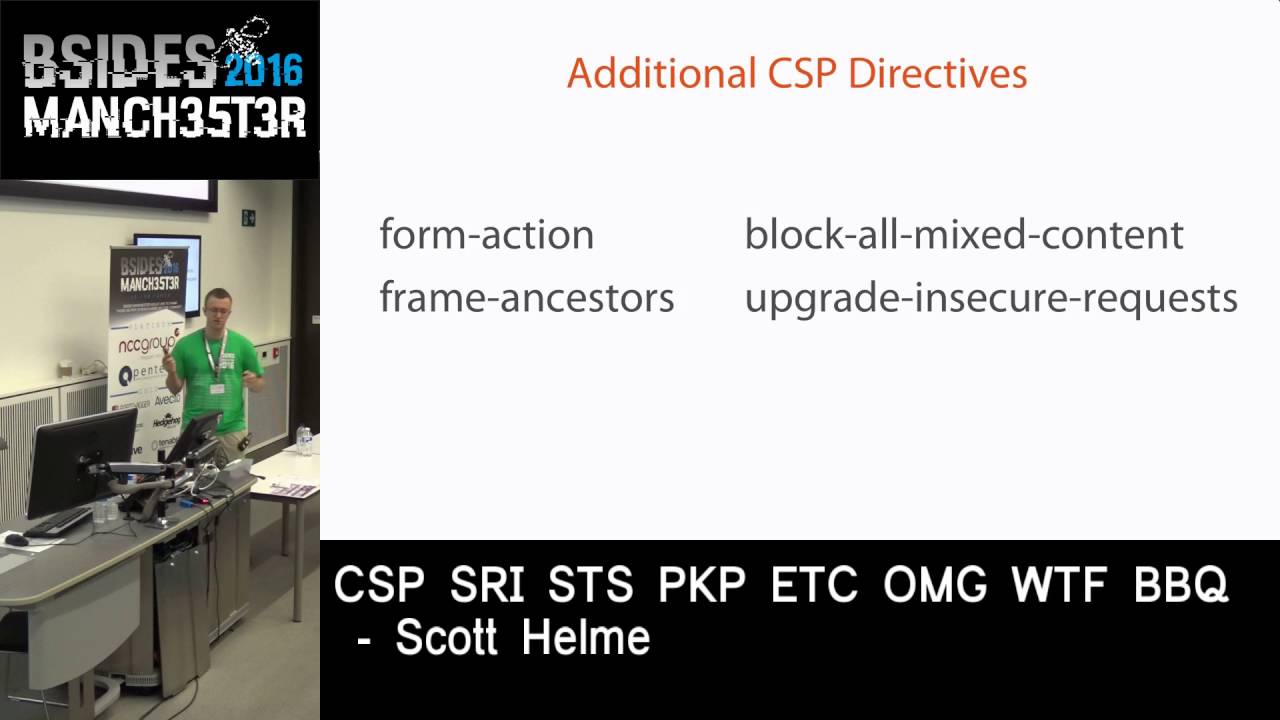
Show transcript [en]
so thanks very much having me and my cocktail today I can't take credit for the title actually it was someone else's idea but it does represent kind of what I want to talk about in that kind of nice version of this title would be I guess modern browser security features and one of the biggest problems I see when working with organizations is that often people just don't know about all of these acronyms we do have these technologies to help us secure our websites but people just don't know about them so I want to do today is kind of a high-level introduction to some of these technologies to tell you about them we're not going to go into them too
deeply but what I want you to do is to go away and think perhaps this could help me perhaps we could deploy this on our site and the technologies I'm going to talk about today I see is kind of the evolution of how security has evolved on the web sorry so we have typical browsing scenario we have the browser talking to us so throughout the demo we or iOS is the whole stat so we're trying to protect our site and historically a lot of our effort was focused on kind of securing the server so we patch r OS and our applications we make sure that only the correct people have access to the servers and there's
lots of things that we can kind of do this end of the conversation and as time has gone by our responsibility as the host is expanded out into the transport layer I'm sure all of you heard of the Snowden revelations and the huge push to encryption basically as a result of that in fact I publish some research recently that shows that encryption is being adopted on the web now at a rate that we've never seen in history so we are extending our responsibility kind of out into the transport layer and we're now enforcing our security requirements there as well and what we do with the technologies that i'm talking about today's we're actually going to take
that one step further and what we're doing is we're actually reaching out into the browser in an effort to secure this whole conversation end to end and we can actually control certain features of the browser we can configure options within the browser and in some scenarios we can actually override the user if the user is doing something that would be dangerous we can actually override the action and enforce our preferred action so we're basically bringing the browser on to our team and it's now going to be working alongside us to secure this entire conversation now one of the things it usually happens when I talk about all some new browser security features is that people kind of
off for all their eyes and think yeah okay listen you know I bet browser support is terrible but browser support isn't terrible all the features that I'm talking about here do have pretty mainstream support across the browsers I'm sure I don't need to tell any of you that support is better that into the slide than this end that's just a given but in a lot of the scenarios it doesn't actually matter it doesn't matter if browser support isn't widely spread you know some of these technologies I don't have come about fifty sixty percent coverage and mainstream browsers right now but it doesn't matter because the browser's at the support them well honor them will do what they say will will act
more securely and the browsers that don't support them will just carry on as they do now so we can deploy these things and it's only going to get better with time as support gets better and for one of them i'm going to talk about we can actually protect people that don't support it so the first three acronyms that i want to talk about are what i refer to as a set of security headers so i'm going to look specifically at the three down the left-hand side we've got content security policy if you see me online you'll know I'm a huge advocate of CSP we've got public key pins are public keep inning and then strict Transport
Security so these are the CSP pkp and sts acronyms from my slide title there are some of the security head is down the right-hand side i'm going to make the slides available after my talk so if you want to have a look into some more of these I've listed them up there as well to see you can kind of go away and do additional research on them as well but I'm going to start with something called content security policy and content security policy was originally created to stop something called the content injection attack or basically to stop bad people putting bad things into our websites and this is an example of what a cross-site scripting attack might
look like we've got some HTML up there it's one of our web pages we don't know how it doesn't matter how but an attackers got a script tag into our page and it's going to load a keylogger file into our page this is a cross-site scripting attack and this is basically one of the main things that CSP was created to try and fight to try and mitigate and CSP itself like I said is just a HTTP response header so if you're familiar with HTTP requests and responses you'll know what response headers are and you can see content security policy is there just issued as another response header with the response so this is all we need to do as
a host to enable CSP protection we just issue the CSP response header there's no particularly technical configuration to do we just issue the header and put the policy in that we want the browser to enforce now building the policy itself can sometimes be a little bit tricky it can be harder than legacy applications but we have some things that can help us out now the policy itself is built of one or more of what we call the CSP directives and these basically are where we start to control the actions of the browsers the ones I'm showing on the screen at the minute are probably about a third of the directives that are available and there were I refer to as
the fetch directives these are the ones that control the actions at the browser when it's going out to fetch some kind of content to bring back and put into our pages and they're fairly kind of the fairly self-explanatory so we have any sauce in the top right that details and list the locations the browser is permitted to load images from we've got the font sauce so you specify the font sauce directed and list the locations that the browser is allowed to load funds from so to show you what this looks like I've put together pretty much the most basic CSP but I can kind of think of so we issue the content security policy header I put the default
sauce in there that was on the previous slide every director on the previous slide falls back to default if it's not specified so you can be a little bit more relaxed in your policy creation and I've just said defaults or self so that means that by default the browser can load content from my domain that's what the self keyword does and cdnas com so I'm saying you are only permitted to load content from these two locations content is not allowed to be loaded from anywhere else going back to our evil com jas keylogger we saw a few slides ago evil dot coms that in the whitelist so the browser would not load that script we've neutralized the cross-site
scripting threat the problem is that you wouldn't actually be able to deploy that on your site because I'm sure all of you guys like me load content from about a million different locations and have all kinds of crap on your website so we have to kind of fine tune our policies so I've taken that policy and I've just fine-tuned it a little bit so by default i said i'm happy to load any content for myself and I'm doing now is I'm adding in the script source so when you define a new policy directive like this you override the default so I've had to specify itself again so that I can load scripts for myself and I've put in the
cloud flare and Google CDN tins and what that basically allows you to do is script tags on your page like that so the browser will go through rendering the page it'll come across these script tags and it will check the hosts in the script tags against the script directive in the header and if that host is in the header then the browser will load the script if it's not then the browser will block the script and it will not load it so that's the scripts and you basically just kind of go on fine-tuning like this so you can see here we've got the script source style black male of styles from image source child sources for things
like iframes it go in bed like a YouTube video or something they typically come in I frames and you just kind of go through all of your content and white list the locations that you expect to load content from and by white listing the locations that we do want to load content from we can stop content from being low different locations that we don't want it to be lowly from so this is a this is like one of the first aspect of CSP this is where the browser actually goes out to kind of fetch content and bring it back but there are a lot more directed in CSP as i said i think the ones i showed
earlier about a third so I've kind of cherry picked another few here again we're not we're not going to get full coverage in the talk like this I need the full slot to talk about just CSP and probably more time so i chafe it these 16 i quite like these and i really like the form action directive now the form action directive which really kind of does what it says on the tin again it controls where the action for any form on your site is allowed to post to and I don't know why every time on the planet isn't using this because the one thing that we definitely don't want to happen on our website is for a login form to
post somewhere else when your users come to your website they type in their username and password and they hit submit do you actually want that form to be able to send that username and password elsewhere hopefully the answer to that is no I always want the username and password to come to me and that's what the formation directive does it stays to the browser these are the only locations that you're allowed to send form data a CSP is issued on a per page basis you issue is a response header so you could just lock this down on your login page if you have forms elsewhere that are supposed to post the third party domains we have the frame ancestors directive
some of you maybe philly familiar with the the x frame options header which controls whether or not your site is allowed to be framed by other sites so can somebody load my site in an iframe in their side it's quite often you things like clickjacking attacks so if somebody on my site with frame ancestors if somebody put this iframe into their page and try to load my site in an iframe in their page the browser would block it and this is what frame ancestors controls who is allowed to frame you and it's a lot more flexible than the x fo header because the x fo header is an on/off setting with CSP and frame ancestors you can actually
whitelist maybe there are three websites that you're happy to frame you and then go others so you can you can have more flexibility they say this effectively deprecates x fo although not officially it's both are still supported and these two I really like blah comics content and or grading secure requests if you serve your site / https I'm sure many of you know about something called mixed content you have a https page and it tries to load a HTTP i set the browser will throw up some kind of warning it will say there's mixed content on this page it's a bad thing and it results in a bad user experience so on my https site we're loading this
asset it's an image target it's got a HTTP source and you can use one of these two directives the first one blah comics content kind of does what it says on the tin it will see this HTTP source and it will block the image it will say that's that's mixed content I'm just going to block it and not load it what I prefer and what I use is the upgrade insecure requests so the browser will see this HTTP asset but before it tries to load it it will switch the scheme to HTTPS and fetch it over HTTPS instead so we've avoided them mixed content warning it can't happen now because the browser will default to secure now we can't
guarantee that image is available over HTTPS because this particular website might not have it but at least we've tried to fix the problem rather than just blocking it or getting a mixed content warning in the browser one of the one of the things you may kind of picked up on the whole CSP thing is you do have the ability to kind of break your website if you accidentally you know mix out some sources in your JavaScript or your styles and you don't load your stylesheet so your website's going to look pretty enough so we have a way of testing CSP without any risk whatsoever and what we do is we we eschew exactly the same policy but we
just change the name of the header and I'd report only to the end so what this does it sends out to the browser and it's a to the browser I want you to look at this policy and it will pop areas in the dev console for any things that breach it but without actually taking the blocking action on the page so if you've accidentally wiped out all of your JavaScript or all of your styles instead of actually blocking it and trashing your website it'll just pop an arrow in the dev console we'll look at these more closer later don't worry about reading it so it's a way of deploying it without the risk so you can
open up your website deploy the CSP report only mode and fly around and have a look for any areas coming up in the dev console maybe you've missed something and you just need to make an addition to your white list or it could be a genuine problem the only problem with that is it doesn't really scale if I've worked with a couple of media organizations that have like fifteen thousand page back catalogs oh oh sweat rubbish and you know this is like flying around with the dev console open trying to find these areas it's just not going to work but CSP can fix that as well we have something called CSP reporting so if you
look at this header we've got another directive in here on the second line called the report URI directive and what this does it saves to the browser if you come across an error why would like you to do is send me a book report to the address that I've specified so you put report you Rin I run a service funnily enough cold report your eye which is designed specifically to collect these reports and if something violates the CSP the browser will fire a post with JSON payload that contains all the details of what went wrong so you can see here I've got an example JSON payload it gives you the document URI which page did this violation happen on
I want to know where it happened what was violated it was a script source in this particular case it gives you the original policy because you can issue customized csps in different areas of your site with more or less protection so it gives you the original policy back to know what you were working with and the block you are I hear evil calm so I now know that on that particular page on my site there was a script tag trying to load content from evil calm and evil that come isn't in my white list and again if you look at the head of here it's still in report only mode so you can use this before you actually enforce
it to get feedback from your visitors and you're basically taking all of your visitors browsers and turning them into tiny little Q a bar so they're actually going to go and QA your website and file really nice bug reports and John couldn't even get me to do that when I worked in with him so it's you getting freaky where you can actually you know turn your browsers visitors browsers into little Q a box and actually get them to do the legwork for you and there's a couple of kind of little tricks with CSP as well you can issue multiple CSP heathers so you can lay your policy however you like you can have like one huge big policy or you can
have multiple policies with different purposes and there's one here if anyone's ever been involved in a migration of taking a site from HTTP to HTTPS you know that it can actually be a bit of a nightmare not unfortunately it's not just as easy as flipping the big encryption switch and turning it on so one of the things that we want to avoid is mixed content that I touched on and you can use this header here so it's a report on the header it's not going to take any blocking action and the default source what you can actually do is just specify the scheme like I have here so I'm saying by default I don't care where
I lord anything from I just want it to be loaded over HTTPS and then I specified the report your I directive so if anything violates this policy is loaded over HTTP the browser will send you that report that we just saw so again you're turning all of your visitors browsers into little QA balls and they're basically going to scan your entire website for you for free and file these lot reports when they find things that violate your policy so if you are going through a migration or you're looking at migration use things like this it makes your life so much easier just get all your visitors browsers to to hard work don't sit there creping
through whatever to try and find HTTP image tags are things you CSP and i want to touch on just a couple of the advanced features as i said i definitely dark time to talk about CSP as much detail as i like but you can do things like white listing scripts with their hashes as well if you don't want to whitelist the origin that they're being loaded from you can just whitelist them using their hash you can inject nancy's into the script tag and into the CSP header so you can whitelist script tags or any tag that you want with a nonce as well CSP has a graceful fall back we've got three different versions of the CSP spec
now and we can gracefully fall back all the way through all three of them so if you want to use the latest and greatest features from CSP three it will gracefully fall back to browsers that are CSP two on one complaint without completely breaking them so we don't need to worry about adding these new features into our policies because if the browser doesn't understand it it will just disregard it and carry on you know so there's no worry about kind of supporting the older versions and path white listing page isn't here but if I didn't mention quiet listening budget of a heart attack rather than whitelisting like an entire origin like cdnas calm basically says I can load any script
from CDN jfcom you can actually drill right down into the specific path so if you're loading a particular version of angular you can actually whitelist the path to that specific version to make sure an attacker can't load in an older version while loading a different script from that host so you can be really you know really tight and really restricted with your CSP if that's what you need touch them the multiple policy thing don't worry about having like one huge massive big policy I see lots of science trying to go for crazy insane policy like on the first deployment just turn one feature of CSP on start out with just upgrading secure or just a set of
pretty broad default sources a lot of sites fail on deploying this because they try and do literally like crazy insane policy from the beginning just start go for the easy wins you know deter pick a couple of things enable one or two features and build on it and you can issue the enforced and report only header at the same time so you can have your actual and forth policy and then you can deploy another policy alongside and report only mode to say right I want this one enforcing but I want to get the feedback on what would happen if I used this one instead so you can kind of iterate through different policy versions as well and there's something
coming in CSP 3 yet it's only spot in chrome right now because strict dynamic and basically if you didn't want to whitelist all of the locations that you lord script from and you have a script tag on your page you can whitelist art script and with strict dynamic you can permit it to bring its dependencies in without having to whitelist all of the origins of the dependencies so it just makes CSP a little bit easier to deploy because you say I trust this script and I want to pass up but trust on to any dependencies that it may load without having to whitelist all of their origins or white listing them via hash or whatever the method so we we've realized
that CSP was a little bit difficult to deploy and there are some things coming in the next version to make that easier so the one last thing to wrap up on CSP as well I'm sure a couple upenn test guys probably picked up on is with the cross-site scripting we can whitelist the third-party origins like evil kamma and block the script from loading their the way that we get a complete kind of protection really against cross-site scripting is that inline scripts like this are also banned by CSP in default by default sorry so if you have a script tag this one's not particularly but if you have the script tag on your page the browser would just not execute it full
stop is inline script and the reason if the browser doesn't know where it came from the browser can't know where the wii's the host put that there or there an attack upon today is just an inline script tag so what we have to do is externalize that file into oil externalize it into a file them and load it back from our domain a domain whatever but we're giving the browser the piece of information that it needs is this host in the whitelist you can enable inline script in CSP if you want but it's one of the biggest wins that we have with CSP so last resort if you really have to enable inline script but try not to because we lose a really
good mitigation for cross-site scripting so that was a very brief overview of CSP the next acronym up Wiz pkp which is public key pinning this is another HTTP response header still and pkp kind of it helps us with the ability to come back something called rogue certificate so I've got two certificates up on the screen here they're both issued from my domain they're both signed by a legitimate certificate authority and they're both within the validity period what the browser accept either one of these certificates is a nun disagree but what if this one wasn't issued to me why if this one was issued to somebody else the browser is still going to trust it because the only three metrics that a
browser has to look at in a certificate is there's a hostname correct which it is is it signed by a trusted CA which it is and is it within its validity period so it's past those three metrics even though this certificate is a minus a rogue certificate somebody might have compromised the ca start com got popped a few weeks back the guy tried to get certificates for paypal com the browser doesn't know so what pkp does is pkp gives a browser forth metric by which to check the certificate and again pkp is just a HTTP response header you can see there the public key pins header and you issue the policy as the value of the header and send that out
with all of your pages now fortunately pkp is a bit simpler than CSP these are the directives in pkp so it's nice and simple we've only got the three we've got the pin sha-256 there which is the actual pin of the key that we want to pin max-age is the number of seconds that the browser sir should cash in for so unlike CSP which is enforced on a per page basis it has no lifetime weather than the lifetime of the age pkp is actually cached by the browser for the number of seconds in max age and include subdomains again it's pretty obvious if you wish you this on a host do you want to include all subdomains underneath
that particular host honor and this is what pkp policy looks like so it kind of looks a little bit messy but it's basically just we've got the two pinch are 256 values so these are the actual two pins these two keys that we want to pin one is what I refer to as the Y pin so that's the current pin that you have in production for the key that you're actually using and the other is the backup so it's you know a key in a safe somewhere that if your main key ever gets compromised you can fall to the back up and then get your back up out of the safe and carry on using that
and then roll your header so you've got to have a minimum of two but if you're looking at pkp that the minimum is two it's not the maximum people go with pkp and only have one backup have look at mine I have like six backups you can have as many backups as you want and you can issue as many of these as you want so don't don't feel that you you know you kind of have to stick to the spec and just go with the two and then you can see include subdomains in the max age there I think I was like a month or something in seconds and the actual pin values themselves the pin value itself is the base64
encoded version of the shower 256 hash of something that we call the subject public key information basically just think of it as a hash of your key it's you know we don't need to know the specific details but basically we're just hashing bsp ki basically for encoding it and then sticking that in the header so don't worry too much about the technicalities do the consideration if you want to deploy pkp is where you're going to pin because when we use certificates on our websites we actually have a certificate chain so I've I've rebuilt my chain here to show you you've got my domain over on the right hand side that's signed by the let's encrypt intermediate certificate
who r cross signed by the DST root and what you can actually do is you can pin at different levels you can pin your leaf like we call it the leaf which is the one over here with my domain name on or you can pin further down the chain like the intermediate or at the root now there are different considerations as pros and cons to each of these if you want to pin at the leaf you're pinning your own private key so were your own public keys are your own key pair so you're responsible for looking after the associated private key and the backup is offline hopefully somewhere in a safe from a USB Drive that nobody can get
access to so what you're saying to the browser is this is the key that I'm currently using my certificate and I have this one back up so it should either be one of these two keys whenever you come to my website we should be using one of these two keys now this is the most secure level to pin up because only you have these keys nobody else has these keys so nobody can get any vogue certificates for your site because the browser is going to look for one of these two keys the problem is is that if you kind of get compromised and so on gets access to your key and you've not looked after your backup or you've lost
it and you have no backup your kind of screws because your website is going to go offline or however long you set in max-age so what some websites do is they pin further down the chain and you can pin Italy intermediate so you could in my scenario I could pin against the let's encrypt intermediate and then for your backup because you have to pin another key that's not in the chain you could pin against another CA so you can pick tcas that you trust you say here's my current CA so this key should always be in the chain and here's my backup key which is another CA that I trust now the problem with pinning here is that now
these two cas can technically issue rogue certificates for you because we're trusting the intermediate but what we have done is still a massive win because we've gone from the 350 cas in the world however many there are that could issue rogue certificates rules down to just these two so we've hugely reduced the attack surface now in that you can pick to reputable cas that might not be coerced by foreign governments things like that and lock your lock your pkp against those so if somebody pops the china post office and gets them to issue a certificate for my domain then the browser won't accept it because it knows that these are the only two casi trust
to issue certificates for me the only problem of intermediates is that they're they're not really long term like you can't guarantee that they'll be there for a long time let's encrypt shifted from the x1 to the x3 intermediate recently broke a few things so intermediates can be kind of a little bit dynamic so what you can do is pinned against the root because roots are much more long-term it takes organizations literally years to get their roots into the restore soap inning against the root is a little bit more reliable in that you know that the roots not going to go anywhere so i could pin against the DST root which is well let's encrypt chained down
to and then just pick another root certificate to pin against if you want and this is actually if you look at github website this is what github do get hub pin I think it's dizzy certain verisign so they picked to reputable cas that they trust and they pinned against them and said these are the only two cas on the planet that should ever issue certificates for github com if you see a certificate from another Authority its rogue it's not ours don't trust it so they can stop their users basically we man in the middle if somebody manages to get hold of a trusted root cert like a company that recently got across signed by symantec and
one of the other good things with pkp is again we have pkp reporting and the other one as well you'll see that I've added report only on to the header here so again you can deploy this in report only mode if you think oh I don't look I'm going to turn this on and tank my website just turn it on the report only mode and if you get boatloads of areas coming in then you broke something and but nothing's going to happen there's nothing worse than the fact you're going to get a lot of error reports so i deploy in report only mode and enable reporting and the good thing with the reporting is that if somebody does
actually get a rogue certificate signed for your site the browser will post a JSON payload and they actually put the pem encoding certificate chain in the payload so you can actually see who's issued it and go directly to the ca as soon as it happens and say gives you signed a certificate for my domain this needs to be revoked so you can actually know about these things that are happening in the wild rather than the current situation which is that everybody's browsers would just carry on accepting the certificate so that's pkp is probably one of the most complex of the technologies I'm talking about today I recently did a crawl of the top 1 million sites on the planet and there's
about 200 that huge pkp is literally a brand new specification and a lot of people are scared of what we call the HP KP [ __ ] gun or HP KP suicide which is where you basically get your pins wrong and then the browser can't use anything so it deployment report on the mode don't just turn these things on always take the safe approach next up is something called strict Transport Security now without strict Transport Security we're going to look through a basic conversation with twitter com so a user opens up their browser and like most of you guys I'm pretty sure that you just type in twitter com like I do so that's the blue bit in this request it user
opens a browser typed in twitter com the browser defaults to http so the very first thing that the browser wants to do is to send an insecure requested Twitter calm so it sends a get request to HTTP twitter com and Twitter responds back with a 301 redirect and says I don't want to talk HTTP I want to talk https I want to be secure so please come back over a secure connection and then the browser honors that request and reissues the same request over HTTPS now the only problem is the very first request that went out and the redirect that came back that told us to go to a secure protocol we sent over an insecure protocol so we
said hey we need to like secure our conversation but we did it over an insecure protocol so then attack is just going to throw that away because we're talking HTTP and the problem with that I'm sure some of you heard of SSL strip or SSL stripping attacks is that the attacker then jumps into the middle and when they see the redirect coming back that says go HTTPS they just throw that away the attacker will go back HTTPS and fetch the page and then answer the clients initial request over HTTP so the attacker literally sits in the middle talk to https to twitter they're happy because we're talking HTTPS and my browser never got the redirect so my browser is happy
to keep talking HTTP and then the attack of literally just sits in the middle and gets our entire conversation with twitter com now STS fixes this and again SDS is just another HTTP response header that you pop into responses on your site so a strict Transport Security header and the policy and again I like STS because it's not like complicated we only have three directives that we can use the only actually required directive for a valid STS policies max-age so we have the max age which is again the number of seconds that the browser should cash and apply this policy for include subdomains does what it says on the tin and I will touch on preloading later but there is one
more directive but the only required one is max age so a valid SDS policy can be as simple as that this is how long we want to apply STS for and what STS does once the browser receives this is stas never talk HTTP to me again only ever talk to me over HTTPS so that's the sole purpose of SDS there's a couple of other benefits but this is basically what we want from sts and what happens then once the browser has received this strict Transport Security policy is that you open up your browser you typing twitter com exactly the same and the browser wants to default to http but we STS it won't the browser will actually block
that request now even if the user types in HTTP colon slash slash twitter com if they click on a link or a bookmark or anything it doesn't matter if the user tries to speak HTTP the browser will override them and block their action because it knows we've issued an SDS policy we only want to speak HTTPS so we'll actually override any action whatsoever and force the request the very first request to go out of a https instead and what we've done there is basically ensure that our entire communication happens over HTTPS and sliced out the whole HTTP part which is where an attacker would have inserted themselves so if you're using HTTPS and your website and you redirect to https
then you should be using SDS because it will it will get rid of that initial redirect which will just save you guys load because you're not constantly just redirecting browsers pointlessly but it also removes all these SSL stripping attacks the other thing that s testers as well is has anyone ever got a certificate warning in their browser I'm sure loads of you have you go to a website and it says are there's something wrong there's a nice big shiny blue continue button at the bottom and like ninety-nine point nine percent of people or like my browser's telling me something mayor and they just mash the button to bypass the warning and carry on STS disables that it completely takes
options out if you get any error to do with HTTPS connection and you're an sts host the browser is not permitted to allow the user to bypass that so that's the other benefit of SDS is that people can't just click through those warnings like they always do now the next acronym that I want to talk about is something called s RI or sub resource integrity you'll be really happy to know that s RI isn't a HTTP response header and what s RI does is it resolves a problem that we have with third party trust on our sighs I mentioned earlier about the CSP bowler the CSP policy being too basic because we all load content from countless domains from CD
ends we have twitter widgets we embed things we we have all kinds of stuff loaded into our website so my sites here nice and secure I'm loading in jQuery whatever from some CDN I'm effectively giving that CDN code execution in my page I'm is basically i call it i saw it online somewhere consensual access s so it's saying to this CDN hey give us a javascript file and just like plop it in my page and trusting that CDN to give you the javascript file that you actually wanted now most of the time they will give you the javascript file that you actually wants a double give you jquery or whatever it is that you're loading but what if the CDN is
compromised what if someone out the CDN has a bad day and things you know screw you guys I'm going to put Wildcat since a jquery and you know completely tanked everyone's website they you know we're trusting them to do that and what s RI does is it removes this trust aspect so you can see here basic script tag we're loading jQuery from Sun CDN calm and s RI is basically just two extra attributes in a script tag we have the first one here that's cross-origin this value is always anonymous don't worry about that just certain forget and then we have the integrity attribute as well and this is basically just the base 64 encoded hash of the file that we should
expect from the CDM so what we're saying to the browser is we want to load jQuery from the CDN here's the hash of the file that you should get from the CDM so when the CDN sends I filed the browser will hash it and compare the hash to the integrity attribute as long as it finds a hash that matches we know that the CDN hasn't tampered with the file itself we've actually got the file that we were expecting to get now the good thing with ssris its set and forget you know if you're loading a particular version of jQuery from a CDN that file should never change so we don't need to change these once you put that script tag into the
page you just put that script tag into the page and the only time you ever need to do anything with it is if you want to change the jQuery version you just update the hashes so si is minimal overhead and he gives us a lot of security because we can take you know we're still trusting the CD ins to load those assets but we're verifying the files that they're sending to us and that's the crucial part is like trust but verify as well dead easy to set up if you want to do it kind of at the command line literally just count the file pipe it into I'm using openssl digest sha-256 don't forget the binary flag
spent ages debugging this and then just pipe it into some kind of basics before encoding and that output there is what you put into the script tag prepended with sha-256 in this case and if you want to do char 384 and you can also do sha-512 and you can put all three versions into the script tag for the same file and the browser will always choose the strongest hash that its support so again you know old rubbish browsers we can keep the sha256 hash for them there using a newer better browser it will pick the stronger hash to validate the file against I also have one of my websites online way if you don't want to do all this you can
literally just paste in the URL for the asset and it just generates the full script tag with all the values in for you so you don't even have to do this you could build it into your bill pipeline so you can automatically generate these hashes of files into deployments and things you know there's loads of different ways to do this and it can look a bit messy that's kind of that's the script tag there it's only got the shower 256 and 384 values and I couldn't fit the 512 one on as well so it does make the script tags a little bit bigger but that's it that's sr i fully deployed I've got away fetched out
J profile generated the hashes and put them in the script tag done takes about 10 seconds and there's no maintenance from that point forwards as long as you're referencing a particular version of jQuery and you don't want your CDN to be changing code versions and things anyway because that's potentially a terrible idea so back to the original third party trust problem now I have my nice super secure website and the content will be blocked it will get the file it will get jquery from the CDN maybe they've switched it out to be a keylogger or rickroll whatever it will hash the file and it will say this file doesn't match the hash I was expecting
this is not file that I wanted and it will just throw it away now there is also the ability to have kind of a fallback mechanism if you will it was in the specification so if you load this file from the CDN and something happens the hash doesn't match there was another attribute where you could specify a fallback location somewhere on your own site perhaps that didn't make it through but what I saw there was a talk at Def Con and a couple of guys have basically written a tiny little script that will look for the events of scripts being blocked with s RI and then you can just load in your own local version so it
will say right loading from the CD and something went wrong okay Lloyd jquery from my domain instead as a backup so you can I have a fallback as well with sr I if the CDN you know does do something bad and changes the file then you can also have a backup option and not have to worry about your website going offline which is something that a lot of people worry about but when you think about it if the CD hands change the file then you probably don't wanna be like carrying on anyway so what I want to do now I've got I want to demo quite a few of these I was thinking of doing it throughout but I
don't want to keep telling in out the slides so I actually want to demo a few of these things excuse me up and running now my twitter handle is that i'm going to send out a couple of tweets with links in for you to click i would like some of you guys to click on them because some of them play music so make sure your device has sound on and we can actually see some of these things in action excuse me not married he's gone off yet so the first one that I want to have a look at is going back to CS be here and I want to look at a basic content injection attack so I'm just copying a
piece of JavaScript there nothing particular and you know what less actually I wonder if the demo gods would be nice anyone here work with Barclays no good i'm going to use the Barkers website as an example then I had to change this but I did this last time resume for the handle awkward and I'm basically right so I'm going to go to the console Wow write a load of rubbish so ignore all those areas I don't know what's wrong with their website so basically the piece of JavaScript I've just copied well I'm going to do is I'm going to paste it into the console and allow it to run so i'm going to paste it in hit enter and
i'll close the console so you can watch what this piece of JavaScript does so pace the script soon hit enter and you can now make this website to do the Harlem shake so when it actually fixing it just grabs all the elements on the page and does crazy [ __ ] with them so this is this is basically a content injection attack that's really annoying let me just get rid of that who here thinks that that's actually indicative of any kind of problem yeah okay does I don't think that's not a problem because I just did it my browser and me okay that's good response so what I've done those I've injected the content locally so obviously that's only
affected my copy of the page of my browser it's not happening to anyone else these you know copies of the page and their browsers no one else will see that but me so but what it does indicate is the fact that if you can get the content there then the browser will will honor it it will do what it says if you say he's play an annoying song and make all the things bounce around then the browser will do it and all you have to do is get that content there now I can't do the rest of the demo on the Barkers website because I get in a lot of trouble so fortunately Troy if you don't
follow try hun he's another security research down in ours he sell this website which is basically a playground where you can actually do hacky things and he gives you permission so what I'm going to try an do is get that content into the page but without actually doing it myself to actually get it in there and what I'm going to use for the first example is something called a reflected cross-site scripting attack so if I by reflected content i mean if i give this website the string b-sides and then hit submit the website sends me the page back and it reflected that content into several locations you can see it's been rendered back into the search box
there it's been rendered into the page and it's also in the address so i give it a piece of content and the page comes back with the content in it now what if i give it a script tag if i give this search box a script tag and say hey here's a script tag i'm not going to type it all in I've got here's one I prepared earlier so basically this is exactly the same thing I've just put the search term into the URL instead and what I've done is I put some script into the search term so the browser has sent that off to the site and the site is sent the page back and
written the script that I gave it into the page and you can see now that we've popped and a word it's pretty harmless but this is a reflective cross-site scripting attack so now what I can do next is if i take my harlem shake script and pass that it instead i can now admit this website do the Harlem shake and to prove this is actually real I will send out a tweet now and I want to hear someone's on tits on this device playing this you can you can click it it's fine nothing nothing bad will happen just to click click the link so that's that's reflected cross-site scripting attack and this is this is
basically just a specially crafted URL and like song so one click on it on to actually hear it do the thing you click on that URL and then it will render that script tag into the page and your copy of the page on your phone will start playing the annoying music and doing all the crazy bounce around things there we go so it definitely works and this this is okay but I need to get you to actually click on this specially crafted link so it's that that link is got the payload in it that's reflected what we want and what's better is a store across site scripting attack and we can do this as well so on this website you have the
ability to look at various different cars and sorry I've slogged me up some reason why did I set my password as password no why's it locked me out okay i'll just create a new fake one sorry about that some reason it's troy may reset the website every now and again somebody does completely deletes like his entire site so he has to reload it from an image which means I lose my account sometimes so you can go onto the leaderboard here ah this is your the problem with using a hacky website so you go into the leaderboard here and view information about a particular car but what you can also do is you can cast a vote and when
you vote it puts your name down here and it also puts a comment at the bottom so I'm going to vote on one of these cars and leave a comment nothing to see here dark and what I'm going to do I have a script tag here as well i'm gonna copy that script tag a pen lands the end of my comment and i'm going to vote so what it will now do is it will leave my comment on the bottom page now my comment is there but the browser has also rendered that script tag into the page and it's now actually stored in the page this is a persistent issue so what happens now if I revisit
that page somebody else's cross-site scripting payload pops up and that script tag is now actually in that page permanently so there's no special or crafted URL here and I'll tweet this one out again another one you can see it's not a crafted URL there's nothing in the URL at all it's literally just that page and that page now actually has that payload embedded into it so again if you click on that link now in your browser's it will do that permanently until somebody goes and actually delete that we will get the Harlem shake popping up in the background every time and again this the problem here is that the browser is rendering this content into the page and it's saying go and
respects this particular style sheet that does all the crazy animations go and fetch this audio clip and the browser doesn't know that it's not supposed to do that because we put the script tag into the page and the browser doesn't know and this is what we can fix with CSP so going right back to the very first example when I grabbed the script there I'm going to go to one of the sites that Iram so this is the site report you're either i mentioned i run this i deploy CSP on here and what I'm going to do is the very first thing that I demo to you open the console paste the script in and I'm going to hit enter so
it should start doing the crazy shaky things because I put the script into the browser but it doesn't let me zoom in so you can actually see a bit better so it's a seer the some areas in the console now and it says refused to load the style sheet from blah blah blah domain because it violates the following content security policy directive style sauce and then there's another one down here refuse to load the media because it violates the content security policy so now even though we've actually managed to get the script into the page that loads the style sheet and loads of media object the browser knows because of the content security policy that I'm not
supposed to be loading things from amazon AWS calm because i don't let any content from a so you can completely neutralize that attack with content security policy one of the other things I touched on as well was the form action I really like the form action in CSP and honestly I just think that everybody what yeah are you hacking me while I'm on stage so I'm going to go to the login page and I'm going to have a look at my login form now my login form posts as you would expect back to me post to my authentic logging controller what I'm going to do actually I'll just demonstrate that this works first so I have a one password on
my laptop I use the password manager you all should let me just don't like that so I have a keyboard shortcut for one password i basically press command back slash i have multiple accounts for this website he says which account do you want to log in with I hit Scott helmet hotmail com and it automatically fills in the username and password and hits login for me so the 1password literally does paste my username and password into the box and say is logging with this user name and password right that's how it's supposed to work but what happens if that log in form wasn't sending that back to me maybe you know like I say an employee had a bad
day someone logged in to maybe use WordPress and you're terrible logs into your CMS and changes the form you know there's a lot of different ways that this could be changed it doesn't matter how it's changed what we want is to know that it's secure if it's not so I'm going to do I'm going to change I'm going to change the action here let's go to what is this do password our PHP so does everyone agree when I hit submit on this form that the browser will actually post to evil com does anyone disagree I've changed the page it says post of evil com so that's what the browser's going to do so he doesn't
matter where this change happens I know that I've just done this locally but I know that I've just done this locally but it doesn't matter where this change happens I'm going to do exactly the same thing and when they hit command back slash pop up my password manager and I'm going to say login with this user name and password except this time it's not worked and you may have noticed a little error popped up in the console over here assuming so you can see that and it says that the browser refused to send form data to Eagle calm because it violates following CSP directive form action itself so Mike format can say is the only time you ever
send any form data is to me or don't send it so in this scenario again it doesn't matter who or how or why that form got changed you know that the browser will not post your user credentials to evil calm and hopefully nobody here wants user credentials to ever be posted to evil calm so that's one of the additional things that you can do with CSP as well I set up oops I think it was on this URL here so just to quickly show you what s RI looks like so I set up this page on my site of the day just to quickly demo this I base our to script tags on the page one's got a valid hash for the file
from the CDN as you would expect the other one has an intentionally invalid file hash and quite simply all the browser does when you load the page is it throws an error in the dev console and it says failed to find a valid digest for this particular resource being loaded from the CDN and it tells you what the hash was and it says it's over there the resource has been blocked so we got the script back from the CDM in this case have obviously intentionally misconfigured the hash attribute for it but it knows the browser knows that something was wrong this file is not the file that we're expecting so it simply blocks it and as
I said s our eyes is just set and forget' if you're putting a script tag or a style sheet into a page just put the utter I attributes on them am i okay for time can I yeah okay oh well they're going to miss out they're going to miss out on there I have another one here as well so what I'll do I need to reload that page because that's going to equal com I just want to show CSP reporting I mentioned with CSP reporting when things violate your policy the browser will provide that post object the JSON payload to you that actually happens in real time as well and this is the other thing i like about CSP is that someone
successfully finds a cross-site scripting exploit on your website you will literally get like the first time it's exploited you literally get a post back that says something just went wrong on this page so you actually get basically kind of real-time threat detection almost for free with CSP and this service that I run basically just listens for these reports and it catches them in passes them does pretty grass and things but this particular page here I only it looks all right okay this page on my site basically has intentional violation so I put things on here that breach my CSP on purpose to force the browser to send so if I reload this page once that's reloaded the browser will
send the reports as you can see in the console if I tab back over right before I can even get back to the other tab the browser's already fired the post payload with the reporting that stays here so you can see I have just loaded that page CSP test there's an image I'm intentionally trying to load it with the FTP protocol which I don't want list so literally in the time that it took me to shift from one tub to the other the browser's already fired the payload we've already received it parsley and you know there's a problem on your website in the time that it took me to click from one tab to the other so you
can literally get real time feedback from your content security policy when it's deployed in the wild and this the reason I sell report your eye and I run it is because CSP reporting is incredibly powerful I found so many problems on websites well we've deployed reporting for them and if you want if you need to sell it to the business you can like make pretty graphs and things and make it look awesome but from a technical standpoint CSP reporting is so valuable you can literally get real time feedback from your visitors browsers about what's going on in your site in the wild and the last sink so let me go back and just to show you how it literally
how easy it can be to generate generate an SR I tag I have some tools as loads of tools online don't feel obliged to use mine but you've literally just paste him that asset there you can incorporate this into you know like your production environments and Italy sort of spits out the script tag at the bottom you could just write your own little script that does this you know scan through your code base pull out the script tags and just pop them back with the ESRI attributes internet so there was I just out of interest actually i'm just going to tweet this one as well so let's see why if you click on that one for me
hopefully what we'll be able to see I didn't think about this one actually just so you can show I can show you that it's definitely not faked it someone finds that tweet and clicks on that now hopefully we should see your actual live reports coming in just to show you that it's not a setup and this definitely works oh there we go that's what browser are you using I doesn't know I'm one chrome ah wonder what browser dies is anyone using a weird browser that's not chrome firefox safari or ie okay that'd be why after look up your user agent ways to another but yeah that's basically it that's if that was an actual cross-site scripting bug that
was being exploited and people were actually being attacked by that then that would contain all the information of the cross-site scripting book you know obviously it's just useless image reports on this one but this is this is the thing you can actually sit there and monitor this and no real time and something go sideways on your website and i'll leave the demos there actually and that's pretty much everything for me i'm hoping that you at least got enough information from these different technologies that you might be able to go away and think can i deploy these can i use them more often than not i find that its people just don't know about them they're not publicized widely so
this was meant as kind of an introduction hopefully to get some thoughts going maybe that you can deploy some of these things things like s RI easy wins there's a couple of features in CSP you know just go for the low-hanging fruit don't go for like crazy insane policies just go for the low-hanging fruit and that's better than where we are at the minute thank you very much [Applause]
Related talks
 39:16
39:16 42:21
42:21 46:25
46:25 47:26
47:26 46:12
46:12 48:32
48:32