GT - All that glitters isn't Chrome: Hunting for Suspicious Browser Extensions - Mike Sconzo
Show transcript [en]
excellent thanks the mic working is here okay awesome and for those of you on the Internet the room is completely packed so you're lucky you're watching about with us so be very serious talk by the way I know several people in the audience they will likely be heckling those of you that I don't know feel free radical as well but today we're going to be talking about hunting for suspicious browser extensions using some data analytic data science whatever buzz word you want to use techniques this is a little bit about me I do you threat intelligence a box for those of you that haven't heard of box we're a cloud content management company we store
people's files we help them with workflows I run a I guess a website it's probably then of you know like late 1990s Geocities called sec repo comm I never claimed to be an HTML author of some security related data there I'm happy to host more and happy to take links and obviously enjoy data analysis which what I'm doing here you can find me on Twitter and github under sushi and then I had had this last one in but I consider myself a scruffy both because I have beard and because my approach to em LNA I kind of just the more hackish engineering approach so I sat through hydrants on here although I was gonna tease him a little bit I sawed through
his his talk earlier he's way smarter than me so I apologize for all of you that have been through his talk in mind but I think we'll make it through but overall why why should you care about Chrome extensions I mean for the most part there are huge sorts of risks huge sorts of risk prizes that nobody's really paying attention to burn the news people like to either find abandoned ones and kind of take them over on github and maybe re-upload them or they like to create new ones that look similar to existing ones to maybe social engineer or entice users to download them and then when they do well what happens they steal credentials they coin
mine right huge huge problems if you're dealing with an enterprise and you want to keep it safe most places don't wanna legal credentials so in this talk kind of talk through how can you find them what are some of the tell-tale signs that might be interesting either something that is malicious or something that's suspicious that's worth digging into and asking some more questions around hopefully you can take these techniques back you can apply them you can find cool things you can shift the policy at your organization's to really kind of begin to shape the the perception internally to the org of like hey this is a real thing that we need to pay attention to so most importantly
gotta work flowing tools if you want to reproduce this work you can it's pretty simple I was talking to somebody else about it earlier today basically all you need to do is get the and these are kind of the steps that we followed so I'll go through some of the the other ones but basically get the Chrome extensions that are in your environment one of the things that we thought was important we had like an accurate account a count of how many were on each system and which ones were on each system one so we could go back and find them pretty easily and two so we could really kind of begin to understand the distribution of how these
things were in the environment but basically you go get the ID take the ID you go to the Chrome Web Store you find it you download it you pull it apart then you can you can wind up building some data structures and we'll go through that in a second the other thing that I mind up using a little bit's your excavator it's a service by duo it's free they give you risk scores it works pretty well so it's all done in Python I'm not the best Python coder but it works I use graphics tree which I love you don't have to use graphics tree so the ones with the asterisks are think that what it's kind of just an overview of the
data so throughout this will be talking roughly about 2000 Chrome extensions which to me is mind bob analyst can hunt history specifically will be focused not focusing on about 1700 of them which are interesting and we'll kind of talk again so will deep dive into permissions as well so that way you guys can understand which ones might be more interesting than others which ones you should care about what they mean bunch of different unique ones say the long tail right like most of the Chrome extensions in an environment likely exist on only one or two machines versus everybody having had the same one I also added the picture so that way you guys would take this slide seriously and
it actually looked like I did some work there's nothing to do with the presentation though so one of the the first ways that I was like well like maybe maybe we can hunt our way through this and let's let's see what's going on let's clean the data what's going on this is the data that we started with this simple JSON structure you can kind of see a little sneak preview of permissions where the Chrome extension live blah blah blah not too super exciting so my first thought was like hey why don't we look through all the Chrome extensions that don't have a name on the Google Play Store and have no permissions set right requests nothing
from the web browser so they just kind of exist for 300 of them in this dataset which is insane so if you think that you can you can now you know because you can have an enterprise but you can also create an extension on the Google or the google chrome store that has no permissions and no name and who's okay with that so it was pretty surprised so the next thought was hey wait a second let's trust the Internet certainly right everybody who uses the Chrome Web Store they're gonna put on ratings and they're gonna know what's going on so I could probably use it as a wait list right like ah I'm gonna trust everything
with a four star and above rating and more than 50,000 users that have marked it as a four star because it's gonna be great so you end up with this list sorry if it's a little hard to see but really my first like what the heck is going on is there's one called pop-up blocker for Chrome popper blocker with with 1p so it's extra legit and then this other one is my favorite hola free VPN proxy unblocker also super great sounding and something I'm sure everybody wants in their organization so it turns out never trust the internet shocker even something really simple like this amazing visualization that took me days to create you can find interesting
things but it's getting very something and now will kind of just dig through a few rings and you guys can see that okay just to kind of get a feel for what they look like and maybe some of their ratings this is a very popular extension that a lot of people run it's called honey anybody use honey I it because I love saving money but you know that honey can phone home to like websites if it's choosing and intercept your requests good times right actually similar shouldn't give to the popper blocker with one p so from a high level behavioral like and then weight free VPN unblocking can be and it can look at all
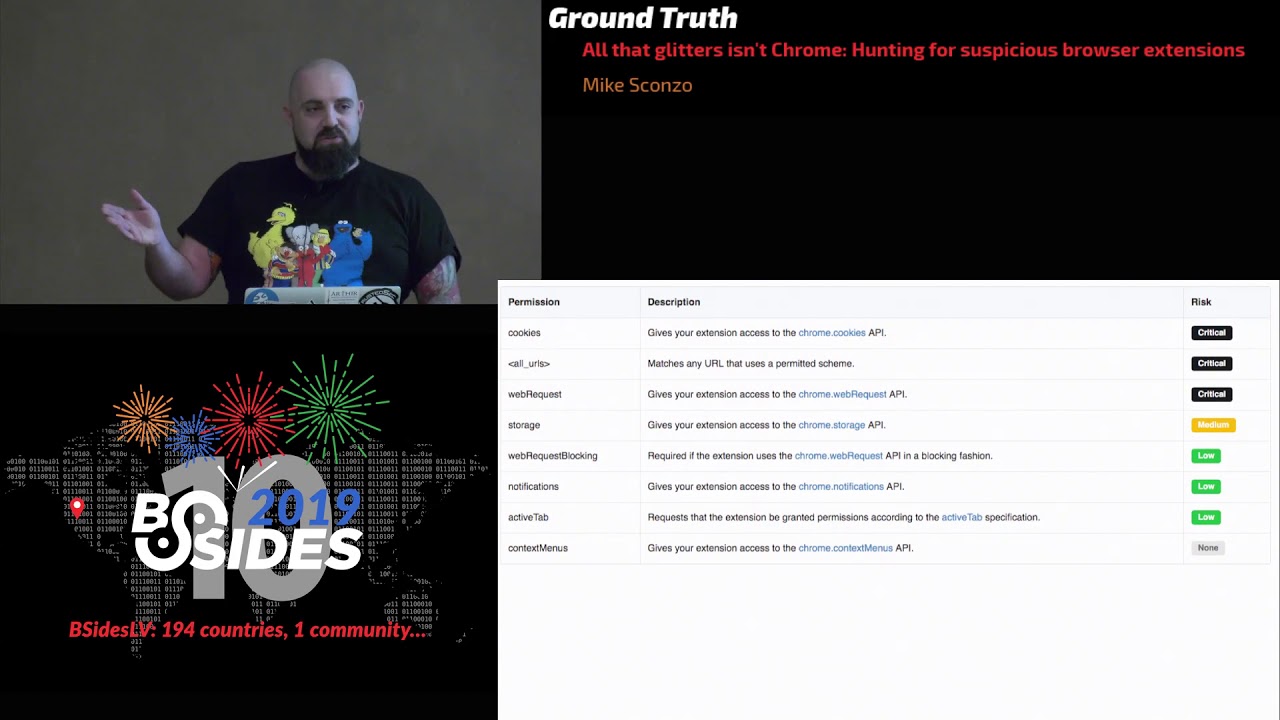
of your different web traffic coming to and from it can access anything on any URL it can connect to URL can look at all your cookies because certainly nothing said if is a note permission a little bit more some see our excavator it wasn't really kind of what I wanted but it gave me a really good starting place so definitely shouts out to them Maxim is critical and you're thinking well like what's critical so you've got these two I'll kind of point out that's essentially any protocol on any web site or IP address so if FTP WebSockets right that's good what why wouldn't you want your web browser having access to all of that within itself you know and video
capture audio capture gen'l'men uses here yeah so you kind of see again my level ones and these will kind of play into a couple different graphs and it is a side bar if you wind up using CR excavator it actually uses these to generate some of its or score and we'll kind of look at that in a second to then going from here I mean you'll kind of notice to kind of point it out the ones over here on the left that's like any any protocol any any URL any IP address then on the right you can I see specific ones so foot all right like any file in your machine yeah but there's more of
those right like it can request access to specific sites so one of the things is my favorite Stack Overflow questions I was like Chrome extension phone home to this arbitrary website and then like well you just add it to permissions and then you write this usually three lines of JavaScript so that's awesome it's good if you're doing static analysis on these permissions one because well it has these kind of seat or phone home domains or whatever domains they're lifting access to in them so we can begin to look at those so looking at that over the entire data set a 1500 different domains URLs in just from these extensions which to me was mind-blowing I did not expect anything
that big about 1500 them were unique HD and then not looking at the the blatant wild card the ones that what they're doing but they're from specific and then I kind of had another random thought like hey what if what if we looked for all the ones that had the specific port in it or just any port and something's a bizarre and then localhost I really want my chrome extension doing something with a service on my system so Kanye's upset and now we're really going to get into the meat of this presentation this is a stepbrothers reference if anybody loves to movie like we put wite-out on a be so yeah we we here had all of our data scientists at
work developing the best algorithm anybody has ever seen to figure out what permissions were most common in this data set we don't open a word cloud I'm just kidding so kind of going back the other way if we overlay these permissions on the graphs that we were looking at earlier once again kind of our fifty thousand and five cutoff you can really see there's some shady permissions that pair so this is kind of versus either Chrome Web Store rating you can see I'm mostly every like everybody has unique browser extensions and then the other ones similarly out except that one is and I'm sure me to yelled at by Jake on this one because it looks different but you want
a lower better than a googol high score from the data scientists and this is how I feel actually going to talk about it a little bit sexier then Ted's got a plot funds from so this so wisely I can take a look at all these Chrome extensions I'm gonna take a real naive approach so so my three dimensions I'm gonna do first and that was a so what went back to the drawer a little bit more and I'm saying you're choosing a different algorithm this is using optics a little bit I felt the results are a little more intuitive I thought they described the day a little bit better and one thing they really sit out so
kind of do a quick jog back you see these lines in between the clusters some in this graph is well Aysen see that but it was weird to me what basically what I did was the clusters have a number they have a label and then each node is labeled by its name so we know what a brief tangent stop tangent time I'm not gonna apologize for it
so in this data set there are four extensions called the Kindle Cloud Reader got multiple JSON format or multiple jason viewer all the way through this this was crazy I figured you know the Chrome Web Store would say hey you get a unique name you get a unique name everybody gets unique name it's not the case that's just kind of what they look like really to see just the ones that were we're here that's my tentative is ablation so you can say like oh yeah there really is a whole bunch of them and all these and get the publisher and the number of votes oh you get the same jason different publisher oh and a third okay
so not only do you not have to have unique names on the Chrome Web Store but different people can create Chrome extensions with the same name so now you you've got this whole other area that's worth digging into and worth hunting through in your enterprise because all of these extensions could be potentially some attacker trying to engineer some users into downloading extension sleeker controls to mind Bitcoin or whatever else but the other thing that I thought was really interesting and sorry this is a little harder to read here's two that are named the same auto replay for YouTube so we have one auto replay for YouTube that wants access to all of your web requests to and from YouTube and all
your different tab information and cookies and oh but wait there's this other wildcard that youtube doesn't run right it's embedded running off of YouTube and not off
I'm interesting that you even have same name in different the preparations Jackson is very displeased and now we've got a little bit more and I apologize in it with it it's pretty tolerable lotsa we're still gonna go to more machine learning because wait a morning thing resembled what I said maybe use only you yes we're going somewhere better any well the number there other it's not super interesting basically what it was took all the URI one out and looked at all the unique different permissions and then one hot encoded them and then kind of behavior in other words like what what are these extensions requesting that might be super interesting that I would want to know about and it actually
gave me some good results so here are some that are in the same plus pair and you can see the obviously the extension permissions are pretty similar but they're essentially solving different business problems but do I have and I know is my Wikipedia extension thing is my freaky and profit and blocker extension and the answer is like yeah they're they're real similar which is about it being able to hunt through and being able to understand okay what's going on from a behavioral perspective in these extensions versus just looking high-level at apps or readings that why not is super useful the other reason to I focus in a lot on permissions is I didn't want to parse JavaScript code and
try to figure out what they were legitimately doing but there's no but we can do there as well and this worked pretty well this led to some really good insights but it kind of felt like there was a little bit more so the idea was to turn that on its head so we looked at hey let's look at behavior and we're solving those problems or if there's multiple things going on the environment that are essentially maybe doing the same thing this one was kind of like hey what if we've got you know like one extension named X Y the other one was ABC for whatever it's solving these same different these same problems but with different extensions so the
idea here is maybe we can align on hey this is our goal set of extensions to solve problem a and this is B and this is C so we can kind of delve in and see what the users are doing let me just use you know it was really nice at was sometimes some of the malicious ones will be like a couple characters off or something like that so this will kind of begin to lump all those in different clusters and yes I'm a roughly 270
vivix engines and it's it's mind-boggling written websites that they want to function off when I have access to and that they can talk to right so now you really begin to hunt through these extensions and say man like hey people with YouTube but really doing the right thing kind of looking the other see decisions password man we would use it Enterprise so that was super super enlightening so I think we're pretty closely question time so with perfect awesome so including right the idea is hey and thing things and we can do really simple clustering that maybe not great but acting lines that really led to like different ends on the crow store the same name for
publisher and there's a real easy path for social engineering my users I'm kind of profiled or clustered by behavior in quotes because it wasn't actually javis radio just kinda permissions the things like the extensions are gonna look at and then finally flipped it on its head like are we exposing ourselves to unnecessary risk by saying hey we've got all these and solving a business case but they didn't ask me different ways and potentially open us up with that right if you have questions if you have questions please raise your hand and then I'll bring the mic over it's about the temperature I'll take this light down hi great talk I wanted to ask do also
try to look or inspect whether it's with some kind of machine learning any kind of machine learning model or or mechanism or in another way at the actual code so the JavaScript that's in these extensions and whether that javascript is malicious or not or try to do something malicious or not yeah we we don't want that didn't really feel like parsing through or trying to kind of deal with all the things that are that you you try to do all the things you've run into doing code analysis one of things we did do was all of the domains and IP addresses that we pulled out other permissions where you can do simple checks like Google Safe Browsing
thread feeds that kind of stuff led to some interesting results so you mentioned that there are there's the potential to publish multiple extensions with exactly the same name is there a way to identify the legitimate ones when I'm scanning like via gooood or something like that I haven't found a really good way to do it other than just that table that I had just show me the duplicates and then just manually flip him through him it was fairly easy especially something like Jason formatter I don't know who the authoritative jason formatter sources so that's looking staining the permission cap is just based off from it oh hey Mike um when you pulled those URLs out of the I'm assuming the
JavaScript that was in the compressed files then it's tar.gz yeah you pull down you expand it there's a manifest and the manifest I can make it back to the guys it's got JavaScript yeah it's got to have this great yeah in some of the malicious extensions that I've been looking at it the URLs are obfuscated they're like in 15 different places like in the code in the code okay did you ever your whatever your technique you used did you ever see that so you wouldn't be able to pull those out is what I'm saying yeah other permissions
okay I think for those the I mean they're likely gonna have to request a permission like this and to me that's scary hi so you mentioned jump in the beginning but I don't really see it mentioned anywhere in the presentation other than the first few slides how'd you use gem so Jam was essentially used for that very first bullet point they get data from was an easy way to get what extensions are installed on a machine in the in a Mac advisor thank you yeah you're welcome so if you've got Windows you could probably use a GPO or PowerShell or whatever it is yeah hi oh good good talk Thanks one question do you have any comment on
oh man is it not yeah yeah I have very important questions to answer yeah yes okay all right yeah it's gonna ask like do you have any comments on permissions requested by content brokers extensions like adblock new block origin by design I think they require everything in order to inspect of traffic so anything suspicious there or no like I mean you're right they do require a crazy amount and number of permissions and the ones that they request are insane but to me that's one of those really prime examples as a business looking at risk you should go hey either we're gonna block ads via whatever DNS solution or a proxy or if we're going to allow browser
extension this is the one you just have to use because it's way easier to monitor one then 24 ones yeah and and there's a bunch of so somebody said oh there's a function bunch of functionality in Chrome on Windows and Mac where you can explicitly allow deny certain permissions or certain extension IDs there's some manageably as well all right any other questions okay please help me in thanking Mike [Applause]
Related talks
 51:51
51:51 32:48
32:48 33:48
33:48 54:33
54:33 31:06
31:06 20:51
20:51