Analysis And Detection Of Malicious OLEs Using Open Source
Show transcript [en]
okay hi so like Warren just said I'm gonna talk to you about analysis and detection of malicious oles I using open source tools but when I say open source tools what I actually really mean is that we are going to play with them using snort specifically for detection of them so Who am I I am a threat research engineer for Cisco Talos I work for the outreach team which means I spend my time divided between hunting novel threats trying to find new and exciting moer that we haven't seen before and traveling to talk at conferences and also speak to customers a prior to working for the outreach team I worked in detection response which means that I did vulnerability research
malware analysis things along along those lines with the goal of developing detection for Cisco security products which is a fancy way of saying that I wrote snort rules and clamavi signatures for a living and that is what makes me qualified to talk to you about this today prior to working in InfoSec my academic background is in computational astrophysics which is why I have this picture of this galaxy here and if you haven't heard of Cisco Talos we are the threat intelligence division of Cisco security this means we do a huge range of threat research on everything from finding vulnerabilities and third-party software to doing signature development for security products - speaking of conferences like this to give you a
brief outline of my talk first I'm gonna intro you to snore into the rule language we're gonna talk a little bit about the differences in writing good rules versus just generally being able to write a snort rule because to write a snort rule is actually very easy to write a good snort rule is an entirely different matter and that's why we employ so many people that do this for a living we're then going to do a super brief intro to Ilyas and to these file formats and then we're going to use two case studies to talk about the ways that Talos detects these malicious these are both Oh days from the last roughly year or two that are still
actively being used today which is why I've picked them for my case study so like I said I'm gonna give you a real brief bare-bones introduction to start right now snore if you haven't heard of it is a network ideas that was first created in 1998 by Marty Roche amongst many many other things it does real-time packet analysis it's also free and open source and available online and the rules format is actually text-based and very easy to learn so you can probably read a snort roll straight off even if you've never seen one before and I'll show you one in just a second and you'll see what I'm talking about but actually being able to write a rule well takes a little
bit of practice unfortunately I can't really talk to you about all of the cool things that Stewart does because I only have 45 minutes for this talk and I could probably spend a few days talking you about snort so this is like I said a really brief bare-bones introduction to it so first I'm gonna give you a a snort rule just to look at this is a little bit of a complicated one just because we have so many rural options here I'm not actually going to explain what this is detecting because this is just a simple malware rule and we're looking for a number of the parameters that the Mauer is using in its request but if you've
never seen a snort rule before this is what they look like so like I said it's a text-based rule format and it's maybe not the simplest thing in this case to read but it's at least English which is nice and now I'm gonna get into the snort rule syntax so the first line of the snort rule in any case will be our rule header so we have a couple of different things going on here our first word of our header is the rural action so in this case it's going to work this is what the rule will be doing if we do hit in all of our content matches are within whatever we're inspecting you may
also see this be drop but in general this will just be alert I then we have the rule protocol in general probably TCP maybe UDP we do have other options as well but these are the most common ones then we have our source and pour address excuse me source address and source port and in this case there any so we don't particularly care what they are we then have an arrow that shows us the direction of traffic and this goes to the destination address and port which can be a specific value or any as we have on the left side of the rule you can actually make this arrow go in either direction but you should probably
never do that it's confusing to whoever's reading the rule and it's also just not really convention and a cool thing we can do with these header variables is use them to group values rather than having to list out a huge number of addresses or ports we can just put them in a configuration file somewhere rather than having to change them in every rule every time that something on our network changes we can just use them in a configuration format and specify them in some other file somewhere one that comes up a lot maybe I would be the HTTP servers in HTTP ports we also commonly see file data ports being used and something that you will probably see in
just about every rule that the Talos rule set contains is home and external net so these are what you would expect IPS that are related to your network and IPS that are not related to your network every other thing that I'm going to talk about from now on is called the rule option so on the left in this case we have a rule option which would be the message in this case on the right we have our argument which is literally rule message and the most important rule option of all of them would be our content match so static strings are the bread and butter for snort in order to have a good snort rule to have any snort
rule all actually you need to have some kind of static string even if it's just one byte the longer and more unique the string the better obviously for the case of being able to refine vulnerability traffic versus not malicious traffic I'm and also for the sake of role performance so in this case this rule is looking for just a string ABCD and you can specify this as the actual string or as hex values and like this just finds a static pattern and your network data whatever you're looking at we can also modify our content match we can make a case insensitive which is kind of nice if you don't know the way that it's going to
appear in your traffic or maybe this could be used to evade your rule by default our content matches are case sensitive so that's something to keep in mind we can also specify where in our packet we want to look so if we use a Content modifier called the offset we want to specifically skip two bytes of our packet before we start to look for our content match which is ABCD so you can think of this as the beginning of the window that you're going to be searching for your content match and this is the absolute position in the file the corollary to our offset is depth so depth is kind of the terminator of that window that we're searching
within in this case we have a depth of four for our content match and we want to find these four bytes within the first four bytes of our packet as I said are these these role modifiers offset and depth are absolute in the packet the next I'm going to talk about our relative to previous content matches so you can use offset and depth if you only have one content match but in order to use the next two you have to have at least two because they're relative so in this rule the first content match we see is ABC we skip one byte because we're specifying that our distance is one and then we look for de F anywhere else
appearing in the packet like I said this is relative so you have to have at least two content matches and we can also use the within modifier to specify where we should stop looking for a second content match so in this case we want to match on ABC before checking the next ten bytes following ABC for efg you can also negate a content match so in this case we would want to find ABC in our packet and then check the next ten bytes following our first match to make sure that you've G does not appear you cannot have a rule that only contains a negative content match so if you are trying to you check that something is not there
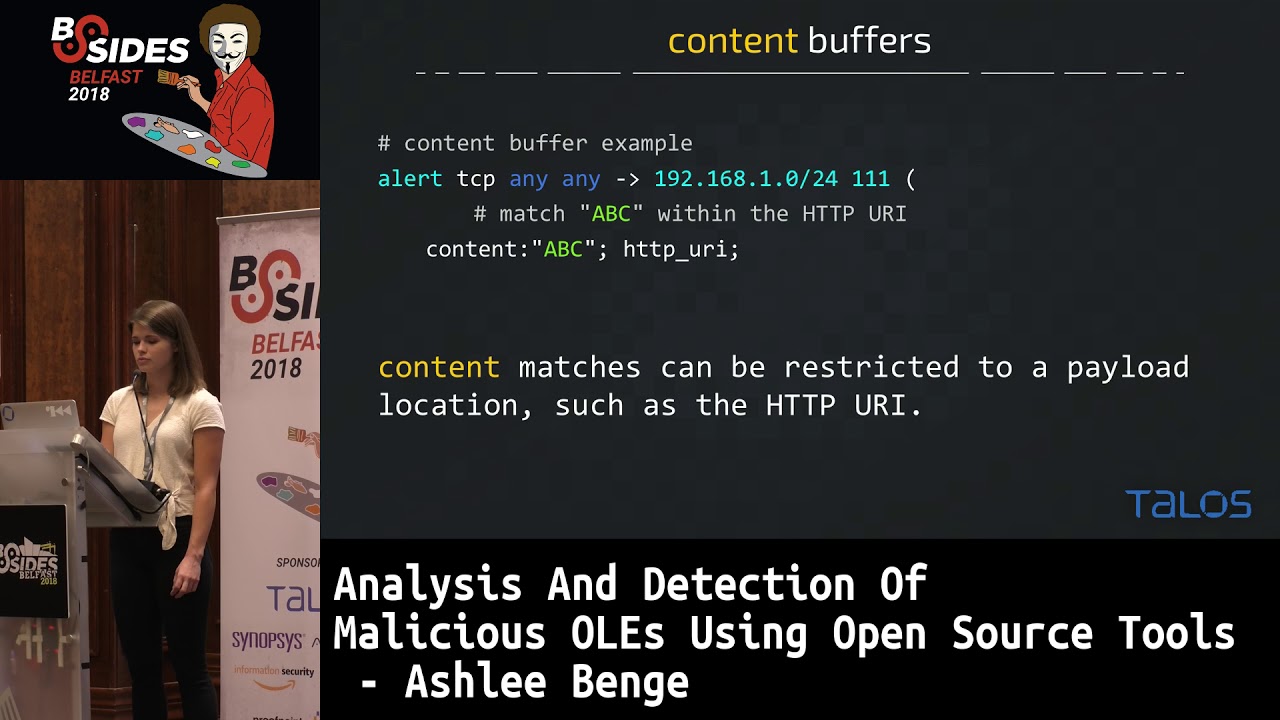
you do have to have something positive in your role the next thing I'm going to talk about is a little bit complicated because I don't have a whole lot of time to actually talk to you about the processing work that snort does when it looks at a packet so smart is pretty smart and is able to tell what kind of traffic it's looking at so in this case for this specific content match ABC we only want to check the HTTP URI and snort is able to look at a packet and decide what is the URI and we can check only that window that snort has identified for this content match which is nice if you're trying to speed up a
rule because you're looking at a large amount of traffic to give you a better idea of all of the ways you can use this if you take a look at everything in all the different colors here snort is able to identify our HTTP method we can look at the URI we can also check any of the headers we can check just the value of the cookie we can also just check the HTTP client body and this saves you a lot of processing time because you don't necessarily want to check every single thing in every single packet if you only have a simple content match something I'd like to point out here that we see a
lot when people submit to our community rules set is that you should never ever ever match on the HTTP method that would be in this case this post here and the reason for that is that you're not actually doing anything to help limit inspections so our goal when we write a snort rule is to limit the amount of traffic that we're inspecting because this is computationally intensive and slow so the more content matches you have the more time snort has to spend deciding if something is going to match on your rule so when you use something like post or get the HTTP method in your rule you're really not doing anything for the sake of limiting what we're
actually looking at there are some exceptions to this rule but it's pretty doubtful that you're actually going to need them so in general this is just not something that you should use if you're trying to write your own rules another content buffer that's going to come up a lot when we talk about our malicious oles is the file data content buffer so this restricts a Content match to just the file data ah and whereas we have to repeatedly define for our other content buffers which one we want to look at for each content much but file data we actually only have to include it once that's pretty useful because a lot of times we want to identify a lot of things and our
file data buffer and it just makes it quicker if you're an analyst writing this rule so in this case we have we have three content matches and they're all within the file data buffer another thing I'm going to point out that's a bit of a more advanced rule option is our flow bits option so this allows rules to track States during a session and this would be used in conjunction with the rule that contains actual detection so this is kind of a fancy way of saying that we're going to use this to identify file types and this will make more sense when this comes up later on and probably the most important thing that I'm going to talk to you about in
terms of snort rules is our fast pattern so this is our entrance condition if we match on our fast pattern we're going to evaluate all of our other options until we reach the end of the rule and or we miss on a rule option so we want to keep as much traffic out of the detection engine as we can because like I said it's slow and the more traffic we have being evaluated by a rule with slower snort is going to be so we want to pick the most unique content match that we can so here and this role we've set ABC is our fast pattern and you can think of this as the entrance condition
additionally we have a fast pattern only option so in this case that means that we would evaluate ABC and then we would drop out of the rule because we only had the one content much when we specify a fast pattern you evaluate at once in the fast pattern engine and then you would evaluate a second time as we evaluate the rest of the rule options which maybe doesn't make sense right now but will make sense when we have content matches to our fast pattern because we're not able to use any kind of distance modifier if we specify fast pattern only we're also able to use Perl compatible regular expressions which is quite nice if you have something that's maybe more
complicated than just a static string and I pointed this out a few times but one of the most important things when we write a snort rule is that we minimize what we're inspecting so we do this first with the fast pattern we want our fast pattern to kind of decide for us if we're looking at traffic that might actually be interesting and relevant to our rule we then have things like content matches the more general ones that we can use to isolate just the vulnerable application traffic and then we can use the more complicated or more general content matches after our more unique ones to identify just things relevant to whatever vulnerability condition we're trying to identify and
finally we would go into computationally intensive things like the pcre or the bite tests other things that I haven't mentioned in this talk because they're a bit more complicated and hard to explain when I only have limited time but the goal of this again is to just isolate traffic that is relevant to our vulnerability whatever we're trying to identify or if you're just trying to identify malware traffic so now I'm going to give you a very brief intro to office file formats so for the first file type we have an RTF we have a file magic consisting of what is in green here and in an RTF you'll see a number of control words that are Dillon
delineated by a backslash on each of these control words has a different action for example the slash par would indicate that you're looking at a new paragraph in the file RTF SAR relatively simple so there's not a whole lot for me to say about this on the more interesting file format our dock and docx files which you see more often so dock is a legacy office file format whereas dock is the newer one since 2007 docx is actually just a zip archive of XML files that has a particular structure and the one that we really care about in this case is word slash document XML that's usually where you would see at least in what I'm going to talk about something
that would be relevant to an exploit and now I'm gonna get to the actually exciting part of this talk which is the section about malicious oles so for this portion I'm gonna talk about two specific O'Day's that we see relatively often on the strategies that we use at Talos to actually detect these files the first one I'm going to talk about is CVE 2017 o 199 you may have heard about this because it's so commonly used as a dropper even today we still see this being used quite actively and generally this would be used to go and grab other malware that would then infect your system so you would see something exploiting this cve maybe being used in like a phishing
campaign and then someone would have to download it and open it and unfortunately that happens quite often so this is successfully used quite a bit and again like I said these are malicious RTF documents and they contain an embedded Oly which is kind of unique that you would see that embedded in an RTF and these oles are abusing the URL moniker in order to make outbound HTTP requests which are then used to grab and drop other malware onto your victim machine if you've never heard of it Oh Ally moniker according to Microsoft they're used to identify connect to and run oily compound document link objects which is a complicated way to say that it's used
to make that HTTP request to the attacker controlled domain so the important part that actually matters for us as this value right here in green and I've thrown that up there just so in the next slide you can kind of look for what I'm talking about the way that I've set up these slides is so kind of one explain the mechanics of what is going on and then to give you guys an example of the way this actually looks when you're hunting through things I was an analyst I put in pcaps of the malicious files as well as chunks of the the files themselves that are relevant to these exploits so what makes this malicious if you have a sample and you
are working in something like detection response you may get something you have no idea if it's good or bad or what it's doing maybe a customer has just said that oh this is this is bad we think it's doing something or maybe you have no idea at all and so maybe in order to get an idea of what you what you're seeing you'd pop it into a sandbox or open it on isolated system and see if you can get any network traffic if it's malware it probably has some kind of network functionality at least for the type that I'm concerned with which is mal Docs and so in this case I threw this sample in a
sandbox and it made an outbound HTTP request in this case for something called template doc and if you further inspect this requests it maybe looks a bit normal template doc isn't it like particularly alarming necessarily the headers seem normal but if you take a look at this host we have this long randomized hostname and that's probably not anything normal normal people don't really go out and register domains that look like this so that's kind of sketchy and indicates to me that yeah this is probably bad traffic even though we got a 403 and I don't actually have the file that this is requesting there were of course other files that did grab actual malware so
that's also a pretty good indication that this is bad but 403 with a sketchy domain is also a pretty good sign so now I know that this file is malicious and I am gonna go ahead and start hunting through this because I'm an analyst and it's my job to try and write a rule to detect this so I go through this RTF and this is a very small chunk at some point there is an embedded holy like I mentioned before and then if we look at the contents of this Oly it's kind of a bit boring to look at but like I mentioned previously we end up seeing and it's highlighted here on the slide I
don't know if I have a laser here maybe right here that string that I threw up earlier is now in the file so there you go that seems kind of unusual and if you take a look just after we see bites and then we see another set of bites and because I look at this all the time I see some ASCII readable characters in here not that I have the hex table memorize at the top my head but in that case I know those bytes and they're followed by nulls which makes me think that this is a Unicode string and if you translate this to actual readable bytes all we see this this requests URL
which is what we saw in our pcap earlier so now we saw the request for template doc and the P cap we see it within the file so that's a good indication to me that yes this is what is actually causing this bad traffic which indicates that we found our exploit so now our goal is to detect this and our strategy here is going to be to identify an RTF document we want to identify abuse of that URL moniker and we also want to identify a potentially malicious HTTP request so this is a Talos rule for for this CVE or one of them because there are quite a few and I'm gonna highlight for you the chunk that actually matters
because like I said earlier we have a header we have a rule message there's some other stuff down here that isn't necessarily important to the rule but it does matter for the sake of snort being able to organize the rules and also just for customers reading this to be able to see that this is associated with us CDE so if we break down the chunk of the detection that actually matters we first see that we only want to inspect RTF files because we have our flow bits specified here and you'll always see flow bits being used with either is set or set depending on if it's of a rule that's going to identify a file type or
some other type of traffic or if it's a rule that's using some other flow bits rule so in this case we're using some other flow bits rule to identify that we are looking at in RTF we then have our file data buffer because we only want to look at things within the file itself and then we look for a ul URL moniker and finally relative to that URL moniker within the next 50 bytes of the URL moniker we want to look for the Unicode string HTTP colon slash and why you might ask are we including this if we just want to look for abuse of this moniker because unfortunately there are people out there that are
using this for non malicious traffic and this seems strange to me that you would need to do so but people use things in strange ways all the time and so we unfortunately can't block their files and we need to add this in to make sure that we're not falsely alerting on things that aren't malicious you may also know that even though I just told you it's really important we're not specifying a fast pattern and this is because if we don't specify snort will actually decide that the first most the first longest content match in our rule will become the fast pattern snort defaults to fast patter not fast pattern only which means that we would evaluate
this as a fast pattern and then we would re-enter the rule and we would evaluate a second time and be able to use a relative content match after this match for the moniker now I'm going to talk to you about dde code execution which doesn't actually have a CVE you may have heard about this because this keeps coming up so this is a way to execute code in Microsoft Office products without using macros this always appears at least in the cases I'm going to talk to you about in a doc or docx file and this actually just recently came up again because we have a blog post with some research that poll in the audience said where this was used
as a dropper which is the way that we usually see it so what makes this malicious this actually gets you arbitrary code execution which is kind of cool and we're also doing it without macros so there is no this is kind of novel and that it's very different from the usual and if we were to pop open a malicious file we would actually see this plain text the way it is here so this is one example of a command that was in an actual malicious sample that we saw so in this case it's pretty obvious to see why this is bad we're using this to open PowerShell and execute a PowerShell commands something you should
probably not ever be doing with some random file that you just downloaded from the internet and we're using it to go grab some Citibank Exe file from some kind of sketchy looking domain so probably a good indicator that we're using this to go grab our if we were to pop up in a pcap of the file we would see another command like this we again are seeing a PowerShell being used to go grab a file from some kind of sketchy looking domain and if you look prior to DDT auto this little dot is indicating to us that that's a non readable byte which is important later on when we look at our rule the byte is hex 13 which is
a carriage return which is why we don't see it in the peek app so now that we've seen this exploited in a doc file one of our goals is and our rule is going to be to identify again specifically doc files that are you abusing this I mentioned it briefly earlier and all the examples I've shown have used dde Auto but it's also possible to use something called dde which the only difference there is that dde I believe asks for user permission prior to executing the command so this is a Talos rule for this exploit and again this is kind of long but the the chunk that actually matters to us is highlighted here in blue and
I'll go ahead and break it down in the next slide so again we're using flow bits you inspect just our doc files we only want to inspect the file data buffer because we only care about the contents of the file we then want to identify our exploit and we want something that makes for a decent fast pattern so we're gonna use that hex 13 followed by dde and I'll explain why we've chosen DD in just a minute we then want to look for exe appearing within 250 bytes and the no case makes this case insensitive and why are we adding this content match when maybe it would be possible to use this in a way that
we're not calling PowerShell because fortunately again this is used in non malicious ways not for calling PowerShell but we did find files when we tested this role originally that we're using this in a way that we probably shouldn't be alerting on so we have to add the second content match in order to limit our false positives if you look at the first content match this hex 13 dde here we have opted to go with ddee because if we we could write two rules we could have one looking for DDE and DDD order but why would I bother to have two rules if I could just have one it's we want to have as few rules as possible
in the rule set because it's expensive computationally to evaluate more rules so anytime we can condense is is desirable we're also able to exploit this in a docx file so what I have here is a chunk of the just the malicious XML file unzipped from the zip archive and if you read through this you see a bunch of crap that we don't really care about this appears and a lot of these files and then finally we see an interesting chunk which is this instruction text tag followed by DD Auto and if we keep reading this is actually a file I've neutered for my own testing but we see again this PowerShell command being executed and then we have a URI going to
some kind of executable that's being grabbed from the internet so this looks pretty similar to the way this is being exploited in a doc file as well so now we want to detect just i just xml files from a decomp rekt decompress docx file that abuse these fields similarly to the way they're abused in doc files and so the again the content of this role that we really care about is highlighted in blue and we're using flow bits to identify just an XML file we then specify we want to only look and file data and then we use our instruction text tag which actually is required for this exploit the reason that I know that this is
required is because I spent a lot of time playing with these files getting rid of things that probably didn't matter and seeing if I could still get it to execute code we then look for dde appearing after this tag the reason that I have distant zero specified here is because it just indicates to sort that at the end of this tag we want to start looking for our second content match if you just want to look for things appearing after each other or in a specific order you'll probably end up using distance zero quite a bit and then something that we haven't seen before is the use of this piece Erie so this enforces that these two matches
are within the same XML tag and the way we do that is by looking for our malicious tag and then we check that we don't see the opening of another tag prior to DD e appearing so this is a real quick run-through of the way that we use snort to detect these malicious Oh Alize these come up quite a bit because they tend to be used as droppers it becomes increasingly expensive for adversaries to write exploits or try and gain code execution on your machine by chaining together multiple CVS or anything like that so this has become a trend that we're using things like phishing attacks to get a user to download a file run it
maybe click that box that says you want to enable macros in this case you don't have to do that for either of the the CVS I've mentioned but as we see more and more user based attacks this becomes more important for us to be able to detect these things and so it's kind of cool at least in my opinion that we're able to use a network IDs in order to detect things like that RTS and Doc files I hope that you've maybe come with some kind of understanding of snort that has been improved a bit on how you can differentiate just writing a snort role versus writing a good snort role it's actually useful and something cool that
I didn't mention earlier maybe I did briefly um is that this is actually free and open source so even if you don't spend millions of dollars on our security products you can actually go grab snort for your own personal use and we have a free community rule set a lot of people submit rules to us someone on our detection response team will evaluate them and clean them up a bit and then they'll be added to our rule set which is then also actually released to our customers so you - if you are submitting to our community rule set or helping to improve the internet a bit so if you have any questions for me I'll go
ahead and take them now otherwise thank you and you can go ahead and if you feel so inclined and follow me on Twitter or the Talos [Music]
Related talks
 36:09
36:09 41:29
41:29 44:26
44:26 14:53
14:53 48:41
48:41 26:35
26:35