Chasing a red team from the dressing room into the cloud
Show original YouTube description
Show transcript [en]
all right hello everyone and uh welcome to my talk chasing a red team from the dressing room into the cloud my name's tyler foreigns i'm a principal detection and response analyst at expel which is a managed securities provider we cover a lot of different technologies and a lot of different things but we're going to talk about that later what i really want to share with you guys today is kind of an interesting investigation that we did involving aws specifically where we chased a red team literally yes from the dressing room uh all the way into our customers aws cloud a little bit about myself before we jump into the technical details um being a principal detection response
analyst at expel i get to see a lot of really cool incidents and investigations all the way from the enterprise kind of your traditional edr mssp kind of style alerting to a lot of really cool stuff that we actually see in aws gcp and azure i lead our global response team which is kind of the team that comes in at the end when we have a critical incident where we're going to be running down active attackers performing live you know remediation actions live resilience actions and doing a lot of the technical work that um you know kind of tells us the who what where when why of a breach uh before i jumped into expel about three years ago
i worked at mandi and fireeye where i spent a little bit of time there running down targeted activity as well as doing a lot of network and windows-based instant response which was a lot of fun but enough about me what we're going to talk about today is really kind of a few things i want you to take away from this presentation we're going to talk a lot about aws a lot about what attackers do in aws but i really want to share with you our investigative process of how we actually respond to something from a blue team perspective in the cloud and really on the flip side of that talking about some of the tools and
stuff like that is really cool but what i really want to talk about is how attackers abuse aws a lot of people are moving into the cloud a lot of people are making a transition from on-prem infrastructure to all of these uh you know big scary acronyms that exist across across all three big cloud providers but i really want to talk about what an attacker sees when they see some of these services running and kind of how they're thinking about using them to get inside your environment and last but not least this is a really cool red versus blue team engagement which really kind of highlights the importance of purple team which i know is one of those
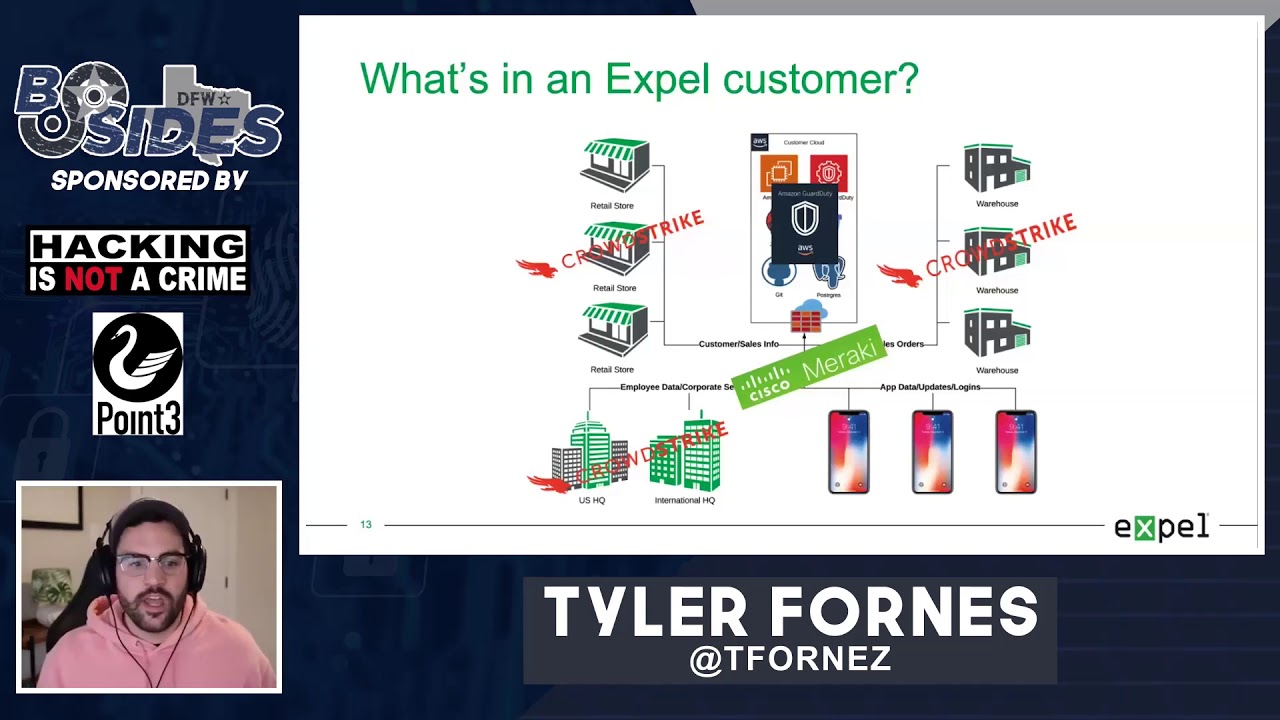
acronyms or one of those you know words that floats around our industry a lot but i really think that this is a good example of what it looks like when a red and a blue team work together for the common goal of making a customer more secure and i think that's really powerful now some background about what i mean when i talk about full cloud compromise uh full cloud compromise looks like this and what you're seeing here is actually a diagram i made of the entire engagement that the red team actually went through to compromise this customer you'll see that it's all not in aws there were some aspects of this investigation specifically in the initial access phase
where the customer actually had to go to a storefront to be able to get their way to the cloud and i think that's really powerful because when we think about how to protect the cloud we usually think about a lot of those border things that are kind of the gatekeepers of the cloud meaning api endpoints console access and things like that but what happens when an attacker makes it into another part of your environment and uses those things and the reconnaissance that they gain from being on your systems against you to get in from the inside and that's really to me what full cloud compromise looks like it's not just someone going out on a github page
and scraping an api key or you know having an opportunistic attack where they come across some access key in your code it's really being able to use the information that they've gained in a breach against you to not only just get into your aws infrastructure but to gain that master control of what they're capable of once they get to that root console access and we're going to take a look a bit into a few specific things but mostly what we're going to talk about is how an attacker can use the aws api remotely to get some of this access what it looks like when they're actually able to to delegate their role or escalate their
privileges into an aws console user meaning they're likely going to have root access or some way of getting to that account then we're going to talk about role delegation and impersonation two-factor bypass and we're going to talk about what it looks like when an attacker actually has full control of all these services and i'm going to share with you some really clever things that the red team did once they had this level of access that was really surprising to us and actually led us to actually creating some really powerful detections that we've been able to use not only at this customer but across our entire customer base and even down the road actually being able to contribute some of them
back to the mitre attack framework which was really cool so really what this looks like on the red team sizes red team side is pretty easy to see but what a blue team starts to see when they start detecting compromise might not be as obvious and as you can see right here these are sanitized versions of some of the alerts that we started to see when we actually started to detect this breach by the red team at one of our customers you'll see here i have two alerts both for uh suspicious access key generation and suspicious ssh key pair generation both of these alerts started coming in around the same time and really when we started seeing them
at face value they kind of mean one thing we know that someone's trying to get in or in the case of the axis key generation happening someone may have already gotten in but that doesn't really answer all of our investigative questions that we ask ourselves as blue teamers when we're running down a breach really we want to know the who what where when why because if i'm seeing these ssh key pairs being generated against aws that means that someone already has been given access and is already in and that's where the really sexy investigation starts to happen and i'm going to start to share with you kind of how we cut up cloudtrail and guard duty
specifically so that we can get the answers to some of these questions really easily and start telling the whole story of the breach now at the end of this this is actually what our findings report looks like uh you know in our tool that we use to communicate with our customers you'll see here a lot of this is redacted but what you're supposed to get away from this slide is there's a lot of stuff that goes into solving this breach and there's a lot of information a lot of iocs that are gleaned alerting will get you halfway there but isn't going to tell the whole story and it's really what you can do with some of
this data that aws gives you by default that's going to allow you to generate a findings report where you can tell the entire story of a breach meaning how did the attacker get in what did they do once they got in and what were the resultant activities of their access that allowed them you know kind of what was the goal in which they you know actually were trying to get to where was the suites that they were trying to unlock right and that's really what we're going to get to at the end and i'll show you some cool things that they ended up doing so a little bit about what we protect and a little bit about this customer's
background before we jump into the story itself this customer is a major organization they have a lot of different retail stores a lot of different headquarters a lot of different apps that communicate as well as a lot of different big warehouses that are around the globe that all communicate with each other over a network and what this all is back ended into is a large aws cloud instance meaning everything and anything that this customer does they've developed to be compliant with aws and a lot of the tools and a lot of the things that they use every day and a lot of the things that their customers use all go back into the cloud inner cloud resonant
so for us what that means is that we're going to have to use a lot of their tooling to start piecing together what exactly happens if an attacker gets in because more than likely the thing that an attacker is looking for isn't going to be in the storefront or may not even be at the headquarters or in the warehouse it's likely going to be at the back end of what is driving this organization in this case aws and a few of the tools specifically that we're going to use to get there is we're going to use aws guard duty for a lot of our alerting and we're going to talk specifically about what alerts in
guard duty are really beneficial and maybe some where some places where we can augment and make them a little better but there's also going to be a significant lift on edr products and network visibility as well because if the attacker starts moving between the cloud and the enterprise or vice versa we're going to want to be able to tell that story and we're going to want to be able to use those tools in tandem to solve this cloud breach now really when we start talking about why the customer really hired this red team it was because they wanted to basically simulate what an advanced adversary would do if they were targeting this customer specifically now
that meant that the customer gave this red team full scope now that's really cool because that means that the red team can be creative and they can use a lot of tooling and things that we have maybe never seen before that's really good for the customer and that's really good for us too as a blue team because cloud is new cloud is something that only a few people have been doing for more than five years and especially from the blue team perspective we really don't have a lot of case studies to study about what an attacker does in the cloud so if we let a lot of really smart technical people go and throw a bunch of exploits and
move around however they want in the cloud we're going to learn a lot about how the cloud works which is really cool on our end but that's also scary for a customer because that means that the red team has the ability to mess with production infrastructure and this customer was comfortable with that because they wanted to know what would actually be useful to an attacker if they got in their environment now the second big thing to take away from this before we start talking about the actual story is we were left in the dark you know as their blue team as their managed security provider we didn't know that this red team had been hired and we definitely didn't know
anything about the scope of the engagement meaning this was just picked up in our sock one day our analysts spotted this from alerting that we had created for aws and we started digging in to kind of see the technical details now full disclosure we didn't detect all of it and that's okay we learned a lot from this and that's the point of having a red team in your environment it isn't to detect all the things it's to get better and that's really what i want to highlight in this whole scenario is that we learned a lot from this and i hope you do too and lastly you can see at the bottom i left this snarky comment
customers love to leave us in the dark you know especially during proof of concepts and this is kind of the well we say we can detect a lot of things but can you really and we love that because it's really challenging for us and it's really cool for us to be able to think outside the box about new detections and ways in which we can augment all of this technology so we really love this situation and this is one of those where we actually won this customer over in terms of how we were able to respond and use these tools enough about that let's jump into the story so where did this all start where this started for us is actually a
crowdstrike alert so this didn't even start in the cloud and what i have listed out here on the left hand side is kind of how we think about doing blue teaming at expel meaning every time we have an alert that comes in and every time that we are looking at an investigation or an incident we train our analysts to think in this mindset we're not a big big fan of run books especially when they're stapled on to technology we really like to train our analysts in terms of how to think and if we can teach them to answer these five basic investigative questions every time an alert comes up we believe that we can solve
any particular breach so over here on the right hand side you'll see that i actually have a redacted screenshot of that crowdstrike activity now this crowdstrike activity uh when you look at the actual alert that showed up in our console you would actually see a suspicious file called a.p.y executing out of a temp directory of an osx laptop now why is that significant and why is that something that we're alerting on well one of the really sketchy things about that python file was that it matched a signature pretty closely to a known version of the empire backdoor now the empire back door there's empire mpire but there's also mpyri which is a fork of that windows
project that allows you to actually have a c2 framework for uh you know across platforms using python so what we were actually seeing was a python backdoor running on an osx laptop we know that that's going to allow remote access to an osx host and we know that this started happening about five minutes ago so using this basic framework of kind of who what where why when we can start deducing where we are in the actual breach itself so for me as an investigator the questions that i have is i know that i have a python backdoor on this box i know that likely it needed some kind of privilege to run and execute how did they get that privilege and how
did it get there itself that's really what i need to go start figuring out and what you can see here is this kind of highlights my exact questions is we see that this a dot py framework running on this box but we know once we actually go look at the host we're going to find some sort of access that happened and what we noticed was that slightly before this backdoor started running someone had sshed into one of the hosts now that's significant because if they were able to ssh in and then run a well remove a back door and then execute it on the box they likely have some kind of admin credential for that specific laptop
and likely other laptops or maybe even other machines and servers in that environment which is basically our red teamers uh you know it's their dream world to be in early on an engagement um i have at credentials i can get me anywhere let's see where they can go and we think about that a lot when we're doing blue teaming because we don't want to just know and tell the customer hey there's a backdoor on this box we want to make sure that we're telling them the whole story and knowing where we are in this breach life cycle is kind of the next step into investigating this thoroughly now to take a break from where we are in
the blue team side of this story i'm going to talk to you a little bit about what was actually going on on the red team side now i'm going to preface this with we didn't know this until this whole thing was over um and we actually found this by reading the red team report which was shared with us but i think it's really important to kind of know and kind of a cool thing to keep in the back of your head while we're going through the rest of this story now this graphic that you'll see here uh shows a mall and uh the attackers the red teamers that were actually moving their way into the environment
they decided that since they had full rain and since they had you know a full capability to do whatever they wanted to get into this specific environment they decided to take a little bit of a non-standard approach which i thought was really cool what they decided to do was that they actually decided to go out to specific retail locations that this company owned and try to socially engineer and try to do kind of a survey of ways that they could possibly get in at the physical layer right so um at four or five different retail locations across the globe actually uh they actually sent them a couple different places they went to the storefront walked in
pretended to be a customer and started looking around the store for ways in which they could start to get their way onto the network and one of the first things that they did was they did a basic wi-fi survey of the environment and saw that there was a guest network open now the guest network um actually uh didn't really get them too far it was subnetted off but they were able to walk around the store long enough to find a back entrance to the store that was attached to one of the dressing rooms that they had access to as a customer so in the red team report they actually write all this out which is hilarious but the
red team actually went and tried on a pair of shorts and they grabbed the shorts off the rack they got an attendant to bring them to the dressing room and as they came out of the dressing room they actually snuck their way into the back entrance of the store which took them to the quote unquote back room warehouse section of that retail store and in that store was a machine that was left unlocked and the red team was actually able to get onto that machine while still wearing the bike shorts that they had uh you know taken to the dressing room to try on and they were actually able to snoop around on that machine a little bit to see what
was on it and one of the things that they came across right away on the desktop of that machine was an excel spreadsheet that had credentials in it for a lot of the different employees that access systems in the store for example uh there was pos systems logins there were wi-fi passwords for the different networks that were uh used between the pos systems the retail customers as well as some of the backend employees there were logins for octa there were logins for all kinds of different things that the customer employed to be able to give services to that specific store and what they did was they simply just took a screenshot of that with their
phone and walked out of the store put the shorts back and left now what they decided to do next which i think is the most interesting part is they decided to use that store as their persistence meaning they came back to the store armed with all of those credentials and they actually built a small computer um using a raspberry pi and a couple of antennas in which they actually created a vpn tunnel onto the wi-fi network that they now had credentials to so they built this little raspberry pi computer uh they taped it up with a few wi-fi antennas and they actually went to a small uh gathering place just outside of the store where they actually taped the
computer underneath the table with a large cell battery and taped it underneath there with the antennas pointing down to be able to connect to the store's wi-fi and then vpn back to a server that they were hosting in lenode to be able to get vpn access into that store securely but also to persist over time through that store and continue their reconnaissance of that piece of the network now i think that's absolutely ingenious and one of the things that's even cooler about this is that that little computer that was sitting under the table went unnoticed by anyone in the mall including security including anyone else for two whole weeks which is insane to me but it was finally discovered it was
finally taken down it was there forever and that was how they got in and we're going to talk about kind of how we piece that together and how we figured that out on our own here in a second now diving away from the red team side of the story we're going to go back and start talking about what actually was happening from a blue team perspective now going back to that lead alert that we were looking at for the python backdoor that was installed on that osx laptop we started using crowdstrike pretty extensively to figure out what these guys were trying to do and crowdstrike is really cool for this kind of stuff because it gives you a lot
of that juicy low-level detail that we need and pro specifically process level detail to know exactly what these guys were doing with the back door you can see here i'm including a query that we use very commonly with crowdstrike to kind of talk about our investigative process in a little more depth i'm not going to read that off but if you want to take a screenshot of it and use it if you're using crowdstrike falcon specifically this is our favorite way of actually timelining a host and once we've timeline a host we can kind of understand exactly what happened after that back door was executed and specifically we're looking for additional commands that they're running
to support the theory that this was likely their way in and now we're looking for reconnaissance now what happens next now what i'm expecting as a blue teamer and someone that's done a lot of investigation into you know post compromise activity i'm expecting that this laptop wasn't the one that they were looking for when they decided to get into the environment i'm expecting that what they're actually trying to look for is somewhere else and we're going to start expecting them to try to discover different hosts and move laterally so really what we start to see is that every time these guys infect a new machine what they're doing is they're using those credentials that they stole
off of that laptop for ssh they're going to install their back door they're going to dump the osx keychain um using this tool that i've referenced here and you can go check that out too it worked really well for them but also what the other the other thing that they're going to do that i thought was rather unique and stood out like a sore thumb when we were doing these investigations was they were actually examining the command line history of every single box and through the command line history of a bunch of these different hosts they started getting juicier and juicier data as they started moving their way through the environment and you can see here in
the diagram that i have referenced what they were doing was they were just moving laptop to laptop to laptop to find interesting hosts that they could keep stealing more and more data from now eventually one of the things that we found was that they actually landed on a developer's developer's machine now you might be asking like developers don't normally work in retail stores right that doesn't make a whole lot of sense but what we were assuming was the red team actually found a way to laterally move and actually found a subnet where they were able to actually get to the headquarters of this uh specific retail uh company now for that to happen is pretty
significant because we wouldn't expect that this store was anywhere near the headquarters of this major company but all we could deduce right now is that these guys were able to do a couple of different things we knew that they had ssh access we knew that they had stolen credentials and we knew that they had ways of moving laterally and performing remote code execution this is where things start to get really spicy because they basically have all of the tools to move to execute and they have the right level of privileges to keep moving their way through pretty much any environment that they're going to come across now you're probably asking yourself at this point uh tyler
we haven't even talked about the cloud yet and i get it and this is kind of where we were too when we were doing this investigation we weren't super prepared for what was about to happen next because we at this point hadn't seen very many if any signif signals that were leading us to believe that these guys had access to the cloud now what we found out at the end was that from these retail locations the red team actually found a way to move from the retail store to the headquarters to the warehouses and a bunch of other different places because this entire customer was on one flat network now by flat network i don't mean
everything was on the same subnet but everything was connected via mlp mpls vpn meaning that all these subnets were routing basically back to a corporate headquarters or a bunch of different locations in which the attacker could easily identify assets and basically just ssh internally from one place to another and what we started to see them do was we started to see and track these ssh connections to a bunch of different physical locations around the globe so they were in one retail store here then there were another one then they made it to the headquarters then they were over here we watched them go a lot of different places but eventually where they landed like i was talking about before was they
found a specific development subnet and they found servers that were being used to uh actually push and sustain a lot of the mobile applications that were being used by this customer now one of the tools that this customer used was jenkins and jenkins is a very common build and deploy type utility where a bunch of developers are going to be pushing code accessing it and basically pushing builds of new software now what's really interesting about jenkins is jenkins is kind of known to have a lot of vulnerabilities and specifically the jenkins that these guys came across had one pretty big cve that allowed rce over the network and what you can see here in the second bullet
is that this rce was actually used to pull down a java executable that the red team compiled themselves and install onto the server itself now why is that significant well it's only significant if it gives these guys additional access and it did because as soon as they actually created the payload to go and run this rce and pull down their java executable they actually had empire backdoor running as a privileged user on a production build server which is nuts right so they found this cve they exploited it using one of the hosts internally that they had found and were able to access and then they were able to pull down their own back door run it on this host and now they have
access to an actual production server inside of the headquarters of this company now you can see here i kind of spelled out how this works uh like i said they basically are able to manipulate the headers that jenkins is able to strip over http pull down that executable run it boom i have command line on this host as if i was a privileged user sitting right in front of the machine now why this matters is because now we're here and really we didn't know this in the moment as soon as we saw this happening but what we started seeing right away after this jenkins exploit was thrown was we started seeing more aws alerts and what started
happening was we started seeing not only this attacker starting to try kind of basic reconnaissance style things in aws but what they actually started to do was they started playing with things that we considered more as administrative you can see here access key creation ssh key pairs being generated those alerts i referenced at the beginning of the the presentation this is where those start flowing in and what's really interesting is that we didn't really have a good sense of how this was happening because it was coming from an internal host but what we started seeing as you can see in this diagram is that up until april 25th we didn't really see a lot of admin activity happening with
any of these users but then all of a sudden these guys had admin level access through the aws api they had privileged access to start creating a lot of the actions that you see at the top half of this chart so how did this happen how did these guys get the ability to be able to do this well what we started seeing was that the jenkins server was we knew that was vulnerable but what we didn't know was how they actually got the credits to do that and what they were able to do was they were able to actually start enumerating through the back door that they dropped on that jenkins machine common locations that aws access keys
were being stored and one of the treasures that they hit was a couple of different dot boto files where aws keys are stored commonly they were able to actually just read those in plain text copy and paste out the details and create their own bodo files on their machines that were located somewhere else to authenticate against the aws api so to recap that really quick they stole credentials from inside the network they recreated those credentials on their own machines and then they started authenticating against the aws api remotely from their own boxes that they had stored completely elsewhere now that's pretty significant because now we've gone through the entire enterprise and we're starting to see these guys use
the aws api from new iocs they're using them from those linud hosts that we talked about earlier they're authenticating from other aws hosts they're able to now manipulate this same command line utility the same way that they that the developers were able to manipulate it using their own machines and that's pretty interesting because that changes our whole attack surface and starts to create that diagram that we talked about earlier so once they had this access what exactly did they start doing we talked a little bit about the aws cli and being able to manipulate the cloud what exactly does that mean well first and foremost what they started to do was they started to impersonate users
now impersonalization impersonation in aws is kind of an interesting thing this allows me similar to like a pseudo style thing to basically take the privileges of another account that are set up beforehand and be able to use the same abilities that user has so i like to think of this as sudo but they started using this to create their own accounts so once they started creating their own accounts we now have more iocs that we need to track because we're expecting the attacker to come back and use those in a similar way that they were going to use their stolen credentials but with these new accounts they were actually able to switch roles as well
to be able to access all aws instances that the customer owned so we were in one aws instance that was being used for development one of the roles that they were able to get a hold of actually had the ability to read write and execute against all of the different aws instances that this customer owned and this is where full cloud compromise starts to happen because what they were able to do next is they were able to start doing things at a global level they were able to actually able to start using that aws root utility to be able to log into the console and make changes as if they were a super admin at this particular customer
now a couple of different things that they tried as well which were rather interesting they were actually able to take control using the console access that they had and using some of the other credentials that they were able to steal from the enterprise to actually bypass 2fa and how they did that was that they were able to actually use an ubuntu exploit on one of the machines using that administrative user that they actually stole from to be able to execute a common uh backdoor to be able to get around 2fa and create their own 2fa users now one of the interesting things about that is we also have duo detections and we actually saw this being done in
real time where one of the red teamers actually used that exploit to get around 2fa and create their own user and then literally register their own cell phone uh to be able to do the two-factor authentication which was really really clever in my opinion um now a couple of other things i started to do obviously like we know s3 buckets are a big pain point in aws and a lot of incidents start with them they were able to read and access about 257 s3 buckets with that access that they stole and they also started to launch new aws ec2 instances now in the latter that latter part where we talk about launching ac2 instances that's a really noisy thing and really
you know uh kind of boisterous thing to do if you're an actual attacker but remember we're in the red team world we're talking about things that theoretically can be done and what could an attacker do if they were actually able to get a hold of your aws instance and that's what they chose to do to prove that their level of access was actually privileged enough to be able to spin up and use resources without the customer knowing now lastly and this is probably the most interesting part of what the attacker did in aws um you know we're talking about root console access we're talking about the keys to the kingdom and one of the things that the attackers
started to do is they realized that they had gotten really far but they hadn't really ex-filled any information yet they hadn't really got to the part where an attacker who was literally trying to target this company would have gone and stolen customer data or stolen pii um this is the part where they did that and i thought that this was ingenious what they decided to do was they actually decided to take a snapshot of the virtual disk of that particular machine that they found a postgres database on since they couldn't get in and the credentials weren't valid they figured that they could take this to the administrative layer you know the ec2 layer and actually
abuse some of the tools to be able to copy that hard drive download it take it offline and actually throw it against one of their cracking utilities to brute force the password to that machine and sure enough they actually got one of the passwords using a pretty uh intense brute forcing rig that they had access to and they were actually able to crack it offline and access all of the secrets that were in that database so this is kind of mind-blowing to me because this is stuff that's going to defeat guard duty this is going to defeat cloudtrail this is going to basically render the trail cold in terms of things that we can detect in the
cloud but was probably the most fruitful things that the act the attacker actually got um you know access to that they were able to abuse in the aws console to be able to benefit from it which is really interesting and like i've said a few times now like at this point in time from going from the enterprise from that dressing room from being able to get to that laptop that was unlocked with all the passwords on it to being able to ssh their way through the environment eventually making their way into the cloud the attackers had control of everything in aws any action that you can perform via the api or in the console itself
they had the ability to do and these were the things that we they chose to teach us in terms of what they had access to so you might be wondering at this point like okay cool tyler like you saw all this stuff happening what did you actually do about it right because we're supposed to be protecting this client um within 15 minutes of the attacker breaking into the restil retail store we were able to actually quarantine the machine that the attacker had initial foothold on and this cut off the attacker's initial access which we obviously didn't know was a red team at the time but it sub it subsequently stopped the entire engagement and um for the sake of this engagement
the red team actually called the customer and said hey we just had our access cut off um this was us could you please let us back in and obviously for the sake of learning and for the sake of letting this engagement play through we unquarantined that machine and let the red team go and to see what they would do and that's kind of the real big takeaway from this is that when we're doing red team response and when we're acting as a blue team when there's an active red team in the environment it's not about red versus blue it's not about who can detect who and it's not about who can get by who it's working together
to protect the organization and find things and find security holes that previously were unknown and that's where we want to play we want to play in that purple team model of learning and getting better now some of the takeaways that we had is a big one is enterprise security rows can lead to cloud security woes and specifically network segregation and aws credential access was a big player here of being able to see how far the attacker could get now i'm not saying that the red team wouldn't have found another way in in terms of you know being able to find another way or fishing their way in or going to another retail store but that original unlocked laptop got
them pretty far and that's a pretty simple thing to fix you know with gpo and a bunch of other tools that allow you to manage assets but um really kind of where we thrived and where we learned a ton is getting really comfortable with the alerting that aws specifically allows you gets you out of the box and that's through aws guard duty and you'll see here i have a qr code i promise this is a malicious this is going to take you to our blog post that we wrote after this is kind of making sense of aws guard duty alerts these are some of the things that we found to be successful with and see
these are some of the high fidelity signals that we look at and we triage every single day but um really what i want to give a final hurrah to was actually the red team that made this possible i can't say their name for confidentiality purposes but this is really in my opinion what a great red team engagement looks like you know they had full rain to do whatever they wanted they had physical and virtual access meaning we're not just testing you know what's vulnerable from you know the internet's perspective but we're also testing the ability of the employees to spot threats and some of the actual physical pieces of what was actually you know implemented in this environment
to prevent these guys from getting in which was really cool and you know i've talked about this a few times the collaboration between red and blue team like we had an open line to the red team they had an open line to us we could easily identify when stuff was red team and confirm with the red team that this was something that they were doing so we know that there wasn't a critical incident that we needed to chase elsewhere in the environment which was really nice from a blue team perspective and lastly mostly native tooling and why this is important is because mostly native tooling is what makes detection hard um you know we talk about prevalence and
we talk about things that are you know uh you know commonly seen in environments you know powershell uh bash command line utilities a lot of that stuff makes detection really hard because all applications use these and all of them do really interesting and sometimes seemingly malicious things that we have to weed out this red team did a really good job at staying to a lot of that tooling and abusing a lot of the things that are commonly seen in this environment to blend in and make us work and strengthen our detection which was really cool to see as the engagement played out so that's it for this story and that's it for the things that i want
you to take away from this talk again great red versus blue team engagement use some of this when you're thinking about doing your own red team engagement or if you're a blue teamer and you're looking to learn about aws you please go take a look at our blog post please reach out you can reach me at any of these contacts and definitely take a look at expel.io in terms of our blog to just kind of look see some of the things that we're seeing and learn from some of the interesting things and some of the mistakes that we've made along the way we're very open about them so thanks again my name is tyler have a
good one
Related talks
 49:49
49:49 24:45
24:45 52:58
52:58 30:41
30:41 45:34
45:34 55:43
55:43