Authenticode in-depth
Show transcript [en]
um all right let's just jump into things here just to reiterate my bio there Scott Piper on dabba-doo on Twitter those are zeros not those the text that's the cool thing to do in the info SEC so as you said I've been in this business for about a decade now developed all sorts of different tools from something similar to cuckoo bought something similar to Facebook's OS query or manion's more response similar to those not those products themselves but I guess competitors that have been more private and then recently I founded a company called some route and order develop an important security product what that means is an aspect of that product is it is to do application
whitelisting and so authentic code is one of the technologies that's used in application whitelisting so I'm just gonna give you guys an overview of what authentic code is how to use it and some of the details about it so authentic code um if you right-click on a file on Windows and select properties and for a file that is signed you'll see that digital signatures tab so in this example here this is um Adobe leader that I looked at and so you can see that it's signed by Adobe Systems they're authentic code is a standard that is used it had or it has a lot of standards that it's built on so for example PK s si si es number seven
and a bunch of other I guess just acronyms and I'll go through some of those and how they're used later and then so it works on most people are most familiar with it working on executable files DLL sis files when you install an MSI file those can also be signed but a lot of other things can be signed as well so it was originally created for ActiveX files actually Java applets can be signed with it and even PowerShell scripts which are just text files can be signed with it so it can really sign anything if you want to try and ensure the integrity and be able to verify where a file came from authentic code is
the solution for that and so I should also state just authentic code in general you can think of it a lot like SSL basically all the same technologies including x.509 and pkcs number seven they're all those different things are within ssl you confirm that a file came from a sir from a place because it's been signed by certificate that was in it that was itself signed by a certificate authority or there's some type of chain of trust that goes up to that certificate authority so anything that you know about ssl is gonna work a lot in the same ways for authentic code so why would you code sign files um in some cases you have to so if you want to run
a Windows 64 bit driver on Vista or above you're going to have to sign it additionally it's gonna avoid some air so on Internet explorer when you try and download a file that has not been code signed and you're one of the first people to download that file you're gonna end up getting this error message there and so if you're a business and you're trying to provide some software to people some people might not want to click on that and that might hurt your revenue ultimately and it just it's it's really just a way to establish trust and a lot of different ways so as a developer these are the reasons that you want to do it and I'll discuss later on
why an administrator you would want people to do this and then additionally it gives you access to Windows err reports so if you are a software company and your software unfortunately has a bug in it and crashes on systems and those systems end up sending Windows error reports back to Microsoft comm if you have informed Microsoft that this certificate that that file was signed with belongs to you you can actually get access to those error reports and so they're anonymized and everything but it would basically help you as a software developer you'll identify where bugs exist in your product out there in the wild um so the other reason of course is all the cool kids are doing it you want
to be popular and all the popular kids are doing it so here at the top we have a list of certificate authorities and below those are some of the different products that have been signed with those certificates or there's a chain of trust that goes up to those certificate authorities so there on the left you have google chrome and Merck the IRC client they're all chained up to thought Microsoft of course has Internet Explorer and office below it and yeah there's a variety of other applications a lot of popular applications are all signed and one of the important takeaways from this is not only are a lot of popular applications sign but it they're signed all across
the board with different certificate authorities so it doesn't really matter which certificate authority you sign your files with much like SSL you oftentimes don't know or don't care who the certificate authority is that has granted that SSL certificate same concept applies to authentic code so a quick history of this um authentic code is actually almost two decades old now starting in April 1996 Microsoft submitted basically a request for proposals to w3c and international standards body and then shortly after that it announced that it had authentic code and it had a partnership with Verisign who was one of the original certificate authorities it worked on Windows NT and Windows 95 this is my understanding I haven't actually tested
on Windows 95 and anyway this is just trying to look through old like Usenet postings and stuff to try and understand a lot of the history behind things and so the reason it came out was actually for Internet Explorer version 3.0 and that was for ActiveX components so ActiveX components are basically DLL so that you used to download and run on your computer that various sites would provide and people realize like hey maybe we should associate some type of trust with these things in some way so if you'll aren't just randomly downloading them from random sites and so authentic code was put in place in order to establish that trust to say yes this random DLL you're downloading on
the Internet and are going to be running on your system actually came from your bank or whoever it happened to be so when it first came out there were 20 companies that were initially signing their code of those 20 companies I only recognize two of them Autodesk and Citrix it seems all eighteen others all have passed away in some manner or been bought or whatever it happens to be but so so it originally came out and there were people doing it so it wasn't you know just they came out with this technology and no one happened to be using it it was actually used so about a year later I believe it was on March 3rd I had a lot
of trouble trying to track this down but authentic code 2.0 was released and the reason they needed to do this was because it added time stamping and I'll get into why this is necessary but basically one of their original root certificates was set to expire basically two months after authentico 2.0 came out and without getting authentic code 2.0 out there and without getting time stamping in place all the files that have been signed previously with a chain of trust up to that certificate that was going to expire it basically was not it was voided it didn't understand how to establish that chain of trust anymore because it said you know your their certificate is expired and so I can't
trust that this is actually from a trusted certificate anymore so in 1997 also this guy Peter Guttman he's pretty famous creepy I believe he's New Zealand maybe Australian but he reverse engineered the format so although authentic code came out and it kind of explained there was like some documentation to specify how it should be used and everything the actual file format for it wasn't understood and so Peter government papers very often reference and Windows 2000 came out in 2000 and it that came with software restriction policies and so that was really kind of first I guess technology that you can actually use with authentic code and so what that does it actually allows you to do
application whitelisting so beginning Windows 2000 it's still in Windows products you can implement application whitelisting it is a pain to use though and I'll get into why you probably don't actually want to use software restriction policies unless you have a very static environment so maybe you have a point of sales terminal or something like that that you're never touching and then 2006 Vista 64-bit came out and required drivers to be signed and that was really the first time when people are like oh I actually need to do this so before it was always like oh all the cool kids are doing it so maybe I should do it but I don't really have a reason to and then all the sudden was
like oh if I want my code to run on Vista I actually have to do this for people that were writing drivers and so it still has not you know been enforced that everyone has to do this because user tool and code see your normal code that you're running it doesn't have to be signed but that was kind of the first requirement for it and then in 2008 Microsoft actually documented it so you didn't have to look at Peter Guttman's reverse engineering solution you could actually see a real specification for the file format so the best practices for code signing would be that you have an isolated system that's not connected to the Internet and you
compile you sign there and then on an internet connected system you do your time stamping time stamping has to call out to a time stamp server somewhere on the internet and so that's why that has to be an internet connected system and then you deploy it I understand most people aren't going to want to do all their dev work on an isolated box I have done that before it is a pain so most people will end up doing their dev work on box that is connected to internet but you still want to do that code signing on an isolated system and the reason for that is because your code signing signature is I mean that's really
establishing the trust that you have so if your dev box gets compromised at least your code signing signature has not been compromised as well which is why you'd want to have that on the isolated system so another things a lot of people do is they will just sign it and so for github and slack's windows clients so slack's client actually hasn't come out for Windows yet but they have a beta product that you can look at but anyways I don't know if they're actually signing it on an isolated system but they are definitely not time stamping it and you want a time stamp and the reason why is because in I'll show this in a moment but basically
in order to ensure that your file has not been signed with a certificate that has been revoked or has it been expired you have to time stamp it so the other thing that people will do and this is probably the most common practice is just all in the same box just compile sign time stamp and deploy it and the reason you don't want to do that is just because again your is something you really don't want or your signing certificate is something you really don't want to get compromised and then probably even more common practice is you don't even the sign it or timestamp it or anything at all you just deploy it and no one knows where
your files came from so putty is a very popular application that is not signed so checking that time stamp so just an explanation of how that's done so imagine if today you got a certificate that was valid for one year and you signed a file if you have not time-stamped it then after basically the end of the year after your certificate has expired that file is no longer going to be valid or that certificate can no longer be checked properly so that's why you want to do that time stamping um so if you're a software developer and you figure alright I'm sold I want to start time stamping so prices they can range from free for open source projects a lot of
places you'll see online is about one hundred eighty five dollars or something like that Verisign sell theirs for seven hundred ninety five dollars a year so if you're the type that buys the gold Apple watch and has just money to burn then get better signed certificates for that high price there are some reasons you might want to get their expensive certificates because Verisign was one of the original certificate authorities there trusted by much older operating systems so if you're still targeting like Windows 95 or something like that then you're gonna have to use a very signed certificate and but if you look around hard enough online you can find certificates for $89 per year for just your normal user land
certificates or $165 per year for certificates that are capable of signing drivers so that's where it's kind of easy or not that extended validation or not so much like with SSL certificates if you look at a lot of bank websites they'll say the name of the bank and then the URL there and that's because they have an Eevee certificate so as opposed to just having a picture of the lock up there they also have the you know a green little banner up there and the name of the company that's what an Eevee certificate is and for for SSL there's not a whole lot of reason to get that Eevee certificate other than just makes you look cooler and more trusted
and stuff like that but for code-signing you actually have to get that TV certificate if you want to get a driver or you want to sign drivers and so those prices there $165 a year that's that's the if you get a three-year certificate so one that's valid for three years I think if you get just a one-year certificate it's like two hundred and twenty four dollars or something like that so that's if you go to Microsoft comm which is also the website that you would go to if you want to get access to your Windows air reports you follow some links in there and then basically it'll bring you to some site it's gonna be did you cert is
where you ultimately want to go in order to pick up those cheaper certificates so now you have a certificate how do you actually sign the files so you can use Microsoft's sign tool that's going to be the way that you'll see online most the times to sign it there's also an open-source tool called OSS L sign code the reason you'd want to use that is if you want to do your signing from Linux system or something like that in order to code sign files that are on Windows there's also a bunch of vendor tools so I myself actually use did you search for for my certificate and so they have like a special tool that I use and run that
on my isolated system and you know I'm in no way I'm a spokesperson or anything four-digit cert but they are I guess a local company so if you want to support local yes there's Salt Lake City days so how does this all work then so you have your certificate you signed a file what did it actually do when you signed a file so here on the right I have a PE header information and the items that are grayed out there are the items that are not going to be hashed when you hash that file so basically win you sign a file it creates a hash of that file and then and then ends up signing that hash
and so you have to know like what you and what you're going to be hashing in that file so you it's signed to Lauro SSL signed code or any other tools are going to read in your PE file your executable and then it's going to read everything the PE header except for the checksum and their certificate table entry certificate table entry is basically a pointer to where in that file that certificate this and it's going to sort and hash the different PE section and then hash anything else that's remaining in there and that's going to be your hash of the file that's used so certificate table looks very much like just SSL cert data there's really almost no difference
between that information it is sn1 encoded and what that means is n1 is basically just a binary file format so if you know XML or Jason those are text-based file formats asn.1 is just a binary form file format so I guess like Google Google protocol buffers would be something similar to that and so so now you're described sn1 format we'll say okay this byte means it's something that follows it is going to be a bit or it's going to be a string or it's going to be an integer and so it just lays things out like that but then you need pkcs7 in order to describe what is going to be in that file so it's basically like a
schema for XML it's just gonna say okay the first thing that's in there is going to be the version of the certificate and the next thing that's in there is going to be the subject name for the certificate and just kind of describes what each of those things are so it's all standards-based all that information it's there's some there's a little bit of Microsoft quirkiness to it but for the most part it's all pretty standard and then you want to check that chain of trust so if you want to validate that a file came from somewhere first you want to ensure that the signature is valid so hash the file in the same way compare
the signature that you get with the one that that is provided by the file ensure the chain of trust is valid so basically each of the certificates are gonna be signed one after another up until the certificate authority ultimately ensure the certificate authority is trusted so these all chained up to somewhere so make sure it's not a self signed certificate that you don't trust and then you can also include in their certificates what that certificate should be used for so certificates can be used purely for SSL or purely for code signing yeah there's not a lot of cases where that's going to be mixed so because of that you want to ensure the code signing certificate that you're
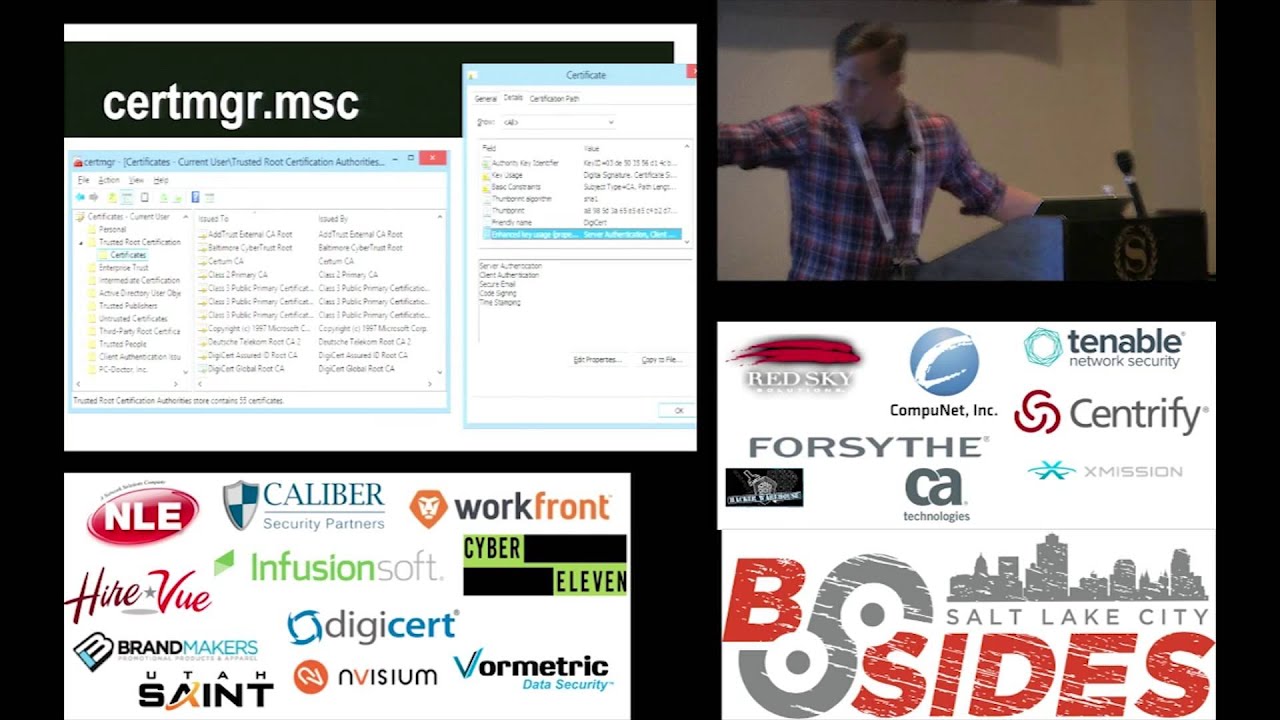
looking at is actually for code signing and is not an SSL certificate or anything else so if you actually want to play around and look at some certificate information about your box if you run cert manager MSC you'll be able to see information about the root certificates that you have on your system and you can double click on some of those there and you can see information about what's in that certificate so in there you can see the very bottom that I've highlighted it's showing the key usage information unfortunately for certificate authorities it's not super useful because the certificate authority might specify only certain key usage information but it can actually use be used for everything so it's it's hard to
be able to tell on a system you know it given that you have like maybe a hundred certificate authorities or you know a couple dozen or something like that which of these are for SSL which of these for code signing you can't really tell unfortunately and then there's catalog files is another important thing to understand so this is something a lot of people run into when they first try and look at files that are code signed so they'll take calcutta XE and they go to look at the Hoos it's signed by just to make sure they have a good understanding of line of code and be able to whitelist and then look at it and within its properties there's no
digital signatures tab and they're like what isn't this sign like didn't this come from Microsoft if I've been hacked is this malware like and the reason for that is because it's it is signed but that signature is actually in a catalog file which is a separate file and so Windows for whatever reason doesn't check those catalog files when it displays the properties of view here but if you use various tools for example here I'm using big check which is it comes with Visual Studio you can use that sorry that's one of the system Eternals tools sig check is using sig check it'll actually check the catalog file for you so that'll help you be able
to verify where it is that it is actually signed and it also show you sorry sig check does not show you what catalog it is it's in but sign finding tool will show you a catalog pilot it's in so looking at that file you can then look at where the catalog while is and so here and when it in sorry and Windows Explorer I'm looking at all the different catalog files that I have on my system and I can see there have I think that says 3000 different catalog files that exist there so then looking at one of those catalog files so this is the catalog file that was used for help dot exe I can see that there
are almost 5000 different files that have a signature in there so that's what those different tag entries are and so there's thumb prints or basically the shot to delete the cache of those files there and so if you trust that that catalog file then you should trust that file so what I've looked at here is if you go to I don't know how to pronounce it la Pio dot i T you go to that site it's just a web app up there that you can drag and drop a catalog file to or any type of certificate to and it'll actually do the asn.1 parsing there so you can see on the left some of the
information that's including the parse so it should show you there's some sequences there's gonna be some integers there's gonna be like an object ID object ID is specifying what information is gonna come next and that next object within the sequence and then there on the right you just have a hex done for that information and this is a pretty cool web app tool to just be able to understand this and one format better um so revocation so if you do lose your certificate or it gets i guess if your system gets hacked or something like that and you haven't put it on isolated system you're gonna have to do certificate revocation in the same way
that with ssl certificates and things like heartbleed and stuff you had to do some revoking there so again it's very similar concept and so within the certificates there's gonna be a link to a crl file that's going to be basically a cab file so same format that we saw before except instead of the cab file containing certificates that you should trust it's containing a list of hashes of certificates that you should not trust and so just to give you an understanding of some of those things it's updated about twice per month and each of those certificate authorities and those crl files they end up revoking about a thousand certificates per year and they rarely give a reason so with SSL certificates
you can give a reason like it's been compromised or you know I lost it or something like that but they they never give any reasons for it it's just miscellaneous information for you here Adobe they sell they there's products for example Adobe Reader they they sign it with a different certificate per product and per version so for example Adobe Reader number version 11 is actually signed with a certificate that's specific to Adobe Reader version 11 so they had a different certificate for Adobe Reader version 10 and that they are going to sign a different product they have a different certificates that's just kind of interesting use case that's not that's kind of rare most of the times people
just use the same certificate for all the products at their company and from what I saw I looked kind of in the history of things and OB reader version 5 was first signed back in 2001 so just to give you guys an understanding that a lot of files are signed today so if you are a developer and you're developing different products you may want to run into the awkward situation in which you want to modify a file after you have code signed it which is exactly what you should not be capable of doing and so the reason that you would want to do this is a Dropbox and GoToMeeting do this technique which is you log in to
Dropbox for example and you know you typed in your credentials in there and then you download the installer and most of the times which should happen is you download installer you run that installer and then you have to retype in your credentials in order to be able to authenticate your system again what Dropbox has done though GoToMeeting is they have actually included in that installer you downloaded some of your authentication information so that you can just download installer run it and you're already authenticated no need to retype in any of your information so it's kind of a nice little usability benefit there for myself I needed to use it because my product basically an administrator is going to want it down
load it and run it across all their systems and they and you want all the systems to be authenticate up to a cloud server and you don't have to retype in you know your credentials and all of your potentially you know thousands of systems that you've installed my product on and so the way that they accomplish this is if we look on the left tiers I believe this was like the Adobe Reader installer and then on the right here I believe was the Dropbox installer and so here I have highlighted in the unauthenticated attributes section there which is the authentication information for the Dropbox server and so what's in there also is the countersign and
signature was that which is the time stamping signature so if you remember I mean remember I talked about previously you want to sign on one box and then time stamp on another box and so if you've already time if you already signed the file and then you timestamp it time stamping is going to be modifying that file in some way and so that's what it's doing is it's adding information that unauthenticated attributes there and so that's the trick is adding information to the authenticated attributes in order to add in whatever additional configuration information you want to add to your file so this there were some other tricks that you could do you could add information to the very end of the
certificate table there but someone was doing something dumb I believe it was Google that was doing this for their chrome installer and what they were doing is basically they just give you a bootstrap installer that's only you know a few K or something like that a few hundred K and then that will go get and go ahead and download an external installer you know a few Meg's in order to install the remainder of application unfortunately what they were doing is in that event on in the end of that certificate table there they just slapped in and URL and so basically you download your chrome installer or bootstrapper and so again I believe this was Chrome apologize if it was not done
but that's my understanding the situation you download this bootstrap installer and you know you verify its integrity it says you know that it's from Google and then and then it would download this additional installer when you went in unfortunately someone figured this out that that was what's happening so that they changed that URL that it was downloading to be you know bad exe from evil comm and so you download your chrome installer and check it and it looks fine and everything and then you run it and it downloads bad dot exe instead and runs that and so that broke the whole concept of being able to verify the integrity of the files so Microsoft decided to you know give them
a slap on the wrist and not allow this anymore they still do allow the other trick so eventually someone's probably going to do something dumb and Microsoft's gonna block that from happening as well but for now it's possible so if you do decide to do this trick be very careful what you put in that area do not just put a URL in there to download you you should probably in some way verify the integrity of the data that that is in there so you might want to you know code sign or do some other type of signature check on the data that you put in there with you know a different certificate some type of quirky thing or just don't
put anything too valuable in there so in order to help you guys make that be able to accomplish that and because I had to do it myself so I modified Oh SSL sign code and added in capabilities in order to do that so that's the github account for some route you can download that fork there it is in the official branch as well of us all signed code now but they haven't made an actual release of it yet so I have some binaries you can run if you want to and there are code signed by summit route and everything so you should be able to trust their integrity so if you actually want to use authentic code in order to
verify the Integrity's of files you'll ultimately do something called application whitelisting and so you know application whitelisting is an old concept but it's just not used as often so application blacklisting is what antivirus does primarily so they also include some application whitelisting as well but primarily antivirus the concept behind it is you have a whole bunch of patterns that you want to look for in a file or hashes of files that you don't trust and so you say these are all the known Bad's don't allow any of these to run application whitelisting is the opposite of that says these are all the known goods don't allow anything that's not on my list to run so you want to do this
you can use software restriction policies so these have been around since Windows 2000 so it's been around forever you have it on your system now probably but the problem is it's very hard to manage there's no ability to import or export you have to use that our @ui for things there's no audit mode so you can't say you know here's a list of rules I want to use generate an alert if I ever run anything that doesn't use these rules and so the problem with that is if you don't have that audit mode that means you either turn all of your application whitelisting on or it's off completely so what that means is if you generate an
application whitelisting policy that has a list of trusted files and you forgot an important file in there and then you try and run it it's gonna block it from running so people can potentially end up breaking their boxes by not including the right files there and then NSA they advocate using application whitelisting the australian DSD I believe it is which is their version the NSA they have like a list of top 20 things that you should do do in secure environments and number one on there is to do application whitelisting is like very easy way to remove a lot of threats that exist out there and so the NSA has just a document describing how to use software
restriction policies so soccer restriction policies is kind of pain to use so there's also built in the windows a thing called app Locker unfortunately it's only built into the enterprise and server versions of recent versions of Windows so and again it suffers from some of the some similar usability issues so a lot of people don't end up using it because again it is kind of painful to use or they just they don't set very strong rules in there so you know maybe they you know whitelist a path as opposed to whitelisting a certain certificate there are some open-source tools that you can also use but these just scan your systems periodically so tripwire and sis check
from OSS see what these will do is basically you can have a some type of job that every night it'll just scan through all your files do hashes of all of them and then ensure that no new files exist or nothing was changed or something like that so it's not it's not really protection as so much it is just a detection to see if you had been hacked at some point during the day or during the week or whenever you scheduled that job for so if you do want to do application whitelisting how much pain is involved in this so this is a sample system this is one of my dev boxes actually so looking for any files that have a p
header on it so just anything with that starts with MZ at the very beginning of it I had about 23 or 24 thousand different files on my system and of those only 8 percent were not signed and a lot of those existed within C Windows assembly and C Windows SSX which is basically used for dotnet where it is automatically generating some files in there and so those were not code signed additionally cygwin is not code signed so if you are using various get clients on Windows chances are they're using different cygwin files or just other open source files that aren't can be signed on there and so on my system there were eight different Microsoft
certificates and these accounted for 89% of the files on my system and there are about 36 certs total so I would just have to have rules set up for 36 certificates and then a couple other rules in there or a few hundred rules for different hashes that I want to trust as well and that would be able to lock down my systems that nothing new could run on my system um so why would you want to do application whitelisting what are the different threats that it's going to be stopping there so kind of the most obvious threat is just if you're tricking the user into downloading and running something it's gonna block that additionally DLL
hijacking or if you plug USB into a computer and it tries to use autoruns tricks or stuffs nets that link vulnerability if any of those victims had have used application whitelisting they would have not have been I guess exploited or compromised and then a lot of malware campaigns are blocked so application whitelisting is not directly trying to defeat things that are going to be using a memory corruption exploits so different buffer overflows or things in that nature where you're getting code to execute in memory because once you can execute memory chances are you may be able to you know stop one of these application whitelisting solutions from running so this is really just trying to stop
legitimate ways that Microsoft runs tools or runs processes from being able to run and then additionally it will help stop different man-in-the-middle attacks so if you download putty you're downloading it over HTTP it is not signed you have no way to verify the integrity of that file other than checking it on virustotal or you know trying to verify this is no one hash of the file or something like that then additionally a lot of auto updates they just occur over HTTP as well so that's it so I'm pretty fast talker there's lunch coming up and everything but if you guys have any questions feel free to ask or if there's a few moments of awkward
silence then just start clapping yeah
umm yeah so so this is a way of verifying the integrity of all those files if this is application that you wrote most of the times people would just end up signing the initial installer and so then anything that's contained within that installer should also be trusted the best course of action is to sign all of those files but that's usually what most people end up doing and then as far as you know if you if you installed it somewhere and then you want to verify those files haven't been changed or something like that I mean you could use this but this is probably overkill for that I'm not sure what a better solution would be I have run into situations
where users have done weird things like that where you know they decide they're smarter than the developers and they think they'll just replace a DLL or something like that and you're like how this that's a horrible idea but yeah I'm not sure if this would be the best solution for that really um I would say there there are some of those um open source certificates out there so you get you could try and start just signing things with those the easiest way though is just generate your own self signed certificate and then you can add that self signed certificate as a certificate authority on your own system on your own test box and just play around with
things like that that's gonna be your easiest way using open source certificates will allow you to share whatever executables you've generated with a friend and it'll be able to work on their system and they'll be able to verify the integrity but for the most part everyone just uses self signed trip tickets that's what I use in testing myself as um also as I just generate a self signed certificate have that certificate authority trusted on my test boxes and then deploy to those systems and then once I want to really actually deploy my code then I go ahead and do the painful process of transferring it to an isolated system and code signing and everything like that but just for
testing and development purposes it's obviously a lot faster to do everything on your own system there any other questions all right thank you