PG - Serial Box - Primer for Dealing with Serial and JTAG for Basic Hardware Hacking - Matthew Jakub
Show transcript [en]
I'm surprised that there's so many people still here shouldn't you all be out drinking or something oh you guys all here okay perfect hi oh so I I'm Matthew jakubowski this talk is just a 101 intro for dealing with cereal and jtag I figure that uh with the new computers you see up today they don't really have serial ports on them anymore but it's still an important interface that you use a lot for debugging on embedded hardware so if you're looking to get into that it's important to know the basics this is it's still used for testing and debugging and if you can understand how to use it you can make the hardware do it you want and so what
it's just programmed to do so I first got into this several years ago playing around with older hardware like that there's a little set top TV boxed as I that was designed to connect to the internet and I thought well I want to put linux on this thing so up there in the upper right corner that pictures a 4-pin molex like you'd see on a flop old floppy drive and that was actually the serial port so with that putting different coat on the compact flash card that it used to boot I was able to get linux up and running but as it turned out it wasn't fast enough to be a mythtv front which is what I'd hoped for it to be so
ended up scrapping that later on I had a Wi-Fi hotspot call nice spot that I wanted to play around with and we were able to find the serial port on it and found that at an open root shell and as I'll show you later in the demo they're not the only ones that do that but first seal vs parallel so on old machines you'll see both types of ports there's differences between the tail at parallel little use multiple wires to send the bits at the same time versus the serial Senate one at a time at the lower speeds that the older hardware is capable of got better throughput that way with the parallel but with the you're able to
have a lot higher clock speeds with cereal which is why you see it nowadays even for things like your hard drives and connections to periphery ports it's like the old ID connector that was a parallel interface but there was a limit to what you could send data with their like I was saying you don't see this on many machines anymore and while the medium has changed you it's still important to understand how we got from there to what we use in the embedded hardware uh yeah the basic pin out for that type of port the only pins you really need to worry about that transmit receiving ground those are the pins that are actually sending the data you care
about the other pins are for flow control which can be used in some cases but for just a basic console you don't really need them and for modem signaling which who uses the modem anymore uh it's not always db9 like you see here can come in many different form factors you got to the right at db25 which you see on old hardware modems and uh really only uses the same nine pins even though it's got the 25-pin connector ya din connector there it was used for some audio-visual equipment the rj45 console port that still used all the time for switches and routers and then down there is a tenpin to db9 connector some motherboards mainly on servers still
have the serial but it's not they don't have the exposed port but the with the 10 pin connector you can still get access to it so once you have your physical connection how do you send data over it you've got what they call the start and stop bit which is what lets each side know where the byte begins and ends you can have a 8 8 data bits is usually the most common but sometimes you'll see seven bits which is a first-rate ascii on older like teletype machines parody is optional most things don't use it anymore and then you have the baud rate which is the speed that you're sending the data across is a for
the this type of cereal there's no clock to let you know when when each bit is coming so you have to agree ahead of time how how fast the date is going to come across yes so yes that's right Oh Joe now embedded devices this one's very nicely labeled got the TX Rx in ground right there not all of them are that easy though sometimes you gotta play around gasps get out a multimeter CEO is this 5 volts here maybe maybe that's it okay this is the same as a known ground so here's our ground here a little bit of trial and error ah well once you've determined what your probable serial as you can't just hook a
standard serial port to it because there's a different signaling and voltage levels this is normal rs-232 is usually 12 to 15 volts and it swings positive to negative we're positive voltages interpreter 0 and the negative voltage is interpreted as a 1 let's sort of like an AC signal almost embedded devices use a what they call TTL signaling the transistor logic works 0 volt 20 and the normal voltage of the device 1.2 volts 25 volts depending on the device 3.3 is pretty common though is the interpreters the one they've got a converter chips to change between these one pictures a maxim 232 back in the day when I was playing around with the msn TV I actually ordered up a
sample chip from maxim to build my own converter because back in 2004 was you couldn't just go to sparkfun in order one of these but it's 2015 and yeah I only asked for two took them like eight weeks send it to me it's 2015 and we all use usb now and you can get serial adapters everywhere this one pictured $15 nice and easy and then it'll do the direct transistor logic so you don't have to worry about any extra converters on top of it though if you do go through a USB to rs232 adapter well one thing I found is a it doesn't do the full 12 volt voltage sling it'll only do two plus five volts into negative 5
volts which doesn't really matter most of the time but I saw video once someone using an old 1960s modem that the tones didn't come out right because the voltage is different is expecting the full 12 volt swing ah next thing that will get into is a jtag which was created in the 80s because uh it was getting to the point that you couldn't just pro pro ball the points on a chip to test them manually anymore and in some cases as they were getting into the surface mount chips that you couldn't even easily get to all the points this is a protocol designed to be able to do boundary scan testing which is basically to test all the outputs on each chip
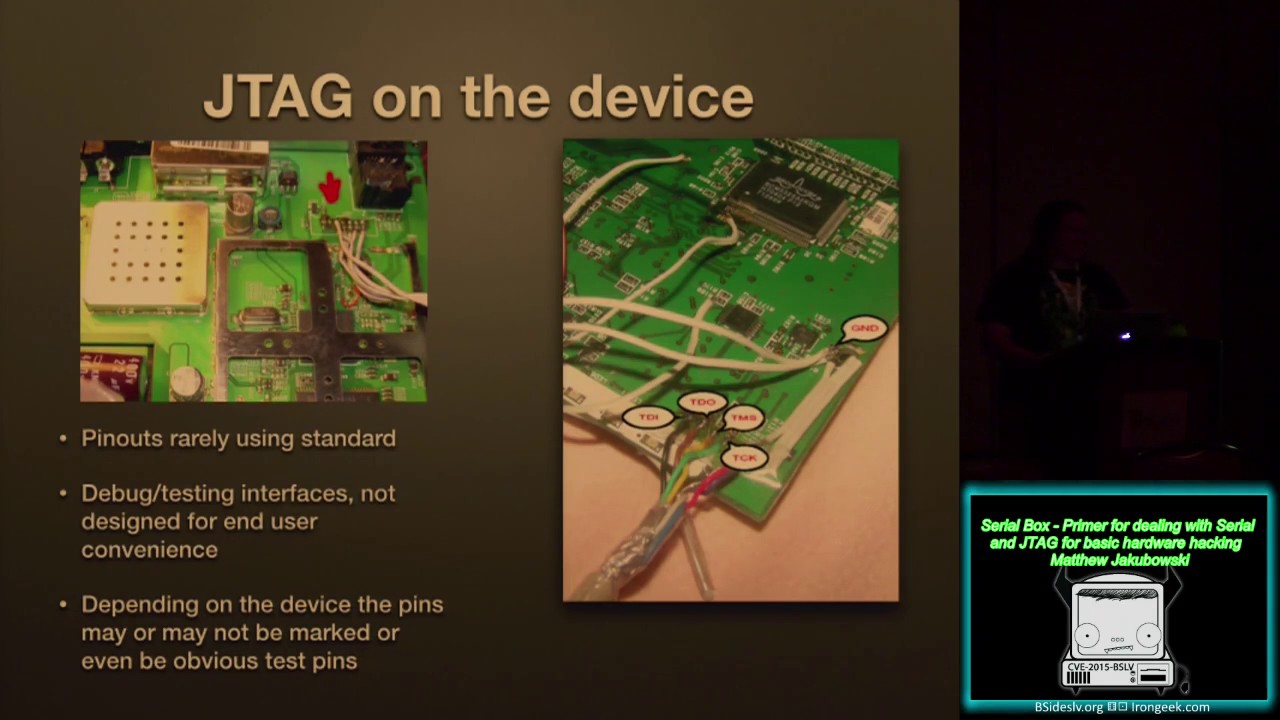
hardware level debugging where you can basically get a GDB type setup directly into the CPU of the device you're interfacing with and then you can also program flash memory the and even access the RAM on the device to write directly to ram and have the cpu ex execute that so to the right you get the full 20 pin interface that is considered like the arm jtag but the only five pins you really need are the input and output pins test mode select which lets you select which chip you're actually communicating with because you can daisy-chain multiple device multiple chips together with jtag so you can just have one set of test points for everything on the board and then test
clock is to determine the speed because unlike rs-232 this is a synchronous data so the clock determines what speed the bits are sent in putting out but and then of course the ground then on the device the pin outs are rarely standard because they're designed for debugging not for end user convenience sometimes they're all up there sometimes they can be all over and in some cases you might even have to find one of the ships where it's got jtag on it and try and solder directly to the surface mount yeah hopefully you're very good at soldering because I know I can't solder that well so for finding the jtag Google helps failing that can find data sheets for
some of the chips on the board to see where what pins are assigned to jtag for those chips if you see some test points on the board but you don't know what they are a new tool that I've been playing around jtag you later bye Joe gran it's a little expensive 160 bucks but it'll let you just look all the possible tense points up an old brute force it until it finds the likely jtag ports so to interface with jtag if you still have a machine with one of those parallel ports like we were talking about you can do it by hand you don't want to though it's slow this guy there he knows that I did it that way once
with an old cable modem to put a hacked firmware on it and that surfboard 51like that yeah but nowadays there's some open source hardware designs that are easy to use interface with jtag couple I played around with a good fat I need to play around it down a little more that's the center for it's a little different the bus part and bus blaster though are easy to configure with open OCD which is a open source software designed specifically to work with jtag that that and it will let you actually run gdb to a lot really I'm going fast okay so open OCD I don't have all the screenshots for it but basically you set your interface
config for example for the bus blaster uses a standard ftdi chip that they've got a configuration for then for the device then there's a lot of standard configs in there like say if you want we're doing something to a to an old linksys wrt 4g they've got configurations for that too I actually do all the flashing stuff for that if not you can just give it a basic config from one of the examples in there and then if for say to dump the flash is the three main command and that is the the flash command that lets you see the flash chips the techs on the board the dump image to read the flash and then right
image to write that flash they've been going pretty quick here let's get going with the demo me okay so having screen connect to my USB serial adapter using the FTDI friend that I had the picture up of earlier and connecting to this device at 115 200 okay connected now Mia apply power the device BAM this is a sprint overdrive which is a little Wi-Fi hotspot device that has cellular functionality
hi there Oh doesn't have Who am I yeah it is running busybox oh yeah they're a lot of that is not easy to read it I was gonna do a JTAG demo but the board I had picked out for that which is a different a hot spot apparently it uh is faulty on me because when I had everything hooked up but got hot enough to melt the hot glue it was protecting the pins so much for that one okay and things it's easier to get into this than ever because all the hardware messing around a Fiat basic serial ten bucks or a little more advanced one that's got a couple extra pins an option that fifteen dollars if
you want to mess around dumps with some different bus types like ITC and get a bus pirate for thirty dollars the bus plaster is talking about for getting into jtag $35 the most expensive things that jtag layers when you're trying to find the Pope different pins two hundred and sixty dollars let's start messing around and stuff is easy and the cereal is dead simple and the jtag isn't too much harder does anybody else have questions yes yes
so this is going to be a dumb question okay I think I heard you say that you've you can do the jtag serial connect to your right gdb the open OCD allows you to use it use gdb to debug jtag interfaces yes so this does not compute I use gdb I run an executable I set breakpoints I stop at some line of code so I'm talking to an executable program and now there's some serial interface where you know maybe the program is opening a serial port but how do those two things connect together so the jtag lets you manually change what the CPU itself is doing unlike an ARM chip so so so it's it's it's the the CPU level that
that debugging is going on or you could talk and I would repeat or out you saying I'll repeat it so you send a signal to the CPU to stall the processor then on the jtag bus you can read and write arbitrary memory values including what the CPU is about to execute next you can ask the dump things or or change code on the fly yeah and tell the CPU now execute it again thanks yeah that all sounds about right along with the being able to read individual values of the pins that this that are on the chip I might ask you to repeat that yes
so uh I see you got struck with the cursive debt live demo bug son sorry about that huh but uh could you explain to us what you were going to show us well the plan was to show you to the connecting to the device with open LCD and dumping the flash from that device okay thanks
thanks everyone for sticking your own time to go party
Related talks
 51:51
51:51 32:48
32:48 33:48
33:48 54:33
54:33 31:06
31:06 20:51
20:51