CG - Pentesting with Docker - Tom Steele
Show transcript [en]
good to go okay so forget started can I get a raise of hands who has heard of docker great who has ran something in docker okay cool good so I'm Tom I'm Tom steel I'm a principal security consultant with octave security so formally fishnet and Acula and this talk isn't going to be a security review of docker itself so there's no gate there's gonna be no security research on containers there's gonna be no discussion of how they do isolation and you know is it secure you know should you run is it okay to run untrusted code on in a container those sorts of things those aren't that's not the topic I'm going to cover that's a really good
topic if you're interested in that like that this this needs to be researched and needs more people people's eyes on it so if you want to talk to me about that come [ __ ] me afterwards I can get you in contact with some people but what it's going to do is going to kind of serve as a light introduction to docker and actually the usability around it so if you've been if you've seen it you've heard of it and you're wondering well how the heck would I even use that that's what that's what we'll cover here
okay and to start right off to kind of get you maybe it [ __ ] a little bit we're just going to start off with a demo okay so you can see my desktop here this is just an Ubuntu VM that I have going and we'll do you know which Java okay so I clearly don't have Java installed but if I want to run burp I can run birth so this is burp suite pro running inside of a Linux container sharing sharing that the kernel resources for like x11 and and it's running all inside and isolate environments and exposing you know the proxy port and every like that so that's what we're gonna work up to let's go
back
so what is doctor what is doctor after all doctor is basically an abstraction layer built on top of you know containers Linux containers are kind of similar to FreeBSD jails if you've ever heard of that it's been described as a root on steroids so conceptually docker is a lot like a VM but technically it's not at all the same but conceptually it is essentially what happens when we run Dockers we share the kernel with the hosts and we have kind of this separate user land that runs in its own environment just like you know the jailer sure would so the difference is between vmware is if we look at the image on the right we
can see that we have several layers we have the server which is you know that's your hardware the host OS and then you run your hypervisor which is you know VMware virtual box what have you and then on top of that on top of the VM you have your guest OS and then on top of that you have your Center library your binaries and then you would run your application on inside this VM so you have these you have this extra layer whereas with docker we get rid of the hypervisor and we were in the guest OS and we simply replace it with the docker engine and then our containers share the hosts OS is kernel and there and they
and they but they duplicate their user lands with the bins and libraries and you duplicate your application there this really slide isn't really all that important it's just kind of funny I was searching I was like well like it'sit's of images for the ends were soccer and this is on someone's blog but this is pretty much true you know in a VM you know the VMS are typically very large whereas the dock at docker container is gonna be very small the startup time of a VM is you know you're starting up the OS that's a little bit this little bit slower whereas it startup of a container your kernels are you there so you already put it into us you just need to
load it and then integration with the VM you know sharing like VM port forwarding sharing volumes you know sharing filesystem volumes and things like that is can be painful has anyone ever tried to share a volume to a VM running on Ubuntu with VMware does it work all the time sometimes yeah it's kind of like this and then port forwarding you can do at the ends but you know it's you're configuring through a UI it's not very programmable and things like that so okay but why docker because we have like I said doctors just built on top of kind of existing technologies in a way so why can't why won't you why don't we just
run Linux containers themselves and also why even use docker like why is it important why is it relevant to a pen tester why would you ever use this and so I think if we go back to slides and look at that and we looked at okay well we're getting rid of that hypervisor layer certainly if you're building out your architecture and you're like you know you're deploying applications to the Internet that that people are going to inherit and use there's a lot of benefits to docker because you're gonna get more out of your hardware you don't have that hypervisor layer but that's not important to us as testers because we don't care we're not you know we
don't actually build anything never just we all we do is break things right so what's why I like using it is because it's easy to share software and it's easy to install software so you know who was ever who was ever you know sock cool tool that's written in Ruby or Python and then you go to download it and the dependencies just won't install we've all done that there's of course our VM and and things like that to manage those those things but that's just another layer on top of your OS and I'm kind of an kind of a I like to have everything clean so I'm kind of a neat freak so docker kind of helps me keep
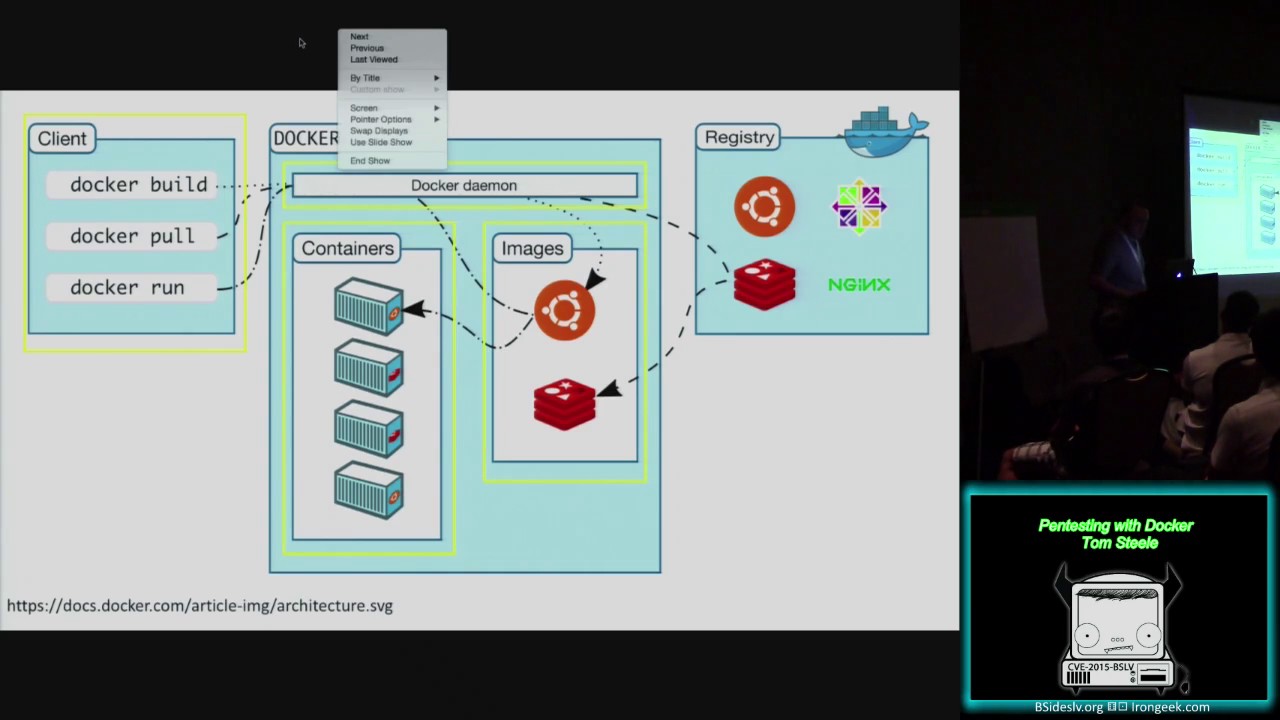
all my dependencies in containers and not have them all over my OS and you can also upgrade things infinitely like that so we'll get into that as well so this is the architecture of docker so it looks like this like I said Linux containers exist outside of dr. you can certainly run them but why use docker at all well doctor gives us a few things it's basically abstraction layer on top of just running containers you know vanilla and it gives us some management around the file system Process Management image management network management so doing things like port forwarding and like I said sharing volumes and sharing environment variables and linking them together so it kind of gives us this whole four
ecosystem versus just like oh I just want to run a container in some thing so stepping through the architecture we first have the docker daemon so dr. Damon is a service that runs all the time listens honest listens on a port and it runs on your Linux host so it only runs on the X it might be running on Windows at some point sometime in the near future in the new version of Windows Server but I don't I don't have too many details on that that's the first thing and that's how you interact with docker you give it commands and it didn't runs things and it gives you the output the next sort of thing and the docker
architecture are images we can think of images like a read-only template for a VM essentially what they're so what you do is you build it you can download images images or you can build in yourself and what they are is just a template for how you want to start a container and there's a lot there's tons of different images this is basically where the ecosystem comes into play I can make my own images and share them with you you can make your own image and share them with me we can also pull them from the internet and things like that so here we have this bun to image and a Redis image so once we have those images
downloaded to our machine we can then run each of those we can basically take that image and say okay go give me a container running this image and that image just doesn't doesn't get touched anymore it's now a running container and that's the thing that you interact with that's the actual thing that runs the code you want to run the applications that you want to run and so it's if you can see in this image if you can see that it's showing that there's two bun two containers running and two reddits containers running just showing how that's that's layered there and then the next thing is this is how this is this is where we actually make
the things happen is using the docker client so there docker client talks to the doctor daemon then dr. demian manages those things and the doctor client itself is very small very small lightweight it's a single binary and then and then in the next thing to highlight is the docker registry the registry can run anywhere you can deploy it yourself but most people use Dockers hosted registry which is just on the internet it's and that is where you can download basically there are official images such as Ubuntu nginx cent OS and Redis or you can also for free as long as it's public you can put up your own images that you fill and host them there
melia so you can also run the registry internally yourself it's just you know it's it's a little bit a bit more involved so what does dr. registry look like this is what the doc registry looks like so this is the official replica posit or e4 Redis official means that it's maintained by doctor themselves it's important certainly important to remember that when you pull an image off of the docker registry you're essentially writing something untrusted I haven't seen anyone talk about this but I could certainly push an image up there that does something malicious to your machine and you would have to sort of hope that it's isolated by docker and the containers and hope that you don't
give it any privileged flags or anything like that so you're taking that sort of risk and we'll get into we'll get into how you can get around that but you are taking a little bit of risk there but with the official rep O's they're built by docker you can probably trust them just about as much as aptitude or any other package management in my opinion so we know that we can you know what kind of know what images are you know that we can pull them from from Dockers centralized repository but what about building our own that's the most important step this billion will be build our own because you know it's it's not likely that docker is gonna have a
official Metasploit image just hosted for you but how do we build our own so I kind of step through this example of how we would go from wanting to install recon ng in a container and how we would build that help how we would build that image so there's several ways to build images yourself the most easiest way and best way to do it is to write what's called a docker file a docker file is basically just a recipe with some keywords so they take you just add you know so very small well-documented steps up 30 words so the first one that you give it is this and you can't see that
and improvise I can see that here
all right we're gonna do this we're gonna just do it like this so this first line here it's not gonna mana me it is from so it's from and then you see Python : 2.7 9 so the way these images work is there a hierarchical you can build on one on top of another so from what I've done here is I pull I'm going to say okay from the official reprobate on image I want to use the tag to go out 7.9 so it's the Python version so my image is going to build on top of this so it's going to be pretty lightweight this image itself and then this next key word is maintainer and there's telling
it's myself Richter basically when this container is being built they say that dr. Damon is going to change directories into /root run runs a command to build the image so it's going to run git clone with the repository and now that I've got the repository cloned I'm going to work there into that again into the insert the Columbia posit ori and i'm gonna run pip install - are requirements which installs all the python dependencies that freakin angie has and then this next keyword is as CMD CMD or you know command that's going to tell the container what it should run by default when you run it you can override that command but every time you run the
container without any arguments it's going to just run that for you and that's the command is going to run [Music]
okay that's just [ __ ] and then I'm just this is just a slide showing you that it's you like by example you call it dad capital B dr. vile and you can just put it in a record there and then build it so how we build this is we just use the doctor CLI if we do doctor build - t adds a tag so you want to give it a name so that you can easily reference it so I'm going to call this Tom steel - frickin mg and then the location of the doctor file which is in the same directory and you'll see it starts running through our commands here it's actually running inside of a container
and you can see like you know we get to this pip thing and it's gonna run pip for us and it's going to install all those dependencies and I'm fine and you know you get successfully built and now you have your image is built it's not pushed up to the registry for docker yet it's actually in your local registry so it's only local to your machine but you have now this image ready to go so what you want to when you want to use that image you do doctor run - - so yeah docker run is how you start containers the - - RM flag is important for us as testers because we don't really ever
want containers to stick around we kind of just want to run them and for like run them once and then be done with it so that - that's our M flag makes it so when a docker container is stopped it's deleted because if you just stop a container it actually sticks around and that's good you can restart it and things like that to be an application you can stop and then start it's good - IT is important because - I means that we want to keep using standard in and - T allocates a sudo terminal so that we can actually interact with it and then you give it the name of the image you want to run so we tagged it as Tom steel
slash recon in D and now we can run it and now we have you know recon ng running in its own isolated environment no-nothing was installed the tip on our host OS very clean it's never you know it gets messed up we just okay rebuild the image and go on third day so how do we share that so if I want to share that with you I would do doctor push with the name light image and that's gonna it's gonna offend gate me in a doctor here and it's just going to push that entire image it's gonna push up into Dockers repository so it's one way to do it it's what I'm gonna share it of course
after it's been pushed another machine this I hopefully you can see that but this is Ubuntu this wasn't on my macbook so it's a VM any any of you replicating this could do docker poll with it with the name of the image and you can pull that down and now you have that image too and you can run it so you'll have to install any dependencies very good way to share software of course a better way to do it to share images is to use doctors on infrastructure so doctor provides in the registry a way to do automated builds and what they do is you give them a repository on github or bitbucket a directory within that
repository to the location of a docker file they will pull down your doctor file they will run the build process that we looked at two slides ago in their own environment so I mostly clustered environment and then that docker image is automatically there so you can just keep just keep an image up there and it's it's ready to go so kind of one of the common things that you'll see is someone will have a repository called docker files and you'll just have a set of directories that for each tool you'd want to share so and then in each of those directories is a docker file and so when you go to set an automated build up you give it a give it or posit
ori and then you give it a docker file location and then you just you start build and eventually your automated build is up on docker and anyone can use it and now now gets to the point we were talking about running untrusted images so why how can you know and trust my image well you can see the docker file so you can see what it should automatically build one thing which I would encourage you to go do maybe you might want to ask permission first or something but I'm wondering if there's any way to push an image up and have the doctor file look like that because you know that's gonna be the concern for
people for running untrusted code is well you say that you can look at the doctor file but I don't really know that that's the image that the doctor file runs I don't know all the internal security of their registry if that's how it works I assume they've thought about that they have some very smart people over a doctor so I'm assuming they've thought of that problem but it's an interesting one to think about and look at that I have it and of course there's a doctor files up here and you don't trust pulling the image you could always download the doctor by yourself and just build it locally and that would you know take you a little bit extra time but it
wouldn't do that and then another thing I'll talk about on this one is that if you do rights if you do like write your own your own application and you want to share that with people one good thing to deal with automated builds is you can trigger it you can make this trigger on a commit so when you commit code to your app it can go build a new image for you and then people can just download that and it will walk through that little layer okay so let's quickly before we start in the demo since I'm gonna be using OS X let's quickly talk about docker on OS X Windows so like I said
the doctor daemon only runs on Linux you can't run it on OS X and Windows yet so basically what you have to do is you have to run VMware or VirtualBox or some other thing on OS X and then you run a tiny Linux VM on that and it's called boot to docker and basically all it does is that's what it does it boots and it runs docker that's all that's all it has to do and then the docker game it actually runs on that virtual machine there's a very good program called docker machine if you want or if you want to use doctrine OS X I personally just like using Linux if you want to use on a section or doc or
Windows you can use docker machine and dr. Machine automates the creation destroying setting up your docker client to talk to the VMS and everything like that so kind of think it a little bit like vagrant if you're familiar with that okay let's jump into the demos I'm gonna minimize this [Music]
how's that bigger okay a little bit little bigger can do bigger how's that I can't alright that's that good okay so like I said a doctor machine new doctor machine LS you can see the doctor machines that are running if you needed so docker uses environment variables to know which daemon to connect to so you can use doctor machine to set all it up so you basically do n and the name of the the name of the machine running and it's gonna run all that so you can just set that up and doctor is talking to the VM so docker images this is the command to list all the images that you have so as you might see I do have a Metasploit
image built let's go take a look at what that looks like so this is basically the process that you would have to go through to install Metasploit on linux but you know just a vanilla version of Metasploit so we do from ruby and 2.1 not 6 that's the recommended version that's what that's what minutes wait you know it recommends use we're gonna CD into we're gonna city into root and app that update apt-get upgrade we're gonna install a bunch of dependencies that it needs we're then going to download and install and map rose Metasploit depends on in that forgot a few things and then we're going to get clone the framework and then we're gonna run bundle install
and everything will just work because we are not using our vm we're just using ruby 2.6 we don't care if we install libraries all over the place because hey it's a container it's an image it can just go away this isn't I don't have to go you know reinstall OS X or rebuild my machine if I get you know you know a little you know get a little tired of you think thing my systems cluttering like that and then we'll run this command okay so one of the things that we talked about is why docker is the ability to do things like do net managed networks and do port forwarding things like that so docker the way you do what you do
handle port forwarding and share ports is we do doctor run and we're gonna do - erm - - IT and then we're going to do P so this is like you know show the port and we're gonna start a handler on port 443 so we'll just map port 443 to our hosts who are in our container to our host on port for number three and then we want to give it something you know the container or the image name to run it so it's gonna start up the framework alright exploit multi handle who knows ash meterpreter
all right so almost yeah I don't worry about this one you don't need this isn't I'm just getting that tea at my doctor machine yeah and we'll set exit on session false because you know we want multiple sessions here
okay so our handlers running so we should be able to talk directly to the container or we should be like to basically talk to the docker host that has this port forwarding that can the port to the container and that should just work and you know we can curl it so if you're familiar with what how Menace what interpreter works if you don't if you don't give it a correct URI you basically get what what makes you think it's Apache and so you are pretty right and so for this demo I was gonna go like alright let's go into Windows and we'll launch a payload but I thought of something that might that you guys might
think is funny but um so if you've ever if you ever have anyone on your team that's running a meterpreter on the internet and you know where it is you can mess with them by just doing something like this just run Apache benchmark against it you are that looks like this and yeah they get pretty messed up so I think that I was giving tips to one of the guys in the pros vs. Joe's to just run this against all the pros yeah just do that a few million times scan the internet and do it be funny yeah you can't you can't do that no okay so if we actually try to look at this I can't control see out of this
fast enough I can't get this container to stop so to stop a running container you can do dr. PS oh we got it I'm gonna get sent mine
and we can see the containers that are running and the Linda ports are there forwarding so to stop a container and we just do doctor stop and you can type out this whole ID or you can just type a little bit of it and we'll figure it out and you know it's gone sound whole thing's got its it's it's you know metal it's not my house fast yes question sir yeah that's the thing with doctor machine is so if you're if you're not native Linux and you're running docker doing - P with the port actually exposes it on your on your global interface so every it's gonna so people who connected outside when you're using doctor machine you actually are
exposing the IP on the VM so then you have to take it a step further and actually forward the ports using like a TCP proxy I have something written to do that so I can hand that out but yeah so if you're using doctor machine you kind of have to do one more step but for the sake of this I was just like well that's kind of confusing so close good one yes
result and of what each day or each week my fish ladies going wrong yep yeah essentially all I almost oh sorry the question was is is there a way to update the image though so if Metasploit updates each week how do I make sure my image is updated and so what I would do is I would just go into the doctor the doctor registry and I would just click start build and it would go through that entire doctor file again and rebuild that image and then I would just be dr. pol and I'd have the most updated version Metasploit another thing to is is if if you don't want to write a doctor file you can actually start a
container do all your install steps and then save that running container as an image so you don't have to go do the doctor ball the doctor file is just sort of the best way to do it because you have a template that you can edit and modify and it's a little easier to test with - yeah right right okay so we talked about port forwarding let's talk quickly about sharing files so by default your container doesn't have access to anything on your host system except for you know that Colonel interface that's built but you know sharing files the thing that you want to do especially with like Metasploit and recon in G if you want to run export or
something you have to be able to get that you want to be able to get that data off of that container and into your own into you it to you so I'm just going to show you how to do that just with a flat move on to a container so do - IT edition - mighty use the - D flag and then you use a full path to the directory you want to share so I'm just going to share this Metasploit directory and then colon and where you want to map it to the container so I use a - data and I really bun - and the command I want to run and now when I go to slash data I can
see my dockerfile living on the host so that's how we can share data across our host OS to our containers and back and forth I don't think you can but let me know if I'm wrong I thought could be they keep adding new features so it like certainly you didn't used to be able to do that but you can't you you kind of can but one thing you can do and that's a good point is you on a running container you can do so I'll just any darker PS so on a running container you can do docker exec and the container ID - 18 so I've had this happen I had this happen to me
before where I was running busy running recon ing in a container and I had done all this research and then I had all this data and I forgot to map a drive and I just kind of like well do it all over again but you can use docker exec and then once you're so on I'm in the same container you could probably what what I did end up doing is just installing SSH server and then figuring out and then getting into another container and then jumping to that and then kind of doing it it's it's Turtles all the way down and you can it's fine so yeah just you can exec into it install SSH or you know if install is
the state's just the client and then FCP the files back to yourself something like that so yeah that's how I would handle it I don't get I would be interested to see if you could map a map a share to a run in container I don't think you can but I won't say that he can't okay next demo
not on your host oh sorry sorry guys the question was incurred in the image creation can you have it automatically mapped arrived you can have it map a volume that is shared across can other containers but you cannot map something on your host OS so one of the things I'm not gonna get into the here because it's kind of like it's not really you kind of it's just kind of there's so many different variables you could get across but the cool stuff too is when you start creating containers that can talk to other containers and that's the sort of thing where you can share volumes across containers you can map ports to different containers based on
environment variables so one thing that would that would be interesting you know that we'd be good to do is if you were running the Metasploit container for instance and you wanted to attach a Postgres database how do you do that well what you'd want to do is start the Postgres use the Postgres image start it in a container share and then share like a database dot you know dot the database camel file to the Metasploit container with the environment variables from the Postgres container and link them together and then they'd be able to talk to each other and you can have you know container is kind of talking to each other and that's that's basically where
docker goes gets really awesome for infrastructure wise because you know you can just you know if you're running if you're if you're writing some application and you know you know and you have a database and you have maybe a caching layer you can just put the containers up on the server you don't have to worry about ops going and having to deploy you know install processes and update those things it's mostly just like ok you got a new version of the app well it's just replace the app container and keep the database container running and pretty much good to go so you said we talked we cut so that's kind of like you know running standard
tools the other thing that makes doctor cool like I said is the ability to share software so a couple of weeks ago I was just messing around one night and who's used bail framework it's awesome with all these probably all use veil that's the way that it basically automates generating payloads that you can execute on you know victim machines and it has a JSON RPC JSON RPC API you can communicate with it remotely so I thought so it's like I like building web apps I'd pretty much just put a web app on everything and call it a day I was like well I'll build a web app that talks to the json-rpc API and then
we can just hit the server somewhere on the somewhere in our lab and I can generate payloads through like you know a forum and I'll be easier so that's what I did I built that and then I was like okay so how do I share this with with everyone on my team and we'll look at the doctor files see kind of how involved it is to install so first thing you know that the the the this this HTTP API needs is it needs a bunch of environment variables set up and so in the docker file we can set default environment variables that are over idle when you run the container so for instance when you want to tell it where
our bay listener is so we're the Vale API is okay so you'd have to start that yourself you have to set up an output directory yourself you have to set the server listener yourself to where it's going to listen to and then we have admin user and admin past I've been past you probably want to change but by default we'll just set it a secret because that's what we do so but you can bet you know the idea is that in the documentation and it says that you should override that instead of secure password whatever and then the next step is you have to install nodejs because I wrote a client-side only UI that you
have to compile with with you know a framework and everything that see if install that you have to go install go you've got a restore go and make sure it works with veil you have to build the clients you have to go run NPM and build the client if they make a bunch of directories any of the I just create the startup scripts so if you want to do it if you wanted to install my thing outside of docker basically I have install instructions for you to go through and run all these things and then you have to go start bail and then you have to basically hook them up it's a little bit of involved process so
really not something that you see some guy wrote something on Friday night and you just want to run it and see what it's like you don't want to go through all these processes and you know install these things on your own on your own machine [Music] so what I did was that basically you know use that docker file to share an image and we'll run that you don't need to use I to you okay so an image like this you might actually not want to do RM you might want to run - D which will run the process that gets started inside the container as a daemon so I'll just always be running our machine so we just st we know that this
thing exposes port 80 so we're gonna map it to port 8080 on our box and then we want to what we want to run is to knees
and now it should be running
decide
and so this is the validation API I can run through this it's pretty cool I think it's pretty cool so say we want to generate a go meterpreter HTTP payload we go get the option let's give it this IP 4 4 3 you generate ok downloads our payload that's pretty cool but you know this is this is just a little day thing in itself but certainly you can think to yourself if you want to just go see what I was doing you probably don't to go install that whole thing get it running but I just want to pull down the image and run it okay that's cool and so that's what we actually deploy things we just deploy
containers and it's good to go so that is that ok so let's get a little more than steer so in the beginning we saw that I don't have Java installed on this on this machine I don't want to install Java I just want to run burp so how did I do it step through the commands so he's docker run - righty - RM we're familiar with I then want to map volumes so I want to map my Java preferences file for burp so I don't have to keep basically I don't want to license it every I don't want to hit their licensing server every time and exceed my allowed numbers don't abuse this burp is really cheap so if you like
run this on a bunch of machines because you can use it if it's kind of addictive but that's ok I mean yes don't do that and then and then I want to map any extensions I have so I use a lot of extensions we probably all do and so I just keep them in a file called a folder called extensions and I map that on the container to extensions and then I want to map just a general directory where I have burp and also map a directory so I can like do something like save my burp state because you know there's that's what you want to do when you're working on a web app is you want to save your
state you want to just delete that file or whatever so and then you want to be able to share States files and things like that now we have to be using the UI so you have to share the UI we have to share x11 so what we do is we we do - B and we share x11 unit you know our socket their stockpile their with temp and then we have to inside the container set the display environment variable to our display environment variable and then this next command - - net host what this does is every single port that is listening in the container is now listening on my host of us if you
are in security and you have developers or operations teams that are doing this option just just tell them not to do it because you shouldn't do this you should only do this when you're just you know messing around yourself on your you know you you should know what you're doing here you're basically sharing every single port and so if that thing gets compromised it's not good but you know here we're just we know we're running perp so the reason I did this and not just you know - pata T for instance is because I like to run some extensions that listen on services - so I have one particularly called for buddy which like is it puts an HTTP API on top of burp
that you can use I like to have that available - - name burp so you know how we kept interacting with containers the ID this left us to interact with them via you know canonical name so we can just call it verb and then we're going to use the Java image and we're going to run we're going to run you know Java - jar and then the location of our map burp file so the map the burp you know the burp suite jar isn't in isn't in our container it's we're going to map it via share you can do that
and then you know there you go so we can come in here and enjoy the preferences I'll show you this real quick so if we run through run netstat [Music] tea you know we can see that Java is listing on a bunch of parts from our burp container on our on our host OS is difficult so then in the settings
firefox and the most doing fill okay I don't have any recognition but you can see our proxy networks so we're running burp inside of a container let's go about this is you could go and run a single burp instance for like it maybe every client you're working on and then save that work so that you can keep you can for sure to keep everything segregated yeah and then what I can't get working because Firefox doesn't let you set the proxy through a command-line utility but you could do it with chrome is I have a Firefox container and so I was trying to like use linking and then map them together but like this is oh oh
boy oh okay all right I see yeah
that's the son
yeah don't override entry point so I was trying to get this talking to burp through environment variables and stuff but Firefox doesn't let you run with a proxy command but you could do this with Chrome and so you could basically decide not to expose any of Burt's burps ports to your hosts OS just expose them to docker and then you could have another container that could talk to that one and use those ports but like I said Firefox doesn't work like that so you could build your own Firefox image but I didn't want do that either it's probably just easier to read fire but I already have it installed so this is kind of just you're kind of just going over till
at that point [Music] because that's all I have for demos I want to leave a bit of a time for questions and answers got any questions yes oh okay Joyce I can't you know I'll repeat it right um you said that it was just as reliable to download something from the docker repository as it is from like the wind repository isn't there some kind of thing that goes on with the boon to repository yeah yeah possibly over spoke there certainly the aptitude repositories are going to be probably most likely more secure than the official repositories for docker I'd imagine that I don't know the security processes around bunty's repositories it's probably better than what Dockers internal
security team has at this point but I don't know there is signing that's it's there signing in place but it's not really enforced yet in the docker image so you'll see like if you did if you download an image it will say like they'll give you the signature but it was basically say it's not verified so they haven't built that in yet but that's something that are gonna do oh yeah you can push anything you want so yeah that's the thing is like I trust I typically tend to trust the official rep O's but if it's just you know Bob slash you know you know Bob slash Firefox I might not trust that I might just go
ahead and download his doctor file and inspect it and build it myself yeah yeah so the images can basically have anything they want sir yeah they're yeah they're so they're in github.com slash Tom steel and then you'll see dr. boss also if you want more of this type of thing and seeing like the crazy things that you can do with containers on your client machine there's an awesome person who works at docker herself her name is Jessie and she has thousands of docker files for like everything Spotify Skype and she's given a lot of talks like these that are much better than mine ones called I think it's called like the Willy Wonka of containers it's just kind
of it just kind of very talented and it's a you should go watch those a few if you're interested in this sort of thing I don't know how to pronounce your last name it's like Brazil or something but if you just go search Jess on docker that should pop up or you search Jess docker on YouTube a lot of her talks should pop up yes you know that's that's something I didn't look for I know in particular there's Cali so that's one things I didn't get into is there's a Cali image so if you do from Cali you have access to all their rep O's so you can just go install the tools like if you wanted to go through
an easier route to get Metasploit you can do from Cali and then there's do apt-get update apt-get upgrade app get install Metasploit and it will pull it from Callie's write those too but yeah I don't know if there's a vulnerability I know there's no there's a lot of cool ones for fuzzing so I can't look like an American fuzzy lot there's a container for that too so like getting sometimes getting all that stuff set up is kind of a pain but yeah good idea oh okay so there you have it there's a damn verbal Web Apps or whatever yeah cool yeah it's an awesome way to share things that you don't that you typically share through a VM and make them a lot
smaller so if there's no other questions I'll just say thanks for coming thanks for having me it was awesome [Applause]
Related talks
 51:51
51:51 32:48
32:48 33:48
33:48 54:33
54:33 31:06
31:06 20:51
20:51