BSides Iowa 2018: "Drug Dealing in IOC’s: a retrospective on threat intel & threat hunting..."
Show transcript [en]
welcome everybody hopefully everybody's had a good day I'm gonna talk about threat hunting and threat Intel just a bit about me I didn't put an about slide I've been at KC's for a year and a half now and was hired on to pretty much formalized the Sauk program so we had a second Janee hring team but we didn't have a security analyst side an actual Sauk so I was hired in to come in and create the Sauk and build it up and so we got there in about a year and we hired on a second senior stock analyst on the team so it's just the two of us and we are essentially building off you've seen if
you've seen some of the other talks today the mitre attack framework has been referenced we actually our director turned around use that framework to pull out all the TT PS and the detective controls within mitre and build that so we've pretty much in the last six months formalized a lot of other pieces from just some basic detection and monitoring to to getting actual monitoring going on and some centralized data logging and that type of thing and I'll talk about a lot of that in the talk but this is more passion of mine than anything else it's it's something we've we've pursued to a certain limited extent at KC so far we're trying to get all the those
Detective controls like I mentioned upgraded and and good to go first and so this has been more of my own passion obsession whatever you want to call it since I started doing doing the job originally and kind of a thing that I've kept in my back pocket on the back burner for for our program moving forward so just a quick overview I'm gonna do some definitions and brief intro on some concepts do a little breakdown about threat intelligence itself talk about some the fact that a huge part of this is quality over quantity and dealing with AI OCS and not actual usable data some threatening and some tools they're a little story time I got a couple fun examples my main point
of the entire talk and this isn't to ruin anything but a big part of it is context we're missing context that's 2018 we got a lot of vendors a lot of tools none of them work together and especially on the threat Intel side of things you have a lot of feeds which is tied back into the title of my talk that feeds have data in them and it's data it's not intelligence in the first place the even if it is intelligence getting integrated in your tools of some context and figuring out where the date is actually coming from and and you know if you have a tool that happens to give something a threat ranking asking the
vendor to provide that information to give you some ideas about impossible in the first place I put the other piece in here because everybody hasn't heard artificial intelligence or machine learning enough in the last year so I said please yell at me if I happen to say that I am not planning to say either of those terms for the rest of the time after here and then questions at the end and if you went to Chad's talk at one o'clock on threat hunting I'm gonna go into a little bit of that is a lot of his slides of the first few slides I have as well this document right here is pretty much what I consider to be if you're
building a threat Intel program your threat intelligence Bible it's by M WR info security it's called threat intelligence collecting analyzing and evaluating I did not put a link to this document in here but I can provide it for you or send you a copy of it if you guys give me your contact information but if you're building a threat intelligence program everything that you will need and want to start with is in here and there's a huge bunch of references so it's one of the few white papers I've found that's actually got some usable information in it and is really well designed I know of talking in the sec dsm community I'm part of sec
DSM I obviously have been since the beginning there are other companies that are building up to high detail programs or half threat Intel programs and have been using this as their Bible as well so what the heck is threat intelligence I did want to read just quickly out of here I did not put it on the slide but in the paper they put as one description of threat intelligence is the process of moving topics from an unknown unknown to at least a known unknown by discovering the existence of a threat and then shifting those known unknowns to known knowns so when the threats then well understood and mitigated so the idea is to take data and actually turn it into
an intelligence and that's actually one of the problems because a lot of the vendors out there providing nothing but data and they're not actually providing intelligence behind that data that we can use so a huge part of threat intelligence also is before you reach out to the vendors you really have to remember that all the data you already have on hand essentially all the programs that you have in your system that have a log if you can get those into central manner managed database a centralized logging system that is a huge amount of information about your own network it's knowing your own network it's you know being aware of everything that's there being smart about it and actually thinking through
what you've already got before you go out to someone because just going out to a vendor and saying give me threat intelligence does absolutely no good as we know just like all the you know other discussions on attacks and things like that if you don't know your own network you're not gonna have any clue what to do with this huge flood of information whether it's free open source flood feeds if it's the et Pro rule set if it's from a huge you know expensive vendor like threat connect that type of thing it's of no use to you unless you have some idea and essentially it's that that outside part is this you know what someone else considers malicious in some
way so it's something that someone's pulled out of malware it's all the IOC's that you can think of the problem is a lot of those are are very time-based and quality based and it's a huge problem that's out there right now and that's my third bullet point that it has to be more than just data it's got to be where people come in you've got to be able to take that information in you've got to be able to build it into your program and use it as an analyst that's us the humans behind the keyboard they actually turn that data into intelligence because most places are giving you nothing but the data and you know there's certain
vendors out there that are doing more of the translation into intelligence but those are also extremely expensive so if you're getting started these are not things you can get easily you can get open source feeds that are free but the big vendors like you know threat connect and and some of these other big vendors that are doing also someone that do you like endpoint data response that'll provide threat feeds and pieces like that those are expensive programs and you have to be ready to ingest that data because you're talking about you know anywhere from in the line of thousands to tens of thousands to hundreds of thousands of dollars a year I don't know what your budgets look like I don't know
how big your company is but that's a huge amount of money to turn around to dedicate to something that you know there's a lot of programs that don't even have what people like to refer to whatever is the basics involved already to dedicate a huge budget on your program to just threat data that you can't use is a major problem that people are facing at this point just because it's there just getting spun up with these programs and then threat hunting threatening is the other side of it so it's essentially nothing really threat hunting is but proact an incident response so if you have a system in your entire system and your entire program is built the detective
control side is built on alerts that's a good start but if you're doing nothing but running those alerts as we all know if you've done any of this there's a huge amount of false positives inside any of alerting systems no matter who the vendor is whether it's a you know a third party sim or just a detective tool and east-west network monitoring tool all of them have to be tuned and they've all got a lot of false positives built into them because a lot of times they would rather fail and have an analyst look at it because they don't view the analyst time is more important and so you've got this this disconnect between those two pieces and so threat hunting
is essentially if you have the alert pieces done and you're you know your analyst is done for the day or they have some dedicated time what they're essentially going to do for threat hunting is think up what it is that they want to go look for whatever it happens to be something some program they're concerned about something malware that's out there doing that research and then going and looking for it inside your own environment so as I put the last bullet point on the slide it's really about getting in the flow thinking like an attacker engineering definitely doesn't get to do this but even the analysts on your team if you have a sock if you have
a few analysts or if you've got an engineer analysts and people sharing time it's really about getting into that flow on thinking like an attacker as I put here there's a horribly overused quote about the fact that defenders think and lists and attackers thinking graphs and there's a lot of good ways to fix that but a huge part of that is to think about your network as a way that people would attack something so take a specific point one of my stories later is about power shell and power shell monitoring that's the whole idea of living off the land attackers are going to get into your systems and they're going to use the tools that are there
because if they're logged potentially they're not logged at all because they're just being used in the environment if you're using it for software distribution and things like that PowerShell is going to be out there and someone has to know what they're looking for and then they're actually using those as attacks so it's it's more along those lines of just not doing check boxes not just checking off alerts as they go on but actually thinking about the entire network graph and how you would attack those things and kind of attack flows and so ok we have defense in depth and we're going to attack something a certain way if we have a plan to stop that what are the other three four eight
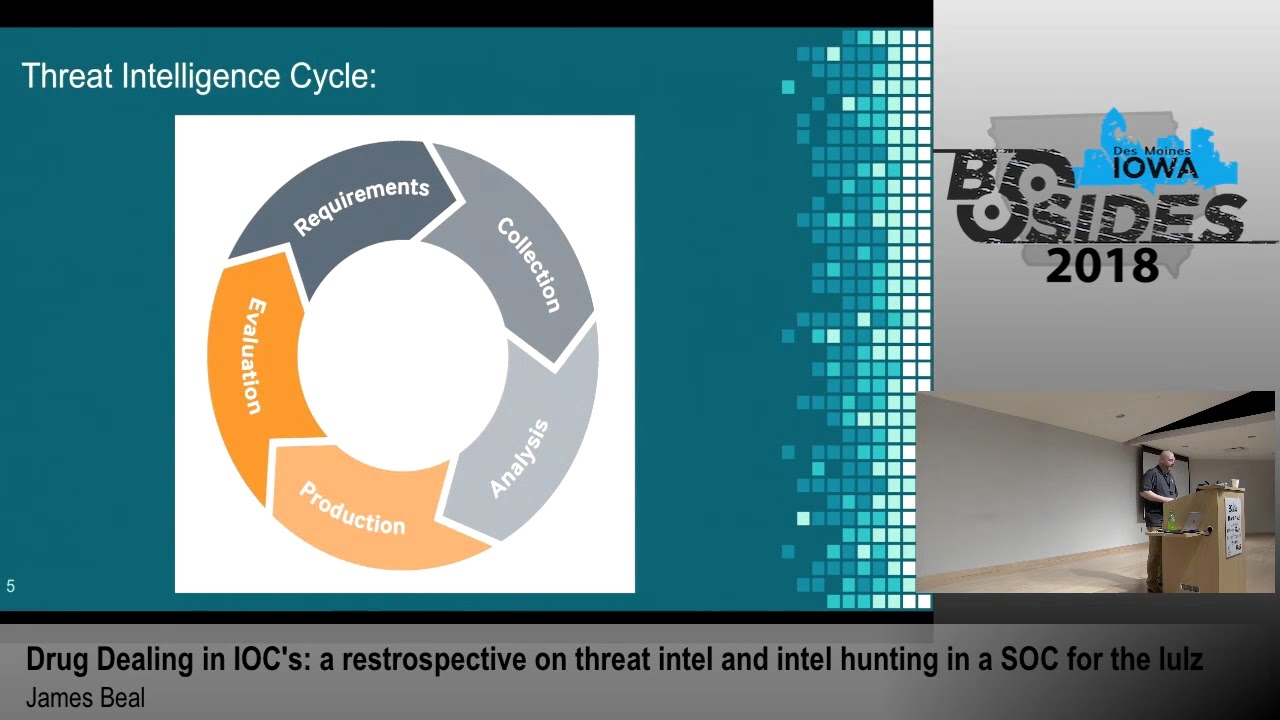
ten different ways that someone could get in alright and this is somewhat other review chad cover this little earlier and his threat Intel talk if you saw that as I said this is kind of the threat intelligence cycle that MWR uses in their paper and the different stages are the requirement stage is first you really wanted to find what you're looking for and what you want the program to tell you so if you can't turn around this is the idea of don't go out and pay an expensive vendor for threat intelligence if you don't know what you're gonna use it for in the first place this is essentially this stage so you've got to sit down and look at your
own requirements and truthfully one of the best ways to do is just narrow down and pick a subject to start with so if it's the PowerShell side if it's you want to look at file hashes and do you know file hash comparisons that type of thing based on tools you have it can also be technical or strategic the technical side of things would be those I OCS would be TTP's would be pieces of actual technical data and then the strategic view as you'll see later it's kind of one of the subtypes of threat intelligence the strategic view is more the type of things that you would provide to the board so if you're looking to the board and the board is
interested in risk you're providing more risk based reports you know the management level and all the way up to the board level isn't gonna be interested in you know oh hey I found this awesome new piece of malware and this is great yay they're not gonna care they're carrying about risk to the company and you know losing losing huge piles of money if there's a risk and exposure a data breach of you know if you if you process credit cards that your credit card database gets popped which is a major concern of ours that is you know our Holy Grail as a retail organization is the fact that we process credit cards and have a credit card
database but these requirements also need to be feasible so they need to be something that when you provide an actual final product the team can actually use this not only your team to do the analysis but provide out to the rest of the security team if it's the engineering team looking at new projects they want to bring on new tools that type of thing it actually has to be functional the collection stage this is a huge part of the program it ends up being a huge part of the cost as I said actually getting it in you can start with the free pieces but if you we want other pieces of data and you can't get them this can be a very
expensive way to get them and this is pretty much the opposite side of being a analysis side a huge part of the focus needs to be on identifying the best information so you need to if you're getting feeds you really don't want to rely on one feed on top of everything else you really need to have enough data so you can do some comparison and some ranking internally and that type of thing and actually figure out what is reliable data and what is the desirable information for what you're looking for so a lot of the feeds a big problem with this is a lot of the feeds are generalized and it may not apply to any
of the actual attackers or you know groups that may be attacking your company specifically and then a huge part of this is also the analysts themselves and those sharing groups we're part of our sis because they're a retail organization they're a huge group of people you know target is one of the major members they provide a ton of intelligence on a weekly basis after after their situation a couple years ago they spun up a huge security team and they do a lot of contributing back to the community and a lot of providing that that actual intelligence and you know human analysis intelligence and not just hey we saw this fish and you guys might want to look for this email
address or you know this piece of malware involved so and then the analysis piece as I said this is the other side from collection it's usually the part that's using the rest of analyst time there you're gonna collect the data and then you've got to review everything so you can't get in 40 feeds from you know 40 different vendors and expect that one analyst is going to be able to look at them because it's a huge fire hose of information so you've got to figure out ways to narrow that down as well production is the reporting piece pretty simple it's just disseminating the information out to whoever the customers might be whether that's the other people
on your team to say hey you know we want to do this inside we want a firewall rule that type of thing or to turn around and report up to the board those those risk pieces that type of thing and then the evaluation this is really the back inside of it as everybody does with projects you just need to evaluate the actual output and whether anyone's getting any real value out of it not only just your own analysts but as I said the engineering team and pieces like that quickly go over the thread Intel types this is also from the MWR paper they pretty much break out subtypes of four different pieces of thread Intel their
strategic piece this is the part that goes to the board in the executives those reports they're based on risk current risk and you want to look at future risk as well and then actual likelihood of these risks occurring so it's super important if you're actually writing up some of these documents that you take into that future piece because that's really what they're looking for and then scoping it down so that you've got an actionable definition operational would be your actual information on specific inbound attacks so this wouldn't be TTP's specifically to like and overall but it would be tied to specific attacks and a likelihood of those things occurring in your company potentially when and where those
requirements have to be focused on individual groups and it's kind of it should contain nature of the attack any of the capabilities potentially this is the type of thing we're gonna sit down have a team meeting and say okay if you give a weekly report or a bi-weekly report to your security team so the engineering teams aware so management's aware and that type of thing that here's the capabilities the attackers this is people that are attempting to focus on us and not just a general oh well let's talk about in in the retail realm we deal offense Evan and that's a focus of an attacker that we use and not just something that's like oh it's Russian team whatever
that's just you know hacking the internet for crypto currency that type of thing and then tactical these are the actual TTP's so I didn't put the hierarchy graph on here but a big problem with IOC s itself in the IOC data is the fact that they're very very tied to time and so if you have a hash of course if someone recompiles the code and changes one bit in the piece of code they change one line one letter you're going to get any different file hash so file hashes are almost completely useless dependent upon your tools they're good for application whitelisting inside your company which i which i talked about later but file hashes themselves are extremely
extremely you know tied to variability as well as a lot of IOC s the vast majority of them are IP addresses and those are only tied to you know thread actors through whatever someone decide it was inside a piece of malware or inside some piece of piece of code that was examined and then these are once again groups that likely attack you and then the technical side this is what a lot of us are going to be doing this is the actual data this is the IOC s this is the command and control channels this is the attacker infrastructure this is different from tactical because it's specific information and once again here is the the exact time and us of those
pieces of data that you've got this super timeline is tied to everything it's not you know an IP address especially with like a I P address or URL that's tied to a domain generated algorithm URL is possibly maybe going to be up for three or four hours and that's not gonna be any good if you get a threat Intel report for free two and a half weeks later when the site's been restored or it's been taken down already and then when you're looking at requirements you want to look at current and historical as well if you possibly can across your network so a few observations on threat Intel definitely the biggest point here is quality over
quantity every time if you can figure out a source that's actually giving you quality information like our sisters for us that quality of information is so much more useful than had just having this huge fire hose from 20 different feeds and my second bullet point there it's mostly useful useful or I meant to say less than useful data excuse me that a lot of these are coming from you've got a huge amount of information a very small amount that actually applies to you and figuring that out is a huge huge amount of work and another problem is a lot of the current platforms we have exposure to some commercial threat Intel providing vendors and there's huge
problems with their platforms once again we're in 2018 we should be a little better at this point but a lot of the vendors are just providing these feeds or they're providing we've Splunk for our logging and we got you know a centralized logging through spunk and they've got dashboards that you can build up for a spunk it's an app that's installed in spunk the the dashboard itself is either useless it's it's running a huge amount of processing power because it's trying to process this giant hose of Io seas back on all your historical data and causes a lot of problems there so at the point we're at right now from what I've seen a huge amount of
them are a problem in the vendor space now this is also another big one from the from the commercial entities and and the open source zone we've seen very few if any are aging out data so once again if you've got thread Intel data and it's two weeks old is it really useful as an IP address really useful on top of the fact that a huge part of it's tied to the web and their ad networks and things like that that you're getting IP addresses on so just farming through it all is a horrible problem in one specific tool that I've seen you could mark things as false positives there was no way to take
that back so if you mark something as a false positive and then turn around and need to use you know that you find out from a different source that this is an actual problem you have to then contact the vendor to turn around and change it on their database back and to get it to function and a huge amount of these vendors are just getting started and as I've said they could be considered at best maybe a fancy threat feed of anything else there's very few vendors that are going into the depth that they need to to get actionable data to you that actually applies to your your specific area of business let alone your
specific company your specific network that type of thing they're just there's no communication there where even a lot of them are reaching out saying these are the things we can do for you how are you set up what would the benefit be that type of thing so this is the joke you should all have known it was coming we had to have a little crack fix joke so this is the inspiration for my title I feel many of the vendors are seeing us as nothing more than someone looking for their next fix of data so there's sling and i/o sees out there we're getting I OCS it's a huge flood but there's no thought to any threat intelligence and
actual usable data out there for us specifically in each of our companies and I want to talk about threat hunting as well this pretty much sums up a very good part of threat hunting and attackers out there and people people are you know that the whole adage the old adage of people are the weakest link only in the fact and I think the the Facebook trial the last week or so or not trial but the Facebook you know interrogation stuff that's been going on is tied to that that you know you've got this people and knowledge and awareness type of issue that that you can have where people aren't aware of how systems work and so they feel that
way more secure or way less secure and so they'll just do whatever they want because that's what they want to do so this is the fun part the threatening parts the fun part so you've got all the data you want to turn it into intelligence right here simple and easy just pick something just pick PowerShell they'll look at pick a piece of malware to look at go out and do some research on it figure out what the IOC s and TTP's are tied in to that and just go look for it in your environment what tools you have use the tools you have in your own environment whether you've got you know a network monitoring tool whether you've got
endpoint detection response where you've got an application whitelisting system that's turning around and pulling up hashes and and programs and alerts for band pieces and that type of thing we refer to it essentially as our daily checks we go through a whole list of all our tools we've we've coordinated a lot of it down into the one pane of glass and in Splunk and built up a lot of dashboards that way but there's still vendor tools out there that aren't available to do that and so we go through everyday and do those analysis checks and see what's out there and then we turn around and take it to the next step and say what are the things we're
seeing what aren't we seeing what do we think we're not seeing what do we want to test that type of things so so as the joke is you know we can't live by alerts alone and this is our chance to be bad guys so I want to go over a few tools were quick as I said earlier every piece of software you already have has logs inside of it you should use those first get centralized logging if you don't have it it's a massive massive boon to being able to look for stuff in the first place you need to get into this log management system get it useable get it to the point where your analyst can
turn around and search data in there and like spunk is a good example it's a paid-for product but it actually does data analysis and then you do queries against it it's a huge benefit for being able to see what's inside your own Network and use some of this as a function of of the job itself and you know you've got thread hunting and thread intelligence data you can define your hunt from those you can decide okay well we've had a larger phishing campaign this week that type of thing so just a few tools real quick in case you're not aware of them this is as I use for analysis and for threat hunting and that type of thing just to talk
about them real quick so there's URL scanners they're the two buttons I've found our URL query which is the example here and then URL scan dot IO there's a whole bunch of them as well these are cloud URL scanners URL query if I remember correctly does not give this option but URL scan does if you go under you see the button that says go is a public scan that will actually list anything any website you put up here so that's if it's you know from an internal phishing message and it may have company information in it just like you know some of the scanners I'm going to talk about later if you go underneath options
you can choose it to be a private scan and so your data won't be out there a lot of these and the next the next piece I'm talking about virustotal is probably quote unquote the worst they're a vendor out there there is no way to turn around and specify if you put a document in that it's not public data that's kind of how they trade that's how they make their money unfortunately if you turn around and take a company document you know like an excel file they got marked somehow as malicious and you upload it and it's got company personal data information in it you're in trouble because there's no way to get it back this is a database you can sign
up for a Perl plan if you're not aware there are plenty of talks out there from a ton of different security conferences about guys who's given entire talks on going in with their pro account to virustotal and pulling out company information and we mean database creds and pure in in plain text financial information everything is out there so virustotal is kind of a backup that i would use if it's something that came in as like a potential fish from an outside source and then hybrid analysis i think is a way better program they've actually just updated and added some more scanning functionality into it there's actually a way in here as well to specify not
scanning it as far as a public piece and then for URL details you've got a whole bunch of companies out there this is essentially advanced who is so if you're looking at URLs you're looking at IP addresses you're looking at you know co-hosting that type of thing you can get that from the URL and IP scanners and then dns dumpster is really cool if you guys haven't ever seen this one go out and throw your company domain in there and take a good look at it it's actually rather eye-opening they they will pull down all the public information you'll get to see your entire network if if you're not already aware of it it can scare people
and then since this is a pretty new one to me I don't know how long this has been out there well you actually need to sign up for an account you get a free couple free queries but if you sign up for a free account though you turn around do a scan and it's pretty much like these other ones you can put in you put in domains and IPS and they'll give you all the infrastructure that they can see tied to those different places here are a couple I've got two of them two big ones that I found that there's a whole bunch of useful information and alienvault is a pretty much a sim company out there they do a lot with a
community and then they've got their own commercial product as well but this their open source thread Intel platform is completely free you sign up you can essentially sign up to follow other people that that provide information and your by default signed up for their general feed and they will actually email you and I get probably anywhere from 5 to 15 emails a day based on threat information and threat actors and malware and pieces like that that they will actually email you about so that you can go out and take a look and then they've got this entire platform that you can post your own information and that type of thing in and then IBM actually has one as well iBM has the
x-force exchange if you haven't heard of that before they are an open-source threat Intel program they'll pull in a whole bunch of information and and help you look at data as well you can go hunting in these environments or or you can get notifications and and just go out and look and see what's what's top of the pile for the day and then this is a huge one if you're not aware bloodhound is a reasonably new tool it's run by it was created by a few of the guys that were at a couple other companies and they form Specter ops they're a pen testing company they're pretty new in the last year this tool actually is active directory discovery
so you can install this pen testers you're using this at a very high rate so if you had a pen test lately and they haven't used bloodhound I would ask them why it essentially requires no crits essentially just domain user no domain admin anything like that because that's the whole point is to get domain admin a lot of times in a pen test it's a it's an amazing program that just uses the features built into Active Directory if you weren't aware Microsoft designed Active Directory to be very helpful so it leeches out of data this tool is essentially a whole bunch of PowerShell commands and a lot of dotnet and pieces like that that are
tied into Windows it'll go through Active Directory and query Active Directory for everything you can use it for pen testers using it essentially to map your entire ad network if you run this on your work network it will scare you and a huge part of it is that it will show you connections between accounts this will actually connect and you can look at anybody an ad from one side to the other so if you want to see the best route between your account and domain admin hopefully you're not just using your own account as da it's your call but I wouldn't do it it will show you any user so if a pen tester comes in
if they can get a machine and say it's you know you're not doing a full black box test you're doing a white box test and bringing them into the environment you're giving them a machine you can give them a pure machine that just happens beyond the domain they can run this tool with no required upgraded creds map out the entire network and then figure out from whatever their their fake account you just made you know Joe Bob brand new employee in the marketing team they can figure out what level they need to go through between group access as well as machines so it will show that if you just run a query and I should have brought one up and put
a slide up here you can just look at you know Joe Bob and marketing is in these groups and these ten groups and these have rights on these machines and then this you know then you can get to the helpdesk guy and it will build shortest paths it will build all paths and everything so if you haven't used it it's it's it's actually really eye-opening and scary but it will map out pretty much essentially what they need to do to get from any one person to another machine anywhere in your environment in the domain itself and if I'm not mistaken it'll map across domains if there's any domain connectivity so if you have a you know
lockdown domain but it's got some connectivity for accounts or you've got to jump server that type of thing it will map all those out as well so it's a heck of a tool and it's it's a good thing as a defender to look at the top end attack tools and see what you can actually see and then this is one huge program out there this is free open source its security onion if you're not aware of security onion it's essentially a sim it's an open source sim this they've just recently upgraded using an elk stack so you've got the full elk stack Caban a database type of thing a big huge part of security onion
is if you're not it's not easily designed to put into a large-scale production but it's a good way to install in a box and do a POC in your network a big part of that is bro and if you're not aware of bro is not really network monitoring but its network data there's a huge amount of information in there and if you're not aware bro I would go take a look at that bro and what you've got and this is just you know you can put this out as a POC in your environment put it out there give it a tap off your network and just see what kind of information you can pull bro search queries are amazing and super
in-depth and you can become a bro ninja and really really see what your what your environments like so story time first off does anyone recognize any of those three IP addresses any of them anyone know what the first one is Google DNS the second one yeah loopback address on Windows the third one I think I think I mistyped this one I think it actually came in as three one three three seven so instead of leet it came in as elite what do these have to do with IP addresses they sure look like IP addresses don't they that would be great and if you had it would it would be great if they were IP addresses and it
would be awesome if this was plugged into you know like your threat Intel tool is plugged right directly in your firewall and so when thread Intel comes across with negative IPS it's just gonna put a firewall block on them right is that gonna cause a problem potentially with Google or any other IP address it's a instead of 8.8.8.8 it was you know to your main cloud server and your Amazon Cloud your Azure cloud that type of thing a lot of these threading toll programs try and say that they can pull this data down and they're gonna turn around and you can feed them into your your Palo Alto firewall it's got thread Intel pieces built in it'll block things
for you every single one of these is because the thread until tool I was looking at turned around and started using that hybrid analysis tool and their public data that they were providing it decided these were IP addresses they're actually version numbers so eight eight eight eight was I'm trying to member which that one was the one two seven one was Adobe there was a recent Adobe upgrade and the other one was tied to another piece of software so the thread and the intelligence built in the intelligence Intel tool decided those are IP addresses and had we had this tied in directly to our monitoring and firewall blocking system it would have actually you know broken something or a whole lot
of something's if these were a lot you know scarier addresses than these basic ones and it was just kind of hilarious to see these actually qualify that way and then a huge part story-wise is the defense-in-depth so you've got all this all these i/o CS and that type of thing if you don't have defense-in-depth in your network and things are making it through you're in trouble anyway a huge part of this is we've got an app whitelisting program we've got a tool that does it it pulls file hashes we had some pen testers coming a couple months ago and one of the huge problems they had was turning around and actually getting a program to run so unless it's
a whitelisted program in the first place you can't get it to get it to function so any of their any of their custom made tools that type of thing are not going to run on your network period if you've got a whitelisting tool in place so that's a huge benefit deception tools out there a couple other guys today I've talked about some deception tools you've got honeypot tools honey token tools places like Symetra if you haven't heard of them they're Maze Runner tools a huge deception tool canary has a honeypot tool that's essentially a plug-and-play box he put on your network that runs honey tokens there's actually another company and I can't remember the name of
them that actually does essentially honey pots and honey tokens inside of active directory so if your Active Directory environment has you know 10,000 objects in it the tool actually make it appear that there's a million or five million and then the attacker when they turn around and you know iterate through that ends up seeing that you've got you know 1800 domain controllers and 50,000 people and the vast majority of those are fake and they have to figure out a way to you know move through all that data because the more that you're pouring at the attacker for them to see in those cases is better and then of course network monitoring so hopefully everybody has a sim some type of network
monitoring tool that type of thing and then the last one is got to look at threat hunting with threat intelligence is to prove out the bad while you're looking for hunting so you've got you got essentially this idea of tying the tools together and not just as your initial inspiration but actually some functionality as well and then like I said we use Splunk for our one pane of glass it's possible it's a really good tool of some sort if you don't have a spunk or you can't do that there's open source options out there you need to pick a good monitoring a centralized platform and throw everything at it so you can at least see what's going on
your network from the analyst side and my last story is just research I've been doing in the last couple weeks we've been looking at PowerShell and PowerShell logging and it's a great tool and it's built into Windows and it's wonderful and there's a PowerShell 5 essentially if you can get off of PowerShell 2 3 & 4 especially - because there's downgrade attacks with PowerShell - because there's no logging and pieces tied into that but if you can get on - if you can get your systems upgrade and get to PowerShell 5 it's wonderful they have a couple good options built into PowerShell 5 for logging itself script block logging is a huge one it actually logs all the
scripts windows is good at even if it's in malware most most you know malware authors or an obfuscated your code and script block logging will actually take that as it's translated back to PowerShell itself and give you the outputted script so we did a whole bunch of testing with my sock engineer in the last week or two we've tried a thousand different ways and all the logging comes up and then there's transcription logging which essentially if you launch a PowerShell window or PowerShell launches transcription logging is essentially everything that's typing into a window so if someone typed something and erases it those are all great a huge problem that we just found and it's documented out there this isn't
something massive I've discovered but in doing a lot of research we actually found out that PowerShell rights and those logging rights are set in Windows by group policy object sounds like a wonderful idea except to stop a problem with having to look at the group policy object rights every time PowerShell is run PowerShell caches that information there is a way to overwrite the cache to turn off script block logging at this time so you've got all these wonderful logging tools and then your it's falling down and this is just a good recent example those literally happened this week that we're looking at I do not have an answer to it I do not have a final solution yet
it's literally how Windows is built in a group policy object and these are the type of things that if you're not doing threat hunting you're not looking at threat intelligence and things like that you're not gonna know these things aren't there you're gonna think you could turn these things on that's just the way it is great now we have logs if you're not digging into them to the point of looking at the way an attacker looks at these things you're gonna you're gonna lose out because suddenly someone runs a piece of malware and believe me all the malware guys are aware of it they're gonna write their tools with this as the first script and
so you're lucky if you can catch the first script and then you've essentially got a persistent run as rights of the person so if they can get it to run a system you then essentially have a system root shell in a Windows box that's persistent just sitting out there with absolutely no logging and everything you run after that is is gone there's no logs for whatsoever so that's a that's a scary recent discovery so like I said my main point in all of this is that context is king you've got the current state out there outside of very few vendors period whether they're expensive or not they're just getting out i OCS you've got no correlation
whatsoever context and the analysis of them to actually understand the data sources and get some idea of where this is all coming from is completely missing in the vast vast majority of it all and I really think that if a vendor comes along or an open source project get started they can get us that ability to you know we've kind of gotten this idea of one pane of glass in the sock and for defense but we don't really have some of this threat data and threat intelligence turned into something where we can really get context where we can really look at at the data and where it's coming from and figure out whether it's it's actually something we're concerned
of because your company might be concerned at you know a 90 percent level because this is a piece of malware where I know I've got between my defense-in-depth tools a way to stop that already that I've tested that's not going to function like that application whitelisting tool if I have that and you don't you might be way more concerned that a piece of malware makes it through in a fish and someone's going to run it and it's just going to run where I've tested my app whitelisting tool and it's going to block that so my concern might be at a 10% or 20% of that actually occurring in case that happens to work for some reason and
might be at 90 or 100% there's really nothing I've seen out there now I have not seen every tool I've not seen every you know vendor tool out there I haven't seen all their all their platforms and that type of thing but at this point from doing this and researching it I haven't seen anywhere that's really providing us this type of context that's it for me anybody have any questions
yeah so will behavior base ready Intel tool none that I've seen so far once again like I said there are the big vendors that threat connects a big one out there and the reason I know them we've kind of look at their program those big expensive vendors are actually turning around and doing a lot of this intelligence pieces so they're providing a lot of that for you but their programs to buy into them are also there they're looking at you know fortune 50 fortune 100 maybe companies so those just to get into those programs is huge they're doing that they're ripping apart malware so instead of you having to do that yourself it's like oh I got all these io
C's but I want to look at a piece of malware I want to see what my I want to find my own iOS things then you got to spin up you know a box to turn around to detonate the malware and dig through it all reverse-engineer they they pay analysts to do so one of them gave one of their senior analyst gave a presentation at that con a couple years ago in a training class on how their program works and that's great but to pay his salary and ten other guys they're really expensive programs so I think some of its out there I haven't seen a lot of it so far especially on the user behavior side of things
hopefully everyone's looking at user behavior analysis and you know endpoint detection and monitoring tools are really huge right now you need to have one everything's going on in memory and everything's going on at the endpoint and we're not seeing a lot of stuff network-based anymore and so it's definitely there and I think that's probably in the future that's what we're gonna see but definitely not on the free feeds and even a lot of the stuff out there that vendors are providing as I said 99% of it is I OCS with no date attached no information to them where they came from that type of thing so no at this point I haven't seen a lot out
there that's anywhere close to not only tell me where it came from but why what the actual behavior was and if we can stop a user if we can stop this attacker from doing it behavior wise anybody else yeah like I said there's options out there we specified on spunk just because they're a great vendor and they do it a really good job they are expensive in data logging so if you're going for a natural vendor you need to look at the data ingest you are paying essentially for the data you process during per day and so you need to look at those levels and figure out if that's actually functional out there I have not
looked at I'm not on the engineering side of our team so I haven't really looked at I wasn't part of the proof of concept to test several of them so the main one I've seen so far is Splunk and then some of the open source ones I poked around at but a huge part would be if you've got your logging and in place in the first place are you putting it into one tool and then passing it on to Splunk are you able to get it actually are you able to actually get all those logs off so it's really that inner interoperability and functionality if based on what systems you're running are actually able to get the logs into
something that'll do that inspection and that's the biggest part for me is just just an actual tool that that works that actually functions as Splunk is the big one I've used just because we have it at work so it's the only one I've really played with it's in the big vendor space like I can't really tell you beyond that but I can tell you what they do is great and anything that's like that that will actually ingest all the logs break them down into you know a model of tags so you've actually got tagged data so you can see you know you can search across source source IPS URLs that tougher than any of the tools that are doing that is
just a huge benefit because then you don't have to go out and you know attempt to especially from if nothing else from the incident response perspective to turn around have a tool or I can just feel I can go to one tool and turn around it do searches and see what happened across the environment I don't have to turn around and say try and figure out which servers got impacted or which you know what routing information I got to go track down that type of thing so just some type of central logging is a huge move forward from the analyst perspective just from just from a timeframe perspective and feeling like you any type of incident response at all yep
anybody else no not at all Windows whether you're talking about Windows endpoints or Windows servers are horrible so if anyone's ever tried to pull off an event log from a server it stinks and so that is another benefit of Splunk Splunk actually has a tool called the universal forwarder it's an agent that you install just like another endpoint agent that I actually forward those logs in a readable format that's a huge benefit of Splunk I don't know which other tools do that it's been a huge boon for us to get that data because that's as we're testing these pieces in these detection pieces all the endpoint logs are moving - next we have a third-party vendor that does use a
behavior analysis but we want to be able to verify that on our own by pulling all the windows event logs from the endpoints and eventually from the servers as well and without it without a tool that's got a universal forwarder if you try and pull Windows logs I don't know who all has done this but if you try and pull Windows logs off one box and read them on another it's just not designed to do that your only other option is from Microsoft to setup a essential centralized logging database of event logs Forde them all to that and then use that box which you could then turn around a feed in your logging format but if you've got a tool that's
got an agent that'll turn around afford that into something like a Splunk you've then got one dose of that logs on top of it that's actually searchable and broken out for you in a format you can actually read because not only that but Windows of that logs are horrible just in general and trying to read through them all especially in any type of incident response and trying to figure out because you'll have 4,000 events at the same time and two of them you care about trying to find that on a machine if it's not forwarded as horrible anybody else all right that's it for me thank you very much
Related talks
 27:13
27:13 56:10
56:10 54:52
54:52 33:10
33:10 1:14:13
 52:11
52:11