ThreatPursuit VM
Show transcript [en]
just waiting for everyone to show up so we had this whole practice Silvio is going to do the intro but anything much so I'm just sitting there in silence but we have actually been running Seaside's or mocking meter since 2013 about eight years of meetups face to face we've never streamed before but of course we are in a interesting time so we have to adapt or die saying we want to keep on the technical talks see science is all about the technical talks we've had two talks a month for the past eight years and we focus on the technical side of things and we appreciate people so many talks to us and getting an opportunity
to speak whether they're new so we have some great talks lined up tonight we have Dan Kennedy and Silvio and we're going to finish up with a bit of a closing ceremony for the B science Canberra 2020 that never happened but I think first off we'll kick off with with dan dan kennedy and then isn't one for introduction so and I said I'll entry you here was nice but we will do would you do a small entry so Danny is currently a senior threat analyst at magic threat pursue team where he research his hunts and creates adversarial tradecraft emulation he also spoke at the first besides camera back in 2016 which was great and so I've been a long supporter
of besides camera and Seaside's yeah dan would you like to start your screen absolutely thank you guys and so great to be back with the besides crew yes screen I have to say during seaside I was saying I normally sit down the back of the room and let Sylvia just run it say having the camera that's it cool excellent so I'm hoping that that's that screen looks good for everyone on the street yeah that's great here awesome so yeah just this talk today is purely just to introduce a tool that I've been working on for the past couple months now this this talk is yeah mainly an introduction how do you know what it is
how to use it how to install it and leave some of the more depth your aspects of threat intelligence and analysis for for a later piece so with that in mind otherwise I you know obviously turned out like this guy on a on a live stream which I try want to avoid especially if I'm not getting pay for it but a bit about me so I'm a senior analyst at Mannion within the threat pursuit team so I mainly look at commodity malware perform hunting activities but my main focus has been adversarial emulation in my spare time bitter jujitsu fitness and being a dad which occupies almost all my spare time yeah and I love what I do and and I
think I'd you know love to continue doing this sort of thing into the future so with that with that in mind the the basis for the VM is to run on a Windows environment there are plans to make that into a Linux based version so we're aiming to get that towards the end of end of this year but it's primarily focused towards cyber threat intelligence so design you know for your blue teamers for your analysts and even students to have sort of a neat neat tooling ready to use and easy to sort of install and move around so the video itself for me was was I felt was filling a gap that I saw wasn't really
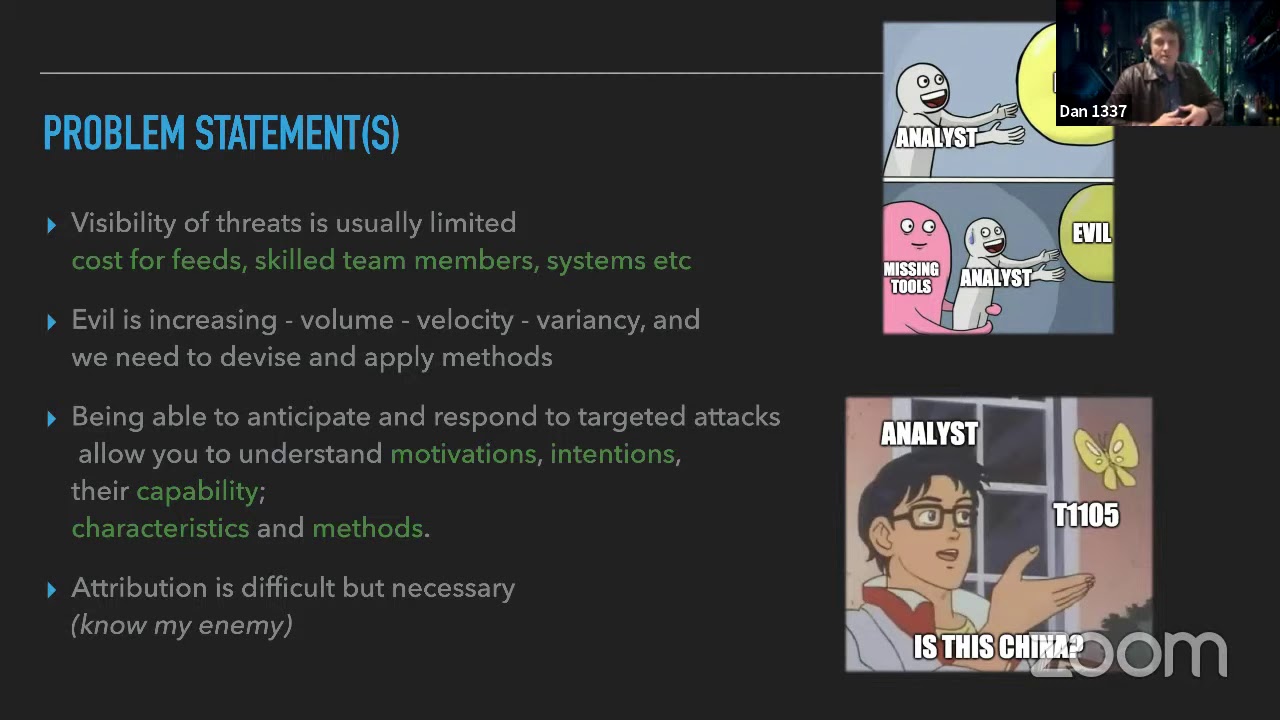
being met and so I felt that you know we're starting to move into a an area where we you know we're obviously dominated by data and we need to be able to discern that data to find evil in sort of better and clever ways so for me it's you know these points on the slide kind of the key themes or the drivers for me to create this video so I can enable others to both you know hunt share their information in in better ways and to help you know guide inform you know decision makers the sort of problem areas that we're looking at forth for the reasoning for this VM which is what I've sort of observed
through feedback from different organizations different users different analysts and they all have sort of the key themes around you know the scope and the resources and you know the cost to associate with some certain feeds and that's all fair game but essentially this tool provides you with you know some open sources so that you can click pull back from a large range of different providers but also give you the sort of tool sets to be able to to do that so and the other reason obviously is the you know evil is increasing so you know in terms of the rate especially there's the last couple of weeks we've covered 19 base themes that is that has just been extraordinary
and obviously emote it up it up until that point and obviously the variants E as well so they're coming in hard and fast they're changing quite quickly there's new new samples new things each and every day I feel that it's important to keep track and tabs tabs of those the sort of lifecycle of some of those of malware and actors and obviously to use and leverage that information further to you know support and guide how you know you can potentially anticipate and respond to you know future scenarios that you've observed in other areas so taking for example you may have seen some indicators from a particular country targeting this industry vertical so being able to sort
of consume that Intel quite quickly rapidly and then develop sort of signatures and apply those you know you know in a quick in a quick manner I through the attribution line in there I know it's sort of always a contested point but it's becoming more and more important not just from a law enforcement perspective but also from sort of a regulatory perspective as well demarcation so the VM itself is primarily focused towards threat intelligence so it should not be used for Incident Response it's a different methodologies it's a different mindset completely reverse engineering there is some re tools built into into the toolset so mainly for static analysis but obviously flare VM exists for that
very purpose so you know keep those guys up for for email we needs and obviously the offensive security space you've got commando VM so this just sits in that same same family and is the sort of the the the lonely child to a degree but I love it so yeah we'll keep on with with the threat pursuit VM the hardware prereqs now this is a pretty beefy box it can be installed not just in a virtualized sense but on a physical box as well but you know inside a VM there are quite a few tools that go into shortly but you will need a pretty high specs box to run that especially the graphics card and the virtualization
counters enabled so that you can take advantage of some of the docker based containers and and they're in their requirements the minimum spec will just get you by so you'd be looking maybe at running one or two application inside this inside with some avian so with with the collection side so when I think of obviously what we do as analyst whether we're you know addressing a particular need or a problem we're validating a narrative it's important for us to sort of work with in a in a lifecycle and so with regards to collection you can either take the targeted perspective where you're looking at you know a specific problem or or an indicator versus you know bulk
you know scraping and pulling back so you just have to be mindful of what your approach is what your needs are but essentially this tool should be able to cover one or more of these these areas quite well so just this is just a note around like you can have a tool but if you don't have the right mind so if you don't have the right sort of practice then all methodology then the tools kind of meaningless and I feel that a good analyst will will have will ask the tough questions on things so whether it's a finished intelligence report and you're looking at I guess certain inferences made from that reporting so you know that for example
the victimology or the targeting you may want to ask some tougher questions or is that do we really agree with that component is the technical analysis correct what are the gaps and what today what did that report miss it's just important to kind of you know ask those questions but also and on the right-hand side you've got an example of the diamond model an image from threat connect and it's just a way for you to have that analytical mindset and pivot from different aspects for for something that you've seen so if you're working on or you're supporting an investigation and you want to provide a level of Intel or intelligence lead you may look may choose to use something
like a diamond model to infer or differ certain parts of information so if the stash this is the the part I guess everyone loves so yep quite a quite a few things here on the left-hand side collection entry arch obviously some things you'd be quite familiar with others you may not necessary but miss and open CTI excuse me would be the sort of key key components that I use for example to to bowl to collect information and then drill into but obviously this is just a subset of what actually exists in the tool there's there's many more providers that so so so Poland is in there as well they've created a really neat tool and have
indexed quite a large range of of malware tools called M query and I'll show you show you guys that a little bit later but a good way to hunt for for other samples the analytics and data is probably where the you know look at the core focus has been and this these tool sets are primarily geared towards applying Suzi analytical models into across data to sort of discern that for for something that you might be looking at so there are some components here that a sort of machine machine learning focused I don't allow you to build and develop and train models to apply across your data set but also to sort of leverage from two to check or verify
your hypothesis for hunting so for example the threat hunter playbook has some pretty good examples there of of events in indicators that you could use to then hunt for across your own data sets so then you've also got Jupiter and Zeppelin which kind of notebooks used as as interpreters for for data so that you can model and classify information quite quickly but you also have Splunk and elk in there so quite quite a bit to play and leverage from the adversarial emulation so the two that stood out for me most were my de caldera and the atomic red team by red canary and this is primarily focused towards running a mission in the offensive sense
and then pulling the event information back from from your emulations into your you're logging platform so you can drill into so that that's the kind of key or why that that exists inside the platform as well is to leverage the domain expertise in the offensive security space and bring that closer to the blue team some users that are in there so the ones that are not mentioned here would be things like floss X or search like string search if a whole bunch of UNIX tools and flare flare VM binaries that are included in there as well as well as some virtualization I was excuse me visualization tool so constellations CD escape and neo4j yes and these are just
like the ones that I wanted to show on on one slide there's there's quite a bit more behind the scenes the types of insource so this is obviously the only tenant install from source and the customized install from source so the the ones that we we recommend now you do and use but however for the purposes of today's presentation I've included a VM file that's just been freshly built and that you can use to as a preview version the unattended install so to run this tool obviously you would need to have your vm already prepared you can if you don't you can grab a VM file from the windows developer website and you can think it's around 60 days
trial evaluation period and then run run a PowerShell script to remotely execute and download all the packages I'll go through the install process with you closely the customized install which is what I recommend this is where you would essentially modify the profile block JSON file and remove the packages that you don't need or we use and that way you can have sort of a smaller install base because it is quite a lengthy process a lot of pictures get installed as a result demo install
I think the display might change yeah
you
to you
always happens on nice too come on okay so I'm just going to change the resolution so everyone can see you you all right the demo install so I'll just run through that this is obviously a pre-built VM that I've just created for the purposes of today but I'll go through the unattended install how a hell that's right
install cool so we got our neat ASCII art some requirements here so you do need to have obviously an updated patched recently patched windows version it's just a check that we put into in the Installer you can choose to take a snapshot or not you won't need to take a snapshot I don't think and before installing you will pump in your credentials that you need and this is to handle the the install the reboot operations but essentially we'll just throw in anything here just for the purposes so we use box tada which allows us to bootstrap the installation so all it is is a controls the reboot operations of the install and you know checks which packages are in
saw which ones are not are they an updated you know is that package still available is it not we just leverage bootstrap the packages and the cells are downloaded from a distribution point cords meigan the packages themselves written in XML which essentially a reference point to the originating distributors the vendors of and the original authors so from github or from a vendors website and it attaches their the licensing arrangements and the description the authors and things of that nature so we preserve all that information and we just simply download the binary from the branding site what we do do though is we ensure that the the downloaded binary from the site is the hash same hash as
as the distribution provided to that version and so we have checks in place to make sure that the binary hasn't been modified or altered in any way based on the the hash checksum that that it returns so rest assured those packages have not been tainted in any malicious way by anyone so yeah that's the that's the theory list so I go ahead and kill this because that is that is the install that will just run for about three hours download all the packages do a couple of reboots and you'll end up with this this desktop so with the desktop we'll just do a bit of a drive around I'll show you a couple of things where to find things and then
kind of leave you guys on your way to to hunt stuff so I guess first things first is you've got some shortcuts so these will just refer you to some online sound boxes that you can use you can use to both check your samples but also pull back samples and as well as a tech navigator to go into that to do to show you sort of if you like the tactics and techniques sort of matrices of of information here that you might want to leverage as part of your reporting but let's not get into that so we're going to Google Chrome we have some shortcuts here I've added in now bookmarks and so from here you can find additional IC
sources that you can that you can pull back from and contribute to you have some other Intel feed providers these are mostly free in with limited use is my understanding but you can sign up and register and and actively check and find things you have some you haven't always seen stack here which is more or less than on untechnical but there are some references to datasets that you can leverage from such as census and you have bitcoin forensics so if you want to do some checkup some wallets you want to obviously keep tabs on transactions and you can you can do so here and just some networking tools that are driven from websites if if that if that is your that
is your thing so that's the that's the shortcuts no need to go further into that you have a tools folder in the tools folder which is just a shortcut it'll have some groupings of the different tool sets that you can go and drill through there's quite a bit there as you can see and this is you know obviously ground zero for this particular VM the plan is to obviously continually update and improve that getting feedback from the community so yep they're all there they mainly just point to a directory in CTools and so within here we have basically the bulk of of of our data and our tool sets so yeah as I mentioned the docker it's
quite docker dependent and for certain things so I'm just gonna go ahead and just make sure that this is still up and running yep so I've got the malware information sharing platform running inside this VM as well as other tools so we're just going to go and have a look around there see what we can see what we can find just kind of a sort of a short workflow
oh my god I swear that's what I put in fat fingers maybe yep so now we're information sharing platform what I want to do is go into the feeds so obviously there are quite a lot of communities it's still growing as I suppose but there's quite a lot of community that exists currently that actively contribute via the MIS platform so I won't go obviously into the depth of this but um I highly recommend every start using it the reason is that it provides a good way to both collect information which is what I primarily use it for now but also to sort of model and tag and verify things and contribute back so it provides a nice sort of neat
package way to do that and we'll just go and remotely view the events that found this provider is willing to share and we see some cool stuff here but this is obviously pretty old so just filter by the day
so again this is pretty old but in any case for the purposes we'll have a look at REM cups so these are these are the tags that have been applied by analysts and from this organization so we maybe want to go and just check whether that's complete whether that's correct whether we agree with the the attribution or not attribution in the sense of the the malware malware family okay so the cool thing is we've got like a pretty well structured data set here we've got some artifacts dropped as a result of the execution of the malware this is inferred from this provider or perhaps written in their in their blog post they've got some see two domains my P
addresses here and they've also listed the the phase of the attack lifecycle that that was at that particular artifact was observed in and we've got some payloads so he's calling it payload delivery payload delivery and payload deliveries so we're going just do a quick check of that hash so we'll have a look at the md5 you it's going to a penny run
we've got like a quick link to a sandbox that we can go and verify the sample if you like or I will submit I agree to your cookies pop that hash in
if we've got any known samples not in a penny run if all else fails she's going to Google throw that in I've got a link here for Joe sandbox another sandbox online actually these guys are quite good now they they do create rules on the fly
and I suppose once this report comes up we can go through and look in-depth the different characteristics of the file such as the execution behavior the signatures more or less but we also want to you know potentially take some of additional mitre attack tagging there or the make them figure out what makes abbreviation stands for but it's another mitre attack or might have framework and way classification which is probably more appropriate for malware and then we've got some other other information here such as the CTO callbacks and whatnot but that's that's okay met perhaps we could not find a sample so from Joe's sandbox we could download the sample and triage that a little bit
further but let's say for example we only have a a yarol to work from and we want to find how many other samples a hit from that yarrow so I've stolen a are or hereby from Florian Roth thanks Florian and what it's going to do is look for what he searched to be mini cats or Safety cats executed or decoded from a figure and obviously the actor has been using cert you tool to encrypt and decrypt a module of whatever it was they dropped on that floor Ian's been looking at so I'm going to go into M query so I've cheated a little bit and I've already pumped in Florian's query and that's come back with some matches here
so there is an API that you can they can go and heat up but yeah em query was created from cert Poland and it contains an index of 1.6 million samples so highly highly recommend it to use it and yeah got a couple of samples here that we can go and take the binary I just download download that obviously try not to execute it but it's probably just gonna have some P headers in Windows functions of mini cats in there so I'm not not too worried I don't really feel like going through it today but yeah it's you know a good way to to kind of hunt for information so that you can sort of validate and verify whether you
agree it's truthful or not there's some other things that are in here obviously you could do that with on the Cape sandbox as well I think I actually submitted this file already yeah we've got some Yara rule hits here that we can also leverage and pull the reporting back for and tag that up in in misc obviously cabaña is also running so I've just taken an apt 29 dataset from the thread hunters playbook and pumped that into into cabaña so yep everything seems to be running pretty well on this VM and I'm just going to do like a quick visualization across the whole data set I'm just looking for my key event IDs process like vs. are a parent process
IDs and different threads obviously this is like you need to drill into this information a little bit more but just provides a good way to obviously callate large amounts of data and start scrutinizing it a little bit further Splunk also exists in this tool I just I'll just bring that up
- to take a little bit you
[Music]
I find if you print it press into there like three times and then decides to work
time
cool
course I'm sure like everyone has almost people have had a look at Splunk and/or elk elasticsearch if you haven't liked definitely definitely go for it you can get access to those inside this tool as well as from those providers there's a whole bunch of training material on how to use that from them as well I highly recommend the advanced hunting apts with Splunk if you're new to hunting and that sort of thing but yeah so essentially you can you know run your boss of the stock in here as well other data sets as long as they're indexed and you're using it appropriately with the terms and conditions of the of the vendor and then you know obviously start querying away
for your data I won't go into that because I'm running a bit short on time
actually how am i doing on time Kylie Silvia have no idea are you four people go alright nice well what I'll do is I'll go through caldera actually I might go through Jupiter notebook so Jupiter notebook is essentially just like a Python interpreter for creating queries so for example I would you probably use this if I was looking at and I'd like some sort of IDs log or something quite quite small you know and I wanted to get some quick information out of it without necessarily creating those queries or indexing indexing that information it might be limited to a sharing problem or that sort of thing so I've actually created a I've prepared a query based on the model data set which
is in ctools Mordor data sets which has like as I mentioned sort of a whole range of files there that have already been taken from an adversarial emulation and so with this obviously you'll need pandas and pity which is which has already been included for you and that will allow you to obviously look at data you know in a structured way so in this example all have been all I'm looking at is event information and I want to see the highest count so I can drill into particular process IDs or event IDs and then I've got a nice neat ordered view of what those events the key events are that have the highest count I can also
tailor this query to then look into obviously the the the payloads that are attached to that inside the event data so yeah that's that's essentially for the tool there's quite a bit quite a bit more to it but um yeah that's that's kind of kind of it for the introduction you don't want to know how many times in practice that cleft fantastic very much we actually do you have some questions on the social media so one question it was asked why someone the slack was can they get popular links from the selecting if that's possible yeah absolutely we'll post it into a size chat the download of the VM and the the installation script will be hosted
on a get github page at fire but that hasn't been released yet I had need to just check what the status is of that I think it's just a time zone problem but you will have access to the VM to download and run that as a preview so we'll make sure that that gets posted in this way and one more question in terms of the social integration social media a leakage to that or social integration was one of the questions we've got all the slack as well yeah absolutely there's a whole range of always in focused links to websites that are there and so do drill do drill through those they will relate to sort of linked
LinkedIn profiles and sort of first social persona related data or websites that quote those sources so I can definitely recommend people go through and and based on whatever need they have social media is such a broad area but there is there is quite a few links there and there's lots of clapping happening on there on the slack as well you can go in and talk to people a bit more after yeah jump in and thanks thanks for coming yeah it's great Dan supported us when we started besides cambree now supporting us the first time we go virtual as well must have a little trust trust in us if you if you do want to talk in real time go on to the
b-sides cameras slack under the sea science
Related talks
 27:20
27:20 30:26
30:26 26:06
26:06 27:37
27:37 44:04
44:04 36:55
36:55