Training With Raspberry Pi
Show original YouTube description
Show transcript [en]
training with a raspberry pi just to give you a little bit about myself as soon as everything actually switches over here we go doesn't it doesn't like the mouse click so we'll do it the hard way so anyway my name is Nathaniel Davis I'm a security consultant with mad security I've been in the information security field for a little bit over three and a half years now I initially got my start doing policy and architecture and one of the big things i found was to be able to write quality policy you actually need to understand some of the threats that are out there so you can actually talk against them and so I started looking at it and
looking at some of these threats and I realized that the best way to understand them was to actually take the time to can hear me okay all right then I look closer to the microphone sorry about that but one of the things i found was i need to take the time to actually understand what's going out on with the different threats that are out there so i needed a way to practice and with our current legal environment you really can't do that safely by going against other people's hardware so I started looking for a way that I could do it myself and that's how i came up with the range box concept now what the range box
is it's a Raspberry Pi platform that's running raspbian host AP as well as a lamp web server that hosts vulnerable websites as well as every time you reboot it it changes the Wi-Fi pass key so if you want to actually work against it you have to break it every single time it's a new creative challenge on that now I recognize that this talk maybe a little low level for some people here so I actually put a challenge into the talk this afternoon all right this morning and so I'm actually going to turn the device on and it's going to show up what SSID is going to be live fire and I have actually hidden a
Where's Waldo image in there so if somebody can actually tell me the title of that image I've got a copy of my SD card that has the range box image on it and a Wi-Fi dongle to go with it so basically all you need is a Raspberry Pi after that plug it in and you were good to go at one of the great things about it is it's really small and portable oh this is actually just a simple WEP encryption that's all it is it's a practice that is the main purpose behind it is practice so I recognized for most people that shouldn't take any time at all so why training platform well I mentioned the legal the actual legal
environment that we're in right now so you've got the CFAA using a device and method otherwise intended you got federal wiretap laws google just recently lost an appeal on that so as they were snagging up all the Wi-Fi data as they were doing their mapping they got into all kinds of problems with that and then depending upon what state you're in you've also got other individual state statutes that you're going to run afoul of so I needed a safe place where you could learn in practice so that's why I actually built the platform it's easy to use the image is simply just turn it on once you've actually got everything and configured and the way I've built the image you
load it turn it on it's ready to go it's repeatable every time every time you turn it on changes a passkey its variable and I couldn't find any place that where this capability existed there was nobody out there that actually had a randomization for a Wi-Fi pass key I tried practicing it on just a standard a wireless router where I define the key already but there was no challenge because I already knew what it was a lot of times would be like why am I taking the time to do this let me just go ahead and key it in and then I'll use it for what I was going to do now why the pie
it's small it's cheap is written for its size it's actually very very powerful and it's portable but the big one I had it on hand and I was doing nothing with it I needed something it was a piece of hardware that I had available so I decided to use it now inside the range box itself actually you need for to be able to function you need your Wi-Fi dongles jose p or anything actually you can use as a access point i use the ISC dhcp you can use a different dhcp if you need it or if you for that this is one I happen to know lamp web server I on the web server right now I'm running mattila day from a
wasp and and all the different vulnerable applications that are included in that sweet the key randomization code and I'm gonna get into that a little bit further on once i actually talk more about host AP but it just generates a random key and there's some system configuration changes that had to happen to be able to actually get it to load in the correct order as far as acceptable dongles you need a device that supports master or AP mode has to be compatible with that and there's a fantastic list that the wireless colonel guys actually have and i've got a link to it there i prefer the arthur host chipset it's what I just happen to have
I have an alpha I also the one that I use on the PI right now is a netgear 150 or in 150 you can use some of the micro USB dongles like the realtek that's actually the 8188 CSE us that one actually requires a special variant of host AP it's available you can get it I'm actually trying to build the image right now so that people don't have to go hunt for it so I'll have both images available and I've got those out on sourceforge I've got a link on the last page for host ap it makes for a really really an easy access point but it has a couple of problems it's built for static
configurations and trying to actually do a a random variable that you're calling inside the config it just doesn't like it it does not accept the system variable so I needed a way that I could actually do this so I actually built into every time it boots it deletes the original config file that was in there and rebuilds it from scratch so there so there are four parts and I recognize this is a little hard to actually see so I'll describe them a little bit so step one on this looks at looks like weather just check and see whether or not there's a config file already in place if there is it removes it number two is
actually just pulling from dev / random so that actually gets a pseudo-random key I recognize that for most applications this is not sufficient for a quality secure password but for this application it's suitable enough and then the extra string and that's in there goes ahead and takes it and converts it to hexadecimal and then it loads it that direction that way so 3 is actually just building the config file itself it reads to the end of the file just then then cats it off writes it to the config file that was defined above and then for just shows where the actual key is in the config file itself now with DHCP obviously it's going to be much easier
then you don't necessarily need it but it's much easier than configuring the device that you're coming in on every single time it just makes it a nice and easy to use one of the things that you have to do they actually make it function is you have to get it you have to tell the dhcp to listen on WN 1 otherwise it's I'm going to automatically default to eat 0 and because of that you actually have to go ahead and define your sub in the subnet that you're expecting it on and that's the subnet definition that I've got on that one a couple of the challenges that I had actually building this boot order was a major problem on that so as you
get further into as you actually tell the load you got a race condition on your damon's when they're loading so under most defaults you're going to have your host AP DHCP and the script that we wrote to build the config file are all going to execute at the same time and you're going to have problems typically the config file won't be in place by the time host AP is ready to read it it dies dhcp can't find the wireless land that is supposed to be listening on so it dies and everything just kind of gives up so what I hack actually had to do is go in do a update RC and force the and
force of different configs who are sorry the host AP and dhcp to wait until the config was built the other problem that I had was network traffic if there's no traffic on the network you're not going to be able to do anything with it so what I actually ended up doing on this one is just a simple little cron job and it's creates a ping runs every minute it's a sends out three pings at a 15 second interval so you've got one ping going out it's going out to a it's an address that nobody on the network is using its not even inside the dhcp range so there is no likelihood that anybody's going to get that address assigned to
them but even if it does there's no there's no traffic you're not actually going to have any traffic on the network to receive so you're not going to have anything that you can grab and the easiest way to break WEP as an ARP replay and so if you're not having any traffic or anything that's actually generating IVs then you're not going to have it's not going to work so you have to have something to be able to actually initializing sorry to get the ip's i sorry the IV's and that's what this does is actually creates traffic because otherwise you've got a random key nothing's going to connect to it so I was going to do a live demo every time
I've tried to do a live demo something goes wrong so this time I actually got smart and I actually recorded a video of it so I'm a run it and to talk over it as things are happening and it's it's really really course you'll see me make typing mistakes it is and a couple of other things on that one for some of the long keys I use I use the air crack sweet the aircrack-ng sweet so for some of the long keys I actually had them pre I hadn't typed in previously and so I just kind of quickly go up and replay them on that one it just saves a lot of time and I don't think you want to sit
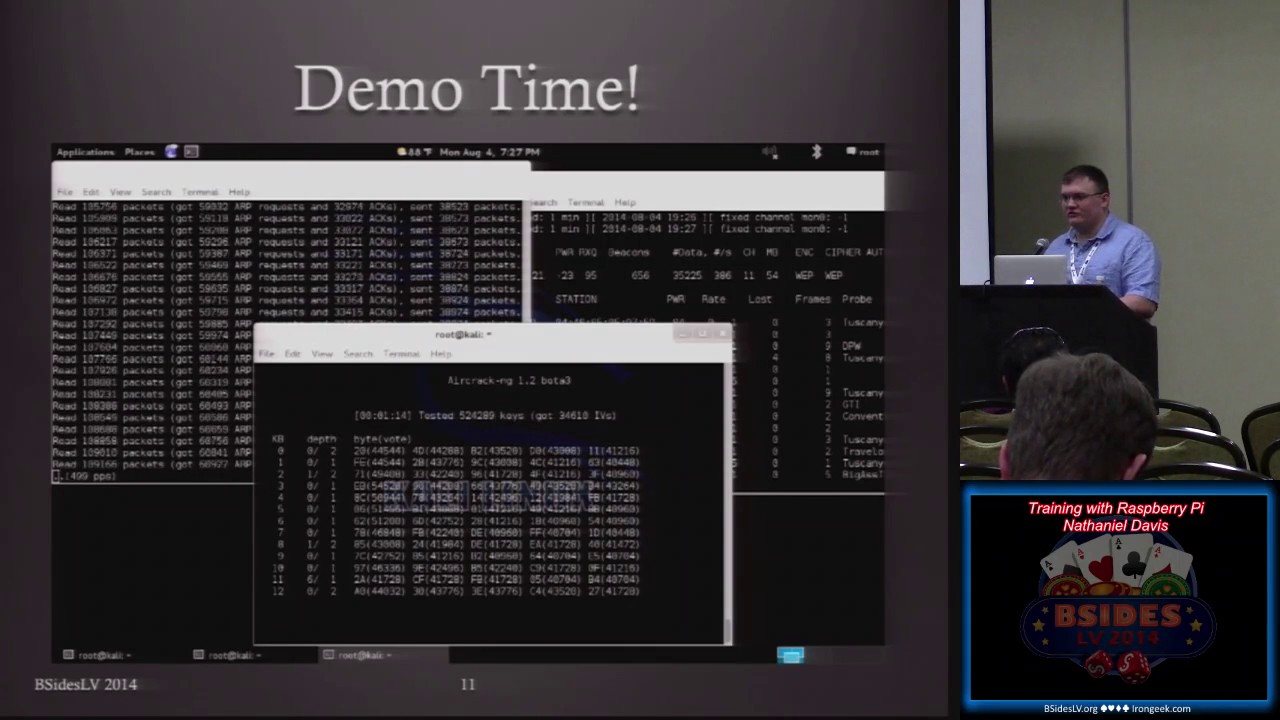
there and watch me type of in this huge long string okay do we actually get yes so yeah I've got three different terminals open on this one first one is where i'm actually going ahead and just setting up the interface so i'm going ahead and monitor and the main reason I'm even showing this is I'm not talking about how to break WEP or how to do anything on those this is just to show you that the capability exists that it functions as I've discussed and so you can see it so I've already got it I try I've already associated with it on the left side and now just going to go ahead and monitor and
actually get the dump off of it and you can see that we've done we've got the IV's ones already shown up and it's just picking up the pings and so so now I've actually started the ARP replay on the left side we're waiting for the next ping to come through and once it pings you'll see it there it goes so while the pings run and I'm gonna go ahead I've already got it and it's going to collect the output so when I started up the dump it was already my automatically dumping it to an output file so I'm just going to it's going to run and it's just going to actually crack the key wallet while I
continue to talk so one of the initial ideas behind building this and it's going to take it about two and a half minutes or so to do this but one of the ideas behind building this was I thought it would be a great way to actually train somebody on how to do this so not only for myself to practice on but for other people to practice on and one of the future capabilities that I talked about and then on the next slide once it once this portion is done is you can actually set it up and you can add code into it so you can check to see whether or not something has associated with the
device or has authenticated with the device and there's there's two different steps on that so you get them and a lot of people get those confused associating is just saying telling the device hey Here I am I want to talk with you and i'm going to give you my passport i give you the passcode for you to validate authenticating is when that passcode has been in fact validated and it actually allows you into the network and so the ARP replay won't work unless you actually associate with the device itself so if you write a script that's actually going to log the association's and you're in a teaching environment you can then monitor that as an instructor
and say ok I've got these different mac addresses for these different device I know which student that's a suit that is linked with and so then you can tell all right this student has successfully associated or this student has successfully authenticated based upon the dhcp leases as well as just the information coming off of that so you can actually use that as a training tool to see what your progress is on the students that you're instructing all right we're that's something that I've actually looked into and I don't think it would be that difficult to do the main problem with this is though with the randomization the way I currently have it set up is that it has to reboot every
single time and so that's the main problem with doing that as a honeypot as opposed to all right somebody has successfully associated and now they're actually working against it and change the passcode absolutely yeah absolutely you can do it that way and eventually somebody will get through and then at that point in time but one of the things i have set up on it right now is it reboots every five minutes so i've got it set with a job in there so every five minutes it just brings it back up brand new passcode so as you'll see it found the key and the last for one out of seven to bravo Bravo I'm gonna switch
over I'm just stopping the collection on the other sides but I'm a switch over in just a second where I had actually come in through ssh and I'm actually I have it set so that I write a log file of every key that's been created just so I can make sure that each time it boots it is doing what it's supposed to be doing and so once I get it up you'll see it that the 72 bravo Bravo key is the last key in this list and so we have successfully found the key that was in sight was on the pie one of the problems that i actually had with my initial configuration was i was running the
script on so i was were actually running twice so it would during reboot it would run build a brand new one and then went on startup and run build a brand new one so i actually had to tell it to not run during the reboot face so this is the this is the actual a wasp interface just showing that it was on there and one thing i missed because i was running my mouth was the actual first web page so is anybody actually attempted to go against the device of live nobody has live fire yeah I've got it I've got it up all right now running so I just didn't know if anybody had even bothered
to try and mess with it while while I was talking there was a prize there was a prize for anybody who actually attempted to I figured I figured with the reset it probably run about 10 minutes worth of time but one of the things that I threw up I through on their the reason I asked is because I actually showed you the actual phrase that I was looking for in that whole process it was just hidden right in there and it's kind of a funny story on this one and that's one of the things I might get into in just a second about how this came to be my back to sub see you can actually see it there it is
I pick Waldo fail that's what I was looking for so a couple of buddies in mind actually said hey you'll never put us in a talk nope right there so I'll tell you more about that in just a few minutes but I want to get I want to continue on with future capabilities so the access point as well as the dongles that I've selected on this support wpa wpa2 if you want to do anything along those lines and you actually will have to add in a secondary dongle and it's a future capability that I've looked at as possibly doing so once you get beyond just practicing with WEP then you actually need to get into a little bit
more with wpa where you've actually have to capture that initial Association packet and then run that against a password list we talked about device Association logging and then how it can actually be used as far as either in an instructing instruction environment or how it could be you done for a honeypot the other thing with it as since it is a web server as more vulnerable applications are available you can put them on there you see some of these things that people talk about you see some of the other talks where they're where they're like yeah I've created this new vulnerable web app here it is all right fine you got you a little you
got your little platform here you go you load it on it and you have their information ready to go but the other great thing is portable I've got this and I got this an aluminum case that I take pretty much everywhere just to play with it and the great fun to show off so just wanted a couple little special thanks for security mo en token call for actually giving me the chance to talk about this timber wolf who was assigned to be my mentor on this and then the two friends that I was talking about actually had the animated gif of fun time falling there but so fun time and bad Jackie for mostly for them
because they pushed me to give the talk and I was like this isn't a really good idea nobody's going to want to hear it man so they were pushing me saying hey this is really a good thing nobody's thought about this you need to get up and share it and so and then company for actually giving me time off to come do this so mad security on that one as far as myself you can find me on twitter my handle is gaither email for information on this device itself or the image on it is the Wi-Fi range box at gmail right now I have the image up on on sourceforge it's under the tag of range
box out as a fort as a four gig image all you have to do is a DD off to an SD card if you've got a app I just extracted directly onto that and then boot it and run it yes right now I am running a it's a netgear w it's at the model numbers wna 1100 but anything with that i use right now is an arthur escape set so the 9k chipset so I've got an alpha that runs it yes actually if you give me a second I'll back it up so you can see this one so yeah actually I didn't add the authoress in here but I've heard the Alpha on here but that's
the preferred one like I said the micros will work you got to be careful with you get one of the ones that's the 8188 see us because it requires a special a special hostapd configuration i know that uh i think it's ed max actually released a special one that will allow host AP to work with that dongle in master mode that's one of the things I plan on doing and I'll actually put that up on uh on sourceforge once I get it up costs yes actually that's one of the great things about this so i paid i think i paid $25 for my adapter take another 25 for the powered USB hub and then 35 for the raspberry bot your s
berry pie be edition so really you're looking at about 85 bucks for a training platform is what you're looking at Plus case or anything additional on that I would recommend though if you're going to if you're going to do it you're going to buy a pie for this purpose that you get the b+ because the PI B plus actually does not have the same power problems that the B has and that's why I have to use a powered USB hub because the B becomes unstable if you run the dongle directly from it you have to have the extra power but the B+ supposedly they have resolved this I do not have one to test it but that's something also
to look at for the future plus you get extra USB slots on that well there any additional questions yes on the on the a um the only thing I know of as far as the a I actually haven't tried it on the a but the first ones that come to mind the a has lower ram capability and it does not have a rj45 jack so if you actually want to ssh in on the other side that's not on the Wi-Fi and do any modifications from that side as opposed to going against the Wi-Fi then that's why i would recommend the be you'll either need a USB to rj45 adapter which you may be able to work with the you
could probably make that work with da it
so yeah so yeah but for the moment for the most part I think it would work but just needs a little bit of tweaking yeah pretty much pretty much any other questions alright I appreciate the time thank you very much
Related talks
 42:47
42:47 40:32
40:32 44:43
44:43 46:42
46:42 42:21
42:21 46:08
46:08