Offensive Azure Security

Show transcript [en]
hello and welcome to b-sides so here and besides budapest we're gonna start the next session which is offensive azure security my name is sergey and i will be presenter uh during this session this session is going to cover azure's azure service and how we can pentest this popular cloud service so you will see live demos of different techniques that may be used to let's say compromise or pan test if you wish this measures azure different different resources that we may deploy in azure so let me show you one more slide about me and then we're going to cover something more more important which is the our content so my name is sergey once again um very important where i'm from i'm
from russia so that's my burden to do all of this hacking and as you can see on the slide i i do a lot of pen tests and also i'm an instructor conference speaker if you want to contact me during the session after the session whatever maybe here's the linkedin url go ahead and find me you may ask something say something or you may just find some other conferences where i speak uh i'm azure mvp i have oscp or sap mct whatever it may be certifications but i think your goal here is not just listen about me but finally let's start the session so let's start the session and let's take a look on our agenda and you can
see here three figures and you may ask what the hell is that i'm waiting for agenda what those things are all about so that's that's my agenda as i mentioned before this session will be about will be about like an offensive things will be about dark side i will show you how those three environments may be compromised so how hybrid ad may be compromised when you have on-premise id and you have ad connect and in azure id as well how those things may be compromised you will see how virtual machines may be compromised and also the last one is application in pass services um using oh it will use only past services how those things may be compromised as well
that's my agenda so let's get started as i mentioned before a session will be based on live demos so you will not see a lot of slides here i will use slides to just show where we are but i will not really use slides for technical explanation so the first scenario is my own parameter directory with ad connect and of course azure id as well so let me jump to demo as you demo as i promised you and so here i have a simple configuration first of all i have the main controller and i have ad connect server as well um and it's it's very very typical configuration of course you have multiple domain controllers it doesn't
really matter so the idea here i have active directory on premises and i have ad connect that connects me to to azure id what may go wrong here um if i connect my on-premise cd to azure using ad connect so when i do it during configuration of ad connect i must choose i must create a diff what's called a deforest account a deforest account that's an account that will that will will will will get access to on-prem database um azure azure id to azure id to get um accounts from there to get users to get groups so this account will be used to access your on-premises id and so during the ad 80 connect configuration
you must create this account or you may also pre-create but more secure option is more commanded is the first one create new id account so adconnect will create a new account for you let's take a look on this account if i go back to my dc and in folder called users i may find this account it's called msl underscore and something something something if i look at the account itself this account should be just a regular user and looks like there is no problem with this account just just a low proof account and yeah it is it is but but when you also configure ad connect you will you will also enable if you wish of course
some options optional features and when you enable optional features that account will have more permissions let's take a look on some features that are you may see you you see some features on the slide that i will give a comment there is only about one feature and very important feature which is highly recommended is called password hash so this feature allows you to store password hashes of your on-premises users in azure id so after synchronization not only user itself will be created in the cloud but also user password hashed will be stored in the cloud as well and so it's very commanded disaster recovery option because if you lose connectivity between your on-premises in the cloud
users will be able to log into the cloud with using stored hashes and stored hash in the cloud that's one of the one one of the benefits of this password here sync but when you enable password account and msrl account will have extra permissions account will have will have this permit to those two permissions so a replicate directory changes and the replicate directory changes all so what those permissions are all about those permissions will allow you to replicate active directory so you will act like you may act like a domain controller so let's take a look on this permissions if i go to properties of my domain and go to security find this msl and
find yeah here we go so i have those permissions and you may say here all right so yeah that's that's quite a lot of permissions but this account was created automatically by microsoft and we don't know the password of this account so it should be secure um yeah it is it is secure but uh how do you think if we have an account and we don't know the password someone or something must know this password if if the something wants to use this account so ad connect ad connect itself must know this password let's take a look where this value is stored let me jump back to adconnect and open adconnect database which is adc indeed
called adsync and here we have multiple tables i need table called mms management agent
let me remove columns i don't need and those columns as well and let's run that so let me find this account and yeah it's here so as you can see here that's that's that's my account in sql database ad connect database and also there's a parameter called password which is says encrypted so yeah password is there but password is encrypted not that simple so there's no plain text password all right maybe maybe it's possible to decrypt password uh yeah it is if you are a local administrator on ad connect server and here's the problem so before before all of this it's it's a common configuration but where's the where's the problem the problem is is
if your regular admin like a server admin middle level admin um tier 2 admin whatever it may be have local admin access to ad connect server let me show you what what may happen if you have configuration like this i'm going to open powershell and try to decrypt this uh this account you made it manually but it will be not very straightforward much better is to find tool called ad connect dump you may find freedom github by the way on the github you may also find the link how to decrypt account manually so the whole procedure but it will take so much time i'm not going to show you here but if you want to just have a result
let me run this tool and look at this now i have now i have account and the password so using this value let me copy this password i'm gonna jump to another machine and let me open this one as different user type password here and user here and click ok so now what i'm trying to do i'm going to open command prompt on client machine as this ms oil user i also have a command prompt open let me show you who am i i'm a user jdo so just just like a regular user uh who is local admin on this machine but not uh not an administrator in domain let's see a second command prompt here i
am a mysil user and so let's try to access domain controller from both command prompts let me try to do this jdog nope denied let's try to do it as um msoil denied so it's the accounts they don't have permissions to access directory but once again one one account which is a mesol has permissions to replicate active directory and so if i want to use this permission i will run tool called mimikats uh by the way mimikatz may be detected by any antivirus i have a different session how to evade antiviruses and so on so uh go ahead and find me on linkedin you will find a link there as well on my session about evasion
and and here what i want to do i want to run simple command called lsa dump dc sync and that one i want to get information about user trainer so i will replicate information about the main administrator and now i have a hash of this user now i'm going to open mimikatz again uh also i want to say privilege previllage debug and run very well known command called pass the hash and let me copy this hash and place here and now if i try to accidentally controller look at this now i have permissions to access them in controller so it means i'm a domain admin and so now we have this environment compromised i'm at the
main admin and i became the main admin based on my access to azure ad connect server so if you have administrators who are have access to this environment i mean ad connect be careful those guys they may become the main admins if they wish so uh next scenario will be my jenkins virtual machines and um i have a jenkins application jenkins application deployed on virtual machines and one note on windows second note on linux to be fair it doesn't really matter for jenkins or something else my goal here is not to show you jenkins the goal is to show you that i may compromise different operating systems maybe linux maybe windows doesn't really matter so let me jump back to demo
and so let's continue from here now i have the main admin credentials and i want to start to explore azure and virtual machines in azure if i'm in the main admin what i can do with this with those permissions so literally i can connect to any workstation on this network let me show you what i can do if if i have permission like this if i can connect to any workstation i'm going to open workstation one workstation and another workstation and here i want to say a oh sorry uh a z uh account list and let's let's output as a table and i can see here the list of my subscriptions all right let's try this let's try to do
the same on the second machine all right now i can see that it says please run a z login to access your account so it asked me for login here but didn't ask me for login here so probably it means that somewhere credentials to access the cloud are cached where they where are they cached if you go to user profile and you find a folder called dot azure and here are cash credentials so if i'm a domain admin what i can do i can connect to workstation of developer or system admin who has access to azure and steal this token let's try to take this token let's zip it real quick
and copy this to second machine
ah let me remove this
and extract this dot azure alright so now let's try again fingers crossed and now i have list of subscription it means i'm i have the same level of access as the administrator on that machine where i get the the folder with token so with those permissions i can start to explore virtual machines let's say az list and i should see the list of virtual machines from this account yeah i can see the list of machines i'm interested in jenkins so i will i will i will test those two machines jenkins master and jenkins slave all right so what i can do with virtual machines now let me jump to portal and let me give you some demo about virtual
machines so so you'll get more ideas uh what may be the problem uh if you look at the virtual machines you may find the option called run command let's click it click there and for windows machine oh sorry slip lens machine for links machine you may find the command to run shell script it means you will run bash script so if i click there i may run script here if i go to windows machine i'm gonna see the same but powershell script let's see that and here i can i can see powershell script what is interesting about this run command first of all they will be executed with the highest permissions with the highest privileges they will be
executed on windows with system privileges and on linux with root privileges that's the first idea that you should keep in mind second idea to execute them you just need to be a reader on the machine level so let's let me show you this if i click reader and click and look at my permissions
compute and let me find run command so look look at this so if i if i'm a reader i have permissions to run commands all right so that's that that's that that's that's my that's maybe a problem if some if this if that user had read permissions that user may run commands so if i want to connect the virtual machine and like let's say i want to get into virtual machine i must know normally a username and password but let me show you how with run commands i can bypass those requirements what i want to do i will run reverse shell commands and so those commands will allow me to get into virtual machine without the
restrictions let's take a look on that so let me let's first try a linux reverse shell i'm gonna run um this the script from command prompt and i will run the command like this so that should give me a reverse shell with linux machine let's try that um what is what is important to know that run commands not super quick so we may need to wait some number of seconds i'm not really sure yeah so let's wait let's wait um 30 seconds and hopefully i will get a shell in parallel in parallel let me run let me try to run that for window on windows and windows will be slightly different in my case um i will download
my my executable with reverse shell and just run it let's try to do it here all right let's see i already have a shell on linux let's see if i type id and root here and so i can do whatever i want on linux machine so i'm root here and i'm a god on this machine let's take a look on windows and yeah we have the same for windows and i'm i work as the local system and to just finish the demo about jenkins um maybe no maybe not maybe not there is there's an airlock of jenkins and you may find the initial passport um there in jenkins so if i copy this copy this password and i can find
um all right so let me just copy this first um login to try to log into jenkins let's take this password again
copy this paste here of course it may not it may not work to be fair i don't really care if this is working or not my goal is to show you how can i get into virtual machines not now how can i get into the into jenkins um all right so but i hope it was clear uh how virtual machines may be compromised because if i have read access on virtual machine level what i can do i can just get into so that was the second scenario where we talk about legacy application really jenkins there's not really a legacy but this application is based on virtual machines so finally let's take a look at the last
scenario and here we're going to cover um application which is which should be a bit more interesting in this application we will have application web application with a sql database backend um also the the credentials to access backend will not be stored um locally on the web application it will be stored in the key vault and the credentials they will be rotated periodically with azure functions and also application will be protected with application gateway in front with the feature enabled so it looks looks like this application is quite secure quite secure but let's try that first let's try that so i'm going to jump back to demo as usual um so we compromised let me close all of
this so we compromised two environments compromised environments now let's take a look um how can they try to get into this um this application um let me show you one more slide to to to just um give an idea what may be in our case an entry point so my goal my initial my my goal is to get access to database because all of the the most interesting things will be there but easier as you remember credentials are to access database will be stored in key vault um let's first test if i have access to key vault or not i'm going to go to keyboard maybe this user that was compromised already have access to key
vault let's see that if i go to secrets uh no there is no permissions to access key vault let me quickly give permissions to myself to just show you that um those something something exists there i'm gonna just give permission to list click add here and go back to secrets refresh no oh damn i didn't save it sorry
let's try again click add and let's click save and now if i go to secrets i should yeah i have password here pass and username so let me remove this permission click save again and now let's try to somehow get access to to those secrets and for me entry point will be key rotation function because it's very commanded to have key rotation uh keys or secrets in my case rotation and on microsoft website you may even find the function that will rotate the secret in the keyboard and on the target application like sql database on our target so here's a slide with my with my function so i have function and this function will like change password on in sql database
and the keyword at the same time and what the typical problem that i find periodically in there in the real world when a function has different configuration compared to keyword so key vault may be very restrictive but the same time function will have also like either permissions inherited from subscription and so function will have a bit more permissions so so users will have a bit more permissions on that function compared to keyword let me show you what i can do if i if i have a case like this so i'm going to go to portal and find functions function applications and here i have one function so let's take a look at what what do we
have here in under one function application i have two functions one is triggered by event grid second one is triggered by http this one is will be more interesting for me because i can trigger that manually so let me show you the code
come on and so by default when i deploy the function from from microsoft github from from github it will show me the code like this so this code is is the legit code to rotate secret but what where maybe the problem the problem is by default function is ac may be accessed via ftp so if you look at the configuration of the function you may find that in general settings ftp is enabled by default most in most cases you don't use that but it's enabled by default and so you go to the deployment center um you may find ftp credentials here and so here's the ftp credentials so now let me try to get those credentials but
of course as usual from command prompt um so let me open command prompt here and let's try to get first of all a url for ftp url to connect the function so here's the ftp url let me copy this and paste to filezilla and then i want to get credentials of this function of this function application and here's the username which is the username paste here and here is the password let me copy this here's the password and now i have permissions to log in there and i can see here the structure which is my two functions let me go to to the http function and here i can and here i can see the
structure of the function what i can do i can upload i can upload my own code and so this code with the name called around.ps1 in this case it's the partial function so i can upload my around.ps1 code and this code will be executed when function is triggered and so this function because the function has permissions to access keyboard i will access keyword and i will get information from keyboard on behalf of function and my code will just get information i need from keyboard let's try that i'm going to just open powershell and run the command like this and so let's let's try to get credentials from from key vault fingers crossed i will get it also by
the way i can go to function itself and and just take a look when it was when it was executed if i click monitor
nothing here maybe already yeah it's ready give me give me information so um it's finished now i can see the username is web app and the password is password and those credentials are will be used to connect to sql server so let's try to connect the sql server now first let me take this url and type my password and now i can see i always connected um and i can see my database with tables and the content there
uh and there's there's only one record there let me try to do the same from the different workstation just connect copy this from different workstation
and now it says hey you can't do it because firewall does not allow you to connect to this server interesting uh let's take a look how this fire will look like now let's go to database and open this database so every sql database in the cloud has this sql server has the firewall database as well by the way so if i if i if i click firewall i can find here very interesting configuration which is very very typical uh this firewall this firewall has this option enabled it says allow azure services and the resources to access this server what does it mean many people think that it means that their azure virtual machines their azure
services may access this database but in fact it is not really true this option means that any any once again any azure ip address will be able to access this sql server so a from any from any customer subscription from any content from any country in the world you will be able to access um your sql server firewall will not filter that at least if you have this option enabled so quite often uh the the the the it professionals in company security professionals they don't really understand the impact of this option so if i have this option enabled then any virtual machine in azure from with azure ap address may have access to my sql let me disable this
and let's try to innate in allow only um only private access so there is no public access at all now now um my sequel is probably better now i have credentials but axe aloud only from internal network so i cannot access from from anywhere is it possible to get into database uh yeah if we compromise the application itself and so from application we can get access to sql database let's try to do to do it let me go back to my portal and i'm going to open application um so if i just go to application configuration you may find here network and if i click configure networking it says hey you must have a standard tier if you want to
work with networking so let me upgrade my application to s1
and so now i can connect my application to network let me do it real quick so i'm going to say add v-net and i want to connect my application to virtual network click ok and so that will take some time before this application will be able to connect so as you can see here it's already con it's just connected but in reality what i can do i can really quickly restart this application to speed things up so now if i compromise this application uh i will be able i should be able to get into database uh the quite common question wait a second but how to compromise application especially if you look at them if you'll
hear there's a vaf application firewall will not allow me to just simply get into application uh yes but i just want to remind you i just want to really remind you that we have for web application the same default configuration ftp is allowed if i go click configuration and go to general settings i may find here ftp is allowed by default so quite often companies they do not disable this ftp and in the same manner i can get into this application as before let me try to do it so let me close this and this um now if i just try the same let me find a ftp url of the application
copy this
and credentials as well and so let me type credentials as well
so as you can see here this application is nothing more than just a php page and let's let's first explore this application that we'll just check the application is working let me open the application itself let's click here i can see the application is here an application is working so let me just take a look if i say i'm a user let's call myself michael and let's say my email is ampsmith whatever it may be whatever.com and let's say submit this this is working so it's working with database application is working now let me jump back to my filezilla and now what i can do if i if i know that this application is php what i can
do i can upload my shell and you know that php and sp as well by the way they they are executed on the server side so the php will be executed on the server side not on the client side so if i can upload my my own php code i can execute something on server let me just run my shell and look at this so now i have access to this workstation or the server through web shell web shell not super interactive so let me establish establish the better shell
so on my web shell i want to to fix the shell i want to make shell better and so now i have a shell all right so what i can what what i found here that my username is just a regular user not the web server web server user usually usually low pre low privilege user so i will not be able to do whatever i want on this server my goal is to connect to sql database but the problem is that a regular server doesn't have tools to connect to sql server um i need some sort of management studio for linux as linux of course not visual studio it's not management studio it will be like a sql cli but to install
that i must be an admin i have i must have sudo permissions or root permissions i don't have it so what i can do here i can use some third-party tools and the tool that you may try called usql this tool will run without insta will work without installation and so using usql i will try to connect to sql database i'm going to say connect using the sql and it looks like i i was connected let's try to list tables and look at this i can see two tables there um so let's try to list the content
and look at this so my jundo and my michael user are there so now i have access to sql database so i hope all of this was informative and you get an idea how those things may be compromised and we've finally reached to the end of the session please use new knowledge that you got from this session and go ahead and ask your questions if you have them so thank you very much for your participation see you next time bye bye
Related talks
 33:59
33:59 19:36
19:36 37:17
37:17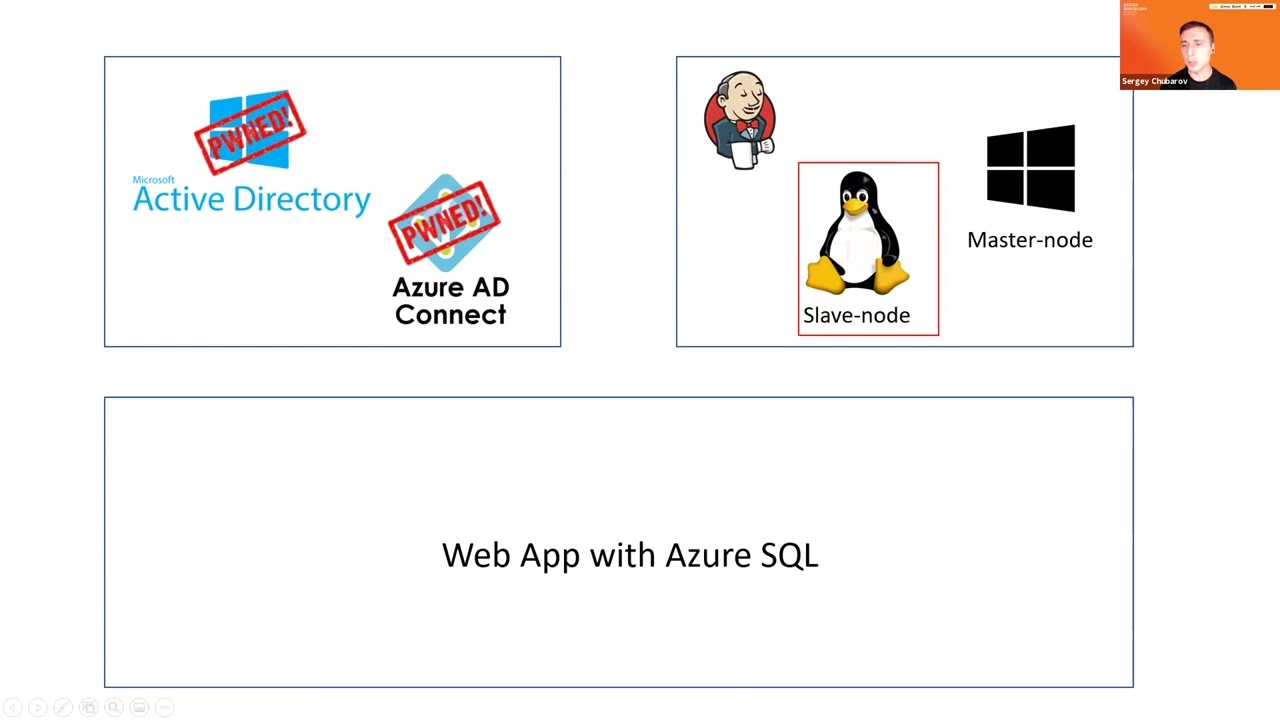 45:40
45:40 49:47
49:47 23:15
23:15