BSidesCharm - 2019 - David Hunt - Automated Adversary Emulation
Show transcript [en]
no matter if you have all of these things you have av you have ids you ever manning a 24 7 stock you can get hacked into uh red teams that i've been on in the past don't try to get into systems we try to get into systems in ways that we have not done so before that is the challenge uh if you try to just get into a system you get bored really quick and you probably move over to the blue side because it's a little bit more challenging you have to be right every time on the blue side red side you just have to be right once so this is the problem uh governments
companies everybody's really struggling with what do you do if i'm already doing all of this why am i not covered if you are doing all of that the next thing is offensive assessments uh this is critical uh very few places are actually doing this uh and it is starting to get more and more of a thing with red teaming kind of getting into the limelight after penetration testing for you know about a five year period that was kind of the thing where you would go through and checklist what you were able to accomplish in a network red teaming is getting us a little bit closer here so what type of offensive testing should i do
well the first kind like i said penetration tests this is finding common weaknesses most of the time you're working off of some type of a checklist you have a cve or you have a vulnerability scanner that's really telling you what to do second part is a little bit more interesting this is kind of the latest and greatest is red teaming this isn't so much of a checklist but what you're doing here is you're simulating the actual goals of the adversary and you're using only those goals in order to accomplish an operation and then the last part that is what we what we will be talking about today is the adversary emulation this is where you pick an actual threat
maybe an apt group thing group on group whatever you want to call them and you only use their behaviors and their ttps in order to access a network environment and what you're doing there is telling your organization you can't protect yourself from every threat at all times especially as a large organization let's focus at the threats that you're actually worried about if i'm worried that apt 28 apt3 is going to hit me let me make sure i've got my basis cover there and then i'll go ahead and start doing the generic stuff [Music] all right so what does it take for automated adversary emulation to actually work you have to know what the adversary can
do uh obviously you need to have those skill sets uh in caldera we're gonna refer to these as abilities um we also build everything from the miter attack framework uh as you saw from the intro side i am a principal engineer at mitre we do a lot of things based on this attack framework and caldera is probably the latest one that is heavily using that after we have an actual ability set we want to have a decision engine that's going to decide out of all these abilities what are we actually going to do in what order and how do we accomplish that and the last part the actual stuff needed to do the things need a server i need agents i need rats
i need infrastructure in order to pull this out off and i need to be able to do it with various levels of stealth and this kind of goes without saying but this is the intersection of red and blue um this what you're going to see today with caldera is a pretty powerful tool it is developed originally in the blue space to help defenders uh i've been on board at mitre for about six months i've been pushing it into the offensive space and so what you're gonna see is a combination of those two so if you're a red or blue teamer this is gonna be very applicable to what you do for work all right so meet caldera
all right what is cal there if you have not heard of it to date uh it is a framework for automated red team operations like i said this came out in late 2017 originally uh the stuff you're gonna see today is brand new um and it's been out since yesterday uh so the parts of caldera that are worth mentioning uh minimal installation time uh it's gonna take you about a minute to set up essentially you clone and you do pip install as long as you do that everything's in one package low overhead it can run on a laptop very little ram i can run on any laptop i've been running the server on raspberry pi's
does not need much to run built off of miter attack the quick technique and development is one of our key things you can drag and drop techniques if you have shell commands in any language that you want to drop in you can actually just drop them into the system just takes a few seconds to add them in we've got hundreds of them at mitre we're unveiling a couple dozen that are going to be part of this original release you don't need any programming experience to use this uh everything is going to be built in tool sets using powershell bash all of these things that you're already used to using you can bring your own rat to the system
now uh this was a something you couldn't do before so if you have a rat that you like using maybe you use powershell you know empire maybe use metasploit maybe you have your own rat uh you can actually write a plug-in now to caldera without touching any of the original source code and it will plug into the rest of the system and run and use the decision engine that is behind the scenes and this is now going to work on windows linux osx and raspberry pi's uh these are kind of the ones that we've tested on so far it will essentially run on anything that runs uh executable code haven't i seen this before 2017 we did
do this release uh the big thing in 2017 so what you're going to see here is we designed it miter designed this originally for research r d it came out of the the r d portfolio it had a lot of limitations because of that reason it was never intended to be a in practice tool the big thing and the big innovative piece that came out in 2017 is the smart planning this is an innovative way to use a combination of ai techniques and machine learning to do the decision making uh there were the limitations up there so last night when i pushed up the code what you're going to see is it's going to work on all platforms low overhead
quick technique development and then the two key things here is it's designed for practical use and you can add your own techniques really easily so you don't have to use something that's already pre-packaged for you you get full control over the system and on top of that we unveiled a completely new ui uh so everything's fresh we even have a terminal mode uh so you can hop into a terminal you can do it through the browser everything's brand new from that perspective why did we do this enable more use cases before when we were constricted only to windows environments that was obviously a very large uh limitation and also we want to support the community's use of
automation we've already been talking with a number of different people in terms of integration points a lot of tests that we have are actually coming out of an inspiration from red canary and we're actually working with them further in order to integrate lots of their tests into our system and we're looking at other places that have modules such as metasploit and other tools that we can integrate fully uh so you'll be able to bounce between tools taking the test with you [Music] all right so now let's look at those ingredients of adversary emulation and kind of tie them into caldera so i'm going to breeze through this quick because i'm sure everybody here is already knowing a little bit about
attack uh so this will be a little bit of a refresher but what can the adversary do uh this is everything that we have technique-wise is coming off of attack and if you're familiar with the attack matrix you're gonna see tactics and techniques kind of filling out this grid and these are our big reasons why we have chosen the attack framework in order to be a base for caldera in terms of in inside of cal there what does it actually look like how are we implementing these techniques so you can see here i'll roll a few of these in these are what the techniques look like every technique inside of cal there is a single file
and they're about that big you can stick in the command field you can stick any executable code that you want in any language as long as you anticipate it is going to run on the system if you were to run it manually uh and this is all you do you toss on the name the description uh what tactic you have it tied to and then you load them in caldera is going to fetch and grab all of your yaml files at the be when it boots up and it's going to load them into an embedded database and then you're off and running you have them at your disposal so you can actually add new techniques
at any point and just reboot the system all right how does the adversary decide what to do this is kind of a fun little chart so let's say that we wake up in the morning and what we want to do is eat breakfast there's a number of different ways that we can actually accomplish this so maybe we want to turn the tv on first watch the weather next we don't accomplish our goal right so this is kind of a very simplistic way but this kind of i think gets the message across that we have a number of different you can imagine this in the computer land here you have a number of different techniques you can do if you want to
accomplish goal a uh you might have to go through a number of abilities or techniques in order to get to that point and this kind of drives that home so let's tie this into uh what caldera can actually do so this is a term called composing techniques so we're going to assume right now that we have code execution a wrap running on host one and what we want to do is we want to excel a bunch of data off of host two we're in the same network here so what we've determined here is okay we know red we want to exfil x fill that data all of these green boxes here are the techniques or the abilities that
we have to do that so the question is how do we know which one we want to do first second third the first way of doing that out of two ways is explicit we might sit there as a right team operator and say okay i know what to do i need to dump the credits first i need to mount a share i need to do all this i create what we would call a chain and i'm just going to execute that start to finish the second way of doing that is more intelligently and this is a one area that that caldera really excels at and this is where we take all the abilities and knowledge that we have and
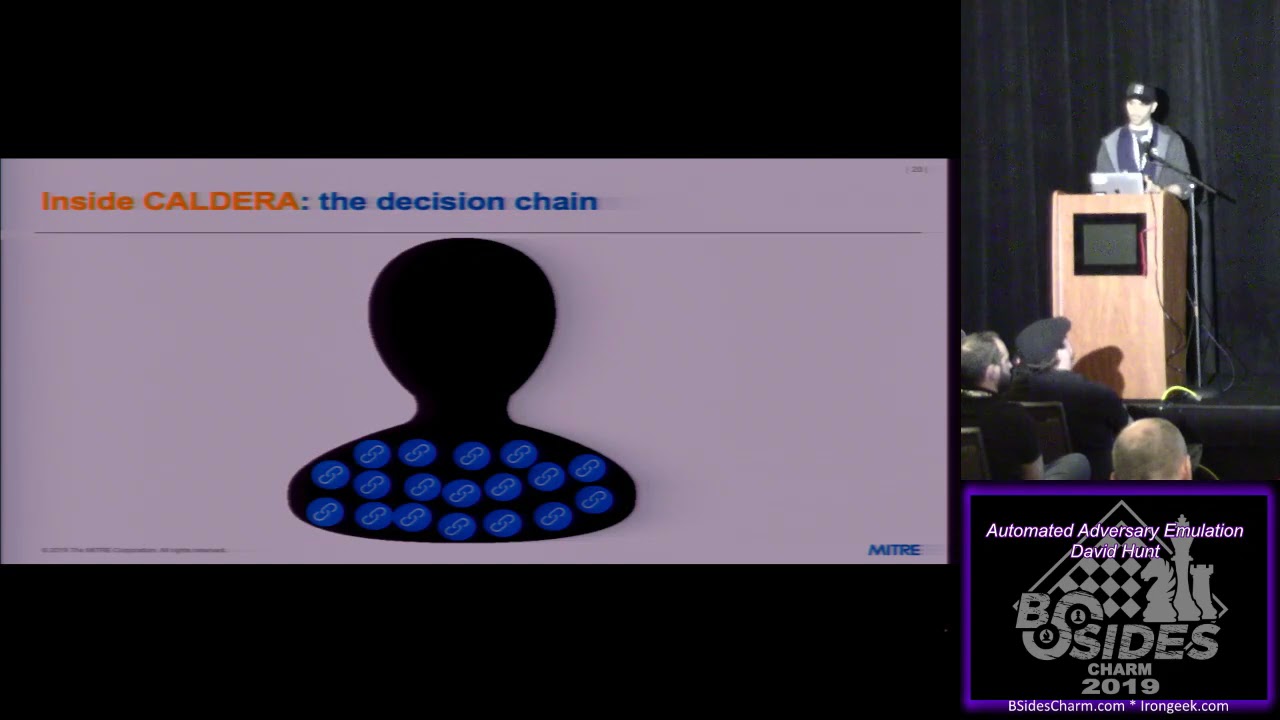
we say okay let's run these through an algorithm let's pass these to caldera's planning mechanisms and let's have that make decisions dynamically so it'll run one thing it'll score the rest of its abilities and then it will pick the highest scored one run the next one and then it will constantly score after every decision that it makes inside a cow there we actually support both and a blend of the two as well so you have a lot of ability based on which environment you're in for how you want to actually execute these decisions and so what we refer to it inside of cal there is the decision chain and so every decision that gets made is
a link in the chain so we're going to say that we have an adversary here it's got a bunch of abilities so these are potential links in the chain that he has the first link that gets used at the first ability might be get process and i'll be running on a windows machine here powershell command and we might then hop over and say okay the second link chosen we're going to get the services then we're going to stop a service based on the knowledge of the services we got prior and then maybe an av started to kind of notice that we're there so we're going to sleep for 60 seconds and we're just going to make no
noise so that would be an example of our decision chain obviously very simple uh once you start doing this at scale and you have lots of abilities and lots of techniques you can imagine how that kind of grows this ties into what is called a logical planner inside of caldera so the logical planner is a code module written in python as the caldera code base is written in and the logical planner is our decision maker this is what determines that decision chain we have a bring your own planner modular framework right now so we've released one planner along with cal there called the sequential planner it's a very basic planner it will run all of your techniques
against all your hosts in order this is a single file it's only about 50 lines long and it can plug into the rest of caldera which means you can actually write your own algorithms and your own decision logic and just replace our planner with that or swap both of them so it gives you a lot of ability and control to create your own your own logic here all right the last ingredient of automated adversary emulation the stuff needed to do the things alright so inside of caldera we have a core code base everything is centered around this core kobe so if you go on github.com caldera and you just do a git clone you're going to get the core code base
if you do a git clone recursive you're going to get the core code base including all of our plug-ins that i'm going to talk about here in a second so the core code base has all the all of the logic and code for connecting to databases uh all the code and logic for how to execute planning algorithms it'll have all of the stuff for loading a gui it'll have all the api information and all of that so everything that's essentially core to running the system you need nothing else if you just wanted to run core and you'll have a terminal application that's bundled alongside of it and you can access that through netcat which i'll
show you in a minute uh the core code base is only 700 lines long and it is a python application it's spread across several different files but it's only 700 lines long it's very tiny and it's intentionally that tiny in order to deploy your c2 because this that's what this is here is a command and control center you can deploy that into an actual network itself that you've compromised if you didn't want network traffic going out and so at 700 lines it's very easy small to to move around and it's very unnoticeable outside of that core code base when you do that recursive clone you're going to get all these things that we call plugins and these are going
to be separate git repositories you're going to see up in the miter github space and the recursive clone will pull them in automatically and it's going to dump them into a plug-in directory in the root of the source code and so the first thing we have here is the chain so this is a repository that is we call chain mode and chain mode is the new stuff this is going to have a rest api this is going to have a gui it's going to have a bunch of like odds and ends in here that are going to allow you to do some pretty cool stuff uh this is a separate git repository so when you clone this and you do the
plug-ins it attaches this to the core code base next one is adversary this is our classic adversary emulation tool this is essentially caldera 1.0 we bundle this up into a separate plug-in itself and we attach it to the core go base so if you wanted to use the classic caldera stuff you can do so by just including that plug-in third one is stockpile and this is where i'm hoping we get a lot of community interest and activity the stockpile itself is a collection of open source abilities techniques planners and adversary profiles and so we have bootstrapped this with a collection of our own we're hoping to get some good involvement here to build that out
we have a gui plugin that gives uh caldera a web application authentication login logout all those kind of features we have a agent that we call sandcat which i'll show you in a minute here this is a stealthy in-memory only agent that will run on any platform we have two variants one for powershell one for bash uh and this thing is uh only about 50 lines along itself so it's very small and we have a variety of what we call delivery mechanisms to getting this onto systems and then custom so this is you can add your own plugin if you had a git repository and you follow just the two or three different rules that we have for
creating a plugin you can actually create your own plug it in and use this to store closed source code that you may or may not want to share with everybody this is what we do at mitre we have our own closed set of plug-ins we have shared these five plug-ins that we're getting out to the community we obviously have our own internal ones uh that we use uh for a variety of reasons all right to get started it's very easy like i said it's a very small uh overhead kind of uh installation so the first thing you need to do is climb the code and do it recursively that way you get all of our plug-ins and
then once you do that from the root of the project you do a pip installation on the requirements uh file itself it's only about five or six requirements so it's very small uh then you start the server it's just a python script the key there is we're passing in a local configuration file which i'll show you when i started up here and then the last part is you deploy agents because this is a command and control kind of application there are two parts you have your caldera server which is our core system and then you have your agents which you're going to deploy on any remote machine out there that you want to communicate back with
the c2 [Music] once you do those things what you're going to get is a login page that's available to you and you're going to get a terminal application that you can log into the entire caldera system can be used from either the terminal or the browser there's very few differences between the two all right before we dive into a demo i want to talk about terminology so because i'm going to be using these terms as we kind of roll through and a lot of these will make a lot of sense to yes so caldera core system for that's communicating with agents when i refer to caldera i'm going to be referring to the server side only not the agents those are
separate because the rest of the system like i said you can bring your own rap doesn't matter when i talk about cal there i'll be talking about that server abilities this is going to be a specific task or set of commands which you can write in any language that can execute code uh very similar to the ones i showed on screen a few minutes ago an adversary is a threat profile that essentially encompasses a set of abilities and this is a good way for you to create repeatable tests in case you wanted to run a adversary against a network every day every month that sort of thing uh let's see an agent that's going to be
an individual computer that's running a rat of any flavor the one that we're releasing with with this is sancat um but you can have your own rat and an agent will be any computer that's running it a group is a collection of agents it's easy and operation is going to be the start to finish execution of an adversary profile against a group terminology out of the way okay so mission number one this is a fun one and this is on the github as well by the way so if you are looking at github uh you'll see this uh so what do we want to do if you have a a macbook you can follow along with this
we want to perform perform reconnaissance on a compromise osx laptop so what we need to do here the employer needs a list of the user's preferred wi-fi networks they want to do some surveillance it's a big brother stuff so they want to know what this user is connecting to maybe his home maybe his office iphone who knows we want to grab that and collect anything else that we can really quickly want to get out of town uh leave no trace we don't want anything on that box to indicate that we were there or that we ran commands and the one caveat is the laptop's av scans in full every minute so we need to do all this in less than
60 seconds otherwise we're going to get caught and that's going to be our first mission that we're going to roll through so let me hop over here
[Music] all right okay it's big enough [Music] all right so the first thing we're going to do is i'm running a macbook as you can see uh run on the mill nothing special i have the cocoon i did my pip install that's good i do not have my internet on because i don't trust any of you so let's see what we can capture without me being on the internet um so let's go ahead and we're gonna run the server itself and you see there booted up real quick uh just a python script um and you can see there it loaded some plugins so you can see stockpile san cat gui chain uh these will obviously be familiar to
you from that slideshow i just went through so it loads them at runtime so if you add new plugins you reboot it'll load up your new plugins and make them available uh this goes ahead and it starts the system up makes it available at a configurable host import and then tells you that it has indeed started all of all this is obviously very configurable and i'm going to show kind of the two ways in now so let's start down here all right so the first thing to note is the terminal application uh once you've got it booted up all you have to do is run netcat localhost and the port by default is three eights
and a zero uh once you run that you're gonna get this funky looking terminal that just shows monitor with a couple of different carrots here uh what this is is so caldera is all built uh is built entirely on a python library called async io with that it uses a library called aiohtdp which is an async rest api framework what this terminal is built on is it injects you directly into that python process which gives you complete control over anything that's happening so as you're writing plugins you have the ability to actually intercept anything happening within the entire system and make modification server side so if you wanted to do something in the middle of say an operation add a new ability or
so forth you can actually do it right from here so the first thing i'll do like always is run help to see what i have at my disposal uh i have a variety of things and they're all going to be two letter keystrokes which i plugged in to try to keep it to things that you can do with one hand to make it quick and easy so you just have to learn about seven or eight things uh the first one is uh let's just roll through the ones that are going to be most useful here for the order a g is going to show me all my connected agents i see nothing that means i have nobody
out there running myself so now i gotta go get an agent so how do i get an agent uh maybe i wrote my own or maybe i want to use cal there's built-in one i'm gonna use caldera's built-in one so i'm gonna hop over to the other way that you can actually interface with caldera which is through the browser and you can see i'm at local host quad 8 and i'm logging in with the default credentials of admin admin once i'm in i get a home page here that's going to show me all the plugins that i have loaded up and the ones that have red links on them mean that they have configuration abilities that i can click into
essentially splash pages so when i look here i can see okay i have san cat right here tells me a little bit about what that agent is so i'll click in i get this nice looking splash page uh sandcasted is quite literally a desert cat that leaves no footprint hence the name of the rat that we have here uh it's designed you can obviously write it to a file but it is designed to run only in ram and as i scroll down here you can kind of read that quick description you'll see that we have two different what we call delivery commands that we have published on the on the page here first one super long and convoluted and
it's a powershell command that one is so long because there are so many different versions of powershell and that will ensure it works on all of them at least all modern ones um the one below is going to work on any bash system so a mac one x that sort of thing and if you are familiar with bash i'm going to run this one first uh this will this will jump out to you but essentially what we're doing here is we are curling a file which the san cad agent is simply a bash file that's about 50 60 lines long and we're going to curl that off of the c2 itself and then we're immediately
going to start it in ram so it doesn't touch the file system so let me just copy it here and i can pop over to that i had it here yeah i pop over here and i'm going to run it directly in a show that way we can kind of watch and see what the logs do uh you can run the snow hub you can run this we have a variety of delivery mechanisms stick this on a usb if you wanna have a lot of fun you can deliver this however you want so once we start this up we can see immediately it registers with the command and control center caldera and then it starts checking in by
default the configuration is going to check in every 60 seconds until it realizes it is in inside of an operation when it actually speeds up the the check-ins so without running i should be able to look at my terminal now and say okay do i have any agents out there perfect so there i can see hostname i can see how many times this host has checked in last time it checked in you can see which type of execution i can send stuff to i can say it's running bash so i can send to bash commands and then i can see very importantly the server variable or the server location here now you can see this shows uh localhost
quad 8 on it uh this is the agent's knowledge of where caldera lives every agent that you deploy out in a real network might have a different perspective on where caldera is actually living one agent might think it is at an ip address another one might think it's at a fqdn so it could vary so every agent actually tracks where it thinks caldera is uh independently and you'll see how that kind of ties into some of the abilities that get driven here so the next thing i want to do is i want to see if i have any groups so i'll type gr and i can see i in fact i do have one group and it's
called client now how did that group get created i can create groups manually if i want or when i start the agent i have the option of starting an agent within a context of a group that becomes very important when you do lateral movement and you want to send the agent from one machine to another you might want to start it within the context of a group that way when it starts checking in it can immediately join a running operation all right so we're good there we've got an agent we have a group now we want to see what we can actually do so a b is going to show me the loaded abilities that i have
so you can kind of flip through these names and descriptions and kind of see what is available you can do things like scanning wi-fi networks can sleep for a minute you can leave a note on the host machine find out the av find domain controllers are all sorts of different things these are the loaded abilities and i'm going to hop out of the terminal for a second here and go to the code base because i want to show how this ties in at this point so inside of caldera looking at the code we have our plugins directory right here which if i dive in a little bit deeper i'm going to see all the plugins that i have
available if i go into the stockpile which is where all of the abilities live i'm going to see the ability directory the organization by tactic and each one of my individual ability files so these are what got loaded when i booted up cal there for the first time if i want to add my own just drop in new files reboot and those abilities will be accessible to you now i see them here um i can copy any of these and this is going to be true of the entire terminal application almost all of the commands in here you can run on its own or you can do on its own plus one parameter usually the id of whatever
you're doing so a b plus the id is going to show me the actual command for that ability so in this case i want to say okay dumping history what does that actually do okay that's going to cache the active users history so i can grab that from the from the terminal and you can do that for any of these abilities once i'm kind of satisfied looking at the abilities i can flip over and type ad and see my built-in adversaries so we've got two built-in adversaries uh mission one and mission two we're gonna roll through and do mission one which is tied to the github mission that i posted as well as the mission in the powerpoint
they're actually executing here following the standard of the terminal if i want to see what mission one actually does outside of reading that description just bash discovery i can do ad1 and i'm gonna get all of the commands that uh mission one adversary actually does so this is the couple of important parts here you're gonna see obviously the commands running in this last column so you can see the first thing it's gonna do is unset history it's gonna cap the bash history it's going to look for the broadcast ip essentially where's that router going to do some arp it's going to download some files it's going to run some wi-fi scanning tools all that sort of stuff
the important thing to note when you're looking at an adversary is to look at the phases so caldera this kind of ties into the planner now so caldera is going to run when it runs the operation it's going to go top to bottom on the phases so it's going to run everything that's in phase 1 first it's going to run everything in phase 2 second and so forth so you can granularly control the order of your abilities and how they're used if you want so i can see here i have a single thing in phase one what i'm doing is i'm saying for sure i want to unset history as the very first command that gets run
that's absolutely i want to do that so that's why there's only one thing there you'll see there's one two three things in phase two there i'm saying i don't care the order of these caldera you figure out what order you want to run them in but i want these three to run before i start phase three and so that's how you can kind of think of those phases the other important notice we're looking at in adversary is going to be this little section here see if i can highlight that now this is a global variable inside of cal there and this ties into how agents know of caldera at different locations so there is a variable syntax in caldera
that's a hashtag and curly braces and the global variable of server there are two global variables inside of caldera server and group that caldera can figure out dynamically so we can see right here this command if i copied and pasted this into a terminal it's not going to work but when caldera feeds this ability to a given agent it's going to know which address that the agent thinks it's at and it's going to feed it that address because it looks it notices it has that variable and it does that uh swap before it actually gives the command to the agent um so that's something to keep track of and then we can see here that
uh this is in fact this is a good example for something else which is the fact that you can download any file that you want from the caldera c2 so you can store malicious files you can store keyloggers you can store bloodhound you can start anything you want uh within the c2 itself and then you just download it through the file download rest api so once we're happy with our adversary and you say okay we're good with this guy uh let's go ahead and queue up an operation so we already have our agent up here running so to queue an operation i'll do help so you can follow along this one takes a couple of parameters uh
they're all very shorthand so it is q u the name of the operation we're just going to call it one and then we need to plug in the adversary id the group id and then what i kind of refer to as the jitter fraction uh so what i'll explain with that one is the agents can be configured dynamically to check in with the c2 at different time periods right now it's checking in as you can see every minute so every 60 seconds it's firing off a check-in check-ins are all happening over http or https like any normal website is going to happen um what i can do when i start the agent is i can start it up and say okay i want
it to check in somewhere between two and five seconds i don't want it to be noticeable that i'm like doing something every five seconds so i can add this jitter fraction in and kind of play with that this can be as big or small as you want it based on essentially a nice little stealthy action so when i do this it cues up the operation but it doesn't start it so this kind of sits in a cue pattern so i can look at the operation if i want by typing op and i can say i do have an operation ready to roll that start is more of a cue kind of activity but it's right there it's ready for me
to go so if i want to start the operation i do st1 for the id of the operation and kick it off now at this point i'm waiting for the first check-in of the agent to happen so it's rolling it every 60 seconds the the next check-in it gets is going to notice that it is in a new pattern so you can see here it's running workflows tail in the log there i'm going to flip out of that one and show the server log so you can see the server logs happening at the same time see how how there is rolling through the phases now from netcat again as i'm sitting here i can tail the operation by passing
the id in and i see man i'm already five things in so the first thing i did was on set history very predictable because i put that in phase one now i cadded bash history i'm rolling through the list in order of phases and then here's kind of that important part with the server variable note that this is no longer a variable the command that was fed to the agent got swapped out and it put in the actual server address there downloaded what i wrote a a very small easy bash wi-fi manipulation tool uh and store that in that's part of the open source code as well specific for macs and so it downloaded that little two tool set into the temp
directory it went ahead and scanned wi-fi networks and then it looked for preferred wi-fi networks which is the that last command there and then let's see if it's done and then i can see it removed the wi-fi toolset uh so it doesn't say history removed anything it wrote to file um and it got out now if i compare that first execution time to the last one my goal was to get out in less than a minute definitely got out is what 35 seconds i was able to get start to finish from the time the first execution to the last one and i was even able to drop a wi-fi toolset onto the box and then remove it before i got out make
sure the av doesn't catch me uh for any of these commands you see here you're going to see off on this left hand column something that we call the link id this is part of that decision chain that happens so we look at this operation and say that's the decision chain every wink is a decision or a row in it so what i can do is i can look at any of them and see the results by typing re for result and let's say if i'm interested in my bash history i'm going to see a lot of probably commands and stuff so let's see what i was able to capture so this is coming from whatever remote
machine you type in the link id you're going to get the entire output of whatever happened in the shell so i get all sorts of fun stuff that comes from that see what else i might have so our e like maybe i want to see who am i that was the what fourth decision that was made okay i can see the active user's name so i'm going to be able to like scan through all of these results and look at them the one that i was tasked with in the mission was to get the preferred wi-fi networks which is link id number nine and i was able to grab those preferred networks off of the machine
mission complete all right so when i want to when i'm happy with the terminal uh and everything looks good from there you can launch all these operations this is a very minimal mode it takes a very little code like i said the core code is only about 700 lines this only relies on the stockpile and the sandcat agent plugins that you plug into the system and you're off and running you can run your own agent like i said it's very easy to do you just plug it in i'm going to drop out of the terminal at this point so you're able to kind of follow these logs and see oh there's one thing i want to show
before i hop out of the terminal uh if you're looking at the operation that i just ran the entire decision chain here you'll note one thing different let me show them side by side so here's the adversary and the adversary set of abilities and then here is the operation that ran and you'll notice something slightly different outside of the server variable you're going to see in the actual execution this command was run even though that was not a listed ability of that adversary so that is what we would call a cleanup uh command and this is an optional thing that you can add to any one of your abilities so i'm gonna actually pop this one open
and show what i mean so this one is a discovery ability and it is right here so this is the full ability that is in this case downloading that wi-fi toolset you can see the last block here which is an optional box is called cleanup if you add a cleanup block to any ability you can write an additional shell command in there to clean up whatever that ability did so if you started a process maybe you want to stop it if you dropped a file maybe you want to remove it so the idea here is putting the ability in your hand as the operator to set reset the environment back to scratch back to what you had it in
now at the end of an operation cal there is going to roll through all of the cleanup actions that it has it tracks them as it rolls and it's going to roll through them in opposite order it reverses the order of them that way it can essentially rebuild your chain backwards running those cleanup commands uh it's all in your hands if you don't include cleanup commands it's not going to do anything if you just do one like in this case i had one it did that single action so that is something to be aware of all right so with that said in the terminal i'm gonna hop out of there and hop back to the browser
and go to home all right so from here um back to kind of the home page of caldera uh i can click into what we call chain mode which is everything you just saw from the terminal but from the browser at this point there's obviously a lot of reasons why you might use a browser over terminal and vice versa uh depends on which environment that you're actually working in so what you're going to see here is we consider we call this area of the canvas so it's just a blank area we designed the ribbon up here to look and feel something like the micro said you know microsoft's really good with design so we went with
microsoft ribbon and uh you have a few options here so uh everything that you did in the in the terminal you do here so if you want to manage groups you click the manage group button it's going to drop a section onto the canvas that shows you all of your agents that are running a little bit more user-friendly to filter through them if you want to search for a certain one if you had a lot you can see how many check-ins and groups as part of and all that sort of good stuff i can create new groups if i didn't start an agent in the context of a group i can go ahead and create them here
an agent can have many groups if i wanted to attach many things to it this is a clear canvas button it allows me to kind of reset the ui if i want [Music] next option i can manage abilities here i choose any of my attack tactics such as discovery and then i can pick any one of my abilities it's going to fill in this little table here that's going to show you all that same information but in the browser a little bit more familiar what you can also do from the browser as well is all of these fields are editable so if you want to edit an ability in line or create a new ability
you can just hop in the browser if you didn't want to handle a yaml file because they are very intimidating you can just hop in the browser and write them in here all right the next part you can manage adversaries so here you can either view or you can add new adversaries depending on what you want to do we'll look at the two existing ones so the one we just ran is called stockpile it has nine abilities and you can see it's a little small up there but you're gonna see uh the name of the ability the phase it's in the tactic and then you have the ability to remove abilities if you want to so if i wanted to remove
this ability i can just drop it off i can save the adversary and i'm good to go that way i don't have to again adjust the ammo file where adversaries live if i want to add new abilities all i have to do is find the ability id that i'm interested in determine which phase i want to put it in say in phase one i want to figure out the avs that are on the machine drop it in and i can attach it you'll see it pop in here i can save it boom it has that ability if you're in the middle of a very large operation you can do this in line and as the
operations running what cal there is doing is it's checking its set of abilities every iteration of the planning logic that happens so after every decision it checks back and says do i have more abilities and so you can actually add them in and say oh man my operation's not working maybe i need to feed it something different go ahead and drop them in and it will it will know that so once i'm happy with my adversaries at this point i can kind of show what the next one is which is mission number two only three abilities in there this is all open source powershell stuff that'll work on windows and macs which i think i have enough time to
roll through a quick one here and then you can manage operations so let's go ahead and start one from here and kind of see what it looks like i can select all the operations this is test one which i just ran by the way so you can kind of see what it looks like they this is all synced uh between the terminal browser uh through an embedded database that gets created the first time that you start up caldera so i'll kind of show that real quick so when you first start up caldera you will see a core.db file get created at the root of the project this is a sql lite file uh that gets dropped in and has a
specific type of uh structure and schema to it uh everything that happens within cal there is going to get dropped into that database um and that is what the api uses that's what the gui is using that's what terminal everything is using uh that embedded database all right so let us roll through one more operation here and kind of see what happens so i'm going to stop my agent here i'm going to open up powershell obviously the open source version and this is that long powershell string that is on the same cat page that is going to start up the powershell variant of sandcast so when i do that what i'm going to get is the same registration
i'm going to get the same fact that it's checking in and i'm off and running so what i can note here is if i pop to the browser and i go look at my groups let me refresh i can see it's all the same with one edition it's now realized that that same host swapped over from being a bash executed to a powershell one so this is gonna accept powershell commands at this time so i was able to kind of dynamically switch the executor uh one other thing i didn't mention on the hosts is every uh every host when it checks in gets what we call a unique paw print after sand cat and our unique print
we're using right now is host name plus the active user and that's uh in order so we can have multiple agents running under different usernames um and that's just a quick easy way to do it all right so we have our synched agent running in powershell form so now i'm going to hop over to manage operations i'm going to click over to add a new one and we'll call this test2 with mission 2 and the same group i only have one group at this point so we'll go ahead and start it off i'm going to refresh the page so it'll show up in my drop down here if anyone wants to put in a pull request
for that that's been driving me nuts all right so i can see here the second mission has started get my information at the top started at this time it has not finished i'm waiting for that and what you're going to see being built here dynamically this part does refresh is you're going to see a timeline that's going to be built of every decision that gets made so the first one was discover system processes so if i click on that you're going to see the decision id case i want to look at the results status code status code is going to be what actually happened on the box what the shell responded with what time the host collected it
what time the host finished it and the actual command that ran so we're going to give that a second to kind of pop in and we can actually look at this and we can see it registered it checked in twice so we're just waiting for the next check in to execute git process all right that executes and now it knows it's part of an operation so now it's going to be starting up quite a quick amount faster and so we can see that the next thing it did arp i ran that the zero status code means it succeeded and then it identified the active user uh and then it successfully completed itself uh so if i want to look up any of
these like i want to know hey what are the system processes that was the mission in mission two i can click the show results here and i can drop in the decision id and just like i did that through the terminal if i want to see it from this perspective i can do the same thing this is going to give me all the processes that are currently running on this macbook so that's a nice handy feature like i said all this is stored in the database so you could take that database file email it to somebody they could open it up in their cal there and then they could view everything so quick easy way to share stuff uh if you
are on the blue team side i did write one thing that would be useful to you guys uh which is everybody on a blue team is going to be very familiar with elk and splunk and so forth uh so everything running inside of caldera uses a custom logger uh that i wrote to plug into uh elk and splunk and so forth and so the custom logger is in the logger.pi class and this simply i don't know if you can read that or not but all logs will walk to the console automatically that's the first place it logs the second place is going to log is a hidden log directory at the root of the project
where it's going to put all of the logs for operations in one file all the logs for plugins and another file and so forth so it's going to separate those out so you'll have those accessible but then the third thing is there's a switch that you can set inside the logger if you have an elk stack or a spunk stack that you can turn it on and then in addition to those other two things it will stream the logs in real time to one of those logging databases so if you're doing a red versus blue kind of operation and the blue team wants to follow along they can see every shell code and command that's being run
uh and the time stamps that they're collected and what time they're executed and so forth so it creates for a very easy way for information to be shared between those two [Music] all right let's check on that operation yep and we are complete there all right so i'm gonna hop back to the powerpoint to make sure i got through all of my slides all right second mission we did have time we completed it there's only three things if anybody wants to expand on that by the way i wrote that adversary last night before i did the push-up because i just want to have a powershell one assuming that some people here obviously use windows machines um it only has
three abilities on it that i gave it because it i ordered pizza and i ran out of time uh so if anybody does want to add to that uh actually before i finish up that slideshow i will show this real quick because it's actually a very serious uh question if anybody wants to do uh so if you were to look at the plugins and you were to look at the stockpile which is where all abilities adversaries and planners live you'll see an adversaries.yaml file and this is super easy so if you have abilities that you have added to the system as yaml files this other yaml file called adversaries.yaml is essentially just a list of all the phases tied to which
ids are going to go inside of each phase and all it has to do that's what it takes to build one of these we're in progress right now building things such as um threat profiles after apts and thing groups there's no reason why we can't emulate them in yaml format and so if anybody does want to take a stab at helping enhance actually either either one of these mission one or mission two guys feel free go at it mission two and obviously need some help i'd like to build these out so our example ones have 20 to 40 abilities and do some you know more extensive stuff the wi-fi one's kind of fun but we
can go even further than that all right to make sure that i got through this
all right what's on the horizon what are we working on this is a very active project uh i've been a miter for about six months uh i've been leading development on this pretty much since i got on board um we are we just did the open source release obviously so that's the push out to the community really want to get community involvement we think that this is going to be a really big tool to be able to use in red team operations this is something that i will use myself alongside metasploit and other tools that i already use uh because i think that this is going to be something that defenders are not going to anticipate
uh especially with the fact that you can bring your own rat in case one does get burned you swap the rats in and out you add plug-ins you can do lots of different things so we're going to be doing a lot of future development on plug-ins and new integration points we're going to be adding tools like metasploit um cobalt strike red canary all these different tools that have both abilities that we can pour it in as well as uh techniques and and lots of different things when it comes to data we're working on uh preceding information into operation so when they start they don't start without any knowledge of a system but they start with
knowledge so we're working on all these different integration points where maybe you run a whole meta-split recon mission and then before you actually do your your operation you dump that data into caldera you start and now i start the decision making with it with a bunch of knowledge uh other things we're doing we're gonna update a lot of our documentation uh we're pretty low on that right now uh our readmes are pretty extensive but we're gonna kind of roll in some some much heavier stuff um but i'd say yeah the reviews are pretty extensive at this point but we want to do demo videos uh we want to do some specific tutorials on how to add
techniques obviously it sounds pretty easy but we want to have that written down uh and then we want to do plug-in development workshops where we can show anybody that's interested in the development side this is how you build a plug-in if you want to write a rat here's how you build a plug-in for a rat just so people have that ability and knowledge um and then we're obviously it's this is still uh been siphoned off into the r d portion of mitre so we're working on enhanced uh planners uh that we have in-house that we're starting to spin up new and more complex ways of making decisions outside of the sequential planner that you see here
[Music] this is my contact information uh feel free to hit me up on twitter uh andy is our project manager feel free to hit him up as well uh so grab either one of those we do have a support email for cal there those do go to me so if you do email that i will see it um and then that is where our code is handful of papers there in case you want to read a little bit more about kind of the research angles of the decision making logic that we use and that's everything that i have and i have time to spare so any questions from anybody out there yes uh we're working on handcuffs but no we
don't have anything that would be a stop gap for that so that's more of a if it's in your hands this is a very powerful tool as you can imagine uh this can do quite a bit i would say the biggest stop gap is the fact that we have a more powerful version in-house that isn't this repeat the question of the microphone yeah the question was is there any stop-gap stop gaps in place to stop this from being used maliciously other questions is there a task or a project of trying to convert the cbes into abilities there isn't one yet but that is something that's one of the integration points that we've talked about but we
haven't prioritized yet but yeah going through the actual modern recent cves and starting to drop them in the question was is there any effort to get cves and convert the cves into abilities nope absolutely yeah so the question was because every server has its own uh knowledge of where caldera is uh is does it have to communicate directly or can it you know talk to say a proxy or something like that uh the answer is it can absolutely talk to a proxy most of the configurations that i use actually so i spent a lot of my career mimicking and i've gotten to be a bad person for a lot of my career mimicking apt groups and hunting them
and so forth uh so what i've seen them do in the in the wild is actually set up things like ever reverse load balancer imagine that uh if you're uh what they'll do is set up something like h a proxy say come up with a hundred h a proxies uh out there but with one c two behind it so really your opposite case um and then as i p addresses get burned on their proxies they'll just chop them off and they still have 99 more proxies ready so i actually use this majority of times in that kind of infrastructure where i will deploy this behind a proxy and then my agents only know where the
proxies essentially are other questions do you use any sort of like built-in privilege explanation to play it out yeah that's a good question do we use any built-in privilege escalation to deploy this uh so you saw me run in this example uh our built-in kind of delivery mechanisms which are intended to run under any uh user permission so it doesn't matter if they're privileged or not they can run that as long as they have access on the network to send out an https request we do have in-house abilities that do privilege escalation we're going to be pushing some to open source um and we're looking for more so if people have privilege escalation that they want to drop
in feel free to drop some abilities in that do that it can absolutely run it and that's one of the cool things to kind of see it do is pass an ability that does prives watch it drop down into that user or start a new shell for that user that we have two agents running one privileged one not uh and then you can obviously do things like lateral movement as well in any possible way that you can think of [Music] other ones [Music] cool all right uh feel free to hit me up like i said through one of those contact mechanisms otherwise i'll be kind of in that lobby area for a few minutes so feel free to come grab me but
otherwise thanks a lot guys
Related talks
 51:34
51:34 47:22
47:22 28:12
28:12 18:35
18:35 48:55
48:55 52:17
52:17