Dynamic Malware Analysis for the Overworked Analyst
Show original YouTube description
Show transcript [en]
so my name is Edmund brummagem I'm a security researcher with Cisco Talos spent about a decade in the security industry most of my career before coming to Talos was in security operations show of hands who here works in security operations in some capacity yeah so if you okay of anyone who works in a Security Operations capacity whether that's monitoring for intrusion events or doing Incident Response or anything like that how many of you have the luxury of being able to statically reverse engineer an unknown binary in your environment okay okay so a couple and most of the security operations centers and security operations teams I've worked in most of the time the team just doesn't have that luxury so you
have a sim chirp or you have a virus alert come in and you have to figure out you know what is a specific binary what does it do is it malware what kind of malware is it what's the risk to my organization and typically you have a very short period of time to answer those questions before management comes in and asks those questions and you have to be able to answer them so kind of wanted to put this talk together to focus on that to provide a quick and easy way that you can you know come across samples in your environment analyze them identify functionality associated with those samples without having to statically reverse-engineer go
function by function and analyze code execution flow there's a lot of different reasons why why security operations teams don't typically have that capacity right sometimes they're just not trained in how to use the disassembler or how to use a debugger and a lot of times they just don't have the time or resources available to be able to you know statically reverse-engineer malware and that's where dynamic analysis comes in then the name of the talk was was aka dynamic malware analysis for the overworked analyst but it could also be a que how to avoid having to perform reverse engineering in the first place because a lot of times it takes a lot of time in in a lot of cases it's not actually
necessary especially with things like commodity malware it's very easy to go from this is a sample that I found in my environment to hey this is what it actually is this is what it does this is the risk it poses and this is the sort of response that to take without having to even open it up in a disassembler or a debugger and and manually analyze code execution flow so what this presentation is not I don't have a single slide with it with a screenshot of assembly code so that's not what it's about it's about not having to actually perform that sort of process on a binary in your environment it's much easier to be able to let's say
execute it in a sandbox environment identify the functionality associated with it put together an IOC list and then pivot on that to identify the malware family and in a lot of cases an antivirus company or a security researcher has already performed the reverse engineering for you right so from a security operations perspective you can very quickly answer the questions you need to answer without having to actually perform that process yourself so what are we going to cover today well I want to go over how to build a kind of a portable malware analysis lab so a quick and easy lab that you can stand up in in an environment that will enable you to perform that dynamic analysis of samples
you may come across I also want to talk about open source intelligence right being able to leverage all of the great work that the entire security industry is doing on a regular basis because it can save you a lot of time it can save you a lot of resources and at the end of the day you're able to answer the questions you need to answer it very very quickly because that's what it's all about when you're trying to figure out you know do I need to initiate incident response and what does that Incident Response needs to look like being able to avoid you know statically analyzing a sample and being able to go straight to hey we know all about this
because there's already been a dossier released on it is very very powerful and then I want to talk about a repeatable process I'm going to go over some some quick and easy tools that you can stand up in in your analysis environment to help you quickly identify you know what a particularly our sample is capable of doing and then that provides you once again information you can pivot on to positively identify if it's a known malware family what functionality is available and and what it's designed for you know what what impact could it have in your environment so you can respond accordingly all right so let's get started let's talk about our analysis labs right when you're building out a
malware analysis lab the first thing you need to do is identify what your requirements are so I just kind of put a list together if some of the requirements I have when I'm putting together a malware analysis lab right you need to be able to facilitate analyzing malware that targets multiple platforms multiple versions of Windows OS X Linux things of that nature I also need to be able to anonymize C to traffic one of the things that you'll see is when a malware author especially in more targeted attacks sins malware into your environment whether it's fishing or through the use of malvert sizing campaigns things like that they're going to notice if they start getting a lot of C - and it looks like
you've found their malware so being able to transparently route all of the traffic from my at my analysis lab through tor is is essential also needs to be reasonably safe from contamination right you don't want to just throw this into your production you know server network and and start analyzing and detonating malware samples because that could get nasty quickly depending on the type of malware it is especially you know given some of the worm activity we've seen this year also need to be able to perform passive analysis of network traffic right so not necessarily running you know TCP dump or Wireshark on the the system that I'm you know detonating malware samples on but being
able to do that off box because in a lot of cases malware will check for the existence of processes that are used for common analysis tasks and then I need to be able to simulate situ communications and I'll go into some tools that facilitate that in a little bit but I also needed it to be a little bit more versatile so maybe I don't just want to analyze malware maybe I also want to you know stand up you know additional virtual machines or additional systems that I can use for other purposes whether that's penetration testing CTF activity things like that so once you identified your requirements one of the most vital answers or questions that you
need to answer is whether or not you go bare-metal or virtual right it's a question that's been asked by pretty much every malware analyst ever right to VM or not to BM there's some pros and cons to both sides right so with virtual environments are really flexible you can simulate a lot of complex network topology configurations without having to buy a bunch of blinky lights or a bunch of gear it's also recoverable right you can take snapshots and you should definitely take snapshots as quickly as possible all the time so that when you are analyzed particularly our sample you can execute multiple times and have different sets of snapshots associated with what you're doing with the particular sample it's
also pretty cheap right once again you don't have to buy a bunch of gear so you can do it on relatively simple hardware you know even a laptop in a lot of cases but there are cons associated with it right a lot of malware is is designed to detect whether or not it's being executed in a virtual environment and it'll behave differently than if it's in bare metal you know anti sandbox techniques are very very common nowadays physical it's it's secure you you don't have to worry about some somebody throwing you an O'Day for your hypervisor or something though if you came across that that would be excellent because those aren't cheap also evasion right malware's never going to detect
it's running in a virtual environment or sandbox because it's not and then it'll keep your house warm during the winter so that's that some of the pros associated with physical systems for me here's some of the lab components that I typically will use or recommend so you know a decent system one of the most important things is storage capacity right when you're taking snapshots and you have multiple VMs you're gonna run into storage issues so that's that's really the most important thing I found you know CPUs ran that's cheap nowadays but finding like let's say a laptop with enough storage to facilitate you know several vm's with multiple trees of snapshots that gets expensive quickly
also recommend a hardware firewall just to make sure that you're in a controlled environment and that you don't have to risk any sort of cross contamination when you're actively you know detonating and running malware in your lab from a guest systems perspective you know it just depends for me I typically try to run a bunch of different versions of the Windows operating system as well as OSX a couple optional but recommended so REM Nix is super useful for analyzing malware especially when it comes to things like passive network inspection and being able to log a lot of the traffic a lot of built-in tools which I'll go over in a little bit IP fire I
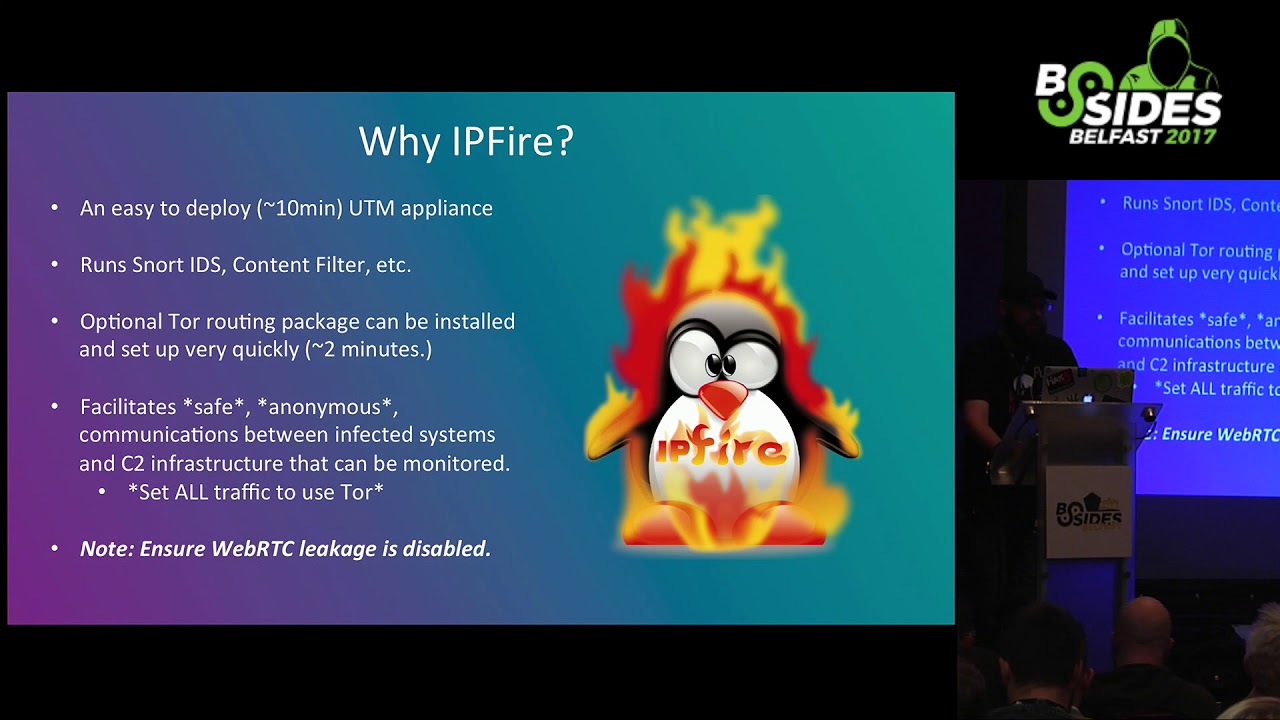
like to use it's it's like a UTM um but it's really really simple to deploy and I like to stand that up because you know it has a snort IDs process that you can enable it also has a tour socks proxy that you can in a so if you're sending traffic through this to exit your environment it can basically route that through tor if you can sock safai your applications and then also onion pie is something that I came across a little bit after I initially put my lab together but it's super useful you can basically take a Raspberry Pi give it to network interfaces one of them in my configuration is Wireless and the other
one is wired but you can basically stand it up so that it's an AP that broadcast in your environment connect your system that you're using for analysis up to it and it will route all the traffic through itself through tor so completely transparent to whatever a physical network you're actually connected to so why do I recommend IP fire super simple to deploy and it's it's really great to use is kind of a gateway between your malware analysis network in the outside world so you can do transparent network inspection you can run intrusion detection rule set and you can gather a lot of log data you can TCP dump from it and you can see pretty much everything
that the system is using to analyze malware is doing at any given time once again it has a an optional tor routing package that you can deploy straight from within IP fire that's really super simple to set up takes about two minutes and then then you have a socks proxy that will just send all your traffic through tor just a note if you do take this sort of approach applications that aren't socks aren't proxy aware and then a lot of malware may not necessarily use your socks proxy so it's important that you you make sure that you're using applications that are proxy aware if you do this or socks apply them or something like that which is kind of why I started
recommending onion PI over IP fired just from a from a tor routing perspective because it's completely transparent so your analysis lab so it's super simple to deploy hooks takes about 30 minutes to setup and then once you've got it set up you plug its physical interface into your network and then it's got a secondary Wi-Fi interface that functions as an AP when you want to analyze malware connect up to the AP and all your traffic gets routed through tor so super super easy super flexible you can simply I always using my Raspberry Pi as a as a retro PI and this is super simple you just pop it others ecard in your Raspberry Pi and
all the sudden you have an onion pie so from from a lab network topology setup one of the things I like to do is I like to stand up multiple virtual network interfaces within whatever hypervisor I happen to be using and so one of those network interfaces will connect to the outside world so whatever network connection your physical host system is connected to and that's what facilitates communication out of your analysis environment and then you've got a secondary virtual network interface that's kind of a private network and then I deploy my IP fire as you can see right here that basically bridges the two networks so it facilitates communications from the internal private only network to the outside world and
through my onion pie and then within your analysis Network that private network you can deploy beans as needed to you know perform the analysis whatever target operating system hours trying to to execute in you can also deploy any tool set that you need to to analyze the malware if you're doing passive analysis things like that so I mentioned Remnick so earlier I'm an avid fan of unix because it's super useful for performing a lot of different off box analysis so two of the tools that i specifically like in REM mixes i netsim and fake dns so the idea here is that you take let's say a Windows VM that you're detonating malware in and you
point your DNS server and Gateway over to your REM NICs VM well by deploying AI netsim and fake DNS within REM NICs you can a have a system that always responds to DNS requests from whatever system you're analyzing malware in and it says oh you want to go to google.com for instance well that's me and so you can very very quickly and easily see all of the DNS requests that malware is making in your analysis environment and I netsim is is great because when you combine it with fake DNS let's say it wants to stand up an HTTP connection to perform command and control communications well I netsim basically simulates a bunch of different network services in your analysis
environment so you've got DNS that says oh yeah you want to go to Google well that's me and then it'll also facilitate an HCC P handshake so you can play with command and control communications that that malware is making can simulate responses that malware may you know want to want to see to get further into the c2 communications process not only that but even if you're not doing active network analysis with with rim mix there's a lot of other very very useful tools for document analysis the obvious gating JavaScript and things that you'll commonly do if you're in Sec ops and you're analyzing threats that may be seen within your environment so a couple of tools that I use on the system that
I'm actually detonating now we're in I use red shot and I'll go into that in a little bit capture bat solder it doesn't run on 64-bit operating systems but if you're doing 32-bit analysis it's super helpful process hacker is really handy for quickly identifying what mal was doing in real time on a system sysinternals suite obviously there's a ton of great utilities that you can use for analyzing samples in your environment and then fiddler and HTTP proxies are super useful for quickly identifying the types of HTTP communications malware may be doing so the idea is as I mentioned set your set of static IP on the analysis machine that you're using and set your gateway
in DNS over to your room next box so you can analyze quickly the DNS communications as well as what sorts of network services the the mal was trying to consume from what would be the attackers command control server and then you turn up Wireshark or TCP dump on on REM NICs as well and you can see from a peek at perspective everything that the system is doing and then since this logs over to a system where you can review them after you've detonated your malware so if you're running a snort on your IP fire eutteum or within REM NICs you just send your syslog out somewhere that you can review it after the fact so I mentioned red shot red shots super
useful for quickly snap taking a snapshot of the the registry on a Windows system as well as indexing the contents of a directory structure and so the idea is that you do this before you execute malware and then you do it again after you execute malware and it'll produce a nice report that shows you everything that's changed from a registry perspective as well as anything that's changed within the directory content so the hard drive of whatever directory that you suggest I typically will start out just indexing the entire hard drive and then kind of a pinpoint from there where I happen to see malware starting to right but it'll give you a nice handy report so you can quickly identify you
know what's changed and based on the contents of new registry keys or new files that are created in a new path setter touch a lot of times you can take those i/o CS and you can pivot on those so you spend five minutes executing a malware sample and you may be able to identify what the malware family is what its capabilities are and what risk it poses to your organization so process hacker is is it's kind of like task manager on on steroids it's super useful for quickly identifying you know what now where's writing to any sort of network connections that get created by the the malware while it's executing etcetera and it's it's very useful from
a visual perspective so while you're analyzing a particular malware sample you can have this up in it color codes changes to the system and you can very very quickly identify those in real time before you even go back and review the log data that you're generating with red shot and other utilities later so this is just an example of all of the the network connections that are being seen on a specific VM that I was running and you can see it's it's color-coded it's it's really intuitive and really easy to quickly identify changes in real time on a system and then you can also see files that are written to disk in in real time
as well so having that just right in front of you is kind of a single pane of glass and what's going on in the system obviously you'll have historical log data later when you're running your red shot reports and stuff like that but if you see something that pops up in process hacker while you're executing malware you can quickly you know start to search on those IO CS and you may not even need a review log data later like I mentioned it's all about trying to avoid expending additional resources if they're not necessarily required in a security operations environment most of the teams that I've been on have been overworked and understaffed so being able to perform this process quickly in
an operational environment is essential and then process monitor is another good utility for monitoring all of the different changes on a Windows system it can be very very verbose so one of the things that they provide is kind of a fill functionality so you can deploy filters that will only show you things that you may be interested in and this requires kind of a balancing act right you don't want a whole lot of extra noise but if you start to get too aggressive with your filtering you may miss things that you actually need to be paying attention to so there's a lot of filters that you can find on the on the interwebs and you
can download them import them into a process monitor there's a lot of use cases that have already been created but it keeps you from having to potentially analyze millions of lines of changes when you really maybe only need to be concerned with you know a few thousand all about speeding that process up so I mentioned fake DNS earlier that's that's that that process that you run on Remnick sand you point your DNS server on your Windows environment to your room next vm or whatever linux system you may be using you can deploy this package on any number of Linux environments but this is kind of what it looks like when when you're you know executing a process
on your Windows VM and it's making DNS requests so it's it's real quick real easy way to to very very quickly identify what now where maybe you know requesting from a domain resolution perspective it's all about putting the information in front of you and is least convoluted of a way as possible so you can quickly perform that analysis so i netsim i netsim is great because it allows you to simulate network services within your analysis environment so you can simulate IRC servers you can simulate web servers you can simulate SMTP servers you can simulate pretty much anything that malware might typically use for command and control and it's really powerful because you can also use eye nets in and write response
information and response instructions within Remnick so you can facilitate getting further into that command and control traffic process so you can simulate responses based on you know what you're finding about what the malware is expecting to receive from command and control and get more information but you typically don't necessarily need to do that if you're just performing a malware identification and this is kind of what it looks like when you know you've got a net sim running and you analyze a malware sample that uses HTTP requests for command and control you can very quickly see you know what you are eyes are being and things of that nature also Wireshark if you don't use Wireshark you probably
want to get familiar with it one of the most powerful things that I find is the ability to export objects so if you do have a malware sample that's making use of HTTP for additional stage downloads or command and control or things like that deployment of additional modules you can very quickly export those HTTP objects out once you've created your pcap and you can analyze those as well so anytime you're analyzing malware in a virtual environment you're going to run into situations where the malware simply won't do what you would expect it to do it may new do nothing at all and there's a lot of different reasons for that now our authors have have taken a lot of
steps to evade automated analysis environments so like sand boxes and things like that you know they'll profile the system they'll look for devices that are associated with VMware virtual box or parallels they'll check for debugger they'll look at system time they'll look at you know the number of cores in your system they'll look for mouse movements they'll look for a lot of different activity to try to identify whether they're being executed you know within a legitimate system that may be an end user is using versus just being pushed into a sandbox and detonated for the creation of like a cuckoo report a lot of times you'll see sleep patterns that are there baked into a lot of the
different malware that we see in the wild so you know you may not be able to just run it for five minutes and expect it to actually kick into the the malicious activity that you would expect you may have to run it for longer and in some cases it may just be easier to stand up bare metal and execute it there so if you're having a hard time trying to identify you know what sort of evasion is this is this now we're doing what's it looking for what's it triggering on is it looking for the existence of different applications installed processes running you know at the end of the day it may be easier just
to run it in bare metal and not even worry about it so there's a couple things that you can do there's some plugins you can use within like oli debug that will hide the the presence of a debugger don't use VM drivers so I know a lot of people it's it's very very convenient to be able to have things like copy paste and directory sharing within let's say VMware but whenever you install the the guest utilities that facilitate that that sort of activity you're basically putting a lot of artifacts on the system that makes it very very obvious that it's running in a virtual environment so you know device drivers get installed things like that I find it's best just not to
install any sort of like guest additions or tools that allow you to copy paste just just deal with it right also there's applications you can use to simulate mouse movements there's also open-source code that you can use that will make it look like your mouse is moving around the screen because there are malware families that do check for that also make sure your VM has more than one core so one of the things that we that we've seen with with certain hour is that if you are executing in a system that only has one core they assume that most conventional commercial pcs nowadays have more than one core right who's got a laptop or desktop with with
less than two cores not very many people so they know that it's common that when you're trying to conserve resources you deploy beans for analysis the least amount of resources necessary so if malware detects less than two cores may not run also snapshot after a few hours of simulated activity so one thing that malware may do is it may look for the presence of documents within the My Documents folder or internet browsing cache or things like that to show that the system's been in use recently right if you just deploy a fresh VM and don't do anything on it it doesn't look like it's a legitimate system that a malware author may want to infect also once
again be patient and you may have to go bare-metal if you know just based on time you could spend time analyzing evasion analyzing anti sandbox techniques but if you're in a Security Operations environment and you just need answers quickly you may just deploy bare metal and do that so finding malware samples if you're interested in getting more acquainted with the dynamic analysis process you can get them all over the place there's no shortage of malware across the internet nowadays Twitter is great for for finding IOC correlating IOC s and then identifying new samples you know people tag malware malware IOC s with hashtags based on on the malware family so like trick bot or globe
imposter or something like that you just search Twitter and you're gonna come up with samples there's there's no shortage also you can use a virus total vti for Yarra hunting if there's a specific malware family that you're looking to get more samples for when in doubt right open your spam folder people are definitely spamming malware on a regular basis sign up for as much junk as you can with a throwaway account you may need to deploy your own email service because gmail will filter your spam pretty well so if you're just looking for raw samples you may need to stand up a domain set up an email and then just start spamming that out on whatever list
she can and then mhm in modern honeypot network is really great for quickly deploying different sorts of honeypot so you can deploy WordPress honey pots things like that to to quickly identify you know what attackers are dropping or what attackers are uploading too vulnerable servers in real time so right you've got an hour in your environment you've done some dynamic analysis and you're trying to figure out what you're actually looking at you've got some IOC data because you executed malware and you've got you know network communications that now is making you got registry entries that are being created WMI registration that's taking place you've got you've got a list of IOC so what do you do with it well open
source intelligence is is great for being able to go from I have a list of IOC s to this is the malware that I'm actually looking at and here's a technical write-up of all the functionality associated with it and when I say OSN or open source intelligence I'm not talking about daxing people I'm talking about the the threat intelligence that's being generated on it on a daily basis by the entire security community and it's great because it's one of the best ways to get samples and you can quickly pivot on IOC s that you may see in your environment to go from unknown binary to being able to answer all the questions that you need to answer you know very very
quickly when you're sim chirps or your AV solution chirps or something like that and and also you know being able to work with it with the key he's great right everyone being able to put as much I OC data as much analysis data out into the the public spaces is great because it saves everyone time it raises the bar for the entire community and that's one of the things that we always try to do so just some examples of some some good open source intelligence resources that are out there that are available for use you know who is data is great domain tools is a paid service but I highly recommend it for being able to perform like
historic Whois reconnaissance being able to do reverse who is being able to search off of different IOC data about a domain registrant is is super helpful when it comes to being able to pivot and identify the scope of a malware campaign that you may see in your environment um also IP void is great if you've only got an IP address and you're trying to figure out you know has it been seen is it bad is it good what what do various sources know about it on virustotal is super helpful one of the things you'll find if you if you come across a hash in your environment is if you throw it into virustotal the community is great about you know
putting comments and in tagging samples with you know the configuration that a malware sample may be programmed to use that will include things like command and control servers a lot of times you'll see the actual malware family itself tagged and that can be very helpful when it comes to identifying you know what you're actually looking at from our sample perspective also security blogs there's a ton of them out there and it's it's good because there's a lot of great information that's that's being put into the the public space on a very very regular basis you know a lot of researchers are coming across you know malware in the wild analyzing it ripping it apart and then putting very
very comprehensive write-ups out and they can be very helpful for a sec ops team or you know a security analyst if you're trying to quickly analyze something that you come across also a URL void is is super helpful as well URL query is another great example because you can quickly visualize all of the different requests that are made and and all of the different response data associated with HTTP communication so if you have a domain that you've come across you've seen malware reach out to it and you want to get more information for the the URL into URL query net and you can get a lot of good information very very quickly about that right so
correlating IOC s2 to identify malware data pivoting pivoting is is very very essential so being able to go from you know Rando IOC X to you know this is this is everything that the the world knows about a malware family is is super useful and you can pivot off of a lot of different data you can pivot off a hashes you can pivot off of you know domains C to IP addresses domain registrant information you know a lot of things like that you can also pivot off of the URI structure of command and control traffic so in a lot of commodity malware you know they don't change that very very often and and and you can see
command and control URI requests go out and you can just basically take the path that's used and quickly identify the sort of malware so things like pony in h1n1 they don't change the URI structure all that frequently from from what I've seen just off of samples in the wild filenames can can be searched that's not as accurate because obviously filenames aren't a hash but making at least help in in certain situations where you're just not coming up with a lot of useful data elsewhere so just some examples I've gone over a few of them so I mentioned a bot rack Pony they've been used to know they've been known to use static URI structures you'll see them
rotate occasionally but it doesn't happen that often it's not like every sample is using a completely different URI structure so just by throwing it into Google on you can very very quickly go from random URI pattern to Oh someone's seen this they've identified the malware family and there's extensive write-ups about it so just a quick and dirty analysis process I've kind of gone through some of this already but just to kind of put it all together and and bring it back to you know what this process actually looks like when you're when you've got a malware sample that you need to analyze in your environment right so first of all you'll start up your REM NICs VM and you'll launch those
two utilities I mentioned earlier I netsim fake DNS you'll probably want to stand up a packet capture program of some sort but whatever your your pcap collection utility of choices Wireshark TCP dump and then you want to start your analysis VM so that that would be the let's say the windows vm that you're actually gonna execute malware in for analysis first things first take a fresh snapshot I can't stress enough on that snapshots are your friend take them often take them as as much as you can because I have had several situations where I just haven't thought about it and I've like set up some utilities and I've done some tweaking and then I just didn't take a
snapshot and then I went to execute some hour and then when I went to revert snapshot it was like oh well there goes four hours of work also set your local DNS and gateway to point to rim NICs so that you can actually be able to collect and analyze those DNS requests you can create the peak apps on and and you can simulate that situ traffic using AI netsim and then test your DNS just to make sure your tools are executing properly you know make a DNS request out you know ping Google or something like that and you'll see it in remix you'll see the DNS requests you'll see the the the actual get request over HTTP in and
that's how you know your tools are working so you don't waste time and come to find out that you're not actually generating log data after you've been executing malware for you know 10 15 minutes so then you'll set up your analysis VM so you'll want to start out process monitor there's some batch files that you can use to basically a lot of times malware will write to the temp directory or to other common directories within the windows file system and you can basically loop in Windows command line that'll basically say ok any time a file gets dropped into this directory copy it out of that directory into staging directory that you can use to look at it later because a lot of times
what you'll see with now where is that they'll drop into Tim execute and then clean temp up so it happens very very quickly and by having this loop over the temp directory you can make sure that you can grab a copy of it before it gets deleted later on also startup process hacker right you want to know what Mallory is doing in real time even though you're generating logs um you know if you can see something very very quickly while you're executing the malware it's it's super helpful and then start a bread shot you want to do red shot after some of these other utilities because they can be somewhat noisy and it'll make your report look a
lot nastier and you'll have to go through a lot more false positives in your red shot report if you do that first and then start kicking off these other processes and then you'll want to save the red shot report that you generate before you execute malware into a directory that's not likely to be overwritten so if you're if you're analyzing let's say ransomware where you don't know what you're analyzing yet you don't want to store this in a location that is just going to be overwritten and encrypted and then if you're on 32-bit Windows system capture that but typically if you're if you're using a 64-bit analysis platform it's not applicable so once you have your initial
red shot report set up and you're capturing data and you got Remnick setup and your beams pointed to it you'll want to actually execute the malware so you'll start process monitor and you'll start capturing system activity you can deploy any filters that you need to like I mentioned earlier you want to execute the malware within the the virtual environment and then you'll want to monitor the activity just let it run for a little bit and then you'll be able to you may have a visual indication like if it's ransomware right that's going to be in your face when when ransomware kicks off it's going to display a ransom note that gives you instructions for how to
pay the ransom demand to decrypt your files and you'll know right then in there that yeah it's it's probably okay to go ahead and terminate execution other types of malware may be less in-your-face as far as like getting you a visual indication that malware is actually executing properly so you may just need to give it some time and then look and see so you know you'll want to execute a second red shot captured that creates your your after report so you have a before port report and you have an after report and then you can basically diff the two and compare what changes have been made you want to export any sort of event logs
from within Windows that you may have and you want to export all the things so all the reports say that your that you've created using these utilities as well as your fake DNS and I netsim reports and at that point you have a lot of data that you can quickly analyze to try to put together that IOC list that I mentioned earlier that you pivot off of to positively identify an hour itself so just some key takeaways you know malware analysis labs aren't expensive hardware costs have come down significantly over the past several years make sure you have storage make sure you have more storage than you think you'll need because snapshots get costly very
quickly on you know you can have several several gigs per snapshot depending on what you've done on the system from the time you've taken your last snapshot to when you take your next one and make sure you have your setup beforehand so this the whole idea behind this is is to try to give a very very inexpensive quick and easy process that security operations teams can use in their environments to very very quickly analyze you know malware related events that they may come across alerts that they may see in their environment but it's very very important that you set all of this stuff up before you actually need it because it takes a little while
to get all the way set up to get all of your tools configured the way that you like them to stand up the virtual environment to stand up all the pins that you need so making sure that you have those already available when you need them as is essential to being able to make this a quick process and in many cases you can identify malware and its capabilities without necessarily even running it you can take a hash and throw it into virustotal or throw it into a Google search and look at different sorts of sandbox reports you know hybrid analysis malware there's a lot of different you know reports that you can get just by throwing a file hash into
Google and it can save you a lot of time because you may be able to put together the i/o seized on that allow you to identify the the malware and its capabilities without ever even needing it detonated in the case that you do this process is super useful for you know providing a quick and dirty way to be able to obtain and answer a lot of questions and obtain a lot of information about malware in your environment how open source data is your friend right no need to reinvent the wheel no need to you know do all of this work yourself if someone else has already done in and has been helpful enough to actually release it to the
world and then if all those fails just run the malware capture its activity you'll be able to put together at least some sort of a list of IOC data related to that malware and then use that to identify it and its associated characteristics and you may be able to identify its characteristics right away just based on what you observed in your analysis lab and so with that if anybody has any questions I'll take them out I appreciate it
Related talks
 27:37
27:37 51:34
51:34 29:48
29:48 29:00
29:00 58:25
58:25 25:56
25:56