PowerShell Deobfuscation: Putting the Toothpaste Back in the Tube
Show original YouTube description
Show transcript [en]
and get started thank you all for coming so a little bit about me i'm daniel i'm a data scientist at in game mainly focus on malware classification and model evaluation if you were here at the two o'clock session on this track my colleague phil roth presented ember that's the sort of stuff that i usually deal with um so in about this talk we're going to be talking about de-obfuscating powershell with the help of machine learning so that's going to be fun a little bit of motivation to get us started as as we heard uh in the keynote today there's this trend about living off the land um powershell is a pretty powerful tool and uh attackers
tend to use that because they don't have to drop a binary on disk avs both uh traditional and machine learning avs are pretty good these days and they'll probably catch you if you drop something but powershell you can get a lot of stuff done without actually putting anything you can do it all in memory fortunately powershell commands can be logged and sometimes files are left behind ps scripts are left behind so security investors investigators like this because they can inspect them to see what the attacker was up to of course attackers don't like making things easy so a common technique is to obfuscate and encode these commands just so it makes it that much harder for
an investigator so a little warning before we get started i'm not a powershell expert and i don't use it in my day-to-day research or development so i know what you're thinking great start um but i'm gonna tell you why that's not a problem um i'm framing this as just a text analysis problem um and and we'll we'll discuss why um the valid question would be why not just re-implement the powershell interpreter logic that's that's perfectly cool um somebody can do that and it'd probably end up with a very clean solution at the end of the talk i'll talk about something that cannot be done by any interpreter but that would that would be a pretty
clean solution however i'm a sloppy data scientist and that doesn't sound any fun to me that's somebody else's job um also that only solves one obfuscation problem and i like to work with ambiguity and uncertainty for the sake of generalization um the logic specific to powershell de-obfuscation in this talk um or de-encoding um this this can be swapped out for other obfuscation use cases and it might still work for those um and the methods and processes used here all are the same so you can have one tool to de-obviously skate javascript powershell command line statements anything else you want so real quick we're going to discuss the problem just a little bit um we're going to discuss what is
obfuscation and encoding most of you probably know but just a quick quick refresher and then we're going to discuss how we want to solve this and it's going to be in a couple steps first we're going to look at a file status classifier a d encoder a de-obfuscator and then a cleanup network then we're going to go over some results um so obfuscation uh generally speaking it's using the functions and quirks of a language to create a command that's easily machine readable but much harder to recognize by human eyes so if you you can't analyze it if you can't read it some some examples of this uh random case changes just flipping the case on on every
character in a string uh concatenating or in this case unconcatenating breaking apart a string just adding some plus signs and the interpreter squashes them all back together reordering stuff this is really gnarly when you have to read it this is usually used when you want you have a bunch of variables that you just want to insert into a statement for obfuscation sake it's used to break up strings and reorder them around back ticks backtick is a line continuation character so what happens when you have a line continuation in the middle of a line well the line just continues and it ignores the character the only only purpose that i've seen so far is that if that's at the end of the
line it says okay keep on processing the next one there are a bunch of other splatting white space all that sort of stuff and then there's variable replacement if you just define a variable a random variable as a string at the beginning of your file then you can replace it all throughout the function and it makes it really hard to read so i apologize throughout this for trying to put full files up in a presentation it's a little hard to read but this is an example of just a regular powershell script before obfuscation um you can see it's it's defining some variables it's doing a chocolatey thing it has a try catch in there all normal stuff
so after objection it looks a little bit messed up you could you could do this by hand and reverse everything and that'd be fine you could read it but yeah that's what computers are for right um and just for reference all these tricks are really well done by daniel bohannon you should check out invoke obfuscation it's a powershell module i'm using that for both the objection and coding processes and throughout this project next we're up uh we're with encoding and so everybody probably knows this as well but it's a glyph or character level mapping into another encoding scheme so the glyph a capital a translates to 41 and hex or 65 in decimal uh left bracket is 5b in hex
91 in decimal so on for the sake of this project i'm only considering hex and decimal just to show that this works with multiple things it's easily extendable to more schemes i just got lazy and didn't want to write the d encoding for everything so this is an example of a file that is like encoded with the decimal so you can see um all all the characters there in the 0 to 256 range just a list of them and you can see some of the logic and powershell to put it back together the for each int as character casts them all as characters and then joins them at the end similarly you can see this something in
hex same sort of deal you convert all to n16 and join all that sort of stuff so that's just what i mean if you're looking at this you're obviously not going to see anything it's encoded but you can de-encode it pretty easily so now we want to see how to build something to take any file whether it's encoded obvious gated not obfuscated anything and then output the result that is non-obligated so to do that it's helpful to know what you're actually looking at so for that to that end we're going to build a file status classifier so i know a lot of people here might not be as read up on machine learning so we're
going to do a couple real quick intros into some topics as we go along so what is a classifier it's a machine learning approach for predicting the category of unlabeled samples so you have input in this example you'd have a powershell script file um you throw it through a feature generator and it you know turns and then spits out all the sort of characteristics that you think are important then throw it into this black box classifier and it predicts this output either hex encoded decimal encoded obfuscated non-obfuscated whatever your output classes are and so let's say we have this classifier and it works well the next step would be if if we have a classifier and it says it's encoded
we run it through a d encoder and then run it back to the file status classifier because it could be obfuscated and then encoded or or any combination similarly if we determine that it's obfuscated we run it through a de-obfuscator back to file status classifier and finally if we ever determine that it's non-obfuscated we output the results so pretty simple logic of returning it back and then keep on working until you get the result you want so for building a classifier the typical machine learning approach is to uh there's three parts one gather a lot of samples with labels and by that i mean a lot of powershell files with the the tag is this obfuscated
is this hexadecimal encode encoded is this not obfuscated and then for each of those you want to generate features on those samples and then train using your selected algorithm so stepping through that let's talk about samples this is often the hardest part of any data science problem is getting the right samples if a couple options for you is if you have access to virus total downloads or similar service you can grab that you can scrape github and or you could ask your friends for all their scripts we're going to be having to train on tens of thousands of scripts so you might need to make some more friends if you do that approach luckily since we're using invoke obfuscation
once we have just regular powershell scripts we can generate the encoded and the obfuscated versions of those so we get the labels for free so features um classical machine learning uh logistic regression support vector machine some others that you might have heard of um you you basically hand define all the features that you want you're gonna write a little script that finds the number of characters the number of values the entropy of the file the number of backtick marks all that sort of stuff um that's personally i find that pretty annoying to derive all these yourself you're going to miss a bunch of important ones you're going to spend a lot of your time doing feature
engineering just not very fun and it often for text it often doesn't represent the relationship between characters well if you have just the string user use er it's going to have the same or very similar results as if you reverse the string resu so that you know the the sort of relationships between characters in this case is probably very important so classical machine learning isn't really going to work for us so we're going to try to use a neural network and super brief because we don't have time to go into a lot of this stuff this is just a classic example of a dense feed forward network you have your input values on the left
each of these circles are nodes that have activations that propagate through to the next layer and then you have an output layer that defines your your classes the the output classes like hex or decimal or obfuscating so if you're running a sample through this while training you you take your feature or you take your sample throw it through the input layer it propagates through and then makes a prediction at the end if your prediction is right that's awesome if it's not then it back propagates and changes the activation of all of the the nodes throughout the network and then tries again with other samples eventually with you know thousands tens of thousands of samples lots of training
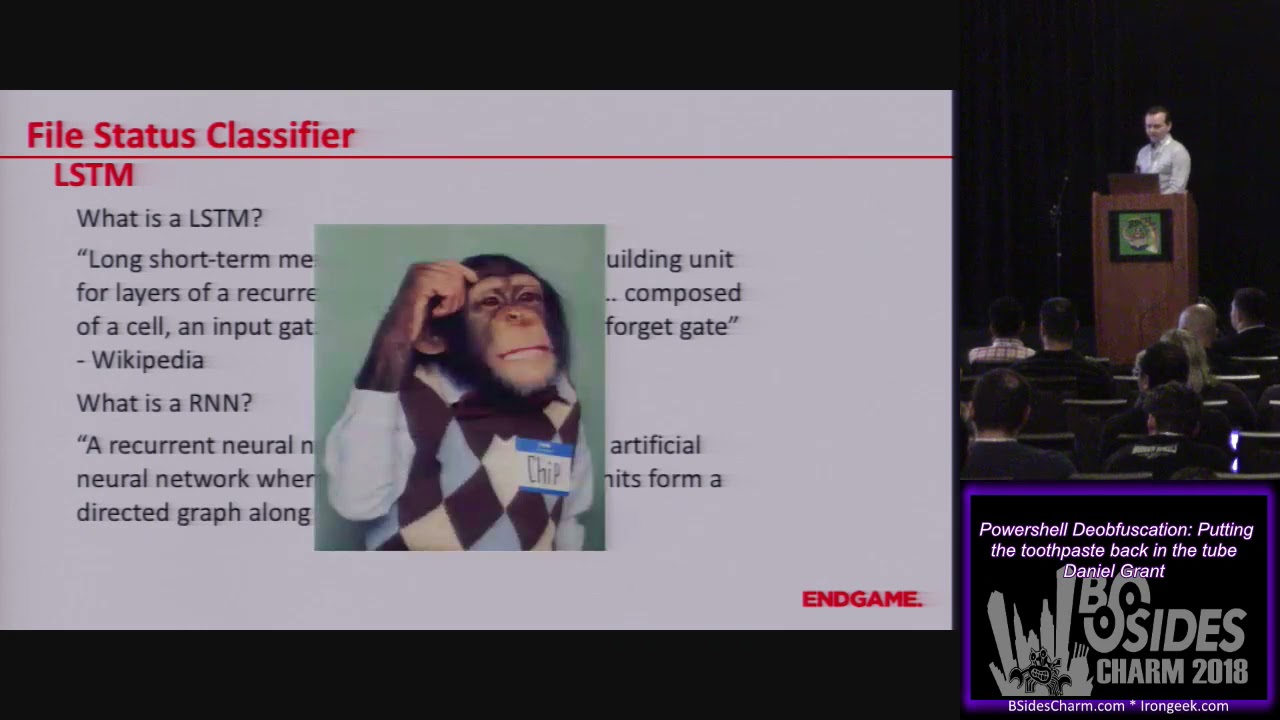
you're going to get a whole bunch of awesomes and you have a good classifier what we're actually going to be using though is a special type of network called a lstm so you're asking what is an lstm and with all definitions we go to wikipedia so long short term memory units are a building unit for layers of recurrent neural network composed of a cell an input gate an output gate and a forget gate all right that's not very helpful maybe it's because we don't know what rnn is a recurrent neural network is a class of artificial neural networks where connections between units form a directed graph along a sequence okay wikipedia has failed us so a quick short summary
in more natural language rnn is a type of neural network that keeps a memory it can reference the previous states the previous predictions that it made as well as current input to determine the value at the bottom in the notes there's there's a really good blog on this um i think if you like query lstm on google um this is the first pop-up so that should be pretty easy to find um so this is this is the architecture of an rnn you can see the the input like on the left side you can see the input at time t um comes down and you have this memory node which can reference its previous self and then your output node which is the
prediction so if you sort of unpack this from time 0 moving forward you can see the first one the memory node doesn't really do much you have the input and output but going on you start to reference the memory node so you reference the previous states as you're predicting so this sort of does character by character predictions referencing the previously predicted character so that's pretty cool and an lstm a long short-term memory network is a version of an rnn that has some bonus internal network structures that let them handle long-term memory better than a standard rnn um again we don't really have a lot of time to go over that so we're just going to leave a
little star there to say it's special so all those memory nodes have some little extra logic that's where the the forget gate the input gate all that stuff and that definition come in now that sounds a little intimidating and if you don't work with neural networks they do look intimidating from the outside but there are a lot of high level neural network frameworks like keras that make this super easy so training this network this is literally the code to do it it's nine lines and one of those doesn't even need to be there um and it's a pretty simple classifier on uh 10 10 000 samples per class so 4 000 or 40 000 samples you can run this
in under 30 minutes on a cpu um and you know so if if you're if you're worried about it don't be just try something out computer science is always about abstraction so you don't have to know exactly how lstm work if you know what sort of problems it's good at solving now we're going to look at how we're going to build a decoder so now we've got a file status classifier that's pretty good um that one that i trained is like well over 99 accurate um and it's it's not really a big deal so now we're going to look at d encoding so i could have just figured out how to use powershell's interpreter or their
interpreter logic to decode a file like this you can you can see how it should be done basically um but like i said i'm a sloppy data scientist and i see a pattern um and you know what's really good for patterns regex um so in four lines you can you can decode that whole thing um just by finding all the things that fit that pattern casting them as characters and then joining them all back together um so that's pretty easy to be fair hex is a little different because it has like a different uh inline structure or end-of-line structure um and there are some other things that invoke obfuscation does like creating split variables that can
make this harder but that's adding five or ten lines of code so it's not really not really too bad and in life my pro tip is don't do anything too complicated when there's a simple answer all right so de-obfuscation this is a fun one um the bulk majority of this stuff can be handled by logic um you can catch strings together you can remove back ticks you can place variables some are really easy removing ticks just replace every back tick except for the one at the end if there is one splatting just look for something that looks like a sliding and replace it for string assignments you can you can cast things as strings or characters and
all this sort of stuff you can find a match and just replace it pretty easily none of those are bad they're all completely reversible functions um sometimes it gets a little bit more complicated the reordering thing that i talked about where you have all the braced numbers and then dash f and then a bunch of strings that get reordered to do that i found the best way was to do character by character processing to find that hook dash f or dash capital f then find all the placeholders before it find all the strings and valid non-string values after it replace them then iterate because you can do this on multiple times on a line and it just
looks super gross but um there are multiple different ways to do this too um you can do replace invoke and a couple other things like that but it's a finite list these are all like definitely solvable and i think i enumerated most of them in the the code but uh maybe not hit all of them but it's it's just it's definitely a solvable problem um so we have a dozen or so of these little fixes to to match all the stuff that's in invoke obfuscation so let's see how we do first we look back at that file that was obfuscated looks gross good times um and then after applying it you know it looks a lot better it's
actually readable there are some things that bug me a little bit you see the the capitalization stuff you're not going to fix that with logic and that's mostly what what what happens there so like you know this thing this mandatory false domain for some reason that gets me and i think it's because of this the sort of mocking spongebob always there always mocking um so this is where things get sort of interesting um all the previous work that we did could be run backwards they're all reversible functions like i said random casing strings and variables that's a different thing so the the thing is if you're looking at this if i'm looking at this if you're
looking at this if anyone in this room is looking at this i bet you could guess how that's supposed to be formatted there are a couple different options but you probably guessed one of these you know the word module you know the word directory through your experience and intuition you can probably figure this out so that's one thing where logic fails but neural networks sometimes have an edge up so this is where we actually put the toothpaste back in as the subtitle goes so we're going to try to train a neural network to learn the various casing formats using powershell and as a bonus it'll help out with some of the extraneous stuff that since i'm a sloppy data scientist i
might have missed so like extra braces extra quotation marks in some locations all that sort of stuff so if you like dell teams you're going to love this because this has like three lstms in it so the goal right here is to translate something like this variable module directory all messed up into variable module directory and we're going to use a sequence to sequence network to do this so what's a sequence sequence um it's a type of neural network that's often used in machine translation so think language translation cantonese to english ordeal so it uses lstms to create an encoder network to transform the starting text and a decoder network to use the output and the decoder memory
to predict output so think of the encoder network is a network that sort of understands cantonese and the decoder network is a network that understands english and they're able to talk to each other in their sort of internal intermediary language and then take characters as they come in in cantonese and convert them into sort of characters as they come in in english also this is way outside the scope but karis has a nice blog on this and a lot of the code using this is uh very similar to the example code in keras's github so i initially tried to translate an entire line i got a little overzealous and i was like we're going to
entire lines at once machines are going to take over it's going to be great um so we start with this this messed up global stored aws region sort of string or line and it started well it started out it's predicting line or character by character and it got global and the colon and then oh no it got user and remember it's using the previous predictions to predict the next one so it just really goes off the rails um i don't know if that's valid or not it'd be interesting to see what that what actually happens [Music] uh so i decided to to downgrade the scope a little bit so pick words in each line to consider so
we're trying to find the the corresponding word in an obfuscated and non-obvious stated uh file so like um if before we just looked at uh store aws region as a word or just aws region as a word and then try to match that messed up version to the original version that's not messed up um so the method i'm using grabs most of the variables and other obfuscated stuff and so you use the obvious data word as the input and the non-objective word is desired output during training and so it predicts character by character to get the new input data it still has some quirks so this git logo membership turned into get lock mirror folation
as an aside i actually doubled the training data and doubled the training time and this works perfectly now but i thought i'd leave it in because it was funny but in general it performs very well um so this sort of messed up local group turns into properly capitalized vagrants all lowercase ps bound parameters is the right casing oh that's good um so now we've we've done four things we have a file status classifier we have a d encoder we have a d obvious skater and we have a cleanup network so let's let's give it a shot we have original file this thing proper powershell obfuscated encoded and then what we're going to do is we're
going to run it through and check and we're going to do all these steps so initially we check the status if it determines it's encoded runs it through the d encoder returns it back to the status checker if it determines it's obfuscated it de-obfuscates it run it runs it back through the status checker it determines it's not obfuscated then it outputs the file and so if it de-obfuscates something it's going to return a partially fixed so that's just with the de-obfuscation logic and then the fully fixed version with the cleanup network applied as well so we're going the uh the partially fixed version you know we saw that before that was pretty cool and then
the cleaned up version um so all those things almost all those things got fixed now there's still some work to do you can see the sr number on line four that one didn't quite get picked up and user handle near the bottom that one didn't quite get picked up but with this is trained on thirty thousand samples um with their various encodings and obfuscations which as far as neural networks goes not a lot so this this has a lot of room to improve um but it it pretty much works um so some some notes about this as we do a little recap the output is not necessarily a valid power shell there are certain things i
can see that it's going to break this they're they're unbalanced parentheses there's an extra period in there somewhere some stuff like that but this is for investigators to look at not to run i still think i'm going to be able to get this to work where it produces valid powershell at the end there's just a little bit more to do and as a note about uh machine learning in general and the cleanup network in specific there's a chance that it's over training a little bit and doing some memorization this is a problem with with like i said machine learning especially with neural networks but for the purpose of this i'm going to argue that that's sort of a difference
without a distinction if it's learning how to handle random cased variables and then output a correctly cased variable that it memorized sort of fits with that pattern so that's solving the same problem that we were outset to do so so it works that might end up having upper bound as a 90 solution because it won't be able to do much with variables that it's never seen a sample of before versus the 95 solution if it was learning proper case we're gonna have to do a lot of introspection and a deep dive to determine if it's memorizing or not because you know neural networks and stuff fun and uh back to back to one of my
original points since i said i i like to work with ambiguity and uncertainty for the sake of generalization only three things here are specific to powershell one the samples for the file status classifier and for the cleanup network if you're going to do this in another language you're going to need like samples in that language fortunately there is something in neural networks called transfer learning where if you sort of bake in training on something you can train the last little bit with the new samples far fewer samples than you had and you'll learn that that's because a lot of the internal structure of the network is learning just how to process text how to make relationships and it's
just the ends that you're going to be fixing up um also the de-encoding logic i wrote this with a powershell example but it's all a regex thing so it might work with another language without change probably it's going to need a tweak or two but that's easy to do and the de-occupation logic each language is going to have their quirks how they how they handle obfuscation but the way this is built you can make a little quick define add it to a config file and run that so it's really easy to add stuff to this unfortunately today i'm not going to have a tool or code to release mostly because i was fixing it on the plane last night
and it's not quite clean enough to come out but we're going to have a blog in a couple weeks with a lot more details and a release there and that's all i got for a talk i'm happy to take any questions i know we're right at time so if anybody wants to do after or here i'm good to go
[Applause]
Related talks
 49:35
49:35 17:51
17:51 28:03
28:03 54:03
54:03 55:23
55:23 55:30
55:30