Software Vulnerability Discovery and Exploitation During Red Team Assessments
Show transcript [en]
all right so the title of my talk here is software vulnerability Discovery and exploitation during red team assessments uh I just kind of realized that this is actually the longest least sexy name for a title ever so you'll have to bear with me hopefully it'll it'll Pro prove to be worth it um let's see so give a little background about myself I work here in Charleston I'm a red team operator um our job is pretty much to you know simulate real world act you know attacks against um our customers networks so that hopefully we can find vulnerabilities and tell those to our customers so that they can patch these um I've been doing this probably
for about 3 or 4 years now um so our job continues to get a whole lot harder harder as our uh Defenders our blue team is getting a whole lot better um because of that we started to look into other possible ways that we can uh have success on our team and and actually be able to find some of the harder avenues that maybe some of the more advanced attackers are starting to use nowadays um and one of these areas that I've been looking into a lot now is is actually vulnerability research um so we're you know looking for actual bugs in some of the software running on the systems uh that that we're running across um and
one of the main reasons we're doing this is because uh a lot of our assessments are actually a long-term uh persistent uh red team assessments so we might actually have you know access inside a Network anywhere from 6 months to a year um and once we're inside the reason we're in there is we're also trying to test them for you know your internal vulnerabilities um and so we usually have to set up persistence inide the Network and then our biggest um goal next is usually try to move laterally throughout the network um and so that's kind of where this all comes into is we're starting to look for services and these types of things that
might have vulnerabilities that we could use to propagate throughout the network all right so I guess the the where to start on this is kind of I just want to present just a lot of the tools and the ways that we start looking for these targets um and a lot of these you guys are probably pretty used to um and so a lot of this talk is really just going to be collecting those all together so that you can package it up and kind of have a process um our first step typically when we get on a box uh the first thing we would want to do if we were looking for remote access opportunities is the first thing we do
is we Run net net stat if it's a Windows box we started identifying what sockets are open um what processes those are running on those sockets as you can see from our example here um this is just a you know quick example we see is something's running on Port 902 and we see that that's process 2352 um from this point we probably want to identify okay what is that process what is that process where is it so I can identify what the application is uh your next step in that would just to be run task list uh we pass it in that process ID and we can see from this example that that's actually uh
VMware uh the same process applies to Linux just a little bit different commands um net stats the same but then once you figure out that process ID uh you move on and you just uh search your process list and grab for that process uh this particular example we were just on Cali and we had a a listener running and it so it shows us that that was actually metas spit running uh once you've identified that application and you found founded on a system uh keep in mind like I said this is assuming that you're already on a system that you've compromised so more than likely you're going to have a rat or some kind of way into that Network um
so so once say like I was saying originally you're going to get that binary you're going to download it back to your system and you're going to start doing analysis on that application um and some of your typical tools that you can use or for your reverse engineering would be ID Ida Pro or hex-rays for those of you that have you know Mac boxes or Linux you can use Hopper um pretty much open that up and from this point you would actually start doing your stack analysis looking for these entry points for where that data is coming in so you can start trying to trace through the code uh when you start that process like
I said a lot of the the ways you're the places you're going to want to look is where that input comes in um some of those examples would be you know command line parameters your sockets as we mentioned before or uh any kind of file reads environmental variables um some of those those functions that do that kind of thing that kind of stand out as you probably have seen things like read uh gets F read receive receive from um from here this is this is pretty much how it comes in and at that point you're going to move directly after that because typically once that data gets in it immediately starts getting processed and parsed and a lot of times those bugs
that we end up finding are right in those parsing routines pretty close to where that data comes
in all right so um as I mentioned the the parsing functions you typically come next um a lot of the vulnerable functions that you guys probably heard about before when dealing with memory are some of these examples here um these are things to kind of keep your eye out for um if if you know you run across these These are definitely hot areas to just make sure that whatever they're doing with memory using these are secure because a lot of times it's just not recommended to use these so if you see them it's definitely something to to to research further make sure especially if you see anything like custom memory operations and they've written their own
string copy or their own memory copy those are definitely places you want to look closer to make sure they did everything correctly bounce checking all those types of things uh another definitely good place to look when you see data being moved around is a lot of times when you have data coming in from the outside a lot of those um protocols will allow you to um specify indexes into memory so say you know this is my first record this is my second record and a lot of people will actually use those to directly memory access so if you see any kind of operations coming in from the outside and they're using indexes and you control that that's always a very
interesting thing to look at all right so once you've kind of done the most static analysis you can um you typically want to move forward and get into more of a dynamic analysis kind of phase um in order to do that it takes a lot more time stack analysis is definitely easier because all you really need is the binary um with d Dynamic analysis you actually have to model your environment so you have to set up your system as closely as possible as the one you found the application on um that means getting whatever libraries it needs whatever um files that it might use for input files uh registry keys if it's Windows a lot of those fun things
actually make this application run if you were to just kick it off um luckily CIS internals gives you tons of tools that actually help this out a lot so once again if you're on a system that you've compromised and you're pretty far under the radar a lot of times you can actually put these tools on there and actually um find out what you need to actually create your modeled environment all right uh another option and this usually comes a little bit further in your analysis but if say you're trying to run your application on your modeled environment and for some reason or another it's just not working um uh one option you could have and it's
definitely easier on things like Linux because GDB comes packaged in you can actually attach yourself to those processes and and dump that memory um at which point then you can take that dump and whatever you have in your modeled environment and you can actually analyze the two and make sure that um that they're the same um this this is definitely one of those things where I've run into the problem where you have one that you you feel like you've modeled perfectly but for some reason or another it just won't run so you can dump that memory analyze the two and see if you missed a library if the memory addresses are just slightly different uh
or something like that um another thing that you'll also notice when you're doing this if you're on a system say it's a secure system you might actually see other uh HS application running like hbss or Emet or something like that and that's a good thing to know uh once you take this further and you're actually trying to write an exploit or something like that um so uh I guess once you get past that point let's say that you've already found your bug you've already moved forward and you've already written an exploit and once again like I just it it's not working for some reason or another and say it's crashing um so You' you've done your memory dump and you
still can't figure it out um if you're on Windows you're on Linux there are actually abilities to actually turn on um the collection of memory dumps from a crash and you can actually bring those back and analyze those further so you see in Windows it's just a simple registry key if you have the ability to write to the registry on Linux same idea uh it's just Quick Command and then those will dump your pores and you can bring them up in GDB and see what might have gone
wrong all right from here kind of we'll move into a case study of something that we found when we were doing one of our red team assessments um on a system and we went through the same process that I just described and I kind of wanted to show you what this might look like and you know real world environment um this particular application is called medicine serve it's a medical application um you can actually get it on the internet um a lot of EMR systems use it for um storing medical data and these types of things and so when we found it and we found it running we thought this might be a pretty good Target to start looking at
um as you can see we started uh in the same process as I originally said where we ran that stat um we found that it was running on Port 880 we saw the process it was running and kind of went from there um once we saw like I said what the the process ID was we identified it as the the meds serve application U we saw it was running as a service so our next step was to try to figure out where on this system it was um so we ran uh SE query which actually will list you know information about any kind of services running on Windows uh we were able to figure out where it was on disk uh
tracked it down and were able to download it and bring it back
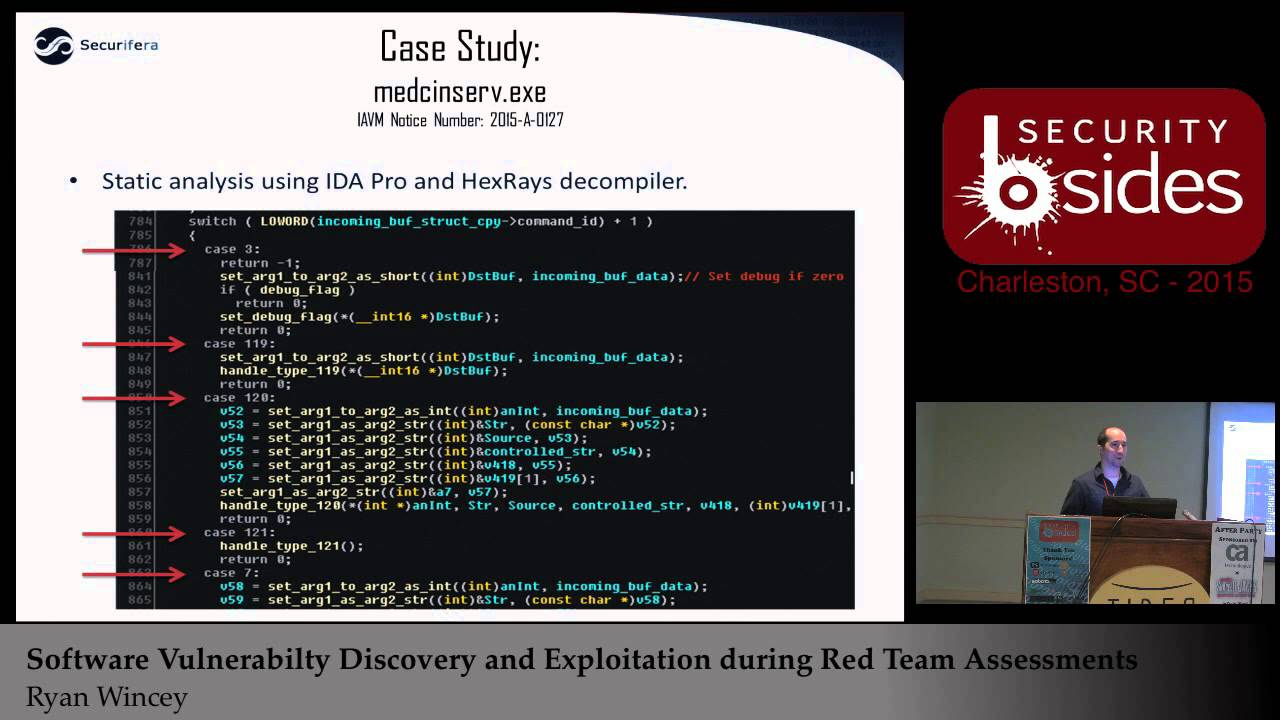
back all right so once we brought it back we opened it up into ID Pro which is one of our favorite dissemblers uh we were lucky enough to actually have hex-rays decompiler so it it makes the code look pretty much like C allows you to you know pretty much reskin all of your your variables to what you think they are doing so by the time you get done it looks really close to probably what the code looked like when they first wrote it um as I mentioned the very first thing I did since I saw that it was running on Port 880 I knew that it was listening in on some sockets so I looked for any receip functions and I
was luy enough to find that there are only two so all data coming in was coming in through this one function um and then it was probably being processed immediately after so as you can see it pretty much takes in a header and then after it took in the header it took in the data um going from here we assumed once again that the function calling this we were hoping that immediately afterwards it would probably process that data and uh we got lucky and that was exactly what it was so pretty much it took in the data and then immediately took one field out of that data which we assumed was the command ID and begin switching
over all the different types of commands and processing them accordingly um so when we were looking at this code as you can see here it was it was literally like 300 different commands and then just how they were processing them unfortunately at this point this is where it gets really tedious cuz we now had 300 commands and we didn't know which ones could be good bad or different which ones might have bugs which ones might not um so pretty much at this point there was a lot of reversing there was a lot of just fuzzing just seeing okay maybe we can pick the needle out of the Hy stack cuz we didn't want to actually
have to go through every single one of these functions cuz we were hoping to have a pretty quick turnaround so we could actually use this in our assessments so much reversing later we came across this one function uh it was a message type was like 239 something like that um and it took in our data um and as you might be able to tell here we had a location on the the stack that was expecting 100 integers um at which point it would go through the data that came in and it was assuming that that data that we gave it was literally Al an array of integers followed by commas um we don't actually know what
they were doing with it at our point it really doesn't matter to us the big thing that stood out to us was that in our Loop right here we have absolutely no bounce checking so we know it's taking in 100 integers and the way that it breaks out of this Loop is basically when it gets to the end of oura which is absolutely horrible so from here anything over 100 integers is to override our stack and we could immediately gain control of this application at least this was our assumption at this point all right so going forward now we think we found a bug so we've done our stack analysis we want to verify this
and this is kind of where you step into your Dynamic analysis it's like can I actually validate that what I think I saw is actually real so this is where we started bringing up the tools that I mentioned earlier for dyamic analysis to start identifying like what files that application needs what library needs so that I can actually run this on my virtual environment first thing we did was run list Ells that should show us any kind of libraries that it needs to run um as you can tell there was absolutely nothing proprietary all the other libraries that it used for all windows libraries so this was actually really convenient um going forward we did uh handle. exe
which is another CIS internals tools that it just lists any open handles to any files that it might have open at the time um this is a good thing if if your application opened a bunch of files and left them open unfortunately this isn't going to show anything that it might open as a configuration file and then close it subsequently um lucky for us though we got a good amount of files that are kept open and it looks like we had a log file because anytime you see a document or a text file or something like that that's probably a log so our next step was to just go ahead and open up that log file and see what that was
uh from the log file we actually can glean there was a few other files that it needed um but the kind of overarching thing we saw was pretty much everything it relied on was in the directory that the binary was in so we were hoping we just copy that install directory and that would be pretty much
everything so we got just about everything so we we got all the files over that were libraries we got all the files over that were input files we still weren't having much luck getting it running and we remembered the one last thing we didn't check was the registry for the actual service um and it's pretty rare but sometimes you'll actually see them put data in there for their their startup stuff and so we checked it out um looked at the registry and noticed that they actually had the path to where their data was um so that wasn't hardcoded and so once we got that out and put that in our in our system we were able to start the application up
and begin our dynamic analysis uh as I kind of mentioned the when you're setting up your Dynamic analysis modeling virtualized whatever you actually want to get to where everything is as close as possible to what you're looking at so you want to get the same operating system same patch level um you know you want to make sure your registry looks the same you want to have debugging tools so that you can actually step through things if you need to you want to have some way of writing scripts cuz more than likely you're going to have a proof of concept that you need to work on to to quickly um send data at this thing without much
work and uh once you've done that you're going to want to try to match what you found in your stack analysis over to a debugger because you're pretty much going to start switching tools at this point unless you do use a debugger immediately from your disassembler for example ID pro has a debugger but a lot of times um I actually tend to move over to immunity debugger because they have a lot of built-in tools that are really nice um so from this point we pretty much found the idea or the address of the function that we thought was vulnerable copied that thing down and then moved over to our debugger and put in a break point um at this point now we
have our system set up the way we want it we have our binary on it we've loaded it up in our debugger and we're ready to see or we're ready to develop a proof of concept to to exercise what we think might have been Aug and see what
happens so once we like I said get to this point we kind of start thinking about the design for our proof of concept um from what we've seen in our disassembly there's a header there's data and there's the data length so we should should be able to go ahead and start getting a a proof of concept for a lot of the boiler plate stuff um we don't really know like I said what what that function might be doing otherwise or what we might have to do to make it you know a reliable exploit or anything like that that that's going to come much later but we should be able to go ahead and set up the necessary things like
opening a socket um sending and receiving closing that socket just the really easy stuff that will get us to the next step of being able to develop a proof of concept and and you you can choose you know whatever scripting language you you feel better about doing this kind of stuff in I usually pick python just because I'm used to it uh here's here was our first stab at our our little proof of concept skeleton um you can see it just takes in um the host the port creates a socket uh creates a string down here that's literally just an array of of of ones followed by commas um and then it just sends it
and then it closes it oh we we did actually add a little helper function over here that will set up that initial header that would just tell basically say hey this is the type this is of the the function that we're going to want to exercise and this is the length of all of our data so that just kind of made it a little easier for us uh whenever we sent data to this this
service all right so uh we got really lucky and even with that very simple proof of concept uh you can see that when we ran it we immediately got access over EIP uh which is your instruction pointer um which is pretty much the one register that determines where your next execution is going to be um and as yall could see earlier there was that array of ones and we have a one sitting in EIP so we got really happy at this point because it's this is ideal uh from this point you probably want to start thinking about okay now I have EIP I would like to actually you know put some Shell Code in there I want
to take over the system I want to use this exploit um and when you start thinking about those types of things you want to know again more about your environment you want to know you know what protections does this binary have in place what am I going to have to get around to make this work um in our case we already know because we control EIP that there were no stack canaries um which is typically it's a protection that allow that keeps you from being able to get to your instruction pointer cuz if it overwrites that stat Canary then it checks it before the end of the function and it it will kill the whole
program before you even get to the situation we just saw so we know it doesn't have that PR protection from our list here this is actually a command that you can run from uh amona script which is developed by corand um that will tell you all the protections for every application every uh library that you have loaded into memory of the time um and as you can tell from ours it actually shows that our binary right there in the middle has absolutely no protections this is like once again ideal for us horrible for them um so at this point we literally could have just written one instruction to our EIP um register and jump straight to our Shell
Code um and we did try that at first but we assumed that more than likely the the systems we were dealing with which were actually very secure systems probably at least had um di DP turned on at the operating system level um and so we we determined that probably to make this as reliabil as possible we would go ahead and pretend like all the protections were enabled and write an exploit for that um let's see so going with that assumption in mind we're assuming that we have to get around D which means that I can't execute anything directly on the stack um so typically the the first thing you want to do is you want to put Shell Code
on the stack and you want to execute it so we can't do that and we also can see other than our binary uh aslr is enabled as a protection too and aslr basically all that means is whenever you load up your binary it gets loaded in a different place in memory um and so when you're actually writing these exploits your exploit is going to be static unless you have the ability to leak addresses back to you in our case we we we don't we don't even need that so we want to actually be able to just have static addresses in our exploit which we can jump to and we'll actually start executing down till we get to our Shell
Code so in this particular case as I said we're going to try to pretend as if all these protections are in place so with them in place we're actually going to have to make calls to reenable execution on our stack lucky for us Windows provides lots of different ways to do that um you can use right process memory you can use Virtual Alec um and and the great thing about this monus script as well is it will actually look for those gadgets for you and it'll just construct that whole chain for you so on this slide right here you can actually see what happened when I ran um the rchain command it went ahead it
found every Gadget I need which is um when I say Gadget this is actually an address in a static library that you can use to do something you need in this case what we need to do is set up our stack and a way to call that function um so this particular chain is set up to call virtual Alec um it basically sets up all the parameters need needed for virtual alic and then once we call virtual alic it will change our stack from non-executable back to executable which point we can jump straight to our Shell Code and start executing um the only problem I found in our particular example was that script found gadgets to every single thing we
needed except the address to Virtual Alec um so it's kind of a big problem because that's you know what we're all hinged on here um so going forward we realize we're going to have to resolve virtual out ourselves using two add additional function calls uh the first being get module handle which will give us the address to Kernel 32 and then once we get the address of Kernel 32 we need to find the address of git process address so that we can then resolve virtual Alec and then of course once we get the virtual Alec address we drop straight into this drop chain that was generated for us and then our Shell Code so since all this gets a little
confusing it it really comes down to you know just software design in the end um and so you start designing out what this is going to need to look like um and then you can start plugging in the pieces as you get to them um so right now in the process we pretty much have our packet header set up we have all of our ones which is basically our our garbage there um and then we'll start setting up our R gadgets for the three stages that we needed um that first being getting the module handle to Colonel 32 then getting the address to Virtual Alec and then calling virtual Alec and then calling our Shell
Code um we added one extra little helper function since we since we're actually passing that data it's looking for Strings that are numbers and when we end up having our Shell Code it'll typically just be raw so we're just going to have a bunch of raw bytes um and we need to format that in such a way that they just look like an array of numbers so all this function does is take in all of our Shell Code um and it converts them into an array of numbers and adds them to the end of our uh our data SE segment there all right so let's let's have a
demo all right so before I run this I'm going to show you kind of what it ended up looking like so this is our code this is our proof of concept um see if I can zoom in you probably can't see this at all can you okay just bear with me all right so this this this part up up top is all of our Shell Code and this is basically just Shell Code for a reverse TCP for interpreter um as you go down this is our send function that basically just sets up our header and then sends our data as we were talking about this is our little helper function that turns our Shell Code into the aray
of numbers uh this is a similar helper function Just For Strings and then this is actually our Rob chain so that first one as we mentioned before that's going to get uh that's going to call get module handle it's going to get kernel 32 as you scroll down we'll have our next call which will be get process address and then as you keep going we're finally going to get down to our actual R chain to call virtual Alec I think that's right here and then once we call virtual Alec the last thing we do which would be right here is ADD our Shell Code all right
so all right so if you look over here we just have simple uh multi- Handler waiting for a call back on P 44 for uh for a reverse TCP uh payload and let's see where's my mouth
go and if we look at our box here let's make sure we have this service
running all right so let's check that
Port so we can see we have a a service list in here on port 8080 uh is that medson serve that we just been talking about and if we run our
script
we go and look up here looks like we got a shell back at which point we can uh make sure y'all definitely can't see this I barely can we see that's a where are system and we run our system info we we say this is our win Seven box so at this point this would be exactly what we wanted this is we we found a service we were able to write an exploit and now we're hoping that this service would be installed all over the network and we'd be able to allow we propagate and start setting up our persistance on other boxes that we may or may not could have gotten through in our red team
assessment all right so one of the fun things about stepping into this new type of uh work in the stuff what we do um as we just described all these these things that we're finding are considered OD days so a lot of these people don't know what we found they don't even know that this stuff is running on their systems um so you know it's it's it's a gr area and you definitely have to make sure that the the customers that you're working with are completely okay with you doing these types of things um and and lucky for us our customers they want to know about any possible that could be done to their Network so they're completely okay with
this um but you have to make sure that you're not going to be doing anything that could bring down their networks so when you start doing things like writing exploits you need to test a lot and you need to make sure that what you're doing isn't going to be adding anything negative to their performance or anything like that um in this particular case uh it was pretty simple because once we got on WE immediately restarted our service and they didn't even know that we had done anything um make sure you get permission and then of course once you get permission then you just get lots of shells uh the next step of course knowing the ramifications of what you've
just done you pretty much have to realize all right well now I got to start telling people what what happened here and a lot of times it's a lot further up the chain than what you think because a lot of times your customer can't do anything about this um so what we've noticed is depending on the customer and how widespread it is if it's commercial based you cany easily just go to user and say hey I found this thing with this vendor we think it's bad news could you reach out to them for us and and start this process um because in our experience so far too like a lot of these vendors they don't want to talk to
you and you can try pretty hard but we've we've been ignored pretty much every time we triy to talk to vendors so far um but luckily user somehow gets them to talk back and they start actually moving forward which is great um if you can't let's say for example that this isn't commercial this is actually just got software you can also have other avenues um like cybercom for example and they will push through similar things and they will keep it more close to the chest um since a lot of that stuff might be sensitive um there's also merer and nist I think they all pretty much work together with user as the main reporting group um at which
point they will then replicate those uh disclosures to you know what the others all right uh does anybody have any questions anyone anyone all right well that's all I
got
Related talks
 36:07
36:07 30:03
30:03 36:12
36:12 43:49
43:49 27:45
27:45 40:50
40:50