Tactics, Techniques and Procedures - Building and Running a Blue Team from Scratch
Show original YouTube description
Show transcript [en]
Good afternoon. Let's go ahead and get started. We got a full room, so might as well get started. My name is Cliff. This is Eveshek. He's going to be giving the presentation today. Hello, everyone. Hi. I feel like you should be doing the exits this way, and the bathroom's down the hall, but you probably figured that out already. Eveshek is a senior consultant.
at EY in their cyber threat management practice. He has over two years of experience in designing and operationally, security operation centers across the globe. He has his MS in computer science from Syracuse University. Get up for that. Thank you.
Thank you everyone for coming in this afternoon. First of all, let's start thanking people who helped me to do this. Rob, there he is sitting. He was my mentor and he helped me to bring the slide and helped me a lot. to do it and two unknown friends of mine whom I can't name, they also helped me and let's thank them. So today, let's give a brief of where I come from, a little bit detail. So I have my masters from Syracuse on computer science that was inclined towards cybersecurity. They have great stuff, you should look at Professor Kevindu's website. They have all the labs that you can go and test these attacks. And then I moved on to cybersecurity where I I started working with EY for two
years, two plus years now, and I have built up SOCs and work on improving them and stuff like that. So anything related to security monitoring, yeah, I kind of have done everything. So that's me, and from my experience, these are the slides where I started working on where are we missing things? How do we operationalize a SOC? Where are the gaps? This is my thought process that I collected over the years. And let's move on to this agenda, what we are going to talk about. This brings to our next slide where we have an introduction. And then we talk about the pyramid of pain. Where do you hurt attacker most? How do you make him feel the pain? We go through a lot of pain to
detect an attack. But how can you use that pain to let the attacker feel even worse? That's important. Then we have kill chain. How do we transfer that pyramid of pain to kill chain and hence use it for our benefit. So after that, when we talked about things, basic concepts, we move ahead on detection. We should start detecting it, find the gaps, test it, iterate the process, iterate the process, and iterate the process. This brings to our first slide where we talk about the pyramid of pain. Surprise. So how many of you can answer this question with yes or no? No, okay, I expect that. Yeah, so that was obvious. So, most of us answered no, right? Why do we say no?
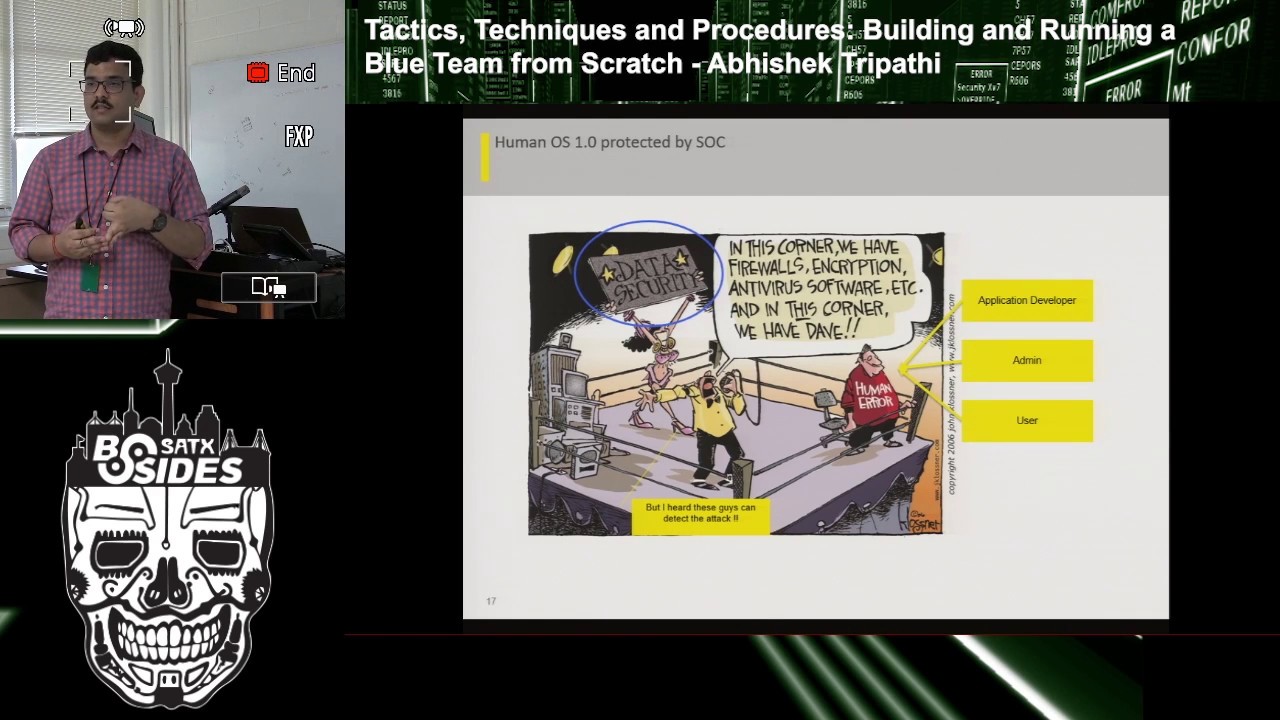
We have firewalls in place, we have anti-viruses, we have perimeter security devices, IDSs, why do we say no? These are just few examples that do occur still every day. When we talk about application development, companies still have legacy applications they depend on and they can't just like, move ahead to a new one because the whole company depends on those applications. They might still be vulnerable to SQL injections, right? Badly written SQL code, like 20 years back, 30 years back. So they still exist in the network. Admins, admins are a key part of a network. They could do mistakes, I'm not saying they should, but it happens. We are human beings, even I do mistakes. Last
but not the least, the users. So, I know everyone knows about phishing emails and the best way to target a company. Even though you have all these tools protecting your data, but someone is going to click it. Send 100 of them, you will have four positive responses on them. So yes, someone is going to come inside your network. They are. But what we can do is have the logs, start detection, and decrease the time when we detect them so that the consequences are minimal. If they came into a network, you are detecting it after two years, they are maybe exfiltring data from there, maybe. Or they are just sitting in your network waiting to do another attack, making you as a bot, your network as a bot. So
if we detect it sooner, the better it is. That's what I said. We are living in a state of assumed breach, right? Where we assume that we have been breached till we detect it. So we have to keep on monitoring our network, keep on monitoring our stuff. till we detect something. So that level of preparedness we need from our end on our networks to be safe. This brings to the slide where we talked about pyramid of pain. And let's talk about the first one that the hash values. So yeah, let us assume that I'm an attacker. How could you give me a lot of pain on my end to, you know, so that I have to go and redo the work? Let's assume you caught the .exe
file that I'm working on. You blocked the hash. By the way, this slide is from FireEyes, one of the FireEyes blog they have back in 2000, and this is pretty much, you know, valid today. And so let's go over it again. The hashes. So hashes, I can change it still, right? It took me like 30 seconds to find a PowerShell that changes the hash of an EXE or a PE by just adding a null value to the PE. And the PE still works, right? So hash detections, maybe you can stop But if you are working against a big nation state, you might want not be like, you know, base your description on the hashish. IP addresses and domain names. So
IP addresses and domain names are something that could be changed easily. You know, you can go ahead on a cloud hosting site and get a new IP address or a new domain name. Getting a domain name is a bit more stressing because you have to go through a registration process and stuff. So yes. These two could easily be changed. So next we talk about the network artifacts. What if we catch a network artifact the attacker is using and we base our detection based on that. So this is how it will be. For an attacker, we have heard about Eilrig, right?
So Eilrig is one of the attackers where they use DNS to do a C2, where they used to send commands in a DNS and they used to get it back. right? The C2 stuff. So if you understand that and disrupt it, they might get another chance, another way to do a C2, but that would be not disrupting the whole process. A small part of the process is disrupted and that they need to change it and find something new. So we are still hurting them, but not as much as we want to, right? We went through a lot of pain to understand that C2 in our DNS. Tools. So
an attacker and let's assume my motive my aim is to get the credentials and I install key logger and you detect that what I have to go back and do is I'm not disrupting the whole process where he's infiltrating your network and installing a key logger on admin I'm just breaking a process where he has to change the key logger a different software that he has to work on. So he has to invest some time to write up a new keylogger and then send it back to the network using the same process which you haven't detected yet. So still a little bit of pain, but still he can easily come back to your network. Last
one, but not the least, that's what we want to do. TTPs. So TTPs is like disrupting the whole kill chain. The moment he comes into a network, to the whole process. So if you know and you base your detection around those whole process chain, right? How did the dropper come in? How did the malware come in? How, what is malware doing? How it is doing a C2? Is it doing an X-Fail? So if you base your process based on the complete kill chain, that's where you hurt him most because it's going to cost him a lot of money and a lot of time to redo the whole process. And he knows that you are smart
if you caught him, right? So he has to be smarter than you next time. So that's a lot of time and money. So this brings me to the next slide where I'm going to talk about the TTPs and Kill Chain. So this was an active attack I have seen a couple of months back where attacker used a vulnerability, in this case I'll say a human being, where he was, you know, he attempted to update his Adobe Flash player.
Yep, have you seen that? So yes, he went ahead and started updating his Adobe Flash Player. The moment he clicked it, boom, the dropper came in and that downloaded the malware. So as we see this part, as we see this part, the moment he clicked it, there was an MSHTA that downloaded a PowerShell and that PowerShell had a script that downloaded the next payload and that ran using MSHTA. a VBScript, and then a command prompt. So that was an attack that we understand a TTP, right? We understand how an attacker does use these techniques so we can block him. Now, we caught him there, then and there. We stopped him, right there. He didn't even, like,
the moment he came into the network, we stopped him, and that was a waste attack on his end. Like, he knows how we can detect it, right? You cannot go ahead with C2 or any action on an objective. That could be lateral movement. That could be exfiltration. So we stopped in there. That's what I meant by TTP. And that's how it relates to kill chain. So let's look at these techniques that we talked about. MSHTA, PowerShell, and Wscript. So what is common among these three programs?
These unknown Microsoft binaries, they are on your host and you cannot just block these hashes, right? So they do exist on your host and they will be there because MSHTA is used to render JavaScript from your...
So MSHTA is used to render JavaScript and it is on your host so it does detect it, right? it does not detect it because all of your antiviruses think this is a legit process that is on your host. So why does we use these processes? So let's look at these one by one, right? MSHT, defense evasion, how does it do a defense evasion? It's a known binary, probably it's doing a legit work, and no one cares about it because it's a legit one, right? It does . And then the attacker is not using any new techniques that exist. He's using PowerShell and he's using scripting. PowerShell, every system has a PowerShell on them. Yeah, it's part of Windows.
And it will be. So that's one of the vectors he used here for execution. And the scripting was, again, for execution stuff. So all these are known Microsoft boundaries. And these are known as the living off the land boundaries. You don't create a new malware. You use what is on the host to deceive the user to do this. So where do I get all these tactics and techniques? So we talked about the pyramid of pain. We talked about where it hurts the most with tactics and techniques. Then we talked about how do we map these techniques to a kill chain. Then we talked about these techniques, what was common in them. This brings me to
the next slide where I will talk about What are these techniques and how did I get them? So these are part of a framework called MITRE framework, where it's an open source community. People are contributing to it. We talk about a lot of processes that an attacker has used, different equities have used. For example, this was one of the techniques that is there, and we saw it in the previous slides. So this is a post-breach framework where I think, in my opinion, this is best suited for my definition is because I am talking about an assumed breach situation where I'm looking for things in my network. So this suits my theory of assumed breach because this is a post breach framework. So they have a
different categorization persistence. My favorite would be lateral movement because an attacker is not going to sit on a single host in your network. If they are a nation state, they will compromise at least, you know, through this system and they will try to move laterally to one they want on a host, on a network. Maybe a DB, maybe whatever it is, a database, if their target is to find the data. So let's look at how does it look like. You can go ahead and do a micro-attack metrics. This is on the internet and you can download it. You can base your design based on these things. Some of them may apply. This is for Windows. So this is for Windows. And then
it's available for Linux and Mac OSS. So you can go ahead and waste your detection on these techniques. Some of them may apply to your network. Some of them might not, depending upon how your network is. So what did we see here? We saw that he used, the attacker used MSHTA to do a defense evasion, and then he used a PowerShell and scripting to execute it. But we caught him there, and he didn't go to the next level where he could have done a data exfiltration or he could have done a lateral movement. So we could use this. This brings to our next slide where we talk about the detection mechanism. How do we detect it? How do we use this framework to detect
it? So we talked about MSHTA. And this is an example of SysMod. How many of you use SysMod for monitoring?
Sysmon is a Windows tool that you can download and install for free on your Windows host, and then you can connect it to your sync where it sends all the process monitoring logs that you have along with the command lines. So why this is important that what Sysmon gives me? This is important because we saw that,
yeah, so this is important because we need MSHTA and the command line to detect an attack to see what exactly did it call to. Was it malicious? Was it not? So we'll move on the next slide and we see how we detect why we are like, why do we need this one for a particular set of things? So for process monitoring, we can use it and push the logs for the same. So once we have all the logs, we are good. But what next? Do we see everything on network? Is everything visible? Are we doing good? So this brings to my next question. What are the gaps in my network, in my visibility, right? So we can use this for our gap
visibility, right? So we talked about Sysmon. This is just one example how we can get a particular type of logs for us. MSHT, it needs process monitoring and command line parameters. That's what Sysmon gives me.
For that particular check box, I can go and say, hey, I have these logs, and I can detect an MSHTA attack if that is happening. So these are the type of data sources. But can you, using the Sysmon, say that, hey, we can detect network sniffing? Sysmon does not give us that type of data. So no, we don't have. That's a red for us. That's a gap where we have. So we should start thinking about getting a pro log or getting a network a different sniffing tool that is available to start getting these things, these gaps filled up. If you look at your package that B-Sides gave you, we have a poster for network monitoring where they have talked about
how you can use growth to detect things. So this fills up the gap for the network monitoring stuff. This is an iterative process, there are different processes, you can go ahead and decide what your tech model is, how your company wants it, how your enterprise, what are the important assets that you want to protect, and these two detections around those starting there. So now we have discussed on getting the locks and then filling in the gaps. So just one thing I want to reiterate here, monitoring is an iterative process. You bring in a lot of stuff, You keep on doing it, you keep on testing it, you keep on filling the gaps as your network changes,
you keep on bringing new stuff. This brings to the next slide where we start testing our differences. We have put in a lot of effort to do that. Is it really worth it? Is it going to help us? So this is one of my favorites because you can run a command line tool to test this. If you have time, you can go ahead and do a quick demo for this. Here, if you look at this line, they are using an MSHTA to run a JavaScript. So if you detect this in your network, you are blocking any attacks that is attempting to use MSHTA for bad purposes. So this is a manual thing, but there are a lot of processes and we want to automate stuff. So there's
another stuff, another red team automation based on this framework that you could run in your network. to check all the defenses and then you can see alerts popping up your console. Hey, there was a network innovation, there was sniffing happening. So you keep on doing this stuff. There are a few others available. So we talk about Caldry. This is special because this integrates to the AD Active Directory and then you can run different attacks on the network and test your detections. So what did we do in this whole presentation? What did we talk about? We talked about how to get detections in place, because we are living in a state of assumed reach. And the moment we start monitoring, it's a time where we
start detecting things. So even though a person, user, is clicking the email, is using one of the techniques that do exist, we can still detect that attack the moment it happens. within a really less time frame that we could. So, yep, we are protected there. We can detect stuff better than not detecting it. So this brings to the last slide where we've talked about what we talked about. As we talked about how do we use the pyramid of pain, where does it hurt an attacker most, how do we map the framework to kill chain, and how do we use it for detection and gap
identification and then testing your network. So that's my Twitter account and eBase if you want to connect.
Yeah, so I did a quick quick setup and do a demo of this. What's happening? I'm using Splunk, so this is the free version that is available there. And what I did was, let me resume this.
So what I did is I used one of those techniques to run a command. So if you could see this command, I don't have an internet, so I can't go to GitHub and pull out those contents. So what I did is I downloaded the file on the host and I am using Red Server 32 to just give you a demo what's happening here. It pops up calculator. This could be used to run a PowerShell or any other bad exes that could be downloaded on your host, maybe in a temp folder. What are you detecting here? Let me go back to the Splunk. So this is a Sysmon that I have configured from that host to this Splunk server that is my SIEM. And
I'm looking for a RedServer32 and I'm looking for the command lines. So as you see, I'm running RedServer and that is running from my desktop a RedServer32SET. So there you go. There's a detection for this. And then there's another pop-up, command line, a calculator. So you might think, why am I seeing this calculator if I'm looking for a ResServer32? You could go into the logs, dig into it, and you will start doing your detection, right? This one. Yeah, this one. And there you go. like this.
So there you have in the logs, you can start detecting them. Yep, that's it, thank you.
Related talks
 39:10
39:10 29:45
29:45 30:27
30:27 55:35
55:35 45:10
45:10 43:57
43:57