GT - Sight beyond sight: Detecting phishing with computer vision - Daniel Grant
Show transcript [en]
hi everybody is the microphone good level for Evan good all right cool let's get started so this is sight beyond sight this is detecting fishing with computer vision get started I'm Daniel grant I'm a data scientist at endgame I primarily focus on malware classification and model evaluation if you need to contact me about this presentation about endgame about anything else here's my email I do have one request though please don't fish me that that'd be real cool so I'm presenting on behalf of a bunch of other colleagues to one project that we're talking about blazar which is a you are URL spoofing detection presenting on behalf of jonathan hiram nagham and then speed Grapher which is a
Microsoft document phishing detection with computer vision bill Finlayson was the the main driver behind that one so agenda we're going to go over a few things we're gonna do the some background like fishing really a problem what are the current strategies then we're to dive right into the technical details of blazar and speed Grapher all right so fishing is bad we can probably agree on this to push home the point we have a nice little icon here this is if cliff he had a demented cousin or something if you're more into numbers Verizon had a really good report data breach report four percent of people targeted click on attachments 94 percent of times it's malicious 17 percent are
reported and of those it takes half an hour to on average to report it this is mostly done over email delivery but social media delivery has been increasing very rapidly so there are too many types of fishing we're gonna look at one fishing for credentials and one fishing for payload delivery there are a couple other types but if you're still getting Nigerian scam emails that's your own problem fishing for credentials is mostly a bank scam or a network potential scam it usually references a compromised or call to action since you will link to to change your password or to log in to a site to check something out the link often redirects to something legitimate looking although
the URL will you know look similar to what you're expecting but probably not one example of this is Bank of America versus Bank of America but with the M replaced with an RN completely different sight looks very similar next for for payload delivery this has been in the news a lot more lately the World Cup in Pyeongchang Winter Olympics were hit by something and there are links at the bottom here for more information on those the DNC and d-triple-c attack was based on a malicious Excel document called Hillary XLS as a side note if any bite has that hit me up after this I'd like to see how some of this works against it these are generally macro
enabled documents that download a payload or it sends info back to a command control server sometimes also links to fake software updates or fake links to download an executable then there are a lot of strategies to do this since email has been around email spams basically been around and so have email spam filters they usually work on the rule of has anyone else seen this or seen something similar if you open up Gmail and go to your spam folder you're gonna see a lot of stuff like this also if you have a like a hosted email like an exchange server or any other host email they often have a navy scanned the checks over the attachments before it
completes the email it's often rule-based IV so this is one I actually generated I sent a zip file of some macro test samples to my VP of engineering apparently you're not supposed to do that so I got this I got this undeliverable mail message back and then there's a domain black listing if you're using any modern browser they probably have a black list of several phishing or malicious domains you'll see a pop up that's not looks something like this as you know we're warning you if you want to continue you can go ahead but we've warned you and finally there's a training most large companies especially if you have any work with the government encourage you know yearly or
partial yearly training basically telling you don't click this so if you don't know for sure ask IT send anything weird to us and that's cool those are all very useful and those cut down a lot and the traffic that we see but we still have phishing attacks they're not complete it's still a problem so we want to try a different solution and we want to try a computer vision solution why computer vision you might ask it's come a long way since detecting cats on YouTube we can now detect raccoons on YouTube we can also detect tumors and medical imaging it can also detect stuff with self-driving cars all this it's all built on a lot of computer
vision analysis and in general when you want to use computer vision you want to be able to answer yes to this question can an attentive users see this so specifically for us it's can attentive user identify fishing so let's see you're all very attentive users hopefully you're paying attention so let's see if anybody can see what's wrong this is a sample email you might get please please download the latest attachment and you see this link below first of all if you're getting if you're getting an email that's asking you to download a software update you know be careful but most of you are also pointing out that this be looks very different than the normal Adobe be in
the international domain name system several top-level domains are accepting extended character sets to work with different languages so this could be a valid valid domain while not being the Adobe site and you're likely getting yourself into trouble another example we have a Bank of America login website you probably immediately see B of America code CC that's not very good you don't want to log in you don't want to put any credentials into this another one say you open up a word document you see this what should first what should first key you off is the entire thing this is all bad what what next should key you off is this enable content button it's not even
a button it's an image telling you how to enable content of course what a lot of you saw and what I saw first was the micro psious that's that's pretty bad so let's go ahead and dive straight into some technical stuff we're gonna talk first about blazar and it's a URL spoofing detection our fancy name for it is detecting hama glyph attacks with the Simon's neural network so what is a hama glyph attack let's break the word apart hum Oh the same same glyph character it's an attack that exploits the visual similarities of different characters so you have something like Amazon with an O and Amazon with a zero we're also including in this class for the sake of this
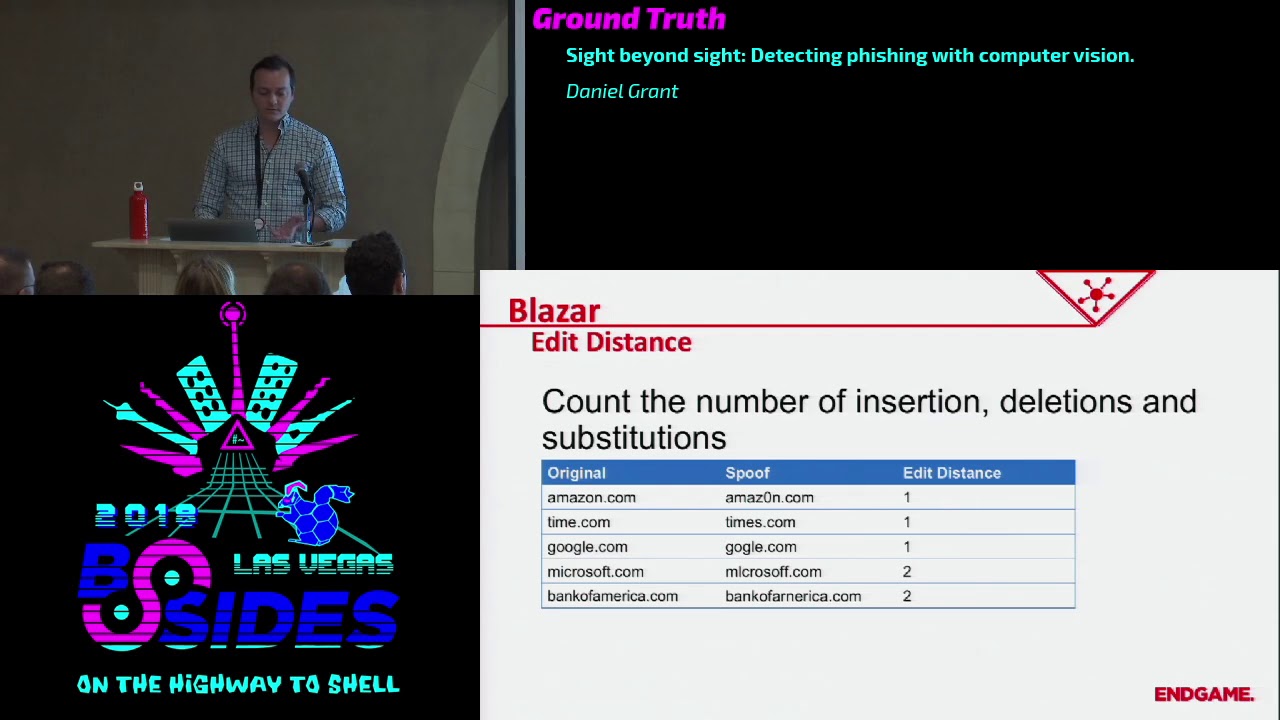
project extensions or subtractions to strings so you'd have time comm times comm google.com and Google with just 100 calm you see a bunch of examples here like Microsoft and Bank of America that email that I showed you before with the the weird be in Adobe that's actually that's an actual attack from September last year it was to deliver the beta botton malwarebytes has a really nice blog about it so check that out when you get a chance so yeah weird be one way to sort of solve this problem is to use edit distance and this is generally counting the number of insertions deletions and substitutions in a stream so for example we have Amazon we substituted ce o--
with a 0 with time in certain s google removing oh this spoof for microsoft we do two substitutions so it's at a distance of two this bank of america we do one substitution and an insert at a distance of two you can probably immediately see how this could blow up if you're using non ASCII characters or extended character sets especially if you're using like UTF characters or unicode you can you can create a string that looks almost identical to bankofamerica.com using completely different characters because there are several characters that you know you really can't tell the difference between the B that's Unicode whatever and B this Unicode like 6,000 something so the Edit distance of that
would be like 14 but it would look very similar one way to mitigate this as an improved edit distance and so this is two-way the Edit distance of the characters based on their visual similarity you can see this on single characters a 0 and capital o very similar high weight double characters are in an M very similar high weight you can see stuff like 3 and E not very similar low weight and so when you combine edit distance with a weight then you can create a sort of closer score to how much this looks similar to another string problem with this is this is just a common notorious issue if you have to map out the similarity of every
character well I I don't want to do that if it does you'd probably end up using some sort of visual learning system to do that and if you're going to do that you might as well go the whole way so our technique is going the whole way we're going to convert text into images and then two feature vectors and we want these feature vectors of potential attacks potential strings that look very similar but are different we want those to have a small Euclidean distance we want them to be close together and we want strings or feature vectors of strings that don't seem like a text Google versus Facebook that's not an attack we want that to have a large
distance between it and there's a point of operation we're gonna be doing this on tens of thousands of items and you don't want to look through you compare one feature vector to tens of thousands of other feature vectors linearly so we're gonna put it index in a KD tree so we get faster lookups so the first thing we need to do is create a sample set we need to create spoofed training set so we have Google and you can do whatever you want under the Sun to create different sort of spoofs of Google add some O's replace characters use you know swaps of uncommon characters that sort of stuff and you do that with a bunch of
different data set so you have a group of things that look like Google a group of things that look like Facebook a group of things that look like espn.com whatever you have a whole set of those and then we're gonna get into the neural network part of it and we're gonna use a convolutional neural network to learn the qualities of an image now convolutional neural networks are very popular and image recognition because they have the ability to sort of learn shapes and characters of shapes and forms and all that sort of stuff the way that they basically work and we could spend over an hour talking about this so basically how they work is you have a
sliding window around the image and each of those gets a series of convolutions to it so you can try to learn this looks like or to have a convolution that tries pick out this looks like a left-handed curve this looks like a line on the right side of that square this looks like some other shape and then you build up layers of that so you can start to learn more complex shapes so eventually after you've trained something you can run it through and it's basically saying okay this is a circle on top and there's a square underneath it and there's this other stuff so it can learn shapes and their relation and then finally to put
this all together we're gonna use it in a sort of Siamese neural network training form so we're gonna try to convert the images to feature vectors so we have that network that we created and this was this network on the the right side here this is the actual one we use it's pretty textbook it's a con u convolutional layer a maxvill convolutional mac school flatten and a dense if you look up you know 101 how to do a convolutional network that's sort of the one that it'll pick out for a first guy so we're gonna try to do it in a Siamese fashion and what this means is that we're gonna take pairs of inputs
and run them through the network to get pairs of features that's the Siamese nature of it when we have those pairs we want to compare them if they're in our spoof set we want the the distance between them including and distance between them to be low close to zero if they're on a non spoof set we want that distance to be one so high you can think of the the network that big square in the middle here as sort of a functional programming thing you you throw a image edit and it spits out an output if you don't change anything you throw the same image through it spits out the same output different image different output
but we want to keep on training it so it it learns you know things that are spoofed are close together things that are not are far away and we do this through a method called back propagation and that's basically if you're wrong on your prediction you say like we have Google and Google comm with you know three O's and the Edit distances are the Kulin including and distance is high then you're going to change all the weights up and your network back propagate the information all the way up there and change them in the direction so next time it ran that through it would say that we're lower and you do this you know you know tens
of thousands hundreds of thousands of samples then you come up with a train network that does what you want and so we want to see if it actually does work so our our network is putting out features that are in a 32 dimensional feature space I don't know about y'all but I've never been very good about visualizing 32 dimensions so what we commonly use is a technique called pca principal component analysis and that sort of squashes the features down into a two-dimensional space so we can look at it and then here we can actually see how how our features compare to each other where they are in relation so in the bottom right hand corner if you can
see the icons this shows all of the google spoofs and they're all clustered sort of close together they have a small distance in between each other and you can see some of the other clusters correspond with Facebook Twitter snapchat and the clusters themselves are far away from each other so this is doing what we expect what we hope it to do items within a spoof close each other small distance items outside of a spoof than they're far away large distance so that's working well so in in practice how we want to do this we've got a train network that can discriminate between something two strings that look alike and two strings that look dissimilar and
we want to see that we want to populate the network with URLs that we want to protect so we get a list of common domain names and get the Alexa top 50k a top 100k anything like that and then you convert them through our network into a feature vectors 32 floats and then you index them all in a KD tree so when you want to check something against it you can take that that string turn it into an image and then get the feature vector for that and then query that through the KD tree to see if it's close to anything in the tree and if it is and if it meets a certain threshold then you can say
okay we think this might be a potential homograph attack against Google in general you want you have all these techniques you want to be able to compare them see how they do against each other one method of doing that just comparing the accuracy but the accuracy depends on the threshold that you choose you pick a threshold of 0.9 for your thing you'll have one accuracy point two you have a different accuracy and each thing is going to sort of have a different curve associated so what we use instead is a ROC curve a rock stands for receiver operating characteristic it has a weird name because it was developed in World War two to measure the efficacy of radar operators or
something but what it basically is is a measure of the false positive rate on the x-axis and a to positive weight rate on the y-axis so let's say you want to be very aggressive in your detection z' you'd be you'd want a high true positive rate that although corresponds with a high false positive rate so you'd be on the right side of this this graph and you would you detect a lot of stuff you've detect a lot of true positive things that are actually malicious that you you say are malicious but you're gonna get a lot of stuff wrong you're gonna say a bunch of stuff is malicious that's not on the other side if you want
to be conservative you'd be on the left side and you would have a low false positive rate you wouldn't call anything malicious that wasn't but you're gonna miss some some actual malicious stuff in general though measuring the effectiveness of your entire algorithm you can measure the area under the curve here so you can see this diagonal line this is just for reference this is a this represents a point five area under the curve and that's basically you'd have a coin flip on every sample 50% chances right 50 grams chance that's wrong we can see that the Edit distance method got a area under the curve is 0.8 one not too bad a visual edit distance
did some good improvement it got up to a point eight nine and our Siamese neural network got up to 0.97 generally that's a pretty good result generally you want to be your curve to be at the top left corner if you can get all the way up to to the very top you have area under the curve of one you've solved that problem in the constraints that you formed it so that's most of blazar there's a lot more information about it that we can't cover in the time period here but we have a repo on on our in-game public github titled hama glow if you can check that out and we also have a paper published on archive we're
also in the I Triple E security paper or security journal I don't have the link for that but I can find it later but that was presented just a couple months ago next let's go into speed Grapher speed Grapher is detecting macro enabled Microsoft Word documents using our document fishing using computer vision so we're trying to just heck phishing documents since we're using a visual approach let's define the problem visually we basically wanted to detect the item on the left as malicious this is saying oh this was made in a newer version of Office you need to go enable content because surely that's fine versus the item on the right that is just some graduation statistics or
something it looks pretty normal and with most computer vision applications this is going to be an ensemble with a lot of different techniques computer vision in general is a sort of intimidating topic to try to jump into from not knowing anything I want to try to demystify that a little bit lower the barrier of entry because a lot of this is a bunch of techniques that aren't too complicated in their own right but you combine them to to make something bigger so we're gonna try to look at the prominent colors of an image the blur and blank area detection optical character recognition and icon detection which is a really cool project so first things first we need to get some images
we and we want to get the image of the first page of a file because that's usually if we're detecting this sort of stuff that's usually where somebody's going to say hey can you enable macros do me a solid instead of opening the actual file and screenshotting it which is a slow potentially manual approach you might be able to automate that somehow but it just doesn't really seem like a elegant approach we're gonna get the preview from the word Interop class this is some documentation from Microsoft on it it's pretty straightforward it just sort of opens it up under the hood snapshots it and since that back to us well I am note on safety
it's still worth sandboxing before we were dealing with strings strings don't really hurt you that much now we're dealing with actual malware so disable Internet disable macros enable Windows exploit guard do all those sort of things you know don't add docx to the end of your file so you won't even open it if you don't try so all this stuff is good keep heat sandbox keep everything safe so let's go into the features that we want to get first we want to try to get the color clusters and we're going to use k-means clustering in the like the RGB space so let's start with we have an image like this one all this image is is a series of pixels each
pixel has a color combination red green blue or whatever color coding scheme you want we can take all these pixels and just map them into the RGB space so if we had like say a hundred of these pixels that's way more than hundred pixels let's say our 100 pixels of like 95 of these pixels were all white then you'd have a lot of dots at this space of 255 255 255 which is the color code for white if you had a bunch that were black you'd have a lot of dots at the space zero zero zero which is the color code for black so you map it in this space and then we want to try to do a
clustering algorithm and so k-means clustering is pretty simple k is just the number of clusters you want so this is the predefined parameter and we're gonna pick three for this case so we want three clusters and in the space that you're looking in your feature space you pick three random spots and then each of those sort of you run down the algorithm to say what is the what spots what data do I have that's closest to closer to this cluster Center than anything else and that becomes part of that cluster and then you re-evaluate you recenter that cluster based on the data that was just glom together with it and so that changes them moves it closer
to where that actual cluster Center was moves everything around eventually you keep on going over this a little bit and eventually you get to a sort of steady state or you've run the maximum number of steps that you want to do and then you have an area that sort of identifies the maximum the biggest clusters that correspond so in this instance we take this image and we convert it to just a color feature and we have we can see that most of the color is white about 95 97 % or something there's a good bit of yellow and then there's the rest of this which is just sort of a combination of the black and red and every other color in
there so we can see we uh now have a feature number numerical feature for the colors that comprise this document next we want to do blur detection and what we're going to do is the variation of the laplacian and that sounds real fun right those of you that have experience with calculus if you remember back this might sound somewhat familiar but this is basically the second-order derivative a laplacian is a second-order derivative so it measures the sharpness of change if you think about it in terms of distance velocity and acceleration classic example velocity is the measure of change of distance is the first order derivative acceleration is the measure of change of velocity it's the measure
of sharpness of change of distance so it's the second order derivative of distance if you look at a document if you're looking at like just a line of pixels and grayscale if you have a white pixel and then a black pixel and then a white pixel you're gonna see that's a very sharp change that's going from 0 to 255 and back to 0 that's pretty quick if you have a white pixel and a little bit of gray a little bit gray black a little bit of gray a little bit gray white then you can see that's a smoother change it's gonna have a smaller laplacian smaller degree of change so we can use that to measure blur which is basically
that concept it smooths out the pixels so you don't really see it a lot of malware does this it's like oh this is a secure document you need a table macros to see all this hidden stuff in between this is just an image there's nothing hidden between beneath fish it's just a blurred image so so this is 1:1 detection that we can do there oh oh yeah and if you don't care about calculus or physics or any of that stuff OpenCV makes a one-liner for you just implement that and you call it a day next we want to do blank detection and here we want to calculate sort of the mean the variance and a max of that average RGB space so
these numbers don't necessarily correspond to any one color this is just sort of the average of those three numbers we're just trying to like convert this into something numerical so you can see on this image on the Left we've got some colors we've got some white we got some black the the average of the mean is somewhere in the middle we have a little bit of variance you have a max that you have a white in there so the max is 255 if you look the image on the right just a blank document the average is 255 it's white their variance is zero it doesn't change the maximum is 255 it's white so that's you
can see like that's a blank document you could also do this for other color if you have blue the the means gonna if everything was blue the means gonna be some number the variance is going to be zero and the max is gonna be that first number again it's everything's blue you're just looking for basically a zero variance and then a color code associated with it and then next we're gonna do text detection so one of the tricks people try to get around some of the rules that you are used and some of the previous of macro detection stuff we talked about is to have an image instead of text this helps avoid detection because if you're looking for a keyword
you're not gonna find that in an image so but they can still give you instructions on how to enable macros and all that sort of stuff so to do that we're gonna use optical character recognition this is a pretty well worn topic we're not gonna go far into details suffice to say Google test tracks pretty good we used uwp OCR which is native and winton so that was helpful for us as an added bonus you can also put in text translation which is another fun machine learning project you can try to implement it yourself that's that's workable in a small scale but really Google being any search engine has an API you can just send text to auto
detect the language and convert it and that's a lot easier than spending your Saturday trying to create a text translation engine believe me and then finally this one's really cool we're gonna do icon detection and we're gonna do it using this this method to this whole set of stuff called Yolo version three and yes there was a version one and two there's also a version 9000 that's they jump from three to nine thousand I don't know so in this instance yellow stands for you only look once and this is different from most other object detection frameworks where they typically you know try to find the object you're looking for then try to find a binding bounding box that looks
good and then iterate on that several times going back and forth over the image until it fills confidence this one is instead predicting the class so trying to predict the class of the image that your object you're looking for and the bounding box around it at the same time this guy PJ Reddy's really funny go here look at all the tutorials it's really good read the paper it's also really good I recommend using this this is the most complicated thing in this entire presentation I'm gonna try to explain some of it but they'll do a better job honestly so go check that up but in general you take the image you break it up into cells and each cell is going to
have a probability of matching a class so say we're trying to detect this this window flower thing whatever that is we're gonna say this cell that's highlighted has a probability of being that window flower and then each cell is going to have its own probability of being whatever class you're looking at and then at the same time you're looking it's detecting possible boxes for all sorts of damages throughout the thing and then it compares those boxes with the probabilities that are previously calculated for yourself and then comes up with one box that has a confidence of being something that you're looking for so to do this we're gonna take five icons that we wanted to sect most of the
time when this sort of phishing occurs people are trying to convince you that they are Microsoft or they are instructions from Microsoft so they're like oh this is a word logo you should trust us so we're gonna charge the sector word logo and enable content and all these different offices that they have and to do this we're gonna we're going to take about 100 or 1,500 samples and label them using a B box label tool we'll show a tutorial link to a tutorial on how to do that later it's really easy and we're also going to do some augmentations we're gonna do some color shifts and some resizing just to make this more robust to changes so in general you you have
all of your documents all these pictures that you've picked up and you put them all in a folder you direct this beat box tool to that and then it pops up an image and tells you draw a box around what you want to detect and label it it's very simple very straightforward this is just a way of taking this information and turning it into a textual information so you know boxes these boundaries on this image this label one thing you might have stopped me at especially if you heard the the previous talk on machine learning and deep learning is you have a 1,500 samples in five classes for doing anything with neural networks that seems
like very few samples for that many classes and you would be right but where you look we're using something called transfer learning to sort of bootstrap ourselves and transfer learning in this context is taking a network that's been pre trained on a general task a larger general task and then taking that pre train network and retraining it to specialize in the class that you're looking at the example here is but we take a pre trained network that was trained on a ton of imagenet data a ton of images to detect many different classes of things so like we were talking about earlier with the convolutional neural networks it's already learned to detect okay this is a
curve this is a circle this is all these other little features shapes and all that sort of stuff and we're just saying yeah we want that shape that shape this color and then narrow that down say that's this class in general you can think of this as if say you were good at racket sports you're good at tennis you're good at racquetball all this or stuff you've learned some depth perception you can see the ball coming in you got hand-eye coordination you've learned the muscle memory of this twisting motion and then say you want to learn baseball you want to learn how to get batter you have a head start because you have all these things you just need
to specialize into using those skills to hit a ball so very easily you learn kung fu so specifically now the way that we're actually doing this we're using the darknet port for windows you can check out here pre train data set it's a port for yellow that works it's all cool and then follow this guy to label samples in train it's it's very easy it's sort of point-and-click sort of stuff under the hood it's very complex you can read lots of papers on it but the application of it is pretty easy and computer science is all about abstraction anyway so just go ahead abstract that away and I'll have all these links at the end too if
we miss them and then so the end result is we can throw an image at this network and it can identify these different office icons these enable content sort of buttons and you'll notice that this it detected the button here but also detected the text enable content so it learned the letters that it was supposed to look for as well so now we have all that info we have a sample we have the blur and blank detection we have the colors the centroid colors that we have in a size of those centroids we have the Yolo information that gets sort of the percent that we think each of these icons are or the percent confidence
almost and then we have the OCR text translated OCR text even so now it's time to build a classifier so we've got features that's cool but the next step is getting labels this is a hard part of machine learning it's getting clean labels nobody just gives it to you unless it's a toy data set luckily it's time for the shameless plug we just released malware score for macros into virustotal I feel comfortable doing a shameless plug because this has been the last six months of my life that was the primary developer on it and this is a machine learning based maliciousness detector that looks at the macro text of a document and actually speed grafters
original purpose was finding true positives for this so we could improve the score here so go check that out when you get a chance but we're gonna use that as the ground truth of labels so next we're gonna build a dumb classifier and I'm gonna say it's a dumb classifier because in our operation we haven't really built a classifier for this I built this for this talk we're still in the process of refining more information we can get for speed driver extending it to different file types all that sort of stuff so we haven't really gotten to the classifier thing but I want to show you how when you have rich data really good data and decent labels
then you can build something very robust very easily and so what we're gonna do is just take all that data that you saw in that JSON blob just smash it into a vector we're not going to do any analysis on it anything like that we're just kind of put the raw numbers in there so we take the color centroids put those in there we take a blur and blank vectors we put those in there the Yolo Keys we rip out the percentage and set them in the appropriate index level put them in there and we you know grab some text keys drop them in there this is one hot encoded if it's there that values
one if it's not a value zero so if you had just enabled content in text you would have a vector of one zero zero because it didn't have enable macros and didn't have macros if you had enable macros in the text and you'd have 0 1 1 because I had enable macros and also macros because you know it had enable macros so we have that and we just put them all in the vector I don't care so one thing you do want to care about though we're later we're gonna be using a random forest classifier so this doesn't really matter that's a quirk of the classifier it's a tree based decision boundary based classifier but in general good data
hygiene to always do is to normalize your vector between 0 and 1 you want to make sure that just because one of your features has a large scale 0 to 9,000 maybe you don't want that to overweigh another feature that scaled 0 to 5 just because it has big numbers it might not have big importance so we're going to normalize this real quick I'll convert it to numpy vectors if you use numpy and you're doing data science you're probably doing something wrong so use that and then we're gonna build a classifier and and for this we're just gonna make a basic random forest classifier this I just copy and pasted from sublime text so this is more
complicated that needs to be because this could be one line you just import multi class or from import like random forest classifier from ensembl and then you know say number of estimators and max depth and you're pretty much good you have a classifier that you can train now and then finally we want to train it one important part of training and this should be hit home all the time is you you don't test on the data you train with this would be like if you were you're getting ready to come to Vegas and you were practicing blackjack and you look at your cards and then you look at the dealer's cards real quick and then you make your bet that might work
at home you're gonna do great at home you come here you get kicked out of the casino um here you you want to you want to train on a certain set of data and test on another set of data but you want to be able to to do this like at scale so what we do is what's called a k-fold cross-validation and this is training on a portion of data testing on another portion of the data and repeating with a different train and test set so for this instance we're gonna do say we do 10-fold cross-validation we're gonna run this ten times we're gonna take a test set size of 10% of the data we're gonna
train on 90% evaluate on the 10% record all the predictions that we made on it and the the valid score the true positive scores for the or the true scores of that and then we're going to repeat that but we're gonna move our window and we're gonna test on the next ten percent of the data and train on the rest of the 90 percent and keep on doing this and aggregate all of these testing testing points of information and then we can create a confusion matrix we can create false positive rates to positive rates all that sort of stuff and we can create that ROC curve that we did before so let's take a look at this and again you
know you can plot in one line right there you might even miss it because we're that good we're up here we have a receiver operating operating characteristic of 0.98 which is it was really good for a dumb classifier that's a testament to good data going in we can look at the the false positive rate and the true positive rate we we have a sort of class and balance of malicious versus benign in our training set that's sort of ok this isn't too bad if you have like a hundred benign samples and 20,000 malicious samples you got a problem this one I'd want to adjust but for the sake of this it's fine and then we can
look at our false positives we have some samples that we label as as malicious but are actually based on our labeling system are considered benign and we have false negatives things that we know labeled benign that based on a labeling system we label malicious so it's always good practice to dive into those you know look at what you miss and then you can tweak and adjust how you how you perform change your algorithm change your data change your labels and then retrain it and just minimize those two those two functions so what thing that was very interesting is 70% of the false positives are actually neutered malware so we see something like this this is
one of those samples and you know that looks very clean and all but it is fishy it's asking you to enable content of you a decrypted message when you look at it in in virus total you can see like the actual macro text or if you won't have a parser that can rip it out or something you'll see that macro code was removed by Symantec to song-like thanks Symantec you that's good and all but you messed up my classifier and also the majority of the false negatives are malicious but don't really show it so we're doing a computer vision application some things aren't applicable for computer vision this has to be part of a layered
mechanism you can't just depend on one thing that's usually a tenant all the time so some of these just don't look bad that summer in characters that our OCR has trouble with we didn't really do much configuration on the OCR we could revisit this when we decide to but a lot of Asian characters just don't show up for us I think we were just using a Latin character set or something and some don't show it on the first page we have this nice resume by Joe Smith Joe if you're here come talk to me after class this is a security specialist but if you dig into the macro there that doesn't look like it's doing anything
good so while it looks like a normal resume our computer vision application isn't going to detect it because I wouldn't want it to detect that because it doesn't look like it's bad we're trying to find stuff it looks bad luckily our other malware score caught this one so we're all good and so that's that's basically it we're at about 40 minutes right now we covered the background fishings a problem current strategies we talked about blazar and speed Grapher and here's a set of links if you want to take a picture of if you have any questions I think we've got a microphone that we can pass around and yeah that's about it looks like thanks a lot to him
so if there are any questions yeah you're ROC score was phenomenal 0.98 it almost makes me a little skeptical so what did you do to defend against overfitting yeah so overfitting is definitely a problem for this since we're using cross-validation that's a decent decent measurement technique against overfitting there there is and I will say there's an intrinsic problem with this data there are repeats throughout and so we might be training on something that looks super similar to something we're testing on that's a huge caveat and it's a very good point this is something that we want to try to when we are going to build a real classifier this for this we want to sanitize and deduplicate all
this but that being said a ROC curve of over nine eight in this realm is is not unheard of our macro detector is is over 99 it's it's almost at four nines we're trying to get that fourth nine any more questions yes so under on the blazer project did you guys try to use different font types because I can see how different font types would change the look of the URL that that is a very good question we didn't that's sort of on extended research if we want to to really develop this into part of the product we used Arial as the font base and with the repo we asked you just like you know download
Arial and install that one because that's what it's worked worked on but yeah using different fonts it it should be trivial just to add a different font and expand your data set duplicate your data set based on that you might lose some accuracy but it should work the exact same way but this was a research project that we did we hadn't we haven't put this in the product yet so we just used one font for this one but that is a very good question so for your blade for blazer let's say you're trying to visit goggle comm like you actually want to go to google.com but uh you know there any way to really make sure that it won't
detect or tert rain snow won't flag legitimate but similar looking websites to like Google yeah so that that's a very good problem one way that you want to do this is expand your training data set to include things that that are similar your are gonna have you're never gonna get this method to work 100% I'll say it right there we also use this for for a file name detection if you're running a bunch of processes we had like SVC host if you replace oh with zero that's malicious but you have stuff like Java and Java see those look like they should be smooth with each other but they're both legitimate processes so when you have small character strings
like that you do have a lower rate and you'll notice that our our false positive if we if you go back all the way here let's see our faults our rock cutter sort of bottoms out at one point and this is exactly the problem that we're seeing there one second yeah you can see at the top we're not getting we're getting pretty close but it does bottom out a little bit we have when we're doing the one for file type it's even more pronounced this one's a little bit hard to see but file type characters that are legitimate but look like boots with each other so that might be a white listing feature that you add
to that like okay you can you go alcohol goes back yeah any more questions well that's that's grant so thanks a lot Danielle
Related talks
 51:51
51:51 32:48
32:48 33:48
33:48 54:33
54:33 31:06
31:06 20:51
20:51