Emulate.Go: Adversary Emulation for CTI Analysts
Show original YouTube description
Show transcript [en]
hey y'all welcome third to last talk we've got hidden johnson who's going to be walking us through emulate go thanks a lot for doing this talk cadence all yours thank you i mean like don't go just be correct hello everyone thank you very much for joining my talk uh my face is bright because of this ring of fire in the in the way i hope that's gonna be okay not distracting from the talk too much but let's see how we go this talk is about uh emulate.go it's a tool i wrote and the links are in the bottom left hand corner if you ever want to play with it so the way this talk is going to work is
i'm going to try a live demo we'll see if it goes well or not i have video recordings but they're a bit too small apparently so we'll see how it goes and then each slide that has a good tool or a good link or good something brain brain thing it's going to have a link in the bottom left corner so it'll be there don't need to take screenshots unless you want to tweet and be an influencer be my guest so i guess we'll jump into it and i need to click next slide so this was a tool or a talk that i previously prevented at presented at red team village with tyria she's really awesome you can
find her on twitter there her handle is down below the idea of the talk was to help cti analysts contribute to purple team exercises adversarial emulation all the big win items you've heard recently so cheerio was sharing how to extract indicators so from a malware sandbox or or more mostly online sandboxes because ctr analyst released from my experience at the bank was that i would see a threat report copy of paste indicators an ip address into oxide all good a really fun job into excel but chair analysts generally provide indicators of emulation or indicators of attack to red team people so we wanted to help them sort of make one make their job more fun
and to help them understand the indicators better so she helped with that getting indicators and then this tool that i'm going to present is going to show um show how to execute them and sort of extract that a little so the problem was or not a problem depends on your skill level is that c2 tools can have a steep learning curve uh powershell employer for example is quite quite in-depth many modules uh c2 tools can require dependencies so you might need to know kali linux or linux itself and then you might you have to do the app get update install make sure it has python the pip things like that and that can be a bit uh i guess
it can intimidate say someone that's not technical and then so that was the problem i was sort of dealing with or trying to fix the goal was to lower the bar for entry again help cti analysts anyone who really wanted to understand attacks students juniors stuff like that i wanted to abstract away the technicality and choose to focus on initial access so it doesn't um do things like privilege escalation lateral movement like interpreter you get a shell and then there's all these modules you can inject modules and all the things didn't want that and then the goal was uh to help people learn so that was my thought process on this tool a client the solution then was
emulate.go oh someone linked that thank you if i can only just see through the ring uh it was a client server implementation it without a command line interface gui by that i mean it has a command interface but it doesn't have a command line for this gui like metasploit or powershell empire it doesn't have payloads or modules it runs both on linux and windows because it's written in go i compiled it for linux and windows just so the dependencies weren't there you can also run the go code itself and i limited it to command line execution so focusing on initial access at the start of the attack life cycle as is as they say and then because i wanted it
to be a repeatable process or to tie the the results from the indicators wrong into a tool such as a sim i did basic blogging into json format i could just do a text file with it might change it we'll see uh so if you go to the github there's readme with some videos there's the emulate which is pretty cool the elf for the linux there's the executable and then there's the go code so i'm a hobby curtist so it could do a lot of improvement but we'll we'll keep continues along it's like a professional cool way so the client server portion of it is when you think of a c2 you think about admin interface
a command it gets executed it lands on the client the client runs it then results are sent back that's great that's that's all i wanted but then i thought what about lateral movement or x acting as a proxy server so there would be the admin interface there's a parent which forwards the traffic backwards and forwards it's just that opens two sockets right and listens then it has the child malware which executes that sends the results back to the parent which is another machine and then sends it back to admin pretty simple so for the visual learners out there uh the three parts are the admin interface which runs the admin interface the parent which proceeds the traffic
and the client which does all the work so it's all embedded in that one executable or else binary it's all in the one which makes it easier to use so i thought of c2 infrastructure or command control callbacks and i was like i want to make this easy so i want to make this repeatable so there's a normal process where in the left screenshot uh just my mouse show cool is that um it'll run command by command you enter it it gets results back or you can re run a list so the list is uh the file just line by line of commands you want simple as that so there is a caveat with this because
of the way i uh have it execute the command or at least in windows is that it does cmd slash c which means it's beacon like so slash c carries out the commands specified by the string and then terminates so it's important note for this because when you're using it you cannot change directory in one line like you can go cd dot dot up and then execute next command that directory it needs to be all in one line and i'll show that in one of the demos in thought thing i was thinking about was logging as mentioned before it outputs to json format the timestamp of command execution and then the result so i just wanted a way for an analyst to
say okay these are the results i got back now in elk splunk maybe an nsm tool can you um find how can you more easily find the indicators or events of evolved things like that and if you run it one day maybe you want to test it the next day and then you can just look and then it prints to the screen unnecessarily because it's a hobby tool but it prints out so that new users can see one that it's running see that what it's doing on both the clients client and admin interface so normally malware on an infected machine isn't going to print and run through it but this one does so i thought maybe i'll add a dash
silence for that so it doesn't print anything to the screen i do need to refactor that a bit a little i think because there might be some lines i've missed and even using science and something will pop up so in the idea of making it easy i was thinking that that why not add encryption so if you add it on an admin server your infected host or whatnot and the traffic is going through in production maybe don't do a production if you have some network monitoring tools i was thinking that basic encryption might bypass it so you don't have to disable or whitelist it every and every time you want to use it so certificates are normally included on
the server and then it connects like that and you need the ip address and all that information however i didn't want someone to have to do that so i just self-signed this certificate in a really non non-ethical way or not a good way to do this if it's for prod but um the insecure verified is set to true so it doesn't verify the search it just accepts it and it still encrypts the trip it encrypts the traffic so it's just a way for someone to add to your list if they want and then you can use wireshark and see that it's uh encrypted and non-encrypted things like that i think that's all i had it might help
with firewalls and then another thing with the tool is that it pushes all the options to the screen again for easy use such as logging on or off running in clear text and i just added press enter to continue just so you know what you're doing or can see what it's going to do so i added skip in case you want to make it a repeatable process and then it won't actually pause i was just trying to make it easy make it easier so someone could see the options or not if they want so demo time i hope you like the tools i think it's pretty cool we'll see so the video i wanted to show
was the basic admin and a scheduled task come on vlc let's uh run oh no it's slowed down it's all right so this should be big enough basically it's a ubuntu machine i've pulled called ubuntu uh and then the host name in powershell is it's an aws system in the cloud and then we're just gonna run the alph i did accidentally upload the executable so you just do dash mode for admin appliance and this one is gonna be admin dash listen and the ip address so what port is it going to listen to on 888 because that's what all delete apts use and then you can see the options showing and then it even tells the user which
port might be addressed to connect the child to so on the windows machine you run the executable you use the client mode you do dash client connect because where is the client connecting to and then you do the ip address and the four ports as well and then it just simply connects i was nervous when i was doing this demo so my typing was a little off but as you can see the options run it's connected unless identified as windows and just two commands simply comes back we called it actually the domain extra spicy because we were calling our talk spy as a spot spy simulation or something the other demo i wanted to show was on
the scheduled task pop up please so the idea here was that cheerio from the previous talk wanted was that reversing malware and getting indicators and there was a scheduled task as such um i just wanted to create an executable that would print to the screen right on the right here this program will test the scheduled task and i want to demo the tool doing that so this is going to do the admin list it's going to listen on port 44. it's going to use the skedtest.txt and run through that so again we're running tls is enabled ah decent yes yes that's very true and then it runs through that way and then it was just lucky because i
said it to the minute that it popped up in a couple of seconds so it wasn't me cheating it just was the end of the minute i guess and then the results show up so it's nice and simple like that okay now the limitations of this tool again it's not going to help with pen testing it's not going to help with dumping credentials so you can't say module mini cats dump elsa stuff like that might bypass ideas we'll see uh swapping out the search for it uh yes but in the code it's like it's there it's just you have to use the actual cert itself like the actual code not not the file that makes sense so with the talk i
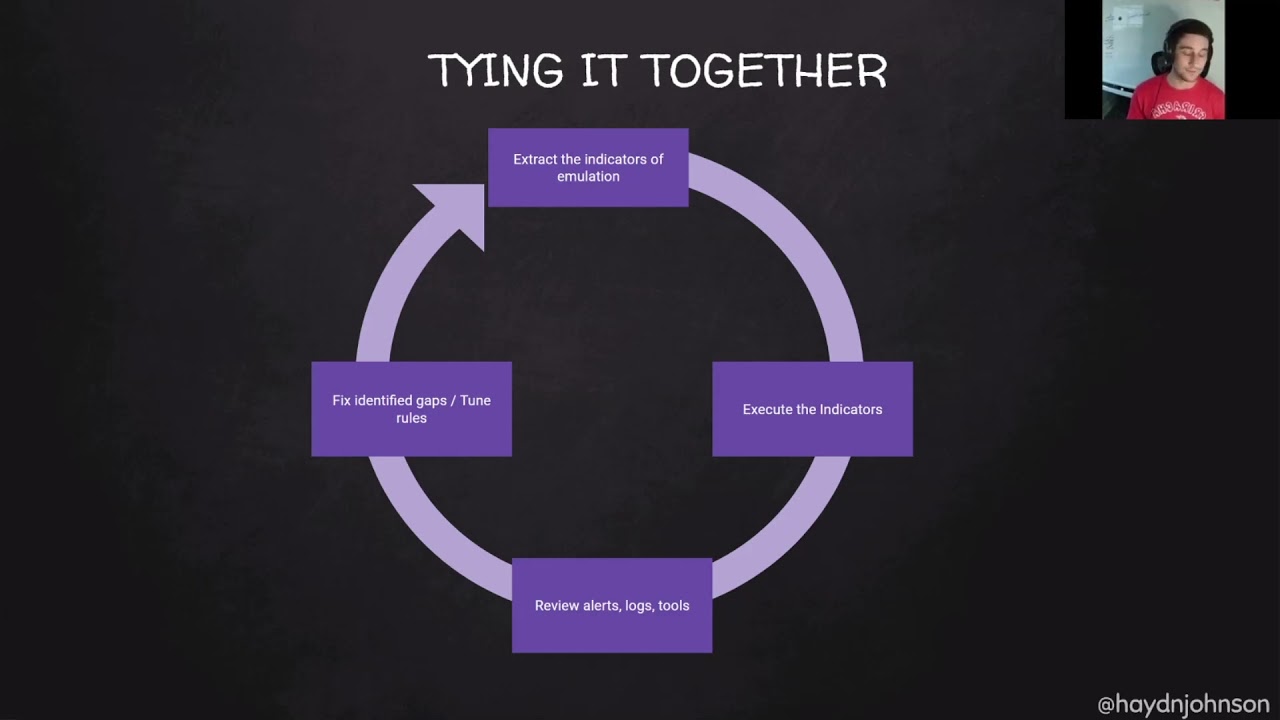
wanted to try it all together it was about adversarial emulation so we wanted to extract the indicators emulation the idea is to execute those indicators then review the alerts and tools and then fix identified gaps the whole just attack defend figure out what it is in true same old right so i wanted because this is b-sides conference oh my top notes have disappeared because it's a b-sides conference it's the local con in toronto um so i'll stop reading the chat uh there's a lot of students a lot of juniors and entry level here so hopefully this helps you might if you've already done this you can just take a coffee be good so what i advise as a home lab is a
minimum is a windows client and a windows server domain connected and powershell logging especially from the powershell stuff because i i just really like powershell logging and the script box i find it's really awesome and then the ideal one is splunk or helping greylock uh with sysmon your group policy objects and order policy all all doing all the threat optics and the funny thing was that the last talk is cheerio was that doing the malware analysis live malware has strong vm detection so you're not going to be able to run live malware in a lab like this unless you use anti-vm anti-anti-vm detection so the reason i brought this up is that there are really awesome labs in the
cloud which make it really easy to pop it up pull it down if you don't have the infrastructure at home so this terraform is really valuable here so the one i've been using the most it because i was introduced to it first is the applied purple team lab it's in azure find microsoft you can have a free trial of 300 or something it uses help the links in the bottom left whereas the right one is uh the splunk attack range which was also demoed at red team village which i thought was amazing as well it's in amazon obviously the most popular aws it runs splunk so it's more i guess the enterprise tool it's obviously the free
version to pop it up and then it's called the splunk attack range it also has os query and an option to add carly and zeke i think yeah it's pretty cool but i tried to create this last week or on the demo and there were things that wasn't breaking i didn't have time to fix it so there's no demo for that sorry so i'm 15 minutes in perfect so talking about the home lab i really wanted to spend time not just showing the tool but helping students showing my thought process on how i learn and how i run attacks and then i found this really valuable because in the process injection training they were talking through their code
examples and talking through it really helped so hopefully this helps you guys as well so i called it the one man purple team aka you're just gonna design an attack run it yourself so if we take the purple team exercise framework as a framework to use for this example there's four stages cyber threat intelligence preparation exercise execution lessons learned which is great so for cyber threat intelligence for exercise design what attack would you want to do so let's look at mitre attack framework everyone knows it's really crazy good um so i just found up wmic as an example just quickly grab a technique t1047 i've seen that asteroth uses wmic to execute payloads ap 29 is used dump wmi to steal
credentials and execute back doors so this comes in handy so let's use wmic to execute a payload that's really good idea so then i was googling around and i found a family living off the land binaries and scripts or i got it from friend or twitter the important thing is you you search and you learn and then this website has a bunch of binaries that lives on microsoft can build things or do awesome sneaky stuff so as you can see uh it has wmic has execution which is great that's what we wanted so what happens when we go in there it tells us how to execute it gives us the command which is pretty awesome i think
so wmic dot xc process call create code so we're going to save that for our exercise that we're designing and then i was like so we're going to execute something but what are we going to build so how can i build something and then i was like oh i found this one binary file usedby.net to compile c sharpcode csc.exe and it's on windows which is really cool and so we have this executable in windows that will turn a c sharp file into an executable it will compile it which is pretty awesome more learning so what do we want to compile here so we have seriously building something but if i if i'm in in my organization or
at home i don't want to launch malware so the cool learning experience was c sharp so i wanted to build a defect executable it's just going to be hello world so i googled it and it prints line hello world which is awesome but then we need to get it on the machine through the tool so we're going to use powershot so this is the command lines i came up with in my tool we're going to enable tos 1.2 we're going to use powershell web request to download the file that i'm hosting on github doesn't have to be stoppy then we're going to use the csd executable to build it into what we call test.exe and then we're going to use wmic to
execute it which is pretty cool i added another screenshot here because this was it though the way remember when i mentioned that where it executes cmd that you have to do one line so this top bit here is all one line on because it runs in cmd if you run this bit in a powershell it won't work so cmd just enables tls then powershell allows it to be downloaded then the rest rest executes that's great so what do we have so far we have an attack scenario designed and payload to use which is pretty awesome so now to preparation back to the framework it's the next step preparation for an org is more like what team does what
who's the white team what's the cta analyst um researching what attacks are going to be executed the preparation for me in this on your own in the one man purple team is setting up a lab and getting the threat opticspro key so preparation lab setup so for this demo i'm going to use the applied purple team lab it's in microsoft azure and 20 minutes in so i'll try to hurry this up if you're just setting up the lab you download the terraform script you run web builder dot pi after you've added the subscription id and all the um access it needs then it runs for 20 minutes and then you go get a coffee which is
great it sets it up domain client server domain and help so when it finishes you'll see your public ip address here and then strew clients to dc and linux what i advise is adding a public ip address for cabana because it's so much easier than having to remote desktop and load the sheet that terrible internet explorer up and then if you go but there is also uh through enabling threat optics which includes sysmon auto policy powershell volume so the guys from defensive origin have created this which is amazing it pulls different zip files but when i was testing it it wasn't consistently grabbing powershell logs so myself i just pulled the reaper and then added through powershell manually
it just gave me confidence that it was vlogging what i needed and ironically today it it wasn't giving me the full box so funny things can go wrong so once it's built you have your powershell here it says computer policy update you run it on the windows and the server that's server first then to the right in your cabana you'll see hostname so i would always double check that you're getting logs from both because it's important to compare both logs at both machines both here so the web so far is we have an attack design with payloads we have the threat optics web setup and all the vlogs logging so now we get to the fun bit well it's
all fun for the exercise for 10 minutes 20 minutes awesome so again the purple team exercise framework exercising the execution or exercise execution now i have a youtube that's recorded which is awesome but what i wanted to show was live so let me grab it and see how the demo goes go today so if i just type what i've done is i've taken i've taken the commands that we spoke about earlier and i put them in the file commands dot text which is awesome and then with my tool i'm just going to do dash mode admin list list on all interfaces on port 88 with the commands.txt then on my server again if i clear it there
really is nothing here oh there's a hello world let's screw it up because i was testing it's not prepared before if we go here client connect ip address connect i press enter it runs and by bing bada boom you have execution which is pretty awesome and as you can see it like i said the client or the child malware it gives a lot of screen printing so you can know what's happening but the important thing is that we got our hello world and then we had a wmic teacher which is pretty cool and then i think oh the cat somehow opened my door that's great but yeah it downloaded the c-sharp file and test exe
i wonder if someone close the door for me so from that you've run the exercise the c-sharp file which is really good and you followed your design so then the fourth part is lessons learned so when i go through the execution of design it's all good but what do i want to learn from it i've learned how to build c-sharp use powershell pull it down in the attack but from a pen testing point of view what logs am i creating or from a defender what blogs am i is being created and how can i tune them or uh find them so this is sort of a contrived example with like 10 minutes left so i will go
oh no let me fire up this one i had this prepared earlier have them all in tabs because it was running slow oh am i a good one so for example i would type hello world i have not hello just how it was asterix as you can see i've tried other queries and the methodology is that you search through you have a look at the event id 4103 oh powershell awesome the up um and then you can just view what different bits are there what fields are in the logs which is pretty cool but one trick i wanted to show when i'm looking through them is that i try to list the event ids that are
triggered because you can get probably thousands of events but if you're in a lab you're generally fine so you can see here there's 600 i think related to powershell and one is process creation 400 for 103 and 11. i think no three isn't it anyhow so you go oh nice event id one so let's do event id one and then hello stuff like that and what that brings up is your hello world c-sharp file and your event id where is the one then id one what this allows you to do is really understand each log that's created which machine it's on where it's being executed stuff like that so what else i wanted to show was that
if you type in csc.exe it'll bring up the process name so like here uh no that's wrong you can see the process name and you can say okay so event id one which was showing up with hello when we were searching uh hello it's coming up there here look it comes out it shows csc.exe which is pretty cool and then within elk i might oh it might not move too quickly we shall see no it's running real sorry anyhow i would save it as a search and what you can learn through hunting and whatnot so for wmic it's the same kind of uh methodology 10 minutes awesome so wmic you can see it once here i don't know if
this is the right log this is live so it's not too much information so that's not that useful but if then we go down to the next one we can see that the process command one thanks to sysmon is wmic so would the process command name be no we understand the parent is powershell which is then launching wmic so that's why in the next one i would search process underscore name equals wmic.exe and then the process command line process call create and what i've done within elk is lists the columns parent process command line and the process name so it's much easier to sort of see what the world has or at least the vital pieces of
information such as this command line because if you drop down and you go to here uh raw event or something or if i just delete them okay i've got an error it can i close that oh excuse my legs sorry damn what's annoying anyhow as you can see here is that it's not as clear to read that the columns are really important which is pretty cool and from there i wanted to show this little not trick but i love powershell logging so the idea here was that event id 4103 script blocking would show everything that was executed now this is the problem with windows logging or your lab you might not have all the logs
you expect so you might not have it in pro stuff like that uh so here you can see my powershell is launching the c sharp file and then the out file which is pretty cool but the video i wanted to show is here uh down to the end yeah so in this this log as you can see with the powershell parameter value is that it's a huge ex it shows everything i did in the one file so it's really awesome to look at different things like that which i think is valuable i think i've got 12 minutes so i hope you liked the demo it's just sort of my methodology of trying an attack or sorry finding an
attack sounding interesting building it under trying to understand what payloads you might use running it in the lab and seeing what events are logs and it's a contrived example as well because obviously in real life you're going to have a lot of different blogs you might have a lot of false positives anyhow gets that so we understood an attack we understood the execution of the attack and the payload we built which was awesome and then learning from that we learned how to build a basic c-sharp program to execute we reviewed the logs and considered different things within the logs which is awesome so the tips for detection as i said in the demo is that to list all event ids
or blogs related to the indicator might not be for linux not so uh professional with that but they don't come up as clear but it's great for windows yet list your event ids from there and then you can choose what you know so if you've scripted hello world like i did you can look for that as an indicator and then you can look at all the logs and sort of see what a valuable what are not and so continuing along that is that you should probably uh review each log understand what each word means so sometimes they have the same id but it might be powershell or something else i found that sometimes confusing and
then what fields are valuable whether it's a process name or if it's just like a random string and then again consider events from both hosts and then there's another one from work we've been working it's not anything famous uh learning about is a alert logic so you might have like csc building something on customer support who cares whatever it's medium event hypothetically but if something's built or malware is detected on a product server with uh health you might make that critical right so when it comes through it pages everyone just like that simple and then i've also added the links to sysmon and some other links that i searched for our events now to go back to students
uh and juniors are entering into the field because my friend and i are in the dc for one slack we do a lot of resume atd shared to you but we review their resumes and i wanted to add this a little bit so what can you so what have you done you've done the attack understand the attacker life cycle powershell commands windows logs and sysmon so what can you tell your hiring manager you might word it as i have executed different types of attacks but what does that mean it's more like i have an awareness of the tackle life cycle and various attacks that can be used and sort of have a better understanding of
how difficult or easy they may be to launch what defender might block it and you're like oh now i need to disable defender or then what i found out with testing was i need.net on the machine so if it's just popped up in the cloud it's not going to have any development frameworks and then i'm sol and then i have an understanding of different windows logs and have played with them for detection so i think that's really important you don't necessarily need to know that 4103 is powershell script blogging but some more in-depth vlogs you might like or just an awareness of sort of the information and what it is so if you're wanting if you're wanting
to do this on your own definitely use the cloud labs but if you're stumped for ideas because i like working from an exercise uh point of view goal orientated when i do training a course and it has like 100 pdf and i've got to read that before i get to the labs or it's like pulling teeth out so i found this one it's free it's from cyber monster security it's free curriculum it's australian which is awesome so it has about 80 60 different exercises so there's one such as write a powershell script to list missing patches which then you learn about sort of people's code they've written how they do it and you sort of use parts of it
it's pretty cool the write an application vulnerable to cross-site scripting i haven't done but i might do it out of interest and then my favorite or at least like for this talk was right help filters that detects uh simple attacks about eight minutes i should be good so in this one as an example it just says powershell included commands you want to detect how do you detect that the process mimics.ex was started it gets a little bit harder because everyone loves mimikats and then in the logs like a process other than explorer launches powershell.exe or cmd so again in elk i showed by the process name you could just do not explore.exe and process equals
powershot.exe and then the bottom right they have references so i've yes i definitely have the link in the bottom link left which is pretty cool so you should have a takeaway for that um in all summary the tool that i've built can really help simplify executing the commands the labs help in building detection understanding the attacks but the real value comes from yourself setting it up running into errors because that's always fun and a struggle but you learn the most that way so hopefully that gives you a methodology and a process sort of help you guide learning on both attack and defense so i think i finished seven minutes early i climb speed run that a little by accident my
contact details are here the tool is there and i guess anyone to pop up any questions
thanks a lot now i understand the sriracha shirt yes yes well yes despite simulation and because the b size toronto logo was red absolutely yeah um so there has haven't been any questions that can have come in yet but thank you for putting in all this work to create this emulate.go seems very useful set up that environment quickly give people that platform to work on do you lab i should probably differentiate that the lab environments in the cloud are not written by me they're written by ten times smarter people and two groups of people so it was just my tool being used in that one so i cheated no no it's all good um all right well
if you want to do more live demos you have time otherwise i can just show um so when i was sitting at the purple wind left today there were some errors it was building fine as you can see but it's still errored in that oh my god i screwed up like a million times is that there was an error joining the domain so if you do run into this i would suggest uh you can just go into windows yourself and connect it to the labs.local domain so and then it was all working it was just i was missing some logs on the windows for some reason or the client so that's why i did a little bit
differently but there are issues but you can work through them fantastic thanks for that all right well with that uh well in the presentation thank you very much hayden for coming and talking again at besides toronto no worries thanks having me again
Related talks
 24:40
24:40 22:10
22:10 26:59
26:59 22:15
22:15 30:27
30:27 55:35
55:35