Not BigData, AnyData
Show original YouTube description
Show transcript [en]
so welcome everyone my name is Martin Holstein and I got the Carolina vet Elsa already uh so I'm going to go into some more of the in-depth details on not just using Elsa but also not quite the configuration I've ever asked about how to extend and uh the overall gist of the talk is going to be not we've heard about big data mapreduce in early time but I want to emphasize that it's not just about having a lot of data it's about having the right data and a lot of times that means data that's specific to your organization data that you can't get from anywhere else from another security tool this gives you a way to actually
Implement that and have it available along with your big data so you have big data and small data at the same time and I guess we're going to call it holidays today so before I get too much into that though I want to talk a little bit about you know why are we here why are we even doing IR first places I mean there's the obvious answer is like why are you know why are you a business law or a business to make money or a business to you know produce an awesome product um you know we're we're creating service in IR we tend to say well we're here to secure things and most of the time for
logical people that's enough but every now and then you run into places where you say well how are we making money being secure or how you know why are we even doing this in the first place and it's sad but it definitely happens when they kind of look at it as almost a Machiavelli Machiavellian thing and uh the answer is that um if if you run into those situations where they don't actually feel like there's a business need to become secure you can get at it from an Ops standpoint and this is a really interesting sentence historically security has been the the group of no you can't do this no this is not secure you can't run it and
oftentimes that's required but what I've found is that when you focus on visibility instead of just saying no instead of locking things down if you focus on audit and knowing what's going on suddenly you have this great Synergy between operations and security and whenever you have that Synergy what you end up with is instead of security saying no Ops loves sending you the data because they get to use it too and that's huge accomplish less staff start working when you start working your next step is to collect events and then artifacts and what I mean by artifacts that's going to be pcap data that's going to be disk images those are the kinds of things that have a little bit
more of a physical presence in most cases and they're also harder to get so events are cheap to get because it's easy to stream events and things artifacts are a little uh tougher to get to higher up the pyramid and when you put it all together what you're looking for is context and then at the very top I think we're fat salts and sweets and that's the yeah that's what they are yeah that's your weekend is at the very top so context is what we're driving towards through all this after all the political ones and in my mind IR isn't done until you've answered the hardest part which is why did something occur not what
happened you're looking for means motive and opportunity so what was the motive behind what was going on for a lot of the stuff it's a simple Smash and grab kind of thing this is crimeware they're on a Bitcoin mining whatever but sometimes it gets more involved than that and that's when you really have to have the context to answer the question why did this occur because if you don't know why it occurred you can't go back and figure out when it's going to happen again what to look for there's no feedback group of success so this is this is pretty much why I wrote also the first place to be able to provide this context
and the key to contacts to be able to not just search but also summarize and drill down quickly and you need to be able to get from events to artifacts easily and there was not a very good way to do that even even with the paid products it was still either too slow or didn't do what I wanted so a couple years ago I set out to do it myself with leveraging a lot of stuff that wasn't mine some other open source stuff syslogging Gene sphincts are the two big components and of course my skill right now is the bad end and uh the other major thing is that it leverages that's what I talk about any
data local and global data what I mean by that is if you're doing a who is look up I'm calling that global data that's not data that you own that's data that's readily available and there's local data that might be uh your event data that might be a database we'll get into that in a little bit but it's that putting the two together and it gives you is the idea that I like to look at is from astronomy it's called Parallax so it's a little bit tangential but bear with me so when they're trying to figure out how far away a star is it's just like if you hold your thumb up and close one eye and
then the other eye it gives you two different viewpoints to the same thing and Chris talked about this a little bit in the last talk but it was a really important idea to me so if you have two different viewpoints that gives you the ability to find depth and depth is where you start to gain context so from an event standpoint these are all the different viewpoints of the same event so we'll say that we had a conversation between this IP address and this IP address that's just a concept right but represented by various events so firewall said oh this is how many bikes that were transferred you know that's all it knows it knows the
connection and then the bytes a proxy will know what URL went to bro will essentially have all of this stuff put together from its various files but among those it'll have the md5 the file is transferred it'll have the country code that it came from uh if you're running um any of the emergency threats or other signature sets you'll be able to see if it was a pact executable that can also trigger something and then if you have Windows logs coming in you could probably figure out the user so each one of these log sources or event sources has a different Viewpoint for the same data you have to put them all together to tell the story
so when you have the full story what you might find for uh we'll call it spearfish in the scenario there was Recon that occurred first and that this was on the 12th then on the 13th the fishing email shows up and that gets read right away so you have evidence of an exploit and then later on you see an exfiltration and it's not until you have all of this that you really see the full story and that starts to tell you about the why because obviously these events are all related and this is the LIE they're looking for this war file here at the end where they're looking for something extra file that's great how do how do we get that
so I want to show you some actual Elsa surgery that would produce the timeline we just saw and I also want to show you the methodology for building that so the first thing is Step One is to find the exploit now if we go back notice that the exploit was not the first thing that happened here and this is a key concept we're not starting from the beginning of timeline because we don't know what happens before and after we only know about what an IDs can tell us what what can the ideas hint to us or maybe it's not an IDs maybe it's anomaly detection or something like that you have to have that first hinge to start with so most
of the time the hint is from an IBS so in this case we'll say that our team is set up to look to investigate any past executables so this query looks really daunting and we're going to break it down here in a minute the first query says show me all of the unique IDs signatures for a pack executable and summarize that by the destination ID and then we're going to take the output of that and we're going to say okay for all the desktop views that we found show me the unique sites linking that together from the desk IP and then for everything go into my proxy locks and show me what wasn't categorized and this one's key because
if you're looking at stuff that's already known bad your proxy already blocked it what you want to know is about an uncategorized sex that went through with a package too that seems pretty interesting and we're going to group that by the internal IP address so this gives us two things to give us I'm just using I'm picking on Eastern Europe with an 82 address we'll call it an 82 address and our victim is local 1.1.1 now the next concept for steps two three and four going back to our timeline these are going to be victim-centric searches these are not the attacker is not going to come from the same IP every time but the victim in this scenario is
going to be the same each time so the next thing we can find is based on searches for 1.1.1.1 we can find exiltration by looking at all of this IDs messages we have for the Victor that should be a much smaller amount because now you're not saying show me all IDs you're showing only the IDS for this one host we're now interested in based on that pack xq and then we'll find that there's an interesting signature there for a RAR file expo well that's pretty interesting but a RAR file in it itself isn't necessarily bad so again at this point we're only at exploit and expel but we don't know the whole story why it
happens so it might not be even be enough to say that this was absolutely exfiltration because we don't know that there was Recon or a fish that happened earlier so step three is go find the bait so now we're going to look at all the emails from this user what were the individual subjects that this user received now we can see that there was something very interesting and it came from our admin at some throwaway.com so it's pretending to be from an administrator so that should pop out because you're only going to see the emails that that user got and then lastly we'll say okay well how did they get this person's email address well maybe they went to the company
directory let's go find out who's been accessing the company directory and that should be after your web Bots that's usually a pretty small number of IP addresses and maybe you'll be lucky and they'll come from a similar geographic region or they'll be use the same user agency or something else to only get it together but it took four distinction not just searches before distinct goals within the searches I'll call them Subways to be able to pull that out so I want to talk just briefly about the internals on sub searches because that was a lot of stuff before and I want to make sure that everyone is clearing how to do a sub search because so many of
these things rely on sub surges so the idea of the sub search is that first you have to do a group eye to say I'm going to summarize everything I'm going to roll it all up by a given column field in analysis case and for this will be death ID and then you're going to say I want a sub search so this is passing those results to another search and there's an option there after the comma to say I want to make sure that the next search uses this as a field so to put the whole thing together let's assume that your first search is about you know 1.1.1 Group by deskip and this gives you 2.2 and 3.3
and they have accounts associated with them so if you do a sub search what it'll do is pass those second two and this is behind the scenes what Elsa will run so it'll take whatever you typed in on the sub search you can see class URL is the only thing that sub search so it starts apply URL and then it dynamically builds based on this result set to the rest of the searches so it puts them together with the words so it'll be a structure B2 and Source 73 and the source ID part comes from like uh from The Source ID after the comma right there so I can pause for a moment is ever does
anyone want me to go over that again I can use the Whiteboard or anything okay uh so let's talk a little bit about the internal Elsa read an awesome job with the architecture which means I don't have to spend a whole lot of time covering that but I do want to go back to that and just in case congrats part of the last talk so we'll talk about parser's first next and I want to show where Parkers fit in the overall chain here so the very first thing that happens with uh specifically syslog on its way in and remember syslog could be generated from a Windows box if you have an adapter on there so it's not always
just straight Phoenix syslog but anything is coming into syslog NG over the network it goes first through a parser then Elsa does a little bit of normalization it's not very noteworthy it just makes IP addresses another major format and protocols in your format and a couple other things but not nothing you'll have to mess with then any forwarding occurs we're going to talk about that a little bit and that gives you a nice option to have log replication so if you want to have say a development environment for Elsa you can have logs copied to another environment after they've already done parse so you get a nice sentence a copy of your logs and actually get stored and archived
into my scale and finally they get indexed by six and then on the search side I do want to go through this real quickly so you can kind of see how the logs come back out your query is parsed in the the web interface then the query is searched in space Sphynx Returns the list of IDs that match uh Elsa goes to mySQL to get the actual definitive event based on that ID then after those results and these look basically like what you get back on the web interface after that point all that the actual final results here get transformed through any number of plugins and that's where you might add Fields you might remove Fields you may apply new data to
it but you've already gotten all the data out of also essentially so this is happening in the web interface and then lastly you might go to a connector email is the the connect you most people are familiar with so let's talk about Chargers you did a really good job earlier Chris talking about the need and showing a few of them I want to get down and dirty because my goal here is for people to be not only be able to write them for themselves but to contribute back on the mailing list all the references at the end and of course that I'm going to experience as well so when when one Defender gets a little bit better we all get a little
bit better and I think that's an important thing so this is an economy scale that way so please if you're if you're right parser submit them to the list even if you're only got them half done they'll help you clean them up so parsers go and uh you and these are custom cars they can go patterns.dxt and you can just toss individual files in there and those all get merged into one so at each um Elsa updated so that you can keep them separate and when you're working on them and it makes it easier for testing to push down a second and so the install that's data Sage which is uh would for a non-security onion that's
what will pull down the latest Elsa and build it for you and uh as I mentioned there's a full documentation of writing Parts uses that on the Google code page which will be a link at the end so here's what a basic RC 3164 assist log message looks like you have the facility priority tag at the beginning almost no one uses that anymore it's rarely helpful only if you're a real pure unit shop is that going to be right now any of the dates the date and time stamp and then you have the program this is referred to in Supply as the program this is actually the pit of the program here but if when you're matching it's
just going to be this part the numbers get ignored and then a colon a space and then the actual textual body of a message so when you're writing a parser the first thing you're going to be matching on is that program that starts out uh Samsung NG uses two different styles of partial so the top one is really just a text search so it doesn't have to be the full name of the program for instance if you're practicing Cisco logs it could be percent sign ASA or percent sign fwsm it doesn't have to be the whole programming numbers and that's really helpful on the other hand you can't use all of the different kinds of
matching you can do on the message that I'll show in a second so really it's just the leading part of the program and so if it passes that then this rule set will take place and this rule set could contain any number of patterns and patterns have a specific kind of matching code and you need to make sure that your class here corresponds to an Elsa class ID through that in a second so the different kinds of parsers I have these are the three that I think you'll really need there are others but they're almost never necessary so I don't want to overload people with all the different ones E string it means end string is pretty much the most important
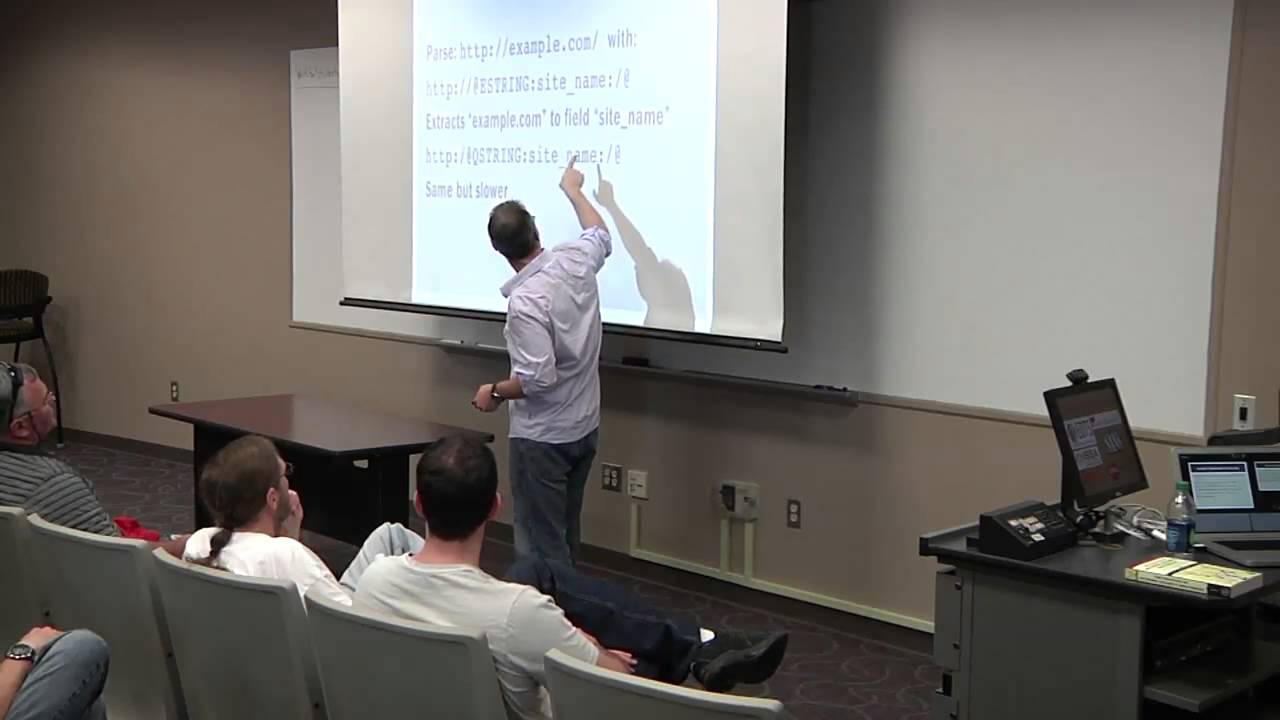
the number can be helpful if you don't know what the next uh the basics so let's look at one the basic syntax is going to be an at sign the type of the parser the field name that you want to extract and then the characters that you're matching on so we can parse this text here this URL with starting with the solid text that matches and that so you're sure that what you've got up into that point is HTTP colon slash then we have the magic with the at sign the assign says now we're going to start cars here it's going to be a type B string which means go up until you get to this end screen
we're going to call it site name and the end string is going to be a slash single slash and then at sign ends the uh declaration so that would extract example.com into the field and with Q string it's almost exactly the same as each string except it expects this to be the beginning and the ending this is that they were double quotes around something you almost never need that but it is kind of Handy to know about especially if you have a lot of fields that are quoted with double quotes or something like that so always try to use Eastern if you can it's the fastest manager but sometimes you don't have uh the the before
knowledge that it's going to start with something exact so you can use e-string without a capture on it to just move the the pointer of evaluation to a certain spot where then you are sure this time so in this example what I have is an E string there's nothing between these quotes or the colons and that means don't name this it's uh it's like a non-capturing group in regex if you want to put it that way none of this happens in regex by the way this all happens in a much faster pattern matching engine but it the idea is similar to uh not actually group there so that moves our evaluation to right up until the end of
the double slashes so then we know that everything up until the next class is going to be our site so that's really helpful um for when you don't know what's been stuck with but you might notice that that means we don't if we don't have that anchor to begin with it's going to match it could match on other things that we didn't anticipate and that's where the the programming is uh really important because that will pre-filter any possible matches to just the ones that you already have a subset of knowledge so this is again the pattern and the rule set element so that's the difference so there's two two times you can pattern this is a
pattern for the message and that rule set outer element pattern is fashion okay so this is where it gets a little bit trickier that other stuff that's like once you get past that it's pretty straightforward this is Elsa specific and kind of weird so it also abstracts all of the field names in the schema so the schema contains all the field names but when the data is stored it's not stored in a source ID or desk ID is stored as field I zero I wanted to or s0 so it's also right now we'll only store up to six strings the six integers I'm working on extending that right now that's the limit and so the
field order it corresponds to the MySQL table and there are I think 19 fields in there and this corresponds to um the order I guess so the fifth field in the schema corresponds to high zero in the 11th field corresponds to s0 and in SQL schema that's how it matched out so this part gets a little bit confusing I don't know maybe next year I'll rewrite this or later in the end of the year because it is a little bit confusing but it's not too bad if you can pull out the steam I don't have a look so there's a table that contains just the name of the fields and the IDM or the field there's
a table that contains all the class names and the ID of course bonds there's a table that combines them and that's the special field order so it says okay if you have dual owner 11 and your class ID is this we're going to name it whatever the ID is here instead might be Source empty and so the actual final message will look a little more like this this is uh the testing part of the rule so you can have examples within the XML for uh the pattern EB and this is a great way whenever you're creating a parser to document The Source data you had from it so that a reference for not only yourself but others see and it also
provides you some quality assurance you could test to make sure the parts are actually part negative you do that by giving it an example message right there in the XML and you say okay for each field you should be getting the value then you can run the Saga gpe tool test and then emerge.tml and then it'll tell you if anything didn't work right okay any questions on parsers all right talking really fast so we're going to have plenty of cheap anytime if you want uh all right let's talk about plugins so there are a lot of places that you can extend also these are all the categories of plugins that you can create uh the
one you're probably going to be most familiar with are the transforms and the one we're going to talk about in a little bit are the data sources we talked a little bit about forwarders before he saw from the last talk that you could do best copy of the SSH forward you can do a URL based forward but you can write your own four years there if there's some other method like I guess copies already covered but like are saying or something like that um there are stats plugins I haven't used those too much but there's a hook for that uh post processors we don't use that too much either but if you wanted to do something with the file after
syslog NG would download it you can put it up in there export's pretty obvious but I think most people's needs are met by the PDF CSV HTML and Google Earth outputs but there's probably something you can think of there transforms have been mentioned already and those are going to be either adding or removing fields or changing the makeup of them and then connectors are like email that that's one that um there's plenty for you to do on a local organizational level because maybe you want to send this a lot somewhere else or send the results of the search somewhere else and then info is and also if you click on a single log and click
the info button it will take that log entry post it to Elsa and say what can I do with this and then Elsa will dig through all the info plugins it has it says oh you could do this or this or this or this and that's where something like streamdv comes in because you'll say you have a screened to be configured if you click here then it'll go and automatically pull up this traffic from screen DB or open FBC at me or other things and then lastly it was dangerous to talk about here so for uh data stores you can have a direct plug-in to a database and this is a little bit different than what Chris was
describing earlier where you're reading from a database and indexing the database this would be a read-only operation where you're leaving the data in the database but you're going to incorporate it within your searches so the goal is to be able to execute an Elsa query that looks like this you say I want to point that my HR data source it's a data source HR this is an example of having a human resources database like an hris might have a clean name I want to say in this HR database I'm looking for all the users in the finance department so the goal here is to find all users so this is actually not that hard to
create in the Elsa web.com we can configure this so the very first step is to figure out the exact SQL prayer that's going to generate the data you want so usually the first step is going to your DBA and saying I need a username and password and you know where it is work out all the connection stuff and it's usually pretty straightforward if it's any kind of normal database odbc is fine so Ms SQL Oracle all that works and then create your query that's going to grab the all the different fields you might want to uh Square so then in the config you say all right for data sources uh we're going to have a
database and this one's going to be called HR here's your connection string it's DSN and your username passwords this is the basic connection information this is where things get not tricky exactly but a little more involved so for each field that we want to be able to extract there's an array and so you call it you give it the name and then I have it here because the name will work where it just expects it to be a string field if you want to make sure that we interpret it in Elsa as an integer you could put type int and that will make sure you can do greater than less than that kind of stuff you can also call it timestamp and
that way your starter end and also will apply to this data source which makes pretty much all the syntax work and then the last most important thing is the active query template so you take the query that we figured out before here hit the select user Department from users and you stick it into query template and then the key thing here is it uses a Sprint app format so you do a template so this is percent ask anytime for free slots so one in the columns you're going to select and then you have these two back here which will take the place of the the where clause or the order by and I'll show you what gets filled in there
so when you do an Elsa query for user Bob your SQL become uh Elsa will take your query and then make that where user like percent five percent and yes I'm using placeholders don't worry so the uh the code will actually execute on the database pull those results down and then display them as if they had come from Elsa itself but you never had to adjust the data that's great on small data sets that's uh that's why I call this any data because sometimes you have a lot of events and a small HR database and there's no reason that the two can't meet so the small database is great for not import because you don't have to
worry about keeping it up to date there's no lag and the data can stay there if it's sensitive that's also very handy so if there are regulations on where it goes you can certainly use TLS when you do database queries yes also determine what was that was that and tried to access yes if you have that data source I have that example next yes so in this case I'm going to this example is using VPN to figure out where they were so great question uh so for the day of baseball again let's let's see how you would actually use this so now that we know kind of how sub-surges work so let's say that our initial Source bit of
data is this external HR database so we're not starting with also we're starting with a local database and this is all the users in the finance department and we want to say okay find the IPS using the VPN login and then this is where the transform is coming we want to augment this data so we're going to say add on Source IP description and then we want to summarize that roll it up by description so we want to find unique description networks for everyone in finance that's kind of cool right so what did we get because this is a made-up scenario but well we saw a whole bunch of augments from Comcast let's say that
they have Comcast as their ISP that makes a lot of sense VPN from home right a bunch of Starbucks okay that makes sense I went to Starbucks and University of Lagos that's a little bit weird for my finance department yeah okay
uh okay so let's look at a different kind of transform that's taking local data that's present what about this global data that I talked about before and you can swap Global with like freely available generic data right so if you go into this podcast URL um you're free to download the top million websites Alexa used to do this and I see now it's an Amazon service which is kind of interesting for a whole query at the standpoint um but uh podcasts are still free and you can just grab the whole file and this provides you the top million websites that's a really helpful Baseline so it's kind of weird if you're visiting a site that's not in the top
million like that's a lot of websites so now there's plenty of reasons that you know sometimes the website will be new or it's a sub domain and there's plenty of reasons why you don't do that so you can't just say show me all the stuff that's not the top million you get a lot of hits it's not perfect but it's a good starting point so uh let's let's try to build in quantcast here as its own custom transform so here's how to create we just create a new table so create table podcast and then account and site are just these two columns here and up to it it's already in a tab separate format and um there's a there's a couple of
comments at the top of the file so we do a load data in file and a product cable ignore the first six lines because they are comments and you get the shiny table that is now local so now it's not an HR database now it's the contrast database and you could skip this if you really wanted to just read that text file that letting in a database with just a few lines of code you could write your own Elsa code plugin in Pearl that would show you um that exact stuff but this is this requires zero code I wish I thought would be a little bit more uh today so in the transform notice that this is
not data sources this is transform transforms now last one started databases database this one's transformed to database and we're just going to name the font pass and then you do the same thing you did before the DSN and username and password that would just be your MySQL connection and then the same field specifications in this case it would be count and uh site and then the query template that we saw before you can pretty much use that exact one and step forwards process so now we find the balance from uncommon size and upon a common like ten thousand if your rank is in the past ten thousand it's a little bit less common so let's
say you want to know all the file downloads so you start with a keyword search of md5 which happens in it and all the growth files output you say I want to see the unique sites for all this now I will mention that if you're doing a group Buy on a really large time frame and you have a lot of data you might get way more than like a thousand records back and for that you're going to want to trim your your size because it's not it's going to be unbeatable to deal with more than that and generally speaking you don't want more than a thousand records back at a certain time so that situation you
want to decrease your time window to say all right just today or just the last hour or which usually works out really well is to put this in an alert so this runs every minute and now you have a very small data set so this works really well to work so all the unique sites that had a profile download A Passage through podcast so the quantcast transform will now take that match it up with the sites it has locally if it can find it it'll attach the count onto it so now you have a quantifies right here and then we're going to roll up on account and then we'll say you have to have 10 pounds
that's got to be your account so I don't I don't have the output from there but it would be dependent on your track but that's one example of just grabbing any old data source and making it work for you basically uh so I kind of wanted that to be just to get the imagination going about all the things you could do and uh there's a lot of opportunities um I think one of the first things people want to do is have their uh events be able to be posted to their own internal ticketing system like a request tracker whatever you have so that's this is all custom stuff right that you have to figure out but if you look at the uh the
Elsa connectors that are there and know somebody that knows Pearl or willing to learn they're it's really only like 20 lines of pearl to figure it out it's really not bad and by all means ask on the mailing list I can help you out and uh so that's that's often one of the first ones in there and I'll tell you for for integration stuff like that and this is goes back to my one of my first slides about making it work for Ops because Ops is going to get you that database username way faster if there's something in it for them they're going to get you the right format to email the help desk if there's something in it for
them so if it's just security it's like okay that's a favor but if you say oh by the way I can tell you whenever a certain flag gets set in active directory and I can have it email you automatically well suddenly you're a hero and they're going to give you all the information that could possibly give you and they're going to do it really fast because you made their job easier so anytime you can do that uh it's a big win for everybody so that's that's the strategy I recommend um you know code and tools and all that stuff is usually the easy part it's usually getting people to agree to do something is the hard part being a large
organization and so more motive you can give them um more likely it's going to be ldap is another good one that would be uh one to shoot down in fact there's a lot of code and um Elsa right now for dealing with aldap authentication is built in by default there are examples there for authenticating against active directory and you can basically copy and paste a lot of that stuff to just make a nail that transform so you could say Okay VPN user what groups are you a member of that would be an interesting thing to know filter on that pass that back to another Search and say okay what were the IDS alerts for the people in the specific
lnet group so if you just kind of keep building on those things and get good stuff out of it I don't know if you want to have the ability to do encrypted export um but it could be coded pretty easily just even even piping anti a g-zip or something like that with a pretty nice especially if you want to have that for posterity for investigation something like that evolved or checks on it or something like that and then maybe just a check that uh does a wmi call to see if the user is logged in something like that and uh actually in the last Tuesday and a local Madison Pearl group we demoed um controlling an AR Drone through Pearl
and it's the people have done that through a lot of different stuff but it just made me realize that now it's probably like 20 lines of code to have the guip transform get latitude and longitude and then pass that to an AR Drone transform and then we can just launch drones at uh whatever log entry that was I told you not to log into my service and they have about 10 minutes of battery life so it better be somebody sitting next to you but uh anyway so that's the gist of it uh and by all means um please sign up on the mailing list we have it's not just me this has been really fun for me in the last year or so
there are other people in the mailing list that answer questions it's really cool and they're very very good uh so between a lot of us we can help you out and uh Blog has a lot of examples on not just also but also integrated things like row and stream DV with also and some things aren't even related also and then the project site there to get code is the Enterprise lab search and archived that Google code.com groups.com to a mail list and uh good we're under 10. so that leads me to the question all right
Related talks
 29:14
29:14 25:46
25:46 31:04
31:04 51:54
51:54 37:51
37:51 8:26:49