This is a serious laptop; No games and chatting possible OK?
Show transcript [en]
Welcome, my name is Yiannis Koukouras. I am the Managed Director of 12SEC. I've been a penetration tester for almost 15 years. I have a bunch of certifications which don't mind here. I'm a very eager cyber community supporter. And today we're going to talk about an assessment that we did in 12SEC for a secure laptop. built for off-site work. So we are going to talk about the methodology that we used, the different vulnerabilities, the different misconfigurations we found, bugs, race conditions, some zero days that we found. And we're gonna show how we use those to extract data of this secure laptop and tap into the corporate network. So, first we got this laptop. Supposedly it was built with security in mind from scratch. It was
for people to work away from the corporate environment. It had Windows 10 fully updated on it. It had an endpoint security solution which included a firewall, ID values, ID malware and IPsec VPN client. The Windows Firewall was disabled, as most of the administrators do in order not to confuse the other firewall. It had a full disk encryption with pre-boot authentication. It had AppLocker on whitelist mode on the default settings. It had a free visualized internet access, so that meant that As long as the user would browse the internet of the corporation with their Internet Explorer, Internet Explorer would work just fine. As soon as they entered a URL that would go outside of the network, a public
URL, then Internet Explorer would close, a virtualized instance of a browser would pop up and then they would be able to browse through there. They will be able to download anything, they will be able to upload anything and as soon as they close the browser the instance will be deleted. The configuration on the laptop was that the BIOS was locked, all the boot devices other than the hardware, the hard drive was locked, all the USB ports, cameras, microphones, everything was locked on the BIOS. CAST credentials were enabled on the laptop, but only for domain users were allowed to login, no local users. So, what they used in this corporation was the World Garden Architecture, which is proposed by the GCHQ, the NSA of the
BRIDGE. So what we have here is we have this laptop in question and it has two modes. One mode is when it's inside the corporate network and one when it's outside. So at boot time prior to decrypting anything it will send a heartbeat to a specific internal server. If he would get a reply that meant that the laptop is inside the network so it would automatically decrypt and prompt the user to login to the domain. If no reply was received by this internal server, that meant that the plateau is outside the corporate network, so it will go to the outside mode. In this mode, it will ask for the login credentials of the domain of the user, which were cast, in order to start the decryption of
the hardware and then it would automatically sign on the user to the Windows environment. At that point the VPN client would try to identify this VPN gateway, this public IP address. If it could find it then it would connect to it and the firewall would apply a policy "OK we are inside the network, allow all connections to internal IP addresses, deny everything public. If the VPN client could not find the VPN gateway, then it would go to another mode that's saying, "Okay, we deny everything. The firewall denies all communication at all." So you wouldn't be able to send files outside the corporate network. They wouldn't be able to attack you, everything like that. And all this All this money, all this architecture, design, all this trouble
was done for one single thing. For the employees of the company to be able to do that. So, the scope of our work was to try to, if we could, implant malware on the laptop or use it to expand it to the rest of the internal network. Get access to the laptop from a secure network, like for example someone is connected to a hotspot, internet cafe, to a co-working space, into his home and secure network, whatever. Maybe use this access to gain access to the corporate network of the client. And if we try to see if a legitimate user that has access to the laptop can extract information of the organization outside the organization. At that point, some smarty pants always say, OK, what if
we take photos? What if we memorize the data? OK, this goes out of scope. This can always be done. So what we did first, we set up a lab. two virtual machines. The first one was to be emulated in the laptop. It had Windows 10, it had the endpoint solution, the whole suite. This is internal, mainly for the procmon and access check tools. The second VM was constructed in order to be the gateway of the laptop, of the first VM. So it had Kali Linux with DHCP daemon on, IP tables in order for the machine to act as a gateway, the responder on with WPAD server on, and Wireshark of course. So before I move on to
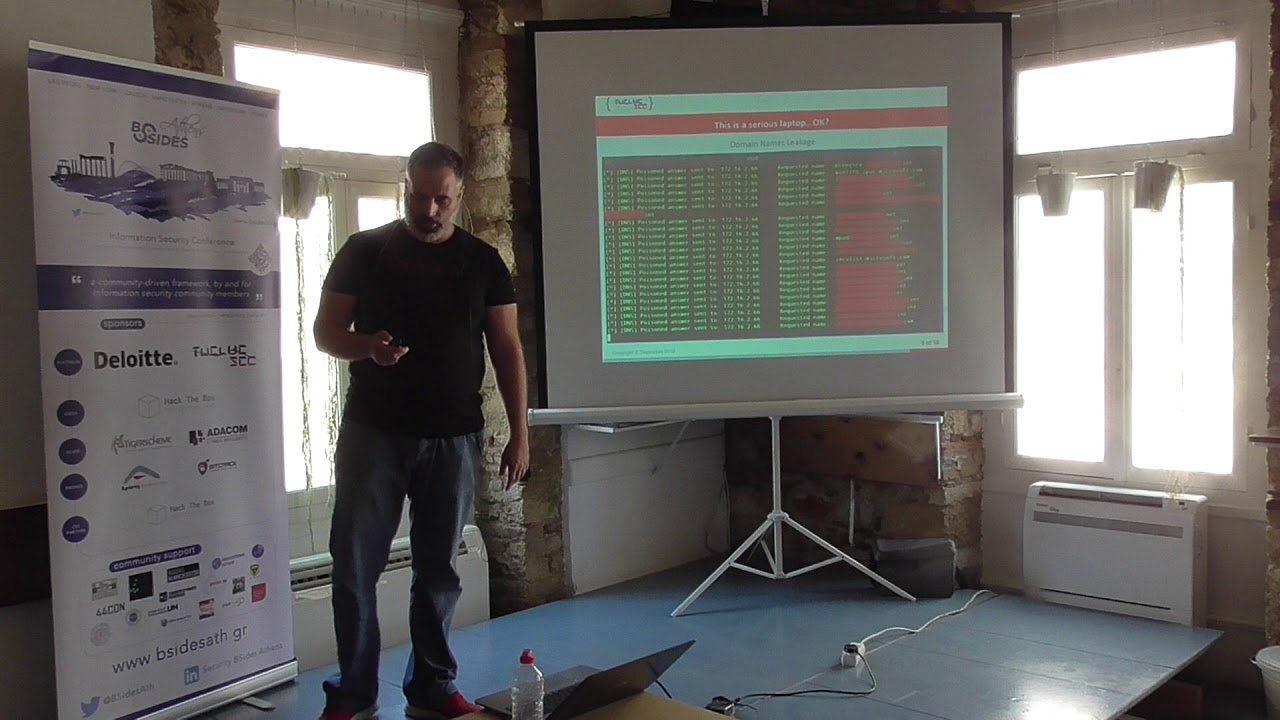
the testing, any questions on the configuration, So, we started to see how this VM was behaving. The first thing we noticed was that during boot time, due to the driver of the firewall being loaded late on the process, it would start leaking local domain names of the organization, trying to connect to different parts of the organization, until the firewall driver kicked in and they stopped. Another thing, during the DHCP negotiations, this is a standard behavior for DHCP client, there were some leakage of the local domain name, host name, excuse me. And the third thing, which was the most weird one, was that when the laptop was connected to the VPN, all the DNS calls were broadcasted into all network devices and the firewall
would allow them. So we get internal domain names of the organization. We can see here a Wireshark screenshot. We got the hostname of the laptop. a specific packet from the DHCP negotiation and we got all kinds of different domain names for internal systems. Here we see the the response running, getting all these requests and trying to poison them. However, due to the Fargo policy, all these poison attempts were blocked. So we moved on and said okay let's see how how this suite is, how securely it's developed. So we searched through WMIC service enumeration, PowerShell service enumeration to see if there were unquoted service paths. Unfortunately, we didn't find any. However, when we ran the ProcMon tool from CC-Ternals, we saw that the service was
trying to execute C program, C program Excel, secret program files, and so on. So it seemed that even though the service path was quoted, within the application itself, there were some calls to some executables that were unquoted. So what we did, create C program Excel, restarted the service, and sure enough, our program Excel was executed. The other thing that we noticed is that when we did that, restarting of the service took quite a a lot of time like 20 minutes 20 seconds so uh this got us suspicious and then what we did we started the service again and as soon as we got this pop-up remember now we were not connected on the vpn so the the final policy was deny all don't
allow anything incoming or outgoing so we did this ping google's dns and it worked for like 15 seconds so for like 15 seconds While the service was starting, it would allow all incoming and outgoing collections. This is a classic case of race conditions. It failed to open. As soon as the service failed, no firewall at all. Another thing we checked was the AppLocker rules. So we ran an access check of these internals and we saw that all these paths had both read and execute permissions on the system. By the way, most of them, except the last two ones, all the other are the default configuration of AppLocker. And probably these were added by the administrator for Altyris to work. We
already knew that developers didn't really care about race conditions, that there were some issues with the software, it was leaking, and it really didn't handle well exceptions. So what we did, we went to the gateway VM and played with access to the VPN gateway. Turn it on, off, again. So, as soon as we changed the status of the VPN connection, we saw on the responder that our poisonous, DNS poisoning has worked and we got, started getting hashes from the system. And this again happened for like 10 to 12 seconds. So, what happened here? The firewall had two rules. two policies. One when it's connected on VPN and when it's not connected. What he did here when he changed policy he
would clear all the rules even the deny all rule, the last one and then reapply the new rules. So there was a window of a few seconds that there was no rule at all so it was practically any any. So using this information try to get access to the laptop. On the second VM, we set up a web server with a fully undetectable reverse shell and we changed the status of the VPN gateway connectivity. We had a PowerShell script ready in order to have the time to do that in 50 seconds, which downloaded and executed the reverse shell and soon enough we got access. The first one was a scenario from an internal user that has access
to the laptop and the words to be able to get the data out of the laptop. The second scenario, social engineering. So if we control the gateway, like having a fake access point or whatever scenario, then we just turn the responder on with WPAD server on, wait, for the user to connect to the VPN and wait for internal DNS requests. And at that point, we close the connection to the gateway And then we have this window, this 12-second window, 15-second window for our responder to execute the WPAD poisoning and redirect the user to our own page and prompt him to download the reverse shell on one of the paths that we before saw on the app locker that are write and execute and ask him
to execute it. And of course, get the shell back. However, the problem here was that we have this 15 second window only and after that the new policy will be applied. The one that said we are outside the VPN network so deny all and we will lose all our connections. So how to maintain access? What we did was re-enabled the connection to the VPN gateway, the VPN client connected So the firewall said, "Okay, we are back in. Policy, allow only internal IP connectivity." We had an internal IP, so there is a reversal reconnected. So at that moment, we had not only access to the laptop, but because the laptop was connected to VPN, we had a pivot point to the whole
corporate network. The reason for this happening was that when the new policy was applied on the firewall, the connection state stable was not flushed. So the connection was there, getting denied all the time. As soon as the new policy was applied, it reconnected back. So this architecture effectively came to become this. So to recap, we found DNS leakage. on the pre-boot, on the DHCP, on the VPN. Unquoted service paths, unquoted exceptions, non-graceful termination, race conditions on the policy and network status chains, failure to flash the connection states, WPAD was enabled, so we could do the social engineering scenario, default rules for the app blocker, and all this can be fixed by, of course, upgrading the firewall. We have already submitted
this information to the vendor so they will be fixing it soon so then we will be releasing this information under 5 different CVEs so they have to mitigate the race conditions improve the loading time of the Fargo driver on the boot flush the connection states on VPN change fail close when fail just deny all when changing from one policy to another first deny all and then reapply all the other rules Deny broadcast requests to avoid the in-ease leakage. Enclose all paths even into the application code with double quotes. And of course, when enabling AppLocker, don't rely on the default configuration. Use the WXOR principle. Only paths that have right access cannot have execute and vice versa. And
another thing is to avoid single point of failures, enable Windows Firewall. It won't mess up with the other firewall. It will be there as a retentance. And of course, everybody should tune in for the five CVs when they are released in order to update. Any questions? Thank you. Thank you.
Related talks
 12:13
12:13 13:42
13:42 37:13
37:13 16:00
16:00 34:30
34:30 10:23:09