BG - Pacu: Attack and Post-Exploitation in AWS - Spencer Gietzen
Show transcript [en]
thank you hi everyone my name is Spencer Jetson I'm with RINO security labs and I'm here today to talk to you about PACU which is an open-source AWS post exploitation framework so start off with little introduction I'm a penetration tester I focus on the cloud and Amazon Web Services in particular so that's kind of what I do I'm the lead developer of PACU we've got an internal team that works on it and I was kind of kind of the one who brought the idea up and worked on it slowly for quite a while before we moved on to you know bringing in some outside help and other other team members so I'm here to talk about AWS security and
penetration testing and you know how PACU solves some problems in the industry that we have right now so you know AWS security in general AWS in general even it's easy to get started but it's hard to master and you don't get everything right there's a lot of good a lot of different resources that are good really good help you know there's a lot of white papers that AWS publishes a lot of blogs and different research that the community posts as well as just the general AWS documentation it's all great places to learn but it's hard to know if you're doing something a hundred percent right and if you're doing everything a hundred percent right because it doesn't really
matter you know you could be doing ninety nine percent of what you're doing correct and that 1% could be the end of your company depending on you know a lot of different things but so it's so hard that even the best mess it up and that's been shown time and time again a couple of examples are Ober they had the github repo Miss configuration where one of their developers or someone pushed some API keys access keys to other github where hackers were able to steal those gain access to their environment through that way a test lost another one they had a public-facing unsecured IT admin console and the hacker is able to get into that and retrieve some keys they
had stored there which they then used to mine some cryptocurrency which is a large theme in these kind of hacks but it's really not I mean that is definitely a big threat but it's not all there is when it comes to these kind of attacks Accenture and you know many many others as I'm sure everyone is aware I s3 bucket misconfigurations you know publicly allowing access to private data company data employee data payment info you know tons of different things that seems like it's happening every other week that something comes out about a new one that's going on but the real threat so that is authenticated compromised that's not just having someone finder s3 bucket that's facing
the Internet it's when your keys get compromised and that can happen in a variety of different ways such as github commits with uber you know social engineering or phishing to get your password or secret Keys password reuse this is something I see a lot as a pen tester myself is you know I go online and find a public database dump with clear text passwords associate it with someone's email and then I go and try and log in on a different website with the same email and same password and it logs me in that's extremely common more common than I would have ever thought then as well as web app vulnerabilities so there's server side request forgery
you can you know contact the ec2 instances metadata API to retrieve temporary AWS credentials for an IM role that's attached to an instance so with just server side request forgery you could gain as much AWS access as that server has or local file reads so through any method you know are C Eve nullify any of that you can discover keys that are stored locally on this system I mean as much of a bad practices that maybe it's still something that's common and people aren't you know doing it correctly all the time and that's that's what I found as well as internal threats and rogue employees and you don't even need to worry about the compromised in that situation there
you have access to your environment are your permissions set up correctly so that they can't end you or cost you thousands of dollars you know it's a lot of different things that can happen here so penetration testing on AWS there's there's a lot missing from the penetration testing industry in regards the cloud and AWS but there's a lot of configuration scanners out there you know a lot of best practice checkers configuration checkers a couple of those Scout 2 clouds boy Prowler there's there's a lot of others those are all really great tools but there's not really there's not much for an attacker how do you go and capitalize on a Mis configuration how do you exploit
something this you know some certain setting how do you gain access to the environment escalate your privileges all that different stuff there's not much out there there's some a couple of them AWS pone nimbostratus or the weird AWS attack library all great tools but those and other AWS attack tools all kind of a common theme they they're kind of forgotten about or stopped working on you know where you you see on the github hasn't been touched in two years or six months and that's not really that's not what the industry needs if we're gonna advance the AWS pentesting industry because AWS is constantly updating their API is adding new services deprecating services and api is you know the tools
need to stay up to date with what you're attacking obviously so it's also something that's hard to learn without practice you know how are you supposed to get into AWS pentesting I don't know if you do if you don't know much about AWS you probably have no idea and so it's you need to practice it but how are you supposed to practice it without an environment you know some sort of lab environment what you need basically is as a well as a pen tester you shouldn't have to worry about deploying the different US resources that you want a pen test against to simulate you know a customer's environment or worry about the Miss configuration of those
resources to you know put up put some vulnerabilities in there and know that there's something you can exploit but and you shouldn't worry about you shouldn't have to worry about a high cost as you're going through these things you shouldn't be charged I don't know even even fifty dollars for testing trying to learn pen testing on your own account on your own accord and you know if you're not familiar with a double yes it's hard to make something like that happen so really it's if only we had something like webgoat for web applications where you can host your own thing and go wild on it and so but that it's kind of brings me to cloud goat which is a
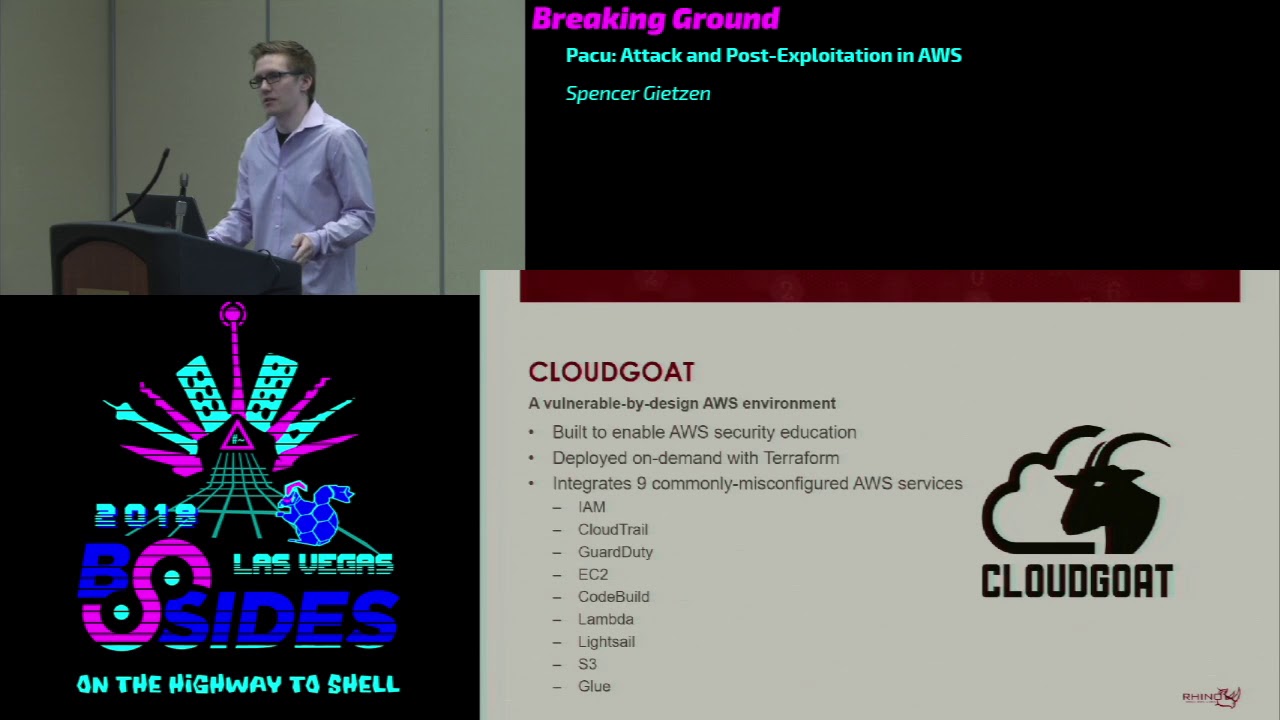
vulnerable by design AWS environment that we recently released at Rhino ski labs it's built to you know enable AWS security education it's supposed to we've made it so that you can learn and get into AWS pen testing easier you know make it so anybody can do it rather than somebody who has access to some sort of environment or has enough knowledge to deploy those resources I ultimately it will help attackers and defenders in the sense that you know it will help them understand different misconfigurations what even just normal configurations can do to your environment if a certain user has a certain amount of access or something like that so it's deployed and destroyed on demand with terraform you
know you can just run start the start script launches all the resources into your account it logs the credentials so you can choose the starting point and then you can destroy it at any time and it's easy to do yeah we integrated nine commonly misconfigured AWS services with plans to expand on that so that includes I am cloud trail guard duty ec2 code build lambda lightsail s3 and glue so there's a variety of different resources within those services that we we've created so there's multiple starting points there's a few different IM users and there are a couple of different instances that you could start in so it's kind of you choose your path and your simulation of an attack
did you steal someone's password and you have you know console access to someone's account did you hack a web server and you got you know access keys or something like that or did you get you know RCE on a server that doesn't have AWS or you know like I guess a RCE on a web application or something like that so you are in the server you're on the command line in the server then that's where you're starting you know a lot of different ways to do that and with that that creates a lot of different attack vectors so there's currently you know 20-plus in the environment at different different ways to escalate privileges disrupting and evading logging and
monitoring data enumeration and exfiltration persistence and a lot of others we try and incorporate as much as we can in there to give you a well-rounded idea of n testing and misconfigurations and AWS it's inexpensive so this is another big worry that we encountered currently if you just run the environments about $1 to 3 a day based on how much you're using it you know if you're attacking it for 24 hours straight obviously it'll be a little bit more than that but this is off of the free tier so you know it's it's really it's really cheap and based on the the start script or based on how it starts up and gets destroyed you can
deploy it and destroy it within just a couple of minutes so even though it's cheap and everything we always suggest you can start it when you're ready to start pen testing it then you can tear it down when you're done and you don't have to worry about any hidden expenses that way it's relatively safe it's safe and the idea that obviously I mean everything's misconfigured so that's not safe but you call ingress traffic to any instances on the inner a Dobis account are white listed to an IP range that you supply when you're starting the environment up so this you know this keeps access to those Miss configuration misconfigured resources to people at on your IP address or people who have
access to the credentials that you just created which ideally is just you if it's not then you probably have other problems even even given that it's not recommended to launch alongside other resources though in your account as obviously there misconfigure eight misconfigured and if they're in the same account they can have access to certain things so you know we'd never suggest deploying it next to your production environment or anything like that it's already we we already released it on github week or two ago with the bsd three license so that's you know it's ready to get started with and start learning i I've got a video here that maybe maybe not there yeah alright so
basically right here I'm starting the start script I passed in localhost as my IP address or my IP range so it's going to whitelist everything to that IP and only people with that IP you can access the server ISO then you can well so then I run I've sped the video up quite a bit because it takes a couple of minutes but so now terraform is going through and creating all the resources in your account you don't it's it's doing everything for it you can just wait for this to be finished and then it'll be ready to go so takes you know not too long just I think two and a half minutes was what this before I sped it up ended
up being I don't think that's that's too long it just waiting on the finish so finishes you see the terraform message it's added 38 resources to your AWS account and then the GPG message there is decrypting a couple of the passwords for the user accounts and I it just outputted that into a credentials file where you can cat that and these are different three of the different starting points for the cloud goat environment you know feel free to try those credentials if you want there but it won't work they well in this talk I mean in general they work so you know you could start as the administrator you just access some of the administrators
account Bob Joe they all have different permissions different you know sets of access so that means there's different attack vectors from each account and you know you can alert and learn a variety of things that way and then to shut it down it's just the kills the kill script and it uses terraform to you know take down everything in the environment as as we can see here and that is it if you don't know terraform that only kills those 38 resources we add nothing that exists in the environment although you shouldn't be running it against an environment with resources already going but separate so we have a vulnerable environment now and you know we're still
missing something that there's more to pen testing and security than just this you know just a vulnerable environment it's hard to how do you know what to do how do you automate these things how do you manage these attacks and really what's needed is a tool that can turn complex multi-step attacks into just a couple of commands and removes a lot of the work on your side of things to you know just to what that tool is doing so you don't have to rewrite a bunch of code every time you want to do this certain attack you don't have to go find it in your operating system you don't have to integrate someone else's code to
try and fix some weird bug it should just be able to handle those things it needs to be future proof so that means it needs to be modular to allow scripts to work together you know you write an enumeration script and enumerate some data when you're later writing and exploitation script whatever that may be you don't want to rewrite the enumeration part so you should just be able to assume that data is there and something will get it for you and it needs to be extensible because AWS is constantly growing so the tool needs to be able to constantly grow and shouldn't require you know framework updates every time there's a new AWS update or
something like that and really you know configuration scanning is great and very helpful and something that is definitely needed but there's we need something to exploit those miss configurations and you know capitalize on them as attackers there's basically those scanners are the necess the cloud tools but we need the Metasploit so the solution to this pocket at the offensive AWS exploitation framework it's written Foley in Python 3 it covers the attack chain or the kill chain so it covers reconnaissance logging and monitoring persistence privilege escalation data exfiltration and just you know general exploitation so the modules simple simple to develop we've got a built-in template I all the modules are structurally separate so all you have to do is add a folder at copy
the template in and your module is in PACU and then obviously you gotta write some code but I would make that we try to make that as easy as possible so like I said before you you shouldn't have to worry about enumerated data if that's not the point of your module you should just be able to say I need this data and then the PACU framework figures that out for you and it gives it to your module so you can you know that's a lot a lot of code that you don't have to even think about you can you know in general that makes it a lot a lot easier as it takes a lot of worry and even even
syntax down to you know your give less lines of code you don't have to worry about errors coming up so it's it's it's extensible we've got a built in API that we exposed to from the PACU core framework to module developers to make things easier I'll get into that a little bit more later on but general takes out you know annoying and repetitive code out of your hands and gives you simple one-liners for those there's session data data management so you can it handle sessions in a variety of ways but basically you can create a session for a company that you're working on and it keeps all the data and keys and you know anything that's gone
on logs everything separate from another company that you might be working on another client and that ties into data management through sequel Lite which is we use a local sequel Lite database to manage all the data that gets you know enumerated as you're attacking these environments and everything that you need saved and there's global error handling so you know Parker's not going to crash and corrupt your database it's always gonna it'll always work it'll always catch those things and you know you don't need to worry about that that kind of stuff and just like cloud code PACU is open source on github as of an hour ago or something so that's that's exciting it's on the the same
oops sorry about that okay so it's on github so PACU and cloud goat were built with each other in mind and you know many of the vulnerabilities in cloud goat were tied in closely with exploits and modules that are in PACU and the plan is to grow them together as well so as PACU modules are built that means we'll integrate those vulnerabilities and techniques into cloud goat so you can capitalize on those and test those modules and then the reverse as well that's you know it's a really great way to learn PACU learn pen testing and you know in general just get an idea of what's going on before you go and test this against a production environment or
something like that so I'm gonna go through it PACU demo now basically this is a post compromised scenario so I've compromised someone's keys through some method and that's all I know I don't know anything else I just have those keys I'll go through you know using the PACU console numerating permissions settings different data escalating my privileges to an administrator level establishing persistence in the account backdoor and security groups to gain access to certain services and then compromising ec2 instances through a real code execution
Oh
well it seems to be frozen
well alright I've got it I guess I'll go with the video I have a video of this not sure why that's not working but
okay so what we'll go through here is first running PACU I splash screen comes up we get the PACU ascii logo and underneath here it's okay so you can see there's that found existing sessions I already created the session for b-sides but if there was no session tell you need to create one you have to give it a name and that'll encompass your project so accept that I'll choose put in one I accept my thing so then it'll come up here we have a lot of different help information a lot of different stuff pops up here not so important quite yet down in the bottom left you can see besides Las Vegas at : Spencer
so in this case besides Las Vegas is your active session so you always know when your session you always know what company you're working on you don't have to worry about accidentally attacking a different company or anything like that and then Spencer is the pair of keys that I compromised I I set the name Spencer to them because I I don't know anything about them and my name is Spencer so you know it can be anything you want so it makes it easy to know what you're doing there's a lot of different help here
Oh
so basically some of those different health stuff you know there's the LS command that was just run that lists all the different modules that exist you can see the category they belong to as well there's the search command that you can search for a string it gives you the name of the module as well as a you know a quick one liner of description for that module there's also you know this can help you get a better idea of what you're trying to execute and what you want to do so to do this you know in this case there's also the set regions command this is a pretty pretty important one that we built in so in
this case I just set the regions to us we US West too and what this does is it ensures that any module that uses regions in one way or another you know this global AWS services but a lot of them use regions this will ensure that a module will not be run against a service that doesn't support a certain region or isn't supported in a certain region as well as it won't run against regions you don't want to target so a module I run a module it's going to check what service bear what regions are supported for that service then it's going to check the session regions and it will only execute against regions that are in both lists
so you always know exactly what you're targeting you don't have to worry about any of okay so then there's the Who am I command this will give you a lot of different information here currently there's not any not any information because all I've done is set these keys I haven't done anything else but a you know a lot of different stuff including the keys and then the key alias just what I named them then too you know gather the information that goes in those different places you can run the there's modules that will contribute to that over time and so what's going on here is that there's tab completion for every command every module so you can
tap complete any command and the modules that you're trying to run I'm using the run command here to run the confirmed permissions module and then there's also argument Auto completion but in this case I'm not using any arguments so I'm gonna run run confirm informations that's gonna run okay so now we've got module summary that pops up confirmed permissions has completed and it says it's found confirmed permissions for demo what that means is that confirmed informations for the username demo and that tells me the keys that I named Spencer are actually named demo and you know that's something I could change later on but it's not all that important right now so now if I run the Who am I
command we'll see a lot more data that's populated so now we can see user name user AR n account ID user ID you know roles groups policies that are attached to your user the keys again alias and then permission permissions confirmed that that's a pretty important one as currently there's only one module that sets that emitter that setting and it's the confirmed permissions module but what it means is that when these permissions were enumerated it was 100% sure that that is the full list and you know it's not just through testing it discovered this it knows that this is the case and so we can see you've got some I am permissions lambda and RDS
I'm not explicitly denied any any permissions there so yeah we don't need to worry about that [Applause]
me from the video yeah there's no there's no well as long as everyone knows it's not my video sister so what I'm doing here is we saw that there were you know I am lambda RTS permissions I'm gonna run the enum ec2 module against instances and security groups we we know these this won't work but it's just to kind of to show you give you an example use the dry run feature of the pythons or AWS Python library voter 3 and it's confirming whether this account has those permissions or not before trying to actually execute the commands which I don't and so then it's tells me nothing to enumerate I you know that's it you
can't do it right now you don't have permissions so what that means to me is that I need to escalate my privileges so that I can run this module and to do that you know a lot of different modules obviously they're complicated so there's a help command that can be run and I run it on the previs scan module which it's not so important right now but basically it just gives you the arguments that you're allowed to use as well as the a long description of what you're what it's going to try and do but right now all I'm going to do is just run it with no arguments and I will see what happens
ok so what happened here is it confirmed it found one privilege escalation method that my accounts vulnerable to and that's the create new policy version method these are all things that I wrote a blog about it in the past 21 different privilege escalation methods that it checks for and then attempts to exploit to gain privileges for you so it's gonna start doing that it's gonna ask if there's a policy that I want to target for this method but no I I'd rather it just finds it for me finds a valid one so I can just hit enter and it will shortly do something maybe so now it's found I it went through and found it a policy that was attached to
my user confirmed that it was a user or customer managed policy rather than AWS managed policy which means we can create a new policy version for it and if you have permissions to create a new version for a policy attached to your user you can create any policy and give yourself any amount of privileges so now it's going to say I have administrator privileges which are star permissions on star resources which is just the wild-card wildcard character so now I can go back through and run the confirmed permissions module again - you know confirm with myself that yes that worked and my account has this access so run that pops up same same results before and then I can run Who am I and
now we can see I have you know all the other permissions are going on and I have star permissions on star resources aka administrator privileges so now I can go back and run that ec2 module that I wanted to run by you know just another confirmation that this actually is happening and actually working so I can run the module numerate instances and security groups I found three instances and I found one security group and because I set my session regions to us Wes - that's the only region it targets otherwise by default it targets all valid ec2 regions so that's going to finish there so now I've got administrative policies I'm going to want to establish backdoor
persistent access to account in one way or another outside of just this current user so I'm going to use the back door users Keys module which will attempt to add a set of access keys to a different user in the account and I didn't pass any arguments in so it's gonna ask if it wants to Anu ask if I wanted to enumerate those users and then prompt for each users it rather than just you know spraying across the whole account and making a whole bunch of noise so I'm gonna say yes to that and now this message is saying it just checked the database for a list of users and it wasn't there now it's gonna but it knows
where to get it so it's going to ask do you want to run this other module to enumerate a list of users that we can then use here and that's I'm gonna say yes to that and it'll run the enum users role as policies groups module and it's going to enumerate 11 different users so now I can go through and you know say which users I want to add some keys to IT admin that sounds like a you know high privileged strong count good good backdoor access so I'm going to I I'm gonna accept that and get some backdoor keys there and once again I know I know where I am so I those are
not valid don't try and use them in the audience right now so now we've got those right I can now I'm going to say no to the rest of them keep moving and I can now use the set keys command that I had used prior to the presentation but now you can actually see it in action set keys it's going to ask for key alias which is previously Spencer I'm going to name it IT admin it's going to ask for my access key ID just copied that from above and that's going to ask for my secret access key paste that in there and so now I've got two users stored in the b-sides Las Vegas session and I can
run Who am I to confirm that they're different users they're separated and I can use the swap Keys command now to switch back to my administrator because with backdoor access I mean I want to leave that there hopefully keep it as silent as possible in the meantime I'll use my administrator privileges to expand in the environment so do that I run Who am I again just to show you know they are separated still back to the regular Spencer user and so from here I can we enumerated some data throughout so far and I can use the services command and it's going to list the AWS services that have data collected for them stored in the
database we've got ec2 instances security and security groups and we've got IM users and roles i can then use the data command on one of those services or all of them you know whatever you want to do but we're on data on ec2 and what's going to happen here is you can see
so I'll run that and then it's gonna pop up and you can see there right here is the some rules for the security group we know there's one security group so we know all the ec2 instances have a single security group on them attached to them we can see there's port 2701 seven white listed to some IP for inbound access and it's got the description so you know my assumption would be there's a database running on that port for the servers and so what I'm gonna do with that is I can confirm that well for one I don't currently have access we know that but I can confirm that I can test it out and it'll fail to connect
and that's what I'll do here shortly you know so just some IP is is some companies IP that they whitelist access and they don't want it public facing they don't want facing other things so exit out of PACU I'll use the shell command to connect to the host that's running the database instance and pass the IP in right there and as we can expect it's gonna sit there for a sec and then it's gonna fail to connect and obviously we need that now we're gonna go back and we're gonna give ourselves access to this port so that we can get access to the database this can be done with the backdoor ec2 security groups module I'm
going to pass in an IP range which is the IP for the server that I'm running this on right now as well as the you know / 32 so it's just that IP and then I'm gonna pass in a port range for 2701 7 to 21 2701 7 since that's the only port I care about right now I could do 1 to 65 you know 65,000 or whatever the max and then I'm gonna pass in the security group I want to target by default it's gonna target all security groups but just as an example using this here so I'll pass in a default at us West too so you can pass in a bunch of different regions and in this
case if I passed in a security group in a different region it would still target it because I explicitly told it to regardless of what my session regions are it allows you to override it in cases that you would want to but it won't ever override it in in other cases so we'll run that and we can see it it targeted the group default it applied the security group rule success port range is open for my IP all right now I should be able to exit out of pocket again and use the MongoDB shell to connect successfully and access the database and hope that they didn't set up you know authentication or something like that as has been relatively common
with MongoDB in the past so I'll exit out of this and run that command again
and so now we're connected we can see it connected to the longer database there was no authentication so now I've got access and all it needed was just a security group rule change and it's that easy you can just use a module basically so got access all right I'm gonna go back to PACU now and I'm gonna run I'm gonna try and get code execution on a ec2 instance that exists in the account there's a module built for this that's called the well so first I'm gonna set up a listener with netcat I it's gonna listen on port 50 50 listen for reverse connection which is what I'm going to send to these ec2 servers and hopefully
hopefully get something and this is this is done through the system and ec2 RCE module and what that is is it uses simple Systems Manager to try and execute commands on instances that have the Systems Manager agent installed on them by default there's a couple of different commands you can or arguments you can pass in but by a default it's going to scan all the ec2 instances ami is and then try and detect if that operating system has the Systems Manager agent installed by default or not and if it is installed by default then it'll add it to the list of targets you can just spray it if you want against everything in hopes that someone
installed the agent but by default it doesn't do that so I'm going to pass in my my command that I want to run on those instances which is just a bash reverse shell and it's hopefully going to connect back to my server so it passes my IP and then the port 50 50
okay so we'll run that and then it's going to scan the ec2 instances a mis we can see it found one vulnerable image doesn't matter necessarily how many instances there are but it found one of them that has a vulnerable image that have is installed by default the Systems Manager agent so it's going to run that then it needs the Systems Manager role and we haven't enumerated roles yet because earlier we only enumerated users and then roles or sorry policies and that's all three arguments that you can pass to those modules so a lot of the different stuff has happened here what basically it runs the aneema you know musers roles policies groups module found 24 different roles it's
under going to search through there and see if there's an existing systems manager service role which there is I found it it's called SSM then it's going to check if that role is associated with an ec2 instance profile and it found that as well it's called SSM if if neither was existed or if one of those existed it would create them and associate them so regardless if they exist or not it'll get ideal it'll get created if you have the correct permissions so then it's going to attach those to the targeted ec2 instances so the instance ID you know 0a or whatever that was the vulnerable instance it attached attaches of that Systems Manager profile to it
and by default it's not going to replace any roles that are already attached to instances to prevent a denial of service through some method or another but there's arguments to do that if you'd rather you know go go all for it and try and get access regardless of what happens to their instances so after that's attached it can take up to 10 minutes or so before the systems manager picks it up as a target in this case it was instant so it detects the instance runs the command on it and we can go back to the reverse shell when this is finished and and we'll be able to see that there was a verse shell created and systems
manager runs as route on Linux instances and runs a system on Windows instances so you get you know high-level access to those ec2 instances that it works on and we'll see that shortly okay so now we can see that we've got a connection on four fifty fifty from this IP and it opens up the shell I've got a root shell you know I can run Who am I I'm route obviously you can see that already and then you can run the hostname command after that and just to show that yeah it's a ec2 instance and we've got access to it and you know at this point there's quite a bit you could do to expand
access from there but you know we can a lot of different things to work on there so that kind of wraps up the demo there let's see
kit so I'm gonna talk a little bit about development now writing modules and you know how you go about doing that for PACU we've got the template that I talked about earlier makes things easy makes it you know simple to go ahead and start developing and then the built in API that I talked about I'll get into some of the actual functions here so the get regions command I already talked about that with pretty much you know making sure you only target instances you want and valid instances for those regions we've got a there's also an update regions command so you know new region gets released for a service you can put it into Paco just by a run in
update regions and you know whenever me or the team pushes a change to to the github repo we always run that first to ensure that the latest version that you clone is the latest version of the region's then there's the get vote of three client and get bow to three session calls which those are the bow to three library is the AWS Python library and creating a client in session is how you interact with the ABS API so we wrapped those into these functions to reduce a lot of repetitive code that you might have to write like the the current keys the current set of keys that you want to create that client for or you
know different things like that and we also added a little bit of extra functionality to it there's some stuff that goes on in the core PACU frameworks such as like user agent modification which can be used to bypass some guard duty there's a guard duty rule that you can be bypassed by that and so what that does it flags on a user using like making AWS API calls from Kali Linux and you can change your user agent so that it doesn't detect its Kali Linux and then you bypass that you don't have to worry about that there's the key info function it gets all the relative relevant information about the account which is basically the Who am I command
allows you to work with that programmatically and then there's print and input which are overwrites of the bill in Python print and input and it allows it so that you can write directory directly to a log file as well as the screen by default and that allows you there's also you know we added some more options in here as well so you can choose maybe this data only needs to be written to the log file or maybe it only needs to be shown on the screen or both there's a couple other small small settings you can change on there as well then there's a lot of functions to work with the sequel Lite database make it
easy for you to read update manipulate whatever data in the database and you know make sure everything's working fine as well as the wiki on our github we've got some developer documentation and different you know resources that you can go to to learn more about PACU and you know building PACU building for PACU in general so really we've talked about problem with a OBS security right now and it's that there's a lack of attack tools for us pen testers and there's a lack of security training and practice labs for those kinds of attacks and so it's hard too hard to get into it if you'd not already in the AWS space but that's we fixed those kind of things
that's that's the goal with cloud gotand PACU cloud goat being the target environment allowing you to you know practice your methods and then PACU allowing you to manage and automate a lot of the attack process and so I've included a couple of resources here for anyone interested in the different privilege escalation methods of the privilege escalation exploiter module those are all documented there with their how you exploit them the methods and then the ideas behind them and then there's the PACU github repo at Rhino security labs slash PACU and the cloud goat repo at varanasi lab slash cloud goat I've also got my email there my Twitter which is at spend Geats and then the Rhino Twitter at Brian our
security and I I'll be posting these slides on on github tonight so if you're interested in checking these out you can see all that and that kind of wraps everything up so I'm really excited to get this these tools released and you know but a lot of a lot of work into these it's fun to see people use them and I hope it's it's helpful as I as it has been to myself so thank you for coming and thank you for listening [Applause] [Music] we do have a few minutes here to do some questions if anyone has any questions
thanks for the talk it looks like two really good tools and I think it's needed as well I have two questions one of them a bit of party-pooper maybe and one probably more interesting but as I recall when I've done pentacene AWS they're quite picky about what you can test so I think it was last time I checked easy to route 53 and the host database service so like have you dug into this and have you had any conversations with Amazon so you know obviously I'm not a lawyer but we built cloud goat in a way that in our interpretation of the AWS acceptable use policy I does not require you to break it to pen test the environment so you
don't need to buy I'm not a lawyer so this is you know but you don't necessarily need to buy my interpretation fill out the AWS pen test form because all the misconfigurations in the environment are acceptable under the acceptable use policy and PACU is a different story that depending on which modules you're using and everything you may need to fill out the pen test form but you know that's if you're using it against a target environment that you don't have permission to which you shouldn't be doing at all so in most cases it it does work out with that that kind of answer your question yeah sure and the second question the interactive seal I did you do that customly already
used like seeing the two moles or something for python it's custom custom it's pretty much just a a while loop with that checks the commands of the input that's getting sent in hey thanks for the great talk with the account access stuff it's a common pattern in AWS to have you know one account that users log into and then they assume role in two separate ones have you looked at STS tokens for persistence or assumed roll activity with your auth modules at all yeah so the the credential database you can use temporary credentials as as keys to attack and there's a couple of different ways that persistence is something we're still working on in terms of modules but you know there's a
assume you can backdoor the assumed role policy of a role so you know you can get permission to assume roles then you can backdoor those to give your account access so that at a later time you can request some temporary credentials for those and pretend for one more question okay big round of applause thank you very much [Applause]
Related talks
 51:51
51:51 32:48
32:48 33:48
33:48 54:33
54:33 31:06
31:06 20:51
20:51