Student Monitoring Software Flunks Security

Show original YouTube description
Show transcript [en]
welcome back all it's my pleasure to introduce sam quinn sam is a security researcher on mcafee's advanced threat research team with a focus on iot and embedded devices his talk is titled student monitoring software flunks security and we'll dive into how security vulnerabilities and student monitoring software can be used to achieve remote code execution uh thanks a lot sam yeah thank you matt um yeah as matt said i've been on the mac mcafee's advanced threat research team for about two years now and uh yeah i'll walk you through some of the vulnerabilities i found last year on a student monitoring software so um you should be seeing my slides here um so yeah enough about me let's uh
let's get into it um like many industries every year year there's more and more cyber attacks that are getting reported and one of the things that we discovered is you know k-12 school districts are are not an exception to that so one of the things as offensive security researchers that we like to do is try to put our minds in the set or set our minds just like a an attacker would by um looking at industries and uh and software targets that would be impactful for um you know them to attack and potentially either use ransomware or whatever to um extract you know extort them or whatever so what we did here was we we decided to
look into a you know we knew that a lot of people were going to transition to schooling from home hybrid learning kind of thing so we wanted to kind of dive into this um this industry since we haven't had any research in this like vertical before and that's kind of when we started to look for um software in this space that had um a large user base this is the same kind of idea what an attacker would probably do they would if they're putting putting the upfront effort they would want to have the most victims as they could possibly have and that's what brought us to netapp vision pro it is a student monitoring software um and it is
used by six million um teachers and student students alike in around 9000 plus school districts the netapp parent company is actually has quite a few more products and they encompass around 100 million users so not a small company at all but um this kind of seemed to fit our our bill of trying to um figure out kind of what an attacker would like to also see if they if they uh invested their time into it um and to kind of highlight on the um the reason we started to do this in 2020 was we like i mentioned before started to notice the trend of um people starting to borrow school district owned computers uh connecting
to you know networks outside of the wild garden of the district on the network where there's a security team and and it professionals that help set up and secure those networks one netapp vision pro is actually not really designed for remote learning or hybrid learning necessarily but with the coven 19 a lot of schools we identified were starting to take these devices lend them out and then these students would bring these devices the home or to the coffee shop or whatever and the software wasn't uninstalled you know they they probably kept the same software set so um it's opening up a lot of these uh software suites that are kind of really meant to be local only or um
confined in the district network kind of getting a broader attack vector outside of their their uh their security there so let me kind of explain a little bit more of how the software is used in the in the real world it is a kind of a student management software where a teacher can perform a handful of administrative tasks on the entire classroom so if you can imagine if you're one teacher and you have to control a whole whole computer lab of kids um trying to not play games and whatnot this this helps with that so they can blink the screen to make sure they're focusing up front the teacher can actually remote control individual computers
they can block web access for instance and then they can even start applications or remotely log in or reboot the computer one thing that caught our eye was the this software is installed at um as a system service and um mostly to be tamper resistant i would say you know if it runs at a higher privilege than the student they can't just use the process explorer and close it or whatever so um that's kind of why i think we they did that and then it's also started at boot so the student can't you know just not start it um it has started as the computer starts and this is kind of to highlight a little bit back on if
they're taking this computer out of the network there's really no way for the um unless the administrator went to each computer individually and like disabled the servers or uninstalled it this would most likely still be running on those lent out computers that the students would bring home or whatnot so um this kind of peaked our attention and uh but um let's uh let's put on our hacking shoes and dive into some of the technical details here um the uh um one uh going into any project it's good to lay out some some uh some fundamental um goals to hit on and these are trying to still be in that mindset of an attacker um where we want to
have um multiple different things where we would hit on the same as what they would probably also try to hit on so we wanted to have a local network attack since this software isn't really designed to be going over the internet um we wanted to see if we could remote control the students um either with uh like a uh remote code execution or rdp or something like that and we wanted to see if we could compromise potentially windows accounts get passwords or whatnot and then since it is started as a system service we wanted to see if we could escalate our privileges and improve our position on the machine so we began by actually just once we
identified this as our target we went to their website and they actually offered a free 30-day trial which to an attacker is an infinite trial um and so we uh we kind of just downloaded that i i there's nothing against free trial i actually personally like them a lot but it does give um you know attackers and and researchers like myself a pretty quick access to the software to begin reverse engineering and kind of figuring how they work in the back end the next thing we did was we set up a test environment we wanted to emulate the student in the teachers environment as best we could so we created a handful of vms we made one the teacher and the rest
students and at this point we're really trying to um identify in the setup if there's any the different ways to configure the software there's nothing worse than finding a vulnerability in something and then realizing that during the installation you unchecked security or something you know so we were kind of at this point still trying to make sure that we're setting it up in a way that is valid and if we found a vulnerability in it it would apply to the the real school districts that are using this and then we started to just start poking around so we opened up the teacher console here that's what this screenshot is and started to try to i narrow down our
scope of what is hackable we wanted to try to find a lot of these different actions here what how they kind of work in the background which ones would be interesting to look at from an attack vector and things like that a lot of people think that you know hacking is just all command line in the basement um with with a hoodie on but a lot of that's just trying to understand the software enough to actually find where there may be vulnerabilities and that's we spend a lot of time here doing is trying to just find out how these all work and so after that we kind of just made a little diagram here of what was going on and
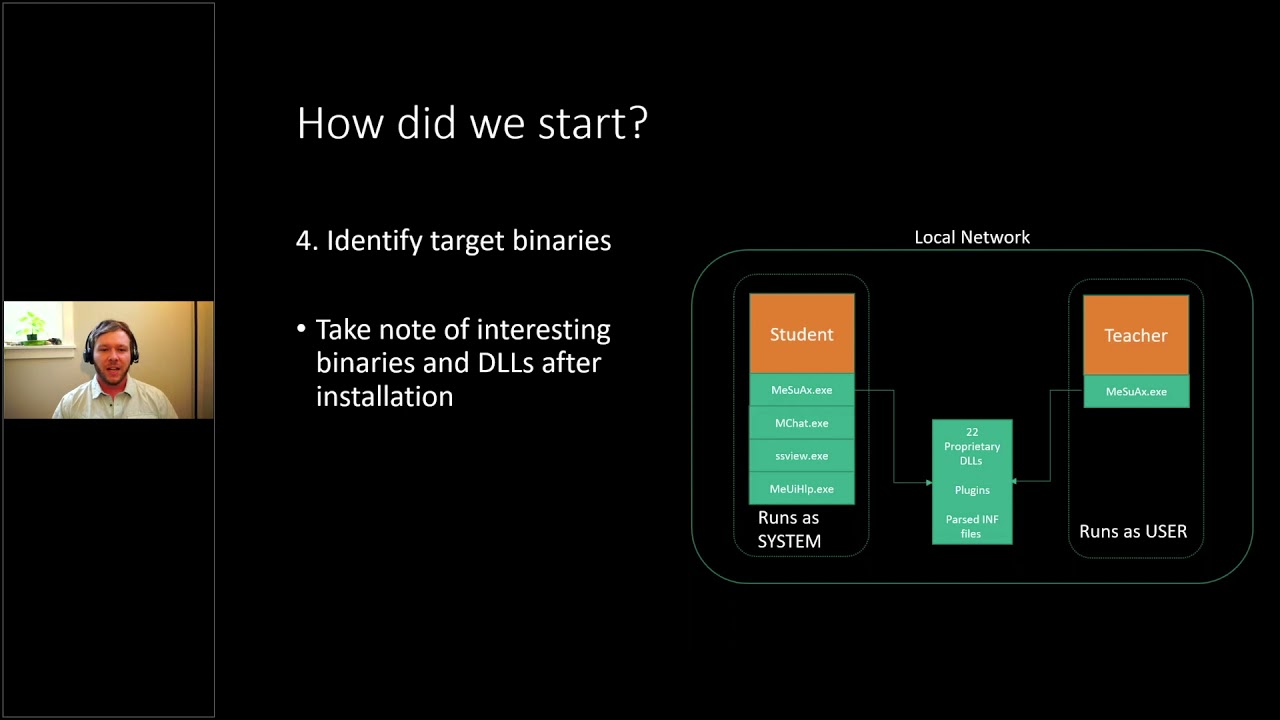
identified uh binaries and kind of how they're communicating in the and one thing we noticed was the student and the teacher had quite different installs actually so the student would actually have they share one application between the two that were similar between both installs but the student also had a lot of these these plugins that would actually facilitate many of the actions shown in the previous slide so for instance if the teacher wanted to blank the screen there's actually like a plug-in for that which is a completely different executable um so we kind of wanted to identify the ones that we wanted to look at and so we kind of listed them out here to just
get a global zoomed out view of the these two installs and one thing i wanted to point out is the student yeah like i mentioned before is running as system and the teacher is only running as the teacher user uh the windows user so this kind of made us want to target the students more there would probably be more of them more of them leaving the school network and uh potentially have that remote or that privilege escalation um because the software is running at system um so now let's uh let's enumerate through some of our goals and see how we approached these um in our research so the first thing we wanted to look at is how the local
network was set up and how the teacher and the student communicate between each other pretty quickly we actually found that doing a wireshark capture and just kind of playing around with some of those buttons um that almost yeah everything was sent in plain text so this software was really designed for local network communication it never really went through the the extra steps to encrypt the traffic so you can see here um even the sensitive data like uh logging into the student computer from the teacher console would actually display the windows username and password in plain text um so easily just to sniff the traffic on the network and just pull those off and so we noticed that and not only the
windows credentials but like yeah for instance when the teacher was can start applications on these students remotely that was also set in plain text which really caught our eyes an attacker trying to get you know code to execute on a remote computer this would be great to just capture this traffic and potentially replay it as well as when the students connect they actually also start broadcasting their screenshots so highlighted here in the red box those are like semi-real-time view of the students they start you know broadcasting out their like screens every few seconds and just being on the network using a network sniffer that can extract images like driftnet for instance on linux we were able to just pull these uh
images by just uh having a passive uh listening you know uh presence on the network um so that uh was so now we can fill in a little bit of more of that diagram and so we can we can identify some of the network traffic and which is all unencrypted so that was good to know and that actually led us to our first cve finding where they we filed it against clear text transmission of sensitive data because the teacher was sending even windows credentials as well as commands and screenshots we had we thought that was sensitive information that should have been uh probably encrypted or obfuscated in some way and to kind of highlight on how easy it
was just to get to that point all the attacker would need to do is have access to the network where the student computer was on um have a wi-fi card or a network card that supports like promiscuous mode and then pretty much just sniff the traffic with either wireshark or driftnet and you'd be able to capture everything i showed before um so if we look back at our goals we didn't get a local network attack since we're not really attacking anything we're kind of just listening but we did we were able to compromise windows accounts that way so that kind of checked off one of our goals there but uh if we uh kind of just recap all
we did was um we had access to the software through the free trial we set up you know some mock classroom um we identified that all network traffic was unencrypted uh the teachers have full control over the students they the students can't really deny these requests from the teacher um the teacher wants to start you know an application or view their screen the students have no way of blocking that and all of the students run as systems so that's kind of where we're at at this point in our project and and then we wanted to um really dive into seeing how many of these functions that the teacher can perform uh we wanted to see if we could just
emulate some of those or you know become a teacher a little bit too an attacker a lot of those functions would be quite useful being able to start remote codecs or start applications view the screenshots things like that so we wanted to think like the person we wanted to become and we wanted to become my teacher so we uh started to look into how um difficult it would be to emulate some of that network traffic and you know kind of move it into a python script or something more extensible that we can uh build exploits and and kind of work from there on um and like i mentioned before uh the reason we wanted to do this was
teachers control the students uh with uh no discretion so the students no matter what time it is it doesn't have to be class time or anything like if a teacher wants to connect to a student computer that has the software running the the student computer will do it um there's no way for them to deny it or they'd probably do that in the classroom um yeah like i said before the just having access to many of those teacher functions could be very useful for an attacker as well so the next thing we had to do is see how the teacher found these students um and you can see maybe a a trend coming up here where
uh um all night you know like the traffic was just in plain text really helping us out as an attacker the student actually broadcasts out their presence on the network every few seconds even so really quick they're they're constantly beaking out not only their computer name but their ip address and their mac address even so kind of everything an attacker would need to do to just sniff on the network just for a short amount of time and kind of curate a list of these potential targets where a an attacker could kind of enumerate through them all and potentially um perform these teacher actions via emulation so now that we have the the student list kind of we know how to identify them on
the network we wanted to see how we could actually connect to them so the way we did that was we started to um capture multiple handshakes from different students different teachers and kind of compare them to see what was similar what was different and we identified the handshake as being like 11 packets so quite a bit more complex than the standard like tcp four-way handshake it's um and but however through our um our diffing of these these packet captures we actually only identified three elements that were unique um and uh yeah so we'll go into those in a little bit but um i also want to point out that right before the red box there's actually
two udp messages and in this scenario actually the teacher is the listening socket and the students are the um the connect the ones that actually do the connection so the teacher actually broadcasts out a udp message and then the students respond acknowledging that udp message and then actually connect to the teacher so it was pretty easy to for us to set up a like listening socket and then just beacon out this udp message and get these students to connect back to us but to go back to those unique elements we we needed to have those to actually have a successful handshake and um what we identified was one of them was a unique identifier for each teacher
which is pretty easy to identify and then the second one was unique to each student so also pretty easy to identify just through the um the network packet sniffing the third one really stumped us for the majority of our research actually until uh you know spending hours in in in windy bug where we actually ended up noticing that the token um started to look quite familiar so the token three when we actually ran it through like the address command we actually found that it was a heap addressed on the student that they were just actually broadcasting out to the teacher for some reason over the network i don't know if they were trying to just
defeat aslr on themselves or whatnot but we thought that was pretty comical where they were using just a heap address as like a unique uh identifier or something so once we had that kind of understood and we could capture all of these uh three tokens we were kind of right on our way to creating some code to emulate this so on the left here these are scapy layers where we can create custom network protocols uh i would say and we did that for this so we we kind of reverse engineered these packets not everything we actually knew what they did so you can actually see a lot of these ukws which are unknowns but um
since it was pretty much a static replay of those we didn't really need to figure out what they did very much so um these are just a few of the packets and then this is kind of code over here to show how simple it is that we um to replay these these packets we all we really needed to do is change those tokens and the target ip and everything else was pretty much static from just the packet that we captured um and then this one so this is a run command function and all we have to do is at the end change which command we want it to run and i'll kind of show you that in this
demo here um so these are all students these windows boxes and this is the attacker script and so what it's doing right there is it's scanning the network just for five seconds and it actually found all of these computers via a broadcast and then what we did is we ran powershell so we'll do it again here with calculator this time so there again it's scanning the network just for five seconds and in that time these all of these students have broadcasted their ip address their mac address and their student computer and what we're doing here is just um pretty much a direct replay of those packets from the teacher um however just changing which application
we want to start and it is um you know executing on all of the students uh pretty pretty uh pretty nicely so that was that was a great um finding right there for us so that was our second cv where we identified it as incorrect authorization since the student has no way of really identifying if a teacher is really their teacher not just a python script or whatever there's there's no way for the student really to have any control over that so if they have the software installed which they can't uninstall since they probably don't have system or administrative access and a python script comes along that anything that we tell it to run would get ran
so if we sync back up on our goals we've actually accomplished quite a bit already pretty early on in the project so we we actually have now a local network attack where we can execute commands on the the student machines after we've found them and identified which ones are vulnerable we can remote control the student uh you know over remote code execution and then we still have the windows count compromise but um you know we still wanted to potentially increase our our position on these these machines knowing that many students would probably not have the greatest privileges uh having access to a student account or code execution as a student is not that that impactful so
um to summarize a little bit more we can passively identify these these students on the network we can spoof the handshake by capturing all of those unique elements we can modify and replay the network traffic since there's no authentication or validation and we can execute arbitrary commands on these remote machines so let's dive into the privilege escalation for a little bit and so uh to kind of bring it back to those calculators that were shown in the last um demo so those were all actually started as the student user so there was code in place which i'll show in a second of that where the system level service is actually identifying the student user and dropping privileges
so all of the plugins are still run as system services so you can see like the screenshot viewer the chat application remote controlling all of that is ran a system to prevent the student from like closing it or you know denying this the teacher however they are any kind of like execution where we're starting an application or opening a file they did a great job of actually dropping the privileges uh correctly so um it is good to see it however it's bad um for you know an attacker or a researcher like me so we we still we wanted to keep digging and that's when we kind of dove into some of the reverse or in the
uh disassembly and wanted to try to find um how that was getting handled so on the left here you'll see that this is all wrapper code for the system level service to identify which user is logged in and then drop the privileges before running like shell execute somewhere down here um there is this path over here that just goes straight to shell execute clearly skipping all of this privilege or these this user finding and whatnot so this really was what we wanted to get at um however it was somewhere up above um it was reading a variable from like the registry once and we didn't find any code to like set that variable especially not over the network so um it
was kind of a dead end there but it really got us wondering how many other shell executes are there and do they all have this wrapper code you know around it and that's kind of when we identified actually four local privilege escalations none of these were actually available over the network so that was good on their part um but you can see right here that this is a shell execute call with clearly none of that wrapper code so this is the support page so if you right click on the icon and go to about and then like support it opens internet explorer actually as system with a pre-filled url and in soon as anything's running a system like
that um there's there's many ways to even just use your mouse and click around you know save as and go to system 32 and open cmd or whatnot and kind of get a local privilege escalation that way and so we kind of identified those in not only the support page but a few of the other plugins as well um all kind of just using the mouse only so um pretty impactful for them not really for an attacker like us but you know students if they knew how to do this could um have system level access so we disclosed this um to them as incorrect privilege assignment since they they should have had that wrapper code around
these calls as well so that was our third find or yeah third finding there so um but we still wanted to do it remotely we wanted to have an exploit where we could run it over the network on these students and get system um level access so that's kind of when we uh started to dive into one of the local privilege escalations on the previous slide was the chat feature and while we were looking in that we we started to notice that it was um quite a bit more feature complete than we thought yeah and one of the it kind of reminded us also of while we were downloading the free trial there was in the change log
um clearly a problem before where if the student opened a document sent from the teacher it would um also launch a system so they've had problems in the past there as well as knowing that you can actually send documents over this chat feature and whenever an attacker can kind of drop files on it their target is kind of uh a good sign so we started to divert our attention a little bit to this chat feature which like i mentioned before was way more feature complete than i thought i thought it was just going to be a dumb um you know instant messenger but one of the things that it could do actually was the teacher can remotely view
the students file directories um and so that was quite interesting in itself um kind of weird that they added that to the chat feature but um so this is showing the student three here uh the teacher can browse the like the my documents folder of that student um they can't really like traver there's no dot dot directory so they can't traverse back up to like the c drive for instance but um they can still view you know and delete and copy files from that pc remotely um so we so this was you know on the real teacher client so we wanted to see if we could maybe emulate that or see how what privileges for instance
the chat client was being ran out was it being dropped to the student um or was it also being ran as like system uh all these file operations are on our system as well and that's when we found that the teach the that uh the chat application was actually performing all of its file operations as systems so it wasn't dropping privileges to the logged-in user or the student and then right at the end it's just pretty much chmodding 777 whatever file it it either wrote or accessed so um not the best honestly but uh so that was actually our highest um uh uh highest cvss score uh in our in our final finding of the
on this project where incorrect default permissions so um through that there um theoretically it could be a way where a a an attacker could have remote file uh system access with system level access so really no files off limits at that point where they could read write and delete files on the remotely so we wanted to take advantage of that and see if we could add that to our python script but the first thing we needed to really figure out was how to get past their their my documents folder for instance um and that's kind of when we found this convoluted path where um we actually found that through like the options menu this teacher can actually remotely set
which path the chat feature on the student is actually um like the root the root folder of that so at this point we could just change it to the c drive or whatnot and um pretty much have system level access on uh the the student machine being able to access any file we really wanted to um so thinking like an attacker again we if we wanted to get actually a remote code execution with that privilege escalation what we decided to do is overwrite a system binary that we knew would be executed with the privileges we wanted and since we know that all of the other netapp plugins that the student has installed all get executed a system
if we actually change this work file path to the install directory of this this software we can overwrite one of the plugins and then kind of just execute it through normal emulation and that's kind of what we did and i'll kind of show you some of the python uh code a little bit to help uh maybe explain it a little bit better so this is the hack the planets with the system level privileges function and the first thing we do is we um you know just scan on the network for five seconds like you saw in the last demo and then we get a curated list of all of the um the targets so then we um
enumerate through each of the targets um and the first thing we do is we start this the chat function is similar to that of the main binary where the teacher is actually the listening socket so we start a listening socket for the chat feature and then we send the broadcast telling the students to connect to us we grab those three unique tokens that we showed earlier and then we finished the handshake so there's the other 10 packets in the handshake and then the mchat join there is in the background um emulating how the teacher can change that root working directory it's changing it to the install directory of netapp it's deleting one of the plugins and then saving a
file uh with the same name as that plugin a binary we could call it malware for here and then pretty much just exiting out and then um here the the the binary that we overwrote is the screenshot viewer so the ssview.exe so we we overwrote that and so now we're just emulating the teacher to start that screenshot viewer which is now really our payload and then we just exit out so to kind of show that live i'll i'll do another demo here where again the student computers are all around the top and the attackers down here what i'm kind of show hearing is just that you know there's there's a it's a normal windows install
with all of the security turned on kind of again trying to emulate the what we would see probably out in the wild most likely and then here showing that you know there's no teacher or anything connected um and now now we'll go into the attack script and we'll use the same python script as before but this time with a dash s flag for system and a dash b for which binary we want to execute so you'll see again that we'll scan on the oh this one i didn't do the verbose mode but i found three vulnerable computers on the network and now it's going to go through each of them and kind of start executing these
this code as system so you'll see a little window pop up on these that's actually the chat application saving that file and then since we bail out pretty quick after that it disappears so you can see that the there would it wouldn't be a perfectly silent attack because the the vision client connected and disconnected messages but um what we actually dropped on there was a reverse shell on each of those machines so what we're doing now is just executing powershell remotely on one of these computers and if we weren't who am i we're actually indeed running as system and just to kind of show a visual we uh ran calculator but really if an attacker
wouldn't open a gui application like that um and uh they'd probably just leave it as a command line but there's really no way for the student to identify visually unless they open up like the process explorer um to see you know that where you have a remote persistent system level uh reverse shell running on all of these computers so um yeah and then the last one here will open up notepad for for something different so to kind of highlight on some of the impacts of that one one thing that we identified was it could potentially be wormable and i know that's a scary word and a lot of um in the security field but theoretically
a well-designed malware instead of running a calculator or whatever i showed in the or a reverse shell in the last demo we could actually have made malware where it just lies dormant until it finds these other broadcasts from the students like i said before these get broadcast out periodically quite frequently and they have really everything the software would need to know to identify for one that it's this software because it has a unique um magic um token you know in the beginning and then as well as everything you would need to do to create a list of these targets um the other thing that we uh kind of theorized was that since it is running a system you
know there's really nothing that's off limits to that we could um turn on webcams microphones um and since it's running you know like the highest privileges on the windows pc we could really do anything at that point and to bring it back down back to the kova 19 exceptions um we i this is kind of when the students bring these devices off the network they could get compromised at like a coffee shop or a local the library or whatever and as soon as they bring these devices back to the network uh the school network they could potentially further the spread so that was kind of what we thought of uh while while looking at the
uh the impact of this these handful of um cves and then so in total we found like two critical issues which we covered here um four local privilege escalations which i briefly highlighted and then three instances of plain text sensitive data like the screenshots and the windows credentials we also since we had the scapy layers um all made up we actually started to just do some rudimentary fuzzing of those um and so we found actually like six crashes that didn't seem quite exploitable and but we also had a path of least resistance with how i showed here so we disclosed all of these to the vendor and they were actually quite responsive and got it all patched up in the latest
version 9.7.2 and one of the things that we like to highlight on is our advanced threat research team always follows a 90-day disclosure period so we found this actually on 12 11 2020 and it was publicly released on 3 21 after we validated their their patch um so yeah thanks thanks again for um tuning in to my talk i'll be sticking around for some questions and if you want to see some more details with more screenshots and things like that feel free to log in to our advanced start research blog here there's this research and quite a few other research topics that we all we all think are cool so if you need to reach me on email or twitter
those are my um my handles there but uh yeah let me um move back over to the window stop presenting and yeah i'll be here for any questions cool thanks sam that was good thanks see if scanning general see looks like there's some typing going on so maybe we have some questions
i'm curious while we're waiting to see if uh do you when you go through that interaction with the vendor uh reporting reporting findings and then um and having a patch to review is uh you don't i mean i don't know how it's appropriate to talk about specific cases but in general do you find that there's back and forth or do you find like they get it right the first time with patches yeah so that's always a hard one is um uh the the back and forth because theoretically you know a new patch it means new code and so it it would uh a lot of times we kind of validate the patch um and see if there's any like really
easy things to identify that they did wrong but we don't do a full audit again because then it would be you know an indefinite project usually but um so we try to do our best though and the vendors that are um very back and forth or uh really communicative um are are great to work with because we can actually help them along the way it's kind of the worst when um you disclose something you don't hear back and then like two days before you know we're planning on releasing it they go hey we fixed it can you check it and then if they have a mistake there like what do we do you know like so
the ones that like start working us with us because we always offer that you know we're like hey if you guys have any questions or anything like want our code you know our exploit code like feel free to ask for it and those those those always work much better for the uh uh like some of the crashes you found with fuzzing um are those things that uh that you will kind of like put a way to like check out later now that um like these findings have been disclosed or is that kind of like yeah it's good enough for now yeah so it's kind of that's another hard one is um usually uh because we have the
opportunity to look at so many products like usually if we get like root or system a lot of times we we start to lose interest because you know like we found the the holy grail you know but um so we actually are going back and looking at some of those now um we're actually gonna try to do a like a potentially like a training internally with with this product you know um because we we've already built so much infrastructure with it and stuff so it's uh we are going back through it but um i'm not saying that's always the case though yeah yeah yeah the new squirrel or you know the new target you know
yeah cool okay uh we and we actually do have some uh some questions from channel so i'll switch to those uh so urbansec asks uh first says seriously great talk uh can you go into more detail about how your sniffing approach is affected by different network architectures and they say for example switched ethernet versus web wi-fi versus wpa2 wi-fi okay yeah um so i think theoretically as soon as you connect over like for wi-fi in in for instance as soon as you are connected to the network the um the connection method or the security involved to get connected actually doesn't play any role there and then like um so the promiscuous mode that i mentioned is
how for wi-fi for instance how you would actually capture network traffic that's not intended for your machine and that's actually just um that is getting broadcast out over the network anyway and most nics just reject it because it doesn't have their signature but promiscuous mode is actually a cpu so it bypasses the nic and actually um uses the cpu to identify which packet is its and at that point you can tell oh all packets are mine so then it consumes them and you can view them in wireshark or whatever um on the ethernet i um i think it's the same i don't know if you even need to put it in promiscuous i might be wrong on that but um i don't
actually think that unless you do some network uh segregation with like vlans or whatever that any sort of network would be able to like prevent against the plaintext sniffing of traffic and that's kind of why you know https and stuff came along as they identified this as just a flaw in networks cool thanks uh so aaron asks if you were able to find any vulnerabilities uh the other way uh so i think he's talking about for going from the student application to the teacher yeah so um that's what uh i i've gotten that question a lot and i am bummed that i didn't actually enumerate that you know i was so stoked on the the student one that we never actually
went back to the st the teacher but um there there potentially could be um we didn't look into it though um as thoroughly because the teacher client is running as the teacher we thought that getting the student or the system level access on the student was more impactful so we we kind of decided to focus on that but yeah that's a really good question thanks uh see we have another one from punk coder uh do you think these class of applications all have similar attack surfaces or do you think this application was an anomaly so that's a that's a really good question um i can't speak for all of them because i haven't looked at them
but uh i do think a lot of these software's um they are designed in a way that they they never really potentially i don't know for sure but like it seems that they don't really expect them to leave the walled garden of a secure network um for instance so that's kind of why uh we usually wouldn't have potentially looked at this product uh as thoroughly thoroughly uh because uh we like to try to find you know the the internet-based attacks and the things that you you hear on you know the news like the um but since this one you know there is a lot of changes going on with now you know hybrid learning could
become a a de facto and things like that so i think um we always go back to if vendors can build in security from the ground up it's much easier than trying to tack it on later because they didn't think of a scenario where now their software is being used so um i can't really speak for other school software but i would probably assume that there's many others that are similar to this yeah that makes sense the uh see we have another question from uh yowza asking uh how many students use this software so i guess an idea of just how prolific this particular yeah so that's that's a really hard like we always try to find
the details on that um kind of thing and um it it's really hard unless they have like uh they brag about it on their their website or whatever um and the netapp actually was one of those that did brag about it and in one of my previous one of my first few slides uh i think there was around six million teachers and students i don't know if that means like uh each one is a one of the million or or if you know one so that's what they claimed six million teachers and students so um potentially six million installs i don't really know it's it's hard to get those numbers but uh whenever we do we we try to you know
we don't just go out and ask them usually i wish we could
cool thanks very much for that talk that was uh yeah super informative yeah excellent yes yeah technical deep dives um cool i don't think we have any more questions um but uh yeah everyone's watching please the questions are coming from discord so feel free to join the link
Related talks
 42:41
42:41 47:57
47:57 27:44
27:44 43:49
43:49 56:06
56:06 9:40:42