Cloud Security: Monitoring and Alerting in GCP
Show original YouTube description
Show transcript [en]
hi everyone i hope you had a nice lunch and that you're not as sleepy as i am and yes i had that joke prepared so we're going to talk today about logging and alerting in gcp i am diana i'm a senior security engineer at king and i also come from telecommunications so i still remember some of the maxwell's equations also i'm from a network and network security background so i know the challenges that us as security professionals face when moving from on-prem where we have our cables and our hardware to a completely serverless solution somewhere in the cloud and also i'm native from romania and that means i know all dracula jokes so if you want to hear more about
dracula mythology or vampires please follow me on twitter and we can as well talk about cloud security that's boring great so this will be our content today it's divided into two parts in one we will talk about logs and alerts and the options that gcp gave gives us we'll state some problem and philosophy there and then in the second part we will show an automation framework completely built inside gcp that will help us with detection and incident response great so let's start i think this is a very busy slide and you don't see anything so i started adding icons and we got to this okay so gcp has a lot of services it has some services like the ones you can't
see there based on computing and other managed complete managed services storage bigquery or machine learning for all those all those services it gives us it has monitoring tools for diagnosis logging and all types of monitoring so we will see this shortly and also we need to remember that some services of google work over compute engine which are basically vms and they have the protections you add after over virtual networks and then they have some complete management complete managed services where we just need to control access to those resources and we will see that shortly and here foggy is the shared responsibility model which we were lucky that we saw it today for amazon as well
so basically means that we're moving from an infrastructure as a service module where we have compute engine where we need to control everything from system operating up operating system up and we go to completely serverless logic and elastic resources where we just need to control the access to that and um as uh winking are collaborating with gcp for a couple of years our main use cases for uh gcp platform are big data because we have a lot of players and a lot of metadata for that players and we need to parse it as well as machine learning and this is a super cool use case we actually have virtual players for our games that's you know like computers that play
candy crush and i think that is terrific and you can find more information on our tech blog [Music] and the big nasty problem so uh this talk will be focused on the vision and on the perspective of moving from on-prem to the cloud and the problems that this adds and basically the problems as as follows we are used and we are comfortable in an on-prem where we have our stack where we have our hardware where we know how to manage those controls and when we're moving to the cloud environment we see that we cannot implement the same stack and that makes us feel we have a lack of visibility also in the devops environment where
developers are managing their own infrastructure they're in agile technology companies it happens more and more and some companies even enforce that the developers manage their own infrastructure they don't want it centralized and this lack of centralized management also makes us feel insecure and out of control and makes us not be too open to the cloud and all this the news that we hear every day about data leaks don't make us feel very well because most of those news are because of buckets or storage buckets or data databases which are not properly configured and we need to understand how we have visibility and how we can control that and we will see how to solve this nasty
problem with gcp native tools and the second thing we are very lucky to have in the cloud is that we can very easily practice now even in the demo that i will show you i actually did that demo with my private account in five minutes i spawned it up and i have some tokens for a full year to test i don't need to buy us an expensive appliance or to have a very complex virtual lab i just with two clicks i am able to practice that and that's absolutely great so now let's go into logging and temelemetry
so uh i want you to also think about those slides as a cheat sheet in the future because there are some lines of codes and some queries and we don't need to go over them now but they're thought this is something that i used i would have loved to have a few years ago you know when i started looking into this i would like to have already those lights prepared so if it's so much information don't worry we're gonna see it afterwards so one of the google monitoring products that it has is stackdriver which is basically a log aggregator and in gcp everything is logged every action every access to data is being logged and it's being logged in
json format which gives us a lot of flexibility than to parse those logs you have options to keep the logs in this stack driver and parse them there of course to discard them if they're not of use or to export them to storage to bigquery or to pub sub which is a messaging service published subscription messaging service for your external cms or systems and we have audit logging for access to data we have rich metadata telemetry for log balancer traffic vpc flows and firewall logs and some application specific logging and here we enter a little into detail the admin activity logs are enabled by default and it's all the activity performed by admins over resources so this means
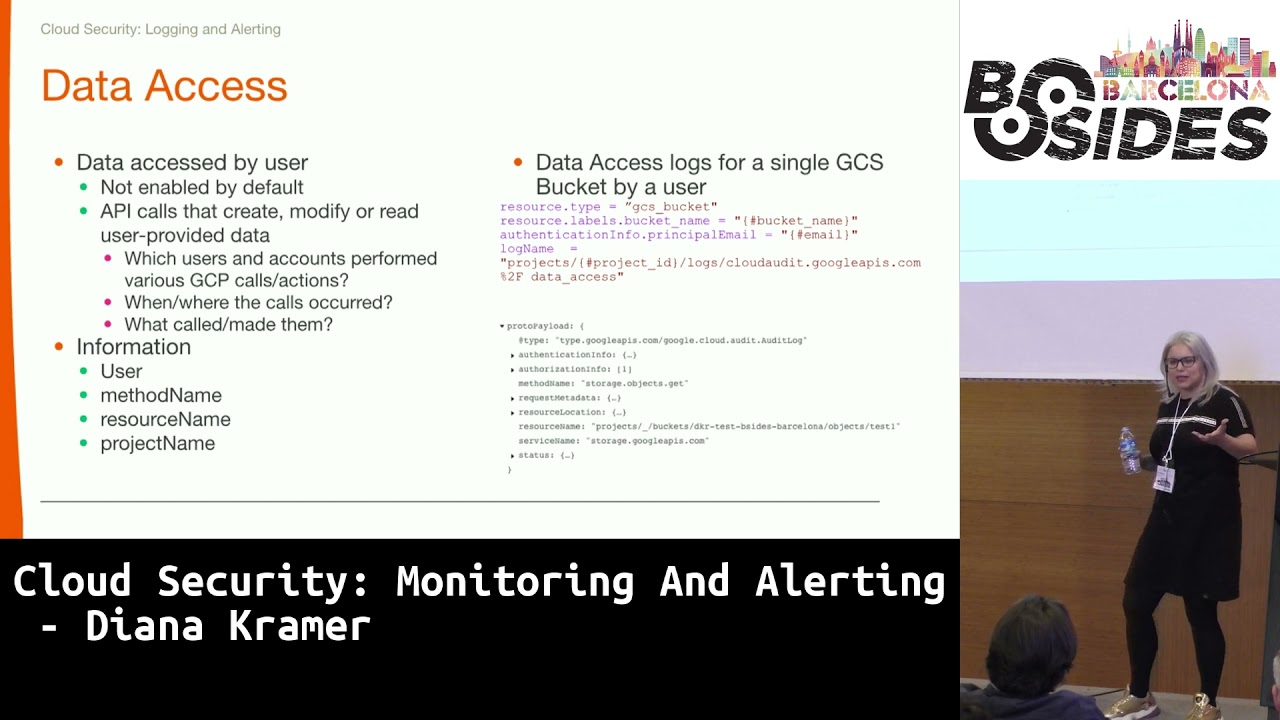
if somebody created modify deleted resources we can see all that we can see who did it so we kind of not even need now to have a clear uh audit of or inventory of our resources because we can see who acted on the resources source ip user agent and info about the projects and the methods invoked and on the right you can see but there are some pre-done fields that you can directly use in your queries or in your investigations and here is a query that can be used in stackdriver to see all the activity from a subnet of compute engine vms so you can check this out later this is access to data data access logs
and if in the case of admin activity logs we could have seen when somebody created a bucket in this case we can see if somebody uploaded or downloaded information from that bucket we have the same metadata about this activity and we can see also the methods that have been invoked from where and what or whom did them and here is a very nice blurry example of a query to see all activity over a bucket by a sole user and here in the result you can see it's a get method over the exact button um exact object so it's a download so sorry you can see that and here is another busy slide with vpc flows and vpc flows are like the flows
that were used on prem you can have the five tuple with source ipm destination uh i pn destination ips source port and destination important protocols volume information and in this diagram which is from data studio also a service from gcp that can help you visualize big data information flows being one of it you can see flows from vm to several public ids you can see the ports and you can see how much volume of traffic has been passed and here are some direct little queries that you can use in your investigation to see vpc flows for vm port and subnet so with all those informations and all those data that we have we've seen now
we should leverage them and we can leverage them creating alerting and this is a very interesting concept because we are used with parsing logs and creating alerts so we can do the same thing in the cloud the only difference is we have all the logs needed we don't need to go and beg for logs for several teams and we can alert over everything some can be policy and compliances like creation of non-compliant vm or non-domain accountants accessing gcp and others can be security related as traffic volume and high resource consumption and on the right is an example of such alert over uh traffic sent bytes from a vm but here we discover another problem okay we have all the logs okay you
create alerts for everything okay or developers have freedom spamming spam instances add users you know do their thing but it's very difficult to manage a scale alerting on all those things and going what going on slack on each one hello have you added this person here you shouldn't have so this this has a high operational overhead and being a reactive approach we need and giving the freedom and being reactive we need to react fast so we can't you know have an alert and react on it over 12 hours so that's not a good idea so here comes the second good part of a cloud solution in this case gcp as we have a look for everything we have an api for
everything so we're gonna see a clear example how we can leverage all the logs and all the apis to create a complete automatic auto solution to um be able to feel comfortable in the cloud because we're detecting everything and we level to respond to those challenges so the example here is the classic and in famous public bucket we've seen how much problems this gave and one of the things that the public bucket has in case of gcp it has two ways of making it public one is all users which basically means is 100 percent public and the second thing is uh role all authenticated users and this has a little problem because people might think that all authenticated users
might mean user authenticated in my organization and that is so not true means all my organization any organization that has a gcp a google account or even gmail accounts so you need to be authenticated with google so this creates a lot of problems so basically we can create an alert with this query right here we're checking for the member or users being added over uh the resource type being a bucket and another nice thing to see is that every time you have a back-end being made public it gives you a little message there and says beware it's public it's not a good idea okay so having this alert in this query let's see how we can automate completely
the response so if in our policy is you cannot have a public bucket except if the use case is clearly analyzed before by security and we add you to a white listing and we approve you to be on a public bucket which basically you need to have a public bucket only if you have public web content if not we will have a way to reduce it to a group or a user so here what's happening i can't even see what's happening here so okay what's happening here you will see afterwards is that we have a user that when goes to a bucket and says okay i want to make it make this bucket public and in that moment that log that
somebody made the bucket public with the filter we saw before goes uh to logging to stackdriver to monitoring and there we have a pub sub listening to all the events that apply that query to and then and this is where the magic happens we have a function that listens to that pops up on the pops up the full log comes so we are it's a json we can parse it and as we said we have the log the function is listening to it and then it invokes the cloud storage api to make that bucket private again and that's instantaneous and of course as we respect our users because sometimes they might be wrong or we send them a message because we can
use for parties we can send it to slack and email and send them the message saying okay you're not allowed to do this but if you want to do this this is the documentation and we start the conversation with them so that's super cool and we're gonna see it now and here you have a little snippet like this is done with less than 20 lines of code okay you just get it you put it then and there you have it so now let's see exactly how the magic happens okay are you excited yay great because i am so okay so uh can we see okay we can see this is the log export export that i
told you about so here is the exact query that we saw okay do i still have internet i don't of course i don't have internet oh yes i do okay we have internet people so here is the here is the query we talked about so we're just checking to be all user ad over this resource type and as i said this is my own private uh google cloud project and organization and everything done with my account which i did it in one hour so everybody can play with this and here i'm exporting it to this destination which this is the pub sub if we go to the function we can see which is a function like lambda
functions more or less in amazon for people more familiar it's listening to this topic and this is the this is the the function this is all so it's super short here is reading the log that just came through pops up here is getting the client for um cloud storage and here is discarding the role so let's see how it happens okay so this is our bucket we're adding the member all users okay let's add it just your roles the roles are the same as every your editor full admin and you will see that now it tells us that the bucket kit is public and let's go back here and okay let's go back to function details
[Music] let's have patience with it even if yeah oh that was a lot okay so [Music] let's refresh this yeah i'm from my phone now so the magic happened there so you know okay i have a video as well so okay let's refresh this and we will see how it's not public anymore see the bucket is no longer public and if this has refreshed we will be able to see that the function has triggered so this happened in how long and how long my phone internet works in 20 seconds so is that simple and with so little things you are in control again and you're doing something that is done very difficult on-prem because on-prem is
more difficult to interact with all our security controls and other security stacks to automate this see it's it's been triggered and the bucket is private again yeah that was cool wasn't it thank you faint come on i need to back here forever perfect and as we saw it the case for just the public bucket of course this can be extended to everything so you can see here again but you can have a pops up that risk logs for everything you want to enforce being if you see a high volume consumption if you see a resource consumption if you see that somebody added a user from outside the company or anything like that and then you have several functions for
each one and the last thing is the notification module you have a sole notification for everything or several depending on how you go and you might have one that directly sends to slack and notifies the user or just opens directly an incident ticket in your incident response framework and with this we go to the conclusions and the idea we started with is that we don't feel comfortable on going to the cloud because we have no only visibility but we have because of the rich logging information and then that we feel we're not in control because security controls are now distributed and managed by developers but we do have control because we have apis and we can do this
centrally and then what this happens is we can balance the world of user freedom with the reactive enforcing of security policies through automation because we can automate all this and we're not afraid that we will being without the control for a too long time and as i said i think it's a great starting point for the transition from the on prementality to the cloud mentality feeling you you know and uh you can interact with until you fully enter in that serverless mentality and you understand all the controls that the cloud 4 cloud platform can give [Music] thank you in questions [Music]
[Music]
[Music] hi thank you for that you uh you have one one alert here which is an open uh an open bucket uh how many alerts do you propose writing or do you have any library of alerts that you could apply or buy from somewhere or how many alerts are you aiming at well that's a very good idea actually well every company we in its blue team or in its sock team has a catalog of alerts and of detection that they do over time starting with some basic alerting that everybody has and then going to more specific alerting based on their environment so i think this should just make part of your detection framework and detection
catalog and as you add a new detection for the production on-prem environment because you know you have some some applications and how to detect them you can do the same type the same thing with the cloud and the only difference would be that you are adding a new log source for those detections so okay how many you have how many you feel necessary if you only imagine if you only start using cloud using buckets this will be enough for you when you start using other services you will add but thank you for the idea it would be nice to already have you know like a set of predefined alerts and some of the queries that i've done can be directly
used to create alert but this also depends on the cm you're using you can do it over a cm in particular and you'll have your queries or you can do them directly in stackdriver but it's just part of the detection catalog hello thank you so much for the presentation it was lovely here yep a quick question this is an event that you can trigger very easily something in order to fix the issue but what happens when you receive a lot of alerts uh that are related to false positives how you handle false positives in other kind of alerts that are not as easy to detect as this one okay so also in the part that you have
of the detection framework that you already have on-prem when you're when you're designing a new alert what you're doing is that you have a first time of doing the event discovery and starting to see okay i want to detect this i want to detect when the communication happens on this port or when this user is added you first do some queries be it in stackdriver or in your cm and you see how many events that would have generated during a while and you start tweaking that alert until it makes sense because you're right with something an alert makes sense only if it's actionable that's the idea of automation so you just need to know your
environment i'm sure every environment is different and you need to do an alarm it's not done like okay i have this query i'm just going to enable it you need to work on it and tweak it until it's perfect [Music] hope that answers your question question here thank you i wish to ask you which kind of uh benchmarks or frameworks you are trying to achieve during google and in king or is that something that is home made by you or your team of security engineers or you're trying to which kind of level you're giving to the tools that you have in google cloud or external tools in order to achieve this compliance level i think i don't understand no
i mean you know as your example says i mean you have been using products in google cloud in order to automate that stuff right yes but which kind of uh lever for example you are trying to achieve cis benchmarks so some kind of uh compliance level on that sense where you're doing an inc ad king in your own team some kind of framework you know that okay and can help you in order to achieve this okay i see what you're saying uh what i was showing here was just a point of starting so just a way of a security of a company uh to leverage those logs and have this control but the fact that they follow a
framework or another when they're enforcing controls because this is just a reactive detection part that depends in every company we also have our types of controls that go over this so this this is more from a point of view what what you need when you the first day you start so i think it's it's more important to be seen from that point of view
yeah if you have a particular attack or a data breach are you able to reconstruct the activity what is the log retention on this platform okay so you by default in stackdriver so you're just using stackdriver they have 30 days retention which is not enough then you can export it to platform to other platforms for like bigquery for example or in cold storage and then you can use whatever retention you are using in your policies so yes for stack drivers 40 days it's just good for alerting and first incident response on something that you see but then you need to you need to export them somewhere where you can have a longer storage correctly good question
that's it [Music] cool thank you
Related talks
 25:47
25:47 41:42
41:42 47:20
47:20 43:16
43:16 30:15
30:15 34:01
34:01