Fuzz Smarter, Not Harder: An afl-fuzz Primer
Show transcript [en]
able to produce this without them if you have any feedback about the conference you can go to besides.com feedback or you can go on the schedule to a particular session that you have feedback on click it and click on the feedback survey button again we have a raffle for 150 Amazon gift card by Jim Alto that will be done at the end of the day so if you want to to submit to that please go ahead again the burning rubber smell is from a fire down the street nothing to worry about um we'll let you know if there's a real emergency uh yeah so I just want to introduce Craig young he's a security researcher
at tripwire and he's going to be talking about fuzz smarter not harder and AFL fuzz primer keep your attention great all right hello b-sides um thank you thank you for having me back again uh so as introduced I'm Craig young and I am a security researcher with tripwirevert I do a lot of vulnerability hunting and today I'm going to be talking to you a bit about one of the tools that I like to use recently for hunting for bugs um fuzzing and specifically the AFL fuzzer so to go through this we're going to talk a bit about what fuzzing is exactly how it gets used the values of AFL how to use AFL how to get the most out of using AFL
and then we'll look at what you do once you've actually discovered some crashes how you evaluate them and figure out whether or not they're worth something whether or not they're exploitable and to wrap up we'll talk a little bit about some of the results that have come out of the use of AFL as well as perhaps some time for question and answers so what is fuzzing um fuzzing at a general level is the concept of mutating input passing into some process and looking for it to Break um there are a couple categories of automated fuzzing that will go over very quickly you have dumb fuzzers like zzuf basically what you're talking about here is just blindly mutating a file and
hoping for crashes to come out we've got smart based foot or smart fuzzing which is where you're going to generally devise some kind of template that's going to describe the format that you're fuzzing so the advantage of this over dumb fuzzing is that you're going to hit a little bit more of the harder to reach places in the code you're going to expose more features because you've got a description of the data that's being fuzzed here um one of the problems though is you've got to actually develop some code and spend some time understanding the format you're fuzzing and of course with dumb fuzzing you don't have to spend very much time setting it up but you're not
going to hit stuff that's very deep within the code so this brings us to instrumentation based or coverage based buzzing the idea here is that you're actually going to be monitoring how the program executes and seeing what code paths are being taken and using that to determine the value of your fuzzing efforts the advantage here is that you have very quick setup time you don't need to worry about any knowledge of what type of data is being parsed and you're also going to be able to hit very deep levels of the code as we'll see American fuzzy Lop is a great example of information instrumentation guided fuzzing but it is not the only technique out there some of
you might have used the Intel pencil for example for doing similar types of things so um when we are fuzzing there are a couple different mutation strategies that we will use you want to be flipping bits um adding and subtracting different values uh so basically walking through your file or your test input interpreting sequences of bytes as different lengths of values and going from there with arithmetic uh changing around byte orders that you find when you're doing that iteration and also inserting things like Max in and just setting high order bits putting in generally interesting values the advantages of fuzzing there are lots of them so you can be fuzzing 24 7. right now I'm talking to you guys but
I'm also fuzzing a media parser on 32 cores um you're going to find with this process a lot of bugs that are going to escape typical code review particularly we see a lot of use after free bugs that are not going to be readily visible by even very experienced programmers but the fuzzers will kick these conditions out and if you look through browser bugs especially that's a lot of what you're seeing now is use after freeze fuzzing also gives you a way of generating a test Corpus that you can use in other testing efforts and finally you want to be fuzzing because frankly the people that are trying to attack your software that you're designing or your internal
systems they're also going to be fuzzing so you want to be on the same page as them so American fuzzy Lop this is a tool that was developed by a Google engineer sorry if not pronouncing the name correctly but Michelle zaluski also known as alcampton and he developed this based on some of the research that was going on showing how you could use gcav specifically to look over a set of test cases and figure out what the most valuable test cases were based on coverage and that this would lead to more valuable fuzzing efforts so alcampton took this one step further and actually started fuzzing while instrument under while binaries are instrumented so that you can see the results of your puzzing
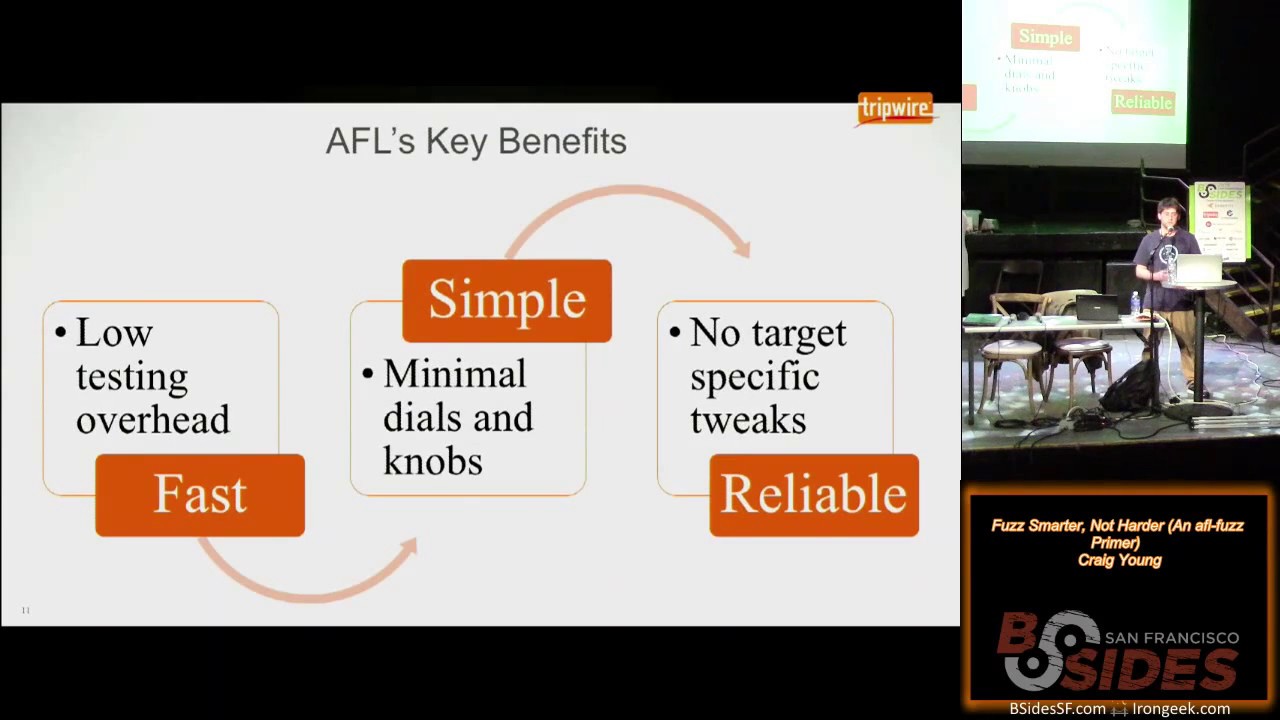
in real time and the results here is that American fuzzy Lop is quite effective against a wide range of um different targets so image parsers browsers compilers you've got a wide spectrum of places where it's successful as we'll see the key benefits of the system AFL is really fast there's not a lot of overhead involved it's got some features that we'll talk about that make it very effective at being able to use instrumentation and quickly discover interesting test cases it's very simple to use meaning there aren't a whole bunch of things that you have to tune in and stuff that really only the person who made the tool is going to understand how to get it tuned in exactly as it
needs to be and it's just overall very reliable you don't have to worry about making tweaks here or there because you're fuzzing one target versus another you follow the steps for using it and it's generally going to work and keep working before we get into how it works it's necessary to kind of understand what a basic block is I'm sure most of the people in this room know that but at a high level the basic block is a set of instructions where you're going to enter and as if you enter you are going to exit at a specific point unless there is an exception the way that AFL works is by instrumenting these basic blocks so you
put in a little a few new instructions around places where there are branches so that you're able to monitor the execution path okay you can see here that um some pseudocode for the instructions that are being put into the binaries this can of course either be put in through compiling or through user emulation with quemo but the first thing I want to point out is you've got a random number here this might seem odd but the reason that you do this is you're going to be compiling a number of different objects and linking them together you want to have minimal overlaps here and then also you'll see on the second line of that pseudocode there is an xor operation
going on and those locations you want to have a good distribution for the results of that xor so that it's not clustered and having these random numbers helps doing that um when you're actually fuzzing AFL fuzz is going to give to the Target program a 64 kilobyte shared memory region and that region is then going to be essentially a bitmap for the code execution it's going to be able to identify when where execution came from and where it is now so that you recognize State Transitions and then State transitions which have not been seen before or when you have noticeable differences in the hit counts for different path tuples or these State transitions that's going to be something
that you consider interesting and you're going to want to add that to your queue and continue fuzzing based on that so you probably can't see very clearly but that's intended here this is a chart of el campus efforts fuzzing gzip just for a couple hours on a single core you can see in the First Column there these are all the test cases that you would reach just through blindfold browsing through random mutations but then when you take those test cases and you start fuzzing on them then you can find that second level and so forth all the way up to the six levels here and you could of course go beyond that but just to show the kind
of variety of test cases that you're going to get that you would not otherwise get through blind fuzzing efforts um one of the more interesting things that I've seen or one of the things that got my attention rather in the first place with AFL was the blog post from El campus showing how he was able to just seed input for jpeg parser with the word hello and using that all these Graphics that you see here were actually synthesized by the fuzzer without any previous knowledge of jpeg so that means you went from the word hello to being able to figure out how to populate Huffman tables and create jpeg frames it's really quite impressive and
starting to get images like this in my experience you can do that within a day or two maybe three days so if you want to go ahead and start using AFL to fuzz stuff it's pretty simple the first step you have is you need to build the AFL tool set so it's a very standard download extract make process and then the next step is you're going to need to find a Target that you want to fuzz and when you have your target you grab the source code for it and you configure it to use the build products from AFL so this means that when you did that make on AFL you're actually generating wrappers for GCC and clang
and potentially a few other things that we'll talk about further down the line uh you're then going to make your program using those compilers you'll actually recognize what's going on that it's using your tool the AFL tool chains because you will see status messages coming up telling you that locations have been instrumented so once you've got your instrumented binary and you've got AFL built of course you then take the instrument binary and you pass it to the AFL fuzz application along with references to some initial test inputs and a place to Output your findings so this is the most basic usage of AFL fuzz when you're running it you'll get a status screen that's something like this
a very nice retro look there and if we start breaking that down there's some important elements that you can take from the status screen so first in the overall results box you've got this Cycles done what is a cycle well this means that you've gone through all of the test cases in your queue and gone through a stage of fuzzing on them you generally want to let something run for at least one cycle typically several Cycles the color on that will actually start changing as you stopped identifying New Paths for long periods of times so additionally in that overall results box you've got to count for the number of paths that have been discovered so
this is essentially saying how many interesting test cases have we found that represent or exercise unique code paths you've got counts for the number of crashes which is self-explanatory and hangs Which is less self-explanatory um this is actually not necessarily referring to like infinite Loops or anything like that but just any test case where it's triggering a code path that exceeds the timeout that's been established by FL or manually entered with the T flag so by established by AFL what I mean here is that it's going to Baseline the process with the test case inputs that you gave it and determine how long it expects on average for the process to take if it's taking too long
it's going to cut it off you can tell it not to do this or exceed the timeout but really what I'll countif has said is that you're not gaining any additional or much additional coverage for the time costs from that uh another important thing to look at on the status screen the map coverage this is indicators of how your fuzzing bitmaps are filling up and if you see that this first number there that's 7326 on the screen if that drops below 200 or if it is below 200 this probably indicates that you didn't instrument enough stuff um or you're not fuzzing what you think you're fuzzing so you should probably control C and check your bases again
um the percentage that's indicated there this is also a good metric if it goes above 70 percent it probably means you're having some collisions the fuzzer's not able to effectively determine new state transitions New Paths so you're going to want to control C and start reading the docs for the AFL inst ratio which basically is just going to say when it's compiling stuff there's some percentage likelihood that it's going to instrument any particular branch um finally on the path geometry there's one field that I want to point out that's the variable field what this means is that when AFL runs the same test case twice it's not getting the same execution flow this is important because
it could be implicit or implicating certain security bugs like the use of uninitialized memory specifically so something to keep an eye out for Azure fuzz progresses it's going to start populating a few directories as well as creating a few files within the queue directory this is where all the interesting test cases are as so that's essentially your synthesized Corpus the crashes directory of course has your unique crashes and your Hangouts directory those test cases that were exceeding the timeout when you're running a fuzz you might run into a couple different error conditions or blockers if you will the first one that you'll probably notice is out of memory conditions this is going to happen a lot on some things
because when you're running AFL it's going to be limiting the memory envelope that you've got the virtual memory available for the fuzz process um if you use the dash m flag you can increase this until you get sufficiently few out of memory conditions you can also at least on some of the older versions of FL disable the memory limit but this can lead to instability within your system if you're fuzzing something that's really a slow binary that's going to be a big problem here too because in case you haven't noticed the whole idea here is that we're trying to execute the program as many times as possible to try and identify these new States so slower
binaries means less executions per second means less interesting test cases means less vulnerabilities that you're going to find um if you have a very big test Corpus which means like let's say you start with 100 different images to fuzz djpeg that's not going to be a good thing because for one thing all of those test cases are going to implicitly become part of the queue so each time you're going through a cycle you might have 40 or 50 extra paths that need to go through a complete closing cycle or a complete round of fuzzing which is going to be a big waste of time for you we'll talk a little bit later about how to
identify the best test cases to make your Corpus effective for your fuzzing um large test cases finally this is another problem area of course if you have a large test k or a large input file it's probably going to take longer to execute through your target application and another factor to consider here if you've got a larger file that is more bytes that potentially need to be fuzzed so it means that the likelihood of fuzzing one specific byte in that file that might reveal a bug is going to be reduced so you can minimize your test cases this is something else we'll talk about in the next section uh but before that it one example of
fuzzing if you want to take Ubuntu packages you're probably going to want to fuzz them built configured the same exact way that they're getting shipped out in the operating system so a very simple way to do this using apt you grab the source you get the build dependencies of which you might actually want to not install the packages but rather go through this process and build those and Link against instrumented libraries and dependencies but for each package in the source directory typically it's enough to just go into the Debian rules file and add some export lines to set up the environment to use the AFL compiler and any other parameters for AFL that you want to
specify and then you can just do a Dev build and you will get um a directory with the binaries instrumented built the same as if they were built for the Ubuntu package so how do you get the most from the fuzzer there are a number of features that AFL offers for you the first one that you're probably going to want to use is parallel fuzzing so if you don't have or if you have idle CPU on your box you probably aren't getting the most out of your fuzzing operations so the way to resolve this is by taking advantage of the Master Slave model that AFL offers in this model you have a mask one master
node typically which is going to perform very deterministic fuzzing steps and then you have one or more slave nodes which are going to just perform random tweaks the master is going to be a bit slower generally and these slaves are going to get through their Cycles quite quickly relatively speaking the arguments here are roughly the same except that you're going to have Dash o and no longer specifying an output directory but instead specifying async directory and within that sync directory you'll have additional directories for the names of the master and slave nodes and under those you have what you would expect in the normal AFL output directory the contents like the test cases that get discovered in the
different slaves and in the master they're going to be picked up and synchronized across the threads using a calling algorithm to identify favorable test cases to bring in um so in this way your test cases do kind of gradually become somewhat homogeneous also it's important to note you don't need to worry about monitoring closely each of the status screens in fact in my fuzzling I generally pipe to a file and it does not produce the status screen it gives a little bit more lightweight status outputs but you really just want to keep an eye on what crashes are coming up in the slaves which there's a tool we'll talk about in a minute to do
that and also looking at the cycle count and the color of that cycle node on the master to get an idea of whether or not your fuzzing is still being productive there is a tool included with AFL which gives you the ability to measure your computer and determine whether or not you've got resources available to keep on running more processes basically this is just going to make a busy Loop and measure how much time is scheduled to that process in the busy Loop compared to how much time expires on the clock you can see some sample output of what that looks like so once you've got parallel fuzz and going and you've maxed out your box the
natural progression from that is to start Distributing the fuzz across multiple boxes so this is basically running parallel using AFL fuzz um with the Master Slave model but across multiple boxes what you need to do here is just on the other boxes you need to copy or periodically synchronize the queue and the fuzzing stats um over to the other nodes so that everything can benefit from that there's an example script within the AFL distribution this sync script under experimental directory there and there's also reference in the documentation a GitHub project dis fuzz which gives you some nicer controls over being able to start Clauses and keeping them all synchronized hmm now that we've got our fuzz using all
the resources available and also using multiple boxes you can continue to get some performance benefits by moving into the llvm mode so now this is not currently a main mode for American fuzzy Lop in order to take advantage of this you have to actually go into the llvm mode directory and follow some steps to do a build in there it's quite simple you just need lvm config on there and of course silang what you're going to do here is be able to create the AFL sealing fast family of compiler wrappers which are rather than [Music] compiling something to assembly and then rewriting the assembler it's going to actually do true compiled in instrumentation the advantage here is
quite big because you're going to get to take advantage of compiler optimizations which just are not available when you're at the point of already compiled assembly one thing to note when you're compiling a target with this you will need to point it to the AFL home directory through the AFL path environment variable but once you are using this there's some features that AFL see Lang fast and sealing fast plus plus offer that you can take advantage of to even further speed up your comp or your executions [Music] um the first bonus feature that you get here is deferred instrumentation what this is doing for you um relative to the normal operation of AF Alphas which
in a nutshell you're you're using a fork server that's going to start up the process and run it all the way to the entry point Main of your C application or C plus plus application and then it's going to clone that and put it someplace else where it's able to keep on spawning up from that point so you don't have as much overhead in forking new processes over and over with the Deferred instrumentation however you can actually tell AFL it's okay to not start or to run the process a little bit further and wait before you clone it so that let's say you want to fuzz TCP downpour or something like or I'm sorry Wireshark
let's say and you want to get past the points where it's registering different protocol handlers or dissectors that this will actually save quite a bit of time because each time you're executing you don't have that overhead there there is of course it's important to be conscientious about where where you're putting the initialization in if you do it too late after say you've started working with some temp files or started some sockets or timers whatever it might be you're going to have some interesting results from your fuzz but if you do it right it is a very good bang for the buck the second bonus mode that we have here is AFL celine's persistent mode so this
gives you some ability to get a little bit closer to [Music] um in process fuzzing techniques so you're going to cut out even more of the overhead involved um by making it so that you have AFL run a certain set of code within a loop what's necessary to do here you just have to make sure that the state of your parser or whatever you're trying to fuzz is really cleaned up so any file descriptor accesses need to be closed memory needs to be freed and stuff needs to be put into a pristine state or you need to be working with something that is truly stateless and so um you can see here the way that this
happens is use the macro AFL Loop and you give that a parameter indicating how many times you want it to go through that Loop of code a good starting point for this is one thousand um if that works well for you and you're not seeing performance pickups or memory leaks coming on you can bump that up as high as you want a million is oftentimes pretty good to give an example of what's going on with this um this is some testing I did the other day of depackaged so the First Column there the first paragraph is indicating how many executions I got over 60 seconds of de-package just having it compiled with AFL sealing fast which is
notably faster than when you're running it just compiled with AFL GCC but I didn't actually collect a figure for that the middle bar here is showing how many executions I got over 60 seconds when I added set it to be working in deferred mode so pushing the the instrumentation to the latest point that I thought was reasonable we ended up going from thirteen thousand five hundred executions per second to seventeen thousand two hundred I'm sorry not executions per second executions in a minute um seventeen thousand five hundred and then finally that very tall one on the right that's when you're doing both persistent mode and deferred mode um and in that case we got thirty seven
thousand four hundred executions of D package in just a minute which is roughly 2.8 times Improvement um so you can see that those are very effective techniques for improving the speed of your fuzzing efforts um so now we're going to get back to what I mentioned on those blockers of having too big of a haystack here so if you have long test cases they're going to run more slowly and it's going to be less likely that your fuzzing efforts are going to touch critical data structures so AFL provides a tool for this the t-min tool allows you to minimize the contents of your test inputs it's doing this of course by using the instrumentation you're taking
your test input file and running it with different iterative processes going on to it so character minimizations and seeing what you can do to the file to shrink it without it affecting that execution path sometimes this really isn't going to get you very far but other times you'll see substantial deflating of your test cases through this um the next tool in the same vein as I had mentioned earlier is a tool for actually reducing the scope of your Corpus so if you have a directory full of um JPEG files and you want to start fuzzing a JPEG parser you're not necessarily going to want to use all of those files the AFL cement tool will run through
them and identify what the smallest set of test cases for you to make up your Corpus will be where you're getting coverage of the most features or code paths from the Target and what you get out of this is as opposed to with the t-min tool which gives you a single file you're going to get a directory of what should be a good um starting point for your fuzzing so another performance boost that you can get if you've ever fuzzed something with AFL you'll know that finding magic numbers and getting to understand the syntax of the whatever file format you're fuzzing it's um time consuming so what you can do to improve this process is actually build a
dictionary indicating the different tokens and other types of complex structures that are going to appear within your target so for example if you want to fuzz mpeg-4 you might go to a specifications document and scrape out all the atom types and put those values into a fuzzing dictionary there are examples within the AFL source that you can use to model after but it's a very simple format and what this does of course is makes it so that if you want to hit the mpeg-4 atom movhd you don't have to randomly come to aligning all of those letters but rather it's going to have a stage in the fuzzing where it's just going to be taking values that are
user supplied from this dictionary and putting them in and this will help you expose new features or new test cases New Paths uh so another important thing to note is that if you're fuzzing a Target that has checksums in it um so the PNG format for example has sections in there that are checksum data sections if you start fuzzing a PNG you're going to be wasting a lot of CPU cycles for the most part because as you change that checksum data you're just going to end up going to a short circuit through your parser because the checksum isn't going to match the way to deal with this is to go into the source find the checksum
verification code and comment it out for that specific example of PNG files the AFL Source provides an example patch for lib PNG which comments out the checksum verification so that you can actually start to fuzz that format now once you've so some of the targets that you're wanting to fuzz they might not be very conducive for fuzzing through AFL they might be closed Source or they might just be particularly slow and not good for this um the need for making many rounds of execution to identify your interesting test cases so the great thing about AFL is that when you've fuzzed one thing like say we fuzz one jpeg parser we're going to be able to take the queue that
was generated from there and of course any crashes and hangs and you can use those as starting points to feed into a fuzzing process um that's much more targeted towards another fuzzer so we'll talk a little bit about um examples of how this was used to find vulnerabilities in Internet Explorer for example which clearly you can't fuzz directly with AFL fuzz so you've been doing your fuzzing and oftentimes you're going to find especially if you're fuzzing a Target that hasn't been well fuzzed in the past you'll get hundreds or thousands of crashes this is a big thing that you need to go through you need to be able to assess the impact of all these
crashes so how do we do this one option is to use AFL there's some tools in there there's also the ability to have a faulting and non-faulting test case to compare against you can use sanitizers like address sanitizer or memory sanitizer or Val grind for that matter you can use the debugger so dumping out registers and such um so first when you've got your crashes the first thing you'll see is a file format or a file naming convention similar to the one that's up on the screen here you've got monotonically increasing ID number for The Unique crash the signal that was generated from the crash what test case was being fuzzed or what path was being
fuzzed to produce this and then of course what operation what fuzzing strategy that is and what byte or bytes were fuzzed or in the case of the splice mode where it's mixing together two inputs you'll get information on which inputs are being mixed together to form this test case so the first thing that you're going to want to do is actually make sure that the crash is reproducible outside of the fuzzer especially if you're seeing a lot of signal sixes it's quite possible that it's boarding on and out of memory condition you need to up that Dash M limit but assuming your crash does reproduce you're going your next step is probably going to be to say all right
well actually maybe this won't be your next step you might want to jump down a little bit further into the process but another thing that you can do here is to look at the format specification documents to try and understand what the significance of that byte is that has been fuzzed that led to this crash tools like jpeg dump and Tiff dump and anything else that's going to give you detailed output about the structure of a file assuming they don't crash while you're parsing the file it can oftentimes give you very quick information about what particular attribute of the file or parameter in the file has been changed that led to the crash it's also helpful here to be able to go
back to that parent path test case so meaning you take that Source number and you go to the queue and you find the file with that ID number and then you have a file that was the direct descendant or direct precedent of the crashing test case um so if you can look at the value from that byte and have some meaning assigned to it in the non-faulting test case compared to the faulting test case might give you a better idea of what's going on sometimes though you're going to want to explore crash a little bit more so AFL actually has a mode that you can invoke through the dash Big C option which is going to make
it so that you're fuzzing and you're looking for Unique crashes and you're discarding anything that's not resulting in a crash the idea here is that you might be able to start to see whether or not you have control of different registers and get an idea of what this crash is all about so moving on to sanitizers as I mentioned address sanitizer and memory sanitizer these are very good tools um they're actually included with modern compilers so GCC and clang both have them in there now you can add this into your compile by setting C flags with the dash F sanitize and then address or memory is the value depending on what you want to do when you're using memory
sanitizer this is going to be helpful for recognizing uses of uninitialized memory address sanitizer which is what I'm generally using is going to be tracking all of your memory and tell you about use after free conditions and different other exploitable conditions you can see here on the bottom some output from one media library that was fuzzing and you can see that it's telling you plain as day there's a stack Overflow here so the sanitizers to think about this with some older technology it's like Val grind but rather than running in your emulator environment you're putting this in a compile time and the program is just going to be halted as soon as there's even the most subtle memory
corruption or mis access to memory so say you've got an overread condition that's just reading an extra four bytes off a variable normally that's not going to crash your program neither would writing an extra four bytes perhaps depending on where it is but with address sanitizer you will recognize that test case um you could actually use this all the time and have very good Security on your applications but it does have a performance at roughly two times performance degradation and also it has a much higher memory envelope because it needs to maintain a lot more metadata about your allocations and the usage of different structures um so here is a slide showing AFL or address sanitizer output from something
I found with AFL this hasn't been disclosed yet which is why it or hasn't been fixed yet rather which is why uh it is redacted there you don't see the stack Trace but in the top half there where you can see addresses related to a stack trees we would also get information if available about the symbols in the binary and enough to generally figure out where the variable was allocated where it was used and tracked down your bug um another powerful tool that's a little bit more lightweight is going to be GDB of course um within the AFL got an example script in there for triage and crashes what this is going to do is go through your crashing test
cases and for each one run GDB let it crash dump out the registers disassemble around the program counter and give you a back trace for recording you might need to make some minor tweaks depending on what your target is like if it's not using um standard input you're going to want to modify it so that it's taking as an argument a file location another tool that I use is the GDB exploitable plugin which was originally a cert triage tool this is nice because there's not much thought involved with it you're not looking at registers and thinking about the disassembly and what might have happened here instead it's going to automate that process and give you an exploitability classification
like you can see here it's saying for the this particular bug which was in a compression engine it's probably exploitable which would be a good reason to investigate it further um in my environment what I tend to do is some basic bash for looping where I go through each test case and I use GDB to do something basically the same as what um that triage crashes script is doing and then I also run bang exploitable to save that output off as well as running an ASL or asan um compiled version of the binary and outputting the asan report to files so in this way I can very quickly grep through the files in the directory
looking for different keywords that are going to come out from this output like overflow exploitable probably exploitable and recognize the most interesting crashes there very quickly um you can also of course make updates the triage crashes script to use being exploitable and asan so the results of AFL are really quite impressive this list that's up here it's all the different things that are in the AFL trophy case so this is by no stretch of the imagination all the things that AFL has been used to find bugs in but it is some of the more notable security bugs that have been found in it too long to list through but we will talk about a couple of them specifically so
first of all everybody knows shell shock when shell shock was not found with AFL but when shell shock was found and the patch came out um El campus worked and used AFL fuzz to very quickly find new code execution bugs within bash related to environmental variables of course in order to do this it just took some slight tweaks to bash so that it would be reading the environmental variables from standard in you can read all about this on El camptov's block and actually within the AFL Source he's got the diff file or the patch that he applied to bash in order to make this work and some instructions about how to use that Heartbleed another name brand
vulnerability here also not found by AFL but it could have been found by AFL and in fact hono Beck he did some research and showed conclusively that without knowledge of where to look for heart bleed um you could take open SSL and make various modifications from it and locate art bleed so in order to make this work since part bleed of course is an overread Condition it's not going to cause a crash he needed to be using asan I mentioned before that asan doesn't play real well with AFL but in 32-bit mode you can do it and also if you disable the memory limit as honor did you're able to make AFL work with asan and crash when
it hits a heat buffer overread as was the case with heart bleed another hurdle to overcome here though which is perhaps something that many of you might encounter if you want to start fuzzing Network applications with AFL you've got the problems that it's AFL is designed to take input from files not network sockets so in order to work through this the application was Rewritten slightly to make a standalone app that was taking advantage of files to pass along messages and be able to fuzz those message formats and it did in fact find the buffer overeat condition within the heartbeat extension so one more example result here I mentioned that AFL had been used to find bugs in
Internet Explorer specifically one example of this is the use of AFL to find anselr bypasses or information leaks within Internet Explorer and other browsers the way that this worked is that you start with an open source image parser or some other format that the browser is going to consume in this case images though and you generate a synthesized Corpus from it and then there is some HTML and JavaScript that all Camp have put together which is in the AFL source which is going to iterate through all the files in your test Corpus and [Music] first you load up an iframe to just kind of populate the memory with some data you create an HTML canvas on the web
page and then with the JavaScript you keep on loading that graphic rendering it to the canvas and reading back out the output to see whether or not it's changing the idea here is that if the output is non-deterministic like if your graphic renders one time with data dump a and another time with B in another time with C it seems very likely that it's making use of some uninitialized data and this could mean that you're getting values off of the stack and you could have addresses in there which can be very useful for crafting an exploit and since an attacker can actually read that back off through the base64 output of the image on the canvas this is a viable attack
vector um so this is now the time for questions does anybody have anything that they'd like to ask okay
all right so the question was how long does it take you to go from finding an exploitable crash to actually writing an exploit for it
um so from finding a crash to seeing if it's likely exploitable is very quick um if you're using uh address sanitizer for example to actually conclusively confirm that it's exploitable that's going to vary quite a bit based on what it is that you're looking at if you're familiar with the file formats you can quite possibly do that pretty quickly when you're looking at something that you're not as familiar with like I've looked at some things that seem to be exploitable with the Pearl compatible regular Expressions engine which I still haven't been able to actually demonstrate for example being able to take control of VIP but with some other things like there were fuzzing efforts that on the libtiff tools
um El campofit posted onto full disclosure uh quite some time ago saying that nobody should be using these because there are so many holes in like the very slow with Tiff dump for example I had gone very quickly from finding an exploitable condition to demonstrating control over VIP like an hour for me but other people can probably do it faster um any other questions all right thank you everybody for your time and
thanks again and again on behalf of b-sides and thanks for watching Fitbit want to present you with a Fitbit thank you thank you again appreciate it [Music]
foreign
Related talks
 28:29
28:29 29:24
29:24 32:13
32:13 30:17
30:17 38:53
38:53 32:39
32:39