Do Androids Dream of Electric Fences?
Show transcript [en]
last up for the day we have Brandon weeks and Do Androids Dream of Electric fences defending Android and the enterprise in this talk Brandon will cover Android Enterprise security and how to use the features provided by the platform in your organization to protect your users unfortunately Blade Runner was a few years off and androids aren't self-aware enough yet to protect themselves though Android itself has T has a huge uptake in the enterprise its management features are not widely deployed despite potentially providing a lot of enterprise security functionality in this talk you'll learn about Android devices or how Android devices are typically used by organization threats to Android in the enterprise the latest Android enterprise management security
features how these compared to user requirements how to maximize the use of of these in your organization and how Google itself uses these features to protect its users most importantly you'll learn where to start after all we're not computers we're physical Brendan thank you hello I'm Brandon weeks I'm a security engineer on Google security and privacy team my focus area is securing the mobile devices used by Googlers I am NOT part of the Android security team opinions are my own and not necessarily those of androids if you have any questions during this talk please put on that slide Oh with the event code besides SF 2019 just to make sure everyone's in the right room this
isn't a talk about how secure Android is I will it'll be about how you can manage Android devices to protect your enterprise data and services if you're interested in a deep dive about the internals of Android security model I would highly recommend the black hat talk honey i shrunk the talk surface by Nick on the Android platform security team first I will discuss the properties of a secure Android device and some of the threats mobile devices face next I'm going to give a brief introduction about the functionality provided by Android for management then I will give you some insight into how Google secures our own devices using this functionality and finally I will talk about how you can begin improving
managing of your own devices throughout this presentation I'm gonna focus on three themes of Android security foundations of a secure device physical access attacks and malware a secure foundation is required in order to have insurance in the security properties as you move up the stack these are the intrinsic building blocks that everything else stands upon our chain of trust begins with hardware while the Android Open Source project will run on just about anything that runs Linux only certified Android devices must fulfill the security Android security requirements such as Hardware back key store next up is the boot chain verified boot ensures that all code executed is signed either by the device manufacturer or by Google itself during boot each
stage verifies the integrity of the next stage many Android devices allow the end-user to unlock the bootloader allowing customized versions of Android to be installed respecting user control is a core philosophy of Android and what makes Android distinctive from other platforms with that said customized versions of Android break the chain of trust and likely don't offer the security you need most importantly is the Android platform itself new versions of Android make exploiting vulnerabilities more difficult via attack surface reductions such as control flow integrity and increasingly restrictive selinux policies last but not least is security patches Android issues monthly security bulletins that include patches for vulnerabilities that were discovered during that period a recent version of Android and a recent
security patch are together are what formed the foundation of a secure device building on our secure foundation we want to see we want to secure devices where the attacker has physical possession requiring a screen lock is the most basic form of protection against physical attacks it prevents against immediate compromise from unsophisticated attackers such as toddlers or cats brute-force attacks probably shouldn't be part of your threat model gatekeeper entangles the users passcode with a key both the key and the unlock attempt counter are stored in secure hardware and unlock attempts are rate limited with an exponential back-off focus on password policies that make passwords hard to guess next we want to ensure our data is encrypted at rest encryption protects
against more advanced attacks such as digital forensic tools like celbrate thankfully full disk encryption has been enabled by default since Android 6 so this is not something we really need to worry about finally if a device is lost or stolen the data can be remotely wiped destroying the data on the device shrinks the window where a device can be attacked using digital forensic tools
Google Play is androids app marketplace apps obtained from Google Play are far less likely than abstain from other sources to be malware Google Play protect is our marketing term for androids malware analysis systems all apps are analyzed before being made available on Google Play the optional verify apps feature uses the same system to also protect against apps obtained from other sources managed play allows for creating a store containing internal only apps along with a curated set of public apps that you trust in this section I'm going to give a brief overview of the Android device management and how we can prevent against these threats Android has three management modes some rudimental management can be performed via methods
such as active sync or app wrapping I won't be discussing these since they provide essentially no security the device administrator api's are the original management functionality that was introduced in 2012 by Android 2.2 since multiple apps can request to administrate the device users could be tricked into granting malicious apps control over the device additionally no new functionality has been added to this mode since Android 4.3 in 2013 device administrator has also been deprecated in android 9 and in android 10 it won't even be possible to set screen lock policies using device administrator Android 5 introduced the work profile and fully managed modes intended to replace device administrator both modes offer far better security guarantees for your data thanks to our
marketing team you may be familiar with these by their former names Android for work or Android enterprise they are now again simply referred to as Android which mode is right for you choosing the management mode based on who owns a device and how much control of the device you need work profiles are intended for the bring your own device use case where employees have access to enterprise data on their personal devices it offers full control over the data and apps inside the profile with limited control over the device itself fully managed is intended for devices that are owned by the enterprise itself it offers full control over the entire device work profiles can be added to a
user's existing personal device whereas fully managed requires that a device be factory reset to prevent abuse work profile is built on the Android multi-user concept where the work profile functions as a separate Android user segregated from the primary profile the work profile shares a common UI with the personal profile apps and notifications are accessed as they normally would with a briefcase overlaid on apps to indicate they are the work apps the work and personal profiles are strongly isolated using se separate SELinux contexts distinct UID ranges and unique disk encryption keys work profiles offer strong security for enterprise data while also retaining control and privacy for the users the work profile can be removed from the device remotely for
example if an employee leaves the company leaving the personal data untouched fully managed allows for expanded control and monitoring for company owned devices some of its functionality is unique to the fully managed mode for example managing factory reset protection factory reset protection is the feature that requires a user's the prior users credentials to be entered after a device has been reset this can lead to enterprise devices being unusable after employee leaves the company with fully managed the company can actually reset this you also get access to security and network event logging this can be fed into existing detection response pipelines to look for things like DNS events and instead of just being able to remove the work
profile in this mode the entire device can be remotely factory reset now I'm going to talk about how Google uses these management features to secure our devices the beyond Corp security model allows us to associate every request with the device that originates from a device must be present in our inventory system and under management before it can access any resources at the company beyond Corp also allows us to progressively increase the amount of access a device has based on the security properties of the device a concept we call tiered access our goal is a balance of security and user experience fully managed devices they're provided by Google have the most restrictive policies and correspondingly have the
most access to data BYOD devices with a work profile have less restrictive policies and correspondingly less access our users typically have higher expectations of privacy and control on their personally owned devices than those provided by Google what hardware do we use for highly privileged access we selected Google pixels as these are our most trusted devices for basic access Android enterprise recommended devices also meet our requirements such as frequent security patches how do we secure the boot chain the safety net at the station API is how we measure the integrity of the boot chain for any access a positive revolt result from safety net is required it indicates the hardware is a certified device that it
is running a certified build of Android that the bootloader is locked and that the device has not been routed beyond the build of the Android platform we also have version requirements for highly privileged access the device must always be running the latest version of Android which is always available to pixel devices immediately for basic access we allow the last two major versions which are currently Android 8 in Android 9 and finally security patches for highly privileged access we always require the device to be running the latest security patch for basic access we allow a longer window of security patch levels android enterprise recommended devices are required to provide patches at least every 90 days for three years so this would be a
reasonable baseline requirement for your company to set as a security patch requirement
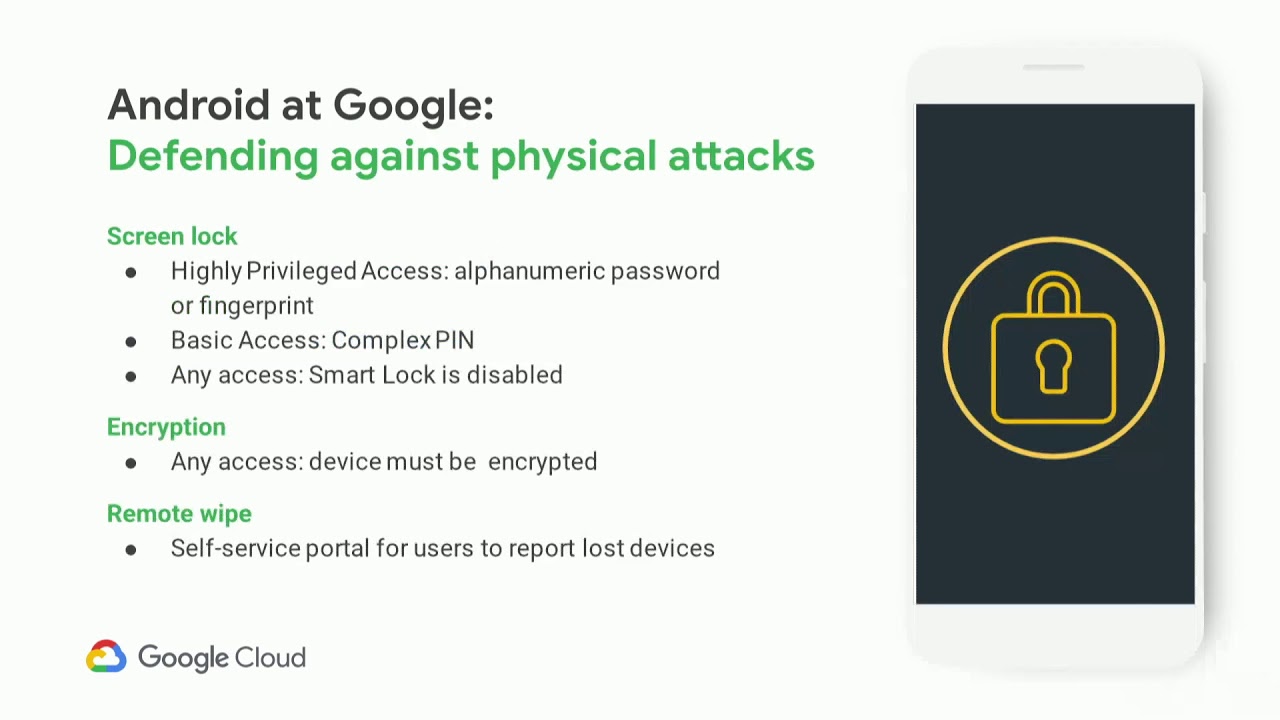
enforcing a strong screen lock is our primary defense against misplaced devices for highly privileged access an alphanumeric password is required at boot and periodically as a knowledge proof the fingerprint sensor offers a convenient and secure method for unlocking the device during regular use for basic access instead of an alphanumeric password only requiring a pin code as a reasonable compromise a pin complexity requirement can be set that prevents values such as 1 2 3 4 or 0 0 0 0 smart lock is a feature that encompasses unlocking a device via location Bluetooth connection gate detection face detection and voice recognition while these can be convenient ways for consumers to unlock their device each has known weaknesses
and is best to disable smart lock entirely in enterprise encryption is enabled by default on modern Android so all of our devices are always encrypted when devices are nevela be misplaced remote wipe allows us to remotely destroy data with a hundred-thousand Android devices misplaced devices are in a common occurrence instead of our security team having to handle each incident individually we have created a portal where users can report their device as misplaced our device management is integrated with this portal triggering the device to remotely be wiped in those situations
policy can be used to restrict apps where apps can be installed from user choice should be carefully balanced when choosing which policies to enforce for highly privileged access we require that apps must be obtained from Google Play for basic access apps can opt to install applications from other sources but only inside the personal profile not inside the work profile we rely on Google Play protect for malware protection enforcing it verify apps via policy ensures every app on the device has been scanned by google and has determined been determined not to be malware when a user is obtaining an app from a source other than play verify apps prevents users from installing particularly egregious malware for apps
that pose a lesser risk instead a warning is shown to the user and they could opt to ignore the warning and install the app regardless since users are smart and would never intentionally install an app that could harm their device obviously this would never happen on the off chance that users would choose to do this the safe the safety net verify apps API can be used to detect any harmful applications on the device and disallow access we do not allow any devices with any amount of potentially harmful applications to access any data at Google with these features alone malware on Android has essentially been a non-issue for Google itself we do not use any third-party
mobile antivirus software and have identified zero tangible benefits in doing so internally we use manage Play to distribute our internal applications to employees only permitting apps to be installed via manage Play can protect against employees sharing data with unwanted applications but is also highly restrictive on their use of the device while the work profile is isolated from the personal profile there is some functionality that allows data to be shared between profiles to provide a good user experience some of this functionality is enabled by default policies exist to manage sharing between the profiles some policies defend against malicious personal apps whereas others defend against users exfiltrating data from the work profile to the personal profile some special
permissions that apps can request from users can be used expose through exfiltrate data from the work profile apps that act as an accessibility service are able to capture the contents of the screen either in the personal or work profile input method editors also known as keyboards can capture all input in both of the work and personal profile and notification listeners are able to capture the content of notifications including those coming from the work profile you can set policies restricting which apps are able to use each of these functionalities the Android enterprise security white paper goes into extensive detail about cross profile data sharing and all of the different types of policies you can set to prevent it now
how can you do this at your company
enterprise mobility management is the marketing term for software that manages mobile devices common options you may have heard of our AirWatch google cloud identity and MobileIron or microsoft into not every EMM implements all the policies have talked about the Android enterprise recommended EMM s are required to support a minimum amount of functionality so choosing one of them is probably a better place to start if you'd prefer to manage your devices programmatically by creating your own EMM the Android management API offers a Web API for applying policies to Android devices it consists of a cloud API to set policy and the Android device policy app to actuate policies on the device since it is developed by
Android itself it always supports the latest Android platform features and a variety of deployment types such as point-of-sale kiosks and this is in addition to regular employee devices once you have device management the next step is selecting which policies to apply Android has a dizzying of different policies and configuration options where should you begin first the safety net at the station provides assurance the rest of the policies you are applying are built on a secure foundation next enforcing a screen lock protects data when the attacker is in the physical is in physical possession of the device and finally verify apps defends against malware whether it's obtained via the Play Store or not in summary if you care about your data you
should begin managing the devices that can access it and this includes mobile devices to have any assurance in isolation properties provided by Android you must begin with a secure foundation use androids modern management functionality that is either work profiles or fully managed mode either options are massive improvements over active sync app wrapping or device administrator thank you everyone for coming to the last talk of the day I hope it was useful does anyone have any questions we have a couple of questions on slide out the first one being does Play protect beta include better channel apps that does just play protect beta include better channel apps yes always anything available via the Play Store has always been scanned at all times
okay and next we have do password managers like LastPass work with restricted work profiles for instance I use LastPass for work and personal use do I install the app twice or do I need a policy exception to make copy paste work password managers that integrate via androids autofill API work correctly in both work and personal profiles password managers that use accessibility services or input methods to hack around API probably gonna work especially if you set a policy restricting input methods or accessibility services that does not include last class we actually white list white pass as an input method for this reason you would probably want to install it twice as well if there aren't any other questions on the room that's
it right well on behalf of b-site San Francisco I'd like to thank you for your presentation today thank you several applause
Related talks
 22:35
22:35 28:29
28:29 29:24
29:24 32:13
32:13 30:17
30:17 38:53
38:53